1
Winning Solutions...
BluBoxx Communication Pvt. Ltd.
2
Universal Network Management
System Software LITE
UNI-NMS-LITE
3
Presentation Outlines
PRODUCT
POSITIONING
PRODUCT
OVERVIEW
PRODUCT
BENEFITS
PRODUCT
FEATURES
PRODUCT
SPECIFICATIONS
4
PRODUCT POSITIONING
5
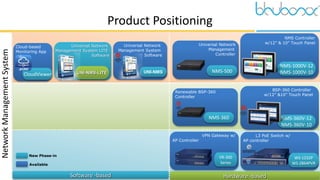
Product Positioning
Renewable BSP-360
Controller
NMS-360
Hardware -based
Software -based
Universal Network
Management System
Software
UNI-NMS
L3 PoE Switch w/
AP controller
WS-1232P
WS-2864PVR
Universal Network
Management
Controller
NMS-500
Network
Management
System
New Phase-in
Available
BSP-360 Controller
w/12” &10” Touch Panel
NMS-360V-12
NMS-360V-10
NMS Controller
w/12” & 10” Touch Panel
NMS-1000V-12
NMS-1000V-10
Cloud-based
Monitoring App
CloudViewer
Universal Network
Management System LITE
Software
UNI-NMS-LITE
VPN Gateway w/
AP Controller
VR-300
Series
6
PRODUCT OVERVIEW
7
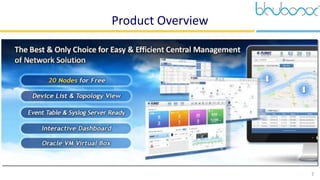
Product Overview
8
PRODUCT BENEFITS
9
Product Benefits
Setup
Wizard
Performance
Optimization
AP Controller
Interactive
Dashboard
Event
Statistics
Central
Management
20 Nodes
Auto Topology
Provisioning
Syslog
Recording
10
PRODUCT FEATURES
11
Product Features
 Dashboard: Providing the at-a-glance view of system, device summary, traffic, PoE network
status, etc.
 Setup Wizard: Easy to use step-by-step guidance
 Node Discovery: To detect PLANET managed devices available and allow AP grouping to
accelerate AP management.
 Topology Viewer: A topology of network devices compliant with SNMP, ONVIF, Smart Discovery
and LLTD Protocol.
 Event Reports: The status of a network can be reported via network alarm and system log.
 Batch Provisioning: Enabling multiple APs to be configured and upgraded at one time by using
the designated profile.
12
Product Features
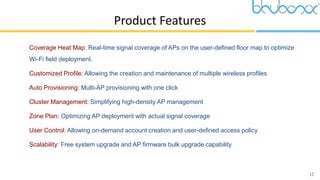
 Coverage Heat Map: Real-time signal coverage of APs on the user-defined floor map to optimize
Wi-Fi field deployment.
 Customized Profile: Allowing the creation and maintenance of multiple wireless profiles
 Auto Provisioning: Multi-AP provisioning with one click
 Cluster Management: Simplifying high-density AP management
 Zone Plan: Optimizing AP deployment with actual signal coverage
 User Control: Allowing on-demand account creation and user-defined access policy
 Scalability: Free system upgrade and AP firmware bulk upgrade capability
13
Product Features – Setup Wizard
 Setup Wizard
14
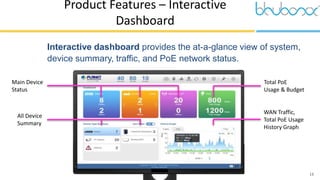
Main Device
Status
Total PoE
Usage & Budget
All Device
Summary
WAN Traffic,
Total PoE Usage
History Graph
 Interactive dashboard provides the at-a-glance view of system,
device summary, traffic, and PoE network status.
Product Features – Interactive
Dashboard
15
 Using SNMP&LLDP Protocol to build Domain Network Topology
Product Features – Topology
16
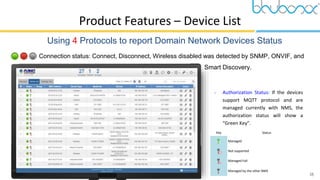
Connection status: Connect, Disconnect, Wireless disabled was detected by SNMP, ONVIF, and
Smart Discovery.
Product Features – Device List
 Using 4 Protocols to report Domain Network Devices Status
 Authorization Status: If the devices
support MQTT protocol and are
managed currently with NMS, the
authorization status will show a
“Green Key”.
Key Status
Managed
Not supported
Managed Fail
Managed by the other NMS
17
Product Features - System Event
 System Event Statistics
 Through this Web interface, Event Statistics reports enable you to visualize the system usage and
node status in real time so as to address whatever issue they may have.
18
Product Features - Syslog Recording
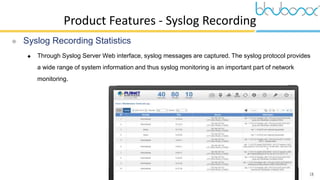
 Syslog Recording Statistics
 Through Syslog Server Web interface, syslog messages are captured. The syslog protocol provides
a wide range of system information and thus syslog monitoring is an important part of network
monitoring.
19
Product Features – AP control
 AP control
 In the AP mode, set SSID and password to Access Point for AP control with ease.
20
Product Features - Optimizing Wi-Fi
 Optimizing Wi-Fi Deployment
 With the floor maps, APs can be located according to the field deployment, thus saving your time
and cost of on-site support and monitoring.
21
Product Features – Run on VM
 Browser-based Control on VM Eliminates Limitation of OS
Designed to provide more flexibility, the UNI-NMS-LITE utilizes the Oracle VM VirtualBox technology to
enable to import software image under different OS platforms.
22
APPLICATIONS
23
Applications
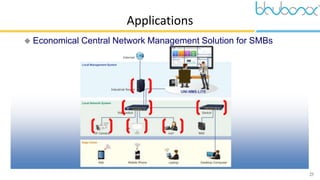
 Economical Central Network Management Solution for SMBs
24
PRODUCT REQUIREMENT
SPECIFICATIONS
25
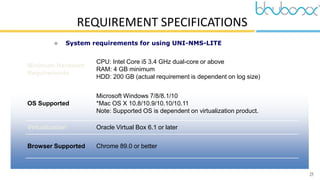
REQUIREMENT SPECIFICATIONS
 System requirements for using UNI-NMS-LITE
Minimum Hardware
Requirements
CPU: Intel Core i5 3.4 GHz dual-core or above
RAM: 4 GB minimum
HDD: 200 GB (actual requirement is dependent on log size)
OS Supported
Microsoft Windows 7/8/8.1/10
*Mac OS X 10.8/10.9/10.10/10.11
Note: Supported OS is dependent on virtualization product.
Virtualization Oracle Virtual Box 6.1 or later
Browser Supported Chrome 89.0 or better
26
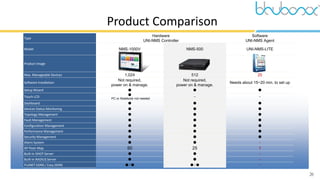
Product Comparison
Type
Hardware
UNI-NMS Controller
Software
UNI-NMS Agent
Model NMS-1000V NMS-500 UNI-NMS-LITE
Product Image
Max. Manageable Devices 1,024 512 20
Software Installation
Not required,
power on & manage.
Not required,
power on & manage.
Needs about 15~20 min. to set up
Setup Wizard ● ● ●
Touch LCD
●
PC or Notebook not needed
– –
Dashboard ● ● ●
Devices Status Monitoring ● ● ●
Topology Management ● ● ●
Fault Management ● ● ●
Configuration Management ● ● ●
Performance Management ● ● ●
Security Management ● ● ●
Alarm System ● ● –
AP Floor Map 50 25 1
Built-in DHCP Server ● ● –
Built-in RADIUS Server ● ● –
PLANET DDNS / Easy DDNS ● / ● ● / ● –
27
Thank You 
BluBoxx Communication Pvt. Ltd.
102/B, Surekha Apartment, Pune Satara Road,
Pune-411037. Maharashtra, India.
Tel: +91-7875432180, Email: sales@bbcpl.in
www.bbcpl.in

Universal Network Management System Software (LITE)

  • 1.
  • 2.
    2 Universal Network Management SystemSoftware LITE UNI-NMS-LITE
  • 3.
  • 4.
  • 5.
    5 Product Positioning Renewable BSP-360 Controller NMS-360 Hardware-based Software -based Universal Network Management System Software UNI-NMS L3 PoE Switch w/ AP controller WS-1232P WS-2864PVR Universal Network Management Controller NMS-500 Network Management System New Phase-in Available BSP-360 Controller w/12” &10” Touch Panel NMS-360V-12 NMS-360V-10 NMS Controller w/12” & 10” Touch Panel NMS-1000V-12 NMS-1000V-10 Cloud-based Monitoring App CloudViewer Universal Network Management System LITE Software UNI-NMS-LITE VPN Gateway w/ AP Controller VR-300 Series
  • 6.
  • 7.
  • 8.
  • 9.
  • 10.
  • 11.
    11 Product Features  Dashboard:Providing the at-a-glance view of system, device summary, traffic, PoE network status, etc.  Setup Wizard: Easy to use step-by-step guidance  Node Discovery: To detect PLANET managed devices available and allow AP grouping to accelerate AP management.  Topology Viewer: A topology of network devices compliant with SNMP, ONVIF, Smart Discovery and LLTD Protocol.  Event Reports: The status of a network can be reported via network alarm and system log.  Batch Provisioning: Enabling multiple APs to be configured and upgraded at one time by using the designated profile.
  • 12.
    12 Product Features  CoverageHeat Map: Real-time signal coverage of APs on the user-defined floor map to optimize Wi-Fi field deployment.  Customized Profile: Allowing the creation and maintenance of multiple wireless profiles  Auto Provisioning: Multi-AP provisioning with one click  Cluster Management: Simplifying high-density AP management  Zone Plan: Optimizing AP deployment with actual signal coverage  User Control: Allowing on-demand account creation and user-defined access policy  Scalability: Free system upgrade and AP firmware bulk upgrade capability
  • 13.
    13 Product Features –Setup Wizard  Setup Wizard
  • 14.
    14 Main Device Status Total PoE Usage& Budget All Device Summary WAN Traffic, Total PoE Usage History Graph  Interactive dashboard provides the at-a-glance view of system, device summary, traffic, and PoE network status. Product Features – Interactive Dashboard
  • 15.
    15  Using SNMP&LLDPProtocol to build Domain Network Topology Product Features – Topology
  • 16.
    16 Connection status: Connect,Disconnect, Wireless disabled was detected by SNMP, ONVIF, and Smart Discovery. Product Features – Device List  Using 4 Protocols to report Domain Network Devices Status  Authorization Status: If the devices support MQTT protocol and are managed currently with NMS, the authorization status will show a “Green Key”. Key Status Managed Not supported Managed Fail Managed by the other NMS
  • 17.
    17 Product Features -System Event  System Event Statistics  Through this Web interface, Event Statistics reports enable you to visualize the system usage and node status in real time so as to address whatever issue they may have.
  • 18.
    18 Product Features -Syslog Recording  Syslog Recording Statistics  Through Syslog Server Web interface, syslog messages are captured. The syslog protocol provides a wide range of system information and thus syslog monitoring is an important part of network monitoring.
  • 19.
    19 Product Features –AP control  AP control  In the AP mode, set SSID and password to Access Point for AP control with ease.
  • 20.
    20 Product Features -Optimizing Wi-Fi  Optimizing Wi-Fi Deployment  With the floor maps, APs can be located according to the field deployment, thus saving your time and cost of on-site support and monitoring.
  • 21.
    21 Product Features –Run on VM  Browser-based Control on VM Eliminates Limitation of OS Designed to provide more flexibility, the UNI-NMS-LITE utilizes the Oracle VM VirtualBox technology to enable to import software image under different OS platforms.
  • 22.
  • 23.
    23 Applications  Economical CentralNetwork Management Solution for SMBs
  • 24.
  • 25.
    25 REQUIREMENT SPECIFICATIONS  Systemrequirements for using UNI-NMS-LITE Minimum Hardware Requirements CPU: Intel Core i5 3.4 GHz dual-core or above RAM: 4 GB minimum HDD: 200 GB (actual requirement is dependent on log size) OS Supported Microsoft Windows 7/8/8.1/10 *Mac OS X 10.8/10.9/10.10/10.11 Note: Supported OS is dependent on virtualization product. Virtualization Oracle Virtual Box 6.1 or later Browser Supported Chrome 89.0 or better
  • 26.
    26 Product Comparison Type Hardware UNI-NMS Controller Software UNI-NMSAgent Model NMS-1000V NMS-500 UNI-NMS-LITE Product Image Max. Manageable Devices 1,024 512 20 Software Installation Not required, power on & manage. Not required, power on & manage. Needs about 15~20 min. to set up Setup Wizard ● ● ● Touch LCD ● PC or Notebook not needed – – Dashboard ● ● ● Devices Status Monitoring ● ● ● Topology Management ● ● ● Fault Management ● ● ● Configuration Management ● ● ● Performance Management ● ● ● Security Management ● ● ● Alarm System ● ● – AP Floor Map 50 25 1 Built-in DHCP Server ● ● – Built-in RADIUS Server ● ● – PLANET DDNS / Easy DDNS ● / ● ● / ● –
  • 27.
    27 Thank You  BluBoxxCommunication Pvt. Ltd. 102/B, Surekha Apartment, Pune Satara Road, Pune-411037. Maharashtra, India. Tel: +91-7875432180, Email: sales@bbcpl.in www.bbcpl.in