Unit-IV
Peripheral Interfacing
Study on need, Architecture, configuration and interfacing, with ICs: 8255,
8259, 8254, 8279 , A/D and D/A converters & Interfacing with 8085 & 8051.
UNIT 4 Syllabus
Introduction: Memory Interfacing & I/O interfacing
• 8255 PPI {Parallel communication interface}
• 8259 {Programmable Interrupt controller }
• 8253/8254 Timer {Timer or counter}
• 8237/8257 {DMA controller}
• 8251 USART {Serial communication interface}
• 8279 {Keyboard /display controller}
• A/D and D/A Interface {ADC 0800/0809,DAC 0800}
[Interfacing with 8085 & 8051]
Introduction to Peripheral Interfacing
4
Data Transfers
• Synchronous ----- Usually occur when peripherals are located
within the same computer as the CPU. Close proximity allows all
state bits change at same time on a common clock.
• Asynchronous ----- Do not require that the source and destination
use the same system clock.
5
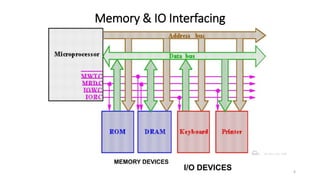
Memory & IO Interfacing
6
MEMORY DEVICES
I/O DEVICES
 interface memory (RAM, ROM, EPROM'...) or I/O
devices to 8086 microprocessor. Several memory
chips or I/O devices can connected to a
microprocessor. An address decoding circuit is used
to select the required I/O device or a memory
chip.
7
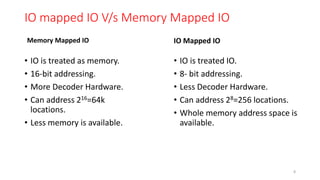
IO mapped IO V/s Memory Mapped IO
Memory Mapped IO
• IO is treated as memory.
• 16-bit addressing.
• More Decoder Hardware.
• Can address 216=64k
locations.
• Less memory is available.
IO Mapped IO
• IO is treated IO.
• 8- bit addressing.
• Less Decoder Hardware.
• Can address 28=256 locations.
• Whole memory address space is
available.
8
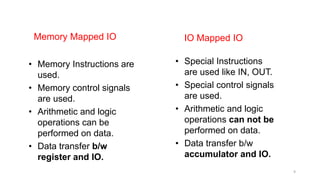
Memory Mapped IO
• Memory Instructions are
used.
• Memory control signals
are used.
• Arithmetic and logic
operations can be
performed on data.
• Data transfer b/w
register and IO.
IO Mapped IO
• Special Instructions
are used like IN, OUT.
• Special control signals
are used.
• Arithmetic and logic
operations can not be
performed on data.
• Data transfer b/w
accumulator and IO.
9
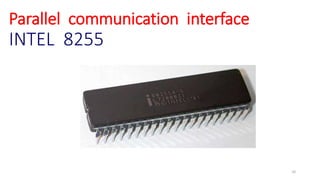
Parallel communication interface
INTEL 8255
10
8255 PPI
• The 8255 chip is also called as Programmable Peripheral Interface.
• The Intel’s 8255 is designed for use with Intel’s 8-bit, 16-bit and
higher capability microprocessors
• The 8255 is a 40 pin integrated circuit (IC), designed to perform a
variety of interface functions in a computer environment.
• It is flexible and economical.
11
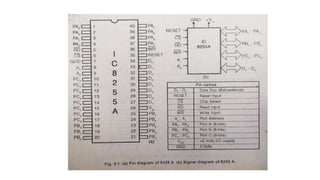
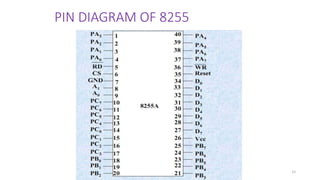
PIN DIAGRAM OF 8255
15
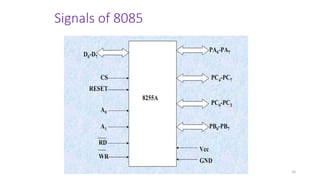
Signals of 8085
16
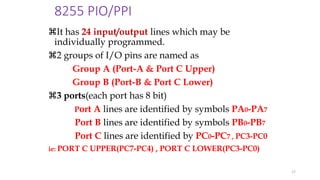
8255 PIO/PPI
It has 24 input/output lines which may be
individually programmed.
2 groups of I/O pins are named as
Group A (Port-A & Port C Upper)
Group B (Port-B & Port C Lower)
3 ports(each port has 8 bit)
Port A lines are identified by symbols PA0-PA7
Port B lines are identified by symbols PB0-PB7
Port C lines are identified by PC0-PC7 , PC3-PC0
ie: PORT C UPPER(PC7-PC4) , PORT C LOWER(PC3-PC0)
17
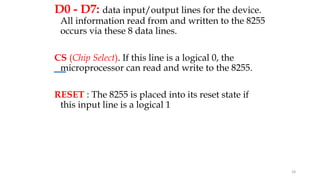
D0 - D7: data input/output lines for the device.
All information read from and written to the 8255
occurs via these 8 data lines.
CS (Chip Select). If this line is a logical 0, the
microprocessor can read and write to the 8255.
RESET : The 8255 is placed into its reset state if
this input line is a logical 1
18
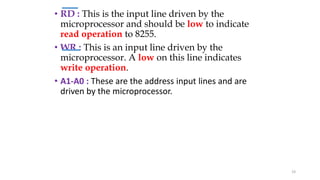
• RD : This is the input line driven by the
microprocessor and should be low to indicate
read operation to 8255.
• WR : This is an input line driven by the
microprocessor. A low on this line indicates
write operation.
• A1-A0 : These are the address input lines and are
driven by the microprocessor.
19
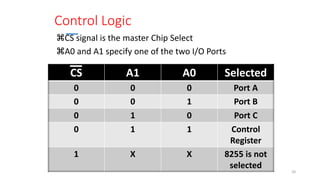
Control Logic
CS signal is the master Chip Select
A0 and A1 specify one of the two I/O Ports
20
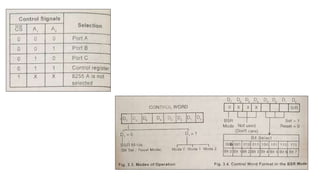
CS A1 A0 Selected
0 0 0 Port A
0 0 1 Port B
0 1 0 Port C
0 1 1 Control
Register
1 X X 8255 is not
selected
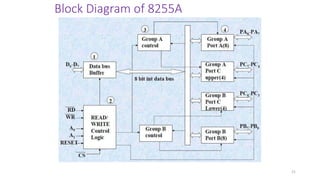
Block Diagram of 8255A
21
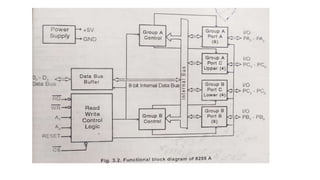
Block Diagram of 8255 (Architecture)
It has a 40 pins of 4 parts.
1. Data bus buffer
2. Read/Write control logic
3. Group A and Group B controls
4. Port A, B and C
22
1. Data bus buffer
This is a tristate bidirectional buffer used to interface the 8255
to system data bus. Data is transmitted or received by the buffer
on execution of input or output instruction by the CPU.
23
2. Read/Write control logic
This unit accepts control signals ( RD, WR ) and
also inputs from address bus and issues
commands to individual group of control blocks (
Group A, Group B).
It has the following pins.
CS , RD , WR , RESET , A1 , A0
24
3. Group A and Group B controls
• These block receive control from the CPU and issues
commands to their respective ports.
Group A - PA and PCU ( PC7 –PC4)
Group B – PB and PCL ( PC3 –PC0)
a) Port A: This has an 8 bit latched/buffered O/P and 8 bit input
latch. It can be programmed in 3 modes – mode 0, mode 1,
mode 2.
25
Presented by C.GOKUL,AP/EEE Velalar College of Engg & Tech , Erode
b) Port B: It can be programmed in mode 0, mode1
c) Port C : It can be programmed in mode 0
26
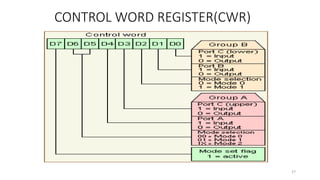
CONTROL WORD REGISTER(CWR)
27
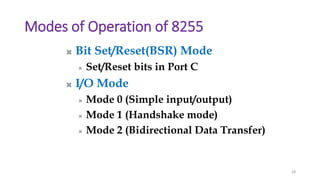
Modes of Operation of 8255
28
 Bit Set/Reset(BSR) Mode
 Set/Reset bits in Port C
 I/O Mode
 Mode 0 (Simple input/output)
 Mode 1 (Handshake mode)
 Mode 2 (Bidirectional Data Transfer)
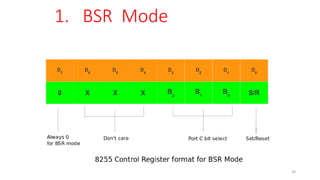
1. BSR Mode
29
30
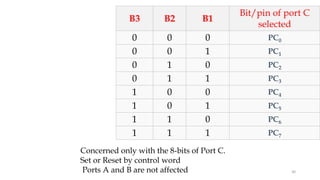
B3 B2 B1
Bit/pin of port C
selected
0 0 0 PC0
0 0 1 PC1
0 1 0 PC2
0 1 1 PC3
1 0 0 PC4
1 0 1 PC5
1 1 0 PC6
1 1 1 PC7
Concerned only with the 8-bits of Port C.
Set or Reset by control word
Ports A and B are not affected

Unit-IV.pptx

  • 1.
  • 2.
    Study on need,Architecture, configuration and interfacing, with ICs: 8255, 8259, 8254, 8279 , A/D and D/A converters & Interfacing with 8085 & 8051.
  • 3.
    UNIT 4 Syllabus Introduction:Memory Interfacing & I/O interfacing • 8255 PPI {Parallel communication interface} • 8259 {Programmable Interrupt controller } • 8253/8254 Timer {Timer or counter} • 8237/8257 {DMA controller} • 8251 USART {Serial communication interface} • 8279 {Keyboard /display controller} • A/D and D/A Interface {ADC 0800/0809,DAC 0800} [Interfacing with 8085 & 8051]
  • 4.
  • 5.
    Data Transfers • Synchronous----- Usually occur when peripherals are located within the same computer as the CPU. Close proximity allows all state bits change at same time on a common clock. • Asynchronous ----- Do not require that the source and destination use the same system clock. 5
  • 6.
    Memory & IOInterfacing 6 MEMORY DEVICES I/O DEVICES
  • 7.
     interface memory(RAM, ROM, EPROM'...) or I/O devices to 8086 microprocessor. Several memory chips or I/O devices can connected to a microprocessor. An address decoding circuit is used to select the required I/O device or a memory chip. 7
  • 8.
    IO mapped IOV/s Memory Mapped IO Memory Mapped IO • IO is treated as memory. • 16-bit addressing. • More Decoder Hardware. • Can address 216=64k locations. • Less memory is available. IO Mapped IO • IO is treated IO. • 8- bit addressing. • Less Decoder Hardware. • Can address 28=256 locations. • Whole memory address space is available. 8
  • 9.
    Memory Mapped IO •Memory Instructions are used. • Memory control signals are used. • Arithmetic and logic operations can be performed on data. • Data transfer b/w register and IO. IO Mapped IO • Special Instructions are used like IN, OUT. • Special control signals are used. • Arithmetic and logic operations can not be performed on data. • Data transfer b/w accumulator and IO. 9
  • 10.
  • 11.
    8255 PPI • The8255 chip is also called as Programmable Peripheral Interface. • The Intel’s 8255 is designed for use with Intel’s 8-bit, 16-bit and higher capability microprocessors • The 8255 is a 40 pin integrated circuit (IC), designed to perform a variety of interface functions in a computer environment. • It is flexible and economical. 11
  • 15.
  • 16.
  • 17.
    8255 PIO/PPI It has24 input/output lines which may be individually programmed. 2 groups of I/O pins are named as Group A (Port-A & Port C Upper) Group B (Port-B & Port C Lower) 3 ports(each port has 8 bit) Port A lines are identified by symbols PA0-PA7 Port B lines are identified by symbols PB0-PB7 Port C lines are identified by PC0-PC7 , PC3-PC0 ie: PORT C UPPER(PC7-PC4) , PORT C LOWER(PC3-PC0) 17
  • 18.
    D0 - D7:data input/output lines for the device. All information read from and written to the 8255 occurs via these 8 data lines. CS (Chip Select). If this line is a logical 0, the microprocessor can read and write to the 8255. RESET : The 8255 is placed into its reset state if this input line is a logical 1 18
  • 19.
    • RD :This is the input line driven by the microprocessor and should be low to indicate read operation to 8255. • WR : This is an input line driven by the microprocessor. A low on this line indicates write operation. • A1-A0 : These are the address input lines and are driven by the microprocessor. 19
  • 20.
    Control Logic CS signalis the master Chip Select A0 and A1 specify one of the two I/O Ports 20 CS A1 A0 Selected 0 0 0 Port A 0 0 1 Port B 0 1 0 Port C 0 1 1 Control Register 1 X X 8255 is not selected
  • 21.
  • 22.
    Block Diagram of8255 (Architecture) It has a 40 pins of 4 parts. 1. Data bus buffer 2. Read/Write control logic 3. Group A and Group B controls 4. Port A, B and C 22
  • 23.
    1. Data busbuffer This is a tristate bidirectional buffer used to interface the 8255 to system data bus. Data is transmitted or received by the buffer on execution of input or output instruction by the CPU. 23
  • 24.
    2. Read/Write controllogic This unit accepts control signals ( RD, WR ) and also inputs from address bus and issues commands to individual group of control blocks ( Group A, Group B). It has the following pins. CS , RD , WR , RESET , A1 , A0 24
  • 25.
    3. Group Aand Group B controls • These block receive control from the CPU and issues commands to their respective ports. Group A - PA and PCU ( PC7 –PC4) Group B – PB and PCL ( PC3 –PC0) a) Port A: This has an 8 bit latched/buffered O/P and 8 bit input latch. It can be programmed in 3 modes – mode 0, mode 1, mode 2. 25 Presented by C.GOKUL,AP/EEE Velalar College of Engg & Tech , Erode
  • 26.
    b) Port B:It can be programmed in mode 0, mode1 c) Port C : It can be programmed in mode 0 26
  • 27.
  • 28.
    Modes of Operationof 8255 28  Bit Set/Reset(BSR) Mode  Set/Reset bits in Port C  I/O Mode  Mode 0 (Simple input/output)  Mode 1 (Handshake mode)  Mode 2 (Bidirectional Data Transfer)
  • 29.
  • 30.
    30 B3 B2 B1 Bit/pinof port C selected 0 0 0 PC0 0 0 1 PC1 0 1 0 PC2 0 1 1 PC3 1 0 0 PC4 1 0 1 PC5 1 1 0 PC6 1 1 1 PC7 Concerned only with the 8-bits of Port C. Set or Reset by control word Ports A and B are not affected