Cryptography and CyberSecurity
[IT311]
Sanjivani Rural Education Society’s
Sanjivani College of Engineering, Kopargaon-423603
(An Autonomous Institute Affiliated to Savitribai Phule Pune University, Pune)
NAAC ‘A’ Grade Accredited, ISO 9001:2015 Certified
Department of Information Technology
(NBAAccredited)
Mrs. Kanchan D. Patil
Assistant Professor
2.
Unit 6: Tools& Methods used in Cybercrime
• Introduction, Phishing, Password Cracking, Key-loggers and Spywares,
Types of Virus, Worms, Dos and DDoS, SQL injection, Cyber laws-Indian
context, The Indian IT Act-Challenges, Amendments, Challenges to
Indian Law and cybercrime Scenario in India, Indian IT Act and Digital
Signatures.
Cryptography & Cyber Security Mrs. Kanchan Patil Department of Information Technology
3.
Key-loggers
• Keystroke logging(key-logging) is the practice of noting (or logging) the
keys struck on a keyboard, typically in a covert manner so that the person
using the keyboard is unaware that such actions are being monitored.
• Keystroke logger or key-logger is quicker and easier way of capturing the
passwords and monitoring the victims' IT savvy behavior.
• It can be classified as
• Software key-logger
• Hardware key-logger
Cryptography & Cyber Security Mrs. Kanchan Patil Department of Information Technology
4.
Software Key-loggers
• Softwarekey-loggers are software programs installed on the computer
systems which usually are located between the OS and the keyboard
hardware, and every keystroke is recorded.
• Software key-loggers are installed on a computer system by Trojans or
viruses without the knowledge of the user.
• Cybercriminals always install such tools on the insecure computer systems
available in public places (i.e., cybercafes, library) and can obtain the
required information about the victim very easily.
• A key-logger usually consists of two files that get installed in the same
directory:
• A dynamic link library (DLL) file: It does all the recording of keystrokes
• An EXEcutable (EXE) file that installs the DLL file and triggers it to work.
Cryptography & Cyber Security Mrs. Kanchan Patil Department of Information Technology
5.
Hardware Key-loggers
• Toinstall these key-loggers, physical access to the computer system is
required.
• Hardware key-loggers are small hardware devices.
• These are connected to the PC and/or to the keyboard and save every
keystroke a file or in the memory of the hardware device.
• Cybercriminals install such devices on capture ATM Cards' PINs.
• Each key press on the keyboard of the ATM gets registered by these key-
loggers.
• These key-loggers look like an integrated part of such systems. hence, bank
customers are unaware of the presence.
Cryptography & Cyber Security Mrs. Kanchan Patil Department of Information Technology
6.
Anti-keylogger
• Anti-keylogger isa tool that can detect the keylogger installed on the
computer system and also can remove the tool.
• Advantages of using anti-keylogger are as follows:
• Firewalls cannot detect the installations of key-loggers on the systems.
hence, antikeylogger detect installations of keylogger.
• This software does not require regular updates of signature bases to
work effectively such as other antyvirus and antispy programs. if not
updated, it does not serve the purpose, which makes the users at risk
• Prevents Internet banking frauds. Passwords can be easily gained with
the help of installing keyloggers.
• It prevents ID theft
• It secures E-Mail and instant messaging/chatting
Cryptography & Cyber Security Mrs. Kanchan Patil Department of Information Technology
7.
Spywares
• Spyware isa type of malware (i.e. malicious software) that is installed on
computers which collects information about users without their knowledge
• The presence of Spyware is typically hidden from the user.
• It is secretly installed on the user's personal computer.
• Sometimes, Spywares such as key-loggers are installed by the owner of a
shared, corporate or public computer on purpose to secretly monitor other
users.
• The features and functions of Spywares are beyond simple monitoring
• Spyware programs collect personal information about the victim, such as
the Internet surfing habits/patterns and websites visited.
• The Spyware can also redirect Internet surfing activities by installing
another stealth utility on the users' computer system.
Cryptography & Cyber Security Mrs. Kanchan Patil Department of Information Technology
8.
Spywares
• Spyware mayalso have an ability to change computer settings, which may
result in slowing of the Internet connection speeds and slowing of response
time that may result into user complaining about the Internet speed
connection with Internet Service Provider (ISP).
• Various Spywares are available in the market such as 007 spy, spector pro,
eBlaster etc.
• To overcome the emergence of Spywares that proved to be troublesome
for the normal user, anti-Spyware software are available in the market.
Cryptography & Cyber Security Mrs. Kanchan Patil Department of Information Technology
9.
Virus and Worms
•Computer virus is a program that can "infect" legitimate programs by
modifying them to include a possibly evolved copy of itself.
• Viruses spread themselves, without the knowledge or permission of the
users, to potentially large numbers of programs on many machines.
• A computer virus passes from computer to computer in a similar manner as
a biological virus passes from person to person.
• Viruses may also contain malicious instructions that may cause damage or
annoyance.
• The combination of possibly Malicious Code with the ability to spread is
what makes viruses a considerable concern.
• Viruses can often spread without any readily visible symptoms
Cryptography & Cyber Security Mrs. Kanchan Patil Department of Information Technology
10.
Virus and Worms
•A virus can start on event-driven effects (e.g.. triggered after a specific
number of executions), time-driven effects (e.g., triggered on a specific
date, such as Friday the 13th) or can occur at random.
• Viruses can take some typical actions:
• Display a message to prompt an action which may set of the virus
• Delete files inside the system into which viruses enter
• Cramble data on a hard disk
• Cause erratic screen behavior
• Halt the system (PC)
• Just replicate themselves to propagate further harm
Cryptography & Cyber Security Mrs. Kanchan Patil Department of Information Technology
11.
Virus and Worms
•Viruses spread
• Through the Internet
• Through a stand-alone computer system
• Through local networks
Cryptography & Cyber Security Mrs. Kanchan Patil Department of Information Technology
12.
Virus and Worms
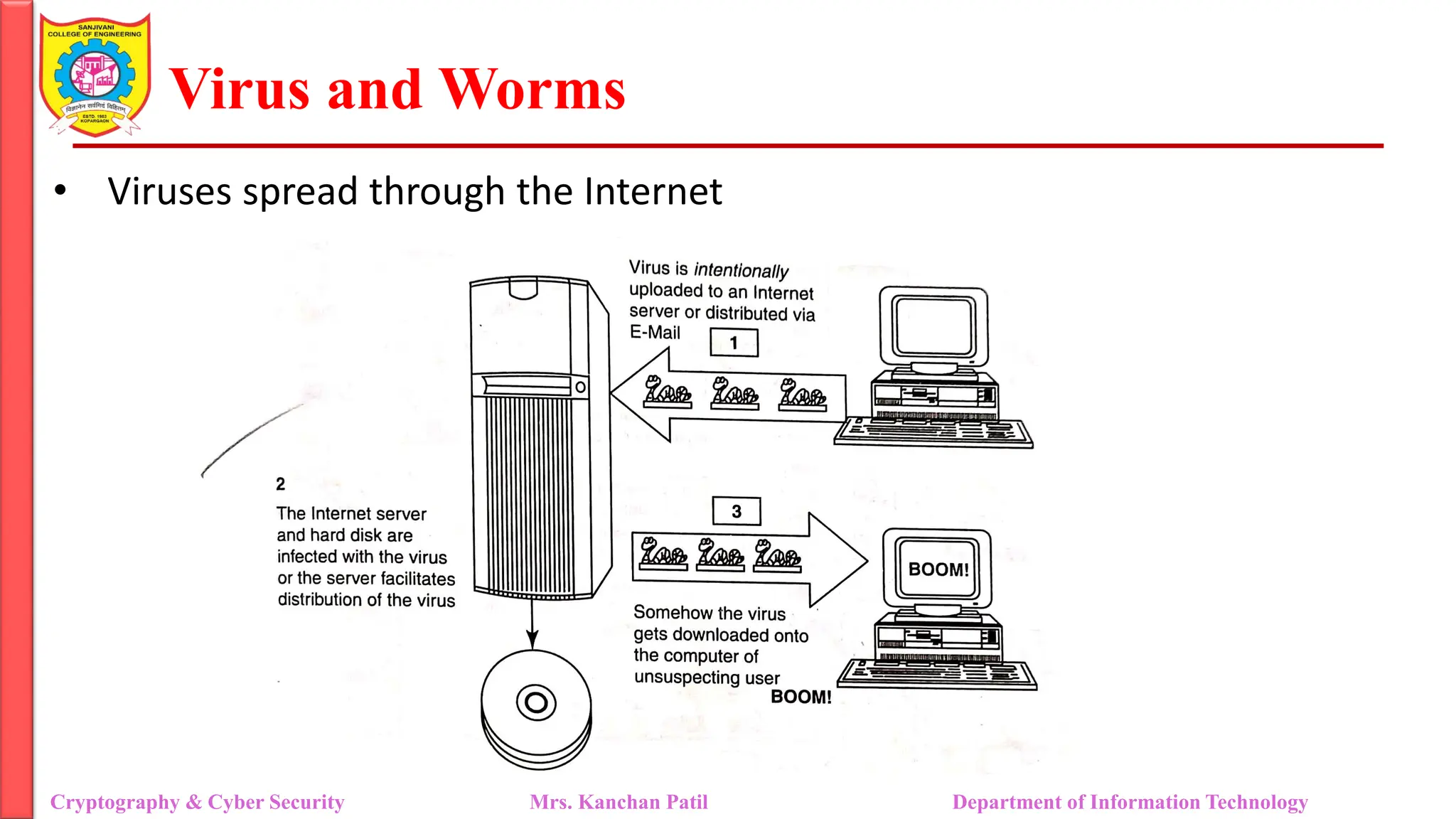
•Viruses spread through the Internet
Cryptography & Cyber Security Mrs. Kanchan Patil Department of Information Technology
13.
Virus and Worms
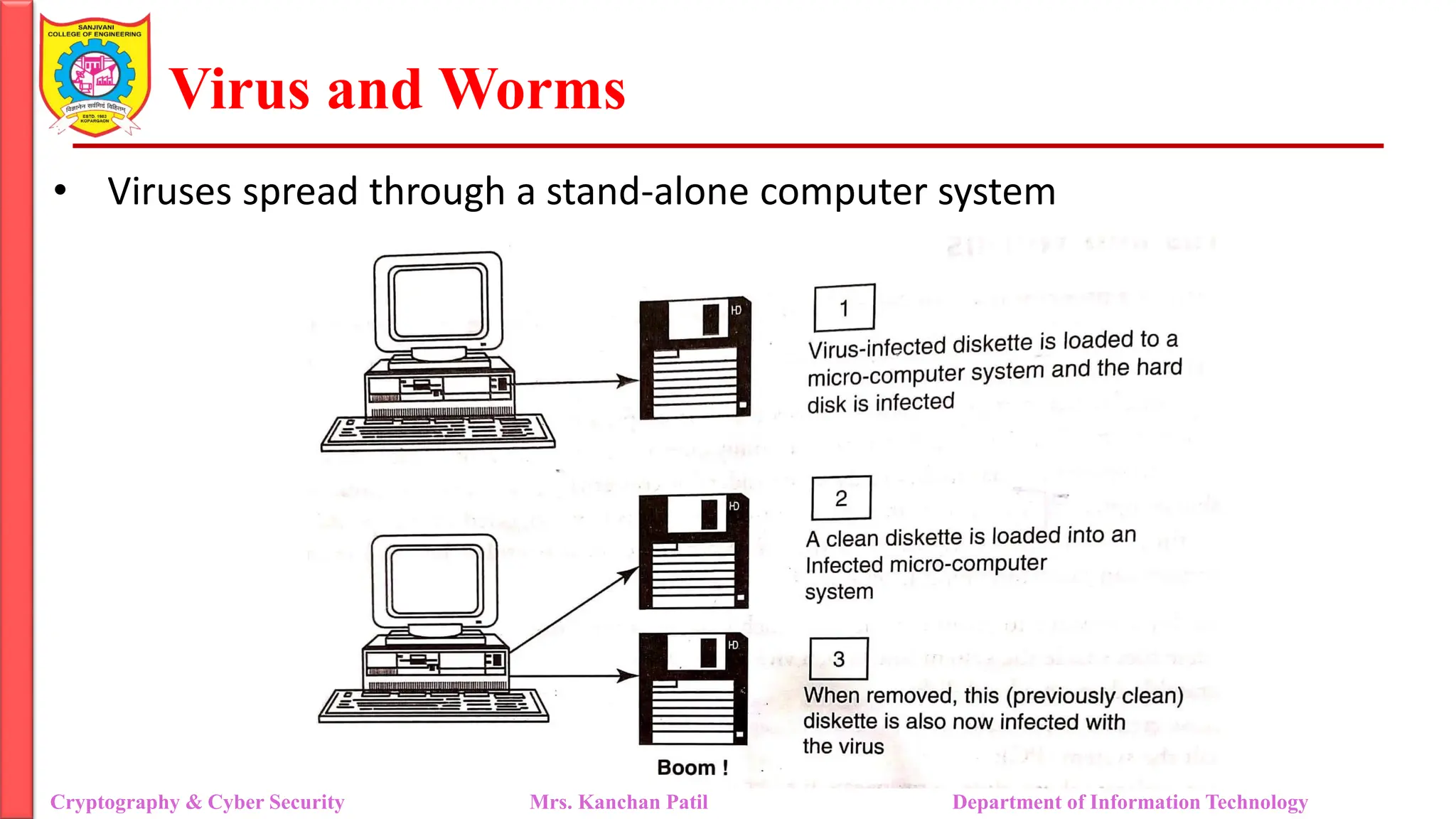
•Viruses spread through a stand-alone computer system
Cryptography & Cyber Security Mrs. Kanchan Patil Department of Information Technology
14.
Virus and Worms
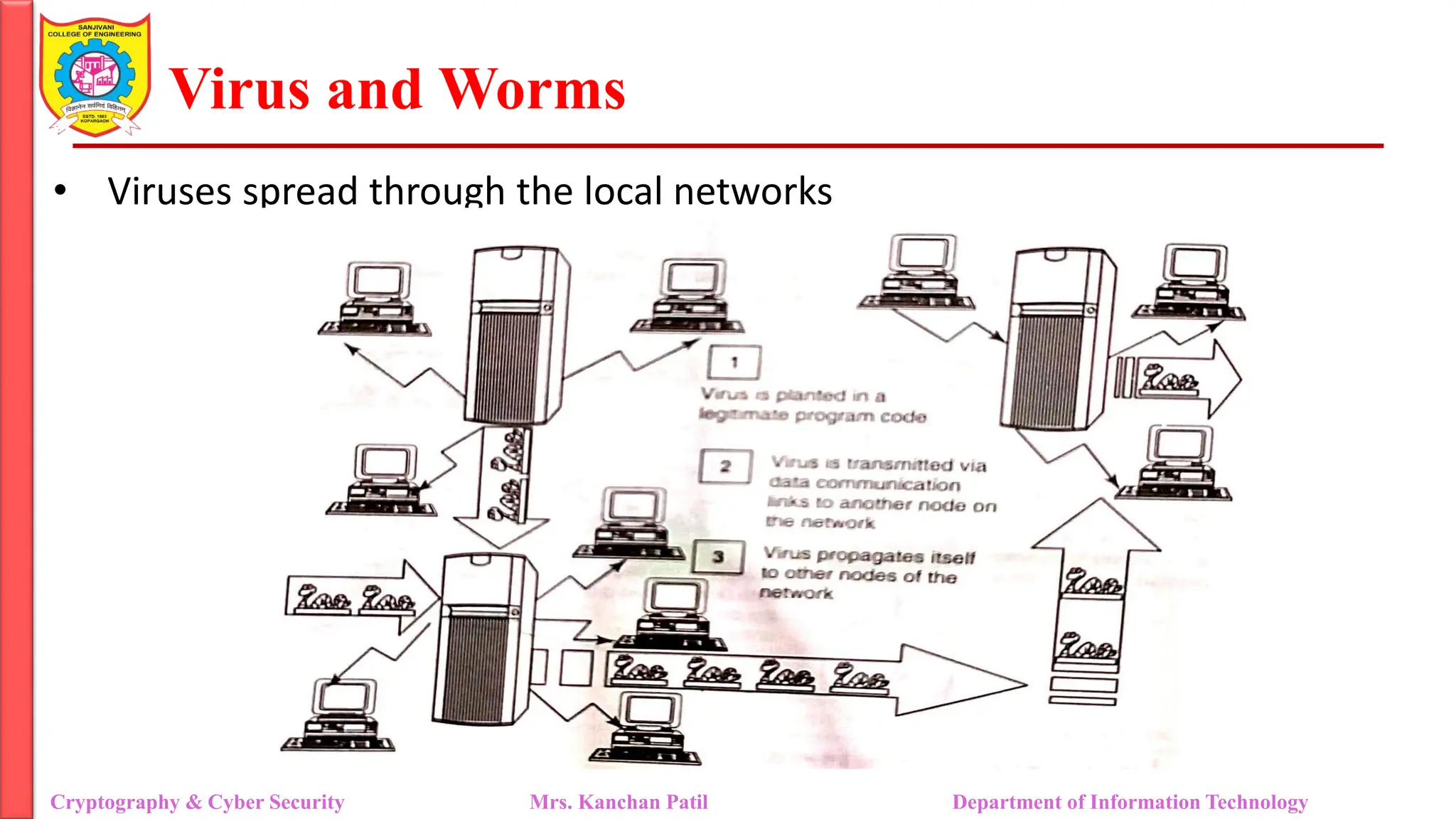
•Viruses spread through the local networks
Cryptography & Cyber Security Mrs. Kanchan Patil Department of Information Technology
15.
Virus and Worms
•Computer virus has the ability to copy itself and infect the system.
• The term virus is also commonly but erroneously used to refer to other
types of malware, Adware and Spyware programs that do not have
reproductive ability
• True virus can only spread from one system to another (in some form of
executable code) when its host is taken to the target computer
• for instance, when a user sent it over the Internet or a network or carried it
on a removable media such as CD, DVD or USB drives, Viruses can increase
their chances of spreading to other systems by infecting files on a network
file system or a file system that is accessed by another system.
Cryptography & Cyber Security Mrs. Kanchan Patil Department of Information Technology
16.
Virus and Worms
•Malware includes computer viruses, worms, Trojans, most Rootkits, Spyware,
dishonest Adware, crime-ware and other malicious and unwanted software as
well as true viruses.
• Viruses are sometimes confused with computer worms and Trojan Horses, which
are technically different
• A worm spreads itself automatically to other computers through networks by
exploiting security vulnerabilities, whereas a Trojan is a code/program that
appears to be harmless but hides malicious functions.
• Worms and Trojans, such as viruses, may harm the system's data or performance.
• Some viruses and other malware have noticeable symptoms that enable
computer user to take necessary corrective actions, but many viruses are
surreptitious or simply do nothing for user's to take note of them.
• Some viruses do nothing beyond reproducing themselves.
Cryptography & Cyber Security Mrs. Kanchan Patil Department of Information Technology
17.
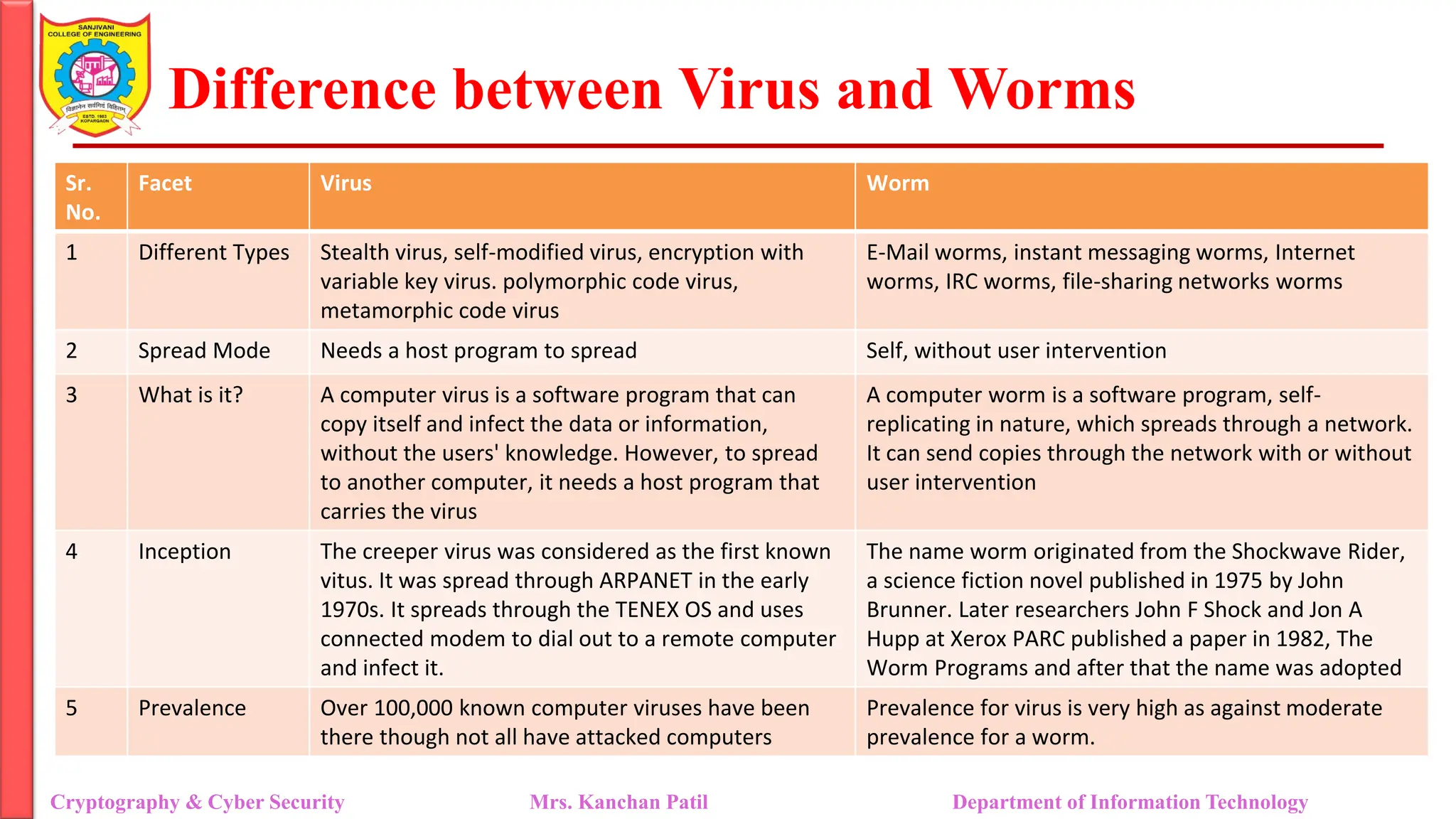
Difference between Virusand Worms
Cryptography & Cyber Security Mrs. Kanchan Patil Department of Information Technology
Sr.
No.
Facet Virus Worm
1 Different Types Stealth virus, self-modified virus, encryption with
variable key virus. polymorphic code virus,
metamorphic code virus
E-Mail worms, instant messaging worms, Internet
worms, IRC worms, file-sharing networks worms
2 Spread Mode Needs a host program to spread Self, without user intervention
3 What is it? A computer virus is a software program that can
copy itself and infect the data or information,
without the users' knowledge. However, to spread
to another computer, it needs a host program that
carries the virus
A computer worm is a software program, self-
replicating in nature, which spreads through a network.
It can send copies through the network with or without
user intervention
4 Inception The creeper virus was considered as the first known
vitus. It was spread through ARPANET in the early
1970s. It spreads through the TENEX OS and uses
connected modem to dial out to a remote computer
and infect it.
The name worm originated from the Shockwave Rider,
a science fiction novel published in 1975 by John
Brunner. Later researchers John F Shock and Jon A
Hupp at Xerox PARC published a paper in 1982, The
Worm Programs and after that the name was adopted
5 Prevalence Over 100,000 known computer viruses have been
there though not all have attacked computers
Prevalence for virus is very high as against moderate
prevalence for a worm.
18.
Difference between Virusand Worms
• Computer viruses can be categorized based on attacks on various elements
of the system and can put the system and personal data on the system in
danger
• Program viruses:
• These viruses become active when the program file (usually with
extensions bin, .com, .exe, .ovl, .drv) is executed (ie., opened - program
is started).
• Once these program files get infected, the virus makes copies of itself
and infects the other programs on the computer system.
Cryptography & Cyber Security Mrs. Kanchan Patil Department of Information Technology
19.
Difference between Virusand Worms
• Boot sector viruses:
• It infects the storage media on which OS is stored eg, floppy diskettes and hard
drives and which is used to start the computer system.
• The entire data/programs are stored on the floppy disks and hard drives in smaller
sections called sectors.
• The first sector is called the BOOT and it carries the master boot record (MBR).
• MBR's function is to read and load OS, that is it enables computer system to start
through OS. Hence, if a virus attacks an MBR or infects the boot record of a disk,
such floppy disk infects victim's hard drive when he/she reboots the system while
the infected disk is in the drive.
• Once the victim's hard drive is infected all the floppy diskettes that are being used in
the system will be infected.
• Boot sector viruses often spread to other systems when shared infected disks and
pirated software(s) are used.
Cryptography & Cyber Security Mrs. Kanchan Patil Department of Information Technology
20.
Difference between Virusand Worms
• Multipartite viruses:
• It is a hybrid of a boot sector and program viruses.
• It infects program files along with the boot record when the infected
program is active.
• When the victim starTs the computer system next time, it will infect the
local drive and other programs on the victim's computer system.
Cryptography & Cyber Security Mrs. Kanchan Patil Department of Information Technology
21.
Difference between Virusand Worms
• Stealth viruses:
• It camouflages and/or masks itself and so detecting this type of virus is
very difficult.
• It can disguise itself such a way that antivirus software also cannot
detect it thereby preventing spreading into the computer system.
• If alters its file size and conceals itself in the computer memory to
remain in the system undetected.
• The first computer virus, named as Brain, was a stealth viruS
• a good antivirus detects a stealth virus lurking on the victim's system by
checking the areas the virus must have infected by leaving evidence in
memory.
Cryptography & Cyber Security Mrs. Kanchan Patil Department of Information Technology
22.
Difference between Virusand Worms
• Polymorphic viruses:
• It acts like a "chameleon" that changes its virus signature (ie., binary
patter every time it spreads through the system (i.e., multiplies and
infects a new file).
• Hence, it is always difficult to detect polymorphic virus with the help of
an antivirus program.
• Polymorphic generation are the routines (ie., small programs) that can
be linked with the existing viruses.
• These generators are not viruses but the purpose of these generators is
to hide actual viruses under the cloak of polymorphism.
Cryptography & Cyber Security Mrs. Kanchan Patil Department of Information Technology
23.
Difference between Virusand Worms
• Macroviruses:
• Many applications, such as Microsoft Word and Microsoft Excel, support
MACRO (ie., macro languages).
• These macros are programmed as a macro embedded in a document.
• Once a macro virus gets onto a victim's computer then every document
he/she produces will become infected.
• This type of virus is relatively new and may get slipped by the antivirus
software if the user does not have the most recent version installed on
his/her system.
Cryptography & Cyber Security Mrs. Kanchan Patil Department of Information Technology
24.
Difference between Virusand Worms
• Active X and Java Control:
• All the web browsers have settings about Active X and Java Controls
• Little awareness is needed about managing and controlling these
settings of a web browser to prohibit and allow certain functions to
work such as enabling or disabling pop-ups, downloading files and
sound which invites the threats for the computer system being targeted
by unwanted software(s) floating in cyberspace.
Cryptography & Cyber Security Mrs. Kanchan Patil Department of Information Technology
25.
References:
Cryptography & CyberSecurity Mrs. Kanchan Patil Department of Information Technology
• Nina Godbole, Sunit Belapure, “Cyber Security-Understanding Cyber
Crimes, Computer Forensics and Legal Perspective”
![Cryptography and Cyber Security
[IT311]
Sanjivani Rural Education Society’s
Sanjivani College of Engineering, Kopargaon-423603
(An Autonomous Institute Affiliated to Savitribai Phule Pune University, Pune)
NAAC ‘A’ Grade Accredited, ISO 9001:2015 Certified
Department of Information Technology
(NBAAccredited)
Mrs. Kanchan D. Patil
Assistant Professor](https://image.slidesharecdn.com/unit6keyloggerspywaresvirusworms-250428073320-a8ba454e/75/Unit-6_keylogger_Spywares_virus_worms-pdf-1-2048.jpg)