Adding New Users
and
Storage
Prepared By
Prof. Bhushan Pawar
www.bhushanpawar.com
Prof.Bhushan Pawar
www.bhushanpawar.com
1
The /etc/passwd file
• /etc/passwd file is a list of users recognized by
the system.
• The system consults /etc/passwd at login time
to determine a user’s UID and home directory,
among other things.
Prof.Bhushan Pawar
www.bhushanpawar.com
2
Continue…
• It contains seven fields separated by colons:
• Login name
• Encrypted password
• UID (user ID) number
• Default GID (group ID) number
• “GECOS” information: full name, office,
extension, home phone
• Home directory
• Login shell
Prof.Bhushan Pawar
www.bhushanpawar.com
3
Continue…
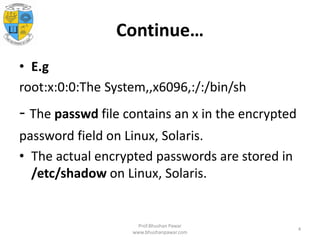
• E.g
root:x:0:0:The System,,x6096,:/:/bin/sh
- The passwd file contains an x in the encrypted
password field on Linux, Solaris.
• The actual encrypted passwords are stored in
/etc/shadow on Linux, Solaris.
Prof.Bhushan Pawar
www.bhushanpawar.com
4
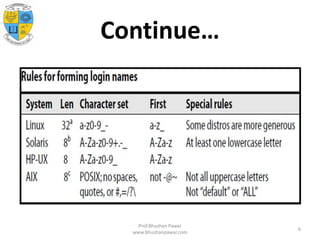
Login name
• Must be unique and, depending on the
operating system, may have length and
character set restrictions.
• Login names can never contain colons or
newlines because these characters are used as
field separators and entry separators.
Prof.Bhushan Pawar
www.bhushanpawar.com
5
Continue…
Prof.Bhushan Pawar
www.bhushanpawar.com
6
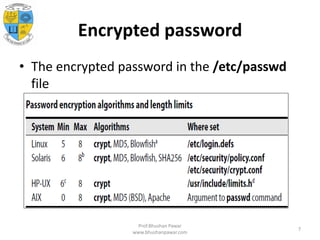
Encrypted password
• The encrypted password in the /etc/passwd
file
Prof.Bhushan Pawar
www.bhushanpawar.com
7
UID (user ID) number
• UIDs are usually unsigned 32-bit integers.
• Root has UID 0.
Prof.Bhushan Pawar
www.bhushanpawar.com
8
Default GID number
• A group ID number is a 32-bit integer.
• GID 0 is reserved for the group called root or
system.
• The /etc/group file defines the groups, with
the GID field in /etc/passwd providing a
default (or “effective”) GID at login time
Prof.Bhushan Pawar
www.bhushanpawar.com
9
GECOS field
• The GECOS field is sometimes used to record
personal information about each user.
• The chfn command lets users change their
own GECOS information.
• On most systems chfn understands only the
/etc/passwd file
Prof.Bhushan Pawar
www.bhushanpawar.com
10
Home directory
• If the home directory is missing at login time,
the system prints a message such as “no
home directory” and puts the user in /.
• On Linux, if /etc/login.defs sets
DEFAULT_HOME to no, the login is not
allowed to continue.
Prof.Bhushan Pawar
www.bhushanpawar.com
11
Login shell
• The login shell is normally a command
interpreter such as the Bourne shell or the C
shell (/bin/sh or /bin/csh), but it can be any
program.
• sh is the traditional default for UNIX, and bash
(the GNU “Bourne again” shell) is the default
for Linux and Solaris.
• tcsh is an enhanced C shell with command
editing.
Prof.Bhushan Pawar
www.bhushanpawar.com
12
THE /ETC/SHADOW AND
/ETC/SECURITY/PASSWD FILES
• A shadow password file is readable only by
the superuser and serves to keep encrypted
passwords.
• IBM calls the file that stores the encrypted
passwords /etc/security/passwd, while the
rest of the world calls it /etc/shadow.
Prof.Bhushan Pawar
www.bhushanpawar.com
13
/etc/shadow
• The shadow file is not a superset of the
passwd file, and the passwd file is not
generated from it. We must maintain both
files or use tools such as useradd that
maintain both files on your behalf. Like
/etc/passwd, /etc/shadow contains one line
for each user. Each line contains nine fields,
separated by colons
Prof.Bhushan Pawar
www.bhushanpawar.com
14
Continue…
• Login name
• Encrypted password
• Date of last password change
• Minimum number of days between password changes
• Maximum number of days between password changes
• Number of days in advance to warn users about password
expiration
• Linux: Days after password expiration that account is disabled
Solaris/HP-UX: Days before account automatically expires
• Account expiration date
• A reserved field that is currently always empty, except on
Solaris Prof.Bhushan Pawar
www.bhushanpawar.com
15
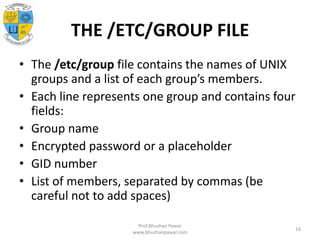
THE /ETC/GROUP FILE
• The /etc/group file contains the names of UNIX
groups and a list of each group’s members.
• Each line represents one group and contains four
fields:
• Group name
• Encrypted password or a placeholder
• GID number
• List of members, separated by commas (be
careful not to add spaces)
Prof.Bhushan Pawar
www.bhushanpawar.com
16
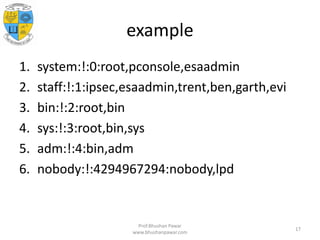
example
1. system:!:0:root,pconsole,esaadmin
2. staff:!:1:ipsec,esaadmin,trent,ben,garth,evi
3. bin:!:2:root,bin
4. sys:!:3:root,bin,sys
5. adm:!:4:bin,adm
6. nobody:!:4294967294:nobody,lpd
Prof.Bhushan Pawar
www.bhushanpawar.com
17
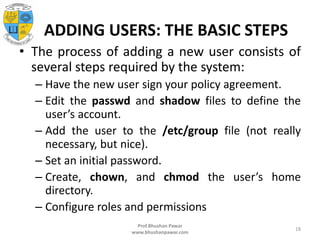
ADDING USERS: THE BASIC STEPS
• The process of adding a new user consists of
several steps required by the system:
– Have the new user sign your policy agreement.
– Edit the passwd and shadow files to define the
user’s account.
– Add the user to the /etc/group file (not really
necessary, but nice).
– Set an initial password.
– Create, chown, and chmod the user’s home
directory.
– Configure roles and permissions
Prof.Bhushan Pawar
www.bhushanpawar.com
18
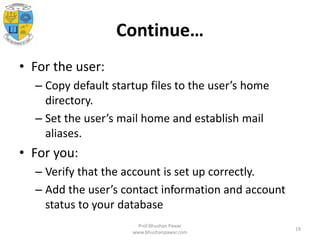
Continue…
• For the user:
– Copy default startup files to the user’s home
directory.
– Set the user’s mail home and establish mail
aliases.
• For you:
– Verify that the account is set up correctly.
– Add the user’s contact information and account
status to your database
Prof.Bhushan Pawar
www.bhushanpawar.com
19
Continue…
• You must be root to add a user, you must have
Admin privileges.
• This is a perfect place to use sudo.
• For this we can use “useradd” or “adduser”
command.
Prof.Bhushan Pawar
www.bhushanpawar.com
20
Editing the passwd and group files
• If you have to add a user by hand, use vipw to
edit the passwd and shadow files.
• NOTE:-
– On Solaris, and Red Hat systems, vipw
automatically asks if you would like to edit the
shadow file after you have edited the passwd file.
SUSE and Ubuntu systems use vipw -s for this
function.
Prof.Bhushan Pawar
www.bhushanpawar.com
21
Setting a password
• Set a password for the new user with
$ sudo passwd newusername
Prof.Bhushan Pawar
www.bhushanpawar.com
22
Creating the home directory and
installing startup files
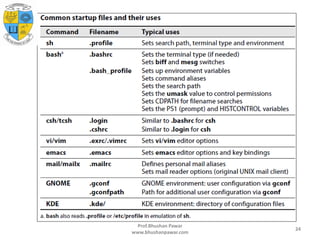
• You can create the new user’s home directory
with a simple mkdir.
• Startup files traditionally begin with a dot and
end with the letters rc, short for “run command,”
• The initial dot causes ls to hide these
“uninteresting” files from directory listings unless
the -a option is used.
• Sample startup files are traditionally kept in
/etc/skel (Linux, Solaris, HP-UX) or /etc
Prof.Bhushan Pawar
www.bhushanpawar.com
23
Prof.Bhushan Pawar
www.bhushanpawar.com
24
Setting permissions and ownerships
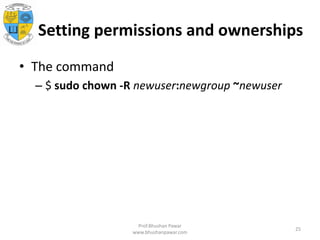
• The command
– $ sudo chown -R newuser:newgroup ~newuser
Prof.Bhushan Pawar
www.bhushanpawar.com
25
Any Question???
• If you having any doubt then you can ask me
question on
bhushan.pawar@mescoepune.org
Or
contact me on (+91)-7588318728
Prof.Bhushan Pawar
www.bhushanpawar.com
26

Unit 6 adding new users and storage

  • 1.
    Adding New Users and Storage PreparedBy Prof. Bhushan Pawar www.bhushanpawar.com Prof.Bhushan Pawar www.bhushanpawar.com 1
  • 2.
    The /etc/passwd file •/etc/passwd file is a list of users recognized by the system. • The system consults /etc/passwd at login time to determine a user’s UID and home directory, among other things. Prof.Bhushan Pawar www.bhushanpawar.com 2
  • 3.
    Continue… • It containsseven fields separated by colons: • Login name • Encrypted password • UID (user ID) number • Default GID (group ID) number • “GECOS” information: full name, office, extension, home phone • Home directory • Login shell Prof.Bhushan Pawar www.bhushanpawar.com 3
  • 4.
    Continue… • E.g root:x:0:0:The System,,x6096,:/:/bin/sh -The passwd file contains an x in the encrypted password field on Linux, Solaris. • The actual encrypted passwords are stored in /etc/shadow on Linux, Solaris. Prof.Bhushan Pawar www.bhushanpawar.com 4
  • 5.
    Login name • Mustbe unique and, depending on the operating system, may have length and character set restrictions. • Login names can never contain colons or newlines because these characters are used as field separators and entry separators. Prof.Bhushan Pawar www.bhushanpawar.com 5
  • 6.
  • 7.
    Encrypted password • Theencrypted password in the /etc/passwd file Prof.Bhushan Pawar www.bhushanpawar.com 7
  • 8.
    UID (user ID)number • UIDs are usually unsigned 32-bit integers. • Root has UID 0. Prof.Bhushan Pawar www.bhushanpawar.com 8
  • 9.
    Default GID number •A group ID number is a 32-bit integer. • GID 0 is reserved for the group called root or system. • The /etc/group file defines the groups, with the GID field in /etc/passwd providing a default (or “effective”) GID at login time Prof.Bhushan Pawar www.bhushanpawar.com 9
  • 10.
    GECOS field • TheGECOS field is sometimes used to record personal information about each user. • The chfn command lets users change their own GECOS information. • On most systems chfn understands only the /etc/passwd file Prof.Bhushan Pawar www.bhushanpawar.com 10
  • 11.
    Home directory • Ifthe home directory is missing at login time, the system prints a message such as “no home directory” and puts the user in /. • On Linux, if /etc/login.defs sets DEFAULT_HOME to no, the login is not allowed to continue. Prof.Bhushan Pawar www.bhushanpawar.com 11
  • 12.
    Login shell • Thelogin shell is normally a command interpreter such as the Bourne shell or the C shell (/bin/sh or /bin/csh), but it can be any program. • sh is the traditional default for UNIX, and bash (the GNU “Bourne again” shell) is the default for Linux and Solaris. • tcsh is an enhanced C shell with command editing. Prof.Bhushan Pawar www.bhushanpawar.com 12
  • 13.
    THE /ETC/SHADOW AND /ETC/SECURITY/PASSWDFILES • A shadow password file is readable only by the superuser and serves to keep encrypted passwords. • IBM calls the file that stores the encrypted passwords /etc/security/passwd, while the rest of the world calls it /etc/shadow. Prof.Bhushan Pawar www.bhushanpawar.com 13
  • 14.
    /etc/shadow • The shadowfile is not a superset of the passwd file, and the passwd file is not generated from it. We must maintain both files or use tools such as useradd that maintain both files on your behalf. Like /etc/passwd, /etc/shadow contains one line for each user. Each line contains nine fields, separated by colons Prof.Bhushan Pawar www.bhushanpawar.com 14
  • 15.
    Continue… • Login name •Encrypted password • Date of last password change • Minimum number of days between password changes • Maximum number of days between password changes • Number of days in advance to warn users about password expiration • Linux: Days after password expiration that account is disabled Solaris/HP-UX: Days before account automatically expires • Account expiration date • A reserved field that is currently always empty, except on Solaris Prof.Bhushan Pawar www.bhushanpawar.com 15
  • 16.
    THE /ETC/GROUP FILE •The /etc/group file contains the names of UNIX groups and a list of each group’s members. • Each line represents one group and contains four fields: • Group name • Encrypted password or a placeholder • GID number • List of members, separated by commas (be careful not to add spaces) Prof.Bhushan Pawar www.bhushanpawar.com 16
  • 17.
    example 1. system:!:0:root,pconsole,esaadmin 2. staff:!:1:ipsec,esaadmin,trent,ben,garth,evi 3.bin:!:2:root,bin 4. sys:!:3:root,bin,sys 5. adm:!:4:bin,adm 6. nobody:!:4294967294:nobody,lpd Prof.Bhushan Pawar www.bhushanpawar.com 17
  • 18.
    ADDING USERS: THEBASIC STEPS • The process of adding a new user consists of several steps required by the system: – Have the new user sign your policy agreement. – Edit the passwd and shadow files to define the user’s account. – Add the user to the /etc/group file (not really necessary, but nice). – Set an initial password. – Create, chown, and chmod the user’s home directory. – Configure roles and permissions Prof.Bhushan Pawar www.bhushanpawar.com 18
  • 19.
    Continue… • For theuser: – Copy default startup files to the user’s home directory. – Set the user’s mail home and establish mail aliases. • For you: – Verify that the account is set up correctly. – Add the user’s contact information and account status to your database Prof.Bhushan Pawar www.bhushanpawar.com 19
  • 20.
    Continue… • You mustbe root to add a user, you must have Admin privileges. • This is a perfect place to use sudo. • For this we can use “useradd” or “adduser” command. Prof.Bhushan Pawar www.bhushanpawar.com 20
  • 21.
    Editing the passwdand group files • If you have to add a user by hand, use vipw to edit the passwd and shadow files. • NOTE:- – On Solaris, and Red Hat systems, vipw automatically asks if you would like to edit the shadow file after you have edited the passwd file. SUSE and Ubuntu systems use vipw -s for this function. Prof.Bhushan Pawar www.bhushanpawar.com 21
  • 22.
    Setting a password •Set a password for the new user with $ sudo passwd newusername Prof.Bhushan Pawar www.bhushanpawar.com 22
  • 23.
    Creating the homedirectory and installing startup files • You can create the new user’s home directory with a simple mkdir. • Startup files traditionally begin with a dot and end with the letters rc, short for “run command,” • The initial dot causes ls to hide these “uninteresting” files from directory listings unless the -a option is used. • Sample startup files are traditionally kept in /etc/skel (Linux, Solaris, HP-UX) or /etc Prof.Bhushan Pawar www.bhushanpawar.com 23
  • 24.
  • 25.
    Setting permissions andownerships • The command – $ sudo chown -R newuser:newgroup ~newuser Prof.Bhushan Pawar www.bhushanpawar.com 25
  • 26.
    Any Question??? • Ifyou having any doubt then you can ask me question on bhushan.pawar@mescoepune.org Or contact me on (+91)-7588318728 Prof.Bhushan Pawar www.bhushanpawar.com 26