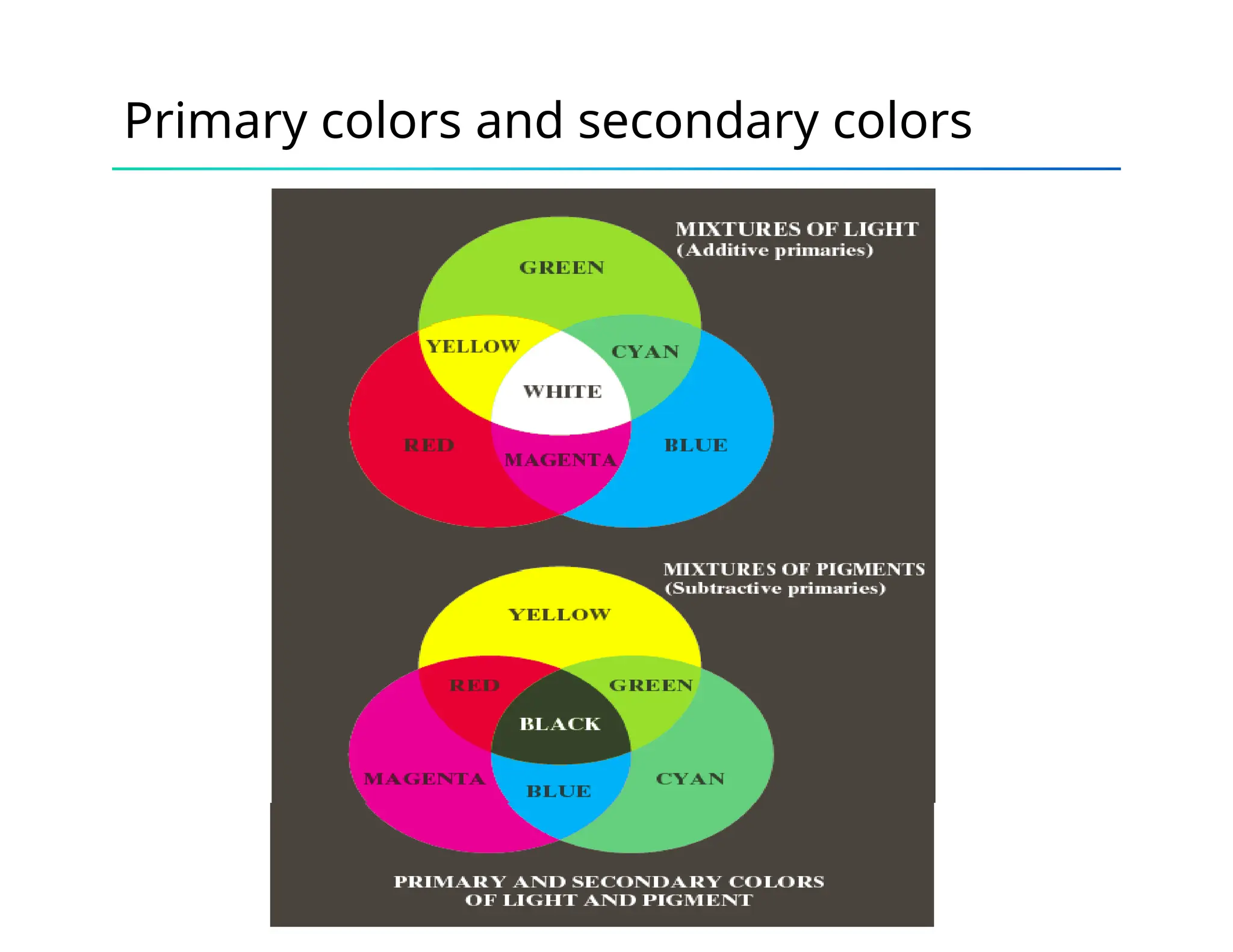
Primary colors and secondary colors
Characterization
• Brightness, hue, and saturation.
• Brightness: achromatic notion of intensity.
• Hue: attribute associated with dominating wavelength in a
mixture of light waves, i.e., the dominant color perceived
by observer.
• Saturation: refers to the relative purity or the amount
white light mixed with a hue.
• Hue and saturation together are called chromaticity, so a
color can be characterized by its brightness and
chromaticity.
Color models (color space, or color
system)
• A color model is a specification of a coordinate system and
subspace where each color is represented as single point
• Examples
– RGB
– CMY (cyan, magenta, yellow)/CMYK (cyan, magenta,
yellow, black)
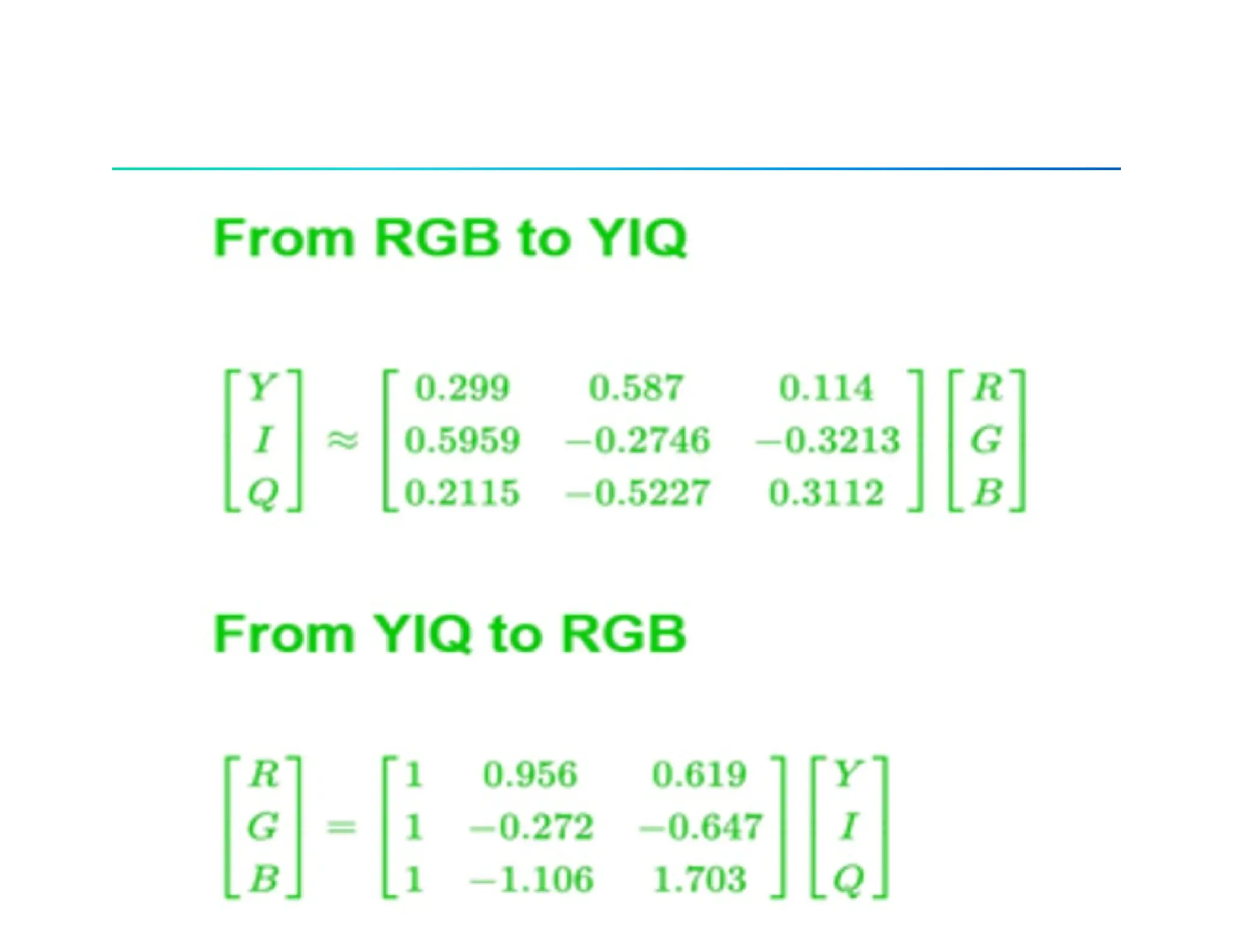
– YIQ (In Phase & Quadrature)
– HSV
– HSI
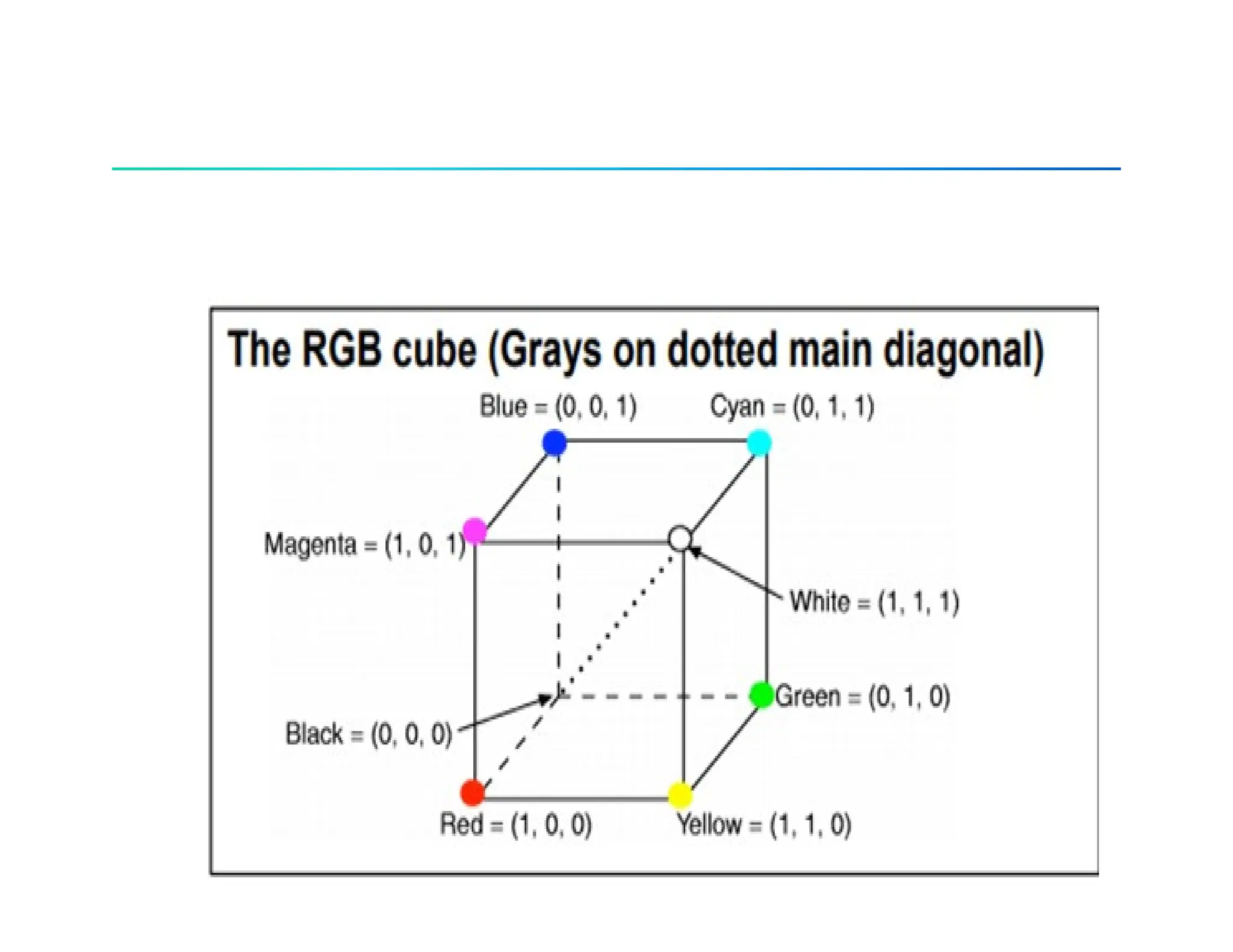
RGB Color models
• (R, G, B): all values of R, G, B are between 0 and 1.
• With digital representation, for a fixed length of bits each color
element. The total number of bits is called color depth, or pixel
depth. For example, 24-bit RGB color (r, g, b), 8-bits for each
color. The 8-bit binary number r represents the value of r/256 in
[0,1]
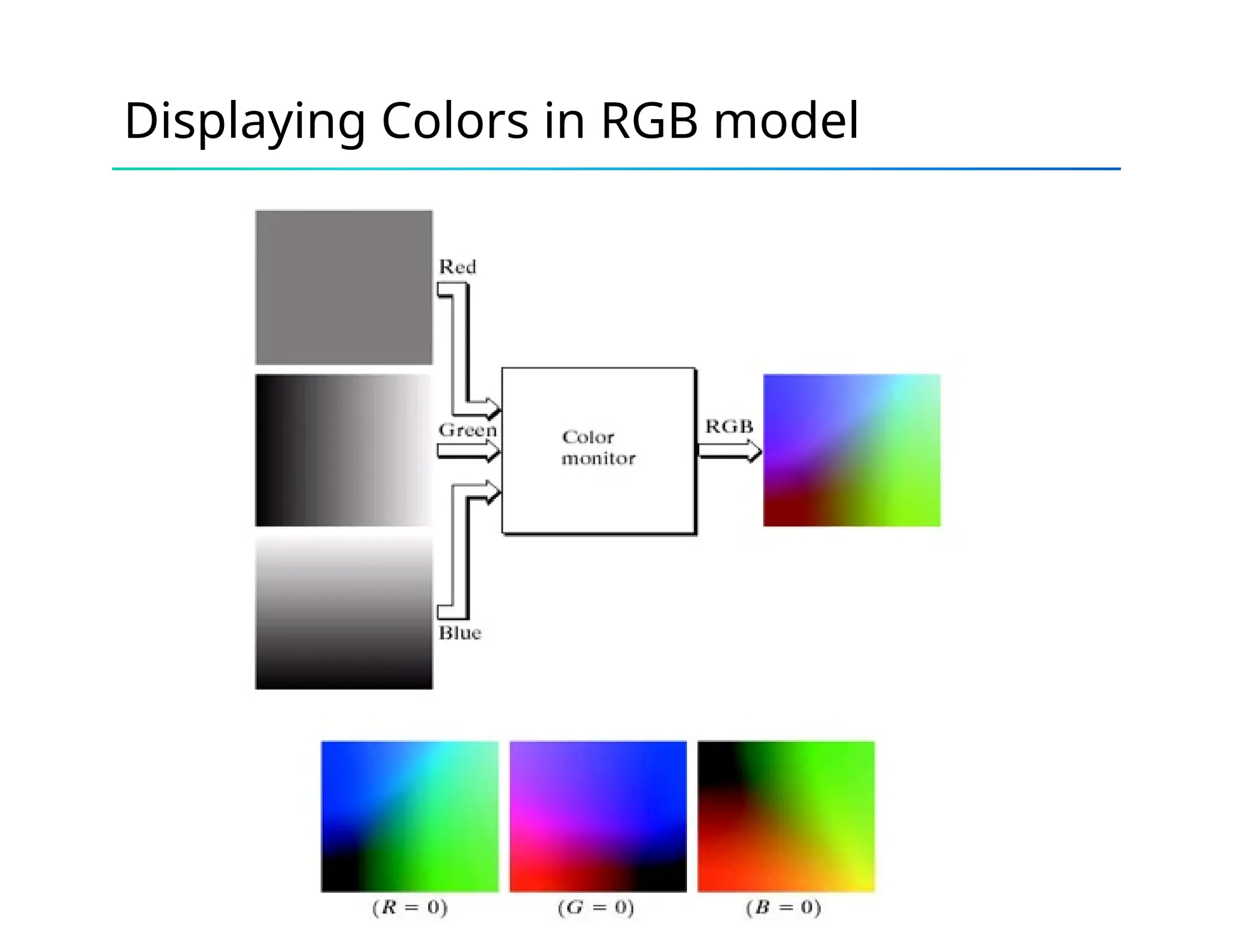
Displaying Colors in RGB model
CMY and CMYK model
• (C, M, Y)
[
𝐶
𝑀
𝑌 ]=
[
1
1
1]−
[
𝑅
𝐺
𝐵]
• CMYK: (C, M, Y, B), where B is a fixed black color. This
basically for printing purpose, where black is usually the
dominating color. When printing black, using B rather than using
(C, M, B) = (1, 1, 1)
HSI
• HSI color space: H – hue, S-saturation, I-intensity
, B  G
H 


360  B  G
1
[(R  G)  (R  B)]
 cos1
{ 2 }
[(R  G)2
 (R  B)(G  B)]1/ 2
3
S 
1
[min(R, G,
B)]
(R  G  B)
I 
1
(R  G  B) 3
HSV COLOR MODEL
•It Color parameters in this model are hue (H), saturation (S) and
value(V).
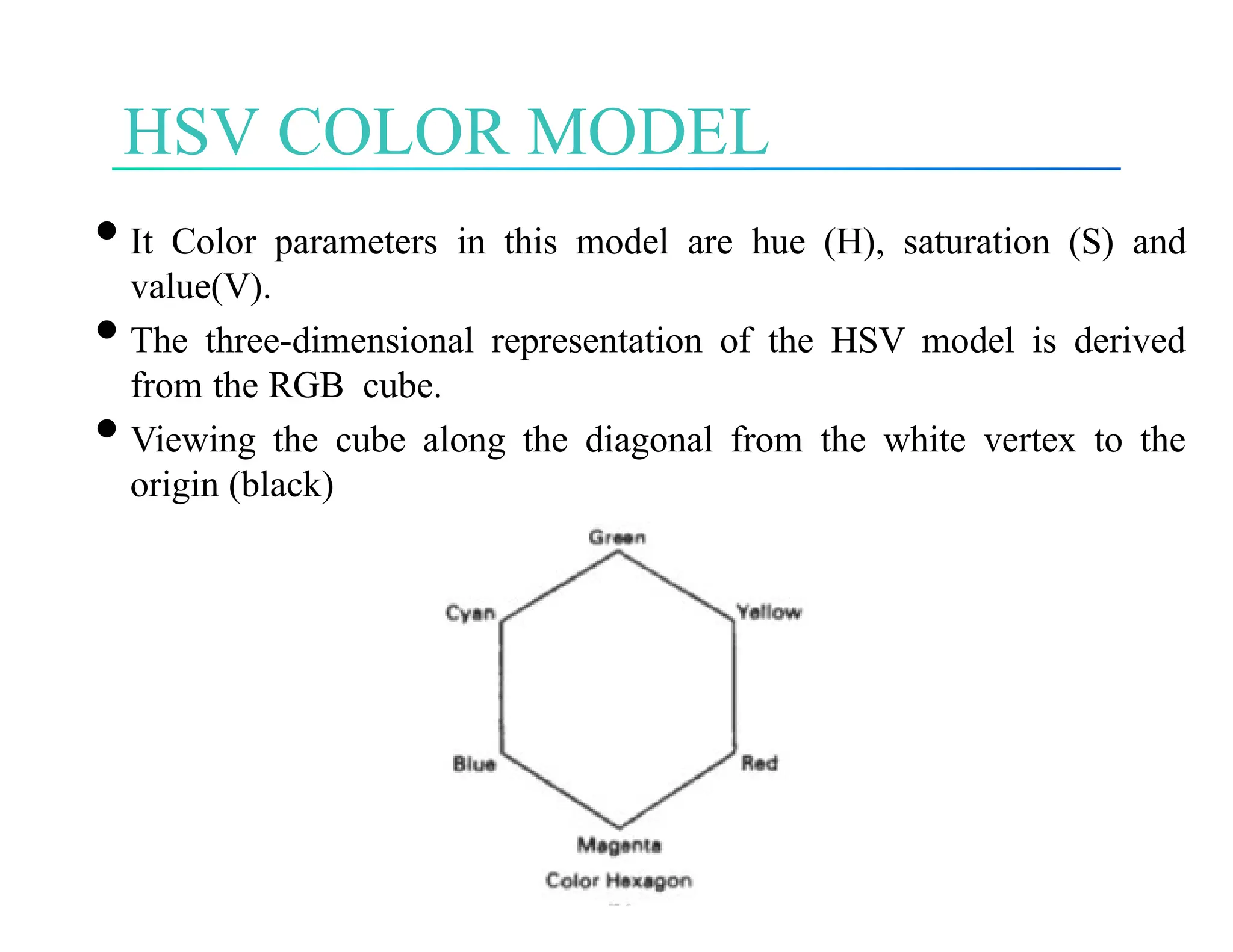
•The three-dimensional representation of the HSV model is derived
from the RGB cube.
•Viewing the cube along the diagonal from the white vertex to the
origin (black)
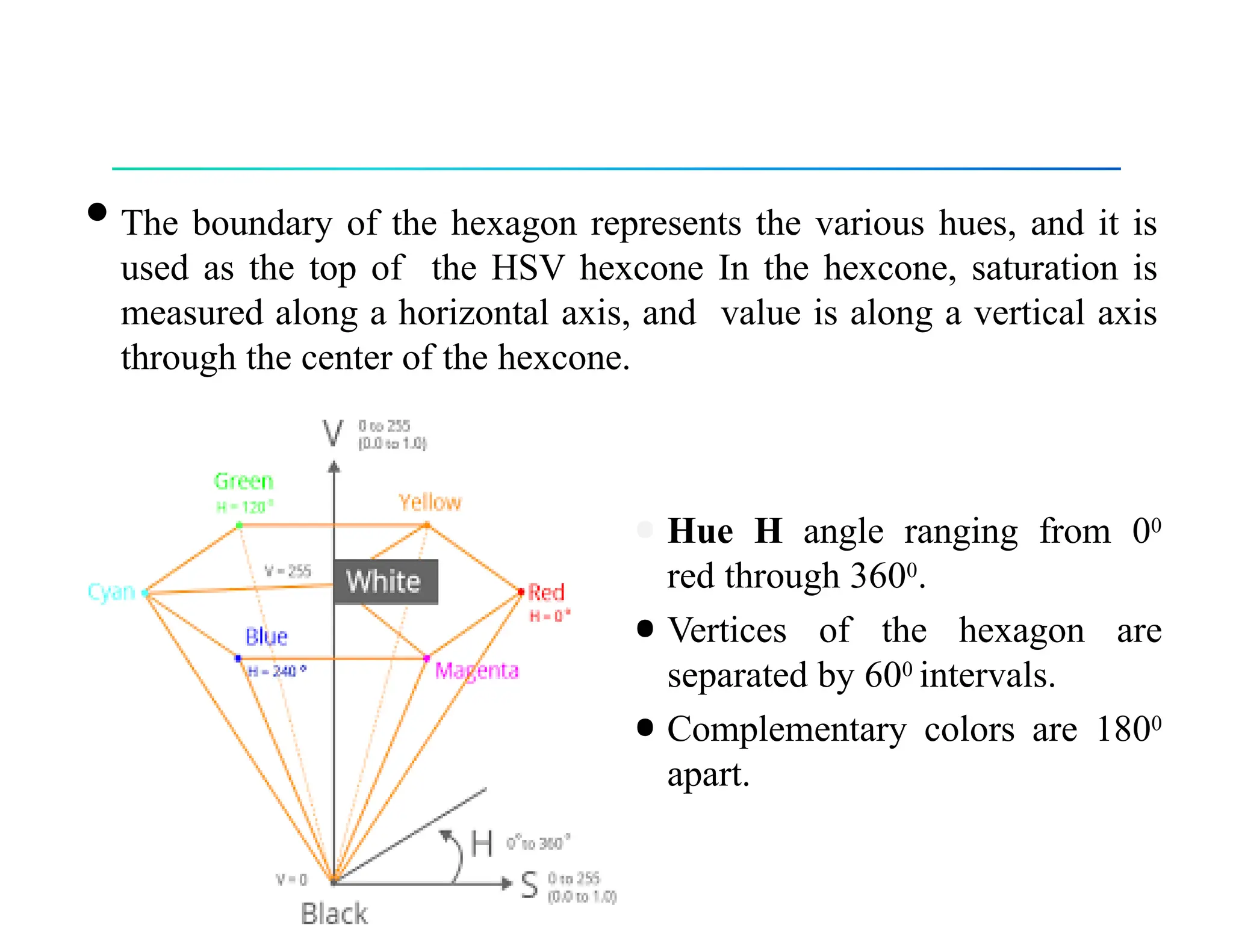
•The boundary of the hexagon represents the various hues, and it is
used as the top of the HSV hexcone In the hexcone, saturation is
measured along a horizontal axis, and value is along a vertical axis
through the center of the hexcone.
•Hue H angle ranging from 00
red through 3600.
•Vertices of the hexagon are
separated by 600 intervals.
•Complementary colors are 1800
apart.
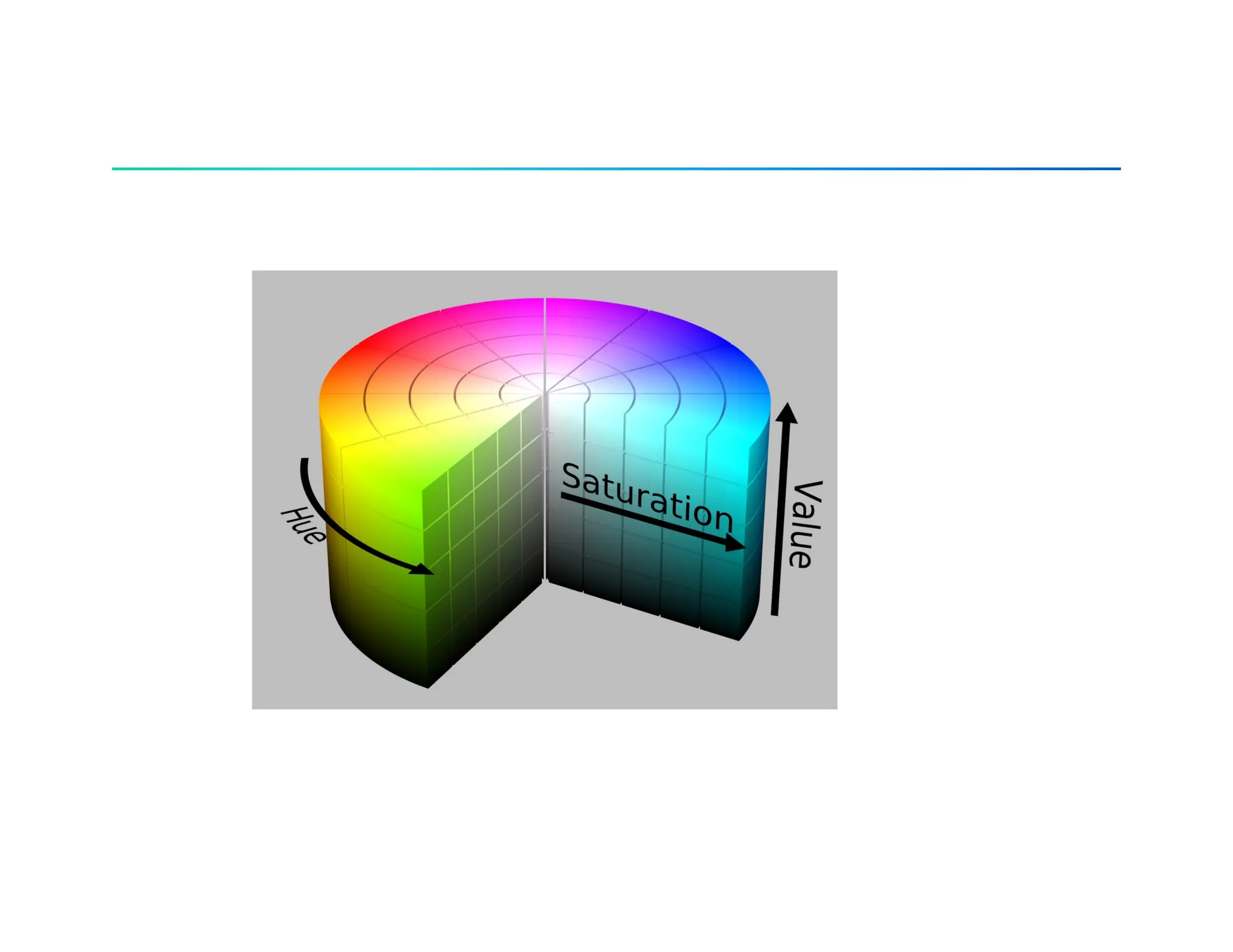
•Saturation S varies from 0 to 1 .
•S can be defines as the ratio of the purity of a selected hue to its
maximum purity at
S = 1.
•At S = 0, we have the gray scale.
•Value V varies from 0 at the apex of the hexcone to 1 at the
top.
•When V = 1 and S = 1, we have the "pure" hues.
•White is the point at V = 1 and S = 0.
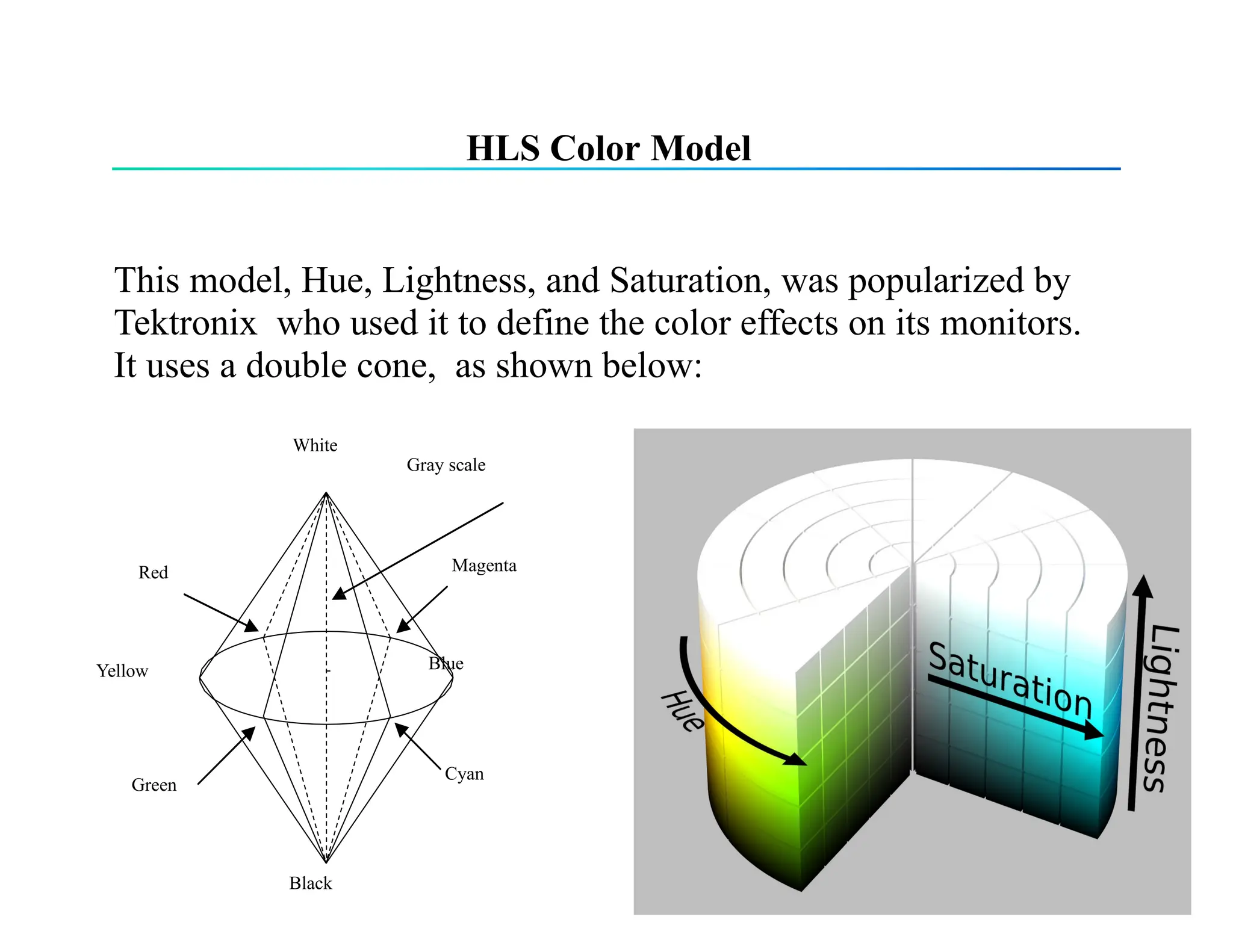
HLS Color Model
This model, Hue, Lightness, and Saturation, was popularized by
Tektronix who used it to define the color effects on its monitors.
It uses a double cone, as shown below:
Black
Magenta
Blue
Red
Green
Cyan
Yellow
White
Gray scale
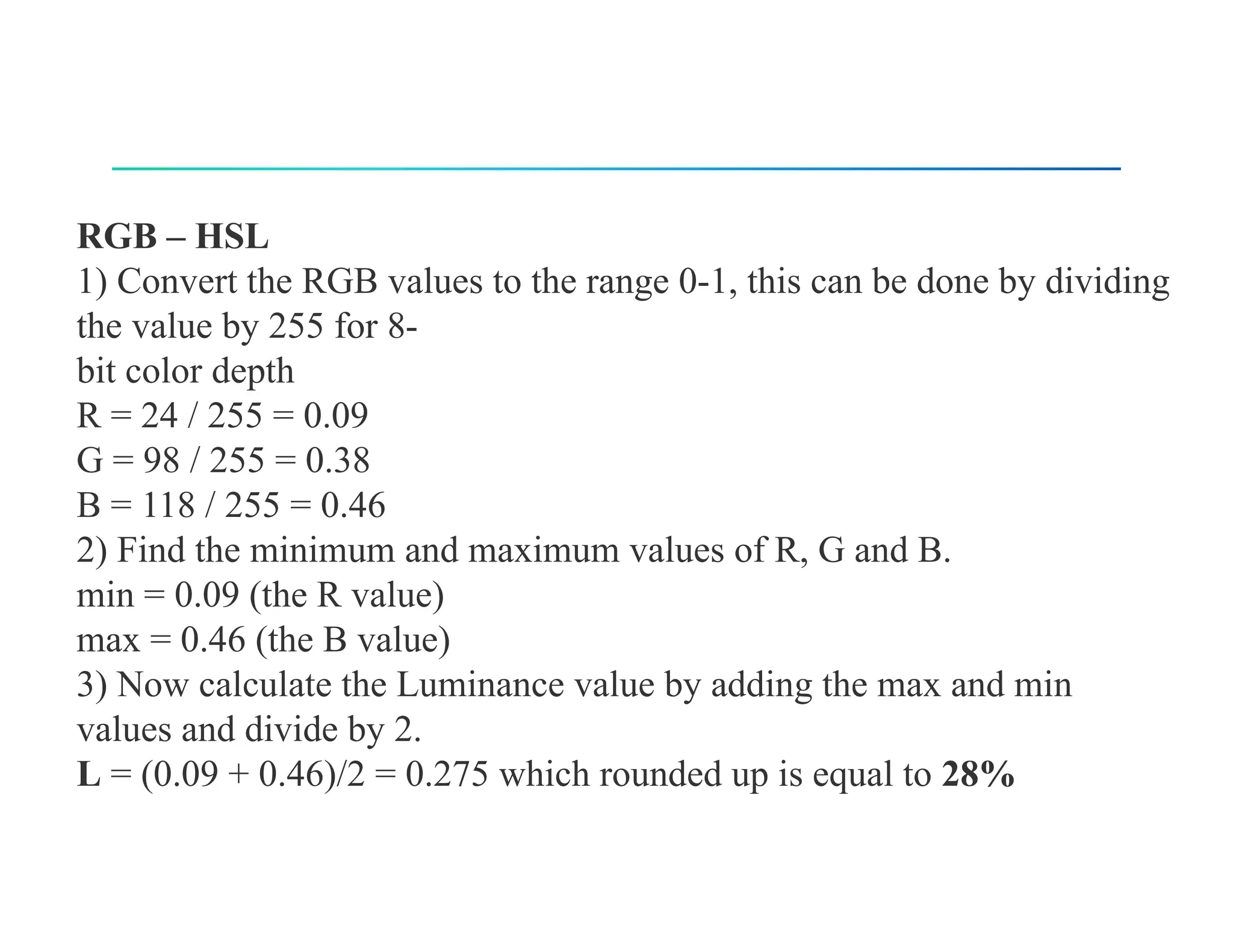
RGB – HSL
1) Convert the RGB values to the range 0-1, this can be done by dividing
the value by 255 for 8-
bit color depth
R = 24 / 255 = 0.09
G = 98 / 255 = 0.38
B = 118 / 255 = 0.46
2) Find the minimum and maximum values of R, G and B.
min = 0.09 (the R value)
max = 0.46 (the B value)
3) Now calculate the Luminance value by adding the max and min
values and divide by 2.
L = (0.09 + 0.46)/2 = 0.275 which rounded up is equal to 28%
4) The next step is to find the Saturation.
If the min and max value are the same, it means that there is no saturation.
If all RGB values are equal you have a shade of grey. Depending on how
bright it’s somewhere between black and white. If there is no Saturation,
we don’t need to calculate the Hue. So we set it to 0 degrees.
But in our case min and max are not equal which means there is
Saturation.
5) Now we know that there is Saturation we need to do check the level of
the Luminance in order to select the correct formula.
If Luminance is less or equal to 0.5, then Saturation =
(max-min)/(max+min)
If Luminance is bigger then 0.5. then Saturation = ( max-min)/(2.0-max-
min)
In our case Luminance is smaller then 0.5, so we use the first formula.
S = (0.46 – 0.09) / (0.46 + 0.09) = 0.37 / 0.55 = 0.672 which is rounded
down equal to 67%
6) Two done, one to go. We still need to calculate the Hue.
The Hue formula is depending on what RGB color channel is the max
value. The three different formulas are:
If Red is max, then Hue = (G-B)/(max-min)
If Green is max, then Hue = 2.0 + (B-R)/(max-min)
If Blue is max, then Hue = 4.0 + (R-G)/(max-min)
The Hue value you get needs to be multiplied by 60 to convert it to
degrees on the color circle
If Hue becomes negative you need to add 360 to, because a circle has
360 degrees.
Blue is our max, we have to use the third formula.
H = 4.0 + (0.09 – 0.38) / (0.46 – 0.09) = 4.0 + (-0.29)/0.37 = 3.21
Now convert it to degrees
H = 3.21 x 60 = 192.9 which rounded up is 193 degrees
Q1. Convert an RGB color model with components R=0.5, G=0.7G, and B=0.3 to the
CMY color model. Convert a CMY color model with components C=0.4, M=0.2, and
Y=0.6 back to the RGB color model.
1. RGB to CMY Conversion:
The CMY components are calculated as: =1− , =1− , =1− ,
𝐶 𝑅 𝑀 𝐺 𝑌 𝐵
Given =0.5, =0.7 =0.3:
𝑅 𝐺 𝐵
C = 0.5, M = 0.3, Y = 0.7
CMY to RGB Conversion:
The RGB components are calculated as: =1− , =1− , =1− ,
𝑅 𝐶 𝐺 𝑀 𝐵 𝑌
Given =0.4, =0.2, =0.6
𝐶 𝑀 𝑌
𝑅=0.6, =0.8, =0.4
𝐺 𝐵
Q. An image pixel has the following RGB values:
R=150, G=100, B=200
Convert these RGB values to the corresponding YIQ values using the formula for
conversion.
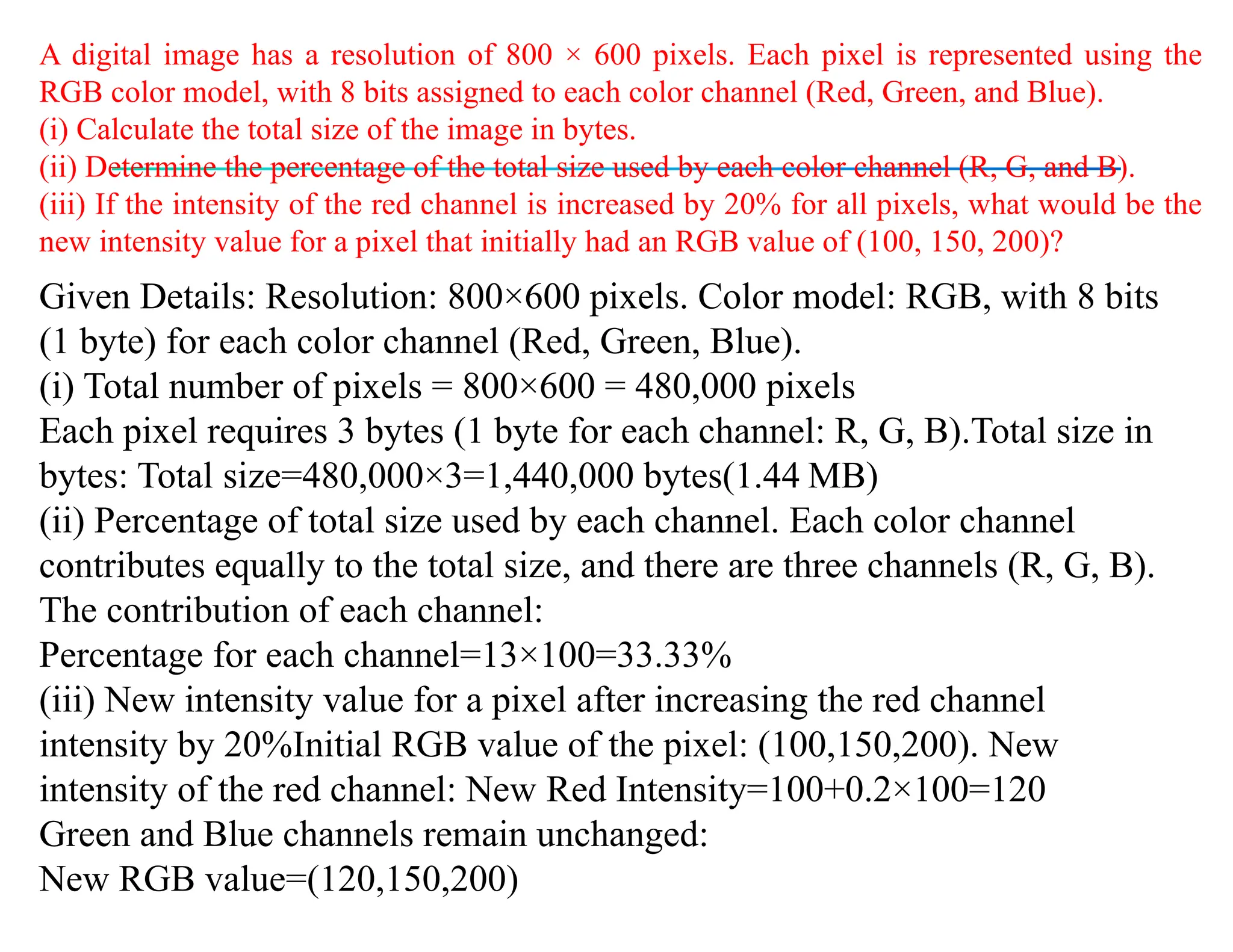
A digital image has a resolution of 800 × 600 pixels. Each pixel is represented using the
RGB color model, with 8 bits assigned to each color channel (Red, Green, and Blue).
(i) Calculate the total size of the image in bytes.
(ii) Determine the percentage of the total size used by each color channel (R, G, and B).
(iii) If the intensity of the red channel is increased by 20% for all pixels, what would be the
new intensity value for a pixel that initially had an RGB value of (100, 150, 200)?
Given Details: Resolution: 800×600 pixels. Color model: RGB, with 8 bits
(1 byte) for each color channel (Red, Green, Blue).
(i) Total number of pixels = 800×600 = 480,000 pixels
Each pixel requires 3 bytes (1 byte for each channel: R, G, B).Total size in
bytes: Total size=480,000×3=1,440,000 bytes(1.44 MB)
(ii) Percentage of total size used by each channel. Each color channel
contributes equally to the total size, and there are three channels (R, G, B).
The contribution of each channel:
Percentage for each channel=13×100=33.33%
(iii) New intensity value for a pixel after increasing the red channel
intensity by 20%Initial RGB value of the pixel: (100,150,200). New
intensity of the red channel: New Red Intensity=100+0.2×100=120
Green and Blue channels remain unchanged:
New RGB value=(120,150,200)

Unit 5- Color Model COMPUTER GRAPHICS .pptx

  • 1.
    Primary colors andsecondary colors
  • 2.
    Characterization • Brightness, hue,and saturation. • Brightness: achromatic notion of intensity. • Hue: attribute associated with dominating wavelength in a mixture of light waves, i.e., the dominant color perceived by observer. • Saturation: refers to the relative purity or the amount white light mixed with a hue. • Hue and saturation together are called chromaticity, so a color can be characterized by its brightness and chromaticity.
  • 3.
    Color models (colorspace, or color system) • A color model is a specification of a coordinate system and subspace where each color is represented as single point • Examples – RGB – CMY (cyan, magenta, yellow)/CMYK (cyan, magenta, yellow, black) – YIQ (In Phase & Quadrature) – HSV – HSI
  • 5.
    RGB Color models •(R, G, B): all values of R, G, B are between 0 and 1. • With digital representation, for a fixed length of bits each color element. The total number of bits is called color depth, or pixel depth. For example, 24-bit RGB color (r, g, b), 8-bits for each color. The 8-bit binary number r represents the value of r/256 in [0,1]
  • 6.
  • 7.
    CMY and CMYKmodel • (C, M, Y) [ 𝐶 𝑀 𝑌 ]= [ 1 1 1]− [ 𝑅 𝐺 𝐵] • CMYK: (C, M, Y, B), where B is a fixed black color. This basically for printing purpose, where black is usually the dominating color. When printing black, using B rather than using (C, M, B) = (1, 1, 1)
  • 8.
    HSI • HSI colorspace: H – hue, S-saturation, I-intensity , B  G H    360  B  G 1 [(R  G)  (R  B)]  cos1 { 2 } [(R  G)2  (R  B)(G  B)]1/ 2 3 S  1 [min(R, G, B)] (R  G  B) I  1 (R  G  B) 3
  • 9.
    HSV COLOR MODEL •ItColor parameters in this model are hue (H), saturation (S) and value(V). •The three-dimensional representation of the HSV model is derived from the RGB cube. •Viewing the cube along the diagonal from the white vertex to the origin (black)
  • 10.
    •The boundary ofthe hexagon represents the various hues, and it is used as the top of the HSV hexcone In the hexcone, saturation is measured along a horizontal axis, and value is along a vertical axis through the center of the hexcone. •Hue H angle ranging from 00 red through 3600. •Vertices of the hexagon are separated by 600 intervals. •Complementary colors are 1800 apart.
  • 12.
    •Saturation S variesfrom 0 to 1 . •S can be defines as the ratio of the purity of a selected hue to its maximum purity at S = 1. •At S = 0, we have the gray scale. •Value V varies from 0 at the apex of the hexcone to 1 at the top. •When V = 1 and S = 1, we have the "pure" hues. •White is the point at V = 1 and S = 0.
  • 13.
    HLS Color Model Thismodel, Hue, Lightness, and Saturation, was popularized by Tektronix who used it to define the color effects on its monitors. It uses a double cone, as shown below: Black Magenta Blue Red Green Cyan Yellow White Gray scale
  • 15.
    RGB – HSL 1)Convert the RGB values to the range 0-1, this can be done by dividing the value by 255 for 8- bit color depth R = 24 / 255 = 0.09 G = 98 / 255 = 0.38 B = 118 / 255 = 0.46 2) Find the minimum and maximum values of R, G and B. min = 0.09 (the R value) max = 0.46 (the B value) 3) Now calculate the Luminance value by adding the max and min values and divide by 2. L = (0.09 + 0.46)/2 = 0.275 which rounded up is equal to 28%
  • 16.
    4) The nextstep is to find the Saturation. If the min and max value are the same, it means that there is no saturation. If all RGB values are equal you have a shade of grey. Depending on how bright it’s somewhere between black and white. If there is no Saturation, we don’t need to calculate the Hue. So we set it to 0 degrees. But in our case min and max are not equal which means there is Saturation. 5) Now we know that there is Saturation we need to do check the level of the Luminance in order to select the correct formula. If Luminance is less or equal to 0.5, then Saturation = (max-min)/(max+min) If Luminance is bigger then 0.5. then Saturation = ( max-min)/(2.0-max- min) In our case Luminance is smaller then 0.5, so we use the first formula. S = (0.46 – 0.09) / (0.46 + 0.09) = 0.37 / 0.55 = 0.672 which is rounded down equal to 67%
  • 17.
    6) Two done,one to go. We still need to calculate the Hue. The Hue formula is depending on what RGB color channel is the max value. The three different formulas are: If Red is max, then Hue = (G-B)/(max-min) If Green is max, then Hue = 2.0 + (B-R)/(max-min) If Blue is max, then Hue = 4.0 + (R-G)/(max-min) The Hue value you get needs to be multiplied by 60 to convert it to degrees on the color circle If Hue becomes negative you need to add 360 to, because a circle has 360 degrees. Blue is our max, we have to use the third formula. H = 4.0 + (0.09 – 0.38) / (0.46 – 0.09) = 4.0 + (-0.29)/0.37 = 3.21 Now convert it to degrees H = 3.21 x 60 = 192.9 which rounded up is 193 degrees
  • 19.
    Q1. Convert anRGB color model with components R=0.5, G=0.7G, and B=0.3 to the CMY color model. Convert a CMY color model with components C=0.4, M=0.2, and Y=0.6 back to the RGB color model. 1. RGB to CMY Conversion: The CMY components are calculated as: =1− , =1− , =1− , 𝐶 𝑅 𝑀 𝐺 𝑌 𝐵 Given =0.5, =0.7 =0.3: 𝑅 𝐺 𝐵 C = 0.5, M = 0.3, Y = 0.7 CMY to RGB Conversion: The RGB components are calculated as: =1− , =1− , =1− , 𝑅 𝐶 𝐺 𝑀 𝐵 𝑌 Given =0.4, =0.2, =0.6 𝐶 𝑀 𝑌 𝑅=0.6, =0.8, =0.4 𝐺 𝐵
  • 20.
    Q. An imagepixel has the following RGB values: R=150, G=100, B=200 Convert these RGB values to the corresponding YIQ values using the formula for conversion.
  • 21.
    A digital imagehas a resolution of 800 × 600 pixels. Each pixel is represented using the RGB color model, with 8 bits assigned to each color channel (Red, Green, and Blue). (i) Calculate the total size of the image in bytes. (ii) Determine the percentage of the total size used by each color channel (R, G, and B). (iii) If the intensity of the red channel is increased by 20% for all pixels, what would be the new intensity value for a pixel that initially had an RGB value of (100, 150, 200)? Given Details: Resolution: 800×600 pixels. Color model: RGB, with 8 bits (1 byte) for each color channel (Red, Green, Blue). (i) Total number of pixels = 800×600 = 480,000 pixels Each pixel requires 3 bytes (1 byte for each channel: R, G, B).Total size in bytes: Total size=480,000×3=1,440,000 bytes(1.44 MB) (ii) Percentage of total size used by each channel. Each color channel contributes equally to the total size, and there are three channels (R, G, B). The contribution of each channel: Percentage for each channel=13×100=33.33% (iii) New intensity value for a pixel after increasing the red channel intensity by 20%Initial RGB value of the pixel: (100,150,200). New intensity of the red channel: New Red Intensity=100+0.2×100=120 Green and Blue channels remain unchanged: New RGB value=(120,150,200)