1
Digital Image Processing
Lecture-5
Color Image Processing
2
5.1 Color Model
A color model is a system used to describe a color.
The hardware-oriented models most commonly used in practice are the RGB
(red, green, blue) model for color monitors and a broad class of color video
cameras; the CMY (cyan, magenta, yellow) and CMYK (cyan, magenta, yellow,
black) models for color printing; and the HSI (hue, saturation, intensity) model,
which corresponds closely with the way humans describe and interpret color.
The HSI model also has the advantage that it decouples the color and gray-
scale information in an image, making it suitable for many of the gray-scale
techniques
3
5.1.1 RGB Model
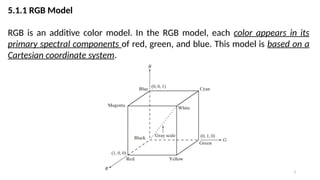
RGB is an additive color model. In the RGB model, each color appears in its
primary spectral components of red, green, and blue. This model is based on a
Cartesian coordinate system.
4
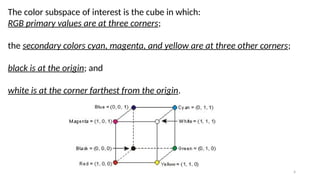
The color subspace of interest is the cube in which:
RGB primary values are at three corners;
the secondary colors cyan, magenta, and yellow are at three other corners;
black is at the origin; and
white is at the corner farthest from the origin.
5
In this model, the gray scale (points of equal RGB values) extends from black to
white along the line joining these two points. For convenience, the assumption
is that all color values have been normalized so that the cube is the unit cube.
That is, all values of R, G, and B are assumed to be in the range [0, 1].
6
The number of bits used to represent each pixel in RGB space is called the pixel
depth.
Consider an RGB image in which each of the red, green, and blue images is an 8-
bit image. Under these conditions each RGB color pixel [that is, a triplet of
values (R, G, B)] is said to have a depth of 24 bits (3 image planes times the
number of bits per plane).
The term full-color image is used often to
denote a 24-bit RGB color image.
The total number of colors in a 24-bit
RGB image is
7
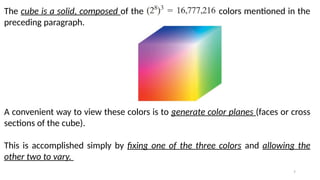
The cube is a solid, composed of the colors mentioned in the
preceding paragraph.
A convenient way to view these colors is to generate color planes (faces or cross
sections of the cube).
This is accomplished simply by fixing one of the three colors and allowing the
other two to vary.
8
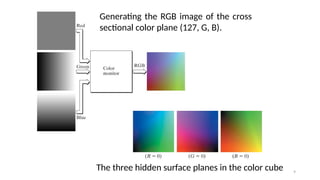
For instance, a cross-sectional plane through the center of the cube and parallel
to the GB-plane is the plane (127, G, B) for
Here we used the actual pixel values rather than the mathematically convenient
normalized values in the range [0, 1] because the former values are the ones
actually used in a computer to generate colors.
9
Generating the RGB image of the cross
sectional color plane (127, G, B).
The three hidden surface planes in the color cube
10
11
12
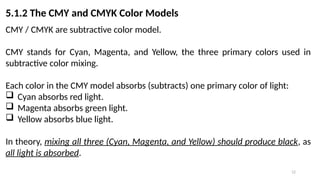
5.1.2 The CMY and CMYK Color Models
CMY / CMYK are subtractive color model.
CMY stands for Cyan, Magenta, and Yellow, the three primary colors used in
subtractive color mixing.
Each color in the CMY model absorbs (subtracts) one primary color of light:
 Cyan absorbs red light.
 Magenta absorbs green light.
 Yellow absorbs blue light.
In theory, mixing all three (Cyan, Magenta, and Yellow) should produce black, as
all light is absorbed.
13
Most devices that deposit colored pigments on paper, such as color printers and
copiers, require CMY data input or perform an RGB to CMY conversion
internally.
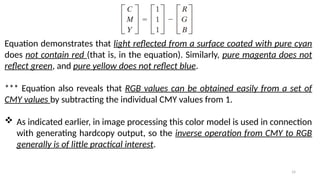
Cyan = White – Red
Magenta = White – Green
Yellow = White – Blue
This conversion is performed using the simple operation
Where, again, the assumption is that all color values have been normalized to
the range [0, 1].
14
Equation demonstrates that light reflected from a surface coated with pure cyan
does not contain red (that is, in the equation). Similarly, pure magenta does not
reflect green, and pure yellow does not reflect blue.
*** Equation also reveals that RGB values can be obtained easily from a set of
CMY values by subtracting the individual CMY values from 1.
 As indicated earlier, in image processing this color model is used in connection
with generating hardcopy output, so the inverse operation from CMY to RGB
generally is of little practical interest.
15
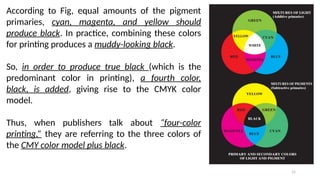
According to Fig, equal amounts of the pigment
primaries, cyan, magenta, and yellow should
produce black. In practice, combining these colors
for printing produces a muddy-looking black.
So, in order to produce true black (which is the
predominant color in printing), a fourth color,
black, is added, giving rise to the CMYK color
model.
Thus, when publishers talk about “four-color
printing,” they are referring to the three colors of
the CMY color model plus black.
16
5.1.3 The HSI Color Model
As we have seen, creating colors in the RGB and CMY models and changing
from one model to the other is a straightforward process.
As noted earlier, these color systems are ideally suited for hardware
implementations.
*** Unfortunately, the RGB, CMY, and other similar color models are not well
suited for describing colors in terms that are practical for human
interpretation.
17
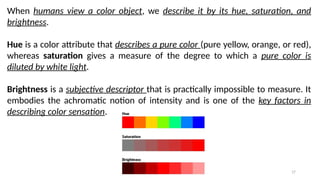
When humans view a color object, we describe it by its hue, saturation, and
brightness.
Hue is a color attribute that describes a pure color (pure yellow, orange, or red),
whereas saturation gives a measure of the degree to which a pure color is
diluted by white light.
Brightness is a subjective descriptor that is practically impossible to measure. It
embodies the achromatic notion of intensity and is one of the key factors in
describing color sensation.
18
Why HSI model?
We do know that intensity (gray level) is a most useful descriptor of
monochromatic images. This quantity definitely is measurable and easily
interpretable.
*** The model we are about to present, called the HSI (hue, saturation,
intensity) color model, decouples the intensity component from the color-
carrying information (hue and saturation) in a color image.
 As a result, the HSI model is an ideal tool for developing image processing
algorithms based on color descriptions that are natural and intuitive to
humans, who, after all, are the developers and users of these algorithms.
19
Relationship between RGB and HSI
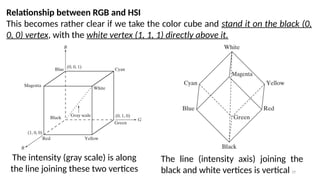
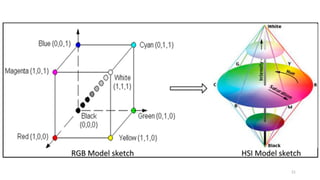
This becomes rather clear if we take the color cube and stand it on the black (0,
0, 0) vertex, with the white vertex (1, 1, 1) directly above it.
The intensity (gray scale) is along
the line joining these two vertices
The line (intensity axis) joining the
black and white vertices is vertical
20
Thus, if we wanted to determine the intensity component of any color point in
Fig, we would simply pass a plane perpendicular to the intensity axis and
containing the color point. The intersection of the plane with the intensity axis
would give us a point with intensity value in the range [0, 1].
21
22
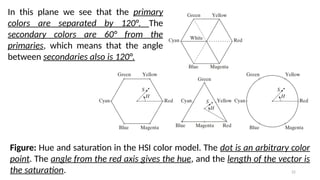
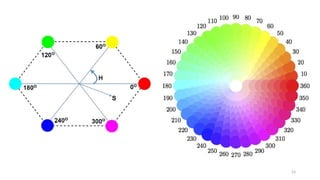
Figure: Hue and saturation in the HSI color model. The dot is an arbitrary color
point. The angle from the red axis gives the hue, and the length of the vector is
the saturation.
In this plane we see that the primary
colors are separated by 120°. The
secondary colors are 60° from the
primaries, which means that the angle
between secondaries also is 120°.
23
24
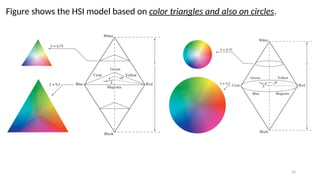
Figure shows the HSI model based on color triangles and also on circles.
25
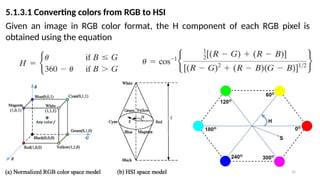
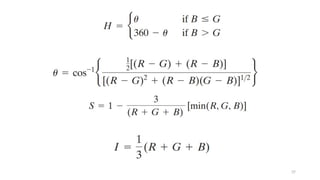
5.1.3.1 Converting colors from RGB to HSI
Given an image in RGB color format, the H component of each RGB pixel is
obtained using the equation
26
The saturation component is given by
Finally, the intensity component is given by
It is assumed that the RGB values have been normalized to the range [0, 1] and
that angle is measured with respect to the red axis of the HSI space.
 Hue can be normalized to the range [0, 1] by dividing by 360° all values
resulting from Eq.
 The other two HSI components already are in this range if the given RGB
values are in the interval [0, 1].
27
Steps of Conversion
Normalize the RGB Values:
First, convert the RGB values to the [0, 1] range by dividing each component by
255. For example, consider a pixel with RGB values (100, 150, 200):
28
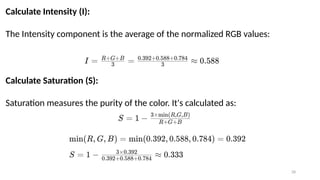
Calculate Intensity (I):
The Intensity component is the average of the normalized RGB values:
Calculate Saturation (S):
Saturation measures the purity of the color. It's calculated as:
29
Calculate Hue (H):
Hue represents the color type and is calculated using:
Finally, normalize to the [0, 1] range by dividing by 360°.
𝐻
30
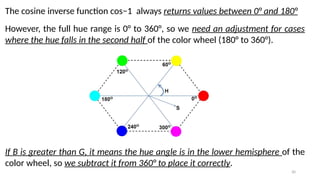
The cosine inverse function cos⁡
−1 always returns values between 0° and 180°
However, the full hue range is 0° to 360°, so we need an adjustment for cases
where the hue falls in the second half of the color wheel (180° to 360°).
If B is greater than G, it means the hue angle is in the lower hemisphere of the
color wheel, so we subtract it from 360° to place it correctly.
31
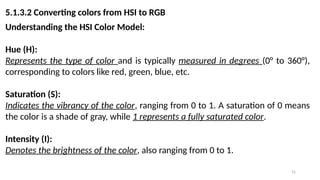
5.1.3.2 Converting colors from HSI to RGB
Understanding the HSI Color Model:
Hue (H):
Represents the type of color and is typically measured in degrees (0° to 360°),
corresponding to colors like red, green, blue, etc.
Saturation (S):
Indicates the vibrancy of the color, ranging from 0 to 1. A saturation of 0 means
the color is a shade of gray, while 1 represents a fully saturated color.
Intensity (I):
Denotes the brightness of the color, also ranging from 0 to 1.
32
5.1.3.2 Converting colors from HSI to RGB
Given values of HSI in the interval [0, 1], we now want to find the corresponding
RGB values in the same range.
The applicable equations depend on the
values of H.
There are three sectors of interest,
corresponding to the 120° intervals in the
separation of primaries.
33
We begin by multiplying H by 360°, which returns the hue to its original range
of [0°, 360°].
RG sector : When H is in this sector, the RGB components are given
by the equations
34
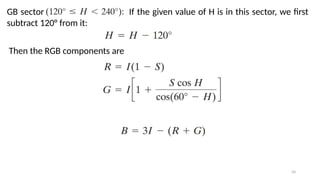
GB sector If the given value of H is in this sector, we first
subtract 120° from it:
Then the RGB components are
35
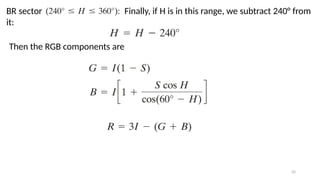
BR sector Finally, if H is in this range, we subtract 240° from
it:
Then the RGB components are
36
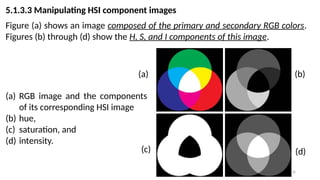
5.1.3.3 Manipulating HSI component images
Figure (a) shows an image composed of the primary and secondary RGB colors.
Figures (b) through (d) show the H, S, and I components of this image.
(a) (b)
(c) (d)
(a) RGB image and the components
of its corresponding HSI image
(b) hue,
(c) saturation, and
(d) intensity.
37
38
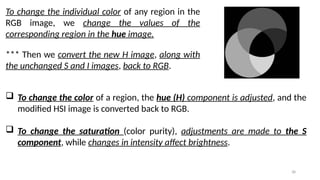
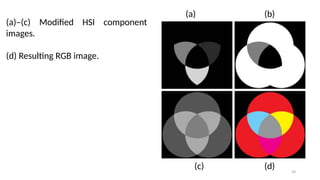
To change the individual color of any region in the
RGB image, we change the values of the
corresponding region in the hue image.
*** Then we convert the new H image, along with
the unchanged S and I images, back to RGB.
 To change the color of a region, the hue (H) component is adjusted, and the
modified HSI image is converted back to RGB.
 To change the saturation (color purity), adjustments are made to the S
component, while changes in intensity affect brightness.
39
(a)–(c) Modified HSI component
images.
(d) Resulting RGB image.
(a) (b)
(c) (d)
40
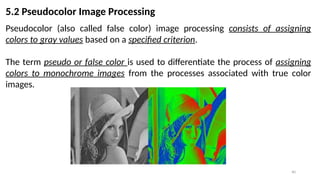
5.2 Pseudocolor Image Processing
Pseudocolor (also called false color) image processing consists of assigning
colors to gray values based on a specified criterion.
The term pseudo or false color is used to differentiate the process of assigning
colors to monochrome images from the processes associated with true color
images.
41
5.2.1 Intensity Slicing
The technique of intensity (sometimes called density) slicing and color coding is
one of the simplest examples of pseudocolor image processing.
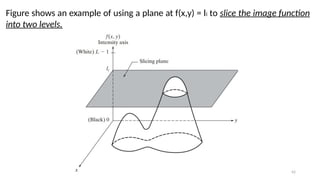
If an image is interpreted as a 3-D function, the method can be viewed as one of
placing planes parallel to the coordinate plane of the image; each plane then
“slices” the function in the area of intersection.
42
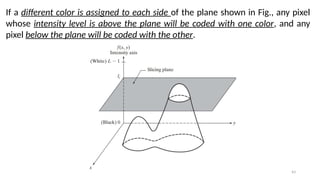
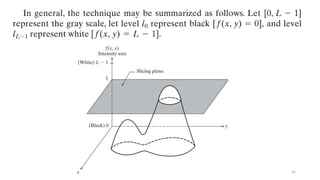
Figure shows an example of using a plane at f(x,y) = li to slice the image function
into two levels.
43
If a different color is assigned to each side of the plane shown in Fig., any pixel
whose intensity level is above the plane will be coded with one color, and any
pixel below the plane will be coded with the other.
44
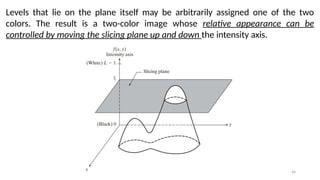
Levels that lie on the plane itself may be arbitrarily assigned one of the two
colors. The result is a two-color image whose relative appearance can be
controlled by moving the slicing plane up and down the intensity axis.
45
46
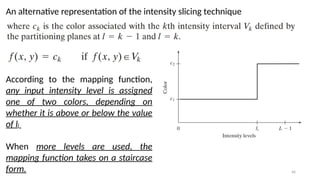
An alternative representation of the intensity slicing technique
According to the mapping function,
any input intensity level is assigned
one of two colors, depending on
whether it is above or below the value
of li
When more levels are used, the
mapping function takes on a staircase
form.
47
Let ( , ) represent the intensity function of the image, where and are
𝐼 𝑥 𝑦 𝑥 𝑦
spatial coordinates, and ( , ) is the intensity at that point.
𝐼 𝑥 𝑦
Define Intensity Range:
Define a set of intensity intervals [𝐼1,𝐼2],[𝐼3,𝐼4],…,[𝐼𝑘,𝐼 +1
𝑘 ], where each interval
corresponds to a different color range.
Assign Color:
For each pixel with intensity value ( , ), assign a color based on which interval
𝐼 𝑥 𝑦
the intensity value falls into.
48
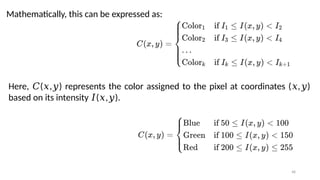
Here, ( , ) represents the color assigned to the pixel at coordinates ( , )
𝐶 𝑥 𝑦 𝑥 𝑦
based on its intensity ( , ).
𝐼 𝑥 𝑦
Mathematically, this can be expressed as:
49
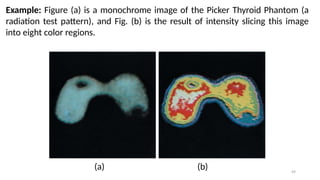
Example: Figure (a) is a monochrome image of the Picker Thyroid Phantom (a
radiation test pattern), and Fig. (b) is the result of intensity slicing this image
into eight color regions.
(a) (b)
50
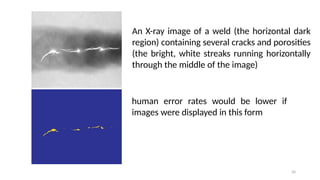
An X-ray image of a weld (the horizontal dark
region) containing several cracks and porosities
(the bright, white streaks running horizontally
through the middle of the image)
human error rates would be lower if
images were displayed in this form
51
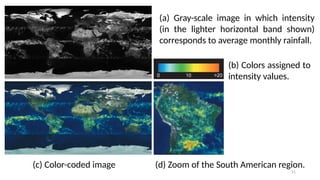
(a) Gray-scale image in which intensity
(in the lighter horizontal band shown)
corresponds to average monthly rainfall.
(b) Colors assigned to
intensity values.
(c) Color-coded image (d) Zoom of the South American region.
52
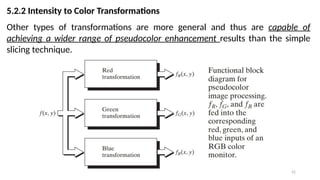
5.2.2 Intensity to Color Transformations
Other types of transformations are more general and thus are capable of
achieving a wider range of pseudocolor enhancement results than the simple
slicing technique.
53
Basically, the idea underlying this approach is to perform three independent
transformations on the intensity of any input pixel. The three results are then
fed separately into the red, green, and blue channels of a color television
monitor.
*** This method produces a composite image whose color content is modulated
by the nature of the transformation functions.
 Note that these are transformations on the intensity values of an image and
are not functions of position.
54
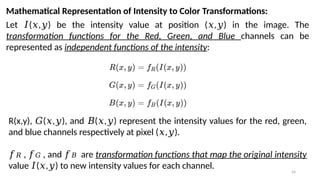
Mathematical Representation of Intensity to Color Transformations:
Let ( , ) be the intensity value at position ( , ) in the image. The
𝐼 𝑥 𝑦 𝑥 𝑦
transformation functions for the Red, Green, and Blue channels can be
represented as independent functions of the intensity:
R(x,y), ( , ), and ( , ) represent the intensity values for the red, green,
𝐺 𝑥 𝑦 𝐵 𝑥 𝑦
and blue channels respectively at pixel ( , ).
𝑥 𝑦
𝑓𝑅 , 𝑓𝐺 , and 𝑓𝐵 are transformation functions that map the original intensity
value ( , ) to new intensity values for each channel.
𝐼 𝑥 𝑦
55
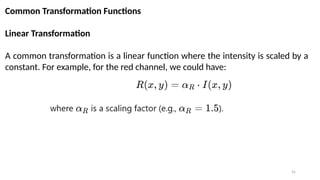
Common Transformation Functions
Linear Transformation
A common transformation is a linear function where the intensity is scaled by a
constant. For example, for the red channel, we could have:
56
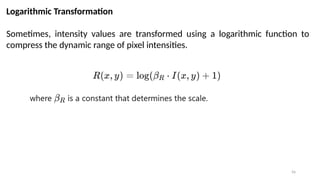
Logarithmic Transformation
Sometimes, intensity values are transformed using a logarithmic function to
compress the dynamic range of pixel intensities.
57
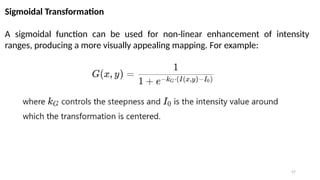
Sigmoidal Transformation
A sigmoidal function can be used for non-linear enhancement of intensity
ranges, producing a more visually appealing mapping. For example:
58
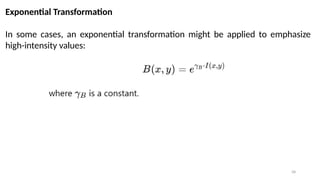
Exponential Transformation
In some cases, an exponential transformation might be applied to emphasize
high-intensity values:
59
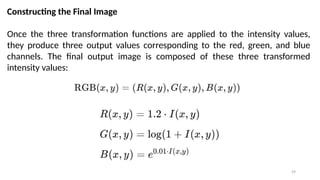
Constructing the Final Image
Once the three transformation functions are applied to the intensity values,
they produce three output values corresponding to the red, green, and blue
channels. The final output image is composed of these three transformed
intensity values:
60
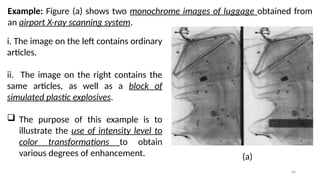
Example: Figure (a) shows two monochrome images of luggage obtained from
an airport X-ray scanning system.
 The purpose of this example is to
illustrate the use of intensity level to
color transformations to obtain
various degrees of enhancement.
i. The image on the left contains ordinary
articles.
ii. The image on the right contains the
same articles, as well as a block of
simulated plastic explosives.
(a)
61
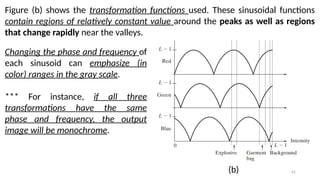
Figure (b) shows the transformation functions used. These sinusoidal functions
contain regions of relatively constant value around the peaks as well as regions
that change rapidly near the valleys.
Changing the phase and frequency of
each sinusoid can emphasize (in
color) ranges in the gray scale.
*** For instance, if all three
transformations have the same
phase and frequency, the output
image will be monochrome.
(b)
62
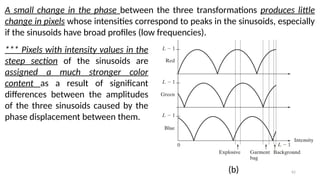
A small change in the phase between the three transformations produces little
change in pixels whose intensities correspond to peaks in the sinusoids, especially
if the sinusoids have broad profiles (low frequencies).
*** Pixels with intensity values in the
steep section of the sinusoids are
assigned a much stronger color
content as a result of significant
differences between the amplitudes
of the three sinusoids caused by the
phase displacement between them.
(b)
63
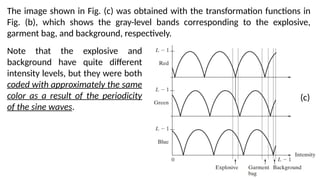
The image shown in Fig. (c) was obtained with the transformation functions in
Fig. (b), which shows the gray-level bands corresponding to the explosive,
garment bag, and background, respectively.
Note that the explosive and
background have quite different
intensity levels, but they were both
coded with approximately the same
color as a result of the periodicity
of the sine waves.
(c)
64
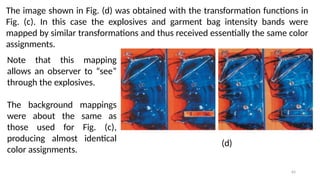
The image shown in Fig. (d) was obtained with the transformation functions in
Fig. (c). In this case the explosives and garment bag intensity bands were
mapped by similar transformations and thus received essentially the same color
assignments.
(d)
Note that this mapping
allows an observer to “see”
through the explosives.
The background mappings
were about the same as
those used for Fig. (c),
producing almost identical
color assignments.
65
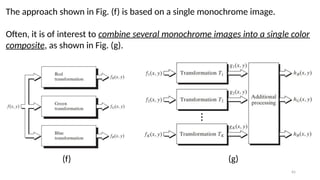
The approach shown in Fig. (f) is based on a single monochrome image.
Often, it is of interest to combine several monochrome images into a single color
composite, as shown in Fig. (g).
(f) (g)
66
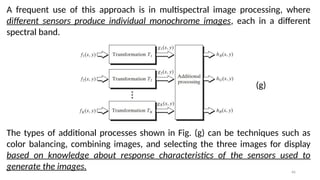
A frequent use of this approach is in multispectral image processing, where
different sensors produce individual monochrome images, each in a different
spectral band.
The types of additional processes shown in Fig. (g) can be techniques such as
color balancing, combining images, and selecting the three images for display
based on knowledge about response characteristics of the sensors used to
generate the images.
(g)
67
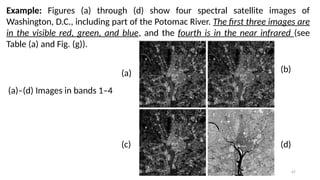
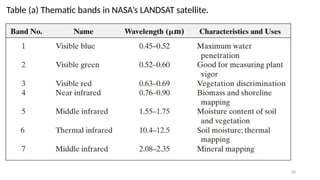
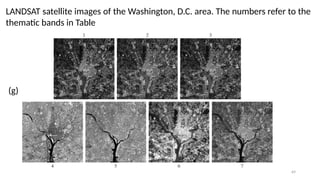
Example: Figures (a) through (d) show four spectral satellite images of
Washington, D.C., including part of the Potomac River. The first three images are
in the visible red, green, and blue, and the fourth is in the near infrared (see
Table (a) and Fig. (g)).
(a)
(c)
(b)
(d)
(a)–(d) Images in bands 1–4
68
Table (a) Thematic bands in NASA’s LANDSAT satellite.
69
LANDSAT satellite images of the Washington, D.C. area. The numbers refer to the
thematic bands in Table
(g)
70
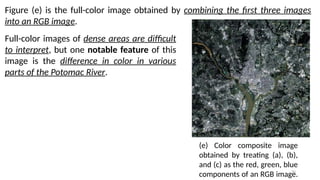
Figure (e) is the full-color image obtained by combining the first three images
into an RGB image.
(e) Color composite image
obtained by treating (a), (b),
and (c) as the red, green, blue
components of an RGB image.
Full-color images of dense areas are difficult
to interpret, but one notable feature of this
image is the difference in color in various
parts of the Potomac River.
71
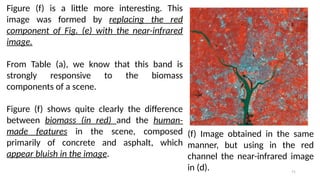
(f) Image obtained in the same
manner, but using in the red
channel the near-infrared image
in (d).
Figure (f) is a little more interesting. This
image was formed by replacing the red
component of Fig. (e) with the near-infrared
image.
From Table (a), we know that this band is
strongly responsive to the biomass
components of a scene.
Figure (f) shows quite clearly the difference
between biomass (in red) and the human-
made features in the scene, composed
primarily of concrete and asphalt, which
appear bluish in the image.
72
The type of processing just illustrated is quite powerful in helping visualize
events of interest in complex images, especially when those events are beyond
our normal sensing capabilities.
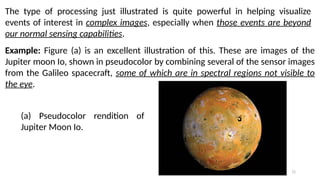
Example: Figure (a) is an excellent illustration of this. These are images of the
Jupiter moon Io, shown in pseudocolor by combining several of the sensor images
from the Galileo spacecraft, some of which are in spectral regions not visible to
the eye.
(a) Pseudocolor rendition of
Jupiter Moon Io.
73
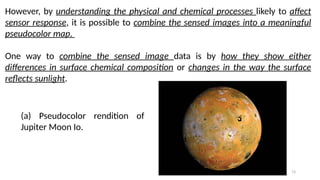
However, by understanding the physical and chemical processes likely to affect
sensor response, it is possible to combine the sensed images into a meaningful
pseudocolor map.
One way to combine the sensed image data is by how they show either
differences in surface chemical composition or changes in the way the surface
reflects sunlight.
(a) Pseudocolor rendition of
Jupiter Moon Io.
74
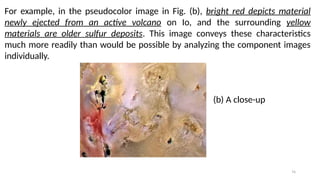
For example, in the pseudocolor image in Fig. (b), bright red depicts material
newly ejected from an active volcano on Io, and the surrounding yellow
materials are older sulfur deposits. This image conveys these characteristics
much more readily than would be possible by analyzing the component images
individually.
(b) A close-up
75
5.2.2 Basics of Full-Color Image Processing
Full-color image processing approaches fall into two major categories.
 In the first category, we process each component image individually and then
form a composite processed color image from the individually processed
components.
 In the second category, we work with color pixels directly. Because full-color
images have at least three components, color pixels are vectors.
76
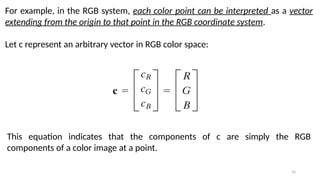
For example, in the RGB system, each color point can be interpreted as a vector
extending from the origin to that point in the RGB coordinate system.
Let c represent an arbitrary vector in RGB color space:
This equation indicates that the components of c are simply the RGB
components of a color image at a point.
77
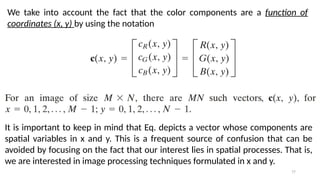
We take into account the fact that the color components are a function of
coordinates (x, y) by using the notation
It is important to keep in mind that Eq. depicts a vector whose components are
spatial variables in x and y. This is a frequent source of confusion that can be
avoided by focusing on the fact that our interest lies in spatial processes. That is,
we are interested in image processing techniques formulated in x and y.
78
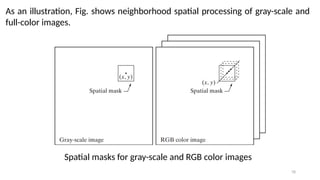
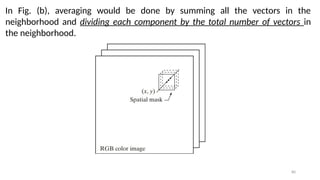
As an illustration, Fig. shows neighborhood spatial processing of gray-scale and
full-color images.
Spatial masks for gray-scale and RGB color images
79
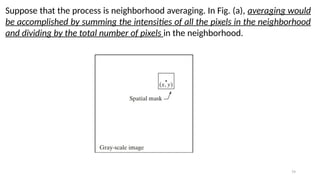
Suppose that the process is neighborhood averaging. In Fig. (a), averaging would
be accomplished by summing the intensities of all the pixels in the neighborhood
and dividing by the total number of pixels in the neighborhood.
80
In Fig. (b), averaging would be done by summing all the vectors in the
neighborhood and dividing each component by the total number of vectors in
the neighborhood.
81
5.2.2.1 Color Transformations
The techniques described in this section, collectively called color
transformations, deal with processing the components of a color image within
the context of a single color model, as opposed to the conversion of those
components between models.
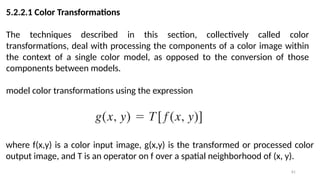
model color transformations using the expression
where f(x,y) is a color input image, g(x,y) is the transformed or processed color
output image, and T is an operator on f over a spatial neighborhood of (x, y).
82
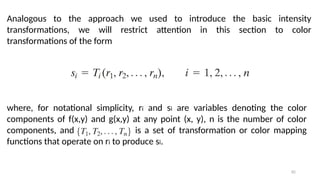
Analogous to the approach we used to introduce the basic intensity
transformations, we will restrict attention in this section to color
transformations of the form
where, for notational simplicity, ri and si are variables denoting the color
components of f(x,y) and g(x,y) at any point (x, y), n is the number of color
components, and is a set of transformation or color mapping
functions that operate on ri to produce si.
83
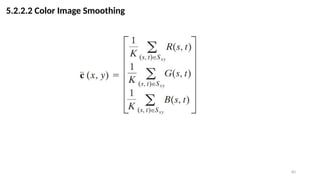
5.2.2.2 Color Image Smoothing
84
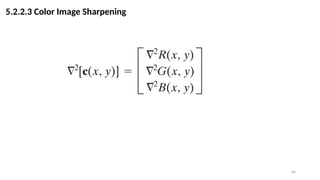
5.2.2.3 Color Image Sharpening

Color Image Processing (Digital Image Processing - Lecture 5)

  • 1.
  • 2.
    2 5.1 Color Model Acolor model is a system used to describe a color. The hardware-oriented models most commonly used in practice are the RGB (red, green, blue) model for color monitors and a broad class of color video cameras; the CMY (cyan, magenta, yellow) and CMYK (cyan, magenta, yellow, black) models for color printing; and the HSI (hue, saturation, intensity) model, which corresponds closely with the way humans describe and interpret color. The HSI model also has the advantage that it decouples the color and gray- scale information in an image, making it suitable for many of the gray-scale techniques
  • 3.
    3 5.1.1 RGB Model RGBis an additive color model. In the RGB model, each color appears in its primary spectral components of red, green, and blue. This model is based on a Cartesian coordinate system.
  • 4.
    4 The color subspaceof interest is the cube in which: RGB primary values are at three corners; the secondary colors cyan, magenta, and yellow are at three other corners; black is at the origin; and white is at the corner farthest from the origin.
  • 5.
    5 In this model,the gray scale (points of equal RGB values) extends from black to white along the line joining these two points. For convenience, the assumption is that all color values have been normalized so that the cube is the unit cube. That is, all values of R, G, and B are assumed to be in the range [0, 1].
  • 6.
    6 The number ofbits used to represent each pixel in RGB space is called the pixel depth. Consider an RGB image in which each of the red, green, and blue images is an 8- bit image. Under these conditions each RGB color pixel [that is, a triplet of values (R, G, B)] is said to have a depth of 24 bits (3 image planes times the number of bits per plane). The term full-color image is used often to denote a 24-bit RGB color image. The total number of colors in a 24-bit RGB image is
  • 7.
    7 The cube isa solid, composed of the colors mentioned in the preceding paragraph. A convenient way to view these colors is to generate color planes (faces or cross sections of the cube). This is accomplished simply by fixing one of the three colors and allowing the other two to vary.
  • 8.
    8 For instance, across-sectional plane through the center of the cube and parallel to the GB-plane is the plane (127, G, B) for Here we used the actual pixel values rather than the mathematically convenient normalized values in the range [0, 1] because the former values are the ones actually used in a computer to generate colors.
  • 9.
    9 Generating the RGBimage of the cross sectional color plane (127, G, B). The three hidden surface planes in the color cube
  • 10.
  • 11.
  • 12.
    12 5.1.2 The CMYand CMYK Color Models CMY / CMYK are subtractive color model. CMY stands for Cyan, Magenta, and Yellow, the three primary colors used in subtractive color mixing. Each color in the CMY model absorbs (subtracts) one primary color of light:  Cyan absorbs red light.  Magenta absorbs green light.  Yellow absorbs blue light. In theory, mixing all three (Cyan, Magenta, and Yellow) should produce black, as all light is absorbed.
  • 13.
    13 Most devices thatdeposit colored pigments on paper, such as color printers and copiers, require CMY data input or perform an RGB to CMY conversion internally. Cyan = White – Red Magenta = White – Green Yellow = White – Blue This conversion is performed using the simple operation Where, again, the assumption is that all color values have been normalized to the range [0, 1].
  • 14.
    14 Equation demonstrates thatlight reflected from a surface coated with pure cyan does not contain red (that is, in the equation). Similarly, pure magenta does not reflect green, and pure yellow does not reflect blue. *** Equation also reveals that RGB values can be obtained easily from a set of CMY values by subtracting the individual CMY values from 1.  As indicated earlier, in image processing this color model is used in connection with generating hardcopy output, so the inverse operation from CMY to RGB generally is of little practical interest.
  • 15.
    15 According to Fig,equal amounts of the pigment primaries, cyan, magenta, and yellow should produce black. In practice, combining these colors for printing produces a muddy-looking black. So, in order to produce true black (which is the predominant color in printing), a fourth color, black, is added, giving rise to the CMYK color model. Thus, when publishers talk about “four-color printing,” they are referring to the three colors of the CMY color model plus black.
  • 16.
    16 5.1.3 The HSIColor Model As we have seen, creating colors in the RGB and CMY models and changing from one model to the other is a straightforward process. As noted earlier, these color systems are ideally suited for hardware implementations. *** Unfortunately, the RGB, CMY, and other similar color models are not well suited for describing colors in terms that are practical for human interpretation.
  • 17.
    17 When humans viewa color object, we describe it by its hue, saturation, and brightness. Hue is a color attribute that describes a pure color (pure yellow, orange, or red), whereas saturation gives a measure of the degree to which a pure color is diluted by white light. Brightness is a subjective descriptor that is practically impossible to measure. It embodies the achromatic notion of intensity and is one of the key factors in describing color sensation.
  • 18.
    18 Why HSI model? Wedo know that intensity (gray level) is a most useful descriptor of monochromatic images. This quantity definitely is measurable and easily interpretable. *** The model we are about to present, called the HSI (hue, saturation, intensity) color model, decouples the intensity component from the color- carrying information (hue and saturation) in a color image.  As a result, the HSI model is an ideal tool for developing image processing algorithms based on color descriptions that are natural and intuitive to humans, who, after all, are the developers and users of these algorithms.
  • 19.
    19 Relationship between RGBand HSI This becomes rather clear if we take the color cube and stand it on the black (0, 0, 0) vertex, with the white vertex (1, 1, 1) directly above it. The intensity (gray scale) is along the line joining these two vertices The line (intensity axis) joining the black and white vertices is vertical
  • 20.
    20 Thus, if wewanted to determine the intensity component of any color point in Fig, we would simply pass a plane perpendicular to the intensity axis and containing the color point. The intersection of the plane with the intensity axis would give us a point with intensity value in the range [0, 1].
  • 21.
  • 22.
    22 Figure: Hue andsaturation in the HSI color model. The dot is an arbitrary color point. The angle from the red axis gives the hue, and the length of the vector is the saturation. In this plane we see that the primary colors are separated by 120°. The secondary colors are 60° from the primaries, which means that the angle between secondaries also is 120°.
  • 23.
  • 24.
    24 Figure shows theHSI model based on color triangles and also on circles.
  • 25.
    25 5.1.3.1 Converting colorsfrom RGB to HSI Given an image in RGB color format, the H component of each RGB pixel is obtained using the equation
  • 26.
    26 The saturation componentis given by Finally, the intensity component is given by It is assumed that the RGB values have been normalized to the range [0, 1] and that angle is measured with respect to the red axis of the HSI space.  Hue can be normalized to the range [0, 1] by dividing by 360° all values resulting from Eq.  The other two HSI components already are in this range if the given RGB values are in the interval [0, 1].
  • 27.
    27 Steps of Conversion Normalizethe RGB Values: First, convert the RGB values to the [0, 1] range by dividing each component by 255. For example, consider a pixel with RGB values (100, 150, 200):
  • 28.
    28 Calculate Intensity (I): TheIntensity component is the average of the normalized RGB values: Calculate Saturation (S): Saturation measures the purity of the color. It's calculated as:
  • 29.
    29 Calculate Hue (H): Huerepresents the color type and is calculated using: Finally, normalize to the [0, 1] range by dividing by 360°. 𝐻
  • 30.
    30 The cosine inversefunction cos⁡ −1 always returns values between 0° and 180° However, the full hue range is 0° to 360°, so we need an adjustment for cases where the hue falls in the second half of the color wheel (180° to 360°). If B is greater than G, it means the hue angle is in the lower hemisphere of the color wheel, so we subtract it from 360° to place it correctly.
  • 31.
    31 5.1.3.2 Converting colorsfrom HSI to RGB Understanding the HSI Color Model: Hue (H): Represents the type of color and is typically measured in degrees (0° to 360°), corresponding to colors like red, green, blue, etc. Saturation (S): Indicates the vibrancy of the color, ranging from 0 to 1. A saturation of 0 means the color is a shade of gray, while 1 represents a fully saturated color. Intensity (I): Denotes the brightness of the color, also ranging from 0 to 1.
  • 32.
    32 5.1.3.2 Converting colorsfrom HSI to RGB Given values of HSI in the interval [0, 1], we now want to find the corresponding RGB values in the same range. The applicable equations depend on the values of H. There are three sectors of interest, corresponding to the 120° intervals in the separation of primaries.
  • 33.
    33 We begin bymultiplying H by 360°, which returns the hue to its original range of [0°, 360°]. RG sector : When H is in this sector, the RGB components are given by the equations
  • 34.
    34 GB sector Ifthe given value of H is in this sector, we first subtract 120° from it: Then the RGB components are
  • 35.
    35 BR sector Finally,if H is in this range, we subtract 240° from it: Then the RGB components are
  • 36.
    36 5.1.3.3 Manipulating HSIcomponent images Figure (a) shows an image composed of the primary and secondary RGB colors. Figures (b) through (d) show the H, S, and I components of this image. (a) (b) (c) (d) (a) RGB image and the components of its corresponding HSI image (b) hue, (c) saturation, and (d) intensity.
  • 37.
  • 38.
    38 To change theindividual color of any region in the RGB image, we change the values of the corresponding region in the hue image. *** Then we convert the new H image, along with the unchanged S and I images, back to RGB.  To change the color of a region, the hue (H) component is adjusted, and the modified HSI image is converted back to RGB.  To change the saturation (color purity), adjustments are made to the S component, while changes in intensity affect brightness.
  • 39.
    39 (a)–(c) Modified HSIcomponent images. (d) Resulting RGB image. (a) (b) (c) (d)
  • 40.
    40 5.2 Pseudocolor ImageProcessing Pseudocolor (also called false color) image processing consists of assigning colors to gray values based on a specified criterion. The term pseudo or false color is used to differentiate the process of assigning colors to monochrome images from the processes associated with true color images.
  • 41.
    41 5.2.1 Intensity Slicing Thetechnique of intensity (sometimes called density) slicing and color coding is one of the simplest examples of pseudocolor image processing. If an image is interpreted as a 3-D function, the method can be viewed as one of placing planes parallel to the coordinate plane of the image; each plane then “slices” the function in the area of intersection.
  • 42.
    42 Figure shows anexample of using a plane at f(x,y) = li to slice the image function into two levels.
  • 43.
    43 If a differentcolor is assigned to each side of the plane shown in Fig., any pixel whose intensity level is above the plane will be coded with one color, and any pixel below the plane will be coded with the other.
  • 44.
    44 Levels that lieon the plane itself may be arbitrarily assigned one of the two colors. The result is a two-color image whose relative appearance can be controlled by moving the slicing plane up and down the intensity axis.
  • 45.
  • 46.
    46 An alternative representationof the intensity slicing technique According to the mapping function, any input intensity level is assigned one of two colors, depending on whether it is above or below the value of li When more levels are used, the mapping function takes on a staircase form.
  • 47.
    47 Let ( ,) represent the intensity function of the image, where and are 𝐼 𝑥 𝑦 𝑥 𝑦 spatial coordinates, and ( , ) is the intensity at that point. 𝐼 𝑥 𝑦 Define Intensity Range: Define a set of intensity intervals [𝐼1,𝐼2],[𝐼3,𝐼4],…,[𝐼𝑘,𝐼 +1 𝑘 ], where each interval corresponds to a different color range. Assign Color: For each pixel with intensity value ( , ), assign a color based on which interval 𝐼 𝑥 𝑦 the intensity value falls into.
  • 48.
    48 Here, ( ,) represents the color assigned to the pixel at coordinates ( , ) 𝐶 𝑥 𝑦 𝑥 𝑦 based on its intensity ( , ). 𝐼 𝑥 𝑦 Mathematically, this can be expressed as:
  • 49.
    49 Example: Figure (a)is a monochrome image of the Picker Thyroid Phantom (a radiation test pattern), and Fig. (b) is the result of intensity slicing this image into eight color regions. (a) (b)
  • 50.
    50 An X-ray imageof a weld (the horizontal dark region) containing several cracks and porosities (the bright, white streaks running horizontally through the middle of the image) human error rates would be lower if images were displayed in this form
  • 51.
    51 (a) Gray-scale imagein which intensity (in the lighter horizontal band shown) corresponds to average monthly rainfall. (b) Colors assigned to intensity values. (c) Color-coded image (d) Zoom of the South American region.
  • 52.
    52 5.2.2 Intensity toColor Transformations Other types of transformations are more general and thus are capable of achieving a wider range of pseudocolor enhancement results than the simple slicing technique.
  • 53.
    53 Basically, the ideaunderlying this approach is to perform three independent transformations on the intensity of any input pixel. The three results are then fed separately into the red, green, and blue channels of a color television monitor. *** This method produces a composite image whose color content is modulated by the nature of the transformation functions.  Note that these are transformations on the intensity values of an image and are not functions of position.
  • 54.
    54 Mathematical Representation ofIntensity to Color Transformations: Let ( , ) be the intensity value at position ( , ) in the image. The 𝐼 𝑥 𝑦 𝑥 𝑦 transformation functions for the Red, Green, and Blue channels can be represented as independent functions of the intensity: R(x,y), ( , ), and ( , ) represent the intensity values for the red, green, 𝐺 𝑥 𝑦 𝐵 𝑥 𝑦 and blue channels respectively at pixel ( , ). 𝑥 𝑦 𝑓𝑅 , 𝑓𝐺 , and 𝑓𝐵 are transformation functions that map the original intensity value ( , ) to new intensity values for each channel. 𝐼 𝑥 𝑦
  • 55.
    55 Common Transformation Functions LinearTransformation A common transformation is a linear function where the intensity is scaled by a constant. For example, for the red channel, we could have:
  • 56.
    56 Logarithmic Transformation Sometimes, intensityvalues are transformed using a logarithmic function to compress the dynamic range of pixel intensities.
  • 57.
    57 Sigmoidal Transformation A sigmoidalfunction can be used for non-linear enhancement of intensity ranges, producing a more visually appealing mapping. For example:
  • 58.
    58 Exponential Transformation In somecases, an exponential transformation might be applied to emphasize high-intensity values:
  • 59.
    59 Constructing the FinalImage Once the three transformation functions are applied to the intensity values, they produce three output values corresponding to the red, green, and blue channels. The final output image is composed of these three transformed intensity values:
  • 60.
    60 Example: Figure (a)shows two monochrome images of luggage obtained from an airport X-ray scanning system.  The purpose of this example is to illustrate the use of intensity level to color transformations to obtain various degrees of enhancement. i. The image on the left contains ordinary articles. ii. The image on the right contains the same articles, as well as a block of simulated plastic explosives. (a)
  • 61.
    61 Figure (b) showsthe transformation functions used. These sinusoidal functions contain regions of relatively constant value around the peaks as well as regions that change rapidly near the valleys. Changing the phase and frequency of each sinusoid can emphasize (in color) ranges in the gray scale. *** For instance, if all three transformations have the same phase and frequency, the output image will be monochrome. (b)
  • 62.
    62 A small changein the phase between the three transformations produces little change in pixels whose intensities correspond to peaks in the sinusoids, especially if the sinusoids have broad profiles (low frequencies). *** Pixels with intensity values in the steep section of the sinusoids are assigned a much stronger color content as a result of significant differences between the amplitudes of the three sinusoids caused by the phase displacement between them. (b)
  • 63.
    63 The image shownin Fig. (c) was obtained with the transformation functions in Fig. (b), which shows the gray-level bands corresponding to the explosive, garment bag, and background, respectively. Note that the explosive and background have quite different intensity levels, but they were both coded with approximately the same color as a result of the periodicity of the sine waves. (c)
  • 64.
    64 The image shownin Fig. (d) was obtained with the transformation functions in Fig. (c). In this case the explosives and garment bag intensity bands were mapped by similar transformations and thus received essentially the same color assignments. (d) Note that this mapping allows an observer to “see” through the explosives. The background mappings were about the same as those used for Fig. (c), producing almost identical color assignments.
  • 65.
    65 The approach shownin Fig. (f) is based on a single monochrome image. Often, it is of interest to combine several monochrome images into a single color composite, as shown in Fig. (g). (f) (g)
  • 66.
    66 A frequent useof this approach is in multispectral image processing, where different sensors produce individual monochrome images, each in a different spectral band. The types of additional processes shown in Fig. (g) can be techniques such as color balancing, combining images, and selecting the three images for display based on knowledge about response characteristics of the sensors used to generate the images. (g)
  • 67.
    67 Example: Figures (a)through (d) show four spectral satellite images of Washington, D.C., including part of the Potomac River. The first three images are in the visible red, green, and blue, and the fourth is in the near infrared (see Table (a) and Fig. (g)). (a) (c) (b) (d) (a)–(d) Images in bands 1–4
  • 68.
    68 Table (a) Thematicbands in NASA’s LANDSAT satellite.
  • 69.
    69 LANDSAT satellite imagesof the Washington, D.C. area. The numbers refer to the thematic bands in Table (g)
  • 70.
    70 Figure (e) isthe full-color image obtained by combining the first three images into an RGB image. (e) Color composite image obtained by treating (a), (b), and (c) as the red, green, blue components of an RGB image. Full-color images of dense areas are difficult to interpret, but one notable feature of this image is the difference in color in various parts of the Potomac River.
  • 71.
    71 (f) Image obtainedin the same manner, but using in the red channel the near-infrared image in (d). Figure (f) is a little more interesting. This image was formed by replacing the red component of Fig. (e) with the near-infrared image. From Table (a), we know that this band is strongly responsive to the biomass components of a scene. Figure (f) shows quite clearly the difference between biomass (in red) and the human- made features in the scene, composed primarily of concrete and asphalt, which appear bluish in the image.
  • 72.
    72 The type ofprocessing just illustrated is quite powerful in helping visualize events of interest in complex images, especially when those events are beyond our normal sensing capabilities. Example: Figure (a) is an excellent illustration of this. These are images of the Jupiter moon Io, shown in pseudocolor by combining several of the sensor images from the Galileo spacecraft, some of which are in spectral regions not visible to the eye. (a) Pseudocolor rendition of Jupiter Moon Io.
  • 73.
    73 However, by understandingthe physical and chemical processes likely to affect sensor response, it is possible to combine the sensed images into a meaningful pseudocolor map. One way to combine the sensed image data is by how they show either differences in surface chemical composition or changes in the way the surface reflects sunlight. (a) Pseudocolor rendition of Jupiter Moon Io.
  • 74.
    74 For example, inthe pseudocolor image in Fig. (b), bright red depicts material newly ejected from an active volcano on Io, and the surrounding yellow materials are older sulfur deposits. This image conveys these characteristics much more readily than would be possible by analyzing the component images individually. (b) A close-up
  • 75.
    75 5.2.2 Basics ofFull-Color Image Processing Full-color image processing approaches fall into two major categories.  In the first category, we process each component image individually and then form a composite processed color image from the individually processed components.  In the second category, we work with color pixels directly. Because full-color images have at least three components, color pixels are vectors.
  • 76.
    76 For example, inthe RGB system, each color point can be interpreted as a vector extending from the origin to that point in the RGB coordinate system. Let c represent an arbitrary vector in RGB color space: This equation indicates that the components of c are simply the RGB components of a color image at a point.
  • 77.
    77 We take intoaccount the fact that the color components are a function of coordinates (x, y) by using the notation It is important to keep in mind that Eq. depicts a vector whose components are spatial variables in x and y. This is a frequent source of confusion that can be avoided by focusing on the fact that our interest lies in spatial processes. That is, we are interested in image processing techniques formulated in x and y.
  • 78.
    78 As an illustration,Fig. shows neighborhood spatial processing of gray-scale and full-color images. Spatial masks for gray-scale and RGB color images
  • 79.
    79 Suppose that theprocess is neighborhood averaging. In Fig. (a), averaging would be accomplished by summing the intensities of all the pixels in the neighborhood and dividing by the total number of pixels in the neighborhood.
  • 80.
    80 In Fig. (b),averaging would be done by summing all the vectors in the neighborhood and dividing each component by the total number of vectors in the neighborhood.
  • 81.
    81 5.2.2.1 Color Transformations Thetechniques described in this section, collectively called color transformations, deal with processing the components of a color image within the context of a single color model, as opposed to the conversion of those components between models. model color transformations using the expression where f(x,y) is a color input image, g(x,y) is the transformed or processed color output image, and T is an operator on f over a spatial neighborhood of (x, y).
  • 82.
    82 Analogous to theapproach we used to introduce the basic intensity transformations, we will restrict attention in this section to color transformations of the form where, for notational simplicity, ri and si are variables denoting the color components of f(x,y) and g(x,y) at any point (x, y), n is the number of color components, and is a set of transformation or color mapping functions that operate on ri to produce si.
  • 83.
  • 84.