UNIT V - ADVANCED COMPUTER
ARCHITECTURE
• Parallel processing architectures and challenges
• Flynn’s Classification
• Vector architecture
• Hardware multithreading
• Multicore and shared memory multiprocessors
• Introduction to Graphics Processing Units
• Clusters and Warehouse scale computers
• Introduction to Multiprocessor network
topologies.
Parallel processing challenges
• It is difficult to write software that uses multiple
processors to complete one task is faster.
• Parallel processing will increase the performance of
processor and it will reduce the utilization time to
execute a task.
• By obtaining the parallel processing is not an easy task.
• The difficulty is not in hardware side it is in software
side. We can understand that it is difficult to write
parallel processing programs that are fast, especially as
the number of processor increases.
Performance
• If we are running a program on two different desktop
computers, we will say that the faster one is the desktop
computer that gets the job done first.
• In some situation we cannot get parallel processing as faster
than sequential programs. The reasons are,
1. Scheduling: It is done to load balance and share system
resources effectively and achieve a target. It can be done by the
following ways
2. Portioning the work into parallel pieces: Divide the task
equally to all the processor.
3. Load Balancing: Work load distribute evenly and amount of
execution time is also equal.
4. Time to Synchronize: Here the throughput must be high.
5. Overhead for Communication
Speed-up Challenge
• Strong scaling: Speedup achieved on a
multiprocessor without increasing the size of the
problem.
• Weak scaling: Speedup achieved on a multiprocessor
while increasing the size of the problem
proportionally to the increase in the number of
processors.
Example 1: Suppose you want to achieve a speed-up
of 90 times faster with 100 processors. What
percentage of the original computation can be
sequential?
Example: 2
Speed-up Challenge: Balancing Load
Example:3
To achieve the speed-up of 20.5 on the previous larger
problem with 40 processors, we assumed the load was
perfectly balanced. That is, each of the 40 processors
had 2.5% of the work to do. Instead, show the impact
on speed-up if one processor’s load is higher than all
the rest. Calculate at twice the load (5%) and five times
the load (12.5%) for that hardest working processor.
How well utilized are the rest of the processors?
THANK YOU
Flynn’s Classification
• Parallelism in computer architecture is explained used
Flynn’s taxonomy.
• Flynn’s taxonomy is a specific classification of parallel
computer architectures that are based on the number of
concurrent instruction (single or multiple) and data streams
(single or multiple) available in the architecture.
• The four categories in Flynn’s taxonomy based on the
number of instruction streams and data streams are the
following:
– (SISD) single instruction, single data
– (MISD) multiple instruction, single data
– (SIMD) single instruction, multiple data
– (MIMD) multiple instruction, multiple data
SISD
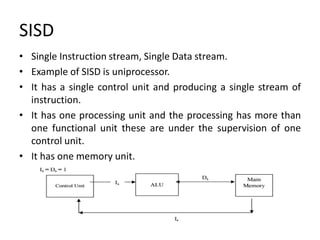
• Single Instruction stream, Single Data stream.
• Example of SISD is uniprocessor.
• It has a single control unit and producing a single stream of
instruction.
• It has one processing unit and the processing has more than
one functional unit these are under the supervision of one
control unit.
• It has one memory unit.
SIMD
• It has one instruction and multiple data stream.
• It has a single control unit and producing a single stream of
instruction and multi stream of data.
• It has more than one processing unit and each processing unit
has its own associative data memory unit.
• In this organization, multiple processing elements work under
the control of a single control unit.
• A single machine instruction controls the simultaneous
execution of a number of processing element.
• Each instruction to be executed on different sets of data by
different processor.
• The same instruction is applied to many data streams, as in a
vector processor.
• All the processing elements of this organization receive
the same instruction broadcast from the CU.
• Main memory can also be divided into modules for generating
multiple data streams acting as a distributed memory as
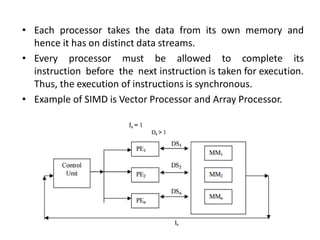
shown in figure.
• Therefore, all the processing elements simultaneously execute
the same instruction and are said to be 'lock-stepped'
together.
SIMD
• Each processor takes the data from its own memory and
hence it has on distinct data streams.
• Every processor must be allowed to complete its
instruction before the next instruction is taken for execution.
Thus, the execution of instructions is synchronous.
• Example of SIMD is Vector Processor and Array Processor.
MISD
• Multiple Instruction and Single Data stream (MISD)
• In this organization, multiple processing elements are
organized under the control of multiple control units.
• Each control unit is handling one instruction stream and
processed through its corresponding processing element.
• But each processing element is processing only a single data
stream at a time.
• Therefore, for handling multiple instruction streams and
single data stream, multiple control units and multiple
processing elements are organized in this classification.
• All processing elements are interacting with the common
shared memory for the organization of single data stream as
shown in figure.
• The only known example of a computer capable of MISD
operation is the C.mmp built by Carnegie-Mellon University.
MIMD
• Multiple Instruction streams and Multiple Data streams
(MIMD).
• In this organization, multiple processing elements and
multiple control units are organized.
• Compared to MISD the difference is that now in this
organization multiple instruction streams operate on multiple
data streams.
• Therefore, for handling multiple instruction streams,
multiple control units and multiple processing elements are
organized such that multiple processing elements are
handling multiple data streams from the main memory as
shown in figure.
• The processors work on their own data with their own
instructions. Tasks executed by different processors can start
or finish at different times.
• They are not lock-stepped, as in SIMD computers, but run
asynchronously.
• This classification actually recognizes the parallel computer.
That means in the real sense MIMD organization is said to be
a Parallel computer.
• The processors work on their own data with their own
instructions. Tasks executed by different processors can start
or finish at different times.
MIMD
• They are not lock-stepped, as in SIMD computers, but run
asynchronously.
• This classification actually recognizes the parallel computer.
That means in the real sense MIMD organization is said to be
a Parallel computer.
THANK YOU
Vector architecture
Vector architecture
• SIMD is called vector architecture.
• It is also a great match to problems with lots of data-
level parallelism. i.e. Parallelism achieved by
performing the same operation on independent
data.
• Rather than having 64 ALUs perform 64 additions
simultaneously, like the old array processors..
Vector architecture
• The vector architectures pipelined the ALU to get good
performance at lower cost.
• The basic idea of vector architecture is to collect data
elements from memory, put them in order into a large set of
registers, operate on them sequentially in registers using
pipelined execution units, and then write the results back to
memory.
• A key feature of vector architectures is then a set of vector
registers. Thus, vector architecture might have 32 vector
registers, each with 64-bit elements.
Comparing Vector to Conventional Code
• Suppose we extend the MIPS instruction set architecture with
vector instructions and vector registers. Vector operations use
the same names as MIPS operations, but with the letter V
appended.
• For example, addv.d adds two double-precision vectors. The
vector instructions take as their input either a pair of vector
registers (addv.d) or a vector register and a scalar register
(addvs.d).
Comparing Vector to Conventional Code
• The value in the scalar register is used as the input for all
operations.
• The operation addvs.d will add the contents of a scalar
register to each element in a vector register.
• The names lv and sv denote vector load and vector store, and
they load or store an entire vector of double-precision data.
• One operand is the vector register to be loaded or stored; the
other operand, which is a MIPS general-purpose register, is
the starting address of the vector in memory.
Comparing Vector to Conventional Code
• The most dramatic is that the vector processor greatly
reduces the dynamic instruction bandwidth, executing only 6
instructions versus almost 600 for the traditional MIPS
architecture.
• This reduction occurs both because the vector operations
work on 64 elements at a time and because the overhead
instructions that constitute nearly half the loop on MIPS are
not present in the vector code.
Vector versus Scalar
Vector Scalar
The instruction fetch and decode
bandwidth needed is dramatically
reduced.
The instruction fetch and decode
bandwidth needed is not reduced.
The compiler or programmer
indicates that the computation of
each result in the vector is
independent of the computation of
other results in the same vector,
The compiler or programmer indicates
that the computation of each result is
not independent of the computation
of other results.
Hardware does not have to check for
data hazards within a vector
instruction.
Hardware to check for data hazards
within a vector instruction.
Vector architectures and compilers
have a reputation of making it much
easier than when using MIMD
multiprocessors to write efficient
applications when they contain data-
level parallelism.
Not easy to perform this operation
Vector versus Scalar
Vector Scalar
Hardware need only check for data
hazards between two vector
instructions once per vector operand,
not once for every element within the
vectors.
Hardware need only check for data
hazards for every element within the
array.
Save energy because of reduced
checking
It does not save energy because it has
more number of checking.
The cost of the latency to main
memory is seen only once for the
entire vector, rather than once for
each word of the vector.
The cost of the latency to main
memory is seen for each word of the
scalar.
Efficient use of memory
bandwidth and instruction
bandwidth.
No efficient use of memory
bandwidth and instruction
bandwidth.
Entire loop behavior is predetermined Entire loop behavior is not a
predetermined
Vector Versus Multimedia Extensions
• Like multimedia extensions found in the x86 AVX instructions,
a vector instruction specifies multiple operations.
• However, multimedia extensions typically specify a few
operations while vector specifies dozens of operations.
• The number of elements in a vector operation is not in the
opcode but in a separate register.
• This distinction means different versions of the vector
architecture can be implemented with a different number
of elements just by changing the contents of that register and
hence retain binary compatibility.
Vector Versus Multimedia Extensions
• In contrast, a new large set of opcodes is added each time the
vector length changes in the multimedia extension
architecture of the x86: MMX, SSE, SSE2, AVX, AVX2 …
• Also unlike multimedia extensions, the data transfers need
not be contiguous.
• Hardware finds the addresses of the items to be loaded in a
vector register.
Vector Versus Multimedia Extensions
• Hardware finds the addresses of the items to be loaded in a
vector register.
• Indexed accesses are also called gather scatter, in that indexed
loads gather elements from main memory into contiguous
vector elements and indexed stores scatter vector elements
across main memory.
• The following figure illustrates how to improve vector
performance by using parallel pipelines to execute a vector
add instruction.
• The figure using multiple functional units to improve the
performance of a single vector add instruction, C = A + B.
• The vector processor (a) on the left has a single add pipeline
and can complete one addition per cycle.
• The vector processor (b) on the right has four add pipelines or
lanes and can complete four additions per cycle.
Vector Lane
• One or more vector functional units and a portion of the
vector register file. Inspired by lanes on highways that
increase traffic speed, multiple lanes execute vector
operations simultaneously.
• Figure shows the structure of a four-lane vector unit. Thus,
going to four lanes from one lane reduces the number of
clocks per vector instruction by roughly a factor of four.
• The figure shows three vector functional units: an FP add, an
FP multiply, and a load- store unit.
Vector Lane
• For multiple lanes to be advantageous, both the applications
and the architecture must support long vectors.
• The elements within a single vector add instructions are
interleaved across the four lanes.
• The vector-register storage is divided across the lanes, with
each lane holding every fourth element of each vector
register.
• Each of the vector arithmetic units contains four execution
pipelines, one per lane, which acts in concert to complete a
single vector instruction.
Vector Lane
THANK YOU
Hardware multithreading
• A mechanism by which the instruction streams is divided into
several smaller streams (threads) and can be executed in parallel is
called multithreading.
• Increasing utilization of a processor by switching to another thread
when one thread is stalled is known as hardware multithreading.
• A thread includes the program counter, the register state, and
the stack. It is a lightweight process; whereas threads
commonly share a single address space, processes don’t.
• The act of switching processor control from one thread to another
within the same process. It is much less costly than a processor
switch.
• A process includes one or more threads, the address space, and the
operating system state. Hence, a process switch usually invokes the
operating system, but not a thread switch.
Approaches to hardware multithreading
1. Fine-grained Multithreading
2. Coarse-grained Multithreading
3. Simultaneous Multithreading
Fine-grained Multithreading
• A version of hardware multithreading that implies
switching between threads after every instruction
resulting in interleaved execution of multiple threads.
• It switches from one thread to another at each clock
cycle.
• This interleaving is often done in a round-robin fashion,
skipping any threads that are stalled at that clock cycle.
• To make fine-grained multithreading practical, the
processor must be able to switch threads on every
clock cycle.
Advantage of Fine-grained
• Vertical waste is eliminated.
• Pipeline hazards cannot arise.
• Zero switching overhead
• Ability to hide latency within a thread i.e., it can hide
the throughput losses that arise from both short and
long stalls.
• ·Instructions from other threads can be executed when
one thread stalls.
• High execution efficiency
• Potentially less complex than alternative high
performance processors.
Disadvantage of Fine-grained
• Clock cycles are wasted if a thread has little
operation to execute.
• Needs a lot of threads to execute.
• It is expensive than coarse-grained multithreading.
• It slows down the execution of the individual
threads, since a thread that is ready to execute
without stalls will be delayed by instructions from
other threads.
Coarse-grained Multithreading
• Coarse-grained multithreading was invented as an
alternative to fine-grained multithreading.
• A version of hardware multithreading that implies switching
between threads only after significant events, such as a last-
level cache miss.
• This change relieves the need to have thread switching be
extremely fast and is much less likely to slow down the
execution of an individual thread, since instructions from
other threads will only be issued when a thread encounters a
costly stall.
Advantage
• To have very fast thread switching.
• Doesn’t slow down thread.
Disadvantage of Coarse-grained
• It is hard to overcome throughput losses from shorter stalls,
due to pipeline start -up costs.
• Since CPU issues instructions from 1 thread, when a stall
occurs, the pipeline must be emptied.
• New thread must fill pipeline before instructions can
complete.
• Due to this start-up overhead, coarse-grained multithreading
is much more useful for reducing the penalty of high-cost
stalls, where pipeline refill is negligible compared to the stall
time.
Simultaneous multithreading (SMT)
• It is a variation on hardware multithreading that uses the
resources of a multiple-issue, dynamically scheduled
pipelined processor to exploit thread-level parallelism at
the same time it exploits instruction level parallelism.
• The key insight that motivates SMT is that multiple-issue
processors often have more functional unit parallelism
available than most single threads can effectively use.
• Since SMT relies on the existing dynamic mechanisms, it
does not switch resources every cycle.
• Instead, SMT is always executing instructions from multiple
threads, to associate instruction slots and renamed
registers with their proper threads.
Hardware multithreading
• The horizontal dimension represents the instruction issue
capability in each clock cycle.
• The vertical dimension represents a sequence of clock
cycles.
• An empty (white) box indicates that the corresponding
issue slot is unused in that clock cycle.
• The shades of gray and color correspond to four
different threads in the multithreading processors.
• The additional pipeline start-up effects for coarse
multithreading, which are not illustrated in this figure,
would lead to further loss in throughput for coarse
multithreading.
Advantage
• It is ability to boost utilization by dynamically
scheduling functional units among multiple threads.
• It increases hardware design facility.
• It produces better performance and add resources to a
fine grained manner.
Disadvantage
• It cannot improve performance if any of the
shared resources are the limiting bottlenecks for the
performance.
Multicore and shared memory
multiprocessors
Multicore and shared memory multiprocessors
• Multiprocessor: A computer system with at least two
processors
• Multicore: More than one processor available within a single
chip.
• The conventional multiprocessor system used is commonly
referred as shared memory multiprocessor system.
• Shared Memory Multiprocessor (SMP) is one that offers the
programmer a single physical address space across all
processors which is nearly always the case for multicore
chips.
• Processors communicate through shared variables in
memory, with all processors capable of accessing any memory
location via loads and stores.
Multicore and shared memory multiprocessors
• Systems can still run independent jobs in their own virtual
address spaces, even if they all share a physical address space.
• Use of shared data must be coordinated via synchronization
primitives (locks) that allow access to data to only one
processor at a time
Shared Memory Multiprocessor System.[Tightly
coupled processor]
• The conventional multiprocessor system used is commonly
referred as shared memory multiprocessor system.
• Single address space shared by all processors. Because every
processor communicates through a shared global memory.
• For high speed real time processing, these systems are
preferable as their throughput is high as compared to loosely
coupled systems
• In tightly coupled system organization, multiple processors
share a global main memory, which may have many modules.
• Tightly coupled systems use a common bus, crossbar, or
multistage network to connect processors, peripherals, and
memories.
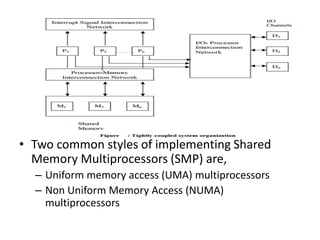
• Two common styles of implementing Shared
Memory Multiprocessors (SMP) are,
– Uniform memory access (UMA) multiprocessors
– Non Uniform Memory Access (NUMA)
multiprocessors
UMA
• In this model, main memory is uniformly shared by
all processors in multiprocessor systems and each
processor has equal access time to shared memory.
• This model is used for time-sharing applications in a multi
user environment
• Physical memory uniformly shared by all processors, with
equal access time to all words.
• Processors may have local cache memories. Peripherals also
shared in some fashion.
NUMA
• Memory is common to all the processors. Processors
easily communicate by means of shared variables.
• These systems differ in how the memory and
peripheral resources are shared or distributed
• The access time varies with the location of the memory
word.
• The shared memory is distributed among the
processors as local memories, but each of these is still
accessible by all processors (with varying access times).
• Memory access is fastest from the locally –connected
processor, with the interconnection network adding
delays for other processor accesses.
• Additionally, there may be global memory in a multiprocessor
system, with two separate interconnection networks, one for
clusters of processors and their cluster memories, and
another for the global shared memories.
• Local memories are private with its own program and data.
No memory contention so that the number of processors is
very large
• The processors are connected by communication lines, and
the precise way in which the lines are connected is called the
topology of the multicomputer.
COMA
• Cache Only Memory Architecture. The COMA model is a
special case of the NUMA model. Here all the distributed
memories are converted to cache memories.
• The local memories for the processor at each node are used
as cache instead of actual memory
Distributed Memory [Loosely Coupled Systems]
• These systems do not share the global memory because
shared memory concept gives rise to the problem of memory
conflicts, which in turn slows down the execution of
instructions.
• Therefore, to alleviate this problem, each processor in loosely
coupled systems is having a large local memory (LM), which is
not shared by any other processor.
• Thus, such systems have multiple processors with their own
local memory and a set of I/O devices.
• This set of processor, memory and I/O devices makes a
computer system.
• Therefore, these systems are also called multi-computer
systems. These computer systems are connected together via
message passing interconnection network through which
processes communicate by passing messages to one another.
• Since every computer system or node in multicomputer
systems has a separate memory, they are called distributed
multicomputer systems. These are also called loosely coupled
systems.
• Message passing: Communicating between multiple
processors by explicitly sending and receiving
information.
• Clusters: Collections of computers connected via I/O
over standard network switches to form a message-
passing multiprocessor.
• Send message routine: A routine used by a processor
in machines with private memories to pass a message
to another processor.
• Receive message routine: A routine used by a
processor in machines with private memories to accept
a message from another processor.
THANK YOU
Introduction to Graphics Processing
Units
Introduction to Graphics Processing Units
• A Graphics Processing Unit (GPU) is a single-chip processor
primarily used to manage and boost the performance of video
and graphics. It is a dedicated parallel processor for
accelerating graphical and deeper computations.
• GPU is designed to lessen the work of the CPU and produce
faster video and graphics. GPU can be thought as an extension
of CPU with thousands of cores.
• A GPU is extensively used in a PC on a video card or
motherboard, mobile phones, display adapters, workstations
and game consoles.
• They are mainly used for offloading computation intensive
application. This is also known as a visual processing unit
(VPU).
Differences between CPU and GPU
CPU vs GPU architecture
GPU features
• 2-D or 3-D graphics
• Digital output to flat panel display monitors
• Texture mapping
• Application support for high-intensity graphics
software such as AutoCAD
• Rendering polygons
• Support for YUV color space
• Hardware overlays
• MPEG decoding
Development of GPU
• The first GPU was developed by NVidia in 1999 and named as
GeForce 256.
• This GPU model could process 10 million polygons per second
and had more than 22 million transistors.
• This is a single-chip processor with integrated transform,
drawing and BitBLT support, lighting effects, triangle setup
/clipping and rendering engines.
• The GPU is connected to the CPU and is completely separate
from the motherboard.
• The RAM is connected through the Accelerated Graphics
Port (AGP) or the PCI express bus.
GPU Pipeline
Input Assembler stage
• This stage is the communication bridge between the CPU and
GPU.
• It receives commands from the CPU and also pulls geometry
information from system memory.
• It outputs a stream of vertices in object space with all their
associated information.
Vertex Processing
• This processes vertices performing operations like
transformation, skinning and lighting.
• A vertex shade takes a single input vertex and produces a
single output vertex.
Pixel Processing
• Each pixel provided by triangle setup is fed into pixel
processing as a set of attributes which are used to compute
the final color for this pixel.
• The computations taking place here include texture mapping
and math operations
Output Merger Stage
• The output-merger stage combines various types of output
data to generate the final pipeline result.
THANK YOU
Clusters and Warehouse scale
computers
Clusters
• A cluster is a collection of desktop computers or servers
connected together by a local area network to act as a single
larger computer.
Disadvantages of Cluster Computing are:
• Difficult to manage and organize a large number of
computers.
• Poor performance in the case of non-parallelizable
applications.
• Physical space needed is considerably greater than that of a
single server.
• Increased power consumption compared to a single server
WAREHOUSE SCALE COMPUTERS
• A warehouse-scale computer (WSC) is a cluster comprised of
tens of thousands of servers.
• Warehouse-scale computers form the foundation of internet
services.
• The present days WSCs act as one giant machine.
• The main parts of a WSC are the building with the electrical
and cooling infrastructure, the networking equipment and the
servers.
WSCs as Servers
• The following features of WSCs that makes it work as servers:
Cost-performance: Because of the scalability, the cost-
performance becomes very critical. Even small savings can
amount to a large amount of money.
Energy efficiency: Since large numbers of systems are clustered,
lot of money is invested in power distribution and for heat
dissipation.
Dependability via redundancy:
• The hardware and software in a WSC must collectively
provide at least 99.99% availability, while individual servers
are much less reliable. WSC architects rely on multiple cost-
effective servers connected by a low cost network and
redundancy managed by software. Multiple WSCs may be
needed to handle faults in whole WSCs.
• Network I/O: Networking is needed to interface to the public
as well as to keep data consistent between multiple WSCs.
• Interactive and batch-processing workloads: Search and
social networks are interactive and require fast response
times. At the same time, indexing, big data analytics etc.
create a lot of batch processing workloads also. The WSC
workloads must be designed to tolerate large numbers of
component faults without affecting the overall performance
and availability.
WSC are not servers
Ample parallelism:
• Servers need not to worry about the parallelism available in
applications to justify the amount of parallel hardware.
• But in WSCs most jobs are totally independent and exploit
request-level parallelism.
• Request-Level parallelism (RLP) is a way of representing tasks
which are set of requests which are to be to run in parallel.
• Interactive internet service applications, the workload
consists of independent requests of millions of users.
• Also, the data of many batch applications can be processed in
independent chunks, exploiting data-level parallelism.
Operational costs count:
• Server architects normally design systems for peak
performance within a cost budget.
• Power concerns are not too much as long as the cooling
requirements are maintained. The operational costs are
ignored.
• WSCs, however, have a longer life times and the building,
electrical and cooling costs are very high.
• The operational costs cannot be ignored.
• These add up to more than 30% of the costs of a WSC in 10
years.
• Power consumption is a primary, not secondary constraint
when designing the WSC system.
Scale and its opportunities and problems:
• The WSCs are massive internally, so it gets volume discounts
and economy of scale, even if there are not too many WSCs.
• On the other hand, customized hardware for WSCs can be
very expensive, particularly if only small numbers are
manufactured.
• The economies of scale lead to cloud computing, since the
lower per-unit costs of WSCs lead to lower rental rates.
• Even if a server had a Mean Time To Failure (MTTF) of twenty
five years, the WSC architect should design for five server
failures per day.
Architecture of WSC
• The height of the servers is measured by rack units. A typical
rack is 42 rack units. But the standard dimension to hold the
servers is 48.26 cm.
Storage of WSC
• A WSC uses local disks inside the servers as opposed to
network attached storage (NAS).
• The Google file system (GFS) uses local disks and maintains at
least three replicas to improve dependability by covering not
only disk failures, but also power failures to a rack or a cluster
of racks by placing the replicas on different clusters.
• A read is serviced by one of the three replicas, but a write has
to go to all three replicas.
• Google uses a relaxed consistency model in that all three
replicas have to eventually match, but not all at the same
time.
WSC networking
• A WSC uses a hierarchy of networks for interconnection.
• The standard rack holds 48 servers connected by a 48-port
Ethernet switch. A rack switch has 2 to 8 uplinks to a higher
switch.
• So the bandwidth leaving the rack is 6 (48/8) to 24 (48/2)
times less than the bandwidth within a rack.
• There are array switches that are more expensive to allow
higher connectivity.
• There may also be Layer 3 routers to connect the arrays
together and to the Internet.
• The goal of the software is to maximize locality of
communication relative to the rack.
THANK YOU
Clusters and Warehouse scale
computers
Clusters
• A cluster is a collection of desktop computers or servers
connected together by a local area network to act as a single
larger computer.
Disadvantages of Cluster Computing are:
• Difficult to manage and organize a large number of
computers.
• Poor performance in the case of non-parallelizable
applications.
• Physical space needed is considerably greater than that of a
single server.
• Increased power consumption compared to a single server
WAREHOUSE SCALE COMPUTERS
• A warehouse-scale computer (WSC) is a cluster comprised of
tens of thousands of servers.
• Warehouse-scale computers form the foundation of internet
services.
• The present days WSCs act as one giant machine.
• The main parts of a WSC are the building with the electrical
and cooling infrastructure, the networking equipment and the
servers.
WSCs as Servers
• The following features of WSCs that makes it work as servers:
Cost-performance: Because of the scalability, the cost-
performance becomes very critical. Even small savings can
amount to a large amount of money.
Energy efficiency: Since large numbers of systems are clustered,
lot of money is invested in power distribution and for heat
dissipation.
Dependability via redundancy:
• The hardware and software in a WSC must collectively
provide at least 99.99% availability, while individual servers
are much less reliable. WSC architects rely on multiple cost-
effective servers connected by a low cost network and
redundancy managed by software. Multiple WSCs may be
needed to handle faults in whole WSCs.
• Network I/O: Networking is needed to interface to the public
as well as to keep data consistent between multiple WSCs.
• Interactive and batch-processing workloads: Search and
social networks are interactive and require fast response
times. At the same time, indexing, big data analytics etc.
create a lot of batch processing workloads also. The WSC
workloads must be designed to tolerate large numbers of
component faults without affecting the overall performance
and availability.
WSC are not servers
Ample parallelism:
• Servers need not to worry about the parallelism available in
applications to justify the amount of parallel hardware.
• But in WSCs most jobs are totally independent and exploit
request-level parallelism.
• Request-Level parallelism (RLP) is a way of representing tasks
which are set of requests which are to be to run in parallel.
• Interactive internet service applications, the workload
consists of independent requests of millions of users.
• Also, the data of many batch applications can be processed in
independent chunks, exploiting data-level parallelism.
Operational costs count:
• Server architects normally design systems for peak
performance within a cost budget.
• Power concerns are not too much as long as the cooling
requirements are maintained. The operational costs are
ignored.
• WSCs, however, have a longer life times and the building,
electrical and cooling costs are very high.
• o, the operational costs cannot be ignored.
• These add up to more than 30% of the costs of a WSC in 10
years.
• Power consumption is a primary, not secondary constraint
when designing the WSC system.
Scale and its opportunities and problems:
• The WSCs are massive internally, so it gets volume discounts
and economy of scale, even if there are not too many WSCs.
• On the other hand, customized hardware for WSCs can be
very expensive, particularly if only small numbers are
manufactured.
• The economies of scale lead to cloud computing, since the
lower per-unit costs of WSCs lead to lower rental rates.
• Even if a server had a Mean Time To Failure (MTTF) of twenty
five years, the WSC architect should design for five server
failures per day.
Architecture of WSC
• The height of the servers is measured by rack units. A typical
rack is 42 rack units. But the standard dimension to hold the
servers is 48.26 cm.
Storage of WSC
• A WSC uses local disks inside the servers as opposed to
network attached storage (NAS).
• The Google file system (GFS) uses local disks and maintains at
least three replicas to improve dependability by covering not
only disk failures, but also power failures to a rack or a cluster
of racks by placing the replicas on different clusters.
• A read is serviced by one of the three replicas, but a write has
to go to all three replicas.
• Google uses a relaxed consistency model in that all three
replicas have to eventually match, but not all at the same
time.
WSC networking
• A WSC uses a hierarchy of networks for interconnection.
• The standard rack holds 48 servers connected by a 48-port
Ethernet switch. A rack switch has 2 to 8 uplinks to a higher
switch.
• So the bandwidth leaving the rack is 6 (48/8) to 24 (48/2)
times less than the bandwidth within a rack.
• There are array switches that are more expensive to allow
higher connectivity.
• There may also be Layer 3 routers to connect the arrays
together and to the Internet.
• The goal of the software is to maximize locality of
communication relative to the rack.
THANK YOU
Introduction to Multiprocessor
network topologies
Network Topology
• Shared-memory interconnects
– Bus
– Crossbar
• Distributed-memory interconnects
– Ring
– Toroidal Mesh
– Omega
– Hypercube
Bus Interconnect
– A collection of parallel communication wires
together with some hardware that controls access
to the bus.
– Communication wires are shared by the devices
that are connected to it.
– As the number of devices connected to the bus
increases, contention for use of the bus increases,
and performance decreases.
Bus Interconnect
Crossbar
• Switched interconnect
– Uses switches to control the routing of data
among the connected devices.
– Crossbar –
• Allows simultaneous communication among different
devices.
• Faster than buses.
• But the cost of the switches and links is relatively high.
Crossbar Interconnection Networks
(a)
A crossbar switch
connecting 4
processors (Pi) and
4 memory modules
(Mj)
(b)
Configuration of internal switches
in a crossbar
Crossbar Interconnection Networks
(c) Simultaneous memory
accesses by the processors
Distributed memory interconnects
• Two groups
– Direct interconnect
• Each switch is directly connected to a processor
memory pair, and the switches are connected to each
other.
– Indirect interconnect
• Switches may not be directly connected to a processor.
Ring
• Cheap: O(N) cost
• - High latency: O(N)
• - Not easy to scale
• - Bisection bandwidth remains constant
2 D-Toroidal Mesh
• Higher path diversity (& bisection bandwidth)
than mesh
• - Higher cost
• - Harder to lay out on-chip
• - Unequal link lengths
Bisection width
• A measure of “number of simultaneous
communications” or “connectivity”.
A bisection of a toroidal mesh
Definitions
• Bandwidth
– The rate at which a link can transmit data.
– Usually given in megabits or megabytes per
second.
• Bisection bandwidth
– A measure of network quality.
– Instead of counting the number of links joining the
halves, it sums the bandwidth of the links.
Fully connected network
Each switch is directly connected to every other switch(Nmpractical).
Hypercube
• Highly connected direct interconnect.
• Built inductively:
– A one-dimensional hypercube is a fully-connected
system with two processors.
– A two-dimensional hypercube is built from two
one-dimensional hypercubes by joining
“corresponding” switches.
– Similarly a three-dimensional hypercube is built
from two two-dimensional hypercubes.
1 D,2 D,3 D Hyper cube
Indirect Interconnect
• Simple examples of indirect networks:
– Crossbar
– Omega network
• Often shown with unidirectional links and a
collection of processors, each of which has an
outgoing and an incoming link, and a
switching network.
A generic indirect network
Crossbar interconnect for distributed
memory
An omega network
THANK YOU

Unit 5 Advanced Computer Architecture

  • 1.
    UNIT V -ADVANCED COMPUTER ARCHITECTURE • Parallel processing architectures and challenges • Flynn’s Classification • Vector architecture • Hardware multithreading • Multicore and shared memory multiprocessors • Introduction to Graphics Processing Units • Clusters and Warehouse scale computers • Introduction to Multiprocessor network topologies.
  • 4.
  • 5.
    Parallel processing challenges •It is difficult to write software that uses multiple processors to complete one task is faster. • Parallel processing will increase the performance of processor and it will reduce the utilization time to execute a task. • By obtaining the parallel processing is not an easy task. • The difficulty is not in hardware side it is in software side. We can understand that it is difficult to write parallel processing programs that are fast, especially as the number of processor increases.
  • 6.
    Performance • If weare running a program on two different desktop computers, we will say that the faster one is the desktop computer that gets the job done first. • In some situation we cannot get parallel processing as faster than sequential programs. The reasons are, 1. Scheduling: It is done to load balance and share system resources effectively and achieve a target. It can be done by the following ways 2. Portioning the work into parallel pieces: Divide the task equally to all the processor. 3. Load Balancing: Work load distribute evenly and amount of execution time is also equal. 4. Time to Synchronize: Here the throughput must be high. 5. Overhead for Communication
  • 10.
    Speed-up Challenge • Strongscaling: Speedup achieved on a multiprocessor without increasing the size of the problem. • Weak scaling: Speedup achieved on a multiprocessor while increasing the size of the problem proportionally to the increase in the number of processors. Example 1: Suppose you want to achieve a speed-up of 90 times faster with 100 processors. What percentage of the original computation can be sequential?
  • 13.
  • 15.
    Speed-up Challenge: BalancingLoad Example:3 To achieve the speed-up of 20.5 on the previous larger problem with 40 processors, we assumed the load was perfectly balanced. That is, each of the 40 processors had 2.5% of the work to do. Instead, show the impact on speed-up if one processor’s load is higher than all the rest. Calculate at twice the load (5%) and five times the load (12.5%) for that hardest working processor. How well utilized are the rest of the processors?
  • 17.
  • 18.
  • 19.
    Flynn’s Classification • Parallelismin computer architecture is explained used Flynn’s taxonomy. • Flynn’s taxonomy is a specific classification of parallel computer architectures that are based on the number of concurrent instruction (single or multiple) and data streams (single or multiple) available in the architecture. • The four categories in Flynn’s taxonomy based on the number of instruction streams and data streams are the following: – (SISD) single instruction, single data – (MISD) multiple instruction, single data – (SIMD) single instruction, multiple data – (MIMD) multiple instruction, multiple data
  • 20.
    SISD • Single Instructionstream, Single Data stream. • Example of SISD is uniprocessor. • It has a single control unit and producing a single stream of instruction. • It has one processing unit and the processing has more than one functional unit these are under the supervision of one control unit. • It has one memory unit.
  • 21.
    SIMD • It hasone instruction and multiple data stream. • It has a single control unit and producing a single stream of instruction and multi stream of data. • It has more than one processing unit and each processing unit has its own associative data memory unit. • In this organization, multiple processing elements work under the control of a single control unit. • A single machine instruction controls the simultaneous execution of a number of processing element.
  • 22.
    • Each instructionto be executed on different sets of data by different processor. • The same instruction is applied to many data streams, as in a vector processor. • All the processing elements of this organization receive the same instruction broadcast from the CU. • Main memory can also be divided into modules for generating multiple data streams acting as a distributed memory as shown in figure. • Therefore, all the processing elements simultaneously execute the same instruction and are said to be 'lock-stepped' together. SIMD
  • 23.
    • Each processortakes the data from its own memory and hence it has on distinct data streams. • Every processor must be allowed to complete its instruction before the next instruction is taken for execution. Thus, the execution of instructions is synchronous. • Example of SIMD is Vector Processor and Array Processor.
  • 24.
    MISD • Multiple Instructionand Single Data stream (MISD) • In this organization, multiple processing elements are organized under the control of multiple control units. • Each control unit is handling one instruction stream and processed through its corresponding processing element. • But each processing element is processing only a single data stream at a time. • Therefore, for handling multiple instruction streams and single data stream, multiple control units and multiple processing elements are organized in this classification.
  • 25.
    • All processingelements are interacting with the common shared memory for the organization of single data stream as shown in figure. • The only known example of a computer capable of MISD operation is the C.mmp built by Carnegie-Mellon University.
  • 26.
    MIMD • Multiple Instructionstreams and Multiple Data streams (MIMD). • In this organization, multiple processing elements and multiple control units are organized. • Compared to MISD the difference is that now in this organization multiple instruction streams operate on multiple data streams. • Therefore, for handling multiple instruction streams, multiple control units and multiple processing elements are organized such that multiple processing elements are handling multiple data streams from the main memory as shown in figure.
  • 27.
    • The processorswork on their own data with their own instructions. Tasks executed by different processors can start or finish at different times. • They are not lock-stepped, as in SIMD computers, but run asynchronously. • This classification actually recognizes the parallel computer. That means in the real sense MIMD organization is said to be a Parallel computer. • The processors work on their own data with their own instructions. Tasks executed by different processors can start or finish at different times. MIMD
  • 28.
    • They arenot lock-stepped, as in SIMD computers, but run asynchronously. • This classification actually recognizes the parallel computer. That means in the real sense MIMD organization is said to be a Parallel computer.
  • 30.
  • 31.
  • 32.
    Vector architecture • SIMDis called vector architecture. • It is also a great match to problems with lots of data- level parallelism. i.e. Parallelism achieved by performing the same operation on independent data. • Rather than having 64 ALUs perform 64 additions simultaneously, like the old array processors..
  • 33.
    Vector architecture • Thevector architectures pipelined the ALU to get good performance at lower cost. • The basic idea of vector architecture is to collect data elements from memory, put them in order into a large set of registers, operate on them sequentially in registers using pipelined execution units, and then write the results back to memory. • A key feature of vector architectures is then a set of vector registers. Thus, vector architecture might have 32 vector registers, each with 64-bit elements.
  • 34.
    Comparing Vector toConventional Code • Suppose we extend the MIPS instruction set architecture with vector instructions and vector registers. Vector operations use the same names as MIPS operations, but with the letter V appended. • For example, addv.d adds two double-precision vectors. The vector instructions take as their input either a pair of vector registers (addv.d) or a vector register and a scalar register (addvs.d).
  • 35.
    Comparing Vector toConventional Code • The value in the scalar register is used as the input for all operations. • The operation addvs.d will add the contents of a scalar register to each element in a vector register. • The names lv and sv denote vector load and vector store, and they load or store an entire vector of double-precision data. • One operand is the vector register to be loaded or stored; the other operand, which is a MIPS general-purpose register, is the starting address of the vector in memory.
  • 36.
    Comparing Vector toConventional Code • The most dramatic is that the vector processor greatly reduces the dynamic instruction bandwidth, executing only 6 instructions versus almost 600 for the traditional MIPS architecture. • This reduction occurs both because the vector operations work on 64 elements at a time and because the overhead instructions that constitute nearly half the loop on MIPS are not present in the vector code.
  • 37.
    Vector versus Scalar VectorScalar The instruction fetch and decode bandwidth needed is dramatically reduced. The instruction fetch and decode bandwidth needed is not reduced. The compiler or programmer indicates that the computation of each result in the vector is independent of the computation of other results in the same vector, The compiler or programmer indicates that the computation of each result is not independent of the computation of other results. Hardware does not have to check for data hazards within a vector instruction. Hardware to check for data hazards within a vector instruction. Vector architectures and compilers have a reputation of making it much easier than when using MIMD multiprocessors to write efficient applications when they contain data- level parallelism. Not easy to perform this operation
  • 38.
    Vector versus Scalar VectorScalar Hardware need only check for data hazards between two vector instructions once per vector operand, not once for every element within the vectors. Hardware need only check for data hazards for every element within the array. Save energy because of reduced checking It does not save energy because it has more number of checking. The cost of the latency to main memory is seen only once for the entire vector, rather than once for each word of the vector. The cost of the latency to main memory is seen for each word of the scalar. Efficient use of memory bandwidth and instruction bandwidth. No efficient use of memory bandwidth and instruction bandwidth. Entire loop behavior is predetermined Entire loop behavior is not a predetermined
  • 39.
    Vector Versus MultimediaExtensions • Like multimedia extensions found in the x86 AVX instructions, a vector instruction specifies multiple operations. • However, multimedia extensions typically specify a few operations while vector specifies dozens of operations. • The number of elements in a vector operation is not in the opcode but in a separate register. • This distinction means different versions of the vector architecture can be implemented with a different number of elements just by changing the contents of that register and hence retain binary compatibility.
  • 40.
    Vector Versus MultimediaExtensions • In contrast, a new large set of opcodes is added each time the vector length changes in the multimedia extension architecture of the x86: MMX, SSE, SSE2, AVX, AVX2 … • Also unlike multimedia extensions, the data transfers need not be contiguous. • Hardware finds the addresses of the items to be loaded in a vector register.
  • 41.
    Vector Versus MultimediaExtensions • Hardware finds the addresses of the items to be loaded in a vector register. • Indexed accesses are also called gather scatter, in that indexed loads gather elements from main memory into contiguous vector elements and indexed stores scatter vector elements across main memory. • The following figure illustrates how to improve vector performance by using parallel pipelines to execute a vector add instruction.
  • 42.
    • The figureusing multiple functional units to improve the performance of a single vector add instruction, C = A + B. • The vector processor (a) on the left has a single add pipeline and can complete one addition per cycle. • The vector processor (b) on the right has four add pipelines or lanes and can complete four additions per cycle.
  • 43.
    Vector Lane • Oneor more vector functional units and a portion of the vector register file. Inspired by lanes on highways that increase traffic speed, multiple lanes execute vector operations simultaneously. • Figure shows the structure of a four-lane vector unit. Thus, going to four lanes from one lane reduces the number of clocks per vector instruction by roughly a factor of four. • The figure shows three vector functional units: an FP add, an FP multiply, and a load- store unit.
  • 44.
    Vector Lane • Formultiple lanes to be advantageous, both the applications and the architecture must support long vectors. • The elements within a single vector add instructions are interleaved across the four lanes. • The vector-register storage is divided across the lanes, with each lane holding every fourth element of each vector register. • Each of the vector arithmetic units contains four execution pipelines, one per lane, which acts in concert to complete a single vector instruction.
  • 45.
  • 46.
  • 47.
    Hardware multithreading • Amechanism by which the instruction streams is divided into several smaller streams (threads) and can be executed in parallel is called multithreading. • Increasing utilization of a processor by switching to another thread when one thread is stalled is known as hardware multithreading. • A thread includes the program counter, the register state, and the stack. It is a lightweight process; whereas threads commonly share a single address space, processes don’t. • The act of switching processor control from one thread to another within the same process. It is much less costly than a processor switch. • A process includes one or more threads, the address space, and the operating system state. Hence, a process switch usually invokes the operating system, but not a thread switch.
  • 48.
    Approaches to hardwaremultithreading 1. Fine-grained Multithreading 2. Coarse-grained Multithreading 3. Simultaneous Multithreading
  • 49.
    Fine-grained Multithreading • Aversion of hardware multithreading that implies switching between threads after every instruction resulting in interleaved execution of multiple threads. • It switches from one thread to another at each clock cycle. • This interleaving is often done in a round-robin fashion, skipping any threads that are stalled at that clock cycle. • To make fine-grained multithreading practical, the processor must be able to switch threads on every clock cycle.
  • 50.
    Advantage of Fine-grained •Vertical waste is eliminated. • Pipeline hazards cannot arise. • Zero switching overhead • Ability to hide latency within a thread i.e., it can hide the throughput losses that arise from both short and long stalls. • ·Instructions from other threads can be executed when one thread stalls. • High execution efficiency • Potentially less complex than alternative high performance processors.
  • 51.
    Disadvantage of Fine-grained •Clock cycles are wasted if a thread has little operation to execute. • Needs a lot of threads to execute. • It is expensive than coarse-grained multithreading. • It slows down the execution of the individual threads, since a thread that is ready to execute without stalls will be delayed by instructions from other threads.
  • 52.
    Coarse-grained Multithreading • Coarse-grainedmultithreading was invented as an alternative to fine-grained multithreading. • A version of hardware multithreading that implies switching between threads only after significant events, such as a last- level cache miss. • This change relieves the need to have thread switching be extremely fast and is much less likely to slow down the execution of an individual thread, since instructions from other threads will only be issued when a thread encounters a costly stall. Advantage • To have very fast thread switching. • Doesn’t slow down thread.
  • 53.
    Disadvantage of Coarse-grained •It is hard to overcome throughput losses from shorter stalls, due to pipeline start -up costs. • Since CPU issues instructions from 1 thread, when a stall occurs, the pipeline must be emptied. • New thread must fill pipeline before instructions can complete. • Due to this start-up overhead, coarse-grained multithreading is much more useful for reducing the penalty of high-cost stalls, where pipeline refill is negligible compared to the stall time.
  • 54.
    Simultaneous multithreading (SMT) •It is a variation on hardware multithreading that uses the resources of a multiple-issue, dynamically scheduled pipelined processor to exploit thread-level parallelism at the same time it exploits instruction level parallelism. • The key insight that motivates SMT is that multiple-issue processors often have more functional unit parallelism available than most single threads can effectively use. • Since SMT relies on the existing dynamic mechanisms, it does not switch resources every cycle. • Instead, SMT is always executing instructions from multiple threads, to associate instruction slots and renamed registers with their proper threads.
  • 57.
    Hardware multithreading • Thehorizontal dimension represents the instruction issue capability in each clock cycle. • The vertical dimension represents a sequence of clock cycles. • An empty (white) box indicates that the corresponding issue slot is unused in that clock cycle. • The shades of gray and color correspond to four different threads in the multithreading processors. • The additional pipeline start-up effects for coarse multithreading, which are not illustrated in this figure, would lead to further loss in throughput for coarse multithreading.
  • 58.
    Advantage • It isability to boost utilization by dynamically scheduling functional units among multiple threads. • It increases hardware design facility. • It produces better performance and add resources to a fine grained manner. Disadvantage • It cannot improve performance if any of the shared resources are the limiting bottlenecks for the performance.
  • 59.
    Multicore and sharedmemory multiprocessors
  • 60.
    Multicore and sharedmemory multiprocessors • Multiprocessor: A computer system with at least two processors • Multicore: More than one processor available within a single chip. • The conventional multiprocessor system used is commonly referred as shared memory multiprocessor system. • Shared Memory Multiprocessor (SMP) is one that offers the programmer a single physical address space across all processors which is nearly always the case for multicore chips. • Processors communicate through shared variables in memory, with all processors capable of accessing any memory location via loads and stores.
  • 64.
    Multicore and sharedmemory multiprocessors • Systems can still run independent jobs in their own virtual address spaces, even if they all share a physical address space. • Use of shared data must be coordinated via synchronization primitives (locks) that allow access to data to only one processor at a time
  • 65.
    Shared Memory MultiprocessorSystem.[Tightly coupled processor] • The conventional multiprocessor system used is commonly referred as shared memory multiprocessor system. • Single address space shared by all processors. Because every processor communicates through a shared global memory. • For high speed real time processing, these systems are preferable as their throughput is high as compared to loosely coupled systems • In tightly coupled system organization, multiple processors share a global main memory, which may have many modules. • Tightly coupled systems use a common bus, crossbar, or multistage network to connect processors, peripherals, and memories.
  • 66.
    • Two commonstyles of implementing Shared Memory Multiprocessors (SMP) are, – Uniform memory access (UMA) multiprocessors – Non Uniform Memory Access (NUMA) multiprocessors
  • 67.
    UMA • In thismodel, main memory is uniformly shared by all processors in multiprocessor systems and each processor has equal access time to shared memory. • This model is used for time-sharing applications in a multi user environment • Physical memory uniformly shared by all processors, with equal access time to all words. • Processors may have local cache memories. Peripherals also shared in some fashion.
  • 68.
    NUMA • Memory iscommon to all the processors. Processors easily communicate by means of shared variables. • These systems differ in how the memory and peripheral resources are shared or distributed • The access time varies with the location of the memory word. • The shared memory is distributed among the processors as local memories, but each of these is still accessible by all processors (with varying access times). • Memory access is fastest from the locally –connected processor, with the interconnection network adding delays for other processor accesses.
  • 69.
    • Additionally, theremay be global memory in a multiprocessor system, with two separate interconnection networks, one for clusters of processors and their cluster memories, and another for the global shared memories. • Local memories are private with its own program and data. No memory contention so that the number of processors is very large • The processors are connected by communication lines, and the precise way in which the lines are connected is called the topology of the multicomputer.
  • 70.
    COMA • Cache OnlyMemory Architecture. The COMA model is a special case of the NUMA model. Here all the distributed memories are converted to cache memories. • The local memories for the processor at each node are used as cache instead of actual memory
  • 71.
    Distributed Memory [LooselyCoupled Systems] • These systems do not share the global memory because shared memory concept gives rise to the problem of memory conflicts, which in turn slows down the execution of instructions. • Therefore, to alleviate this problem, each processor in loosely coupled systems is having a large local memory (LM), which is not shared by any other processor. • Thus, such systems have multiple processors with their own local memory and a set of I/O devices. • This set of processor, memory and I/O devices makes a computer system.
  • 72.
    • Therefore, thesesystems are also called multi-computer systems. These computer systems are connected together via message passing interconnection network through which processes communicate by passing messages to one another. • Since every computer system or node in multicomputer systems has a separate memory, they are called distributed multicomputer systems. These are also called loosely coupled systems.
  • 73.
    • Message passing:Communicating between multiple processors by explicitly sending and receiving information. • Clusters: Collections of computers connected via I/O over standard network switches to form a message- passing multiprocessor. • Send message routine: A routine used by a processor in machines with private memories to pass a message to another processor. • Receive message routine: A routine used by a processor in machines with private memories to accept a message from another processor.
  • 74.
  • 75.
    Introduction to GraphicsProcessing Units
  • 76.
    Introduction to GraphicsProcessing Units • A Graphics Processing Unit (GPU) is a single-chip processor primarily used to manage and boost the performance of video and graphics. It is a dedicated parallel processor for accelerating graphical and deeper computations. • GPU is designed to lessen the work of the CPU and produce faster video and graphics. GPU can be thought as an extension of CPU with thousands of cores. • A GPU is extensively used in a PC on a video card or motherboard, mobile phones, display adapters, workstations and game consoles. • They are mainly used for offloading computation intensive application. This is also known as a visual processing unit (VPU).
  • 77.
  • 78.
    CPU vs GPUarchitecture
  • 79.
    GPU features • 2-Dor 3-D graphics • Digital output to flat panel display monitors • Texture mapping • Application support for high-intensity graphics software such as AutoCAD • Rendering polygons • Support for YUV color space • Hardware overlays • MPEG decoding
  • 80.
    Development of GPU •The first GPU was developed by NVidia in 1999 and named as GeForce 256. • This GPU model could process 10 million polygons per second and had more than 22 million transistors. • This is a single-chip processor with integrated transform, drawing and BitBLT support, lighting effects, triangle setup /clipping and rendering engines. • The GPU is connected to the CPU and is completely separate from the motherboard. • The RAM is connected through the Accelerated Graphics Port (AGP) or the PCI express bus.
  • 81.
  • 82.
    Input Assembler stage •This stage is the communication bridge between the CPU and GPU. • It receives commands from the CPU and also pulls geometry information from system memory. • It outputs a stream of vertices in object space with all their associated information. Vertex Processing • This processes vertices performing operations like transformation, skinning and lighting. • A vertex shade takes a single input vertex and produces a single output vertex.
  • 83.
    Pixel Processing • Eachpixel provided by triangle setup is fed into pixel processing as a set of attributes which are used to compute the final color for this pixel. • The computations taking place here include texture mapping and math operations Output Merger Stage • The output-merger stage combines various types of output data to generate the final pipeline result.
  • 84.
  • 85.
    Clusters and Warehousescale computers
  • 86.
    Clusters • A clusteris a collection of desktop computers or servers connected together by a local area network to act as a single larger computer. Disadvantages of Cluster Computing are: • Difficult to manage and organize a large number of computers. • Poor performance in the case of non-parallelizable applications. • Physical space needed is considerably greater than that of a single server. • Increased power consumption compared to a single server
  • 87.
    WAREHOUSE SCALE COMPUTERS •A warehouse-scale computer (WSC) is a cluster comprised of tens of thousands of servers. • Warehouse-scale computers form the foundation of internet services. • The present days WSCs act as one giant machine. • The main parts of a WSC are the building with the electrical and cooling infrastructure, the networking equipment and the servers.
  • 88.
    WSCs as Servers •The following features of WSCs that makes it work as servers: Cost-performance: Because of the scalability, the cost- performance becomes very critical. Even small savings can amount to a large amount of money. Energy efficiency: Since large numbers of systems are clustered, lot of money is invested in power distribution and for heat dissipation. Dependability via redundancy: • The hardware and software in a WSC must collectively provide at least 99.99% availability, while individual servers are much less reliable. WSC architects rely on multiple cost- effective servers connected by a low cost network and redundancy managed by software. Multiple WSCs may be needed to handle faults in whole WSCs.
  • 89.
    • Network I/O:Networking is needed to interface to the public as well as to keep data consistent between multiple WSCs. • Interactive and batch-processing workloads: Search and social networks are interactive and require fast response times. At the same time, indexing, big data analytics etc. create a lot of batch processing workloads also. The WSC workloads must be designed to tolerate large numbers of component faults without affecting the overall performance and availability.
  • 90.
    WSC are notservers Ample parallelism: • Servers need not to worry about the parallelism available in applications to justify the amount of parallel hardware. • But in WSCs most jobs are totally independent and exploit request-level parallelism. • Request-Level parallelism (RLP) is a way of representing tasks which are set of requests which are to be to run in parallel. • Interactive internet service applications, the workload consists of independent requests of millions of users. • Also, the data of many batch applications can be processed in independent chunks, exploiting data-level parallelism.
  • 91.
    Operational costs count: •Server architects normally design systems for peak performance within a cost budget. • Power concerns are not too much as long as the cooling requirements are maintained. The operational costs are ignored. • WSCs, however, have a longer life times and the building, electrical and cooling costs are very high. • The operational costs cannot be ignored. • These add up to more than 30% of the costs of a WSC in 10 years. • Power consumption is a primary, not secondary constraint when designing the WSC system.
  • 92.
    Scale and itsopportunities and problems: • The WSCs are massive internally, so it gets volume discounts and economy of scale, even if there are not too many WSCs. • On the other hand, customized hardware for WSCs can be very expensive, particularly if only small numbers are manufactured. • The economies of scale lead to cloud computing, since the lower per-unit costs of WSCs lead to lower rental rates. • Even if a server had a Mean Time To Failure (MTTF) of twenty five years, the WSC architect should design for five server failures per day.
  • 93.
    Architecture of WSC •The height of the servers is measured by rack units. A typical rack is 42 rack units. But the standard dimension to hold the servers is 48.26 cm.
  • 94.
    Storage of WSC •A WSC uses local disks inside the servers as opposed to network attached storage (NAS). • The Google file system (GFS) uses local disks and maintains at least three replicas to improve dependability by covering not only disk failures, but also power failures to a rack or a cluster of racks by placing the replicas on different clusters. • A read is serviced by one of the three replicas, but a write has to go to all three replicas. • Google uses a relaxed consistency model in that all three replicas have to eventually match, but not all at the same time.
  • 95.
    WSC networking • AWSC uses a hierarchy of networks for interconnection. • The standard rack holds 48 servers connected by a 48-port Ethernet switch. A rack switch has 2 to 8 uplinks to a higher switch. • So the bandwidth leaving the rack is 6 (48/8) to 24 (48/2) times less than the bandwidth within a rack. • There are array switches that are more expensive to allow higher connectivity. • There may also be Layer 3 routers to connect the arrays together and to the Internet. • The goal of the software is to maximize locality of communication relative to the rack.
  • 96.
  • 97.
    Clusters and Warehousescale computers
  • 98.
    Clusters • A clusteris a collection of desktop computers or servers connected together by a local area network to act as a single larger computer. Disadvantages of Cluster Computing are: • Difficult to manage and organize a large number of computers. • Poor performance in the case of non-parallelizable applications. • Physical space needed is considerably greater than that of a single server. • Increased power consumption compared to a single server
  • 99.
    WAREHOUSE SCALE COMPUTERS •A warehouse-scale computer (WSC) is a cluster comprised of tens of thousands of servers. • Warehouse-scale computers form the foundation of internet services. • The present days WSCs act as one giant machine. • The main parts of a WSC are the building with the electrical and cooling infrastructure, the networking equipment and the servers.
  • 100.
    WSCs as Servers •The following features of WSCs that makes it work as servers: Cost-performance: Because of the scalability, the cost- performance becomes very critical. Even small savings can amount to a large amount of money. Energy efficiency: Since large numbers of systems are clustered, lot of money is invested in power distribution and for heat dissipation. Dependability via redundancy: • The hardware and software in a WSC must collectively provide at least 99.99% availability, while individual servers are much less reliable. WSC architects rely on multiple cost- effective servers connected by a low cost network and redundancy managed by software. Multiple WSCs may be needed to handle faults in whole WSCs.
  • 101.
    • Network I/O:Networking is needed to interface to the public as well as to keep data consistent between multiple WSCs. • Interactive and batch-processing workloads: Search and social networks are interactive and require fast response times. At the same time, indexing, big data analytics etc. create a lot of batch processing workloads also. The WSC workloads must be designed to tolerate large numbers of component faults without affecting the overall performance and availability.
  • 102.
    WSC are notservers Ample parallelism: • Servers need not to worry about the parallelism available in applications to justify the amount of parallel hardware. • But in WSCs most jobs are totally independent and exploit request-level parallelism. • Request-Level parallelism (RLP) is a way of representing tasks which are set of requests which are to be to run in parallel. • Interactive internet service applications, the workload consists of independent requests of millions of users. • Also, the data of many batch applications can be processed in independent chunks, exploiting data-level parallelism.
  • 103.
    Operational costs count: •Server architects normally design systems for peak performance within a cost budget. • Power concerns are not too much as long as the cooling requirements are maintained. The operational costs are ignored. • WSCs, however, have a longer life times and the building, electrical and cooling costs are very high. • o, the operational costs cannot be ignored. • These add up to more than 30% of the costs of a WSC in 10 years. • Power consumption is a primary, not secondary constraint when designing the WSC system.
  • 104.
    Scale and itsopportunities and problems: • The WSCs are massive internally, so it gets volume discounts and economy of scale, even if there are not too many WSCs. • On the other hand, customized hardware for WSCs can be very expensive, particularly if only small numbers are manufactured. • The economies of scale lead to cloud computing, since the lower per-unit costs of WSCs lead to lower rental rates. • Even if a server had a Mean Time To Failure (MTTF) of twenty five years, the WSC architect should design for five server failures per day.
  • 105.
    Architecture of WSC •The height of the servers is measured by rack units. A typical rack is 42 rack units. But the standard dimension to hold the servers is 48.26 cm.
  • 106.
    Storage of WSC •A WSC uses local disks inside the servers as opposed to network attached storage (NAS). • The Google file system (GFS) uses local disks and maintains at least three replicas to improve dependability by covering not only disk failures, but also power failures to a rack or a cluster of racks by placing the replicas on different clusters. • A read is serviced by one of the three replicas, but a write has to go to all three replicas. • Google uses a relaxed consistency model in that all three replicas have to eventually match, but not all at the same time.
  • 107.
    WSC networking • AWSC uses a hierarchy of networks for interconnection. • The standard rack holds 48 servers connected by a 48-port Ethernet switch. A rack switch has 2 to 8 uplinks to a higher switch. • So the bandwidth leaving the rack is 6 (48/8) to 24 (48/2) times less than the bandwidth within a rack. • There are array switches that are more expensive to allow higher connectivity. • There may also be Layer 3 routers to connect the arrays together and to the Internet. • The goal of the software is to maximize locality of communication relative to the rack.
  • 108.
  • 109.
  • 110.
    Network Topology • Shared-memoryinterconnects – Bus – Crossbar • Distributed-memory interconnects – Ring – Toroidal Mesh – Omega – Hypercube
  • 111.
    Bus Interconnect – Acollection of parallel communication wires together with some hardware that controls access to the bus. – Communication wires are shared by the devices that are connected to it. – As the number of devices connected to the bus increases, contention for use of the bus increases, and performance decreases.
  • 112.
  • 115.
    Crossbar • Switched interconnect –Uses switches to control the routing of data among the connected devices. – Crossbar – • Allows simultaneous communication among different devices. • Faster than buses. • But the cost of the switches and links is relatively high.
  • 117.
    Crossbar Interconnection Networks (a) Acrossbar switch connecting 4 processors (Pi) and 4 memory modules (Mj) (b) Configuration of internal switches in a crossbar
  • 119.
    Crossbar Interconnection Networks (c)Simultaneous memory accesses by the processors
  • 126.
    Distributed memory interconnects •Two groups – Direct interconnect • Each switch is directly connected to a processor memory pair, and the switches are connected to each other. – Indirect interconnect • Switches may not be directly connected to a processor.
  • 127.
    Ring • Cheap: O(N)cost • - High latency: O(N) • - Not easy to scale • - Bisection bandwidth remains constant
  • 128.
    2 D-Toroidal Mesh •Higher path diversity (& bisection bandwidth) than mesh • - Higher cost • - Harder to lay out on-chip • - Unequal link lengths
  • 129.
    Bisection width • Ameasure of “number of simultaneous communications” or “connectivity”.
  • 130.
    A bisection ofa toroidal mesh
  • 131.
    Definitions • Bandwidth – Therate at which a link can transmit data. – Usually given in megabits or megabytes per second. • Bisection bandwidth – A measure of network quality. – Instead of counting the number of links joining the halves, it sums the bandwidth of the links.
  • 132.
    Fully connected network Eachswitch is directly connected to every other switch(Nmpractical).
  • 133.
    Hypercube • Highly connecteddirect interconnect. • Built inductively: – A one-dimensional hypercube is a fully-connected system with two processors. – A two-dimensional hypercube is built from two one-dimensional hypercubes by joining “corresponding” switches. – Similarly a three-dimensional hypercube is built from two two-dimensional hypercubes.
  • 134.
    1 D,2 D,3D Hyper cube
  • 136.
    Indirect Interconnect • Simpleexamples of indirect networks: – Crossbar – Omega network • Often shown with unidirectional links and a collection of processors, each of which has an outgoing and an incoming link, and a switching network.
  • 137.
  • 138.
    Crossbar interconnect fordistributed memory
  • 139.
  • 140.