What is Memory Management?
•The task of subdividing the memory among
different processes is called Memory
Management.
•Memory management is a method in the
operating system to manage operations between
main memory and disk during process execution.
•The main aim of memory management is to
achieve efficient utilization of memory.
Logical and Physical Address Space
• Logical Address Space: An address generated
by the CPU is known as a “Logical Address”. It
is also known as a Virtual Address.
• Logical address space can be defined as the
size of the process.
• A logical address can be changed.
• Physical Address Space: An address seen by the
memory unit (i.e the one loaded into the memory
address register of the memory) is commonly
known as a “Physical Address”.
• A Physical Address is also known as a Real
address. The set of all physical addresses
corresponding to these logical addresses is
known as Physical address space.
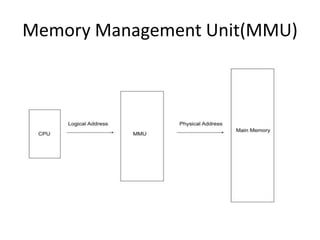
• A Physical Address is computed by MMU. The
run-time mapping from virtual to physical
addresses is done by a hardware device Memory
Management Unit(MMU).
• The physical address always remains constant.
• Logical addresses are mapped to physical
addresses using a page table. The page table
contains information about the mapping
between logical and physical addresses.
• The MMU translates logical addresses into
physical addresses using the page table. This
translation is transparent to the process and is
performed by hardware.
Memory Management Unit(MMU)
Memory allocation methods
Contiguous Memory Allocation:
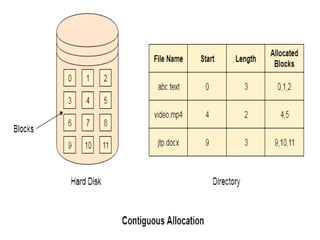
• Contiguous memory allocation is a technique
where the operating system allocates a
contiguous block of memory to a process.
• This memory is allocated in a single, continuous
chunk, making it easy for the operating system to
manage and for the process to access the
memory.
• Contiguous memory allocation is suitable for
systems with limited memory sizes and where
fast access to memory is important.
Contiguous Memory Allocation:
• Fixed Partitioning − In fixed partitioning, the memory
is divided into fixed-size partitions, and each partition
is assigned to a process. This technique is easy to
implement but can result in wasted memory if a
process does not fit perfectly into a partition.
• Dynamic Partitioning − In dynamic partitioning, the
memory is divided into variable size partitions, and
each partition is assigned to a process. This technique
is more efficient as it allows the allocation of only the
required memory to the process, but it requires more
overhead to keep track of the available memory.
These partitions may be allocated by 4
ways
1. First-Fit Memory Allocation
2. Best-Fit Memory Allocation
3. Worst-Fit Memory Allocation
4. Next-Fit Memory Allocation
The first-fit algorithm
• The first-fit algorithm searches for the first free partition
that is large enough to accommodate the process. The
operating system starts searching from the beginning of the
memory and allocates the first free partition that is large
enough to fit the process.
• For example, suppose we have the following memory
partitions:
| 10 KB | 20 KB | 15 KB | 25 KB | 30 KB |
• Now, a process requests 18 KB of memory. The operating
system starts searching from the beginning and finds the
first free partition of 20 KB. It allocates the process to that
partition and keeps the remaining 2 KB as free memory.
The best-fit algorithm
• The best-fit algorithm searches for the smallest free
partition that is large enough to accommodate the process.
The operating system searches the entire memory and
selects the free partition that is closest in size to the
process.
• For example, suppose we have the following memory
partitions:
• | 10 KB | 20 KB | 15 KB | 25 KB | 30 KB |
• Now, a process requests 18 KB of memory. The operating
system searches for the smallest free partition that is larger
than 18 KB, and it finds the partition of 20 KB. It allocates
the process to that partition and keeps the remaining 2 KB
as free memory.
Worst Fit algorithm
• The worst-fit algorithm searches for the largest
free partition and allocates the process to it. This
algorithm is designed to leave the largest possible
free partition for future use.
• For example, suppose we have the following
memory partitions:
• | 10 KB | 20 KB | 15 KB | 25 KB | 30 KB |
• Now, a process requests 18 KB of memory. The
operating system searches for the largest free
partition, which is 30 KB. It allocates the process
to that partition and keeps the remaining 12 KB
as free memory.
Non-contiguous Memory Allocation
• Non-contiguous memory allocation is a technique
where the operating system allocates memory to
a process in non-contiguous blocks.
• The blocks of memory allocated to the process
need not be contiguous, and the operating
system keeps track of the various blocks allocated
to the process.
• Non-contiguous memory allocation is suitable for
larger memory sizes and where efficient use of
memory is important.
Types of Non-contiguous Memory
Allocation
• Paging − In paging, the memory is divided into
fixed-size pages, and each page is assigned to a
process. This technique is more efficient as it
allows the allocation of only the required
memory to the process.
• Segmentation − In segmentation, the memory is
divided into variable-sized segments, and each
segment is assigned to a process. This technique
is more flexible than paging but requires more
overhead to keep track of the allocated
segments.

Unit 4-Memory Management - operating systems.pptx

  • 1.
    What is MemoryManagement? •The task of subdividing the memory among different processes is called Memory Management. •Memory management is a method in the operating system to manage operations between main memory and disk during process execution. •The main aim of memory management is to achieve efficient utilization of memory.
  • 2.
    Logical and PhysicalAddress Space • Logical Address Space: An address generated by the CPU is known as a “Logical Address”. It is also known as a Virtual Address. • Logical address space can be defined as the size of the process. • A logical address can be changed.
  • 3.
    • Physical AddressSpace: An address seen by the memory unit (i.e the one loaded into the memory address register of the memory) is commonly known as a “Physical Address”. • A Physical Address is also known as a Real address. The set of all physical addresses corresponding to these logical addresses is known as Physical address space. • A Physical Address is computed by MMU. The run-time mapping from virtual to physical addresses is done by a hardware device Memory Management Unit(MMU). • The physical address always remains constant.
  • 4.
    • Logical addressesare mapped to physical addresses using a page table. The page table contains information about the mapping between logical and physical addresses. • The MMU translates logical addresses into physical addresses using the page table. This translation is transparent to the process and is performed by hardware.
  • 5.
  • 6.
    Memory allocation methods ContiguousMemory Allocation: • Contiguous memory allocation is a technique where the operating system allocates a contiguous block of memory to a process. • This memory is allocated in a single, continuous chunk, making it easy for the operating system to manage and for the process to access the memory. • Contiguous memory allocation is suitable for systems with limited memory sizes and where fast access to memory is important.
  • 8.
    Contiguous Memory Allocation: •Fixed Partitioning − In fixed partitioning, the memory is divided into fixed-size partitions, and each partition is assigned to a process. This technique is easy to implement but can result in wasted memory if a process does not fit perfectly into a partition. • Dynamic Partitioning − In dynamic partitioning, the memory is divided into variable size partitions, and each partition is assigned to a process. This technique is more efficient as it allows the allocation of only the required memory to the process, but it requires more overhead to keep track of the available memory.
  • 9.
    These partitions maybe allocated by 4 ways 1. First-Fit Memory Allocation 2. Best-Fit Memory Allocation 3. Worst-Fit Memory Allocation 4. Next-Fit Memory Allocation
  • 10.
    The first-fit algorithm •The first-fit algorithm searches for the first free partition that is large enough to accommodate the process. The operating system starts searching from the beginning of the memory and allocates the first free partition that is large enough to fit the process. • For example, suppose we have the following memory partitions: | 10 KB | 20 KB | 15 KB | 25 KB | 30 KB | • Now, a process requests 18 KB of memory. The operating system starts searching from the beginning and finds the first free partition of 20 KB. It allocates the process to that partition and keeps the remaining 2 KB as free memory.
  • 11.
    The best-fit algorithm •The best-fit algorithm searches for the smallest free partition that is large enough to accommodate the process. The operating system searches the entire memory and selects the free partition that is closest in size to the process. • For example, suppose we have the following memory partitions: • | 10 KB | 20 KB | 15 KB | 25 KB | 30 KB | • Now, a process requests 18 KB of memory. The operating system searches for the smallest free partition that is larger than 18 KB, and it finds the partition of 20 KB. It allocates the process to that partition and keeps the remaining 2 KB as free memory.
  • 12.
    Worst Fit algorithm •The worst-fit algorithm searches for the largest free partition and allocates the process to it. This algorithm is designed to leave the largest possible free partition for future use. • For example, suppose we have the following memory partitions: • | 10 KB | 20 KB | 15 KB | 25 KB | 30 KB | • Now, a process requests 18 KB of memory. The operating system searches for the largest free partition, which is 30 KB. It allocates the process to that partition and keeps the remaining 12 KB as free memory.
  • 13.
    Non-contiguous Memory Allocation •Non-contiguous memory allocation is a technique where the operating system allocates memory to a process in non-contiguous blocks. • The blocks of memory allocated to the process need not be contiguous, and the operating system keeps track of the various blocks allocated to the process. • Non-contiguous memory allocation is suitable for larger memory sizes and where efficient use of memory is important.
  • 14.
    Types of Non-contiguousMemory Allocation • Paging − In paging, the memory is divided into fixed-size pages, and each page is assigned to a process. This technique is more efficient as it allows the allocation of only the required memory to the process. • Segmentation − In segmentation, the memory is divided into variable-sized segments, and each segment is assigned to a process. This technique is more flexible than paging but requires more overhead to keep track of the allocated segments.