Memory Management
• Memory can be defined as a collection of data in a specific format.
• It is used to store instructions and process data.
• The memory comprises a large array or group of words or bytes,
each with its own location.
• Motive of a computer system is to execute programs.
• These programs, along with the information they access,
should be in the main memory during execution.
• CPU fetches instructions from memory according to the value
of the program counter.
• To achieve a degree of multiprogramming and
proper utilization of memory, memory
management is important.
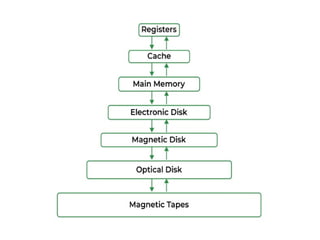
Main Memory
• Main Memory is a large array of words or bytes, ranging in
size from hundreds of thousands to billions.
• Main memory is a repository of rapidly available information
shared by the CPU and I/O devices.
• Main memory is the place where programs and information
are kept when the processor is effectively utilizing them.
• Main memory is associated with the processor, so moving
instructions and information into and out of the processor is
extremely fast.
• Main memory is also known as RAM(Random Access
Memory).
• This memory is a volatile memory.
• RAM lost its data when a power interruption occurs.
Memory Management
• In a multiprogramming computer, the operating system
resides in a part of memory and the rest is used by
multiple processes.
• The task of subdividing the memory among different
processes is called memory management.
• Memory management is a method in the operating
system to manage operations between main memory
and disk during process execution.
• The main aim of memory management is to achieve
efficient utilization of memory.
Why Memory Management is required
• Allocate and de-allocate memory before and
after process execution.
• To keep track of used memory space by
processes.
• To minimize fragmentation issues.
• To proper utilization of main memory.
• To maintain data integrity while executing of
process.
Logical and Physical Address Space
Logical Address space:
• An address generated by the CPU is known as
a “Logical Address”.
• It is also known as a Virtual address.
• Logical address space can be defined as the
size of the process.
• A logical address can be changed.
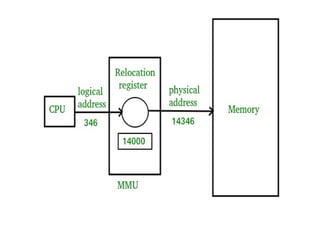
Physical Address space
• An address seen by the memory unit (i.e the one loaded
into the memory address register of the memory) is
commonly known as a “Physical Address”.
• A Physical address is also known as a Real address.
• Set of all physical addresses corresponding to these
logical addresses is known as Physical address space.
• A physical address is computed by MMU.
• Run-time mapping from virtual to physical addresses is
done by a hardware device Memory Management
Unit(MMU).
• The physical address always remains constant.
Static and Dynamic Loading
Loading a process into the main memory is done by a loader.
Two types of loading :
Static loading
• Loading the entire program into a fixed address.
• It requires more memory space.
Dynamic loading
• Entire program and all data of a process must be in physical
memory for the process to execute.
• Size of a process is limited to the size of physical memory.
• To gain proper memory utilization, dynamic loading is used.
• In dynamic loading, a routine is not loaded until it is called.
• All routines are residing on disk in a relocatable load format.
• One of the advantages of dynamic loading is that unused
routine is never loaded.
• This loading is useful when a large amount of code is needed
to handle efficiently.
Swapping
• When a process is executed it must resides in memory.
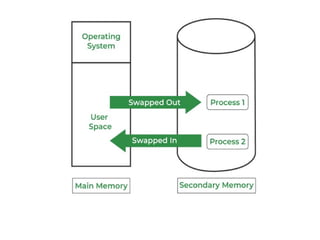
• Swapping is a process of swapping a process temporarily
into a secondary memory from the main memory
• Swapping allows more processes to be run and can be fit
into memory at one time.
• Main part of swapping is transferred time and the total
time is directly proportional to the amount of memory
swapped.
• Swapping is also known as roll-out, roll in, because if a
higher priority process arrives and wants service, the
memory manager can swap out the lower priority process
and then load and execute the higher priority process.
• After finishing higher priority work, the lower priority
process swapped back in memory and continued to the
execution process.
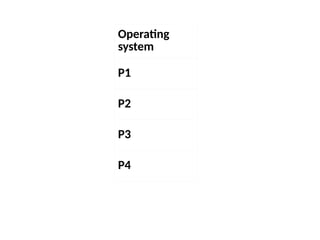
Multiprogramming with fixed
partitions(without swapping)
• Memory partitions scheme with fixed number of
partitions was introduced to support multiprogramming.
• This scheme is based on contiguous allocation
• Each partition is block of contiguous memory
• Memory is partition into fixed number of partition
• Each partition is of fixed size
Operating
system
P1
P2
P3
P4
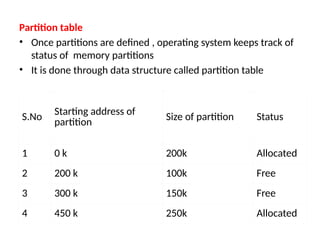
Partition table
• Once partitions are defined , operating system keeps track of
status of memory partitions
• It is done through data structure called partition table
S.No Starting address of
partition Size of partition Status
1 0 k 200k Allocated
2 200 k 100k Free
3 300 k 150k Free
4 450 k 250k Allocated
Contiguous Memory allocation
• Main memory should oblige both the operating system and the different
processes.
• Memory is usually divided into two partitions: one for the resident
operating system and one for the user processes
• Several user processes to reside in memory simultaneously
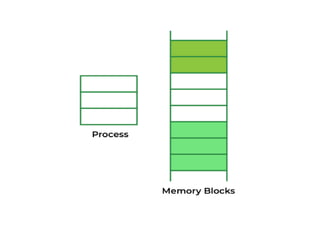
• Need to consider how to allocate available memory to the processes that
are in the input queue waiting to be brought into memory.
• In adjacent memory allotment, each process is contained in a single
contiguous segment of memory.
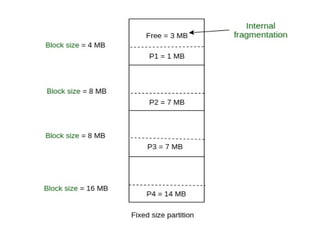
Fixed Partition:
• In fixed partition allocation, the memory is divided into fixed-
size partitions or blocks before the execution of a program.
• Each partition is allocated to a different process, and a
process cannot occupy more than one partition.
• This technique is simple and easy to implement, but it can
result in inefficient memory utilization, especially when the
processes have different memory requirements.
• It also limits the number of processes that can run
simultaneously.
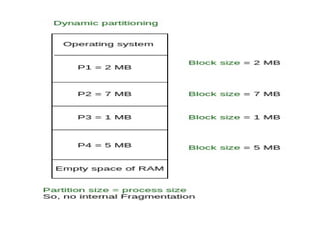
Variable Partition:
• Variable partition allocation dynamically divides the memory into
partitions of different sizes based on the memory requirements of
the processes.
• It provides more efficient memory utilization as it allows processes
to use only the memory they need.
• This technique also allows more processes to run simultaneously,
as partitions can be resized and reused when processes terminate.
• However, it requires more complex memory management
algorithms to ensure efficient use of available memory.
Fragmentation
• Fragmentation refers to the phenomenon where the
available memory space is broken up into small pieces or
chunks, making it difficult to allocate memory to new
processes or programs
Two Types :
• Internal
• External
Internal fragmentation
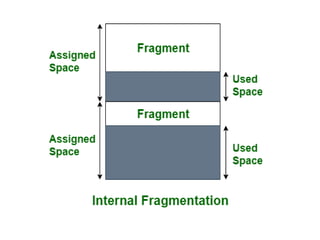
• It occurs when memory is allocated in fixed-sized blocks or
pages, and the process or program that is allocated
memory requires less memory than the size of the smallest
block available.
• This results in unused space within the block or page, which
is wasted and cannot be used by any other process or
program.
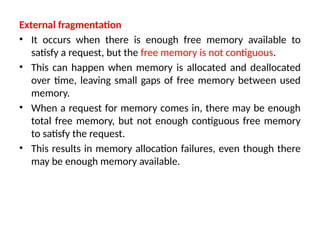
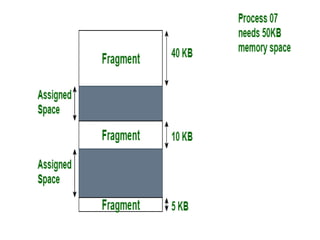
External fragmentation
• It occurs when there is enough free memory available to
satisfy a request, but the free memory is not contiguous.
• This can happen when memory is allocated and deallocated
over time, leaving small gaps of free memory between used
memory.
• When a request for memory comes in, there may be enough
total free memory, but not enough contiguous free memory
to satisfy the request.
• This results in memory allocation failures, even though there
may be enough memory available.
• Fragmentation can lead to reduced system performance
and increased memory usage.
• To minimize fragmentation, operating systems use
memory allocation techniques such as dynamic memory
allocation and memory compaction.
• These techniques aim to allocate memory efficiently and
effectively, while minimizing fragmentation and
improving system performance.
Memory Allocation Techniques
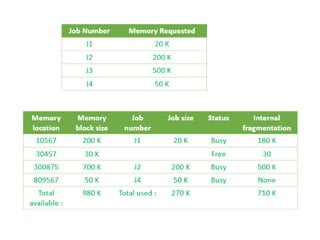
First Fit:
• This algorithm searches for the first available free partition
in memory and allocates the process to it.
• It scans the memory from the beginning and allocates the
first available partition that is large enough to fit the
process.
• This algorithm is simple and efficient, but it can lead to
fragmentation of the memory over time.
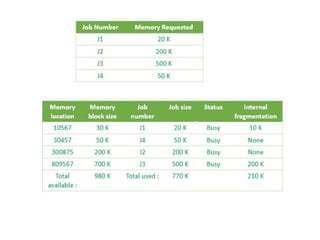
Best Fit
• The Best Fit algorithm searches for the smallest free
partition in memory that is large enough to fit the
process.
• It scans the entire memory and allocates the smallest
available partition that can accommodate the process.
• This algorithm results in less fragmentation than the first-
fit algorithm, but it can be slower as it requires more
time to search the entire memory.
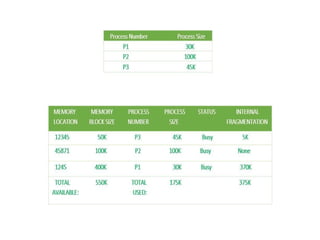
Worst Fit:
• The Worst Fit algorithm allocates the largest available
free partition in memory to the process.
• It scans the entire memory and allocates the largest
available partition that can accommodate the process.
• This algorithm leads to the most fragmentation of the
memory but can be useful when there are large
processes that need to be allocated.
Compaction
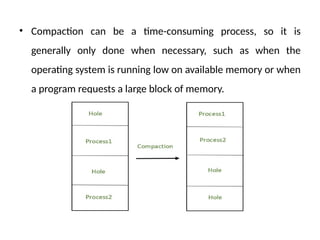
• Compaction refers to the process of rearranging the memory in a
way that frees up contiguous blocks of memory.
• This is important because it allows programs to access larger blocks
of memory, which can improve performance.
• When a program requests a block of memory, the operating system
allocates the requested size of memory from the available pool of
memory.
• Over time, as the program frees up some of the allocated memory,
there may be small blocks of free memory scattered throughout the
allocated memory. This is called fragmentation.
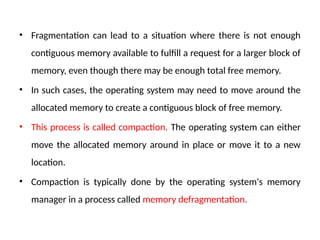
• Fragmentation can lead to a situation where there is not enough
contiguous memory available to fulfill a request for a larger block of
memory, even though there may be enough total free memory.
• In such cases, the operating system may need to move around the
allocated memory to create a contiguous block of free memory.
• This process is called compaction. The operating system can either
move the allocated memory around in place or move it to a new
location.
• Compaction is typically done by the operating system's memory
manager in a process called memory defragmentation.
• Compaction can be a time-consuming process, so it is
generally only done when necessary, such as when the
operating system is running low on available memory or when
a program requests a large block of memory.
PAGING
• Paging is a memory management scheme that
eliminates the need for contiguous allocation of
physical memory.
• Process of retrieving processes in the form of pages
from the secondary storage into the main memory
is known as paging.
• Purpose of paging is to separate each procedure
into pages.
• Frames will be used to split the main memory
• Paging permits the physical address space of a
process to be non – contiguous.
Important Terms
• Logical Address or Virtual Address (represented
in bits): An address generated by the CPU
• Logical Address Space or Virtual Address Space(
represented in words or bytes): The set of all
logical addresses generated by a program
• Physical Address (represented in bits): An
address actually available on memory unit
• Physical Address Space (represented in words
or bytes): The set of all physical addresses
corresponding to the logical addresses
Features of paging
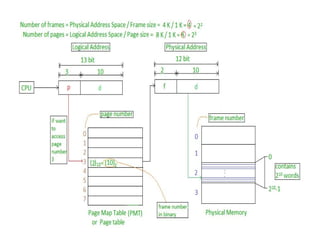
• Mapping logical address to physical address.
• Page size is equal to frame size
• Number of entries in a page table is equal to
number of pages in logical address space
• Page table entry contains the frame number.
• All the page table of the processes are placed
in main memory
• Mapping from virtual to physical address is done by the
memory management unit (MMU) which is a hardware
device and this mapping is known as paging technique
• Physical Address Space is conceptually divided into a
number of fixed-size blocks, called frames.
• The Logical address Space is also splitted into fixed-size
blocks, called pages.
• Page Size = Frame Size
Consider an example:
• Physical Address = 12 bits, then Physical
Address Space = 4 K words
• Logical Address = 13 bits, then Logical Address
Space = 8 K words
• Page size = frame size = 1 K words
(assumption)
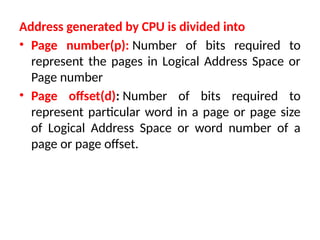
Address generated by CPU is divided into
• Page number(p): Number of bits required to
represent the pages in Logical Address Space or
Page number
• Page offset(d): Number of bits required to
represent particular word in a page or page size
of Logical Address Space or word number of a
page or page offset.
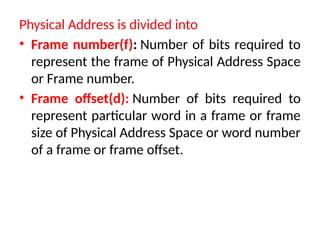
Physical Address is divided into
• Frame number(f): Number of bits required to
represent the frame of Physical Address Space
or Frame number.
• Frame offset(d): Number of bits required to
represent particular word in a frame or frame
size of Physical Address Space or word number
of a frame or frame offset.
• Hardware implementation of page table can be done by using
dedicated registers ( if page table is small ).
• If page table contain large number of entries then we can use
TLB(translation Look-aside buffer), a special, small, fast look up
hardware cache.
• TLB is associative, high speed memory.
• Each entry in TLB consists of two parts: a tag and a value.
• When this memory is used, then an item is compared with all tags
simultaneously
• If the item is found, then corresponding value is returned.
Disadvantages of Paging
Overhead:
• Paging requires the operating system to manage the page table,
which can lead to a significant overhead.
• Each time a process accesses a page, the operating system must
perform a lookup in the page table, which can slow down the system
Fragmentation
• Paging can lead to fragmentation of physical memory, where there
are many small gaps between the pages that cannot be used.
• This can result in inefficient use of physical memory, as some
memory may be left unused due to fragmentation.
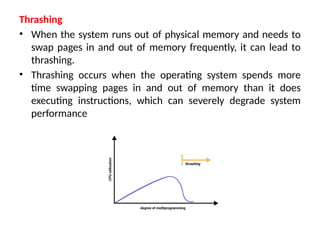
Thrashing
• When the system runs out of physical memory and needs to
swap pages in and out of memory frequently, it can lead to
thrashing.
• Thrashing occurs when the operating system spends more
time swapping pages in and out of memory than it does
executing instructions, which can severely degrade system
performance
Disk I/O
• Paging requires pages to be swapped between physical memory and
the disk, which can lead to a lot of disk I/O
• This can slow down the system and increase the wear and tear on the
hard disk.
Complex memory management
• Paging requires complex memory management algorithms to manage
the page table and allocate physical memory.
• This can make the operating system more difficult to develop and
maintain.
Virtual Memory
• Virtual Memory is a storage allocation scheme in which
secondary memory can be addressed as though it were
part of the main memory
• It maps memory addresses used by a program, called
virtual addresses, into physical addresses in computer
memory.
• It is a technique that is implemented using both
hardware and software.
• All memory references within a process are logical addresses that
are dynamically translated into physical addresses at run time.
• Process can be swapped in and out of the main memory such
that it occupies different places in the main memory at different
times during the course of execution.
• A process may be broken into a number of pieces and these
pieces need not be continuously located in the main
memory during execution.
• Virtual memory is implemented using Demand Paging or
Demand Segmentation.
Demand Paging
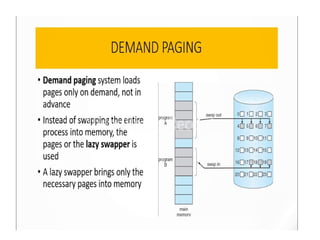
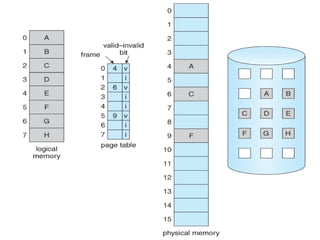
• Process of loading the page into memory on demand
(whenever page fault occurs) is known as demand
paging.
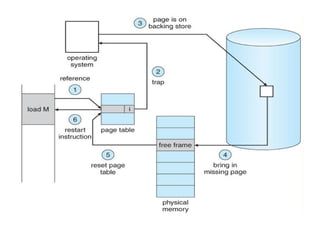
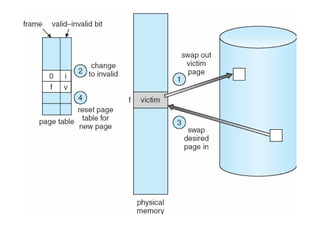
• If the CPU tries to refer to a page that is currently not available
in the main memory, it generates an interrupt indicating a
memory access fault.
• OS puts the interrupted process in a blocking state. For the
execution to proceed the OS must bring the required page into
the memory.
• OS will search for the required page in the logical address space.
• Required page will be brought from logical address space to
physical address space. The page replacement algorithms are
used for the decision-making of replacing the page in physical
address space.
• Page table will be updated accordingly.
• Signal will be sent to the CPU to continue the program
execution and it will place the process back into the
ready state.
Segmentation
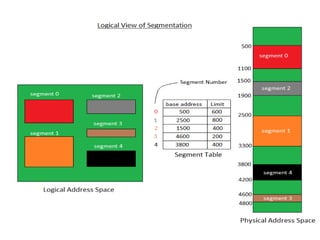
• A process is divided into Segments. The chunks that a
program is divided into which are not necessarily all of the
same sizes are called segments.
Segment Table
Each table entry for each segment has:
• Base Address: It contains the starting physical address where
the segments reside in memory.
• Limit: It specifies the length of the segment
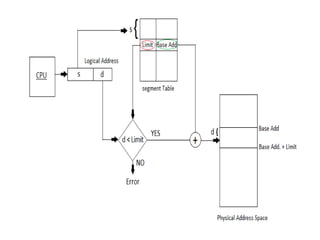
Address generated by the CPU is divided into:
• Segment number (s): Number of bits required to represent
the segment.
• Segment offset (d): Number of bits required to represent
the size of the segment.
Locality of Reference
• Locality of reference refers to a phenomenon in which a
computer program tends to access same set of memory
locations for a particular time period.
• Locality of Reference refers to the tendency of the computer
program to access instructions whose addresses are near one
another
• The property of locality of reference is mainly shown by loops
and subroutine calls in a program.
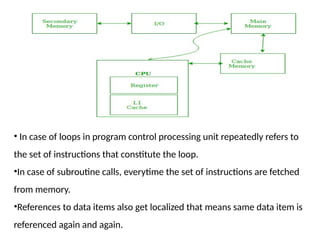
• In case of loops in program control processing unit repeatedly refers to
the set of instructions that constitute the loop.
•In case of subroutine calls, everytime the set of instructions are fetched
from memory.
•References to data items also get localized that means same data item is
referenced again and again.
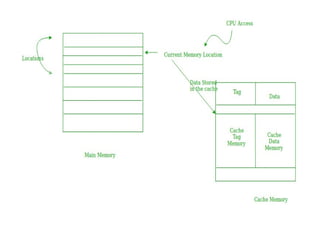
Cache Operation: It is based on the principle of locality of
reference.
• There are two ways with which data or instruction is fetched
from main memory and get stored in cache memory
Temporal Locality
• Temporal locality means current data or instruction that is
being fetched may be needed soon.
• So we should store that data or instruction in the cache
memory so that we can avoid again searching in main
memory for the same data.
• When CPU accesses the current main memory location for
reading required data or instruction, it also gets stored in the
cache memory which is based on the fact that same data or
instruction may be needed in near future.
• This is known as temporal locality.
• If some data is referenced, then there is a high probability
that it will be referenced again in the near future.
Spatial Locality
• Spatial locality means instruction or data near to the
current memory location that is being fetched, may be
needed soon in the near future.
Cache Performance:
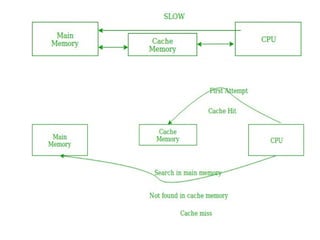
• The performance of the cache is measured in terms of hit
ratio.
• When CPU refers to memory and find the data or
instruction within the Cache Memory, it is known as cache
hit.
• If the desired data or instruction is not found in the cache
memory and CPU refers to the main memory to find that
data or instruction, it is known as a cache miss.
• Hit + Miss = Total CPU Reference
• Hit Ratio(h) = Hit / (Hit+Miss)
• Miss Ratio = 1 - Hit Ratio(h)
• Miss Ratio = Miss / (Hit+Miss)
• Tavg = Average time to access memory
For simultaneous access
• Tavg = h * Tc + (1-h)*Tm
For hierarchial access
• Tavg = h * Tc + (1-h)*(Tm + Tc)
Dirty Page / Dirty Bit
• Dirty page refers to a page in physical memory that has been
modified since it was last loaded from or written to
secondary storage (such as a hard disk).
• To keep track of whether a page has been modified, the
operating system uses a dirty bit, also known as a modify bit.
• This is a single bit that is associated with each page frame in
physical memory, and it is set to 1 (i.e., "dirty") when the
page is modified, and set to 0 (i.e., "clean") when the page is
loaded into memory or written back to secondary storage.
• Dirty bit is used to minimize the amount of data that needs to be
written back to secondary storage during the process of swapping
or paging.
• When a page needs to be removed from physical memory (e.g.,
because it has not been used for a while and the system needs to
free up memory), the operating system checks the dirty bit
associated with that page
• If the bit is set to 1, it means that the page has been
modified, and the operating system must write the contents
of that page back to secondary storage before it can be freed
from physical memory.
• If the bit is set to 0, it means that the page is still clean
and can be discarded without the need for any additional
I/O operations.
• By using dirty bits and only writing modified pages back
to secondary storage, the operating system can minimize
the amount of disk I/O and improve the overall
performance of the system.
Page Replacement Algorithms
• Page replacement algorithm is needed to decide which page needs to
be replaced when a new page comes in
Page Fault:
• A page fault happens when a running program accesses a memory
page that is mapped into the virtual address space but not loaded in
physical memory.
• Since actual physical memory is much smaller than virtual memory,
page faults happen
• In case of a page fault, Operating System might have to replace
one of the existing pages with the newly needed page.
FIFO ( First In First Out Page Replacement Algorithm )
• Operating system keeps track of all pages in the
memory in a queue
• Oldest page is in the front of the queue.
• When a page needs to be replaced , page in the
front of the queue is selected for removal
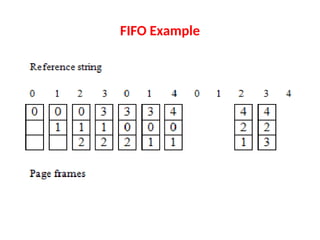
FIFO Example
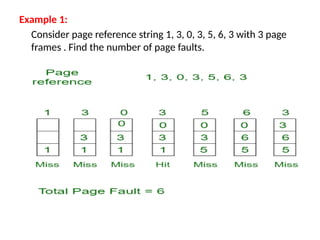
Example 1:
Consider page reference string 1, 3, 0, 3, 5, 6, 3 with 3 page
frames . Find the number of page faults.
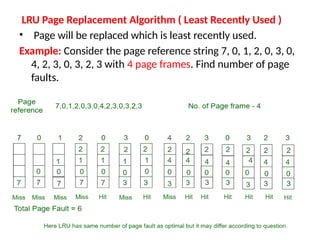
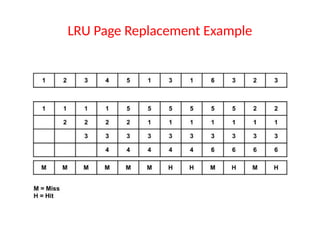
LRU Page Replacement Algorithm ( Least Recently Used )
• Page will be replaced which is least recently used.
Example: Consider the page reference string 7, 0, 1, 2, 0, 3, 0,
4, 2, 3, 0, 3, 2, 3 with 4 page frames. Find number of page
faults.
LRU Page Replacement Example
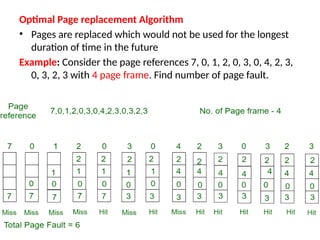
Optimal Page replacement Algorithm
• Pages are replaced which would not be used for the longest
duration of time in the future
Example: Consider the page references 7, 0, 1, 2, 0, 3, 0, 4, 2, 3,
0, 3, 2, 3 with 4 page frame. Find number of page fault.

B.Tech. Computer Science Engineering OS Notes Unit 3

  • 1.
  • 2.
    • Memory canbe defined as a collection of data in a specific format. • It is used to store instructions and process data. • The memory comprises a large array or group of words or bytes, each with its own location. • Motive of a computer system is to execute programs. • These programs, along with the information they access, should be in the main memory during execution. • CPU fetches instructions from memory according to the value of the program counter.
  • 3.
    • To achievea degree of multiprogramming and proper utilization of memory, memory management is important.
  • 4.
    Main Memory • MainMemory is a large array of words or bytes, ranging in size from hundreds of thousands to billions. • Main memory is a repository of rapidly available information shared by the CPU and I/O devices. • Main memory is the place where programs and information are kept when the processor is effectively utilizing them. • Main memory is associated with the processor, so moving instructions and information into and out of the processor is extremely fast. • Main memory is also known as RAM(Random Access Memory). • This memory is a volatile memory. • RAM lost its data when a power interruption occurs.
  • 6.
    Memory Management • Ina multiprogramming computer, the operating system resides in a part of memory and the rest is used by multiple processes. • The task of subdividing the memory among different processes is called memory management. • Memory management is a method in the operating system to manage operations between main memory and disk during process execution. • The main aim of memory management is to achieve efficient utilization of memory.
  • 7.
    Why Memory Managementis required • Allocate and de-allocate memory before and after process execution. • To keep track of used memory space by processes. • To minimize fragmentation issues. • To proper utilization of main memory. • To maintain data integrity while executing of process.
  • 8.
    Logical and PhysicalAddress Space Logical Address space: • An address generated by the CPU is known as a “Logical Address”. • It is also known as a Virtual address. • Logical address space can be defined as the size of the process. • A logical address can be changed.
  • 9.
    Physical Address space •An address seen by the memory unit (i.e the one loaded into the memory address register of the memory) is commonly known as a “Physical Address”. • A Physical address is also known as a Real address. • Set of all physical addresses corresponding to these logical addresses is known as Physical address space. • A physical address is computed by MMU. • Run-time mapping from virtual to physical addresses is done by a hardware device Memory Management Unit(MMU). • The physical address always remains constant.
  • 11.
    Static and DynamicLoading Loading a process into the main memory is done by a loader. Two types of loading : Static loading • Loading the entire program into a fixed address. • It requires more memory space. Dynamic loading • Entire program and all data of a process must be in physical memory for the process to execute. • Size of a process is limited to the size of physical memory. • To gain proper memory utilization, dynamic loading is used.
  • 12.
    • In dynamicloading, a routine is not loaded until it is called. • All routines are residing on disk in a relocatable load format. • One of the advantages of dynamic loading is that unused routine is never loaded. • This loading is useful when a large amount of code is needed to handle efficiently.
  • 13.
    Swapping • When aprocess is executed it must resides in memory. • Swapping is a process of swapping a process temporarily into a secondary memory from the main memory • Swapping allows more processes to be run and can be fit into memory at one time. • Main part of swapping is transferred time and the total time is directly proportional to the amount of memory swapped.
  • 14.
    • Swapping isalso known as roll-out, roll in, because if a higher priority process arrives and wants service, the memory manager can swap out the lower priority process and then load and execute the higher priority process. • After finishing higher priority work, the lower priority process swapped back in memory and continued to the execution process.
  • 16.
    Multiprogramming with fixed partitions(withoutswapping) • Memory partitions scheme with fixed number of partitions was introduced to support multiprogramming. • This scheme is based on contiguous allocation • Each partition is block of contiguous memory • Memory is partition into fixed number of partition • Each partition is of fixed size
  • 17.
  • 18.
    Partition table • Oncepartitions are defined , operating system keeps track of status of memory partitions • It is done through data structure called partition table S.No Starting address of partition Size of partition Status 1 0 k 200k Allocated 2 200 k 100k Free 3 300 k 150k Free 4 450 k 250k Allocated
  • 19.
    Contiguous Memory allocation •Main memory should oblige both the operating system and the different processes. • Memory is usually divided into two partitions: one for the resident operating system and one for the user processes • Several user processes to reside in memory simultaneously • Need to consider how to allocate available memory to the processes that are in the input queue waiting to be brought into memory. • In adjacent memory allotment, each process is contained in a single contiguous segment of memory.
  • 21.
    Fixed Partition: • Infixed partition allocation, the memory is divided into fixed- size partitions or blocks before the execution of a program. • Each partition is allocated to a different process, and a process cannot occupy more than one partition. • This technique is simple and easy to implement, but it can result in inefficient memory utilization, especially when the processes have different memory requirements. • It also limits the number of processes that can run simultaneously.
  • 23.
    Variable Partition: • Variablepartition allocation dynamically divides the memory into partitions of different sizes based on the memory requirements of the processes. • It provides more efficient memory utilization as it allows processes to use only the memory they need. • This technique also allows more processes to run simultaneously, as partitions can be resized and reused when processes terminate. • However, it requires more complex memory management algorithms to ensure efficient use of available memory.
  • 25.
    Fragmentation • Fragmentation refersto the phenomenon where the available memory space is broken up into small pieces or chunks, making it difficult to allocate memory to new processes or programs Two Types : • Internal • External
  • 26.
    Internal fragmentation • Itoccurs when memory is allocated in fixed-sized blocks or pages, and the process or program that is allocated memory requires less memory than the size of the smallest block available. • This results in unused space within the block or page, which is wasted and cannot be used by any other process or program.
  • 28.
    External fragmentation • Itoccurs when there is enough free memory available to satisfy a request, but the free memory is not contiguous. • This can happen when memory is allocated and deallocated over time, leaving small gaps of free memory between used memory. • When a request for memory comes in, there may be enough total free memory, but not enough contiguous free memory to satisfy the request. • This results in memory allocation failures, even though there may be enough memory available.
  • 30.
    • Fragmentation canlead to reduced system performance and increased memory usage. • To minimize fragmentation, operating systems use memory allocation techniques such as dynamic memory allocation and memory compaction. • These techniques aim to allocate memory efficiently and effectively, while minimizing fragmentation and improving system performance.
  • 31.
    Memory Allocation Techniques FirstFit: • This algorithm searches for the first available free partition in memory and allocates the process to it. • It scans the memory from the beginning and allocates the first available partition that is large enough to fit the process. • This algorithm is simple and efficient, but it can lead to fragmentation of the memory over time.
  • 33.
    Best Fit • TheBest Fit algorithm searches for the smallest free partition in memory that is large enough to fit the process. • It scans the entire memory and allocates the smallest available partition that can accommodate the process. • This algorithm results in less fragmentation than the first- fit algorithm, but it can be slower as it requires more time to search the entire memory.
  • 35.
    Worst Fit: • TheWorst Fit algorithm allocates the largest available free partition in memory to the process. • It scans the entire memory and allocates the largest available partition that can accommodate the process. • This algorithm leads to the most fragmentation of the memory but can be useful when there are large processes that need to be allocated.
  • 37.
    Compaction • Compaction refersto the process of rearranging the memory in a way that frees up contiguous blocks of memory. • This is important because it allows programs to access larger blocks of memory, which can improve performance. • When a program requests a block of memory, the operating system allocates the requested size of memory from the available pool of memory. • Over time, as the program frees up some of the allocated memory, there may be small blocks of free memory scattered throughout the allocated memory. This is called fragmentation.
  • 38.
    • Fragmentation canlead to a situation where there is not enough contiguous memory available to fulfill a request for a larger block of memory, even though there may be enough total free memory. • In such cases, the operating system may need to move around the allocated memory to create a contiguous block of free memory. • This process is called compaction. The operating system can either move the allocated memory around in place or move it to a new location. • Compaction is typically done by the operating system's memory manager in a process called memory defragmentation.
  • 39.
    • Compaction canbe a time-consuming process, so it is generally only done when necessary, such as when the operating system is running low on available memory or when a program requests a large block of memory.
  • 40.
    PAGING • Paging isa memory management scheme that eliminates the need for contiguous allocation of physical memory. • Process of retrieving processes in the form of pages from the secondary storage into the main memory is known as paging. • Purpose of paging is to separate each procedure into pages. • Frames will be used to split the main memory • Paging permits the physical address space of a process to be non – contiguous.
  • 41.
    Important Terms • LogicalAddress or Virtual Address (represented in bits): An address generated by the CPU • Logical Address Space or Virtual Address Space( represented in words or bytes): The set of all logical addresses generated by a program • Physical Address (represented in bits): An address actually available on memory unit • Physical Address Space (represented in words or bytes): The set of all physical addresses corresponding to the logical addresses
  • 42.
    Features of paging •Mapping logical address to physical address. • Page size is equal to frame size • Number of entries in a page table is equal to number of pages in logical address space • Page table entry contains the frame number. • All the page table of the processes are placed in main memory
  • 43.
    • Mapping fromvirtual to physical address is done by the memory management unit (MMU) which is a hardware device and this mapping is known as paging technique • Physical Address Space is conceptually divided into a number of fixed-size blocks, called frames. • The Logical address Space is also splitted into fixed-size blocks, called pages. • Page Size = Frame Size
  • 44.
    Consider an example: •Physical Address = 12 bits, then Physical Address Space = 4 K words • Logical Address = 13 bits, then Logical Address Space = 8 K words • Page size = frame size = 1 K words (assumption)
  • 46.
    Address generated byCPU is divided into • Page number(p): Number of bits required to represent the pages in Logical Address Space or Page number • Page offset(d): Number of bits required to represent particular word in a page or page size of Logical Address Space or word number of a page or page offset.
  • 47.
    Physical Address isdivided into • Frame number(f): Number of bits required to represent the frame of Physical Address Space or Frame number. • Frame offset(d): Number of bits required to represent particular word in a frame or frame size of Physical Address Space or word number of a frame or frame offset.
  • 48.
    • Hardware implementationof page table can be done by using dedicated registers ( if page table is small ). • If page table contain large number of entries then we can use TLB(translation Look-aside buffer), a special, small, fast look up hardware cache. • TLB is associative, high speed memory. • Each entry in TLB consists of two parts: a tag and a value. • When this memory is used, then an item is compared with all tags simultaneously • If the item is found, then corresponding value is returned.
  • 49.
    Disadvantages of Paging Overhead: •Paging requires the operating system to manage the page table, which can lead to a significant overhead. • Each time a process accesses a page, the operating system must perform a lookup in the page table, which can slow down the system Fragmentation • Paging can lead to fragmentation of physical memory, where there are many small gaps between the pages that cannot be used. • This can result in inefficient use of physical memory, as some memory may be left unused due to fragmentation.
  • 50.
    Thrashing • When thesystem runs out of physical memory and needs to swap pages in and out of memory frequently, it can lead to thrashing. • Thrashing occurs when the operating system spends more time swapping pages in and out of memory than it does executing instructions, which can severely degrade system performance
  • 51.
    Disk I/O • Pagingrequires pages to be swapped between physical memory and the disk, which can lead to a lot of disk I/O • This can slow down the system and increase the wear and tear on the hard disk. Complex memory management • Paging requires complex memory management algorithms to manage the page table and allocate physical memory. • This can make the operating system more difficult to develop and maintain.
  • 52.
  • 53.
    • Virtual Memoryis a storage allocation scheme in which secondary memory can be addressed as though it were part of the main memory • It maps memory addresses used by a program, called virtual addresses, into physical addresses in computer memory. • It is a technique that is implemented using both hardware and software.
  • 54.
    • All memoryreferences within a process are logical addresses that are dynamically translated into physical addresses at run time. • Process can be swapped in and out of the main memory such that it occupies different places in the main memory at different times during the course of execution. • A process may be broken into a number of pieces and these pieces need not be continuously located in the main memory during execution. • Virtual memory is implemented using Demand Paging or Demand Segmentation.
  • 55.
    Demand Paging • Processof loading the page into memory on demand (whenever page fault occurs) is known as demand paging.
  • 58.
    • If theCPU tries to refer to a page that is currently not available in the main memory, it generates an interrupt indicating a memory access fault. • OS puts the interrupted process in a blocking state. For the execution to proceed the OS must bring the required page into the memory. • OS will search for the required page in the logical address space. • Required page will be brought from logical address space to physical address space. The page replacement algorithms are used for the decision-making of replacing the page in physical address space.
  • 59.
    • Page tablewill be updated accordingly. • Signal will be sent to the CPU to continue the program execution and it will place the process back into the ready state.
  • 62.
    Segmentation • A processis divided into Segments. The chunks that a program is divided into which are not necessarily all of the same sizes are called segments. Segment Table Each table entry for each segment has: • Base Address: It contains the starting physical address where the segments reside in memory. • Limit: It specifies the length of the segment
  • 65.
    Address generated bythe CPU is divided into: • Segment number (s): Number of bits required to represent the segment. • Segment offset (d): Number of bits required to represent the size of the segment.
  • 66.
    Locality of Reference •Locality of reference refers to a phenomenon in which a computer program tends to access same set of memory locations for a particular time period. • Locality of Reference refers to the tendency of the computer program to access instructions whose addresses are near one another • The property of locality of reference is mainly shown by loops and subroutine calls in a program.
  • 67.
    • In caseof loops in program control processing unit repeatedly refers to the set of instructions that constitute the loop. •In case of subroutine calls, everytime the set of instructions are fetched from memory. •References to data items also get localized that means same data item is referenced again and again.
  • 69.
    Cache Operation: Itis based on the principle of locality of reference. • There are two ways with which data or instruction is fetched from main memory and get stored in cache memory Temporal Locality • Temporal locality means current data or instruction that is being fetched may be needed soon. • So we should store that data or instruction in the cache memory so that we can avoid again searching in main memory for the same data.
  • 71.
    • When CPUaccesses the current main memory location for reading required data or instruction, it also gets stored in the cache memory which is based on the fact that same data or instruction may be needed in near future. • This is known as temporal locality. • If some data is referenced, then there is a high probability that it will be referenced again in the near future.
  • 72.
    Spatial Locality • Spatiallocality means instruction or data near to the current memory location that is being fetched, may be needed soon in the near future. Cache Performance: • The performance of the cache is measured in terms of hit ratio. • When CPU refers to memory and find the data or instruction within the Cache Memory, it is known as cache hit. • If the desired data or instruction is not found in the cache memory and CPU refers to the main memory to find that data or instruction, it is known as a cache miss.
  • 73.
    • Hit +Miss = Total CPU Reference • Hit Ratio(h) = Hit / (Hit+Miss) • Miss Ratio = 1 - Hit Ratio(h) • Miss Ratio = Miss / (Hit+Miss) • Tavg = Average time to access memory For simultaneous access • Tavg = h * Tc + (1-h)*Tm For hierarchial access • Tavg = h * Tc + (1-h)*(Tm + Tc)
  • 74.
    Dirty Page /Dirty Bit • Dirty page refers to a page in physical memory that has been modified since it was last loaded from or written to secondary storage (such as a hard disk). • To keep track of whether a page has been modified, the operating system uses a dirty bit, also known as a modify bit. • This is a single bit that is associated with each page frame in physical memory, and it is set to 1 (i.e., "dirty") when the page is modified, and set to 0 (i.e., "clean") when the page is loaded into memory or written back to secondary storage.
  • 75.
    • Dirty bitis used to minimize the amount of data that needs to be written back to secondary storage during the process of swapping or paging. • When a page needs to be removed from physical memory (e.g., because it has not been used for a while and the system needs to free up memory), the operating system checks the dirty bit associated with that page • If the bit is set to 1, it means that the page has been modified, and the operating system must write the contents of that page back to secondary storage before it can be freed from physical memory.
  • 76.
    • If thebit is set to 0, it means that the page is still clean and can be discarded without the need for any additional I/O operations. • By using dirty bits and only writing modified pages back to secondary storage, the operating system can minimize the amount of disk I/O and improve the overall performance of the system.
  • 77.
    Page Replacement Algorithms •Page replacement algorithm is needed to decide which page needs to be replaced when a new page comes in Page Fault: • A page fault happens when a running program accesses a memory page that is mapped into the virtual address space but not loaded in physical memory. • Since actual physical memory is much smaller than virtual memory, page faults happen • In case of a page fault, Operating System might have to replace one of the existing pages with the newly needed page.
  • 78.
    FIFO ( FirstIn First Out Page Replacement Algorithm ) • Operating system keeps track of all pages in the memory in a queue • Oldest page is in the front of the queue. • When a page needs to be replaced , page in the front of the queue is selected for removal
  • 79.
  • 80.
    Example 1: Consider pagereference string 1, 3, 0, 3, 5, 6, 3 with 3 page frames . Find the number of page faults.
  • 81.
    LRU Page ReplacementAlgorithm ( Least Recently Used ) • Page will be replaced which is least recently used. Example: Consider the page reference string 7, 0, 1, 2, 0, 3, 0, 4, 2, 3, 0, 3, 2, 3 with 4 page frames. Find number of page faults.
  • 82.
  • 83.
    Optimal Page replacementAlgorithm • Pages are replaced which would not be used for the longest duration of time in the future Example: Consider the page references 7, 0, 1, 2, 0, 3, 0, 4, 2, 3, 0, 3, 2, 3 with 4 page frame. Find number of page fault.