C# AND.NET PROGRAMMING (18UCSC61)
Unit-I: Introducing C#-Understanding .NET: The C# Environment Literals,Variables
and Data Types DecisionMaking and Looping
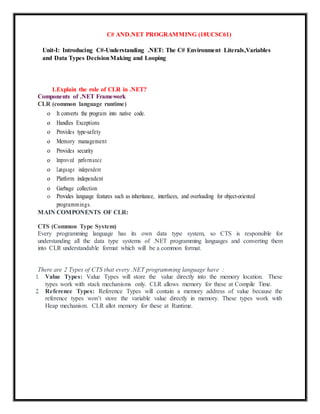
1.Explain the role of CLR in .NET?
Components of .NET Framework
CLR (common language runtime)
o It converts the program into native code.
o Handles Exceptions
o Provides type-safety
o Memory management
o Provides security
o Improved performance
o Language independent
o Platform independent
o Garbage collection
o Provides language features such as inheritance, interfaces, and overloading for object-oriented
programmings.
MAIN COMPONENTS OF CLR:
CTS (Common Type System)
Every programming language has its own data type system, so CTS is responsible for
understanding all the data type systems of .NET programming languages and converting them
into CLR understandable format which will be a common format.
There are 2 Types of CTS that every .NET programming language have :
1. Value Types: Value Types will store the value directly into the memory location. These
types work with stack mechanisms only. CLR allows memory for these at Compile Time.
2. Reference Types: Reference Types will contain a memory address of value because the
reference types won’t store the variable value directly in memory. These types work with
Heap mechanism. CLR allot memory for these at Runtime.
GarbageCollector:
It is used to provide the Automatic Memory Management feature. If there was no garbage
collector, programmers would have to write the memory management codes which will be a
kind of overhead on programmers.
JIT(JustInTimeCompiler):
It is responsible for converting the CIL(Common Intermediate Language) into machine code or
native code using the Common Language Runtime environment.
CLS (Common language Specification)
It is a subset of common type system (CTS) that defines a set of rules and regulations which
should be followed by every language that comes under the .net framework.
It is responsible for converting the different .NET programming language syntactical rules and
regulations into CLR understandable format. Basically, it provides Language Interoperability.
Language Interoperability means providing execution support to other programming languages
also in .NET framework.
Language Interoperability can be achieved in two ways :
1. Managed Code: The MSIL code which is managed by the CLR is known as the Managed
Code. For managed code CLR provides three .NET facilities:
2. Unmanaged Code: Before .NET development, programming languages like.COM
Components & Win32 API do not generate the MSIL code. So these are not managed by
CLR rather managed by Operating System.
2.Write the basic structure of C# program with details.
Structure of C# Program:
namespace HelloWorld
{
class Program
{
static void Main(string[] args)
{
Console.WriteLine("Hello World!");
}
}
}
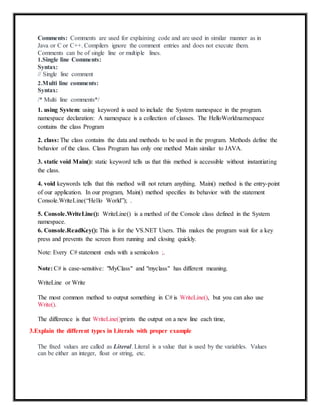
Comments: Comments are used for explaining code and are used in similar manner as in
Java or C or C++. Compilers ignore the comment entries and does not execute them.
Comments can be of single line or multiple lines.
1.Single line Comments:
Syntax:
// Single line comment
2.Multi line comments:
Syntax:
/* Multi line comments*/
1. using System: using keyword is used to include the System namespace in the program.
namespace declaration: A namespace is a collection of classes. The HelloWorldnamespace
contains the class Program
2. class: The class contains the data and methods to be used in the program. Methods define the
behavior of the class. Class Program has only one method Main similar to JAVA.
3. static void Main(): static keyword tells us that this method is accessible without instantiating
the class.
4. void keywords tells that this method will not return anything. Main() method is the entry-point
of our application. In our program, Main() method specifies its behavior with the statement
Console.WriteLine(“Hello World”); .
5. Console.WriteLine(): WriteLine() is a method of the Console class defined in the System
namespace.
6. Console.ReadKey(): This is for the VS.NET Users. This makes the program wait for a key
press and prevents the screen from running and closing quickly.
Note: Every C# statement ends with a semicolon ;.
Note: C# is case-sensitive: "MyClass" and "myclass" has different meaning.
WriteLine or Write
The most common method to output something in C# is WriteLine(), but you can also use
Write().
The difference is that WriteLine()prints the output on a new line each time,
3.Explain the different types in Literals with proper example
The fixed values are called as Literal. Literal is a value that is used by the variables. Values
can be either an integer, float or string, etc.
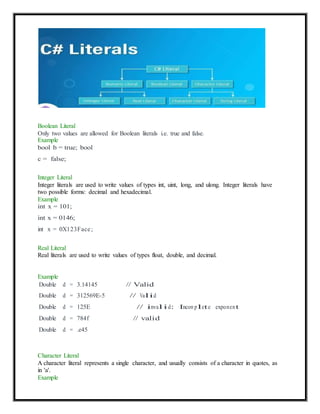
Boolean Literal
Only two values are allowed for Boolean literals i.e. true and false.
Example
bool b = true; bool
c = false;
Integer Literal
Integer literals are used to write values of types int, uint, long, and ulong. Integer literals have
two possible forms: decimal and hexadecimal.
Example
int x = 101;
int x = 0146;
int x = 0X123Face;
Real Literal
Real literals are used to write values of types float, double, and decimal.
Example
Double d = 3.14145 // Valid
Double d = 312569E-5 // Valid
Double d = 125E // invalid: Incom plete exponent
Double d = 784f // valid
Double d = .e45
Character Literal
A character literal represents a single character, and usually consists of a character in quotes, as
in 'a'.
Example
String Literal
Literals which are enclosed in double quotes(“”) or starts with @”” are known as the String
literals.
Example
String s1 = "Hello Geeks!";
String s2 = @"Hello Geeks!";
Null Literal
Null Literal is literal that denotes null type. Moreover, null can fit to any reference-type . and
hence is a very good example for polymorphism.
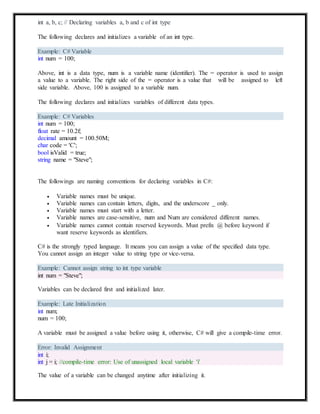
4.Define Variable?How to declare variable ?
In C#, a variable contains a data value of the specific data type.
Syntax:
type variable_name = value;
or
type variable_names;
Example:
char var = 'h'; // Declaring and Initializing character variable
int a, b, c; // Declaring variables a, b and c of int type
The following declares and initializes a variable of an int type.
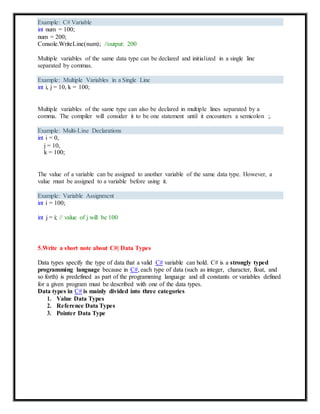
Example: C# Variable
int num = 100;
Above, int is a data type, num is a variable name (identifier). The = operator is used to assign
a value to a variable. The right side of the = operator is a value that will be assigned to left
side variable. Above, 100 is assigned to a variable num.
The following declares and initializes variables of different data types.
Example: C# Variables
int num = 100;
float rate = 10.2f;
decimal amount = 100.50M;
char code = 'C';
bool isValid = true;
string name = "Steve";
The followings are naming conventions for declaring variables in C#:
 Variable names must be unique.
 Variable names can contain letters, digits, and the underscore _ only.
 Variable names must start with a letter.
 Variable names are case-sensitive, num and Num are considered different names.
 Variable names cannot contain reserved keywords. Must prefix @ before keyword if
want reserve keywords as identifiers.
C# is the strongly typed language. It means you can assign a value of the specified data type.
You cannot assign an integer value to string type or vice-versa.
Example: Cannot assign string to int type variable
int num = "Steve";
Variables can be declared first and initialized later.
Example: Late Initialization
int num;
num = 100;
A variable must be assigned a value before using it, otherwise, C# will give a compile-time error.
Error: Invalid Assignment
The value of a variable can be changed anytime after initializing it.
int i;
int j = i; //compile-time error: Use of unassigned local variable 'i'
Example: C# Variable
int num = 100;
num = 200;
Console.WriteLine(num); //output: 200
Multiple variables of the same data type can be declared and initialized in a single line
separated by commas.
Example: Multiple Variables in a Single Line
int i, j = 10, k = 100;
Multiple variables of the same type can also be declared in multiple lines separated by a
comma. The compiler will consider it to be one statement until it encounters a semicolon ;.
Example: Multi-Line Declarations
int i = 0,
j = 10,
k = 100;
The value of a variable can be assigned to another variable of the same data type. However, a
value must be assigned to a variable before using it.
Example: Variable Assignment
int i = 100;
int j = i; // value of j will be 100
5.Write a short note about C#| Data Types
Data types specify the type of data that a valid C# variable can hold. C# is a strongly typed
programming language because in C#, each type of data (such as integer, character, float, and
so forth) is predefined as part of the programming language and all constants or variables defined
for a given program must be described with one of the data types.
Data types in C# is mainly divided into three categories
1. Value Data Types
2. Reference Data Types
3. Pointer Data Type
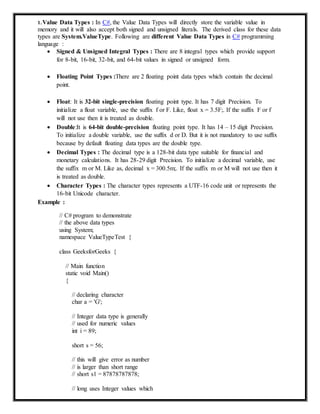
1.Value Data Types : In C#, the Value Data Types will directly store the variable value in
memory and it will also accept both signed and unsigned literals. The derived class for these data
types are System.ValueType. Following are different Value Data Types in C# programming
language :
 Signed & Unsigned Integral Types : There are 8 integral types which provide support
for 8-bit, 16-bit, 32-bit, and 64-bit values in signed or unsigned form.
 Floating Point Types :There are 2 floating point data types which contain the decimal
point.
 Float: It is 32-bit single-precision floating point type. It has 7 digit Precision. To
initialize a float variable, use the suffix f or F. Like, float x = 3.5F;. If the suffix F or f
will not use then it is treated as double.
 Double:It is 64-bit double-precision floating point type. It has 14 – 15 digit Precision.
To initialize a double variable, use the suffix d or D. But it is not mandatory to use suffix
because by default floating data types are the double type.
 Decimal Types : The decimal type is a 128-bit data type suitable for financial and
monetary calculations. It has 28-29 digit Precision. To initialize a decimal variable, use
the suffix m or M. Like as, decimal x = 300.5m;. If the suffix m or M will not use then it
is treated as double.
 Character Types : The character types represents a UTF-16 code unit or represents the
16-bit Unicode character.
Example :
// C# program to demonstrate
// the above data types
using System;
namespace ValueTypeTest {
class GeeksforGeeks {
// Main function
static void Main()
{
// declaring character
char a = 'G';
// Integer data type is generally
// used for numeric values
int i = 89;
short s = 56;
// this will give error as number
// is larger than short range
// short s1 = 87878787878;
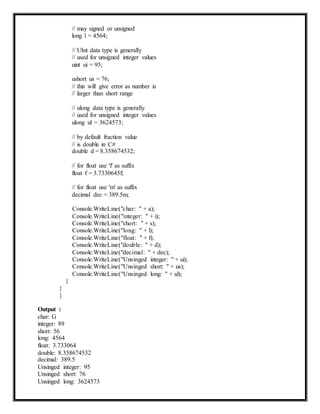
// long uses Integer values which
// may signed or unsigned
long l = 4564;
// UInt data type is generally
// used for unsigned integer values
uint ui = 95;
ushort us = 76;
// this will give error as number is
// larger than short range
// ulong data type is generally
// used for unsigned integer values
ulong ul = 3624573;
// by default fraction value
// is double in C#
double d = 8.358674532;
// for float use 'f' as suffix
float f = 3.7330645f;
// for float use 'm' as suffix
decimal dec = 389.5m;
}
}
}
Output :
char: G
integer: 89
short: 56
long: 4564
Console.WriteLine("char: " + a);
Console.WriteLine("integer: " + i);
Console.WriteLine("short: " + s);
Console.WriteLine("long: " + l);
Console.WriteLine("float: " + f);
Console.WriteLine("double: " + d);
Console.WriteLine("decimal: " + dec);
Console.WriteLine("Unsinged integer: " + ui);
Console.WriteLine("Unsinged short: " + us);
Console.WriteLine("Unsinged long: " + ul);
float: 3.733064
double: 8.358674532
decimal: 389.5
Unsinged integer: 95
Unsinged short: 76
Unsinged long: 3624573
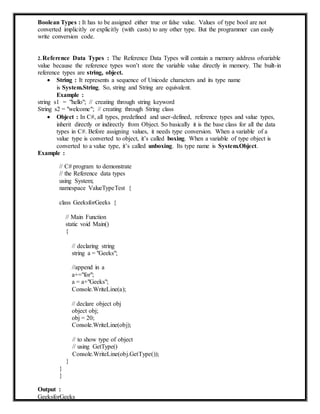
Boolean Types : It has to be assigned either true or false value. Values of type bool are not
converted implicitly or explicitly (with casts) to any other type. But the programmer can easily
write conversion code.
2.Reference Data Types : The Reference Data Types will contain a memory address ofvariable
value because the reference types won’t store the variable value directly in memory. The built-in
reference types are string, object.
 String : It represents a sequence of Unicode characters and its type name
is System.String. So, string and String are equivalent.
Example :
string s1 = "hello"; // creating through string keyword
String s2 = "welcome"; // creating through String class
 Object : In C#, all types, predefined and user-defined, reference types and value types,
inherit directly or indirectly from Object. So basically it is the base class for all the data
types in C#. Before assigning values, it needs type conversion. When a variable of a
value type is converted to object, it’s called boxing. When a variable of type object is
converted to a value type, it’s called unboxing. Its type name is System.Object.
Example :
// C# program to demonstrate
// the Reference data types
using System;
namespace ValueTypeTest {
class GeeksforGeeks {
// Main Function
static void Main()
{
// declaring string
string a = "Geeks";
//append in a
a+="for";
a = a+"Geeks";
Console.WriteLine(a);
// declare object obj
object obj;
obj = 20;
Console.WriteLine(obj);
}
}
Output :
// to show type of object
// using GetType()
Console.WriteLine(obj.GetType());
}
GeeksforGeeks
20
System.Int32
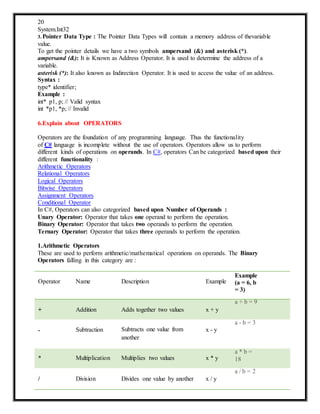
3.Pointer Data Type : The Pointer Data Types will contain a memory address of thevariable
value.
To get the pointer details we have a two symbols ampersand (&) and asterisk (*).
ampersand (&): It is Known as Address Operator. It is used to determine the address of a
variable.
asterisk (*): It also known as Indirection Operator. It is used to access the value of an address.
Syntax :
type* identifier;
Example :
int* p1, p; // Valid syntax
int *p1, *p; // Invalid
6.Explain about OPERATORS
Operators are the foundation of any programming language. Thus the functionality
of C# language is incomplete without the use of operators. Operators allow us to perform
different kinds of operations on operands. In C#, operators Can be categorized based upon their
different functionality :
Arithmetic Operators
Relational Operators
Logical Operators
Bitwise Operators
Assignment Operators
Conditional Operator
In C#, Operators can also categorized based upon Number of Operands :
Unary Operator: Operator that takes one operand to perform the operation.
Binary Operator: Operator that takes two operands to perform the operation.
Ternary Operator: Operator that takes three operands to perform the operation.
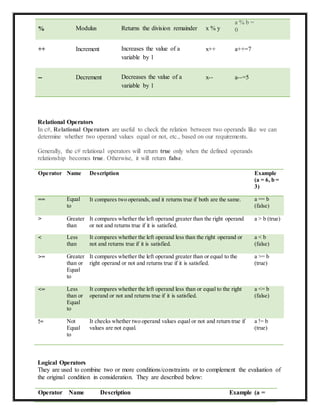
1.Arithmetic Operators
These are used to perform arithmetic/mathematical operations on operands. The Binary
Operators falling in this category are :
Operator Name Description Example
Example
(a = 6, b
= 3)
a + b = 9
+ Addition Adds together two values x + y
a - b = 3
- Subtraction Subtracts one value from
another
x - y
* Multiplication Multiplies two values x * y
a * b =
18
a / b = 2
/ Division Divides one value by another x / y
% Modulus Returns the division remainder x % y
a % b =
0
++ Increment Increases the value of a
variable by 1
x++ a++=7
-- Decrement Decreases the value of a
variable by 1
x-- a--=5
Relational Operators
In c#, Relational Operators are useful to check the relation between two operands like we can
determine whether two operand values equal or not, etc., based on our requirements.
Generally, the c# relational operators will return true only when the defined operands
relationship becomes true. Otherwise, it will return false.
Operator Name Description Example
(a = 6, b =
3)
== Equal
to
It compares two operands, and it returns true if both are the same. a == b
(false)
> Greater
than
It compares whether the left operand greater than the right operand
or not and returns true if it is satisfied.
a > b (true)
< Less
than
It compares whether the left operand less than the right operand or
not and returns true if it is satisfied.
a < b
(false)
>= Greater
than or
Equal
to
It compares whether the left operand greater than or equal to the
right operand or not and returns true if it is satisfied.
a >= b
(true)
<= Less
than or
Equal
to
It compares whether the left operand less than or equal to the right
operand or not and returns true if it is satisfied.
a <= b
(false)
!= Not
Equal
to
It checks whether two operand values equal or not and return true if
values are not equal.
a != b
(true)
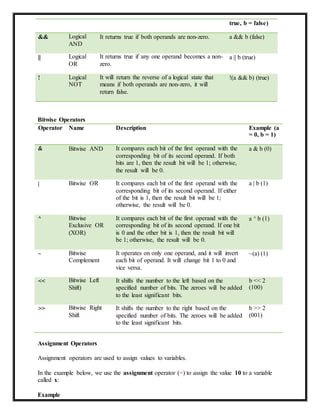
Logical Operators
They are used to combine two or more conditions/constraints or to complement the evaluation of
the original condition in consideration. They are described below:
Operator Name Description Example (a =
true, b = false)
&& Logical
AND
It returns true if both operands are non-zero. a && b (false)
|| Logical
OR
It returns true if any one operand becomes a non-
zero.
a || b (true)
! Logical
NOT
It will return the reverse of a logical state that
means if both operands are non-zero, it will
return false.
!(a && b) (true)
Bitwise Operators
Operator Name Description Example (a
= 0, b = 1)
& Bitwise AND It compares each bit of the first operand with the
corresponding bit of its second operand. If both
bits are 1, then the result bit will be 1; otherwise,
the result will be 0.
a & b (0)
| Bitwise OR It compares each bit of the first operand with the
corresponding bit of its second operand. If either
of the bit is 1, then the result bit will be 1;
otherwise, the result will be 0.
a | b (1)
^ Bitwise
Exclusive OR
(XOR)
It compares each bit of the first operand with the
corresponding bit of its second operand. If one bit
is 0 and the other bit is 1, then the result bit will
be 1; otherwise, the result will be 0.
a ^ b (1)
~ Bitwise
Complement
It operates on only one operand, and it will invert
each bit of operand. It will change bit 1 to 0 and
vice versa.
~(a) (1)
<< Bitwise Left
Shift)
It shifts the number to the left based on the
specified number of bits. The zeroes will be added
to the least significant bits.
b << 2
(100)
>> Bitwise Right
Shift
It shifts the number to the right based on the
specified number of bits. The zeroes will be added
to the least significant bits.
b >> 2
(001)
Assignment Operators
Assignment operators are used to assign values to variables.
In the example below, we use the assignment operator (=) to assign the value 10 to a variable
called x:
Example
int x = 10;
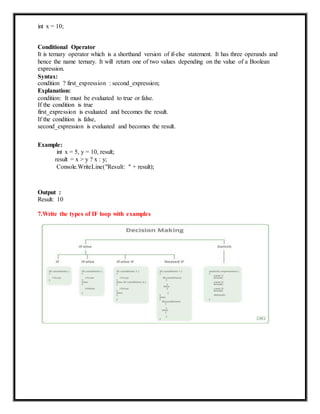
Conditional Operator
It is ternary operator which is a shorthand version of if-else statement. It has three operands and
hence the name ternary. It will return one of two values depending on the value of a Boolean
expression.
Syntax:
condition ? first_expression : second_expression;
Explanation:
condition: It must be evaluated to true or false.
If the condition is true
first_expression is evaluated and becomes the result.
If the condition is false,
second_expression is evaluated and becomes the result.
Example:
int x = 5, y = 10, result;
result = x > y ? x : y;
Console.WriteLine("Result: " + result);
Output :
Result: 10
7.Write the types of IF loop with examples
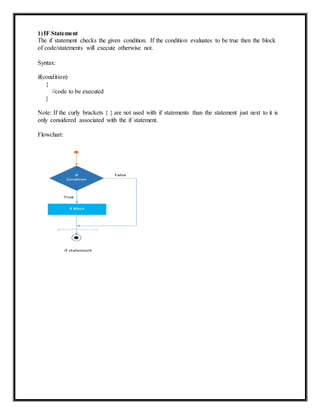
1)IF Statement
The if statement checks the given condition. If the condition evaluates to be true then the block
of code/statements will execute otherwise not.
Syntax:
if(condition)
{
//code to be executed
}
Note: If the curly brackets { } are not used with if statements than the statement just next to it is
only considered associated with the if statement.
Flowchart:
Example:
if (20 > 18)
{
Console.WriteLin e("20 is greater than 18");
}
IF – else Statement
The if statement evaluates the code if the condition is true but what if the condition is not true,
here comes the else statement. It tells the code what to do when the if condition is false.
Syntax:
if(condition)
{
// code if condition is true
}
else
{
// code if condition is false
}
Flowchart:
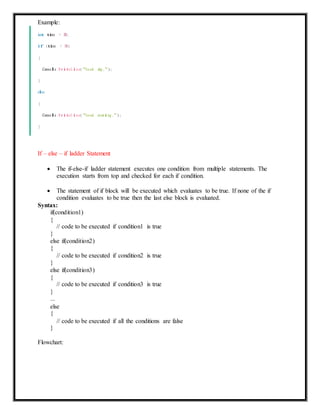
Example:
int time = 20;
if (time < 18)
{
Console.WriteLin e("Go od day.");
}
else
{
Console.WriteLin e("Go od evening .");
}
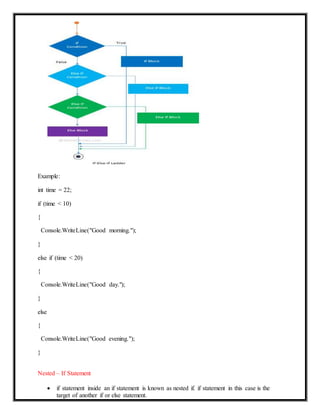
If – else – if ladder Statement
 The if-else-if ladder statement executes one condition from multiple statements. The
execution starts from top and checked for each if condition.
 The statement of if block will be executed which evaluates to be true. If none of the if
condition evaluates to be true then the last else block is evaluated.
Syntax:
if(condition1)
{
// code to be executed if condition1 is true
}
else if(condition2)
{
// code to be executed if condition2 is true
}
else if(condition3)
{
// code to be executed if condition3 is true
}
...
else
{
// code to be executed if all the conditions are false
}
Flowchart:
Example:
int time = 22;
if (time < 10)
{
Console.WriteLine("Good morning.");
}
else if (time < 20)
{
Console.WriteLine("Good day.");
}
else
{
Console.WriteLine("Good evening.");
}
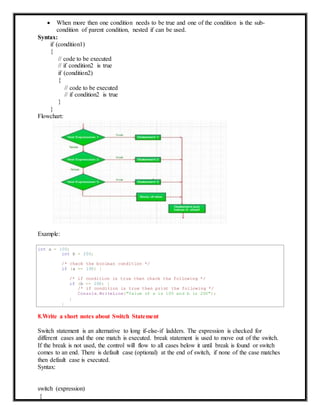
Nested – If Statement
 if statement inside an if statement is known as nested if. if statement in this case is the
target of another if or else statement.
int a = 100;
int b = 200;
/* check the boolean condition */
if (a == 100) {
/* if condition is true then check the following */
if (b == 200) {
/* if condition is true then print the following */
Console.WriteLine("Value of a is 100 and b is 200");
}
}
 When more then one condition needs to be true and one of the condition is the sub-
condition of parent condition, nested if can be used.
Syntax:
if (condition1)
{
// code to be executed
// if condition2 is true
if (condition2)
{
// code to be executed
// if condition2 is true
}
}
Flowchart:
Example:
8.Write a short notes about Switch Statement
Switch statement is an alternative to long if-else-if ladders. The expression is checked for
different cases and the one match is executed. break statement is used to move out of the switch.
If the break is not used, the control will flow to all cases below it until break is found or switch
comes to an end. There is default case (optional) at the end of switch, if none of the case matches
then default case is executed.
Syntax:
switch (expression)
{
case value1: // statement sequence
break;
case value2: // statement sequence
break;
.
.
.
case valueN: // statement sequence
break;
default: // default statement sequence
}
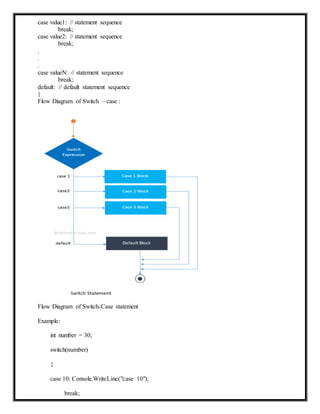
Flow Diagram of Switch – case :
Flow Diagram of Switch-Case statement
Example:
int number = 30;
switch(number)
{
case 10: Console.WriteLine("case 10");
break;
case 20: Console.WriteLine("case 20");
break;
case 30: Console.WriteLine("case 30");
break;
default: Console.WriteLine("None matches");
break;
Output:
case 30
9.What is Entry control Loop? Explain with proper coding
LOOPS IN C#
Loops are used to execute one or more statements multiple times until a specified condition is
fulfilled. There are many loops in C# such as for loop, while loop, do while loop etc. Details
about these are given as follows:
1.for loop in C#
The for loop executes one or more statements multiple times as long as the loop condition
is satisfied.
Syntax:
for(initialization; condition; incr/decr){
//code tobe executed
}
If the loop condition is true, the body of the for loop is executed. Otherwise, the control
flow jumps to the next statement after the for loop.
Flowchart:
do-while loop in C#
The do while loop executes one or more statements multiple times as long as the loop condition
is satisfied. It is similar to the while loop but the while loop has the test condition at the start of
the loop and the do while loop has the test condition at the end of the loop. So it executes at least
once always.
The syntax of the do while loop is given as follows:
do
{
// These statements will be executed if the condition evaluates to true
}while (condition);
Source Code:
using System;
namespace LoopDemo
{
class Example {
static void Main(string[] args) {
int i = 1;
Console.WriteLine("First 10 Natural Numbers are: ");
do
{
Console.WriteLine( i );
i++;
} while (i <= 10);
}
}
}
The output of the above program is as follows:
First 10 Natural Numbers are:
1
2
3
4
5
6
7
8
9
10
10.Define Exit control Loop.Explain with example
An exit controlled loop is that category of loops in which the test condition is checked after the
execution of the body of the loop.
while loop in C#
The while loop continuously executes one or more statements as long as the loop condition is
satisfied.
Syntax:
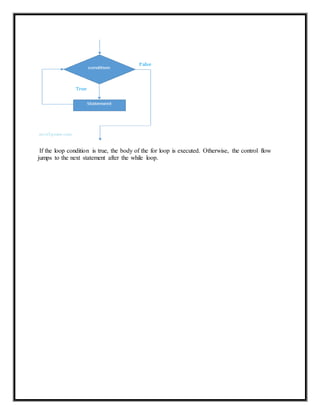
If the loop condition is true, the body of the for loop is executed. Otherwise, the control flow
jumps to the next statement after the while loop.
A diagram that demonstrates the flow in the while loop is given as follows:
:
Source Code: Program that demonstrates while loop in C#
using System;
namespace LoopDemo
{
class Example {
static void Main(string[] args) {
int i = 1;
Console.WriteLine("First 10 Natural Numbers are: ");
while (i <= 10)
{
Console.WriteLine( i );
i++;
}
}
}
}
The output of the above program is as follows:
First 10 Natural Numbers are:
1
2
3
4
5
6
7
8
9
10

Unit 1 question and answer

  • 1.
    C# AND.NET PROGRAMMING(18UCSC61) Unit-I: Introducing C#-Understanding .NET: The C# Environment Literals,Variables and Data Types DecisionMaking and Looping 1.Explain the role of CLR in .NET? Components of .NET Framework CLR (common language runtime) o It converts the program into native code. o Handles Exceptions o Provides type-safety o Memory management o Provides security o Improved performance o Language independent o Platform independent o Garbage collection o Provides language features such as inheritance, interfaces, and overloading for object-oriented programmings. MAIN COMPONENTS OF CLR: CTS (Common Type System) Every programming language has its own data type system, so CTS is responsible for understanding all the data type systems of .NET programming languages and converting them into CLR understandable format which will be a common format. There are 2 Types of CTS that every .NET programming language have : 1. Value Types: Value Types will store the value directly into the memory location. These types work with stack mechanisms only. CLR allows memory for these at Compile Time. 2. Reference Types: Reference Types will contain a memory address of value because the reference types won’t store the variable value directly in memory. These types work with Heap mechanism. CLR allot memory for these at Runtime.
  • 2.
    GarbageCollector: It is usedto provide the Automatic Memory Management feature. If there was no garbage collector, programmers would have to write the memory management codes which will be a kind of overhead on programmers. JIT(JustInTimeCompiler): It is responsible for converting the CIL(Common Intermediate Language) into machine code or native code using the Common Language Runtime environment. CLS (Common language Specification) It is a subset of common type system (CTS) that defines a set of rules and regulations which should be followed by every language that comes under the .net framework. It is responsible for converting the different .NET programming language syntactical rules and regulations into CLR understandable format. Basically, it provides Language Interoperability. Language Interoperability means providing execution support to other programming languages also in .NET framework. Language Interoperability can be achieved in two ways : 1. Managed Code: The MSIL code which is managed by the CLR is known as the Managed Code. For managed code CLR provides three .NET facilities: 2. Unmanaged Code: Before .NET development, programming languages like.COM Components & Win32 API do not generate the MSIL code. So these are not managed by CLR rather managed by Operating System. 2.Write the basic structure of C# program with details. Structure of C# Program: namespace HelloWorld { class Program { static void Main(string[] args) { Console.WriteLine("Hello World!"); } } }
  • 3.
    Comments: Comments areused for explaining code and are used in similar manner as in Java or C or C++. Compilers ignore the comment entries and does not execute them. Comments can be of single line or multiple lines. 1.Single line Comments: Syntax: // Single line comment 2.Multi line comments: Syntax: /* Multi line comments*/ 1. using System: using keyword is used to include the System namespace in the program. namespace declaration: A namespace is a collection of classes. The HelloWorldnamespace contains the class Program 2. class: The class contains the data and methods to be used in the program. Methods define the behavior of the class. Class Program has only one method Main similar to JAVA. 3. static void Main(): static keyword tells us that this method is accessible without instantiating the class. 4. void keywords tells that this method will not return anything. Main() method is the entry-point of our application. In our program, Main() method specifies its behavior with the statement Console.WriteLine(“Hello World”); . 5. Console.WriteLine(): WriteLine() is a method of the Console class defined in the System namespace. 6. Console.ReadKey(): This is for the VS.NET Users. This makes the program wait for a key press and prevents the screen from running and closing quickly. Note: Every C# statement ends with a semicolon ;. Note: C# is case-sensitive: "MyClass" and "myclass" has different meaning. WriteLine or Write The most common method to output something in C# is WriteLine(), but you can also use Write(). The difference is that WriteLine()prints the output on a new line each time, 3.Explain the different types in Literals with proper example The fixed values are called as Literal. Literal is a value that is used by the variables. Values can be either an integer, float or string, etc.
  • 4.
    Boolean Literal Only twovalues are allowed for Boolean literals i.e. true and false. Example bool b = true; bool c = false; Integer Literal Integer literals are used to write values of types int, uint, long, and ulong. Integer literals have two possible forms: decimal and hexadecimal. Example int x = 101; int x = 0146; int x = 0X123Face; Real Literal Real literals are used to write values of types float, double, and decimal. Example Double d = 3.14145 // Valid Double d = 312569E-5 // Valid Double d = 125E // invalid: Incom plete exponent Double d = 784f // valid Double d = .e45 Character Literal A character literal represents a single character, and usually consists of a character in quotes, as in 'a'. Example
  • 5.
    String Literal Literals whichare enclosed in double quotes(“”) or starts with @”” are known as the String literals. Example String s1 = "Hello Geeks!"; String s2 = @"Hello Geeks!"; Null Literal Null Literal is literal that denotes null type. Moreover, null can fit to any reference-type . and hence is a very good example for polymorphism. 4.Define Variable?How to declare variable ? In C#, a variable contains a data value of the specific data type. Syntax: type variable_name = value; or type variable_names; Example: char var = 'h'; // Declaring and Initializing character variable
  • 6.
    int a, b,c; // Declaring variables a, b and c of int type The following declares and initializes a variable of an int type. Example: C# Variable int num = 100; Above, int is a data type, num is a variable name (identifier). The = operator is used to assign a value to a variable. The right side of the = operator is a value that will be assigned to left side variable. Above, 100 is assigned to a variable num. The following declares and initializes variables of different data types. Example: C# Variables int num = 100; float rate = 10.2f; decimal amount = 100.50M; char code = 'C'; bool isValid = true; string name = "Steve"; The followings are naming conventions for declaring variables in C#:  Variable names must be unique.  Variable names can contain letters, digits, and the underscore _ only.  Variable names must start with a letter.  Variable names are case-sensitive, num and Num are considered different names.  Variable names cannot contain reserved keywords. Must prefix @ before keyword if want reserve keywords as identifiers. C# is the strongly typed language. It means you can assign a value of the specified data type. You cannot assign an integer value to string type or vice-versa. Example: Cannot assign string to int type variable int num = "Steve"; Variables can be declared first and initialized later. Example: Late Initialization int num; num = 100; A variable must be assigned a value before using it, otherwise, C# will give a compile-time error. Error: Invalid Assignment The value of a variable can be changed anytime after initializing it. int i; int j = i; //compile-time error: Use of unassigned local variable 'i'
  • 7.
    Example: C# Variable intnum = 100; num = 200; Console.WriteLine(num); //output: 200 Multiple variables of the same data type can be declared and initialized in a single line separated by commas. Example: Multiple Variables in a Single Line int i, j = 10, k = 100; Multiple variables of the same type can also be declared in multiple lines separated by a comma. The compiler will consider it to be one statement until it encounters a semicolon ;. Example: Multi-Line Declarations int i = 0, j = 10, k = 100; The value of a variable can be assigned to another variable of the same data type. However, a value must be assigned to a variable before using it. Example: Variable Assignment int i = 100; int j = i; // value of j will be 100 5.Write a short note about C#| Data Types Data types specify the type of data that a valid C# variable can hold. C# is a strongly typed programming language because in C#, each type of data (such as integer, character, float, and so forth) is predefined as part of the programming language and all constants or variables defined for a given program must be described with one of the data types. Data types in C# is mainly divided into three categories 1. Value Data Types 2. Reference Data Types 3. Pointer Data Type
  • 8.
    1.Value Data Types: In C#, the Value Data Types will directly store the variable value in memory and it will also accept both signed and unsigned literals. The derived class for these data types are System.ValueType. Following are different Value Data Types in C# programming language :  Signed & Unsigned Integral Types : There are 8 integral types which provide support for 8-bit, 16-bit, 32-bit, and 64-bit values in signed or unsigned form.  Floating Point Types :There are 2 floating point data types which contain the decimal point.  Float: It is 32-bit single-precision floating point type. It has 7 digit Precision. To initialize a float variable, use the suffix f or F. Like, float x = 3.5F;. If the suffix F or f will not use then it is treated as double.  Double:It is 64-bit double-precision floating point type. It has 14 – 15 digit Precision. To initialize a double variable, use the suffix d or D. But it is not mandatory to use suffix because by default floating data types are the double type.  Decimal Types : The decimal type is a 128-bit data type suitable for financial and monetary calculations. It has 28-29 digit Precision. To initialize a decimal variable, use the suffix m or M. Like as, decimal x = 300.5m;. If the suffix m or M will not use then it is treated as double.  Character Types : The character types represents a UTF-16 code unit or represents the 16-bit Unicode character. Example : // C# program to demonstrate // the above data types using System; namespace ValueTypeTest { class GeeksforGeeks { // Main function static void Main() { // declaring character char a = 'G'; // Integer data type is generally // used for numeric values int i = 89; short s = 56; // this will give error as number // is larger than short range // short s1 = 87878787878; // long uses Integer values which
  • 9.
    // may signedor unsigned long l = 4564; // UInt data type is generally // used for unsigned integer values uint ui = 95; ushort us = 76; // this will give error as number is // larger than short range // ulong data type is generally // used for unsigned integer values ulong ul = 3624573; // by default fraction value // is double in C# double d = 8.358674532; // for float use 'f' as suffix float f = 3.7330645f; // for float use 'm' as suffix decimal dec = 389.5m; } } } Output : char: G integer: 89 short: 56 long: 4564 Console.WriteLine("char: " + a); Console.WriteLine("integer: " + i); Console.WriteLine("short: " + s); Console.WriteLine("long: " + l); Console.WriteLine("float: " + f); Console.WriteLine("double: " + d); Console.WriteLine("decimal: " + dec); Console.WriteLine("Unsinged integer: " + ui); Console.WriteLine("Unsinged short: " + us); Console.WriteLine("Unsinged long: " + ul); float: 3.733064 double: 8.358674532 decimal: 389.5 Unsinged integer: 95 Unsinged short: 76 Unsinged long: 3624573
  • 10.
    Boolean Types :It has to be assigned either true or false value. Values of type bool are not converted implicitly or explicitly (with casts) to any other type. But the programmer can easily write conversion code. 2.Reference Data Types : The Reference Data Types will contain a memory address ofvariable value because the reference types won’t store the variable value directly in memory. The built-in reference types are string, object.  String : It represents a sequence of Unicode characters and its type name is System.String. So, string and String are equivalent. Example : string s1 = "hello"; // creating through string keyword String s2 = "welcome"; // creating through String class  Object : In C#, all types, predefined and user-defined, reference types and value types, inherit directly or indirectly from Object. So basically it is the base class for all the data types in C#. Before assigning values, it needs type conversion. When a variable of a value type is converted to object, it’s called boxing. When a variable of type object is converted to a value type, it’s called unboxing. Its type name is System.Object. Example : // C# program to demonstrate // the Reference data types using System; namespace ValueTypeTest { class GeeksforGeeks { // Main Function static void Main() { // declaring string string a = "Geeks"; //append in a a+="for"; a = a+"Geeks"; Console.WriteLine(a); // declare object obj object obj; obj = 20; Console.WriteLine(obj); } } Output : // to show type of object // using GetType() Console.WriteLine(obj.GetType()); } GeeksforGeeks
  • 11.
    20 System.Int32 3.Pointer Data Type: The Pointer Data Types will contain a memory address of thevariable value. To get the pointer details we have a two symbols ampersand (&) and asterisk (*). ampersand (&): It is Known as Address Operator. It is used to determine the address of a variable. asterisk (*): It also known as Indirection Operator. It is used to access the value of an address. Syntax : type* identifier; Example : int* p1, p; // Valid syntax int *p1, *p; // Invalid 6.Explain about OPERATORS Operators are the foundation of any programming language. Thus the functionality of C# language is incomplete without the use of operators. Operators allow us to perform different kinds of operations on operands. In C#, operators Can be categorized based upon their different functionality : Arithmetic Operators Relational Operators Logical Operators Bitwise Operators Assignment Operators Conditional Operator In C#, Operators can also categorized based upon Number of Operands : Unary Operator: Operator that takes one operand to perform the operation. Binary Operator: Operator that takes two operands to perform the operation. Ternary Operator: Operator that takes three operands to perform the operation. 1.Arithmetic Operators These are used to perform arithmetic/mathematical operations on operands. The Binary Operators falling in this category are : Operator Name Description Example Example (a = 6, b = 3) a + b = 9 + Addition Adds together two values x + y a - b = 3 - Subtraction Subtracts one value from another x - y * Multiplication Multiplies two values x * y a * b = 18 a / b = 2 / Division Divides one value by another x / y
  • 12.
    % Modulus Returnsthe division remainder x % y a % b = 0 ++ Increment Increases the value of a variable by 1 x++ a++=7 -- Decrement Decreases the value of a variable by 1 x-- a--=5 Relational Operators In c#, Relational Operators are useful to check the relation between two operands like we can determine whether two operand values equal or not, etc., based on our requirements. Generally, the c# relational operators will return true only when the defined operands relationship becomes true. Otherwise, it will return false. Operator Name Description Example (a = 6, b = 3) == Equal to It compares two operands, and it returns true if both are the same. a == b (false) > Greater than It compares whether the left operand greater than the right operand or not and returns true if it is satisfied. a > b (true) < Less than It compares whether the left operand less than the right operand or not and returns true if it is satisfied. a < b (false) >= Greater than or Equal to It compares whether the left operand greater than or equal to the right operand or not and returns true if it is satisfied. a >= b (true) <= Less than or Equal to It compares whether the left operand less than or equal to the right operand or not and returns true if it is satisfied. a <= b (false) != Not Equal to It checks whether two operand values equal or not and return true if values are not equal. a != b (true) Logical Operators They are used to combine two or more conditions/constraints or to complement the evaluation of the original condition in consideration. They are described below: Operator Name Description Example (a =
  • 13.
    true, b =false) && Logical AND It returns true if both operands are non-zero. a && b (false) || Logical OR It returns true if any one operand becomes a non- zero. a || b (true) ! Logical NOT It will return the reverse of a logical state that means if both operands are non-zero, it will return false. !(a && b) (true) Bitwise Operators Operator Name Description Example (a = 0, b = 1) & Bitwise AND It compares each bit of the first operand with the corresponding bit of its second operand. If both bits are 1, then the result bit will be 1; otherwise, the result will be 0. a & b (0) | Bitwise OR It compares each bit of the first operand with the corresponding bit of its second operand. If either of the bit is 1, then the result bit will be 1; otherwise, the result will be 0. a | b (1) ^ Bitwise Exclusive OR (XOR) It compares each bit of the first operand with the corresponding bit of its second operand. If one bit is 0 and the other bit is 1, then the result bit will be 1; otherwise, the result will be 0. a ^ b (1) ~ Bitwise Complement It operates on only one operand, and it will invert each bit of operand. It will change bit 1 to 0 and vice versa. ~(a) (1) << Bitwise Left Shift) It shifts the number to the left based on the specified number of bits. The zeroes will be added to the least significant bits. b << 2 (100) >> Bitwise Right Shift It shifts the number to the right based on the specified number of bits. The zeroes will be added to the least significant bits. b >> 2 (001) Assignment Operators Assignment operators are used to assign values to variables. In the example below, we use the assignment operator (=) to assign the value 10 to a variable called x: Example
  • 14.
    int x =10; Conditional Operator It is ternary operator which is a shorthand version of if-else statement. It has three operands and hence the name ternary. It will return one of two values depending on the value of a Boolean expression. Syntax: condition ? first_expression : second_expression; Explanation: condition: It must be evaluated to true or false. If the condition is true first_expression is evaluated and becomes the result. If the condition is false, second_expression is evaluated and becomes the result. Example: int x = 5, y = 10, result; result = x > y ? x : y; Console.WriteLine("Result: " + result); Output : Result: 10 7.Write the types of IF loop with examples
  • 15.
    1)IF Statement The ifstatement checks the given condition. If the condition evaluates to be true then the block of code/statements will execute otherwise not. Syntax: if(condition) { //code to be executed } Note: If the curly brackets { } are not used with if statements than the statement just next to it is only considered associated with the if statement. Flowchart:
  • 16.
    Example: if (20 >18) { Console.WriteLin e("20 is greater than 18"); } IF – else Statement The if statement evaluates the code if the condition is true but what if the condition is not true, here comes the else statement. It tells the code what to do when the if condition is false. Syntax: if(condition) { // code if condition is true } else { // code if condition is false } Flowchart:
  • 17.
    Example: int time =20; if (time < 18) { Console.WriteLin e("Go od day."); } else { Console.WriteLin e("Go od evening ."); } If – else – if ladder Statement  The if-else-if ladder statement executes one condition from multiple statements. The execution starts from top and checked for each if condition.  The statement of if block will be executed which evaluates to be true. If none of the if condition evaluates to be true then the last else block is evaluated. Syntax: if(condition1) { // code to be executed if condition1 is true } else if(condition2) { // code to be executed if condition2 is true } else if(condition3) { // code to be executed if condition3 is true } ... else { // code to be executed if all the conditions are false } Flowchart:
  • 18.
    Example: int time =22; if (time < 10) { Console.WriteLine("Good morning."); } else if (time < 20) { Console.WriteLine("Good day."); } else { Console.WriteLine("Good evening."); } Nested – If Statement  if statement inside an if statement is known as nested if. if statement in this case is the target of another if or else statement.
  • 19.
    int a =100; int b = 200; /* check the boolean condition */ if (a == 100) { /* if condition is true then check the following */ if (b == 200) { /* if condition is true then print the following */ Console.WriteLine("Value of a is 100 and b is 200"); } }  When more then one condition needs to be true and one of the condition is the sub- condition of parent condition, nested if can be used. Syntax: if (condition1) { // code to be executed // if condition2 is true if (condition2) { // code to be executed // if condition2 is true } } Flowchart: Example: 8.Write a short notes about Switch Statement Switch statement is an alternative to long if-else-if ladders. The expression is checked for different cases and the one match is executed. break statement is used to move out of the switch. If the break is not used, the control will flow to all cases below it until break is found or switch comes to an end. There is default case (optional) at the end of switch, if none of the case matches then default case is executed. Syntax: switch (expression) {
  • 20.
    case value1: //statement sequence break; case value2: // statement sequence break; . . . case valueN: // statement sequence break; default: // default statement sequence } Flow Diagram of Switch – case : Flow Diagram of Switch-Case statement Example: int number = 30; switch(number) { case 10: Console.WriteLine("case 10"); break;
  • 21.
    case 20: Console.WriteLine("case20"); break; case 30: Console.WriteLine("case 30"); break; default: Console.WriteLine("None matches"); break; Output: case 30 9.What is Entry control Loop? Explain with proper coding LOOPS IN C# Loops are used to execute one or more statements multiple times until a specified condition is fulfilled. There are many loops in C# such as for loop, while loop, do while loop etc. Details about these are given as follows: 1.for loop in C# The for loop executes one or more statements multiple times as long as the loop condition is satisfied. Syntax: for(initialization; condition; incr/decr){ //code tobe executed } If the loop condition is true, the body of the for loop is executed. Otherwise, the control flow jumps to the next statement after the for loop. Flowchart:
  • 22.
    do-while loop inC# The do while loop executes one or more statements multiple times as long as the loop condition is satisfied. It is similar to the while loop but the while loop has the test condition at the start of the loop and the do while loop has the test condition at the end of the loop. So it executes at least once always. The syntax of the do while loop is given as follows: do { // These statements will be executed if the condition evaluates to true }while (condition); Source Code: using System; namespace LoopDemo { class Example { static void Main(string[] args) { int i = 1; Console.WriteLine("First 10 Natural Numbers are: "); do { Console.WriteLine( i ); i++; } while (i <= 10); } } } The output of the above program is as follows: First 10 Natural Numbers are: 1 2 3 4 5 6 7 8 9 10 10.Define Exit control Loop.Explain with example An exit controlled loop is that category of loops in which the test condition is checked after the execution of the body of the loop. while loop in C# The while loop continuously executes one or more statements as long as the loop condition is satisfied. Syntax:
  • 23.
    If the loopcondition is true, the body of the for loop is executed. Otherwise, the control flow jumps to the next statement after the while loop.
  • 24.
    A diagram thatdemonstrates the flow in the while loop is given as follows: : Source Code: Program that demonstrates while loop in C# using System; namespace LoopDemo { class Example { static void Main(string[] args) { int i = 1; Console.WriteLine("First 10 Natural Numbers are: "); while (i <= 10) { Console.WriteLine( i ); i++; } } } } The output of the above program is as follows: First 10 Natural Numbers are: 1 2 3 4 5 6 7 8 9 10