COMPUTING AND PROGRAMMING
FUNDAMENTAL
Unit 1: Programming Process
Developing a Program, Program Development Cycle;
Introduction to Algorithms,Characteristics, Writing an
Algorithm; Flowchart, Symbols, Guidelines for Preparing
Flowchart, Benefits of Flowcharts, Limitations of
Flowcharts; Pseudocode, Pseudocode guidelines,
Benefits of pseudocode, Limitations of Pseudocode;
Program Control Structures.
PROGRAM – COLLECTION OF INSTRUCTIONS
 A program is a set of instructions that a computer follows in order to
perform a particular task.
 A computer program, or just a program, is a sequence of instructions,
written to perform a specified task on a computer.
 A computer requires programs to function, typically executing the
program's instructions in a central processor.
2
9/15/2022
Dr.
Thenmozhi
K
3
9/15/2022
Dr.
Thenmozhi
K
4
9/15/2022
Dr.
Thenmozhi
K
5
9/15/2022
Dr.
Thenmozhi
K
DEVELOPING A PROGRAM
 Plan
 Code
Programmer:
 Good programmer – First plan then code
 Large programming task – divide sub process
 30 minutes planning could save hours of trying to make the code work
properly.
 Well planned code is not only more likely to be correct (or at least closer
to correct), but is also easier to understand—and thus fix. 6
9/15/2022
Dr.
Thenmozhi
K
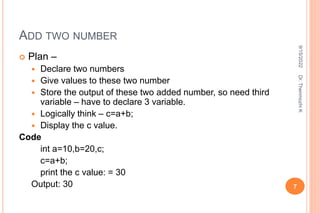
ADD TWO NUMBER
 Plan –
 Declare two numbers
 Give values to these two number
 Store the output of these two added number, so need third
variable – have to declare 3 variable.
 Logically think – c=a+b;
 Display the c value.
Code
int a=10,b=20,c;
c=a+b;
print the c value: = 30
Output: 30 7
9/15/2022
Dr.
Thenmozhi
K
PROGRAMMING
 Computer programming (often shortened to programming) is a process that leads from
an original formulation of a computing problem to executable computer programs
 Programming involves activities such as analysis, developing understanding,
generating algorithms, verification of requirements of algorithms including their
correctness and resources consumption, and implementation (commonly referred to as
coding) of algorithms in a target programming language.
 Source code is written in one or more programming languages.
 The purpose of programming is to find a sequence of instructions that will automate
performing a specific task or solving a given problem.
 The process of programming thus often requires expertise in many different subjects,
including knowledge of the application domain, specialized algorithms and formal
logic.
8
9/15/2022
Dr.
Thenmozhi
K
9
9/15/2022
Dr.
Thenmozhi
K
PDLC
 1. Analyze the problem
 Precisely define the problem to be solved, and write program
specifications – descriptions of the program’s inputs, processing,
outputs, and user interface.
 Eg :
Problem : To find the sum of natural numbers
Inputs : 2 positive numbers
Processing : Adding first number and second number and
storing/Print the result
 User Interface : Any Programming Language (C compiler)
10
9/15/2022
Dr.
Thenmozhi
K
PDLC
 2. Design the program
 Develop a detailed logic plan using a tool such as pseudo code, flowcharts,
object structure diagrams, or event diagrams to group the program’s
activities into modules;
 Devise a method of solution or algorithm for each module; and test the
solution algorithms.

11
9/15/2022
Dr.
Thenmozhi
K
PDLC
 3. Code the program
 Translate the design into an application using a programming language or
application development tool by creating the user interface and writing code;
include internal documentation
 – comments and remarks within the code that explain the purpose of code
statements.
12
9/15/2022
Dr.
Thenmozhi
K
#include<stdio.h>
main()
{
int A, B, TOTAL; // Declare the input variables
printf(“ Enter the first number”);
scanf(“%d”, &A); // Get the first input from the user
printf(“ Enter the Second number”);
scanf(“%d”, &B); // Get the second input from the user
TOTAL=A+B; // Add the numbers and store it in a variable
printf(“ The Sum of Two numbers is %d”,TOTAL); // Print the output
getch() ;
13
9/15/2022
Dr.
Thenmozhi
K
PDLC
 4. Test and debug the program
 Test the program, finding and correcting errors (debugging) until it is error free and
contains enough safeguards to ensure the desired results.
 5. Formalize the solution
 Review and, if necessary, revise internal documentation; formalize and complete end-
user (external) documentation
 6. Operate and Maintain the program
 Provide education and support to end users; correct any unanticipated errors that
emerge and identify user-requested modifications (enhancements). Once errors or
enhancements are identified, the program development life cycle begins again at Step
14
9/15/2022
Dr.
Thenmozhi
K
ALGORITHM
 An algorithm is a set of instructions for solving a problem or
accomplishing a task. (or)
 An algorithm is an effective method and self-contained step-
by-step set of operations to be perform a task in finite amount
of time and space.
Level of description:
 High-level description -algorithm, ignoring the
implementation details.
 Implementation description- way the implementation is done
 Formal description- a finite sequence of instructions to solve
some problem
15
9/15/2022
Dr.
Thenmozhi
K
CHARACTERISTICS
 Instruction precise and unambiguous
 Finite time
 Not be repeated indefinitely
 Optimal results – according to input
 Unique solution
 Finite number of steps
 Meaningful information
 Easy for understanding – begginer
16
9/15/2022
Dr.
Thenmozhi
K
ALGORITHM WRITING
1. Get a clear understanding of the problem statement.
2. Proceed in a step by step fashion.
3. Divide the job into parts.
4. Include variables and their usage and define expressions.
5. Outline each loop
6. Include action statements.
7. Work outwards from the Action Statements, figuring out how each parameter will be determined
each time the loop goes around
8. Go back to step number if loop or condition fails.
9. Use jump statement to jump from one statement to another.
10. Try to avoid unwanted raw data in algorithm.
11. Use break and stop to terminate the process. 17
9/15/2022
Dr.
Thenmozhi
K
EXAMPLE:
 Algorithm to find area of a circle
Step 1. Start
Step 2. Input the value of radius R
Step 3. Let PI=3.14
Step 4. Calculate area=PI*R*R
Step 5. Print area
Step 6.End 18
9/15/2022
Dr.
Thenmozhi
K
19
9/15/2022
Dr.
Thenmozhi
K
20
9/15/2022
Dr.
Thenmozhi
K
21
9/15/2022
Dr.
Thenmozhi
K
FLOWCHART
How to describe an animal to baby?
color, size, etc – not understand
Show picture –
Now – baby understood
“ PICTURES TALKS MORE THAN WORDS’
Like flowcharts - graphical representation of computer
programs. 22
9/15/2022
Dr.
Thenmozhi
K
FLOWCHARTS CONT’
 A flowchart is a visual representation of the sequence of
steps and decisions needed to perform a process.
 Flowcharts use special shapes to represent different types
of actions or steps in a process.
Types :
I. Sequential Structure – sequential order
II. Selective Structure – condition expression (T/F)
III. Looping Structure – Iteration – repeatedly check condition
until false
23
9/15/2022
Dr.
Thenmozhi
K
SEQUENCIAL
24
9/15/2022
Dr.
Thenmozhi
K
SELECTIVE
25
9/15/2022
Dr.
Thenmozhi
K
LOOPING
26
9/15/2022
Dr.
Thenmozhi
K
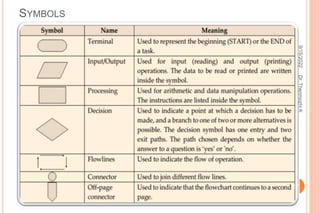
SYMBOLS
27
9/15/2022
Dr.
Thenmozhi
K
SYMBOLS
28
9/15/2022
Dr.
Thenmozhi
K
29
9/15/2022
Dr.
Thenmozhi
K
On-page Connector
Connects two or more parts of
a flowchart, which are on the
same page.
Off-page Connector
Connects two parts of a
flowchart which are spread
over different pages.
30
9/15/2022
Dr.
Thenmozhi
K
GUIDELINES
 Understand a system before flowcharting it.
 Flowchart can have only one start and one stop symbol
 Identify the entities, such as departments, job functions, or external
parties that are to be flowcharted.
 divide the flowchart into columns, label each column
 Use standard flowcharting symbols
 Clearly label all symbols
 Use arrowheads on all flow lines.
 Try to use only one page per flowchart
 On-page connectors are referenced using numbers
 Off-page connectors are referenced using alphabets
 General flow of processes is top to bottom or left to right
 Arrows should not cross each other
 Place the name of the flowchart, the date it was prepared, and the
designer's name on each page of the flowchart. 31
9/15/2022
Dr.
Thenmozhi
K
HOW TO DRAW FLOWCHART
 Input is Number1, Number2
 Output is stored in Sum
 Concentrate on the symbols used.
32
9/15/2022
Dr.
Thenmozhi
K
FLOWCHART ADVANTAGES
 Flowcharts are easier to understand compare to
Algorithms and Pseudo code.
 It helps us to understand Logic of given problem.
 It is very easy to draw flowchart in any word
processing software like MS Word.
 Using only very few symbol, complex problem can be
represented in flowchart.
 Software like RAPTOR can be used to check
correctness of flowchart drawn in computers.
 Flowcharts are one of the good way of documenting
programs.
 It helps us in debugging process.
33
9/15/2022
Dr.
Thenmozhi
K
FLOWCHART DISADVANTAGES
 Manual tracing is needed to check correctness of
flowchart drawn on paper.
 Simple modification in problem logic may leads to
complete redraw of flowchart.
 Showing many branches and looping in flowchart is
difficult.
 In case of complex program/algorithm, flowchart
becomes very complex and clumsy.
 Modification of flowchart is sometimes time consuming.
34
9/15/2022
Dr.
Thenmozhi
K
PSEUDO CODE
 A notation resembling a simplified programming language, used in program
design.
 An outline of a program, written in a form that can easily be converted into real
programming statements.
 Pseudocode cannot be compiled nor executed, and there are no real formatting
or syntax rules. It is simply one step - an important one - in producing the final
code
 Pseudocode is a "text-based" detail (algorithmic) design tool.
 Include control structures such as WHILE, IF-THEN-ELSE, REPEAT-UNTIL,
FOR, and CASE, which are present in many high level languages 35
9/15/2022
Dr.
Thenmozhi
K
PSEUDO GUIDELINES : RULES FOR PSEUDOCODE
 Write only one statement per line
 Capitalize initial keyword
 Indent to show hierarchy
 End multiline structures
 Keep statements language independent
36
9/15/2022
Dr.
Thenmozhi
K
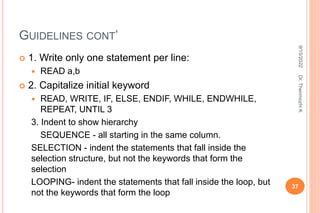
GUIDELINES CONT’
 1. Write only one statement per line:
 READ a,b
 2. Capitalize initial keyword
 READ, WRITE, IF, ELSE, ENDIF, WHILE, ENDWHILE,
REPEAT, UNTIL 3
3. Indent to show hierarchy
SEQUENCE - all starting in the same column.
SELECTION - indent the statements that fall inside the
selection structure, but not the keywords that form the
selection
LOOPING- indent the statements that fall inside the loop, but
not the keywords that form the loop
37
9/15/2022
Dr.
Thenmozhi
K
GUIDELINES CONT’
 4. End multiline structures
 how the IF/ELSE/ENDIF is constructed above. The ENDIF
(or END whatever) always is in line with the IF (or whatever
starts the structure).
 5. Keep statements language independent
 to write in whatever language you are most comfortable
with.
 if you are SURE it will be written in that language, then you
can use the features. If not, then avoid using the special
features.
38
9/15/2022
Dr.
Thenmozhi
K
BENEFITS/ADVANTAGES OF PSEUDOCODE:
 Can be done easily on a word processor Easily modified
 Implements structured concepts well
 Clarify algorithms in many cases.
 Impose increased discipline on the process of documenting detailed design. Provide additional level at which
inspection can be performed.
 Help to trap defects before they become code.
 Increases product reliability.
 May decreases overall costs.
 It can be easily modified as compared to flowchart.
 Its implementation is very useful in structured design elements.
 It can be written easily.
 It can be read and understood easily.
 Converting a pseudocode to programming language is very easy as compared with converting a flowchart to
programming language.
39
9/15/2022
Dr.
Thenmozhi
K
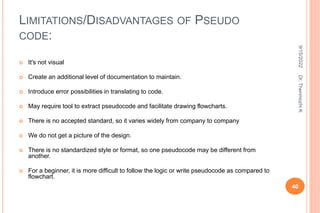
LIMITATIONS/DISADVANTAGES OF PSEUDO
CODE:
 It's not visual
 Create an additional level of documentation to maintain.
 Introduce error possibilities in translating to code.
 May require tool to extract pseudocode and facilitate drawing flowcharts.
 There is no accepted standard, so it varies widely from company to company
 We do not get a picture of the design.
 There is no standardized style or format, so one pseudocode may be different from
another.
 For a beginner, it is more difficult to follow the logic or write pseudocode as compared to
flowchart.
40
9/15/2022
Dr.
Thenmozhi
K
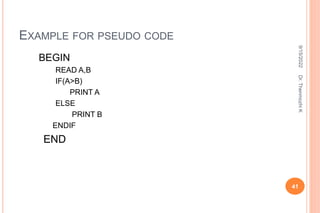
EXAMPLE FOR PSEUDO CODE
BEGIN
READ A,B
IF(A>B)
PRINT A
ELSE
PRINT B
ENDIF
END
41
9/15/2022
Dr.
Thenmozhi
K
PROGRAM CONTROL STRUCTURE
 Control Structures are just a way to specify flow of
control in programs.
 Analyze the flow control
 Act as a decision maker in computing
Basic Terminology:
1) Precondition (Entry control) - state of variables
before entering a control structure.
2) Post condition (Exit control)- state of variables after
the algorithm is run
42
9/15/2022
Dr.
Thenmozhi
K
BASIC CONTROL STRUCTURE
 Sequential
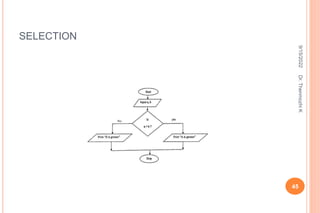
 Selection / conditional / Decision control statements
 Looping /Iteration/ Repetition
43
9/15/2022
Dr.
Thenmozhi
K
SEQUENCE
44
9/15/2022
Dr.
Thenmozhi
K
SELECTION
45
9/15/2022
Dr.
Thenmozhi
K
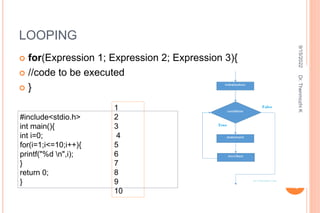
LOOPING
 for(Expression 1; Expression 2; Expression 3){
 //code to be executed
 }
46
#include<stdio.h>
int main(){
int i=0;
for(i=1;i<=10;i++){
printf("%d n",i);
}
return 0;
}
1
2
3
4
5
6
7
8
9
10
9/15/2022
Dr.
Thenmozhi
K
47
9/15/2022
Dr.
Thenmozhi
K
DECISION MAKING
 if statement
 if..else statements
 nested if statements
 if-else-if ladder
 switch statements
 Jump Statements:
 break
 continue
 goto
 return 48
9/15/2022
Dr.
Thenmozhi
K
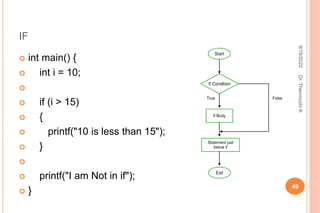
IF
 int main() {
 int i = 10;

 if (i > 15)
 {
 printf("10 is less than 15");
 }

 printf("I am Not in if");
 }
49
9/15/2022
Dr.
Thenmozhi
K
IF ELSE
 int main() {
 int i = 20;

 if (i < 15){

 printf("i is smaller than 15");
 }
 else{

 printf("i is greater than 15");
 }
 return 0;
 }
50
9/15/2022
Dr.
Thenmozhi
K
// C program to illustrate nested-if statement
#include <stdio.h>
int main() {
int i = 10;
if (i == 10)
{
// First if statement
if (i < 15)
printf("i is smaller than 15n");
// Nested - if statement
// Will only be executed if statement above
// is true
if (i < 12)
printf("i is smaller than 12 toon");
else
printf("i is greater than 15");
}
return 0;
51
9/15/2022
Dr.
Thenmozhi
K
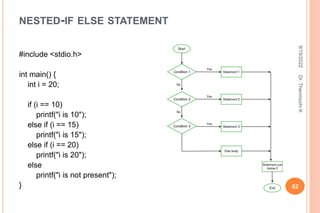
NESTED-IF ELSE STATEMENT
#include <stdio.h>
int main() {
int i = 20;
if (i == 10)
printf("i is 10");
else if (i == 15)
printf("i is 15");
else if (i == 20)
printf("i is 20");
else
printf("i is not present");
} 52
9/15/2022
Dr.
Thenmozhi
K
BREAK
 #include<stdio.h>
 #include<stdlib.h>
 void main ()
 {
 int i;
 for(i = 0; i<10; i++)
 {
 printf("%d ",i);
 if(i == 5)
 break;
 }
 printf("came outside of loop i = %d",i);

 }
 o/p :0 1 2 3 4 5 came outside of loop i = 5
53
9/15/2022
Dr.
Thenmozhi
K
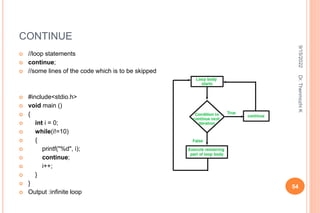
CONTINUE
54
 //loop statements
 continue;
 //some lines of the code which is to be skipped
 #include<stdio.h>
 void main ()
 {
 int i = 0;
 while(i!=10)
 {
 printf("%d", i);
 continue;
 i++;
 }
 }
 Output :infinite loop
9/15/2022
Dr.
Thenmozhi
K
 Syntax1 | Syntax2
 ----------------------------
 goto label; | label:
 . | .
 . | .
 . | .
 label: | goto label;
55
9/15/2022
Dr.
Thenmozhi
K
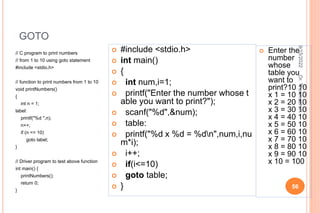
GOTO
// C program to print numbers
// from 1 to 10 using goto statement
#include <stdio.h>
// function to print numbers from 1 to 10
void printNumbers()
{
int n = 1;
label:
printf("%d ",n);
n++;
if (n <= 10)
goto label;
}
// Driver program to test above function
int main() {
printNumbers();
return 0;
}
56
 #include <stdio.h>
 int main()
 {
 int num,i=1;
 printf("Enter the number whose t
able you want to print?");
 scanf("%d",&num);
 table:
 printf("%d x %d = %dn",num,i,nu
m*i);
 i++;
 if(i<=10)
 goto table;
 }
 Enter the
number
whose
table you
want to
print?10 10
x 1 = 10 10
x 2 = 20 10
x 3 = 30 10
x 4 = 40 10
x 5 = 50 10
x 6 = 60 10
x 7 = 70 10
x 8 = 80 10
x 9 = 90 10
x 10 = 100
9/15/2022
Dr.
Thenmozhi
K
// C code to illustrate return
// statement
#include <stdio.h>
// non-void return type
// function to calculate sum
int SUM(int a, int b)
{
int s1 = a + b;
return s1;
}
// returns void
// function to print
void Print(int s2)
{
printf("The sum is %d", s2);
return;
}
57
int main()
{
int num1 = 10;
int num2 = 10;
int sum_of =
SUM(num1, num2);
Print(sum_of);
return 0;
}
Output: The sum is 20
9/15/2022
Dr.
Thenmozhi
K
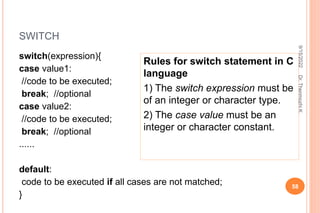
SWITCH
switch(expression){
case value1:
//code to be executed;
break; //optional
case value2:
//code to be executed;
break; //optional
......
default:
code to be executed if all cases are not matched;
}
58
Rules for switch statement in C
language
1) The switch expression must be
of an integer or character type.
2) The case value must be an
integer or character constant.
9/15/2022
Dr.
Thenmozhi
K
59
9/15/2022
Dr.
Thenmozhi
K
SWITCH
 #include<stdio.h>
 int main(){
 int number=0;
 printf("enter a number:");
 scanf("%d",&number);
 switch(number){
 case 10:
 printf("number is equals to 10
");
 break;
 case 50:
 printf("number is equal to 50")
;
 break;
60
 case 100:
 printf("number is equal to 100");
 break;
 default:
 printf("number is not equal to 10,
50 or 100");
 }
 return 0;
 }
 Output :
 enter a number:4 number is not
equal to 10, 50 or 100
9/15/2022
Dr.
Thenmozhi
K
LOOP
61
 FOR
 NESTED FOR
 WHILE
 DO WHILE
9/15/2022
Dr.
Thenmozhi
K
FOR
 for(Expression 1; Expression 2; Expression 3){
 //code to be executed
 }
62
#include<stdio.h>
int main(){
int i=0;
for(i=1;i<=10;i++){
printf("%d n",i);
}
return 0;
}
1
2
3
4
5
6
7
8
9
10
9/15/2022
Dr.
Thenmozhi
K
NESTEAD LOOP
#include<stdio.h>
int main(){
int i=1,j=1;//initializing a local variable
for(i=1;i<=3;i++){
for(j=1;j<=3;j++){
printf("%d &dn",i,j);
if(i==2 && j==2){
break;//will break loop of j only
}
}//end of for loop
return 0;
}
63
1 1
1 2
1 3
2 1
2 2
3 1
3 2
3 3
9/15/2022
Dr.
Thenmozhi
K
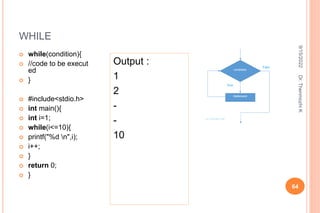
WHILE
 while(condition){
 //code to be execut
ed
 }
 #include<stdio.h>
 int main(){
 int i=1;
 while(i<=10){
 printf("%d n",i);
 i++;
 }
 return 0;
 }
64
Output :
1
2
-
-
10
9/15/2022
Dr.
Thenmozhi
K
DO WHILE
 do{
 //code to be execute
d
 }while(condition);
 #include<stdio.h>
 int main(){
 int i=1;
 do{
 printf("%d n",i);
 i++;
 }while(i<=10);
 return 0;
 } 65
 Output:
 1
 2
 -
 -
 10
9/15/2022
Dr.
Thenmozhi
K
THANK YOU..
Dr.Thenmozhi K
thenmca@gmail.com
66
9/15/2022
Dr.
Thenmozhi
K

Algorithm,Pseudocode,Flowchart.pptx

  • 1.
    COMPUTING AND PROGRAMMING FUNDAMENTAL Unit1: Programming Process Developing a Program, Program Development Cycle; Introduction to Algorithms,Characteristics, Writing an Algorithm; Flowchart, Symbols, Guidelines for Preparing Flowchart, Benefits of Flowcharts, Limitations of Flowcharts; Pseudocode, Pseudocode guidelines, Benefits of pseudocode, Limitations of Pseudocode; Program Control Structures.
  • 2.
    PROGRAM – COLLECTIONOF INSTRUCTIONS  A program is a set of instructions that a computer follows in order to perform a particular task.  A computer program, or just a program, is a sequence of instructions, written to perform a specified task on a computer.  A computer requires programs to function, typically executing the program's instructions in a central processor. 2 9/15/2022 Dr. Thenmozhi K
  • 3.
  • 4.
  • 5.
  • 6.
    DEVELOPING A PROGRAM Plan  Code Programmer:  Good programmer – First plan then code  Large programming task – divide sub process  30 minutes planning could save hours of trying to make the code work properly.  Well planned code is not only more likely to be correct (or at least closer to correct), but is also easier to understand—and thus fix. 6 9/15/2022 Dr. Thenmozhi K
  • 7.
    ADD TWO NUMBER Plan –  Declare two numbers  Give values to these two number  Store the output of these two added number, so need third variable – have to declare 3 variable.  Logically think – c=a+b;  Display the c value. Code int a=10,b=20,c; c=a+b; print the c value: = 30 Output: 30 7 9/15/2022 Dr. Thenmozhi K
  • 8.
    PROGRAMMING  Computer programming(often shortened to programming) is a process that leads from an original formulation of a computing problem to executable computer programs  Programming involves activities such as analysis, developing understanding, generating algorithms, verification of requirements of algorithms including their correctness and resources consumption, and implementation (commonly referred to as coding) of algorithms in a target programming language.  Source code is written in one or more programming languages.  The purpose of programming is to find a sequence of instructions that will automate performing a specific task or solving a given problem.  The process of programming thus often requires expertise in many different subjects, including knowledge of the application domain, specialized algorithms and formal logic. 8 9/15/2022 Dr. Thenmozhi K
  • 9.
  • 10.
    PDLC  1. Analyzethe problem  Precisely define the problem to be solved, and write program specifications – descriptions of the program’s inputs, processing, outputs, and user interface.  Eg : Problem : To find the sum of natural numbers Inputs : 2 positive numbers Processing : Adding first number and second number and storing/Print the result  User Interface : Any Programming Language (C compiler) 10 9/15/2022 Dr. Thenmozhi K
  • 11.
    PDLC  2. Designthe program  Develop a detailed logic plan using a tool such as pseudo code, flowcharts, object structure diagrams, or event diagrams to group the program’s activities into modules;  Devise a method of solution or algorithm for each module; and test the solution algorithms.  11 9/15/2022 Dr. Thenmozhi K
  • 12.
    PDLC  3. Codethe program  Translate the design into an application using a programming language or application development tool by creating the user interface and writing code; include internal documentation  – comments and remarks within the code that explain the purpose of code statements. 12 9/15/2022 Dr. Thenmozhi K
  • 13.
    #include<stdio.h> main() { int A, B,TOTAL; // Declare the input variables printf(“ Enter the first number”); scanf(“%d”, &A); // Get the first input from the user printf(“ Enter the Second number”); scanf(“%d”, &B); // Get the second input from the user TOTAL=A+B; // Add the numbers and store it in a variable printf(“ The Sum of Two numbers is %d”,TOTAL); // Print the output getch() ; 13 9/15/2022 Dr. Thenmozhi K
  • 14.
    PDLC  4. Testand debug the program  Test the program, finding and correcting errors (debugging) until it is error free and contains enough safeguards to ensure the desired results.  5. Formalize the solution  Review and, if necessary, revise internal documentation; formalize and complete end- user (external) documentation  6. Operate and Maintain the program  Provide education and support to end users; correct any unanticipated errors that emerge and identify user-requested modifications (enhancements). Once errors or enhancements are identified, the program development life cycle begins again at Step 14 9/15/2022 Dr. Thenmozhi K
  • 15.
    ALGORITHM  An algorithmis a set of instructions for solving a problem or accomplishing a task. (or)  An algorithm is an effective method and self-contained step- by-step set of operations to be perform a task in finite amount of time and space. Level of description:  High-level description -algorithm, ignoring the implementation details.  Implementation description- way the implementation is done  Formal description- a finite sequence of instructions to solve some problem 15 9/15/2022 Dr. Thenmozhi K
  • 16.
    CHARACTERISTICS  Instruction preciseand unambiguous  Finite time  Not be repeated indefinitely  Optimal results – according to input  Unique solution  Finite number of steps  Meaningful information  Easy for understanding – begginer 16 9/15/2022 Dr. Thenmozhi K
  • 17.
    ALGORITHM WRITING 1. Geta clear understanding of the problem statement. 2. Proceed in a step by step fashion. 3. Divide the job into parts. 4. Include variables and their usage and define expressions. 5. Outline each loop 6. Include action statements. 7. Work outwards from the Action Statements, figuring out how each parameter will be determined each time the loop goes around 8. Go back to step number if loop or condition fails. 9. Use jump statement to jump from one statement to another. 10. Try to avoid unwanted raw data in algorithm. 11. Use break and stop to terminate the process. 17 9/15/2022 Dr. Thenmozhi K
  • 18.
    EXAMPLE:  Algorithm tofind area of a circle Step 1. Start Step 2. Input the value of radius R Step 3. Let PI=3.14 Step 4. Calculate area=PI*R*R Step 5. Print area Step 6.End 18 9/15/2022 Dr. Thenmozhi K
  • 19.
  • 20.
  • 21.
  • 22.
    FLOWCHART How to describean animal to baby? color, size, etc – not understand Show picture – Now – baby understood “ PICTURES TALKS MORE THAN WORDS’ Like flowcharts - graphical representation of computer programs. 22 9/15/2022 Dr. Thenmozhi K
  • 23.
    FLOWCHARTS CONT’  Aflowchart is a visual representation of the sequence of steps and decisions needed to perform a process.  Flowcharts use special shapes to represent different types of actions or steps in a process. Types : I. Sequential Structure – sequential order II. Selective Structure – condition expression (T/F) III. Looping Structure – Iteration – repeatedly check condition until false 23 9/15/2022 Dr. Thenmozhi K
  • 24.
  • 25.
  • 26.
  • 27.
  • 28.
  • 29.
  • 30.
    On-page Connector Connects twoor more parts of a flowchart, which are on the same page. Off-page Connector Connects two parts of a flowchart which are spread over different pages. 30 9/15/2022 Dr. Thenmozhi K
  • 31.
    GUIDELINES  Understand asystem before flowcharting it.  Flowchart can have only one start and one stop symbol  Identify the entities, such as departments, job functions, or external parties that are to be flowcharted.  divide the flowchart into columns, label each column  Use standard flowcharting symbols  Clearly label all symbols  Use arrowheads on all flow lines.  Try to use only one page per flowchart  On-page connectors are referenced using numbers  Off-page connectors are referenced using alphabets  General flow of processes is top to bottom or left to right  Arrows should not cross each other  Place the name of the flowchart, the date it was prepared, and the designer's name on each page of the flowchart. 31 9/15/2022 Dr. Thenmozhi K
  • 32.
    HOW TO DRAWFLOWCHART  Input is Number1, Number2  Output is stored in Sum  Concentrate on the symbols used. 32 9/15/2022 Dr. Thenmozhi K
  • 33.
    FLOWCHART ADVANTAGES  Flowchartsare easier to understand compare to Algorithms and Pseudo code.  It helps us to understand Logic of given problem.  It is very easy to draw flowchart in any word processing software like MS Word.  Using only very few symbol, complex problem can be represented in flowchart.  Software like RAPTOR can be used to check correctness of flowchart drawn in computers.  Flowcharts are one of the good way of documenting programs.  It helps us in debugging process. 33 9/15/2022 Dr. Thenmozhi K
  • 34.
    FLOWCHART DISADVANTAGES  Manualtracing is needed to check correctness of flowchart drawn on paper.  Simple modification in problem logic may leads to complete redraw of flowchart.  Showing many branches and looping in flowchart is difficult.  In case of complex program/algorithm, flowchart becomes very complex and clumsy.  Modification of flowchart is sometimes time consuming. 34 9/15/2022 Dr. Thenmozhi K
  • 35.
    PSEUDO CODE  Anotation resembling a simplified programming language, used in program design.  An outline of a program, written in a form that can easily be converted into real programming statements.  Pseudocode cannot be compiled nor executed, and there are no real formatting or syntax rules. It is simply one step - an important one - in producing the final code  Pseudocode is a "text-based" detail (algorithmic) design tool.  Include control structures such as WHILE, IF-THEN-ELSE, REPEAT-UNTIL, FOR, and CASE, which are present in many high level languages 35 9/15/2022 Dr. Thenmozhi K
  • 36.
    PSEUDO GUIDELINES :RULES FOR PSEUDOCODE  Write only one statement per line  Capitalize initial keyword  Indent to show hierarchy  End multiline structures  Keep statements language independent 36 9/15/2022 Dr. Thenmozhi K
  • 37.
    GUIDELINES CONT’  1.Write only one statement per line:  READ a,b  2. Capitalize initial keyword  READ, WRITE, IF, ELSE, ENDIF, WHILE, ENDWHILE, REPEAT, UNTIL 3 3. Indent to show hierarchy SEQUENCE - all starting in the same column. SELECTION - indent the statements that fall inside the selection structure, but not the keywords that form the selection LOOPING- indent the statements that fall inside the loop, but not the keywords that form the loop 37 9/15/2022 Dr. Thenmozhi K
  • 38.
    GUIDELINES CONT’  4.End multiline structures  how the IF/ELSE/ENDIF is constructed above. The ENDIF (or END whatever) always is in line with the IF (or whatever starts the structure).  5. Keep statements language independent  to write in whatever language you are most comfortable with.  if you are SURE it will be written in that language, then you can use the features. If not, then avoid using the special features. 38 9/15/2022 Dr. Thenmozhi K
  • 39.
    BENEFITS/ADVANTAGES OF PSEUDOCODE: Can be done easily on a word processor Easily modified  Implements structured concepts well  Clarify algorithms in many cases.  Impose increased discipline on the process of documenting detailed design. Provide additional level at which inspection can be performed.  Help to trap defects before they become code.  Increases product reliability.  May decreases overall costs.  It can be easily modified as compared to flowchart.  Its implementation is very useful in structured design elements.  It can be written easily.  It can be read and understood easily.  Converting a pseudocode to programming language is very easy as compared with converting a flowchart to programming language. 39 9/15/2022 Dr. Thenmozhi K
  • 40.
    LIMITATIONS/DISADVANTAGES OF PSEUDO CODE: It's not visual  Create an additional level of documentation to maintain.  Introduce error possibilities in translating to code.  May require tool to extract pseudocode and facilitate drawing flowcharts.  There is no accepted standard, so it varies widely from company to company  We do not get a picture of the design.  There is no standardized style or format, so one pseudocode may be different from another.  For a beginner, it is more difficult to follow the logic or write pseudocode as compared to flowchart. 40 9/15/2022 Dr. Thenmozhi K
  • 41.
    EXAMPLE FOR PSEUDOCODE BEGIN READ A,B IF(A>B) PRINT A ELSE PRINT B ENDIF END 41 9/15/2022 Dr. Thenmozhi K
  • 42.
    PROGRAM CONTROL STRUCTURE Control Structures are just a way to specify flow of control in programs.  Analyze the flow control  Act as a decision maker in computing Basic Terminology: 1) Precondition (Entry control) - state of variables before entering a control structure. 2) Post condition (Exit control)- state of variables after the algorithm is run 42 9/15/2022 Dr. Thenmozhi K
  • 43.
    BASIC CONTROL STRUCTURE Sequential  Selection / conditional / Decision control statements  Looping /Iteration/ Repetition 43 9/15/2022 Dr. Thenmozhi K
  • 44.
  • 45.
  • 46.
    LOOPING  for(Expression 1;Expression 2; Expression 3){  //code to be executed  } 46 #include<stdio.h> int main(){ int i=0; for(i=1;i<=10;i++){ printf("%d n",i); } return 0; } 1 2 3 4 5 6 7 8 9 10 9/15/2022 Dr. Thenmozhi K
  • 47.
  • 48.
    DECISION MAKING  ifstatement  if..else statements  nested if statements  if-else-if ladder  switch statements  Jump Statements:  break  continue  goto  return 48 9/15/2022 Dr. Thenmozhi K
  • 49.
    IF  int main(){  int i = 10;   if (i > 15)  {  printf("10 is less than 15");  }   printf("I am Not in if");  } 49 9/15/2022 Dr. Thenmozhi K
  • 50.
    IF ELSE  intmain() {  int i = 20;   if (i < 15){   printf("i is smaller than 15");  }  else{   printf("i is greater than 15");  }  return 0;  } 50 9/15/2022 Dr. Thenmozhi K
  • 51.
    // C programto illustrate nested-if statement #include <stdio.h> int main() { int i = 10; if (i == 10) { // First if statement if (i < 15) printf("i is smaller than 15n"); // Nested - if statement // Will only be executed if statement above // is true if (i < 12) printf("i is smaller than 12 toon"); else printf("i is greater than 15"); } return 0; 51 9/15/2022 Dr. Thenmozhi K
  • 52.
    NESTED-IF ELSE STATEMENT #include<stdio.h> int main() { int i = 20; if (i == 10) printf("i is 10"); else if (i == 15) printf("i is 15"); else if (i == 20) printf("i is 20"); else printf("i is not present"); } 52 9/15/2022 Dr. Thenmozhi K
  • 53.
    BREAK  #include<stdio.h>  #include<stdlib.h> void main ()  {  int i;  for(i = 0; i<10; i++)  {  printf("%d ",i);  if(i == 5)  break;  }  printf("came outside of loop i = %d",i);   }  o/p :0 1 2 3 4 5 came outside of loop i = 5 53 9/15/2022 Dr. Thenmozhi K
  • 54.
    CONTINUE 54  //loop statements continue;  //some lines of the code which is to be skipped  #include<stdio.h>  void main ()  {  int i = 0;  while(i!=10)  {  printf("%d", i);  continue;  i++;  }  }  Output :infinite loop 9/15/2022 Dr. Thenmozhi K
  • 55.
     Syntax1 |Syntax2  ----------------------------  goto label; | label:  . | .  . | .  . | .  label: | goto label; 55 9/15/2022 Dr. Thenmozhi K
  • 56.
    GOTO // C programto print numbers // from 1 to 10 using goto statement #include <stdio.h> // function to print numbers from 1 to 10 void printNumbers() { int n = 1; label: printf("%d ",n); n++; if (n <= 10) goto label; } // Driver program to test above function int main() { printNumbers(); return 0; } 56  #include <stdio.h>  int main()  {  int num,i=1;  printf("Enter the number whose t able you want to print?");  scanf("%d",&num);  table:  printf("%d x %d = %dn",num,i,nu m*i);  i++;  if(i<=10)  goto table;  }  Enter the number whose table you want to print?10 10 x 1 = 10 10 x 2 = 20 10 x 3 = 30 10 x 4 = 40 10 x 5 = 50 10 x 6 = 60 10 x 7 = 70 10 x 8 = 80 10 x 9 = 90 10 x 10 = 100 9/15/2022 Dr. Thenmozhi K
  • 57.
    // C codeto illustrate return // statement #include <stdio.h> // non-void return type // function to calculate sum int SUM(int a, int b) { int s1 = a + b; return s1; } // returns void // function to print void Print(int s2) { printf("The sum is %d", s2); return; } 57 int main() { int num1 = 10; int num2 = 10; int sum_of = SUM(num1, num2); Print(sum_of); return 0; } Output: The sum is 20 9/15/2022 Dr. Thenmozhi K
  • 58.
    SWITCH switch(expression){ case value1: //code tobe executed; break; //optional case value2: //code to be executed; break; //optional ...... default: code to be executed if all cases are not matched; } 58 Rules for switch statement in C language 1) The switch expression must be of an integer or character type. 2) The case value must be an integer or character constant. 9/15/2022 Dr. Thenmozhi K
  • 59.
  • 60.
    SWITCH  #include<stdio.h>  intmain(){  int number=0;  printf("enter a number:");  scanf("%d",&number);  switch(number){  case 10:  printf("number is equals to 10 ");  break;  case 50:  printf("number is equal to 50") ;  break; 60  case 100:  printf("number is equal to 100");  break;  default:  printf("number is not equal to 10, 50 or 100");  }  return 0;  }  Output :  enter a number:4 number is not equal to 10, 50 or 100 9/15/2022 Dr. Thenmozhi K
  • 61.
    LOOP 61  FOR  NESTEDFOR  WHILE  DO WHILE 9/15/2022 Dr. Thenmozhi K
  • 62.
    FOR  for(Expression 1;Expression 2; Expression 3){  //code to be executed  } 62 #include<stdio.h> int main(){ int i=0; for(i=1;i<=10;i++){ printf("%d n",i); } return 0; } 1 2 3 4 5 6 7 8 9 10 9/15/2022 Dr. Thenmozhi K
  • 63.
    NESTEAD LOOP #include<stdio.h> int main(){ inti=1,j=1;//initializing a local variable for(i=1;i<=3;i++){ for(j=1;j<=3;j++){ printf("%d &dn",i,j); if(i==2 && j==2){ break;//will break loop of j only } }//end of for loop return 0; } 63 1 1 1 2 1 3 2 1 2 2 3 1 3 2 3 3 9/15/2022 Dr. Thenmozhi K
  • 64.
    WHILE  while(condition){  //codeto be execut ed  }  #include<stdio.h>  int main(){  int i=1;  while(i<=10){  printf("%d n",i);  i++;  }  return 0;  } 64 Output : 1 2 - - 10 9/15/2022 Dr. Thenmozhi K
  • 65.
    DO WHILE  do{ //code to be execute d  }while(condition);  #include<stdio.h>  int main(){  int i=1;  do{  printf("%d n",i);  i++;  }while(i<=10);  return 0;  } 65  Output:  1  2  -  -  10 9/15/2022 Dr. Thenmozhi K
  • 66.