BINF 3016: PROTEIN MODELING
Syed Mohammad Lokman
Instructor
Asian University for Women
BINF 3016: PROTEIN MODELING Syed Mohammad Lokman
PROTEIN PROFILING PHARMACOPHORE
MODELING
MOLECULAR DYNAMICS
SIMULATION OF PROTEIN
UniProtKB
https://uniprot.org/
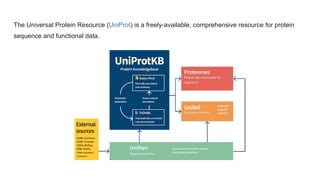
The Universal Protein Resource (UniProt) is a freely-available, comprehensive resource for protein
sequence and functional data.
Where does the data (Sequence data) come from?
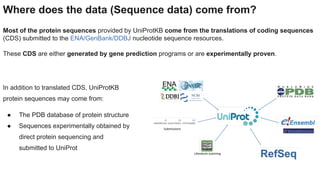
Most of the protein sequences provided by UniProtKB come from the translations of coding sequences
(CDS) submitted to the ENA/GenBank/DDBJ nucleotide sequence resources.
These CDS are either generated by gene prediction programs or are experimentally proven.
In addition to translated CDS, UniProtKB
protein sequences may come from:
● The PDB database of protein structure
● Sequences experimentally obtained by
direct protein sequencing and
submitted to UniProt
Data evidence
1. Experimental data If a piece of information has been experimentally shown in a paper, this will be
indicated with the details of the paper used.
2. Data copied from an experimentally characterised protein: For information which has been
transferred from a related experimentally characterised protein, the accession number of the characterised
protein is provided.
Data evidence
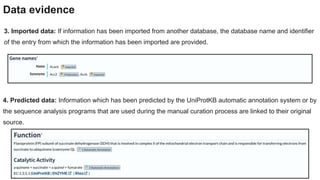
4. Predicted data: Information which has been predicted by the UniProtKB automatic annotation system or by
the sequence analysis programs that are used during the manual curation process are linked to their original
source.
3. Imported data: If information has been imported from another database, the database name and identifier
of the entry from which the information has been imported are provided.
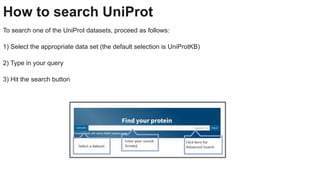
How to search UniProt
To search one of the UniProt datasets, proceed as follows:
1) Select the appropriate data set (the default selection is UniProtKB)
2) Type in your query
3) Hit the search button
Annotation score
What is the annotation score?
The annotation score provides a measure of the annotation content of a UniProtKB entry or proteome. It is a
5-point heuristic scoring system where a score of 5 is associated with the best-annotated entries, and a score
of 1 with entries with basic annotation.
● UniProtKB – the annotation scores can help you to get a quick idea of the relative level of annotation of
the entries in your search results
How are annotation scores calculated?
● Different UniProtKB annotation types are scored either by presence or by number of occurrences.
Annotations with experimental evidence score more highly than equivalent predicted annotations,
thereby favouring expert literature-based curation over automatic annotation.
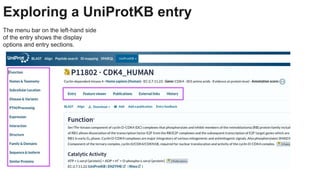
Exploring a UniProtKB entry
The menu bar on the left-hand side
of the entry shows the display
options and entry sections.
When to use UniProt: guided example
This section allows you to revise the knowledge you have gained on this course by providing guided examples
of how UniProt can be used. The following examples demonstrate some uses of UniProt:
1. Finding protein function
2. From disease to protein to variant
3. Download the proteome set for E.coli (strain K12)
Finding protein function: CDC7
From disease to protein to variant:
Spinal Muscular Atrophy 2
Download the proteome set:
E.coli (strain K12)
Thank You

UniprotKB

  • 1.
    BINF 3016: PROTEINMODELING Syed Mohammad Lokman Instructor Asian University for Women
  • 2.
    BINF 3016: PROTEINMODELING Syed Mohammad Lokman
  • 3.
    BINF 3016: PROTEINMODELING Syed Mohammad Lokman PROTEIN PROFILING PHARMACOPHORE MODELING MOLECULAR DYNAMICS SIMULATION OF PROTEIN
  • 4.
  • 5.
    The Universal ProteinResource (UniProt) is a freely-available, comprehensive resource for protein sequence and functional data.
  • 6.
    Where does thedata (Sequence data) come from? Most of the protein sequences provided by UniProtKB come from the translations of coding sequences (CDS) submitted to the ENA/GenBank/DDBJ nucleotide sequence resources. These CDS are either generated by gene prediction programs or are experimentally proven. In addition to translated CDS, UniProtKB protein sequences may come from: ● The PDB database of protein structure ● Sequences experimentally obtained by direct protein sequencing and submitted to UniProt
  • 7.
    Data evidence 1. Experimentaldata If a piece of information has been experimentally shown in a paper, this will be indicated with the details of the paper used. 2. Data copied from an experimentally characterised protein: For information which has been transferred from a related experimentally characterised protein, the accession number of the characterised protein is provided.
  • 8.
    Data evidence 4. Predicteddata: Information which has been predicted by the UniProtKB automatic annotation system or by the sequence analysis programs that are used during the manual curation process are linked to their original source. 3. Imported data: If information has been imported from another database, the database name and identifier of the entry from which the information has been imported are provided.
  • 9.
    How to searchUniProt To search one of the UniProt datasets, proceed as follows: 1) Select the appropriate data set (the default selection is UniProtKB) 2) Type in your query 3) Hit the search button
  • 10.
    Annotation score What isthe annotation score? The annotation score provides a measure of the annotation content of a UniProtKB entry or proteome. It is a 5-point heuristic scoring system where a score of 5 is associated with the best-annotated entries, and a score of 1 with entries with basic annotation. ● UniProtKB – the annotation scores can help you to get a quick idea of the relative level of annotation of the entries in your search results How are annotation scores calculated? ● Different UniProtKB annotation types are scored either by presence or by number of occurrences. Annotations with experimental evidence score more highly than equivalent predicted annotations, thereby favouring expert literature-based curation over automatic annotation.
  • 11.
    Exploring a UniProtKBentry The menu bar on the left-hand side of the entry shows the display options and entry sections.
  • 12.
    When to useUniProt: guided example This section allows you to revise the knowledge you have gained on this course by providing guided examples of how UniProt can be used. The following examples demonstrate some uses of UniProt: 1. Finding protein function 2. From disease to protein to variant 3. Download the proteome set for E.coli (strain K12)
  • 13.
  • 14.
    From disease toprotein to variant: Spinal Muscular Atrophy 2
  • 15.
    Download the proteomeset: E.coli (strain K12)
  • 16.