Understanding SAS Data Step
Processing
Ravi Mandal
Reading Raw Data
• Using the following SAS program:
DATA NEW;
INPUT ID $ AGE TEMPC;
TEMPF=TEMPC*(9/5)+32;
DATALINES;
0001 24 37.3
0002 35 38.2
;
run;
proc print;run;
Ravi M., sasindia@outlook.com
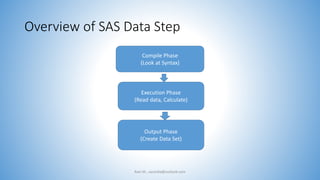
Overview of SAS Data Step
Ravi M., sasindia@outlook.com
Compile Phase
(Look at Syntax)
Execution Phase
(Read data, Calculate)
Output Phase
(Create Data Set)
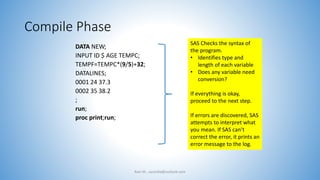
Compile Phase
DATA NEW;
INPUT ID $ AGE TEMPC;
TEMPF=TEMPC*(9/5)+32;
DATALINES;
0001 24 37.3
0002 35 38.2
;
run;
proc print;run;
Ravi M., sasindia@outlook.com
SAS Checks the syntax of
the program.
• Identifies type and
length of each variable
• Does any variable need
conversion?
If everything is okay,
proceed to the next step.
If errors are discovered, SAS
attempts to interpret what
you mean. If SAS can’t
correct the error, it prints an
error message to the log.
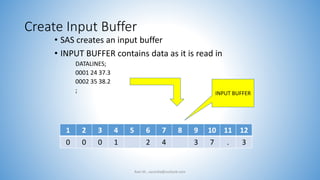
Create Input Buffer
• SAS creates an input buffer
• INPUT BUFFER contains data as it is read in
DATALINES;
0001 24 37.3
0002 35 38.2
;
Ravi M., sasindia@outlook.com
1 2 3 4 5 6 7 8 9 10 11 12
0 0 0 1 2 4 3 7 . 3
INPUT BUFFER
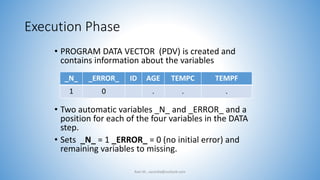
Execution Phase
• PROGRAM DATA VECTOR (PDV) is created and
contains information about the variables
• Two automatic variables _N_ and _ERROR_ and a
position for each of the four variables in the DATA
step.
• Sets _N_ = 1 _ERROR_ = 0 (no initial error) and
remaining variables to missing.
Ravi M., sasindia@outlook.com
_N_ _ERROR_ ID AGE TEMPC TEMPF
1 0 . . .
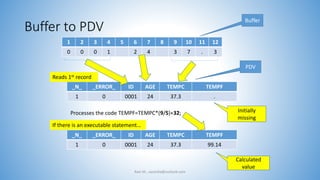
Buffer to PDV
Ravi M., sasindia@outlook.com
1 2 3 4 5 6 7 8 9 10 11 12
0 0 0 1 2 4 3 7 . 3
_N_ _ERROR_ ID AGE TEMPC TEMPF
1 0 0001 24 37.3 .
Calculated
value
Buffer
PDV
_N_ _ERROR_ ID AGE TEMPC TEMPF
1 0 0001 24 37.3 99.14
Processes the code TEMPF=TEMPC*(9/5)+32; Initially
missing
Reads 1st record
If there is an executable statement…
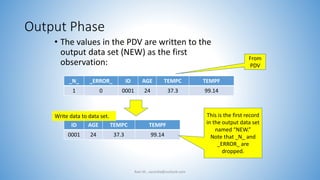
Output Phase
• The values in the PDV are written to the
output data set (NEW) as the first
observation:
Ravi M., sasindia@outlook.com
_N_ _ERROR_ ID AGE TEMPC TEMPF
1 0 0001 24 37.3 99.14
ID AGE TEMPC TEMPF
0001 24 37.3 99.14
This is the first record
in the output data set
named “NEW.”
Note that _N_ and
_ERROR_ are
dropped.
From
PDV
Write data to data set.
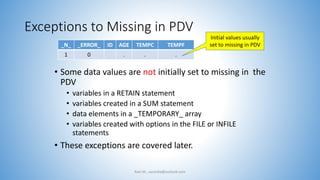
Exceptions to Missing in PDV
• Some data values are not initially set to missing in the
PDV
• variables in a RETAIN statement
• variables created in a SUM statement
• data elements in a _TEMPORARY_ array
• variables created with options in the FILE or INFILE
statements
• These exceptions are covered later.
Ravi M., sasindia@outlook.com
_N_ _ERROR_ ID AGE TEMPC TEMPF
1 0 . . .
Initial values usually
set to missing in PDV
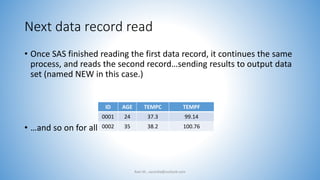
Next data record read
• Once SAS finished reading the first data record, it continues the same
process, and reads the second record…sending results to output data
set (named NEW in this case.)
• …and so on for all records.
Ravi M., sasindia@outlook.com
ID AGE TEMPC TEMPF
0001 24 37.3 99.14
0002 35 38.2 100.76
Descriptor Information
• For the data set, SAS creates and maintains a description about each
SAS data set:
• data set attributes
• variable attributes
• the name of the data set
• member type, the date and time that the data set was created, and the
number, names and data types (character or numeric) of the variables.
Ravi M., sasindia@outlook.com
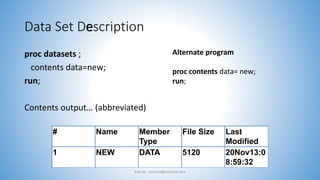
Data Set Description
proc datasets ;
contents data=new;
run;
Contents output… (abbreviated)
Ravi M., sasindia@outlook.com
# Name Member
Type
File Size Last
Modified
1 NEW DATA 5120 20Nov13:0
8:59:32
Alternate program
proc contents data= new;
run;
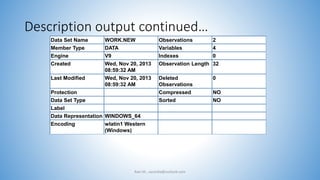
Description output continued…
Data Set Name WORK.NEW Observations 2
Member Type DATA Variables 4
Engine V9 Indexes 0
Created Wed, Nov 20, 2013
08:59:32 AM
Observation Length 32
Last Modified Wed, Nov 20, 2013
08:59:32 AM
Deleted
Observations
0
Protection Compressed NO
Data Set Type Sorted NO
Label
Data Representation WINDOWS_64
Encoding wlatin1 Western
(Windows)
Ravi M., sasindia@outlook.com
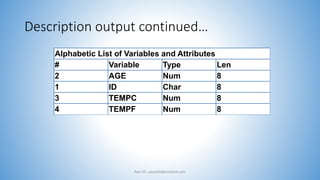
Description output continued…
Alphabetic List of Variables and Attributes
# Variable Type Len
2 AGE Num 8
1 ID Char 8
3 TEMPC Num 8
4 TEMPF Num 8
Ravi M., sasindia@outlook.com
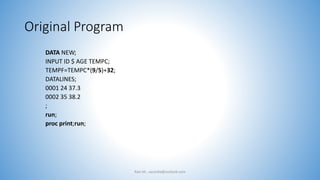
Original Program
DATA NEW;
INPUT ID $ AGE TEMPC;
TEMPF=TEMPC*(9/5)+32;
DATALINES;
0001 24 37.3
0002 35 38.2
;
run;
proc print;run;
Ravi M., sasindia@outlook.com
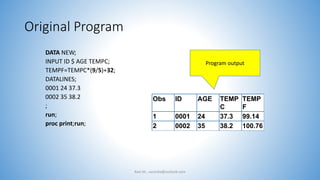
Original Program
DATA NEW;
INPUT ID $ AGE TEMPC;
TEMPF=TEMPC*(9/5)+32;
DATALINES;
0001 24 37.3
0002 35 38.2
;
run;
proc print;run;
Ravi M., sasindia@outlook.com
Obs ID AGE TEMP
C
TEMP
F
1 0001 24 37.3 99.14
2 0002 35 38.2 100.76
Program output
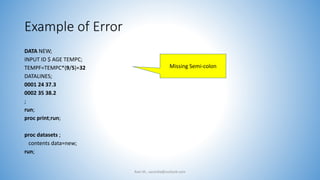
Example of Error
DATA NEW;
INPUT ID $ AGE TEMPC;
TEMPF=TEMPC*(9/5)+32
DATALINES;
0001 24 37.3
0002 35 38.2
;
run;
proc print;run;
proc datasets ;
contents data=new;
run;
Ravi M., sasindia@outlook.com
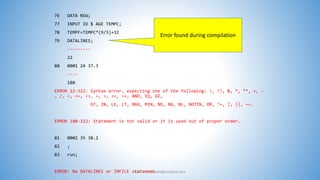
Missing Semi-colon
76 DATA NEW;
77 INPUT ID $ AGE TEMPC;
78 TEMPF=TEMPC*(9/5)+32
79 DATALINES;
---------
22
80 0001 24 37.3
----
180
ERROR 22-322: Syntax error, expecting one of the following: !, !!, &, *, **, +, -
, /, <, <=, <>, =, >, ><, >=, AND, EQ, GE,
GT, IN, LE, LT, MAX, MIN, NE, NG, NL, NOTIN, OR, ^=, |, ||, ~=.
ERROR 180-322: Statement is not valid or it is used out of proper order.
81 0002 35 38.2
82 ;
83 run;
ERROR: No DATALINES or INFILE statement.Ravi M., sasindia@outlook.com
Error found during compilation
Summary - Compilation Phase
• During Compilation
• Check syntax
• Identify type and length of each new variable (is a data type conversion
needed?)
• creates input buffer if there is an INPUT statement for an external file
• creates the Program Data Vector (PDV)
• creates descriptor information for data sets and variable attributes
• Other options not discussed here: DROP; KEEP; RENAME; RETAIN; WHERE;
LABEL; LENGTH; FORMAT; ARRAY; BY; ATTRIB; END=, IN=, FIRST, LAST, POINT=
Ravi M., sasindia@outlook.com
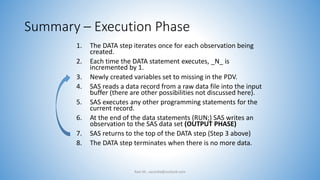
Summary – Execution Phase
1. The DATA step iterates once for each observation being
created.
2. Each time the DATA statement executes, _N_ is
incremented by 1.
3. Newly created variables set to missing in the PDV.
4. SAS reads a data record from a raw data file into the input
buffer (there are other possibilities not discussed here).
5. SAS executes any other programming statements for the
current record.
6. At the end of the data statements (RUN;) SAS writes an
observation to the SAS data set (OUTPUT PHASE)
7. SAS returns to the top of the DATA step (Step 3 above)
8. The DATA step terminates when there is no more data.
Ravi M., sasindia@outlook.com
End
Ravi M., sasindia@outlook.com

Understanding sas data step processing.

  • 1.
    Understanding SAS DataStep Processing Ravi Mandal
  • 2.
    Reading Raw Data •Using the following SAS program: DATA NEW; INPUT ID $ AGE TEMPC; TEMPF=TEMPC*(9/5)+32; DATALINES; 0001 24 37.3 0002 35 38.2 ; run; proc print;run; Ravi M., sasindia@outlook.com
  • 3.
    Overview of SASData Step Ravi M., sasindia@outlook.com Compile Phase (Look at Syntax) Execution Phase (Read data, Calculate) Output Phase (Create Data Set)
  • 4.
    Compile Phase DATA NEW; INPUTID $ AGE TEMPC; TEMPF=TEMPC*(9/5)+32; DATALINES; 0001 24 37.3 0002 35 38.2 ; run; proc print;run; Ravi M., sasindia@outlook.com SAS Checks the syntax of the program. • Identifies type and length of each variable • Does any variable need conversion? If everything is okay, proceed to the next step. If errors are discovered, SAS attempts to interpret what you mean. If SAS can’t correct the error, it prints an error message to the log.
  • 5.
    Create Input Buffer •SAS creates an input buffer • INPUT BUFFER contains data as it is read in DATALINES; 0001 24 37.3 0002 35 38.2 ; Ravi M., sasindia@outlook.com 1 2 3 4 5 6 7 8 9 10 11 12 0 0 0 1 2 4 3 7 . 3 INPUT BUFFER
  • 6.
    Execution Phase • PROGRAMDATA VECTOR (PDV) is created and contains information about the variables • Two automatic variables _N_ and _ERROR_ and a position for each of the four variables in the DATA step. • Sets _N_ = 1 _ERROR_ = 0 (no initial error) and remaining variables to missing. Ravi M., sasindia@outlook.com _N_ _ERROR_ ID AGE TEMPC TEMPF 1 0 . . .
  • 7.
    Buffer to PDV RaviM., sasindia@outlook.com 1 2 3 4 5 6 7 8 9 10 11 12 0 0 0 1 2 4 3 7 . 3 _N_ _ERROR_ ID AGE TEMPC TEMPF 1 0 0001 24 37.3 . Calculated value Buffer PDV _N_ _ERROR_ ID AGE TEMPC TEMPF 1 0 0001 24 37.3 99.14 Processes the code TEMPF=TEMPC*(9/5)+32; Initially missing Reads 1st record If there is an executable statement…
  • 8.
    Output Phase • Thevalues in the PDV are written to the output data set (NEW) as the first observation: Ravi M., sasindia@outlook.com _N_ _ERROR_ ID AGE TEMPC TEMPF 1 0 0001 24 37.3 99.14 ID AGE TEMPC TEMPF 0001 24 37.3 99.14 This is the first record in the output data set named “NEW.” Note that _N_ and _ERROR_ are dropped. From PDV Write data to data set.
  • 9.
    Exceptions to Missingin PDV • Some data values are not initially set to missing in the PDV • variables in a RETAIN statement • variables created in a SUM statement • data elements in a _TEMPORARY_ array • variables created with options in the FILE or INFILE statements • These exceptions are covered later. Ravi M., sasindia@outlook.com _N_ _ERROR_ ID AGE TEMPC TEMPF 1 0 . . . Initial values usually set to missing in PDV
  • 10.
    Next data recordread • Once SAS finished reading the first data record, it continues the same process, and reads the second record…sending results to output data set (named NEW in this case.) • …and so on for all records. Ravi M., sasindia@outlook.com ID AGE TEMPC TEMPF 0001 24 37.3 99.14 0002 35 38.2 100.76
  • 11.
    Descriptor Information • Forthe data set, SAS creates and maintains a description about each SAS data set: • data set attributes • variable attributes • the name of the data set • member type, the date and time that the data set was created, and the number, names and data types (character or numeric) of the variables. Ravi M., sasindia@outlook.com
  • 12.
    Data Set Description procdatasets ; contents data=new; run; Contents output… (abbreviated) Ravi M., sasindia@outlook.com # Name Member Type File Size Last Modified 1 NEW DATA 5120 20Nov13:0 8:59:32 Alternate program proc contents data= new; run;
  • 13.
    Description output continued… DataSet Name WORK.NEW Observations 2 Member Type DATA Variables 4 Engine V9 Indexes 0 Created Wed, Nov 20, 2013 08:59:32 AM Observation Length 32 Last Modified Wed, Nov 20, 2013 08:59:32 AM Deleted Observations 0 Protection Compressed NO Data Set Type Sorted NO Label Data Representation WINDOWS_64 Encoding wlatin1 Western (Windows) Ravi M., sasindia@outlook.com
  • 14.
    Description output continued… AlphabeticList of Variables and Attributes # Variable Type Len 2 AGE Num 8 1 ID Char 8 3 TEMPC Num 8 4 TEMPF Num 8 Ravi M., sasindia@outlook.com
  • 15.
    Original Program DATA NEW; INPUTID $ AGE TEMPC; TEMPF=TEMPC*(9/5)+32; DATALINES; 0001 24 37.3 0002 35 38.2 ; run; proc print;run; Ravi M., sasindia@outlook.com
  • 16.
    Original Program DATA NEW; INPUTID $ AGE TEMPC; TEMPF=TEMPC*(9/5)+32; DATALINES; 0001 24 37.3 0002 35 38.2 ; run; proc print;run; Ravi M., sasindia@outlook.com Obs ID AGE TEMP C TEMP F 1 0001 24 37.3 99.14 2 0002 35 38.2 100.76 Program output
  • 17.
    Example of Error DATANEW; INPUT ID $ AGE TEMPC; TEMPF=TEMPC*(9/5)+32 DATALINES; 0001 24 37.3 0002 35 38.2 ; run; proc print;run; proc datasets ; contents data=new; run; Ravi M., sasindia@outlook.com Missing Semi-colon
  • 18.
    76 DATA NEW; 77INPUT ID $ AGE TEMPC; 78 TEMPF=TEMPC*(9/5)+32 79 DATALINES; --------- 22 80 0001 24 37.3 ---- 180 ERROR 22-322: Syntax error, expecting one of the following: !, !!, &, *, **, +, - , /, <, <=, <>, =, >, ><, >=, AND, EQ, GE, GT, IN, LE, LT, MAX, MIN, NE, NG, NL, NOTIN, OR, ^=, |, ||, ~=. ERROR 180-322: Statement is not valid or it is used out of proper order. 81 0002 35 38.2 82 ; 83 run; ERROR: No DATALINES or INFILE statement.Ravi M., sasindia@outlook.com Error found during compilation
  • 19.
    Summary - CompilationPhase • During Compilation • Check syntax • Identify type and length of each new variable (is a data type conversion needed?) • creates input buffer if there is an INPUT statement for an external file • creates the Program Data Vector (PDV) • creates descriptor information for data sets and variable attributes • Other options not discussed here: DROP; KEEP; RENAME; RETAIN; WHERE; LABEL; LENGTH; FORMAT; ARRAY; BY; ATTRIB; END=, IN=, FIRST, LAST, POINT= Ravi M., sasindia@outlook.com
  • 20.
    Summary – ExecutionPhase 1. The DATA step iterates once for each observation being created. 2. Each time the DATA statement executes, _N_ is incremented by 1. 3. Newly created variables set to missing in the PDV. 4. SAS reads a data record from a raw data file into the input buffer (there are other possibilities not discussed here). 5. SAS executes any other programming statements for the current record. 6. At the end of the data statements (RUN;) SAS writes an observation to the SAS data set (OUTPUT PHASE) 7. SAS returns to the top of the DATA step (Step 3 above) 8. The DATA step terminates when there is no more data. Ravi M., sasindia@outlook.com
  • 21.