SASTechies [email_address] http://www.sastechies.com
DATA steps  typically create or modify SAS data sets, but they can also be used to produce custom-designed reports. For example, you can use DATA steps to  put your data into a SAS data set  compute the values for new variables  check for and correct errors in your data  produce new SAS data sets by sub-setting, merging, and updating existing data sets.  PROC (procedure) steps  typically analyze and process data in the form of a SAS data set, and they sometimes create SAS data sets that contain the results of the procedure. PROC steps control a library of prewritten routines (procedures) that perform tasks on SAS data sets, such as listing, sorting, and summarizing data. For example, you can use PROC steps to  print a report  produce descriptive statistics  create a tabular report  produce plots and charts. SAS Techies  2009 11/13/09
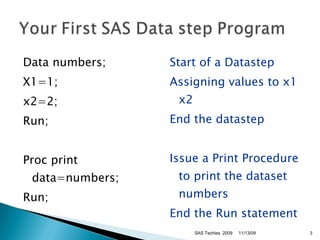
Data numbers; X1=1;  x2=2; Run; Proc print data=numbers; Run; Start of a Datastep Assigning values to x1 x2 End the datastep Issue a Print Procedure to print the dataset numbers End the Run statement SAS Techies  2009 11/13/09
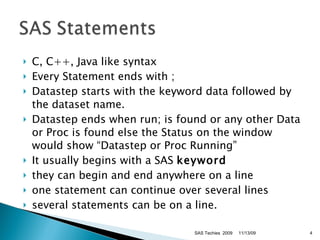
C, C++, Java like syntax Every Statement ends with ; Datastep starts with the keyword data followed by the dataset name. Datastep ends when run; is found or any other Data or Proc is found else the Status on the window would show “Datastep or Proc Running” It usually begins with a SAS  keyword   they can begin and end anywhere on a line  one statement can continue over several lines  several statements can be on a line.  SAS Techies  2009 11/13/09
Log would show the entire program with the Run time i.e. Real time and the CPU Time. Any errors or any output with PUT or Macro statements SAS Techies  2009 11/13/09
Output Window would show the output of the Procedure in a Listing or HTML Format, date, time and SAS System message. Results Window would show any results produced Explorer window would show any dataset prepared in that step. SAS Techies  2009 11/13/09
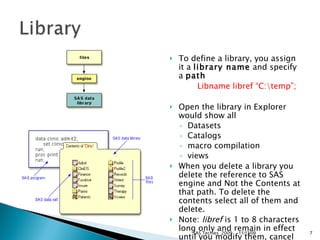
To define a library, you assign it a  library name  and specify a  path   Libname libref “C:\temp”; Open the library in Explorer would show all  Datasets  Catalogs  macro compilation  views When you delete a library you delete the reference to SAS engine and Not the Contents at that path. To delete the contents select all of them and delete. Note:  libref  is 1 to 8 characters long only and remain in effect until you modify them, cancel them, or end your SAS session  SAS Techies  2009 11/13/09
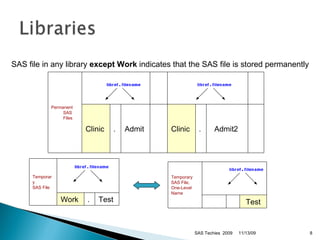
SAS file in any library  except Work  indicates that the SAS file is stored permanently  SAS Techies  2009 11/13/09 Permanent SAS Files                                                 Clinic  .  Admit  Clinic  .  Admit2           Temporary SAS File                      Work  .  Test  Temporary SAS File,  One-Level Name                                 Test
Datalines / cards statement -- Indicates that data lines follow SAS Techies  2009 11/13/09
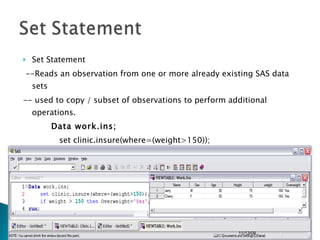
Set Statement --Reads an observation from one or more already existing SAS data sets -- used to copy / subset of observations to perform additional operations. Data work.ins; set clinic.insure(where=(weight>150)); if weight > 150 then Overweight=‘Yes’;  run; SAS Techies  2009 11/13/09
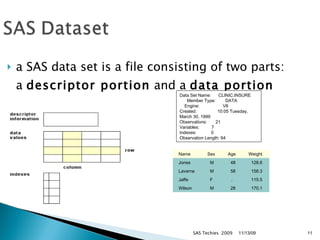
a SAS data set is a file consisting of two parts: a  descriptor portion  and a  data portion     SAS Techies  2009 11/13/09 Data Set Name:  CLINIC.INSURE  Member Type:  DATA  Engine:  V8  Created:  10:05 Tuesday, March 30, 1999  Observations:  21  Variables:  7  Indexes:  0  Observation Length: 64     Name    Sex       Age       Weight       Jones     M     48     128.6    Laverne        M     58     158.3    Jaffe     F     .     115.5    Wilson     M     28     170.1
Variable names must ---- be 1 to 32 characters in length  begin with a letter (A-Z, including mixed case characters) or an underscore (_)  continue with any combination of numbers, letters, or underscores.  A variable's type is either  character  or  numeric .  SAS Techies  2009 11/13/09 Name ------ Policy Total Name Type ---- Num  Num Char Length -----   8   8    20  Format --------- DOLLAR8.2 Informat -------- COMMA10. Label ------------- Policy Number Total Balance Patient Name
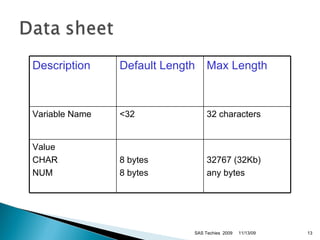
SAS Techies  2009 11/13/09 Description Default Length Max Length Variable Name <32 32 characters Value  CHAR NUM 8 bytes 8 bytes 32767 (32Kb) any bytes
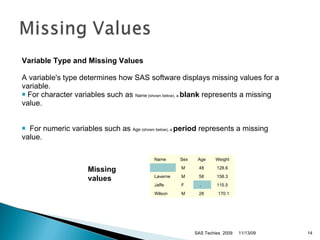
SAS Techies  2009 11/13/09 Variable Type and Missing Values   A variable's type determines how SAS software displays missing values for a variable.  For character variables such as  Name  (shown below), a  blank  represents a missing value. For numeric variables such as  Age  (shown below), a  period  represents a missing value.  Missing          values     Name    Sex     Age     Weight        M     48     128.6    Laverne      M     58     158.3    Jaffe     F     .     115.5    Wilson     M     28     170.1
Informats  Informats determine how data values are read into a SAS data set. You  must  use informats to read numeric values that contain letters or other special characters. SAS Techies  2009 11/13/09 $ASCII w . DATE w . NENGO w . $BINARY w . DATETIME w . PD w.d $VARYING w . HEX w . PERCENT w . $ w . JULIAN w . TIME w . COMMA w.d MMDDYY w . w.d
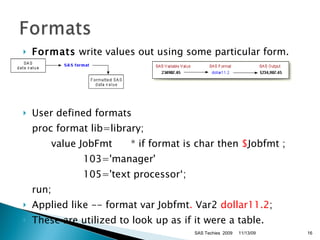
Formats  write values out using some particular form. User defined formats proc format lib=library;  value JobFmt  * if format is char then  $ Jobfmt ; 103='manager'  105='text processor‘;  run;  Applied like -- format var Jobfmt .  Var2  dollar11.2 ; These are utilized to look up as if it were a table. SAS Techies  2009 11/13/09
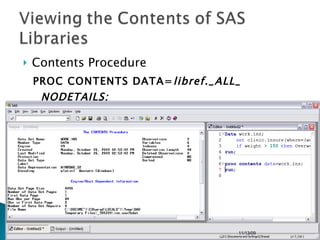
Contents Procedure  PROC CONTENTS DATA= libref._ALL_ NODETAILS; RUN; SAS Techies  2009 11/13/09
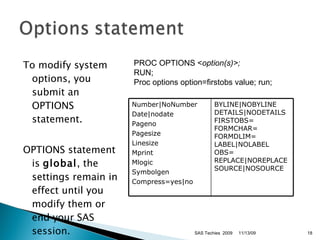
To modify system options, you submit an OPTIONS statement.  OPTIONS statement is  global , the settings remain in effect until you modify them or end your SAS session.  SAS Techies  2009 PROC OPTIONS < option(s)>; RUN; Proc options option=firstobs value; run; 11/13/09 Number|NoNumber Date|nodate Pageno Pagesize Linesize Mprint Mlogic Symbolgen Compress=yes|no BYLINE|NOBYLINE DETAILS|NODETAILS FIRSTOBS= FORMCHAR= FORMDLIM= LABEL|NOLABEL OBS= REPLACE|NOREPLACE SOURCE|NOSOURCE
Default Yearcutoff=1920 SAS Techies  2009 11/13/09 Date Expression Interpreted As 12/07/41 18Dec15 04/15/30 15Apr95 12/07/1941 18Dec2015 04/15/1930 15Apr1995 Date Expression SAS Date Informat Interpreted As 06Oct59 date7.   06Oct1959 17Mar1783 date9.   17Mar1783
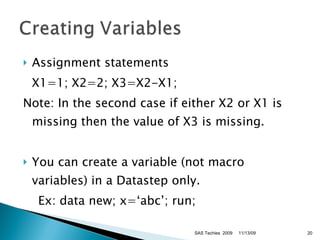
Assignment statements X1=1; X2=2; X3=X2-X1; Note: In the second case if either X2 or X1 is missing then the value of X3 is missing. You can create a variable (not macro variables) in a Datastep only. Ex: data new; x=‘abc’; run;  SAS Techies  2009 11/13/09
To create a variable that accumulates values down observations, a  sum statement  in a DATA step is used. Note -- missing values are ignored. Equivalent to function Sum(x1,x2,….) Ex:  If dsn some has y values  Data new;    Y - 10,20,30 then set some; X+y;   X - 10,30,60 run; SAS Techies  2009 11/13/09
To assign a length to a variable Ex: Length var1 $ 10 var2 10; Where used: data finance.newloan;  set finance.records(drop=amount rate); TotalLoan+payment;  if code='1' then Type='Fixed';   else Type='Variable';  run;  Output will have Type=‘Varia’ SAS Techies  2009 11/13/09
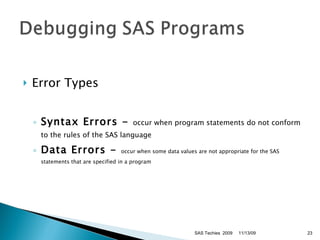
Error Types Syntax Errors -  occur when program statements do not conform to the rules of the SAS language Data Errors -  occur when some data values are not appropriate for the SAS statements that are specified in a program SAS Techies  2009 11/13/09
SAS Techies  2009 11/13/09
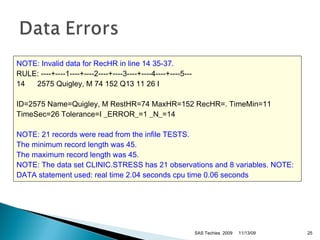
SAS Techies  2009 11/13/09 NOTE: Invalid data for RecHR in line 14 35-37.   RULE: ----+----1----+----2----+----3----+----4----+----5---  14  2575 Quigley, M 74 152 Q13 11 26 I ID=2575 Name=Quigley, M RestHR=74 MaxHR=152 RecHR=. TimeMin=11 TimeSec=26 Tolerance=I _ERROR_=1 _N_=14  NOTE: 21 records were read from the infile TESTS.   The minimum record length was 45.   The maximum record length was 45.   NOTE: The data set CLINIC.STRESS has 21 observations and 8 variables.   NOTE: DATA statement used:   real time 2.04 seconds   cpu time 0.06 seconds

Basics Of SAS Programming Language

  • 1.
  • 2.
    DATA steps typically create or modify SAS data sets, but they can also be used to produce custom-designed reports. For example, you can use DATA steps to put your data into a SAS data set compute the values for new variables check for and correct errors in your data produce new SAS data sets by sub-setting, merging, and updating existing data sets. PROC (procedure) steps typically analyze and process data in the form of a SAS data set, and they sometimes create SAS data sets that contain the results of the procedure. PROC steps control a library of prewritten routines (procedures) that perform tasks on SAS data sets, such as listing, sorting, and summarizing data. For example, you can use PROC steps to print a report produce descriptive statistics create a tabular report produce plots and charts. SAS Techies 2009 11/13/09
  • 3.
    Data numbers; X1=1; x2=2; Run; Proc print data=numbers; Run; Start of a Datastep Assigning values to x1 x2 End the datastep Issue a Print Procedure to print the dataset numbers End the Run statement SAS Techies 2009 11/13/09
  • 4.
    C, C++, Javalike syntax Every Statement ends with ; Datastep starts with the keyword data followed by the dataset name. Datastep ends when run; is found or any other Data or Proc is found else the Status on the window would show “Datastep or Proc Running” It usually begins with a SAS keyword they can begin and end anywhere on a line one statement can continue over several lines several statements can be on a line. SAS Techies 2009 11/13/09
  • 5.
    Log would showthe entire program with the Run time i.e. Real time and the CPU Time. Any errors or any output with PUT or Macro statements SAS Techies 2009 11/13/09
  • 6.
    Output Window wouldshow the output of the Procedure in a Listing or HTML Format, date, time and SAS System message. Results Window would show any results produced Explorer window would show any dataset prepared in that step. SAS Techies 2009 11/13/09
  • 7.
    To define alibrary, you assign it a library name and specify a path Libname libref “C:\temp”; Open the library in Explorer would show all Datasets Catalogs macro compilation views When you delete a library you delete the reference to SAS engine and Not the Contents at that path. To delete the contents select all of them and delete. Note: libref is 1 to 8 characters long only and remain in effect until you modify them, cancel them, or end your SAS session SAS Techies 2009 11/13/09
  • 8.
    SAS file inany library except Work indicates that the SAS file is stored permanently SAS Techies 2009 11/13/09 Permanent SAS Files                                                 Clinic . Admit Clinic . Admit2          Temporary SAS File                      Work . Test Temporary SAS File, One-Level Name                                 Test
  • 9.
    Datalines / cardsstatement -- Indicates that data lines follow SAS Techies 2009 11/13/09
  • 10.
    Set Statement --Readsan observation from one or more already existing SAS data sets -- used to copy / subset of observations to perform additional operations. Data work.ins; set clinic.insure(where=(weight>150)); if weight > 150 then Overweight=‘Yes’; run; SAS Techies 2009 11/13/09
  • 11.
    a SAS dataset is a file consisting of two parts: a descriptor portion and a data portion SAS Techies 2009 11/13/09 Data Set Name: CLINIC.INSURE Member Type: DATA Engine: V8 Created: 10:05 Tuesday, March 30, 1999 Observations: 21 Variables: 7 Indexes: 0 Observation Length: 64     Name   Sex     Age     Weight     Jones    M    48    128.6   Laverne      M    58    158.3   Jaffe    F   .    115.5   Wilson    M    28    170.1
  • 12.
    Variable names must---- be 1 to 32 characters in length begin with a letter (A-Z, including mixed case characters) or an underscore (_) continue with any combination of numbers, letters, or underscores. A variable's type is either character or numeric . SAS Techies 2009 11/13/09 Name ------ Policy Total Name Type ---- Num Num Char Length ----- 8 8 20 Format --------- DOLLAR8.2 Informat -------- COMMA10. Label ------------- Policy Number Total Balance Patient Name
  • 13.
    SAS Techies 2009 11/13/09 Description Default Length Max Length Variable Name <32 32 characters Value CHAR NUM 8 bytes 8 bytes 32767 (32Kb) any bytes
  • 14.
    SAS Techies 2009 11/13/09 Variable Type and Missing Values A variable's type determines how SAS software displays missing values for a variable. For character variables such as Name (shown below), a blank represents a missing value. For numeric variables such as Age (shown below), a period represents a missing value. Missing         values     Name   Sex    Age    Weight       M    48    128.6   Laverne     M    58    158.3   Jaffe    F   .    115.5   Wilson    M    28    170.1
  • 15.
    Informats Informatsdetermine how data values are read into a SAS data set. You must use informats to read numeric values that contain letters or other special characters. SAS Techies 2009 11/13/09 $ASCII w . DATE w . NENGO w . $BINARY w . DATETIME w . PD w.d $VARYING w . HEX w . PERCENT w . $ w . JULIAN w . TIME w . COMMA w.d MMDDYY w . w.d
  • 16.
    Formats writevalues out using some particular form. User defined formats proc format lib=library; value JobFmt * if format is char then $ Jobfmt ; 103='manager' 105='text processor‘; run; Applied like -- format var Jobfmt . Var2 dollar11.2 ; These are utilized to look up as if it were a table. SAS Techies 2009 11/13/09
  • 17.
    Contents Procedure PROC CONTENTS DATA= libref._ALL_ NODETAILS; RUN; SAS Techies 2009 11/13/09
  • 18.
    To modify systemoptions, you submit an OPTIONS statement. OPTIONS statement is global , the settings remain in effect until you modify them or end your SAS session. SAS Techies 2009 PROC OPTIONS < option(s)>; RUN; Proc options option=firstobs value; run; 11/13/09 Number|NoNumber Date|nodate Pageno Pagesize Linesize Mprint Mlogic Symbolgen Compress=yes|no BYLINE|NOBYLINE DETAILS|NODETAILS FIRSTOBS= FORMCHAR= FORMDLIM= LABEL|NOLABEL OBS= REPLACE|NOREPLACE SOURCE|NOSOURCE
  • 19.
    Default Yearcutoff=1920 SASTechies 2009 11/13/09 Date Expression Interpreted As 12/07/41 18Dec15 04/15/30 15Apr95 12/07/1941 18Dec2015 04/15/1930 15Apr1995 Date Expression SAS Date Informat Interpreted As 06Oct59 date7. 06Oct1959 17Mar1783 date9. 17Mar1783
  • 20.
    Assignment statements X1=1;X2=2; X3=X2-X1; Note: In the second case if either X2 or X1 is missing then the value of X3 is missing. You can create a variable (not macro variables) in a Datastep only. Ex: data new; x=‘abc’; run; SAS Techies 2009 11/13/09
  • 21.
    To create avariable that accumulates values down observations, a sum statement in a DATA step is used. Note -- missing values are ignored. Equivalent to function Sum(x1,x2,….) Ex: If dsn some has y values Data new; Y - 10,20,30 then set some; X+y; X - 10,30,60 run; SAS Techies 2009 11/13/09
  • 22.
    To assign alength to a variable Ex: Length var1 $ 10 var2 10; Where used: data finance.newloan; set finance.records(drop=amount rate); TotalLoan+payment; if code='1' then Type='Fixed'; else Type='Variable'; run; Output will have Type=‘Varia’ SAS Techies 2009 11/13/09
  • 23.
    Error Types SyntaxErrors - occur when program statements do not conform to the rules of the SAS language Data Errors - occur when some data values are not appropriate for the SAS statements that are specified in a program SAS Techies 2009 11/13/09
  • 24.
    SAS Techies 2009 11/13/09
  • 25.
    SAS Techies 2009 11/13/09 NOTE: Invalid data for RecHR in line 14 35-37. RULE: ----+----1----+----2----+----3----+----4----+----5--- 14 2575 Quigley, M 74 152 Q13 11 26 I ID=2575 Name=Quigley, M RestHR=74 MaxHR=152 RecHR=. TimeMin=11 TimeSec=26 Tolerance=I _ERROR_=1 _N_=14 NOTE: 21 records were read from the infile TESTS. The minimum record length was 45. The maximum record length was 45. NOTE: The data set CLINIC.STRESS has 21 observations and 8 variables. NOTE: DATA statement used: real time 2.04 seconds cpu time 0.06 seconds

Editor's Notes

  • #3 SASTechies.com Sharad C Narnindi - Attic Technologies 2005
  • #4 SASTechies.com Sharad C Narnindi - Attic Technologies 2005
  • #5 SASTechies.com Sharad C Narnindi - Attic Technologies 2005
  • #6 SASTechies.com Sharad C Narnindi - Attic Technologies 2005
  • #7 SASTechies.com Sharad C Narnindi - Attic Technologies 2005
  • #8 SASTechies.com Sharad C Narnindi - Attic Technologies 2005
  • #9 SASTechies.com Sharad C Narnindi - Attic Technologies 2005
  • #12 SASTechies.com Sharad C Narnindi - Attic Technologies 2005
  • #13 SASTechies.com Sharad C Narnindi - Attic Technologies 2005
  • #14 SASTechies.com Sharad C Narnindi - Attic Technologies 2005
  • #15 SASTechies.com Sharad C Narnindi - Attic Technologies 2005
  • #16 SASTechies.com Sharad C Narnindi - Attic Technologies 2005
  • #17 SASTechies.com Sharad C Narnindi - Attic Technologies 2005
  • #19 SASTechies.com Sharad C Narnindi - Attic Technologies 2005
  • #20 SASTechies.com Sharad C Narnindi - Attic Technologies 2005
  • #21 SASTechies.com Sharad C Narnindi - Attic Technologies 2005
  • #22 SASTechies.com Sharad C Narnindi - Attic Technologies 2005
  • #23 SASTechies.com Sharad C Narnindi - Attic Technologies 2005
  • #26 SASTechies.com Sharad C Narnindi - Attic Technologies 2005