SASTechies [email_address] http://www.sastechies.com
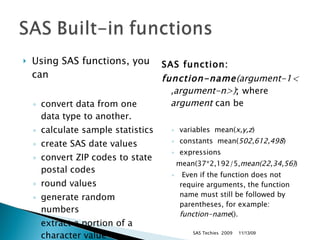
Using SAS functions, you can convert data from one data type to another.  calculate sample statistics  create SAS date values  convert ZIP codes to state postal codes  round values  generate random numbers  extract a portion of a character value  SAS function: function-name (argument-1< ,argument-n>) ;  where  argument  can be  variables  mean( x,y,z )  constants  mean( 502,612,498 )  expressions   mean(37*2,192/5, mean(22,34,56) )  Even if the function does not require arguments, the function name must still be followed by parentheses, for example:  function-name (). SAS Techies  2009 11/13/09
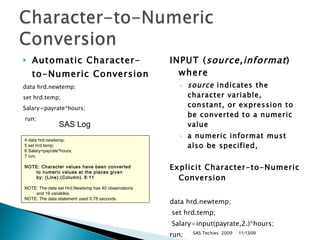
Automatic Character-to-Numeric Conversion   data hrd.newtemp;  set hrd.temp; Salary=payrate*hours; run;  INPUT ( source,informat ) where  source  indicates the character variable, constant, or expression to be converted to a numeric value  a numeric informat must also be specified,  Explicit Character-to-Numeric Conversion data hrd.newtemp; set hrd.temp; Salary=input(payrate,2.)*hours;  run;  SAS Techies  2009 SAS Log  11/13/09 4 data hrd.newtemp;  5 set hrd.temp;  6 Salary=payrate*hours; 7 run;  NOTE: Character values have been converted to numeric   values at the places given by: (Line):(Column).   6:11   NOTE: The data set Hrd.Newtemp has 40 observations and 19 variables.  NOTE: The data statement used 0.78 seconds.
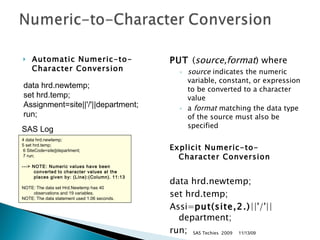
Automatic Numeric-to- Character Conversion PUT  ( source,format ) where  source  indicates the numeric variable, constant, or expression to be converted to a character value  a  format  matching the data type of the source must also be specified Explicit Numeric-to- Character Conversion data hrd.newtemp;  set hrd.temp; Assi= put(site,2.) ||'/'||department;  run;  SAS Techies  2009 SAS Log  data hrd.newtemp;  set hrd.temp;  Assignment=site||'/'||department;  run;  11/13/09 4 data hrd.newtemp;  5 set hrd.temp; 6 SiteCode=site||department; 7 run;  ---> NOTE: Numeric values have been converted   to character values at the   places given by: (Line):(Column).   11:13 NOTE: The data set Hrd.Newtemp has 40 observations and 19 variables.  NOTE: The data statement used 1.06 seconds.
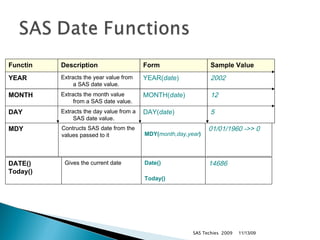
SAS Techies  2009 11/13/09 DATE() Today() Gives the current date Date() Today()   14686 MDY Contructs SAS date from the values passed to it MDY( month,day,year )   01/01/1960 ->> 0 Functin Description Form Sample Value YEAR Extracts the year value from a SAS date value. YEAR( date ) 2002   MONTH Extracts the month value from a SAS date value. MONTH( date ) 12   DAY Extracts the day value from a SAS date value. DAY( date ) 5
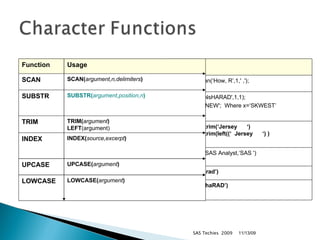
SAS Techies  2009 11/13/09 Example LastName=scan(‘How, R’,1,' ,');   Initial=substr('NsHARAD',1,1); substr(x,1,3)=‘NEW';  Where x=‘SKWEST’ NewAddress= trim(‘Jersey  ‘)   NewAddress= trim(left((‘  Jersey  ‘) ) Found=index(‘SAS Analyst,‘SAS ')  UPCASE(‘sharad’) LOWCASE(‘ShaRAD’) Function Usage SCAN SCAN( argument,n,delimiters )   SUBSTR SUBSTR( argument,position,n )   TRIM TRIM( argument )   LEFT (argument) INDEX INDEX( source,excerpt )   UPCASE UPCASE( argument )   LOWCASE LOWCASE( argument )

SAS Functions

  • 1.
  • 2.
    Using SAS functions,you can convert data from one data type to another. calculate sample statistics create SAS date values convert ZIP codes to state postal codes round values generate random numbers extract a portion of a character value SAS function: function-name (argument-1< ,argument-n>) ; where argument can be variables  mean( x,y,z ) constants  mean( 502,612,498 ) expressions   mean(37*2,192/5, mean(22,34,56) ) Even if the function does not require arguments, the function name must still be followed by parentheses, for example: function-name (). SAS Techies 2009 11/13/09
  • 3.
    Automatic Character-to-Numeric Conversion data hrd.newtemp; set hrd.temp; Salary=payrate*hours; run; INPUT ( source,informat ) where source indicates the character variable, constant, or expression to be converted to a numeric value a numeric informat must also be specified, Explicit Character-to-Numeric Conversion data hrd.newtemp; set hrd.temp; Salary=input(payrate,2.)*hours; run; SAS Techies 2009 SAS Log 11/13/09 4 data hrd.newtemp; 5 set hrd.temp; 6 Salary=payrate*hours; 7 run; NOTE: Character values have been converted to numeric values at the places given by: (Line):(Column). 6:11 NOTE: The data set Hrd.Newtemp has 40 observations and 19 variables. NOTE: The data statement used 0.78 seconds.
  • 4.
    Automatic Numeric-to- CharacterConversion PUT ( source,format ) where source indicates the numeric variable, constant, or expression to be converted to a character value a format matching the data type of the source must also be specified Explicit Numeric-to- Character Conversion data hrd.newtemp; set hrd.temp; Assi= put(site,2.) ||'/'||department; run; SAS Techies 2009 SAS Log data hrd.newtemp; set hrd.temp; Assignment=site||'/'||department; run; 11/13/09 4 data hrd.newtemp; 5 set hrd.temp; 6 SiteCode=site||department; 7 run; ---> NOTE: Numeric values have been converted to character values at the places given by: (Line):(Column). 11:13 NOTE: The data set Hrd.Newtemp has 40 observations and 19 variables. NOTE: The data statement used 1.06 seconds.
  • 5.
    SAS Techies 2009 11/13/09 DATE() Today() Gives the current date Date() Today() 14686 MDY Contructs SAS date from the values passed to it MDY( month,day,year ) 01/01/1960 ->> 0 Functin Description Form Sample Value YEAR Extracts the year value from a SAS date value. YEAR( date ) 2002 MONTH Extracts the month value from a SAS date value. MONTH( date ) 12 DAY Extracts the day value from a SAS date value. DAY( date ) 5
  • 6.
    SAS Techies 2009 11/13/09 Example LastName=scan(‘How, R’,1,' ,'); Initial=substr('NsHARAD',1,1); substr(x,1,3)=‘NEW'; Where x=‘SKWEST’ NewAddress= trim(‘Jersey ‘) NewAddress= trim(left((‘ Jersey ‘) ) Found=index(‘SAS Analyst,‘SAS ') UPCASE(‘sharad’) LOWCASE(‘ShaRAD’) Function Usage SCAN SCAN( argument,n,delimiters ) SUBSTR SUBSTR( argument,position,n ) TRIM TRIM( argument ) LEFT (argument) INDEX INDEX( source,excerpt ) UPCASE UPCASE( argument ) LOWCASE LOWCASE( argument )

Editor's Notes

  • #3 SASTechies.com Sharad C Narnindi - Attic Technologies 2005
  • #4 SASTechies.com Sharad C Narnindi - Attic Technologies 2005
  • #5 SASTechies.com Sharad C Narnindi - Attic Technologies 2005
  • #6 SASTechies.com Sharad C Narnindi - Attic Technologies 2005
  • #7 SASTechies.com Sharad C Narnindi - Attic Technologies 2005