@martin_loetzsch
Dr. Martin Loetzsch
code.talks commerce 2018
Data Warehousing with Python
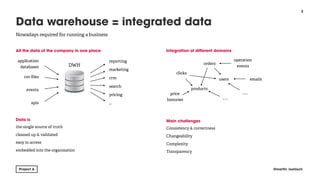
All the data of the company in one place


Data is
the single source of truth
cleaned up & validated
easy to access
embedded into the organisation
Integration of different domains


Main challenges
Consistency & correctness
Changeability
Complexity
Transparency
!2
Data warehouse = integrated data
@martin_loetzsch
Nowadays required for running a business
application
databases
events
csv files
apis
reporting
crm
marketing
…
search
pricing
DWH orders
users
products
price 

histories
emails
clicks
…
…
operation

events
Avoid click-tools
hard to debug
hard to change
hard to scale with team size/ data complexity / data volume 

Data pipelines as code
SQL files, python & shell scripts
Structure & content of data warehouse are result of running code 

Easy to debug & inspect
Develop locally, test on staging system, then deploy to production
!3
Make changing and testing things easy
@martin_loetzsch
Apply standard software engineering best practices
Megabytes
Plain scripts
Petabytes
Apache Airflow
In between
Mara
!4
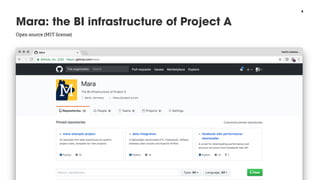
Mara: the BI infrastructure of Project A
@martin_loetzsch
Open source (MIT license)
Example pipeline


pipeline = Pipeline(id='demo', description='A small pipeline ..’)

pipeline.add(
Task(id='ping_localhost', description='Pings localhost',
commands=[RunBash('ping -c 3 localhost')]))
sub_pipeline = Pipeline(id='sub_pipeline', description='Pings ..')
for host in ['google', 'amazon', 'facebook']:
sub_pipeline.add(
Task(id=f'ping_{host}', description=f'Pings {host}',
commands=[RunBash(f'ping -c 3 {host}.com')]))
sub_pipeline.add_dependency('ping_amazon', 'ping_facebook')
sub_pipeline.add(Task(id='ping_foo', description='Pings foo',
commands=[RunBash('ping foo')]),
upstreams=['ping_amazon'])
pipeline.add(sub_pipeline, upstreams=['ping_localhost'])
pipeline.add(Task(id=‘sleep', description='Sleeps for 2 seconds',
commands=[RunBash('sleep 2')]),
upstreams=[‘sub_pipeline’])
!5
ETL pipelines as code
@martin_loetzsch
Pipeline = list of tasks with dependencies between them. Task = list of commands
Target of computation


CREATE TABLE m_dim_next.region (

region_id SMALLINT PRIMARY KEY,

region_name TEXT NOT NULL UNIQUE,

country_id SMALLINT NOT NULL,

country_name TEXT NOT NULL,

_region_name TEXT NOT NULL

);


Do computation and store result in table


WITH raw_region
AS (SELECT DISTINCT
country,

region

FROM m_data.ga_session

ORDER BY country, region)


INSERT INTO m_dim_next.region
SELECT
row_number()
OVER (ORDER BY country, region ) AS region_id,

CASE WHEN (SELECT count(DISTINCT country)
FROM raw_region r2
WHERE r2.region = r1.region) > 1
THEN region || ' / ' || country
ELSE region END AS region_name,
dense_rank() OVER (ORDER BY country) AS country_id,
country AS country_name,
region AS _region_name
FROM raw_region r1;

INSERT INTO m_dim_next.region
VALUES (-1, 'Unknown', -1, 'Unknown', 'Unknown');

Speedup subsequent transformations


SELECT util.add_index(
'm_dim_next', 'region',
column_names := ARRAY ['_region_name', ‘country_name',
'region_id']);


SELECT util.add_index(
'm_dim_next', 'region',
column_names := ARRAY ['country_id', 'region_id']);


ANALYZE m_dim_next.region;
!6
PostgreSQL as a data processing engine
@martin_loetzsch
Leave data in DB, Tables as (intermediate) results of processing steps
Execute query


ExecuteSQL(sql_file_name=“preprocess-ad.sql")
cat app/data_integration/pipelines/facebook/preprocess-ad.sql 
| PGTZ=Europe/Berlin PGOPTIONS=—client-min-messages=warning 
psql --username=mloetzsch --host=localhost --echo-all 
-—no-psqlrc --set ON_ERROR_STOP=on kfz_dwh_etl

Read file


ReadFile(file_name=“country_iso_code.csv",
compression=Compression.NONE,
target_table="os_data.country_iso_code",
mapper_script_file_name=“read-country-iso-codes.py",
delimiter_char=“;")
cat "dwh-data/country_iso_code.csv" 
| .venv/bin/python3.6 "app/data_integration/pipelines/load_data/
read-country-iso-codes.py" 
| PGTZ=Europe/Berlin PGOPTIONS=--client-min-messages=warning 
psql --username=mloetzsch --host=localhost --echo-all 
--no-psqlrc --set ON_ERROR_STOP=on kfz_dwh_etl 
--command="COPY os_data.country_iso_code FROM STDIN WITH CSV
DELIMITER AS ';'"

Copy from other databases


Copy(sql_file_name="pdm/load-product.sql", source_db_alias=“pdm",
target_table=“os_data.product",
replace={"@@db@@": "K24Pdm", "@@dbschema@@": “ps",
"@@client@@": "kfzteile24 GmbH"})

cat app/data_integration/pipelines/load_data/pdm/load-product.sql 
| sed "s/@@db@@/K24Pdm/g;s/@@dbschema@@/ps/g;s/@@client@@/
kfzteile24 GmbH/g" 
| sed 's/$/$/g;s/$/$/g' | (cat && echo ';') 
| (cat && echo ';
go') 
| sqsh -U ***** -P ******* -S ******* -D K24Pdm -m csv 
| PGTZ=Europe/Berlin PGOPTIONS=--client-min-messages=warning 
psql --username=mloetzsch --host=localhost --echo-all 
--no-psqlrc --set ON_ERROR_STOP=on kfz_dwh_etl 
--command="COPY os_data.product FROM STDIN WITH CSV HEADER"
!7
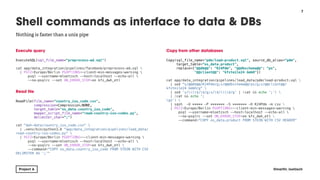
Shell commands as interface to data & DBs
@martin_loetzsch
Nothing is faster than a unix pipe
Read a set of files


pipeline.add(
ParallelReadFile(
id="read_download",
description="Loads PyPI downloads from pre_downloaded csv
files",
file_pattern="*/*/*/pypi/downloads-v1.csv.gz",
read_mode=ReadMode.ONLY_NEW,
compression=Compression.GZIP,
target_table="pypi_data.download",
delimiter_char="t", skip_header=True, csv_format=True,
file_dependencies=read_download_file_dependencies,
date_regex="^(?P<year>d{4})/(?P<month>d{2})/(?
P<day>d{2})/",
partition_target_table_by_day_id=True,
timezone="UTC",
commands_before=[
ExecuteSQL(
sql_file_name="create_download_data_table.sql",
file_dependencies=read_download_file_dependencies)
]))
Split large joins into chunks
pipeline.add(
ParallelExecuteSQL(
id="transform_download",
description="Maps downloads to their dimensions",
sql_statement="SELECT
pypi_tmp.insert_download(@chunk@::SMALLINT);”,
parameter_function=
etl_tools.utils.chunk_parameter_function,
parameter_placeholders=["@chunk@"],
commands_before=[
ExecuteSQL(sql_file_name="transform_download.sql")
]),
upstreams=["preprocess_project_version",
"transform_installer"])
!8
Incremental & parallel processing
@martin_loetzsch
You can’t join all clicks with all customers at once
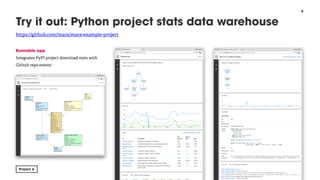
Runnable app
Integrates PyPI project download stats with 

Github repo events
!9
Try it out: Python project stats data warehouse
@martin_loetzsch
https://github.com/mara/mara-example-project
!10
Refer us a data person, earn 200€
@martin_loetzsch
Also analysts, developers, product managers
Thank you
@martin_loetzsch
!11

Data Warehousing with Python

  • 1.
    @martin_loetzsch Dr. Martin Loetzsch code.talkscommerce 2018 Data Warehousing with Python
  • 2.
    All the dataof the company in one place 
 Data is the single source of truth cleaned up & validated easy to access embedded into the organisation Integration of different domains


 Main challenges Consistency & correctness Changeability Complexity Transparency !2 Data warehouse = integrated data @martin_loetzsch Nowadays required for running a business application databases events csv files apis reporting crm marketing … search pricing DWH orders users products price 
 histories emails clicks … … operation
 events
  • 3.
    Avoid click-tools hard todebug hard to change hard to scale with team size/ data complexity / data volume 
 Data pipelines as code SQL files, python & shell scripts Structure & content of data warehouse are result of running code 
 Easy to debug & inspect Develop locally, test on staging system, then deploy to production !3 Make changing and testing things easy @martin_loetzsch Apply standard software engineering best practices Megabytes Plain scripts Petabytes Apache Airflow In between Mara
  • 4.
    !4 Mara: the BIinfrastructure of Project A @martin_loetzsch Open source (MIT license)
  • 5.
    Example pipeline 
 pipeline =Pipeline(id='demo', description='A small pipeline ..’)
 pipeline.add( Task(id='ping_localhost', description='Pings localhost', commands=[RunBash('ping -c 3 localhost')])) sub_pipeline = Pipeline(id='sub_pipeline', description='Pings ..') for host in ['google', 'amazon', 'facebook']: sub_pipeline.add( Task(id=f'ping_{host}', description=f'Pings {host}', commands=[RunBash(f'ping -c 3 {host}.com')])) sub_pipeline.add_dependency('ping_amazon', 'ping_facebook') sub_pipeline.add(Task(id='ping_foo', description='Pings foo', commands=[RunBash('ping foo')]), upstreams=['ping_amazon']) pipeline.add(sub_pipeline, upstreams=['ping_localhost']) pipeline.add(Task(id=‘sleep', description='Sleeps for 2 seconds', commands=[RunBash('sleep 2')]), upstreams=[‘sub_pipeline’]) !5 ETL pipelines as code @martin_loetzsch Pipeline = list of tasks with dependencies between them. Task = list of commands
  • 6.
    Target of computation 
 CREATETABLE m_dim_next.region (
 region_id SMALLINT PRIMARY KEY,
 region_name TEXT NOT NULL UNIQUE,
 country_id SMALLINT NOT NULL,
 country_name TEXT NOT NULL,
 _region_name TEXT NOT NULL
 );
 
 Do computation and store result in table 
 WITH raw_region AS (SELECT DISTINCT country,
 region
 FROM m_data.ga_session
 ORDER BY country, region)
 
 INSERT INTO m_dim_next.region SELECT row_number() OVER (ORDER BY country, region ) AS region_id,
 CASE WHEN (SELECT count(DISTINCT country) FROM raw_region r2 WHERE r2.region = r1.region) > 1 THEN region || ' / ' || country ELSE region END AS region_name, dense_rank() OVER (ORDER BY country) AS country_id, country AS country_name, region AS _region_name FROM raw_region r1;
 INSERT INTO m_dim_next.region VALUES (-1, 'Unknown', -1, 'Unknown', 'Unknown');
 Speedup subsequent transformations 
 SELECT util.add_index( 'm_dim_next', 'region', column_names := ARRAY ['_region_name', ‘country_name', 'region_id']);
 
 SELECT util.add_index( 'm_dim_next', 'region', column_names := ARRAY ['country_id', 'region_id']);
 
 ANALYZE m_dim_next.region; !6 PostgreSQL as a data processing engine @martin_loetzsch Leave data in DB, Tables as (intermediate) results of processing steps
  • 7.
    Execute query 
 ExecuteSQL(sql_file_name=“preprocess-ad.sql") cat app/data_integration/pipelines/facebook/preprocess-ad.sql | PGTZ=Europe/Berlin PGOPTIONS=—client-min-messages=warning psql --username=mloetzsch --host=localhost --echo-all -—no-psqlrc --set ON_ERROR_STOP=on kfz_dwh_etl
 Read file 
 ReadFile(file_name=“country_iso_code.csv", compression=Compression.NONE, target_table="os_data.country_iso_code", mapper_script_file_name=“read-country-iso-codes.py", delimiter_char=“;") cat "dwh-data/country_iso_code.csv" | .venv/bin/python3.6 "app/data_integration/pipelines/load_data/ read-country-iso-codes.py" | PGTZ=Europe/Berlin PGOPTIONS=--client-min-messages=warning psql --username=mloetzsch --host=localhost --echo-all --no-psqlrc --set ON_ERROR_STOP=on kfz_dwh_etl --command="COPY os_data.country_iso_code FROM STDIN WITH CSV DELIMITER AS ';'"
 Copy from other databases 
 Copy(sql_file_name="pdm/load-product.sql", source_db_alias=“pdm", target_table=“os_data.product", replace={"@@db@@": "K24Pdm", "@@dbschema@@": “ps", "@@client@@": "kfzteile24 GmbH"})
 cat app/data_integration/pipelines/load_data/pdm/load-product.sql | sed "s/@@db@@/K24Pdm/g;s/@@dbschema@@/ps/g;s/@@client@@/ kfzteile24 GmbH/g" | sed 's/$/$/g;s/$/$/g' | (cat && echo ';') | (cat && echo '; go') | sqsh -U ***** -P ******* -S ******* -D K24Pdm -m csv | PGTZ=Europe/Berlin PGOPTIONS=--client-min-messages=warning psql --username=mloetzsch --host=localhost --echo-all --no-psqlrc --set ON_ERROR_STOP=on kfz_dwh_etl --command="COPY os_data.product FROM STDIN WITH CSV HEADER" !7 Shell commands as interface to data & DBs @martin_loetzsch Nothing is faster than a unix pipe
  • 8.
    Read a setof files 
 pipeline.add( ParallelReadFile( id="read_download", description="Loads PyPI downloads from pre_downloaded csv files", file_pattern="*/*/*/pypi/downloads-v1.csv.gz", read_mode=ReadMode.ONLY_NEW, compression=Compression.GZIP, target_table="pypi_data.download", delimiter_char="t", skip_header=True, csv_format=True, file_dependencies=read_download_file_dependencies, date_regex="^(?P<year>d{4})/(?P<month>d{2})/(? P<day>d{2})/", partition_target_table_by_day_id=True, timezone="UTC", commands_before=[ ExecuteSQL( sql_file_name="create_download_data_table.sql", file_dependencies=read_download_file_dependencies) ])) Split large joins into chunks pipeline.add( ParallelExecuteSQL( id="transform_download", description="Maps downloads to their dimensions", sql_statement="SELECT pypi_tmp.insert_download(@chunk@::SMALLINT);”, parameter_function= etl_tools.utils.chunk_parameter_function, parameter_placeholders=["@chunk@"], commands_before=[ ExecuteSQL(sql_file_name="transform_download.sql") ]), upstreams=["preprocess_project_version", "transform_installer"]) !8 Incremental & parallel processing @martin_loetzsch You can’t join all clicks with all customers at once
  • 9.
    Runnable app Integrates PyPIproject download stats with 
 Github repo events !9 Try it out: Python project stats data warehouse @martin_loetzsch https://github.com/mara/mara-example-project
  • 10.
    !10 Refer us adata person, earn 200€ @martin_loetzsch Also analysts, developers, product managers
  • 11.