TWITTER FOR BUSINESS


    Twitter for Business
What Is Twitter?


•   Microblogging site
•   Both personal and professional
•   Not restricted to people you know
•   Basic in functionality, immense in
    reach


            Twitter for Business
What is a Tweet?

• A tweet is a message comprised of
  140 characters
• Can include URL links
• There are no styles in tweet text
• The subject can be about whatever
  you want


         Twitter for Business
Twitter Followers

•You do not have to follow people back,
although common etiquette encourages it
•More followers isn’t always better
•Quality, not quantity
•Focus on forming quality relationships
and listening attentively


          Twitter for Business
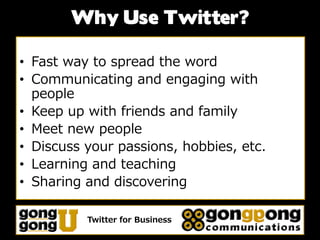
Why Use Twitter?

• Fast way to spread the word
• Communicating and engaging with
  people
• Keep up with friends and family
• Meet new people
• Discuss your passions, hobbies, etc.
• Learning and teaching
• Sharing and discovering

          Twitter for Business
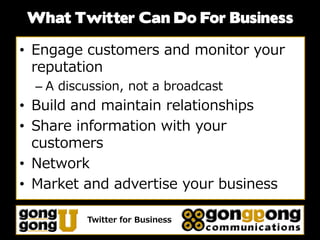
What Twitter Can Do For Business

• Engage customers and monitor your
  reputation
  – A discussion, not a broadcast
• Build and maintain relationships
• Share information with your
  customers
• Network
• Market and advertise your business

          Twitter for Business
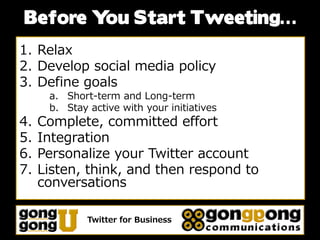
Before Y Start Tweeting…
        ou
1. Relax
2. Develop social media policy
3. Define goals
      a. Short-term and Long-term
      b. Stay active with your initiatives
4.   Complete, committed effort
5.   Integration
6.   Personalize your Twitter account
7.   Listen, think, and then respond to
     conversations

              Twitter for Business
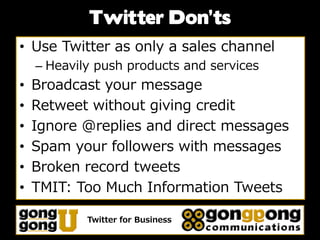
Twitter Don’ts
• Use Twitter as only a sales channel
    – Heavily push products and services
•   Broadcast your message
•   Retweet without giving credit
•   Ignore @replies and direct messages
•   Spam your followers with messages
•   Broken record tweets
•   TMIT: Too Much Information Tweets

            Twitter for Business
Twitter Do’s
• Begin slowly and gradually
• Update regularly
  – Do not let your Twitter brand fade away
• Captivate people with short tweets
  – Raise interest
• Attention on the market and its
  characteristics
• Relax and have fun with it
  – Be the human that you are

           Twitter for Business
Twitter For Business:

     I. Build Your Network
II. Engage Y   our Community
    III. Tracking & Analysis


     Twitter for Business
Build Your Network
• Branded Profile vs. Personal Profile
  – How are you going to use Twitter?
     • XYZCompany_Corporate
     • XYZCompany_HelpDesk
     • XYZCompany_Mary, XYZCompany_Dave
• Personalize your Twitter account
  – Use a calm, friendly tone
• Build a foundation of Twitter followers
  – People choose to view your tweets
  – Post messages your audience will find
    compelling
• Twitter company page

            Twitter for Business
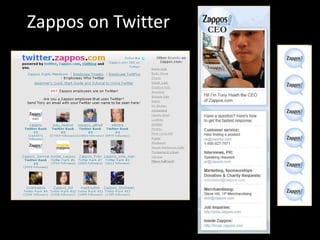
Zappos on Twitter
Build Your Network
• Branded Profile vs. Personal Profile
  – How are you going to use Twitter?
     • XYZCompany_Corporate
     • XYZCompany_HelpDesk
     • XYZCompany_Mary, XYZCompany_Dave
• Personalize your Twitter account
  – Use a calm, friendly tone
• Build a foundation of Twitter followers
  – People choose to view your tweets
  – Post messages your audience will find
    compelling
• Twitter company page

            Twitter for Business
Engage Your Community
• Make the conversation two-way
  – Engage your community
  – Build your credibility
• Publish helpful content that adds value
  – Give people a reason to follow
• Search Twitter for conversations
  – Learn from feedback
• Follow people who follow you
• Use Twitter to promote events

           Twitter for Business
Tracking Twitter Accounts & Activity

• Track conversations
  – http://search.twitter.com/
  – For your company, products, news, etc.
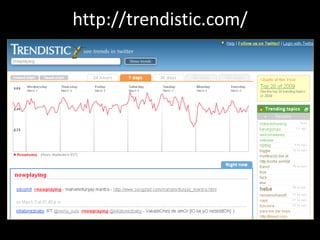
• Find and analyze trends
  – http://trendistic.com/
  – For your company, competitor, products,
    industry, etc.
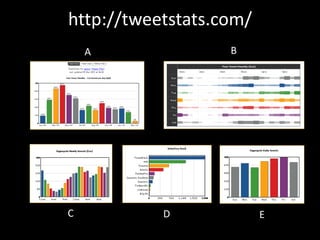
• Analyze your Twitter accounts
  – http://tweetstats.com/
  – How, when, and where you are tweeting
  – Figure out the trends of your accounts

           Twitter for Business
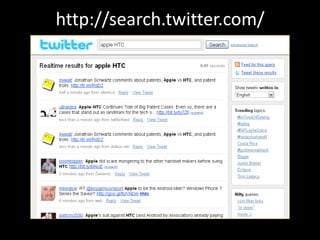
http://search.twitter.com/
Tracking Twitter Accounts &
            Activity
• Track conversations
  – http://search.twitter.com/
• Find and analyze trends
  – http://trendistic.com/
  – For your company, competitor, products,
    industry, etc.
• Analyze your Twitter accounts
  – http://tweetstats.com/
  – How, when, and where you are tweeting
  – Figure out the trends of your accounts

           Twitter for Business
http://trendistic.com/
Tracking Twitter Accounts &
            Activity
• Track conversations
  – http://search.twitter.com/
• Find and analyze trends
  – http://trendistic.com/
  – For your company, competitor, products,
    industry, etc.
• Analyze your Twitter accounts
  – http://tweetstats.com/
  – How, when, and where you are tweeting
  – Figure out the trends of your accounts

           Twitter for Business
http://tweetstats.com/
    A              B


C          D             E
Other Tracking & Analysis Tools

• Twitturly
   – http://twitturly.com/
   – Track top shared URLs
• TweetMeme
   – http://tweetmeme.com/
   – The “hottest” links on Twitter
• Monitter
   – http://monitter.com/
   – Track trends in realtime
• TwitterCounter
   – http://twittercounter.com
   – Stats of your tweets, who you are following, and followers
• TwitterGrader
   – http://twitter.grader.com/
   – Check the power of your account and level of your engagement


                 Twitter for Business
Third Party Tools
•   HootSuite – http://hootsuite.com/
    – Business oriented desktop client
    – Organize personalized Twitter streams into columns
    – Tweet scheduling
    – Manage multiple social media profiles (Facebook,
      Twitter, LinkedIn) in one account
    – Manage multiple users over different Twitter
      accounts – great for managing employees
•   CoTweet – http://cotweet.com/
    – Supervise multiple accounts
    – Track keyword and trends
    – Tweet scheduling
    – Manage conversations between your team
    – Click statistics on your posted links

              Twitter for Business

Twitter for business

  • 1.
    TWITTER FOR BUSINESS Twitter for Business
  • 2.
    What Is Twitter? • Microblogging site • Both personal and professional • Not restricted to people you know • Basic in functionality, immense in reach Twitter for Business
  • 3.
    What is aTweet? • A tweet is a message comprised of 140 characters • Can include URL links • There are no styles in tweet text • The subject can be about whatever you want Twitter for Business
  • 4.
    Twitter Followers •You donot have to follow people back, although common etiquette encourages it •More followers isn’t always better •Quality, not quantity •Focus on forming quality relationships and listening attentively Twitter for Business
  • 5.
    Why Use Twitter? •Fast way to spread the word • Communicating and engaging with people • Keep up with friends and family • Meet new people • Discuss your passions, hobbies, etc. • Learning and teaching • Sharing and discovering Twitter for Business
  • 6.
    What Twitter CanDo For Business • Engage customers and monitor your reputation – A discussion, not a broadcast • Build and maintain relationships • Share information with your customers • Network • Market and advertise your business Twitter for Business
  • 7.
    Before Y StartTweeting… ou 1. Relax 2. Develop social media policy 3. Define goals a. Short-term and Long-term b. Stay active with your initiatives 4. Complete, committed effort 5. Integration 6. Personalize your Twitter account 7. Listen, think, and then respond to conversations Twitter for Business
  • 8.
    Twitter Don’ts • UseTwitter as only a sales channel – Heavily push products and services • Broadcast your message • Retweet without giving credit • Ignore @replies and direct messages • Spam your followers with messages • Broken record tweets • TMIT: Too Much Information Tweets Twitter for Business
  • 9.
    Twitter Do’s • Beginslowly and gradually • Update regularly – Do not let your Twitter brand fade away • Captivate people with short tweets – Raise interest • Attention on the market and its characteristics • Relax and have fun with it – Be the human that you are Twitter for Business
  • 10.
    Twitter For Business: I. Build Your Network II. Engage Y our Community III. Tracking & Analysis Twitter for Business
  • 11.
    Build Your Network •Branded Profile vs. Personal Profile – How are you going to use Twitter? • XYZCompany_Corporate • XYZCompany_HelpDesk • XYZCompany_Mary, XYZCompany_Dave • Personalize your Twitter account – Use a calm, friendly tone • Build a foundation of Twitter followers – People choose to view your tweets – Post messages your audience will find compelling • Twitter company page Twitter for Business
  • 12.
  • 13.
    Build Your Network •Branded Profile vs. Personal Profile – How are you going to use Twitter? • XYZCompany_Corporate • XYZCompany_HelpDesk • XYZCompany_Mary, XYZCompany_Dave • Personalize your Twitter account – Use a calm, friendly tone • Build a foundation of Twitter followers – People choose to view your tweets – Post messages your audience will find compelling • Twitter company page Twitter for Business
  • 14.
    Engage Your Community •Make the conversation two-way – Engage your community – Build your credibility • Publish helpful content that adds value – Give people a reason to follow • Search Twitter for conversations – Learn from feedback • Follow people who follow you • Use Twitter to promote events Twitter for Business
  • 15.
    Tracking Twitter Accounts& Activity • Track conversations – http://search.twitter.com/ – For your company, products, news, etc. • Find and analyze trends – http://trendistic.com/ – For your company, competitor, products, industry, etc. • Analyze your Twitter accounts – http://tweetstats.com/ – How, when, and where you are tweeting – Figure out the trends of your accounts Twitter for Business
  • 16.
  • 17.
    Tracking Twitter Accounts& Activity • Track conversations – http://search.twitter.com/ • Find and analyze trends – http://trendistic.com/ – For your company, competitor, products, industry, etc. • Analyze your Twitter accounts – http://tweetstats.com/ – How, when, and where you are tweeting – Figure out the trends of your accounts Twitter for Business
  • 18.
  • 19.
    Tracking Twitter Accounts& Activity • Track conversations – http://search.twitter.com/ • Find and analyze trends – http://trendistic.com/ – For your company, competitor, products, industry, etc. • Analyze your Twitter accounts – http://tweetstats.com/ – How, when, and where you are tweeting – Figure out the trends of your accounts Twitter for Business
  • 20.
  • 21.
    Other Tracking &Analysis Tools • Twitturly – http://twitturly.com/ – Track top shared URLs • TweetMeme – http://tweetmeme.com/ – The “hottest” links on Twitter • Monitter – http://monitter.com/ – Track trends in realtime • TwitterCounter – http://twittercounter.com – Stats of your tweets, who you are following, and followers • TwitterGrader – http://twitter.grader.com/ – Check the power of your account and level of your engagement Twitter for Business
  • 22.
    Third Party Tools • HootSuite – http://hootsuite.com/ – Business oriented desktop client – Organize personalized Twitter streams into columns – Tweet scheduling – Manage multiple social media profiles (Facebook, Twitter, LinkedIn) in one account – Manage multiple users over different Twitter accounts – great for managing employees • CoTweet – http://cotweet.com/ – Supervise multiple accounts – Track keyword and trends – Tweet scheduling – Manage conversations between your team – Click statistics on your posted links Twitter for Business