Twitter for BusinessJune 13 & 14, 2011Shannon ScanlanBusiness Services Librariansscanlan@ahml.info
What is Twitter?A social networking site for communicating and "micro blogging".Users “tweet" short messages of 140 characters or less.Users "follow" other users, once followed their tweets will appear on your homepage.Direct messages can be sent between users who are following each other. A good choice if a user would like to send a private message to someone instead of sharing it with everyone.The use of hashtags (#) allows people to find similar topics and tweets such as #Chicago or #WhiteSox.
Who is Using Twitter?Over 200 million members. Over 190 million tweets a day. "88% of businesses have now indicated they are employing social media for marketing purposes". "81% of businesses say the number one benefit of social media sites and tools is generating company and brand exposure  followed by increasing traffic and building new relationships with peers and customers".45 % of Twitter users are over the age of 40.From Get Rich with Twitter: Harness the Power of the Twitterverse and Reach More Customers than Ever Before by Dennis L. Prince and The Geeks are Graying: Why Businesses Shouldn't Treat Technology as a Young Person's Game at http://www.inc.com/magazine/201106/the-geeks-are-graying.html 
Why Twitter is Good for BusinessTwitter is a tremendous tool for connecting and networking with users who share your interests, job skills, geographical area, business products etc...Users can get instant results on what is being communicated about your business, staff and product.Twitter is a constant source of ideas, resources and recommendations.Customers go to Twitter for customer support and technical support.Messages on Twitter are short and concise showing that you value your customer's time.
Why, Who, WhenWho in your company will create content, respond, monitor?How much time will you commit to Twitter?Create a purpose for your business on Twitter. Marketing, hiring, brand recognition, community involvement, customer service, interaction with customers, thank you's, coupons...How will you build your community?Invite customers you already have to check out your Twitter page. Insert a link to Twitter in your email signature, on your website, marketing materials etc...
Jumping InSetting up an accountYour nameYour user nameSelect a short, easy to remember Twitter nameChose a name similar to your businessPasswordEmail addressTwitter will ask you to share email addresses with them so they can check to see which of your contacts are using Twitter (You can skip this step).You can then start tweeting, change your account settings, add a picture, personalize the background of your profile page and start following people.
Learn the Lingo@  include the @ symbol before a user's Twitter name to mention them in a Tweet.RT stands for "retweet", use when retweeting another user’s message.d, include "d" in front of a user's Twitter name to send them a direct message. # is a hashtag such as #Follow. Hashtags connect topics.
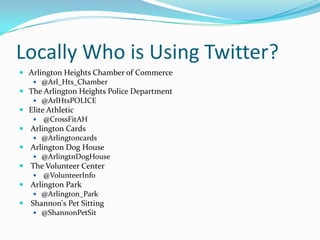
Locally Who is Using Twitter?Arlington Heights Chamber of Commerce@Arl_Hts_ChamberThe Arlington Heights Police Department@ArlHtsPOLICEElite Athletic @CrossFitAH Arlington Cards@Arlingtoncards Arlington Dog House@ArlingtnDogHouse The Volunteer Center @VolunteerInfo Arlington Park@Arlington_Park Shannon's Pet Sitting@ShannonPetSit
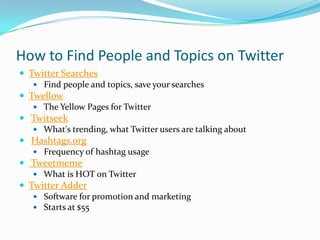
How to Find People and Topics on TwitterTwitter Searches Find people and topics, save your searchesTwellow The Yellow Pages for Twitter Twitseek What's trending, what Twitter users are talking about Hashtags.org Frequency of hashtag usage  Tweetmeme What is HOT on TwitterTwitter Adder Software for promotion and marketing Starts at $55
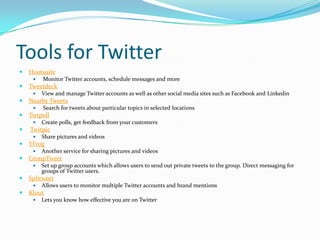
Tools for TwitterHootsuite Monitor Twitter accounts, schedule messages and moreTweetdeckView and manage Twitter accounts as well as other social media sites such as Facebook and LinkedinNearby Tweets Search for tweets about particular topics in selected locationsTwtpollCreate polls, get feedback from your customers TwitpicShare pictures and videosYFrogAnother service for sharing pictures and videosGroupTweetSet up group accounts which allows users to send out private tweets to the group. Direct messaging for groups of Twitter users.SplitweetAllows users to monitor multiple Twitter accounts and brand mentionsKloutLets you know how effective you are on Twitter
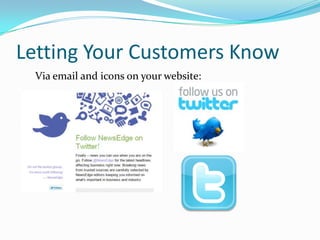
Letting Your Customers KnowVia email and icons on your website:
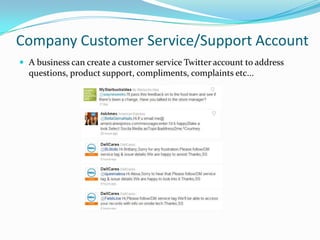
Company Customer Service/Support AccountA business can create a customer service Twitter account to address questions, product support, compliments, complaints etc...
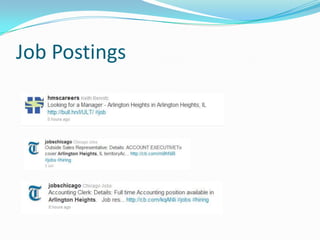
Job Postings
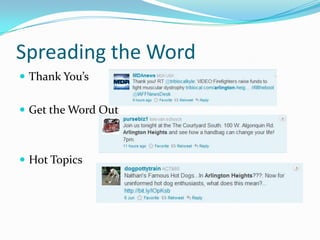
Spreading the WordThank You’sGet the Word OutHot Topics
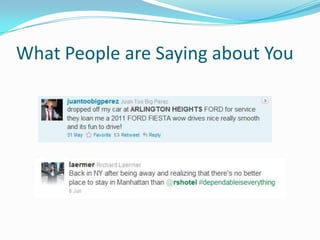
What People are Saying about You
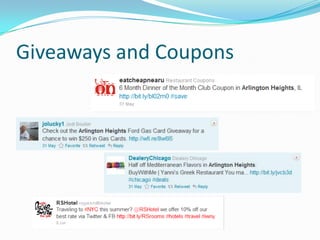
Giveaways and Coupons
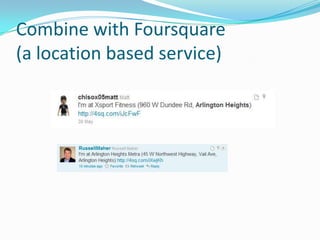
Combine with Foursquare (a location based service)
Some TipsDon't bash your competitors.Keep private and confidential information off Twitter.Legal advice does not belong on Twitter. Don't just tweet slogans, keep it interesting and engaging.Ask questions to get conversations going.Don't tweet long web addresses, use a URL shortening service like Bit.ly, TinyURL or auto shortener in Tweetdeck. Check out Twitter supporthttps://support.twitter.com/groups/31-twitter-basics
More Tips5 Small Businesses that do Facebook and Twitter Righthttp://oneforty.visibli.com/share/S0jHc2  The Geeks Are Grayinghttp://www.inc.com/magazine/201106/the-geeks-are-graying.html How To Save Your Twitter Searcheshttps://support.twitter.com/articles/96646-how-to-save-searches 
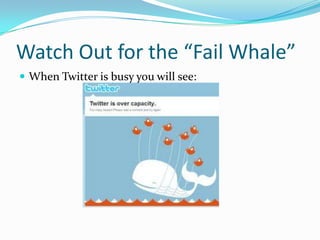
Watch Out for the “Fail Whale”When Twitter is busy you will see:

Twitter for Business

  • 1.
    Twitter for BusinessJune13 & 14, 2011Shannon ScanlanBusiness Services Librariansscanlan@ahml.info
  • 2.
    What is Twitter?Asocial networking site for communicating and "micro blogging".Users “tweet" short messages of 140 characters or less.Users "follow" other users, once followed their tweets will appear on your homepage.Direct messages can be sent between users who are following each other. A good choice if a user would like to send a private message to someone instead of sharing it with everyone.The use of hashtags (#) allows people to find similar topics and tweets such as #Chicago or #WhiteSox.
  • 3.
    Who is UsingTwitter?Over 200 million members. Over 190 million tweets a day. "88% of businesses have now indicated they are employing social media for marketing purposes". "81% of businesses say the number one benefit of social media sites and tools is generating company and brand exposure  followed by increasing traffic and building new relationships with peers and customers".45 % of Twitter users are over the age of 40.From Get Rich with Twitter: Harness the Power of the Twitterverse and Reach More Customers than Ever Before by Dennis L. Prince and The Geeks are Graying: Why Businesses Shouldn't Treat Technology as a Young Person's Game at http://www.inc.com/magazine/201106/the-geeks-are-graying.html 
  • 4.
    Why Twitter isGood for BusinessTwitter is a tremendous tool for connecting and networking with users who share your interests, job skills, geographical area, business products etc...Users can get instant results on what is being communicated about your business, staff and product.Twitter is a constant source of ideas, resources and recommendations.Customers go to Twitter for customer support and technical support.Messages on Twitter are short and concise showing that you value your customer's time.
  • 5.
    Why, Who, WhenWhoin your company will create content, respond, monitor?How much time will you commit to Twitter?Create a purpose for your business on Twitter. Marketing, hiring, brand recognition, community involvement, customer service, interaction with customers, thank you's, coupons...How will you build your community?Invite customers you already have to check out your Twitter page. Insert a link to Twitter in your email signature, on your website, marketing materials etc...
  • 6.
    Jumping InSetting upan accountYour nameYour user nameSelect a short, easy to remember Twitter nameChose a name similar to your businessPasswordEmail addressTwitter will ask you to share email addresses with them so they can check to see which of your contacts are using Twitter (You can skip this step).You can then start tweeting, change your account settings, add a picture, personalize the background of your profile page and start following people.
  • 7.
    Learn the Lingo@ include the @ symbol before a user's Twitter name to mention them in a Tweet.RT stands for "retweet", use when retweeting another user’s message.d, include "d" in front of a user's Twitter name to send them a direct message. # is a hashtag such as #Follow. Hashtags connect topics.
  • 8.
    Locally Who isUsing Twitter?Arlington Heights Chamber of Commerce@Arl_Hts_ChamberThe Arlington Heights Police Department@ArlHtsPOLICEElite Athletic @CrossFitAH Arlington Cards@Arlingtoncards Arlington Dog House@ArlingtnDogHouse The Volunteer Center @VolunteerInfo Arlington Park@Arlington_Park Shannon's Pet Sitting@ShannonPetSit
  • 9.
    How to FindPeople and Topics on TwitterTwitter Searches Find people and topics, save your searchesTwellow The Yellow Pages for Twitter Twitseek What's trending, what Twitter users are talking about Hashtags.org Frequency of hashtag usage  Tweetmeme What is HOT on TwitterTwitter Adder Software for promotion and marketing Starts at $55
  • 10.
    Tools for TwitterHootsuite MonitorTwitter accounts, schedule messages and moreTweetdeckView and manage Twitter accounts as well as other social media sites such as Facebook and LinkedinNearby Tweets Search for tweets about particular topics in selected locationsTwtpollCreate polls, get feedback from your customers TwitpicShare pictures and videosYFrogAnother service for sharing pictures and videosGroupTweetSet up group accounts which allows users to send out private tweets to the group. Direct messaging for groups of Twitter users.SplitweetAllows users to monitor multiple Twitter accounts and brand mentionsKloutLets you know how effective you are on Twitter
  • 11.
    Letting Your CustomersKnowVia email and icons on your website:
  • 12.
    Company Customer Service/Support AccountAbusiness can create a customer service Twitter account to address questions, product support, compliments, complaints etc...
  • 13.
  • 14.
    Spreading the WordThankYou’sGet the Word OutHot Topics
  • 15.
    What People areSaying about You
  • 16.
  • 17.
    Combine with Foursquare(a location based service)
  • 18.
    Some TipsDon't bashyour competitors.Keep private and confidential information off Twitter.Legal advice does not belong on Twitter. Don't just tweet slogans, keep it interesting and engaging.Ask questions to get conversations going.Don't tweet long web addresses, use a URL shortening service like Bit.ly, TinyURL or auto shortener in Tweetdeck. Check out Twitter supporthttps://support.twitter.com/groups/31-twitter-basics
  • 19.
    More Tips5 SmallBusinesses that do Facebook and Twitter Righthttp://oneforty.visibli.com/share/S0jHc2  The Geeks Are Grayinghttp://www.inc.com/magazine/201106/the-geeks-are-graying.html How To Save Your Twitter Searcheshttps://support.twitter.com/articles/96646-how-to-save-searches 
  • 20.
    Watch Out forthe “Fail Whale”When Twitter is busy you will see: