September 18, 2012

         Shannon Scanlan
Business Services Librarian
      sscanlan@ahml.info
The Amazing iPad
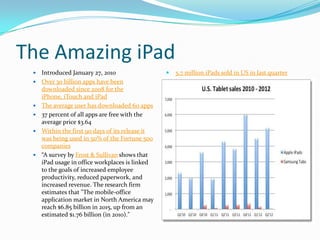
 ď‚—   Introduced January 27, 2010                  ď‚—   5.7 million iPads sold in US in last quarter
 ď‚—   Over 30 billion apps have been
     downloaded since 2008 for the
     iPhone, iTouch and iPad
 ď‚—   The average user has downloaded 60 apps
 ď‚—   37 percent of all apps are free with the
     average price $3.64
 ď‚—   Within the first 90 days of its release it
     was being used in 50% of the Fortune 500
     companies
    “A survey by Frost & Sullivan shows that
     iPad usage in office workplaces is linked
     to the goals of increased employee
     productivity, reduced paperwork, and
     increased revenue. The research firm
     estimates that "The mobile-office
     application market in North America may
     reach $6.85 billion in 2015, up from an
     estimated $1.76 billion (in 2010)."
Business Uses for iPad
ď‚—   Mobile office
ď‚—   Digital sign highlighting products and services
ď‚—   Point of sale
ď‚—   Product or service videos
ď‚—   Customer service
    ď‚— Place in stores for customers to leave feedback or ask
      questions
ď‚— Personal assistant
   ď‚— For customers looking for local
     attractions, directions, referrals
iWork
ď‚— Suite of programs including
   ď‚— Keynote-presentations
   ď‚— Pages-word processing
   ď‚— Numbers-spreadsheets
ď‚— Keynote is comparable to PP
ď‚— Pages includes 140 templates for creating
 documents, newsletters, resumes, invitations and
 more
  ď‚— Can open, edit and export DOC, XML, PDF and ePUB
ď‚— Numbers is similar to Excel
Dropbox
ď‚— Web based hosting service
ď‚— Files and folders synch using the Internet
ď‚— Free account allows up to 2GB of storage
 Users “drop” files into a Dropbox icon on their
  computer, the files are synced via the Internet to the
  user’s other computers and devices via the Dropbox
  client
ď‚— Users can also manually upload files via the Internet to
  their Dropbox account
Dragon Dictation
ď‚— Speech recognition software
ď‚— The #1 business productivity app in the Apple store
  according to developer Nuance Communications
ď‚— The program transcribes spoken words into text for
  documents, email and social media (Facebook and
  Twitter)
Go To Meeting
ď‚— Web conferencing software
ď‚— Users are able to conduct remote meetings and share
  documents via the Internet
ď‚— 2 editions: Personal and Corporate
ď‚— Meetings for 15 users, 25 with corporate account
ď‚— Features include:
  ď‚— Meeting recording
  ď‚— Drawing tools
  ď‚— Desktop sharing
Springpad
ď‚— Productivity app that synchs from your
  computer, phone and iPad
ď‚— Add lists, places, movies, products, notes, alerts, flag
  items, photos, record audio, scan a barcode and search
  nearby
ď‚— Share with your friends
ď‚— Items can be shared on Facebook and Twitter
Skype
ď‚— Voice, video and instant messaging over the Internet
ď‚— Skype to Skype user calls are free
ď‚— Calls to land and mobiles lines have fees
ď‚— As of September 2011 there were over 663 million
  registered users
ď‚— Used by businesses to conduct
  meetings, interviews, contact international
  clients, demos and more
Evernote
ď‚— Digital notetaking app
ď‚— Users can create text, voice recordings, add photos and
  more
ď‚— Organized by folders
ď‚— Can be shared with friends and colleagues
CalcMoolator
ď‚— Financial calculator
ď‚— Calculate mortgage payments, financing, salary
ď‚— Compare renting to buying
ď‚— Equipment buy vs. lease
ď‚— Inventory analysis
ď‚— Profit margin
ď‚— Debt payoff
ď‚— Business debt consolidation
ď‚— Insurance, investments and more
White Pages
ď‚— Search an area by GPS
   ď‚— People
   ď‚— Businesses
   ď‚— Stores
ď‚— Reverse phone number search
ď‚— Reverse address search
Apps for Social Media Marketing
ď‚— Facebook
ď‚— Twitter
ď‚— LinkedIn
ď‚— Wordpress
ď‚— Pinterest
ď‚— Instagram
Apps for Finance
ď‚— Quickbooks Mobile
 InTuit’s Go Payment
ď‚— Square
ď‚— Mint-personal finance mobile
ď‚— Pageonce
Apps for Travel
ď‚— TripIt: Travel Organizer
ď‚— FlightTracker
ď‚— Groupon
ď‚— Google Earth
ď‚— Kayak
ď‚— Weather
Other Apps
ď‚— Analytics HD
ď‚— Idea Boards
ď‚— iMeeting Pad
ď‚— iPassword
ď‚— Sales Force
ď‚— Scanner Pro
ď‚— Bento 4-Personal Database
ď‚— Google Docs
Additional Information
ď‚— 30 Useful iPad Apps for Business and Presentation
ď‚— iPad in Business: Apps for Business
ď‚— 50 Essential iPad Apps for Small Business-2012 edition

iPad Apps For Business

  • 1.
    September 18, 2012 Shannon Scanlan Business Services Librarian sscanlan@ahml.info
  • 2.
    The Amazing iPad  Introduced January 27, 2010  5.7 million iPads sold in US in last quarter  Over 30 billion apps have been downloaded since 2008 for the iPhone, iTouch and iPad  The average user has downloaded 60 apps  37 percent of all apps are free with the average price $3.64  Within the first 90 days of its release it was being used in 50% of the Fortune 500 companies  “A survey by Frost & Sullivan shows that iPad usage in office workplaces is linked to the goals of increased employee productivity, reduced paperwork, and increased revenue. The research firm estimates that "The mobile-office application market in North America may reach $6.85 billion in 2015, up from an estimated $1.76 billion (in 2010)."
  • 3.
    Business Uses foriPad ď‚— Mobile office ď‚— Digital sign highlighting products and services ď‚— Point of sale ď‚— Product or service videos ď‚— Customer service ď‚— Place in stores for customers to leave feedback or ask questions ď‚— Personal assistant ď‚— For customers looking for local attractions, directions, referrals
  • 4.
    iWork ď‚— Suite ofprograms including ď‚— Keynote-presentations ď‚— Pages-word processing ď‚— Numbers-spreadsheets ď‚— Keynote is comparable to PP ď‚— Pages includes 140 templates for creating documents, newsletters, resumes, invitations and more ď‚— Can open, edit and export DOC, XML, PDF and ePUB ď‚— Numbers is similar to Excel
  • 5.
    Dropbox  Web basedhosting service  Files and folders synch using the Internet  Free account allows up to 2GB of storage  Users “drop” files into a Dropbox icon on their computer, the files are synced via the Internet to the user’s other computers and devices via the Dropbox client  Users can also manually upload files via the Internet to their Dropbox account
  • 6.
    Dragon Dictation ď‚— Speechrecognition software ď‚— The #1 business productivity app in the Apple store according to developer Nuance Communications ď‚— The program transcribes spoken words into text for documents, email and social media (Facebook and Twitter)
  • 7.
    Go To Meeting ď‚—Web conferencing software ď‚— Users are able to conduct remote meetings and share documents via the Internet ď‚— 2 editions: Personal and Corporate ď‚— Meetings for 15 users, 25 with corporate account ď‚— Features include: ď‚— Meeting recording ď‚— Drawing tools ď‚— Desktop sharing
  • 8.
    Springpad ď‚— Productivity appthat synchs from your computer, phone and iPad ď‚— Add lists, places, movies, products, notes, alerts, flag items, photos, record audio, scan a barcode and search nearby ď‚— Share with your friends ď‚— Items can be shared on Facebook and Twitter
  • 9.
    Skype ď‚— Voice, videoand instant messaging over the Internet ď‚— Skype to Skype user calls are free ď‚— Calls to land and mobiles lines have fees ď‚— As of September 2011 there were over 663 million registered users ď‚— Used by businesses to conduct meetings, interviews, contact international clients, demos and more
  • 10.
    Evernote ď‚— Digital notetakingapp ď‚— Users can create text, voice recordings, add photos and more ď‚— Organized by folders ď‚— Can be shared with friends and colleagues
  • 11.
    CalcMoolator ď‚— Financial calculator ď‚—Calculate mortgage payments, financing, salary ď‚— Compare renting to buying ď‚— Equipment buy vs. lease ď‚— Inventory analysis ď‚— Profit margin ď‚— Debt payoff ď‚— Business debt consolidation ď‚— Insurance, investments and more
  • 12.
    White Pages ď‚— Searchan area by GPS ď‚— People ď‚— Businesses ď‚— Stores ď‚— Reverse phone number search ď‚— Reverse address search
  • 13.
    Apps for SocialMedia Marketing ď‚— Facebook ď‚— Twitter ď‚— LinkedIn ď‚— Wordpress ď‚— Pinterest ď‚— Instagram
  • 14.
    Apps for Finance Quickbooks Mobile  InTuit’s Go Payment  Square  Mint-personal finance mobile  Pageonce
  • 15.
    Apps for Travel ď‚—TripIt: Travel Organizer ď‚— FlightTracker ď‚— Groupon ď‚— Google Earth ď‚— Kayak ď‚— Weather
  • 16.
    Other Apps ď‚— AnalyticsHD ď‚— Idea Boards ď‚— iMeeting Pad ď‚— iPassword ď‚— Sales Force ď‚— Scanner Pro ď‚— Bento 4-Personal Database ď‚— Google Docs
  • 17.
    Additional Information ď‚— 30Useful iPad Apps for Business and Presentation ď‚— iPad in Business: Apps for Business ď‚— 50 Essential iPad Apps for Small Business-2012 edition