SCAPS
About SCAPS
 One dimensional solar cell simulation program
 Developed at the department of Electronics and Information Systems (ELIS)
of the University of Gent, Belgium.
Alex Niemegeers
Marc Burgelman
Koen Decock
Johan Verschraegen
Stefaan Degrave.
 The program is freely available
 Originally developed for cell structures of the CuInSe2 and the CdTe family.
 Now also applicable to crystalline solar cells (Si and GaAs family) and
amorphous cells (a-Si and micromorphous Si).
 Up to 7 semiconductor layers can be added.
 Almost all parameters can be graded : Eg, χ, ε, NC, NV, vthn, vthp, μn, μp, NA, ND,
and Nt
 Recombination mechanisms: band-to-band (direct), Auger, SRH-type
About SCAPS
 Charge type:
no charge (idealisation), monovalent (single donor, acceptor),
divalent (double donor, double acceptor, amphoteric),
multivalent (user defined)
 The charge state and recombination is accounted for .
 Energetic distributions: single level, uniform, Gauss or tail.
 Optical property filter: reflection of transmission filter
About SCAPS
 Optical property: direct excitation with light possible
 Illumination: a variety of standard and other spectra included: AM0, AM1.5D,
AM1.5G, AM1.5.
 illumination: from either the p-side or the n-side; spectrum cut-off and
attenuation
 Generation: either from internal calculation or from user
 Intra-band tunneling: within a conduction band or within a valence band.
About SCAPS
 Working point for calculations: voltage, frequency, temperature
 Possible calculations: energy bands, concentrations and currents at a given
working point, J-V characteristics, ac characteristics, spectral response (also
with bias light or voltage).
 Batch calculations possible; presentation of results and settings as a function
of batch parameters
 Loading and saving of all settings; startup of SCAPS in a personalized
configuration; a script language including a free user function
About SCAPS
 Very intuitive user interface
 A script language facility to run SCAPS from a ‘script file’; all internal
variables can be accessed and plotted via the script.
 A built-in curve fitting facility.
 A panel for the interpretation of admittance measurements
About SCAPS
SOFTWARE WORKING
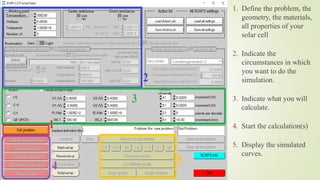
1. Define the problem, the
geometry, the materials,
all properties of your
solar cell
2. Indicate the
circumstances in which
you want to do the
simulation.
3. Indicate what you will
calculate.
4. Start the calculation(s)
5. Display the simulated
curves.
Solar cell definition
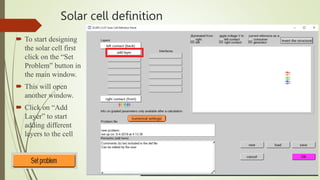
 To start designing
the solar cell first
click on the “Set
Problem” button in
the main window.
 This will open
another window.
 Click on “Add
Layer” to start
adding different
layers to the cell
Solar cell definition
1. Manually Enter
properties of material
2. Add absorption
properties from library
3. Define
recombination
parameters.
4. Select material from
library.
crystalline solar cells &
Amorphous cells
(Si, GaAs, CuInSe2 and
the CdTe family).
Solar cell definition
1. User can decide on
which surface the light
falls.
Solar cell definition
2. ‘apply voltage V to’: when ‘left’ is set, then the right contact is the reference
contact, and the voltage V is applied to the left contact.
When ‘right’ is set, the left contact is the reference contact, and the voltage V is
applied to the right contact.
3. ‘current reference as a’: when ‘consumer’ is set, then the current reference arrow
is set such that P = JxV is the power consumed by the cell, and thus - JxV the
power generated by the cell.
When ‘generator’ is set, then the current reference arrow is set such that P = JxV is
the power generated by the cell, and thus - JxV the power consumed by the cell.
Setting of the current reference arrow thus depends both on the selected voltage
reference and on the consumer/generator selection.
Solar cell definition
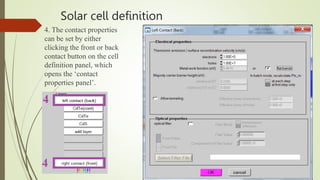
4. The contact properties
can be set by either
clicking the front or back
contact button on the cell
definition panel, which
opens the ‘contact
properties panel’.

Tutorial on SCAPS-1D simulation tool.pptx

  • 1.
  • 2.
    About SCAPS  Onedimensional solar cell simulation program  Developed at the department of Electronics and Information Systems (ELIS) of the University of Gent, Belgium. Alex Niemegeers Marc Burgelman Koen Decock Johan Verschraegen Stefaan Degrave.  The program is freely available
  • 3.
     Originally developedfor cell structures of the CuInSe2 and the CdTe family.  Now also applicable to crystalline solar cells (Si and GaAs family) and amorphous cells (a-Si and micromorphous Si).  Up to 7 semiconductor layers can be added.  Almost all parameters can be graded : Eg, χ, ε, NC, NV, vthn, vthp, μn, μp, NA, ND, and Nt  Recombination mechanisms: band-to-band (direct), Auger, SRH-type About SCAPS
  • 4.
     Charge type: nocharge (idealisation), monovalent (single donor, acceptor), divalent (double donor, double acceptor, amphoteric), multivalent (user defined)  The charge state and recombination is accounted for .  Energetic distributions: single level, uniform, Gauss or tail.  Optical property filter: reflection of transmission filter About SCAPS
  • 5.
     Optical property:direct excitation with light possible  Illumination: a variety of standard and other spectra included: AM0, AM1.5D, AM1.5G, AM1.5.  illumination: from either the p-side or the n-side; spectrum cut-off and attenuation  Generation: either from internal calculation or from user  Intra-band tunneling: within a conduction band or within a valence band. About SCAPS
  • 6.
     Working pointfor calculations: voltage, frequency, temperature  Possible calculations: energy bands, concentrations and currents at a given working point, J-V characteristics, ac characteristics, spectral response (also with bias light or voltage).  Batch calculations possible; presentation of results and settings as a function of batch parameters  Loading and saving of all settings; startup of SCAPS in a personalized configuration; a script language including a free user function About SCAPS
  • 7.
     Very intuitiveuser interface  A script language facility to run SCAPS from a ‘script file’; all internal variables can be accessed and plotted via the script.  A built-in curve fitting facility.  A panel for the interpretation of admittance measurements About SCAPS
  • 8.
  • 9.
    1. Define theproblem, the geometry, the materials, all properties of your solar cell 2. Indicate the circumstances in which you want to do the simulation. 3. Indicate what you will calculate. 4. Start the calculation(s) 5. Display the simulated curves.
  • 10.
    Solar cell definition To start designing the solar cell first click on the “Set Problem” button in the main window.  This will open another window.  Click on “Add Layer” to start adding different layers to the cell
  • 11.
    Solar cell definition 1.Manually Enter properties of material 2. Add absorption properties from library 3. Define recombination parameters. 4. Select material from library. crystalline solar cells & Amorphous cells (Si, GaAs, CuInSe2 and the CdTe family).
  • 12.
    Solar cell definition 1.User can decide on which surface the light falls.
  • 13.
    Solar cell definition 2.‘apply voltage V to’: when ‘left’ is set, then the right contact is the reference contact, and the voltage V is applied to the left contact. When ‘right’ is set, the left contact is the reference contact, and the voltage V is applied to the right contact. 3. ‘current reference as a’: when ‘consumer’ is set, then the current reference arrow is set such that P = JxV is the power consumed by the cell, and thus - JxV the power generated by the cell. When ‘generator’ is set, then the current reference arrow is set such that P = JxV is the power generated by the cell, and thus - JxV the power consumed by the cell. Setting of the current reference arrow thus depends both on the selected voltage reference and on the consumer/generator selection.
  • 14.
    Solar cell definition 4.The contact properties can be set by either clicking the front or back contact button on the cell definition panel, which opens the ‘contact properties panel’.