BiTteRsweet FS


   Dan Şerban
BTRFS rationale and design goals
• Feature-focused, general-purpose FS
   that scales to very large storage
• Linux desperately needs a copy-on-write FS
   (superior crash safety)
• Simplify administration of the entire
   storage stack
• Address the lack of pooled storage functionality
   (integrated volume management,
   multiple device support) in Linux file systems
• Allow for unlimited snapshots that are:
   - cheap in storage
   - fast to perform
BTRFS rationale and design goals
• Very fault tolerant
   - never trust the underlying spinning media
   - solid checksumming
       of all file data and metadata
       using parent-stored checksums
   - transactional object store
• Self-healing (not yet implemented)
   - avoidance of bit-rot errors +1
   - actual error correction -1
BTRFS rationale and design goals
• Extent based file storage
• Dynamic (on an as-needed basis)
   allocation of inodes
• Space-efficient packing of small files
• Performance that doesn't degrade over time
BTRFS vs. ZFS - some context
• Andrew Morton has famously called ZFS
   "a rampant layering violation" because
   it combines the functionality of a file system,
   volume manager, and RAID controller
• However, BTRFS does the same
• By changing where the boundaries are
   between layers ZFS and BTRFS make the entire
   storage stack much simpler
• ZFS and BTRFS layering is done in a way
   that gives each layer more knowledge
   of the structures of the other layers
BTRFS vs. ZFS - some context
• Upper layers having more knowledge
    about the physical side of storing data on disk
    enables e.g. selective resilvering
    of only used blocks
• BTRFS was merged into the mainline kernel
    so quickly because it is building on mature
    kernel features
• It is using the same device mapping code
    for RAID and block abstraction
    that Linux’s software RAID and LVM are based on
BTRFS subvolumes and snapshots
• Subvolume is the unit of snapshotting
• Subvolumes (and their snapshots)
   are similar to independent filesystems that:
   - share the same devpool as their backing store
   - are folded into the namespace
        of the parent BTRFS volume
• Snapshots are subvolumes with initial content
• Formal rollback to snapshot not implemented
• Only writable snapshots are possible
   as of now (2.6.34)
• BTRFS will eventually have read-only snapshots
   through settable quotas at mount time
   ... but quotas aren't yet implemented
#btrfs (IRC) wisdom
Me: is BTRFS self-healing, like ZFS?
#btrfs:
- will be, isn't yet
- self-healing is just buzz for saying when the
data/metadata checksums fail on one disk, use the
redudant copy found on another disk to replace a
faulty bit/block
- currently btrfs will use the redundant data if the
checksum fails, but it doesn't actually rewrite the
original
- it'll issue a warning in dmesg though, so it's possible
to hack in a user-space tool to do the rewrite in a
nicely hackish way :)
- currently, errors can only be fixed by triggering a
rebalance
#btrfs (IRC) wisdom
(N.N. Stability issue at or near 100% disk usage)

#btrfs:
- BTRFS: don't call us, we'll call you ... when it comes
to space usage. When BTRFS calls, it sends a giant
kernel oops message, conveniently crashing the
machine so that you can without additional penalty
power the server down and insert a new disk.
- /sarcasm

(N.N. ZFS suffers from the same issue)
#btrfs (IRC) wisdom
#btrfs:
- for a 30G partition rebalancing should take a few
hours, just look at your dmesg and see if there are
lots of repeated messages.
- if there are, then it's hanging
- if there aren't, then it's working
- generally if you don't have enough space, the
rebalancing process will go into an infinite loop since
it can't find a big enough chunk of free space to stuff
things in
- so just delete a large file or two and then you'll have
plenty of free space and it'll progress.
- also, you can't kill a rebalancing process
- it's unkillable, so you have to reboot to stop it
- it's pretty safe though
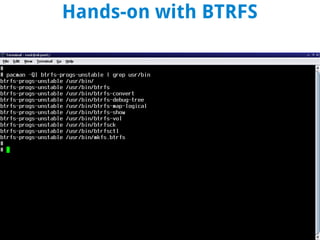
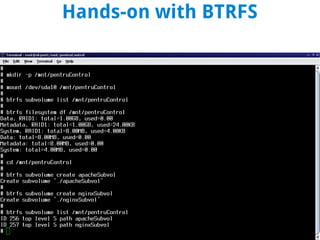
Hands-on with BTRFS
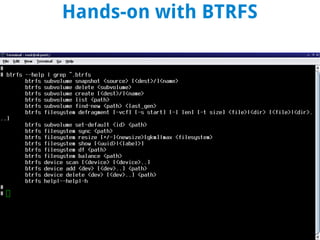
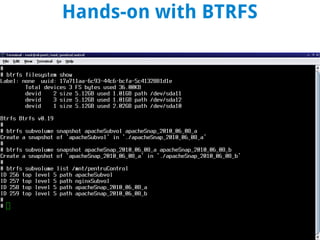
Hands-on with BTRFS
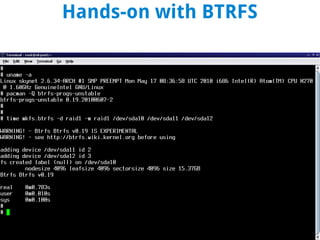
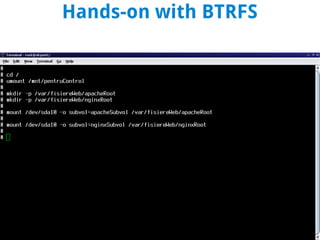
Hands-on with BTRFS
Hands-on with BTRFS
Hands-on with BTRFS
Hands-on with BTRFS
Questions / Feedback

BiTteRsweet FS

  • 1.
    BiTteRsweet FS Dan Şerban
  • 2.
    BTRFS rationale anddesign goals • Feature-focused, general-purpose FS that scales to very large storage • Linux desperately needs a copy-on-write FS (superior crash safety) • Simplify administration of the entire storage stack • Address the lack of pooled storage functionality (integrated volume management, multiple device support) in Linux file systems • Allow for unlimited snapshots that are: - cheap in storage - fast to perform
  • 3.
    BTRFS rationale anddesign goals • Very fault tolerant - never trust the underlying spinning media - solid checksumming of all file data and metadata using parent-stored checksums - transactional object store • Self-healing (not yet implemented) - avoidance of bit-rot errors +1 - actual error correction -1
  • 4.
    BTRFS rationale anddesign goals • Extent based file storage • Dynamic (on an as-needed basis) allocation of inodes • Space-efficient packing of small files • Performance that doesn't degrade over time
  • 5.
    BTRFS vs. ZFS- some context • Andrew Morton has famously called ZFS "a rampant layering violation" because it combines the functionality of a file system, volume manager, and RAID controller • However, BTRFS does the same • By changing where the boundaries are between layers ZFS and BTRFS make the entire storage stack much simpler • ZFS and BTRFS layering is done in a way that gives each layer more knowledge of the structures of the other layers
  • 6.
    BTRFS vs. ZFS- some context • Upper layers having more knowledge about the physical side of storing data on disk enables e.g. selective resilvering of only used blocks • BTRFS was merged into the mainline kernel so quickly because it is building on mature kernel features • It is using the same device mapping code for RAID and block abstraction that Linux’s software RAID and LVM are based on
  • 7.
    BTRFS subvolumes andsnapshots • Subvolume is the unit of snapshotting • Subvolumes (and their snapshots) are similar to independent filesystems that: - share the same devpool as their backing store - are folded into the namespace of the parent BTRFS volume • Snapshots are subvolumes with initial content • Formal rollback to snapshot not implemented • Only writable snapshots are possible as of now (2.6.34) • BTRFS will eventually have read-only snapshots through settable quotas at mount time ... but quotas aren't yet implemented
  • 8.
    #btrfs (IRC) wisdom Me:is BTRFS self-healing, like ZFS? #btrfs: - will be, isn't yet - self-healing is just buzz for saying when the data/metadata checksums fail on one disk, use the redudant copy found on another disk to replace a faulty bit/block - currently btrfs will use the redundant data if the checksum fails, but it doesn't actually rewrite the original - it'll issue a warning in dmesg though, so it's possible to hack in a user-space tool to do the rewrite in a nicely hackish way :) - currently, errors can only be fixed by triggering a rebalance
  • 9.
    #btrfs (IRC) wisdom (N.N.Stability issue at or near 100% disk usage) #btrfs: - BTRFS: don't call us, we'll call you ... when it comes to space usage. When BTRFS calls, it sends a giant kernel oops message, conveniently crashing the machine so that you can without additional penalty power the server down and insert a new disk. - /sarcasm (N.N. ZFS suffers from the same issue)
  • 10.
    #btrfs (IRC) wisdom #btrfs: -for a 30G partition rebalancing should take a few hours, just look at your dmesg and see if there are lots of repeated messages. - if there are, then it's hanging - if there aren't, then it's working - generally if you don't have enough space, the rebalancing process will go into an infinite loop since it can't find a big enough chunk of free space to stuff things in - so just delete a large file or two and then you'll have plenty of free space and it'll progress. - also, you can't kill a rebalancing process - it's unkillable, so you have to reboot to stop it - it's pretty safe though
  • 11.
  • 12.
  • 13.
  • 14.
  • 15.
  • 16.
  • 17.