Upgrade to Oracle Database 19c
Release and Patching Strategy
Virtual Classroom Series
Mike Dietrich
Master Product Manager
Database Upgrade and Migrations
Roy Swonger
Vice President
Database Upgrade, Utilities and Patching
Vice President
Database Upgrade,
Utilities & Patching
Roy F. Swonger
@RoyFSwonger
Master Product Manager
Database Upgrade
and Migrations
Mike Dietrich
https://MikeDietrichDE.com
@MikeDietrichDE
Slides | https://MikeDietrichDE.com
Content Overview
Migration to
Multitenant
4
Ensure
Performance Stability
3
Upgrade to Oracle
Database 19c
2Release and
Patching Strategy
1
Database Upgrade
What you shouldn't do
PhotobyKaiPilgeronUnsplash
Don't do this | Outdated Versions
Monday, January 14, 2019 7:08 AM
I’m working into a deal in LAD Customer, migrating about aprox 70 db oracle database version 7 (supporting
OLD application developed on Oracle Forms) distributed around all country, my customer is want to
modernized their application to 3 layer architecture (using an J2EE app) and move all data to an oracle DB
central repository.
We are intend to recommend best architecture and sizing but we do not know Oracle 7 database.
Don't do this | Outdated Versions
GA: 29-NOV-2006
PhotobySpaceXonUnsplash
Database Upgrade
Why you "want" to upgrade
Lifetime Support Policy
2009
2010
2011
2012
2013
2014
2015
2016
2017
2018
2019
2020
2021
2022
2023
2024
2025
2026
2027
Oracle 18
(12.2.0.2)
EXTENDEDOracle 12.1
EXTENDEDOracle 19
(12.2.0.3)
EXTENDEDWaived EXTENDEDOracle 11.2 MARKET
DRIVEN
Oracle 12.2.0.1 LIMITED
Premier Support Waived Extended Support Paid Extended Support Market Driven Support Limited Error Correction
Oracle 12.2 Release Family
Includes:
• Oracle 12.2.0.1, Oracle 18c (12.2.0.2), Oracle 19c (12.2.0.3)
• MOS Note:742060.1 - The Single Source of Truth
• MOS Note:161818.1 - Releases Support Status Summary
2016
2017
2018
2019
2020
2021
2022
2023
2024
2025
2026
2027
Oracle 18
(12.2.0.2)
EXTENDED
Oracle 12.2.0.1
Oracle 19
(12.2.0.3)
LIMITED
Lifetime Support Policy Brochure
http://www.oracle.com/us/support/library/lifetime-support-technology-069183.pdf
Innovation
EXTENDEDLong Term Support
Innovation
Premier Support Paid Extended Support
Release Types | Long Term Support vs Innovation Releases
Long Term Support Release
• 5 years of Premier Support followed by 3 years of Extended Support
Innovation Release
• 2 years of Premier Support, but there is no Extended Support
• MOS Note: 742060.1 - Release Schedule of Current Database Releases
Old Format
12.2.0.1.0 Year. Update. Revision
New Format
19.7.0
Yearly Releases | 3 Number Format
Patch:
opatch
Oracle 19.3.0 Oracle 19.7.0
Upgrade:
autoupgrade.jar or
dbupgrade
Oracle 18.6.0 Oracle 19.7.0
Basic Facts | Patch versus Upgrade
Patching before Oracle Database 12.2
Patch Set Updates and Bundle Patches
Patching | Before Oracle Database 12.2
Bundle Patch 2
Patch Set Update 2
Bundle Patch 1
Patch Set Update 1
Base Release
Security Fixes Regression Fixes
Optimizer / off
Functional Fixes
Optimizer / off
Functional Fixes
Patch Set Update 1
Security Fixes Regression Fixes
Patch Set Update 2
Security Fixes Regression Fixes
Patching since Oracle Database 12.2
Updates (RU) and Revisions (RUR)
Patching | Release Update 1 (RU)
Base Release
Update 1
Security Fixes Regression Fixes
Optimizer / off Functional Fixes
Patching | Release Update 2 (RU)
Base Release
Update 1
Security Fixes Regression Fixes
Optimizer / off Functional Fixes
Update 2
Security Fixes Regression Fixes
Optimizer / off Functional Fixes
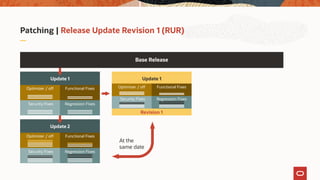
Patching | Release Update Revision 1 (RUR)
Base Release
Update 1
Security Fixes Regression Fixes
Optimizer / off Functional Fixes
Update 2
Security Fixes Regression Fixes
Optimizer / off Functional Fixes
Update 1
Functional Fixes
Security Fixes Regression Fixes
Optimizer / off
Revision 1
At the
same date
Patching | Release Update Revision 2 (RUR)
Base Release
Update 1
Security Fixes Regression Fixes
Optimizer / off Functional Fixes
Update 2
Security Fixes Regression Fixes
Optimizer / off Functional Fixes
Update 1
Functional Fixes
Security Fixes Regression Fixes
Optimizer / off
Revision 1
Update 2
Functional Fixes
Security Fixes Regression Fixes
Optimizer / off
Revision 1
Update 1
Functional Fixes
Security Fixes Regression Fixes
Optimizer / off
Revision 2
At the
same date
Update 3
Timeline Example
Yearly Releases, Updates and Revisions
Timeline | April 2018
Release April July October January April
18c 18.2.0 Beta - Update 1
Timeline | July 2018
Release April July October January April
18c 18.2.0 18.3.0
18.2.1
Update - On-Prem GA
1. Revision
Timeline | October 2018
Release April July October January April
18c 18.2.0 18.3.0 18.4.0
18.2.1 18.3.1
18.2.2
19c 19.1.0New Release
Update
1. Revision
2. Revision
Timeline Example | January 2019
Release April July October January April
18c 18.2.0 18.3.0 18.4.0 18.5.0
18.2.1 18.3.1 18.4.1
18.2.2 18.3.2
19c 19.1.0 19.2.0
Timeline Example | April 2019
Release April July October January April
18c 18.2.0 18.3.0 18.4.0 18.5.0 18.6.0
18.2.1 18.3.1 18.4.1 18.5.1
18.2.2 18.3.2 18.4.2
19c 19.1.0 19.2.0 19.3.0
Timeline Example | Future Projection 2022
April July October January April July October January April July October January April July October
18c 18.6.0 18.7.0 18.8.0 18.9.0 18.10.0 18.11.0 18.12.0 18.13.0 18.14.0 18.15.0
18.5.1 18.6.1 18.7.1 18.8.1 18.9.1 18.10.1 18.11.1 18.12.1 18.13.1 18.14.1
18.4.2 18.5.2 18.6.2 18.7.2 18.8.2 18.9.2 18.10.2 18.11.2 18.12.2 18.13.2
19c 19.3.0 19.4.0 19.5.0 19.6.0 19.7.0 19.8.0 19.9.0 19.10.0 19.11.0 19.12.0 19.13.0 19.14.0 19.15.0 19.16.0 19.17.0
19.3.1 19.4.1 19.5.1 19.6.1 19.7.1 19.8.1 19.9.1 19.10.1 19.11.1 19.12.1 19.13.1 19.14.1 19.15.1 19.16.1
19.3.2 19.4.2 19.5.2 19.6.2 19.7.2 19.8.2 19.9.1 19.10.2 19.11.2 19.12.2 19.13.3 19.14.2 19.15.2
2019
Patching
End 18c
2020 2021 2022
Timeline Example | Possibilities
April July October January April July October January April July October January April July October
19c 19.3.0 19.7.0 19.11.0 19.15.0 19.16.0 19.17.0
19.12.1
19.7.2 19.8.2 19.12.2 19.14.2
2019 2020 2021 2022
Timeline Example | Much simpler: RUs only
April July October January April July October January April July October January April July October
18c 18.6.0 18.7.0 18.8.0 18.9.0 18.10.0 18.11.0 18.12.0 18.13.0 18.14.0 18.15.0
19c 19.3.0 19.4.0 19.5.0 19.6.0 19.7.0 19.8.0 19.9.0 19.10.0 19.11.0 19.12.0 19.13.0 19.14.0 19.15.0 19.16.0 19.17.0
2019 2020 2021 2022
Attention | The RUR trap!
• You will consume RUs "secretly”
• Stay with RUs!
July October January April July October
RU 18.3.0
RUR-1 18.3.1
RUR-2 18.3.2 18.4.2 18.5.2 18.6.2
July October January April July October
RU 18.3.0
RUR-1 18.3.1
RUR-2 18.3.2 18.4.2 18.5.2 18.6.2
18.4.0 18.4.1
Attention | The RUR trap with example numbers
• Assume an RU has 100 new fixes - 25 security only, 75 other fixes
• Then an RUR1 adds 25 fixes on top, RUR2 adds another 25 on top
July October January April July October
RU 100
RUR-1 125
RUR-2 150 250 350 450
July October January April July October
RU 100 200 300 400 500 600
RUR-1 125
RUR-2 150 ? ?? ???
200 225
+100
Further Information
The most important Links and MOS Notes
Testing Recommendations
Oracle Database - Overview of Database Patch Delivery Methods for 12.2.0.1 and greater
(Doc ID 2337415.1)
Most Important Notes
MOS Note: 742060.1
Release Schedule of Current Database Releases
https://support.oracle.com/epmos/faces/DocumentDisplay?id=742060.1
MOS Note: 2285040.1
Release Update Introduction and FAQ
https://support.oracle.com/epmos/faces/DocumentDisplay?id=2285040.1
MOS Note: 756671.1
Master Note for Database Proactive Patch Program
https://support.oracle.com/epmos/faces/DocumentDisplay?id=756671.1
MOS Note: 1962125.1
Oracle Database - Overview of Database Patch Delivery Methods for 12.1.0.2 and lower
https://support.oracle.com/epmos/faces/DocumentDisplay?id=1962125.1
MOS Note 2337415.1
Oracle Database - Overview of Database Patch Delivery Methods for 12.2.0.1 and greater
https://support.oracle.com/epmos/faces/DocumentDisplay?id=2337415.1
MOS Note: 2118136.2
Assistant: Download Reference for Oracle Database/GI PSU, SPU(CPU), Bundle Patches, Patchsets and Base Releases
https://support.oracle.com/epmos/faces/DocumentDisplay?id=2118136.2
Break Time
We'll be back in 5 minutes
987654321000543210987654321098765432109876543210987654321098765432100 4:
SECONDSMINUTES
Break Time
We'll be back in 5 minutes
987654321000543210987654321098765432109876543210987654321098765432100 3:
SECONDSMINUTES
Break Time
We'll be back in 5 minutes
987654321000543210987654321098765432109876543210987654321098765432100 2:
SECONDSMINUTES
Break Time
We'll be back in 5 minutes
987654321000543210987654321098765432109876543210987654321098765432100 1:
SECONDSMINUTES
Break Time
We'll be back in 5 minutes
987654321000543210987654321098765432109876543210987654321098765432100 0:
SECONDSMINUTES
Break Time
… almost over … ☺
Welcome to the Jungle
Patching and the jungle?
PhotobyAndreasDressonUnsplash
Patching Strategies
Patching Basics
The Database Patching Process
Tips for Patching Success
Security
The most important
reason to upgrade
and patch
PhotobyJoseFontanoonUnsplash
Do We Really Need To Say This?
Source: https://www.nytimes.com/2019/07/22/business/equifax-settlement.html?module=inline
Security | What happens if you don't upgrade
"My database is not facing the internet"
PhotobyBenWhiteonUnsplash
of malware is
delivered via email
92%
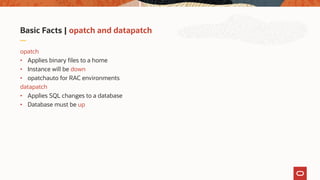
Basic Facts | opatch and datapatch
opatch
• Applies binary files to a home
• Instance will be down
• opatchauto for RAC environments
datapatch
• Applies SQL changes to a database
• Database must be up
Basic Facts | Patch types
One-Off patch - Interim patch
• Single bug fix
Merge patch
• Two or many one-off fixes combined
Bundle patch
• A collection of many fixes on top of a release or another bundle patch
• Examples:
• PSU - Patch Set Update
• BP - Bundle Patch
• RU - Release Update
Oracle Database - Overview
of Database Patch Delivery
Methods for 12.2.0.1 and later
MOS Note: 2337415.1
Basic Facts | Patch Inventory
$ opatch lsinventory
• Tells you what is installed in your software home
DBMS_QOPATCH package provides access to
• Patches installed in the Oracle Home
• FAQ on Queryable Patch Inventory (MOS Note: 1530108.1)
DBA_REGISTRY_SQLPATCH
• View detailing information about SQL patches installed in the database
Recommendation | Out-of-Place Patching
Apply Patches
Original
Database
Home
Cloned
Database
Home
Patched
Database
Home
Restart database
using new home
Recommendation | Standby-First Apply Patching
1. Patch the Standby
2. Test Changes!!!!
3. Switchover
Application Tier
Data Guard
• Production up after Switchover
• Run any patch SQL
• Patch original Primary home
Post Switchover
Recommendation | RAC Rolling Patching
Datapatch
OPatch OPatch
Application Tier
Patching Strategies
Patching Basics
The Database Patching Process
Tips for Patching Success
The Database Patching Process
1 Find the right patches
2 Download & install patches
3 Apply changes to the database
4 Verify the result
5 Special Feature: Install and Patch
Finding the Right Patches | Quarterly
https://www.oracle.com/security-alerts/
Critical Patch Alert April 2020 | Risk Matrix
Critical Patch Alert July 2019 | Risk Matrix
Quarterly Release Update Patch Reference
Oracle Database 19c Proactive Patch Information MOS Note: 2521164.1
• Database 18 Proactive Patch Information MOS Note: 2369376.1
• Database 12.2.0.1 Proactive Patch Information MOS Note: 2285557.1
• Database 12.1.0.2 Proactive Patch Information MOS Note: 2285558.1
• Database 11.2.0.4 Proactive Patch Information MOS Note: 2285559.1
Oracle Java Virtual Machine | OJVM
OJVM Security Fixes in Quarterly Patches: ⌀ 7.9
6,5
9,0 9,0 9,0 9,0 9,0 9,0 9,1 9,0
5,3
9,9
8,2 8,3
8,5
5,3
9,8
3,5
7,5
6,8 6,8
7,5
8,0
0,0
1,0
2,0
3,0
4,0
5,0
6,0
7,0
8,0
9,0
10,0
jan-15 apr-15 jul-15 okt-15 jan-16 apr-16 jul-16 okt-16 jan-17 apr-17 jul-17 okt-17 jan-18 apr-18 jul-18 okt-18 jan-19 apr-19 jul-19 okt-19 jan-20 apr-20
Check | OJVM
Is OJVM installed?
Select comp_id, comp_name, version from DBA_REGISTRY order by 1;
COMP_ID COMP_NAME VERSION
CATALOG Oracle Database Catalog Views 1 9 . 7 . 0 . 0 . 0
CATJAVA Oracle Database Java Packages 1 9 . 7 . 0 . 0 . 0
CATPROC Oracle Database Packages and Types 1 9 . 7 . 0 . 0 . 0
JAVAVM JServer JAVA Virtual Machine 1 9 . 7 . 0 . 0 . 0
OLS Oracle Label Security 1 9 . 7 . 0 . 0 . 0
ORDIM Oracle Multimedia 1 9 . 7 . 0 . 0 . 0
OWM Oracle Workspace Manager 1 9 . 7 . 0 . 0 . 0
XDB Oracle XML Database 1 9 . 7 . 0 . 0 . 0
XML Oracle XDK 1 9 . 7 . 0 . 0 . 0
Recommendation | OJVM
If OJVM is installed, you have 3 options:
• Patch it quarterly
• Disable it with the mitigation patch
• Remove it from the database
Recommendation | OJVM
If OJVM is installed, you have 3 options:
• Patch it quarterly
• Separate from RUs and BPs
• Require downtime or blackout time for Java subsystem
• See MOS Note: 2217053.1
RAC Rolling Install Process for the "Oracle JavaVM Component Database PSU/RU"
• Disable it with the mitigation patch
• Remove it from the database
Recommendation | OJVM
If OJVM is installed, you have 3 options:
• Patch it quarterly
• Disable it with the mitigation patch
• For cases where patching the OJVM is not immediately possible
• Not RAC Rolling installable
• Must be disabled for database upgrade
• Explanation and download in MOS Note: 1929745.1
• Important:
https://mikedietrichde.com/2020/03/31/ojvm-and-the-mitigation-patch-things-to-know-in-2020/
• Remove it from the database
Recommendation | OJVM
If OJVM is installed, you have 3 options:
• Patch it quarterly
• Disable it with the mitigation patch
• Remove it from the database
• https://mikedietrichde.com/2017/08/07/javavm-xml -clean-oracle-database-11-2-12-2/
• Safe repair/reinstall of the JVM Component in 11.2 and up MOS Note: 2314363.1
• Repairing/Reinstalling JVM To A Multitenant Database (CDB and all PDBs) MOS Note: 2262919.1
New since Jan 2020 | JDK Update in RUs
JDK patches included in RUs
• Always stable JDK from the previous quarter
• April 2020 Release Update
• $ cd $ORACLE_HOME/jdk/bin
• $ ./java -version
java version "1.8.0_241"
Java(TM) SE Runtime Environment (build 1.8.0_241-b07)
Java HotSpot(TM) 64-Bit Server VM (build 25.241-b07, mixed mode)
• https://www.oracle.com/technetwork/java/javase/8u241-relnotes-5813177.html
Recommendation | Find out more on the Upgrade Blog
Quarterly Patch Cycles JDK Information
The Database Patching Process
1 Find the right patches
2 Download & install patches
3 Apply changes to the database
4 Verify the result
5 Special Feature: Install and Patch
Download & Install Patches
Check for newest opatch version
Download and unzip patch (bundle)
Check for patch conflicts
Shutdown instance using this home
Apply binary with opatch or opatchauto
opatch
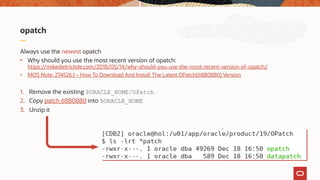
Always use the newest opatch
• Why should you use the most recent version of opatch:
https://mikedietrichde.com/2018/05/14/why-should-you-use-the-most-recent-version-of-opatch/
• MOS Note: 274526.1 – How To Download And Install The Latest OPatch(6880880) Version
1. Remove the existing $ORACLE_HOME/OPatch
2. Copy patch 6880880 into $ORACLE_HOME
3. Unzip it
Patch Download Assistant
Always use the Patch Download Assistant note MOS Note: 2118136.2
Patch Demo using MOS Note: 2118136.2
Recommendation | OPatch
Download always the newest OPatch
• Opatch download via patch 6880880
Be aware of "opatch util cleanup"
• https://mikedietrichde.com/2020/04/17/opatch-alert-be-
aware-of-cleanup-issues-and-the-jdk-version/
The Database Patching Process
1 Find the right patches
2 Download & install patches
3 Apply changes to the database
4 Verify the result
5 Special Feature: Install and Patch
Apply changes to the Database
Startup the database in the new or patched home
• Start all pluggable databases
Patch the database using datapatch
• Since RU April 2019 increased parallelism for PDBs
Proactive recompilation of invalid objects
• Controlled by -recomp_threshold parameter
- Oracle 12.2.0.1 and higher since RU July 2019
- Bug 30485255 - Datapatch: Increase Automatic Revalidation Threshold To 300
datapatch Demo
Patching a Container Database
• datapatch simply "does the right thing"
• Only open PDBs will be patched
• Sequence
1. Patch the CDB$ROOT
2. Patch PDB$SEED and PDBs in parallel
• Since 12.2: Parallelism determined based on system and database characteristics
The Database Patching Process
1 Find the right patches
2 Download & install patches
3 Apply changes to the database
4 Verify the result
5 Special Feature: Install and Patch
Verify the Result
1 Check the logfiles
2 Test appropriately
3 Rollback or reapply if necessary
Automatically keeps zip of necessary files in database
(e.g. for unplug-plug into a CDB) since Oracle 18c
BLOB column: PATCH_DIRECTORY in CDB_REGISTRY_SQLPATCH
Demo | Rolling back a patch
The Database Patching Process
1 Find the right patches
2 Download & install patches
3 Apply changes to the database
4 Verify the result
5 Special Feature: Install and Patch
Install and Patch
Since Oracle 18c, you can install and patch at the same time
• For GI and DB homes
• Grid Infrastructure example:
- mkdir /u01/app/grid/1970
- cd /u01/app/grid/1970
- unzip LINUX.X64_193000_grid_home.zip
- unzip p30899722_19000_Linux_x86-64.zip
- ./gridSetup -applyRU 30899722
• Database example:
- mkdir /u01/app/oracle/product/1970
- cd /u01/app/oracle/product/1970
- unzip LINUX.X64_193000_db_home.zip
- unzip -d p30869156_190000_Linux-x86-64.zip /u01/app/oracle/product/1970/patch
- ./runInstaller -applyRU patch/30899722
• Can include one-off patches as well
- ./runInstaller -applyRU patch/30899722 -applyOneOffs patch/30805684,patch/30524762
Patching Strategies
Patching Basics
The Database Patching Process
Tips for Patching Success
Summary | Tips for Patching Success
• Use out-of-place patching to reduce downtime and risk
• Standardize your environment and use gold images
• Automate where possible
• Stay current on quarterly Release Updates
• Run utlrp.sql before you invoke datapatch to clean up invalid objects
• Where applicable, use RAC Rolling patching and Standby-First Apply to further reduce downtime
Further Information
Finally …
Slides | https://MikeDietrichDE.com
Upcoming Webinars
Webinar 2:
Thursday, June 25 at 11:00h CET
AutoUpgrade to Oracle Database 19c
Webinar 3:
Tuesday, June 30 at 11:00h CET
Performance Stability, Tips and Tricks and Underscores
Webinar 4:
Thursday, July 2 at 11:00h CET
Migration to Oracle Multitenant
Release and patching strategy

Release and patching strategy

  • 1.
    Upgrade to OracleDatabase 19c Release and Patching Strategy Virtual Classroom Series Mike Dietrich Master Product Manager Database Upgrade and Migrations Roy Swonger Vice President Database Upgrade, Utilities and Patching
  • 2.
    Vice President Database Upgrade, Utilities& Patching Roy F. Swonger @RoyFSwonger
  • 3.
    Master Product Manager DatabaseUpgrade and Migrations Mike Dietrich https://MikeDietrichDE.com @MikeDietrichDE
  • 4.
  • 5.
    Content Overview Migration to Multitenant 4 Ensure PerformanceStability 3 Upgrade to Oracle Database 19c 2Release and Patching Strategy 1
  • 6.
    Database Upgrade What youshouldn't do PhotobyKaiPilgeronUnsplash
  • 7.
    Don't do this| Outdated Versions Monday, January 14, 2019 7:08 AM I’m working into a deal in LAD Customer, migrating about aprox 70 db oracle database version 7 (supporting OLD application developed on Oracle Forms) distributed around all country, my customer is want to modernized their application to 3 layer architecture (using an J2EE app) and move all data to an oracle DB central repository. We are intend to recommend best architecture and sizing but we do not know Oracle 7 database.
  • 8.
    Don't do this| Outdated Versions GA: 29-NOV-2006
  • 9.
  • 10.
    Lifetime Support Policy 2009 2010 2011 2012 2013 2014 2015 2016 2017 2018 2019 2020 2021 2022 2023 2024 2025 2026 2027 Oracle18 (12.2.0.2) EXTENDEDOracle 12.1 EXTENDEDOracle 19 (12.2.0.3) EXTENDEDWaived EXTENDEDOracle 11.2 MARKET DRIVEN Oracle 12.2.0.1 LIMITED Premier Support Waived Extended Support Paid Extended Support Market Driven Support Limited Error Correction
  • 11.
    Oracle 12.2 ReleaseFamily Includes: • Oracle 12.2.0.1, Oracle 18c (12.2.0.2), Oracle 19c (12.2.0.3) • MOS Note:742060.1 - The Single Source of Truth • MOS Note:161818.1 - Releases Support Status Summary 2016 2017 2018 2019 2020 2021 2022 2023 2024 2025 2026 2027 Oracle 18 (12.2.0.2) EXTENDED Oracle 12.2.0.1 Oracle 19 (12.2.0.3) LIMITED
  • 12.
    Lifetime Support PolicyBrochure http://www.oracle.com/us/support/library/lifetime-support-technology-069183.pdf
  • 13.
    Innovation EXTENDEDLong Term Support Innovation PremierSupport Paid Extended Support Release Types | Long Term Support vs Innovation Releases Long Term Support Release • 5 years of Premier Support followed by 3 years of Extended Support Innovation Release • 2 years of Premier Support, but there is no Extended Support • MOS Note: 742060.1 - Release Schedule of Current Database Releases
  • 14.
    Old Format 12.2.0.1.0 Year.Update. Revision New Format 19.7.0 Yearly Releases | 3 Number Format
  • 15.
    Patch: opatch Oracle 19.3.0 Oracle19.7.0 Upgrade: autoupgrade.jar or dbupgrade Oracle 18.6.0 Oracle 19.7.0 Basic Facts | Patch versus Upgrade
  • 16.
    Patching before OracleDatabase 12.2 Patch Set Updates and Bundle Patches
  • 17.
    Patching | BeforeOracle Database 12.2 Bundle Patch 2 Patch Set Update 2 Bundle Patch 1 Patch Set Update 1 Base Release Security Fixes Regression Fixes Security Fixes Regression Fixes Optimizer / off Functional Fixes Optimizer / off Functional Fixes Patch Set Update 1 Security Fixes Regression Fixes Patch Set Update 2 Security Fixes Regression Fixes
  • 18.
    Patching since OracleDatabase 12.2 Updates (RU) and Revisions (RUR)
  • 19.
    Patching | ReleaseUpdate 1 (RU) Base Release Update 1 Security Fixes Regression Fixes Optimizer / off Functional Fixes
  • 20.
    Patching | ReleaseUpdate 2 (RU) Base Release Update 1 Security Fixes Regression Fixes Optimizer / off Functional Fixes Update 2 Security Fixes Regression Fixes Optimizer / off Functional Fixes
  • 21.
    Patching | ReleaseUpdate Revision 1 (RUR) Base Release Update 1 Security Fixes Regression Fixes Optimizer / off Functional Fixes Update 2 Security Fixes Regression Fixes Optimizer / off Functional Fixes Update 1 Functional Fixes Security Fixes Regression Fixes Optimizer / off Revision 1 At the same date
  • 22.
    Patching | ReleaseUpdate Revision 2 (RUR) Base Release Update 1 Security Fixes Regression Fixes Optimizer / off Functional Fixes Update 2 Security Fixes Regression Fixes Optimizer / off Functional Fixes Update 1 Functional Fixes Security Fixes Regression Fixes Optimizer / off Revision 1 Update 2 Functional Fixes Security Fixes Regression Fixes Optimizer / off Revision 1 Update 1 Functional Fixes Security Fixes Regression Fixes Optimizer / off Revision 2 At the same date Update 3
  • 23.
    Timeline Example Yearly Releases,Updates and Revisions
  • 24.
    Timeline | April2018 Release April July October January April 18c 18.2.0 Beta - Update 1
  • 25.
    Timeline | July2018 Release April July October January April 18c 18.2.0 18.3.0 18.2.1 Update - On-Prem GA 1. Revision
  • 26.
    Timeline | October2018 Release April July October January April 18c 18.2.0 18.3.0 18.4.0 18.2.1 18.3.1 18.2.2 19c 19.1.0New Release Update 1. Revision 2. Revision
  • 27.
    Timeline Example |January 2019 Release April July October January April 18c 18.2.0 18.3.0 18.4.0 18.5.0 18.2.1 18.3.1 18.4.1 18.2.2 18.3.2 19c 19.1.0 19.2.0
  • 28.
    Timeline Example |April 2019 Release April July October January April 18c 18.2.0 18.3.0 18.4.0 18.5.0 18.6.0 18.2.1 18.3.1 18.4.1 18.5.1 18.2.2 18.3.2 18.4.2 19c 19.1.0 19.2.0 19.3.0
  • 29.
    Timeline Example |Future Projection 2022 April July October January April July October January April July October January April July October 18c 18.6.0 18.7.0 18.8.0 18.9.0 18.10.0 18.11.0 18.12.0 18.13.0 18.14.0 18.15.0 18.5.1 18.6.1 18.7.1 18.8.1 18.9.1 18.10.1 18.11.1 18.12.1 18.13.1 18.14.1 18.4.2 18.5.2 18.6.2 18.7.2 18.8.2 18.9.2 18.10.2 18.11.2 18.12.2 18.13.2 19c 19.3.0 19.4.0 19.5.0 19.6.0 19.7.0 19.8.0 19.9.0 19.10.0 19.11.0 19.12.0 19.13.0 19.14.0 19.15.0 19.16.0 19.17.0 19.3.1 19.4.1 19.5.1 19.6.1 19.7.1 19.8.1 19.9.1 19.10.1 19.11.1 19.12.1 19.13.1 19.14.1 19.15.1 19.16.1 19.3.2 19.4.2 19.5.2 19.6.2 19.7.2 19.8.2 19.9.1 19.10.2 19.11.2 19.12.2 19.13.3 19.14.2 19.15.2 2019 Patching End 18c 2020 2021 2022
  • 30.
    Timeline Example |Possibilities April July October January April July October January April July October January April July October 19c 19.3.0 19.7.0 19.11.0 19.15.0 19.16.0 19.17.0 19.12.1 19.7.2 19.8.2 19.12.2 19.14.2 2019 2020 2021 2022
  • 31.
    Timeline Example |Much simpler: RUs only April July October January April July October January April July October January April July October 18c 18.6.0 18.7.0 18.8.0 18.9.0 18.10.0 18.11.0 18.12.0 18.13.0 18.14.0 18.15.0 19c 19.3.0 19.4.0 19.5.0 19.6.0 19.7.0 19.8.0 19.9.0 19.10.0 19.11.0 19.12.0 19.13.0 19.14.0 19.15.0 19.16.0 19.17.0 2019 2020 2021 2022
  • 32.
    Attention | TheRUR trap! • You will consume RUs "secretly” • Stay with RUs! July October January April July October RU 18.3.0 RUR-1 18.3.1 RUR-2 18.3.2 18.4.2 18.5.2 18.6.2 July October January April July October RU 18.3.0 RUR-1 18.3.1 RUR-2 18.3.2 18.4.2 18.5.2 18.6.2 18.4.0 18.4.1
  • 33.
    Attention | TheRUR trap with example numbers • Assume an RU has 100 new fixes - 25 security only, 75 other fixes • Then an RUR1 adds 25 fixes on top, RUR2 adds another 25 on top July October January April July October RU 100 RUR-1 125 RUR-2 150 250 350 450 July October January April July October RU 100 200 300 400 500 600 RUR-1 125 RUR-2 150 ? ?? ??? 200 225 +100
  • 34.
    Further Information The mostimportant Links and MOS Notes
  • 35.
    Testing Recommendations Oracle Database- Overview of Database Patch Delivery Methods for 12.2.0.1 and greater (Doc ID 2337415.1)
  • 36.
    Most Important Notes MOSNote: 742060.1 Release Schedule of Current Database Releases https://support.oracle.com/epmos/faces/DocumentDisplay?id=742060.1 MOS Note: 2285040.1 Release Update Introduction and FAQ https://support.oracle.com/epmos/faces/DocumentDisplay?id=2285040.1 MOS Note: 756671.1 Master Note for Database Proactive Patch Program https://support.oracle.com/epmos/faces/DocumentDisplay?id=756671.1 MOS Note: 1962125.1 Oracle Database - Overview of Database Patch Delivery Methods for 12.1.0.2 and lower https://support.oracle.com/epmos/faces/DocumentDisplay?id=1962125.1 MOS Note 2337415.1 Oracle Database - Overview of Database Patch Delivery Methods for 12.2.0.1 and greater https://support.oracle.com/epmos/faces/DocumentDisplay?id=2337415.1 MOS Note: 2118136.2 Assistant: Download Reference for Oracle Database/GI PSU, SPU(CPU), Bundle Patches, Patchsets and Base Releases https://support.oracle.com/epmos/faces/DocumentDisplay?id=2118136.2
  • 37.
    Break Time We'll beback in 5 minutes
  • 38.
  • 39.
  • 40.
  • 41.
  • 42.
  • 43.
    Welcome to theJungle Patching and the jungle? PhotobyAndreasDressonUnsplash
  • 44.
    Patching Strategies Patching Basics TheDatabase Patching Process Tips for Patching Success
  • 46.
    Security The most important reasonto upgrade and patch PhotobyJoseFontanoonUnsplash
  • 47.
    Do We ReallyNeed To Say This? Source: https://www.nytimes.com/2019/07/22/business/equifax-settlement.html?module=inline
  • 48.
    Security | Whathappens if you don't upgrade
  • 49.
    "My database isnot facing the internet" PhotobyBenWhiteonUnsplash
  • 50.
  • 51.
    Basic Facts |opatch and datapatch opatch • Applies binary files to a home • Instance will be down • opatchauto for RAC environments datapatch • Applies SQL changes to a database • Database must be up
  • 52.
    Basic Facts |Patch types One-Off patch - Interim patch • Single bug fix Merge patch • Two or many one-off fixes combined Bundle patch • A collection of many fixes on top of a release or another bundle patch • Examples: • PSU - Patch Set Update • BP - Bundle Patch • RU - Release Update Oracle Database - Overview of Database Patch Delivery Methods for 12.2.0.1 and later MOS Note: 2337415.1
  • 53.
    Basic Facts |Patch Inventory $ opatch lsinventory • Tells you what is installed in your software home DBMS_QOPATCH package provides access to • Patches installed in the Oracle Home • FAQ on Queryable Patch Inventory (MOS Note: 1530108.1) DBA_REGISTRY_SQLPATCH • View detailing information about SQL patches installed in the database
  • 54.
    Recommendation | Out-of-PlacePatching Apply Patches Original Database Home Cloned Database Home Patched Database Home Restart database using new home
  • 55.
    Recommendation | Standby-FirstApply Patching 1. Patch the Standby 2. Test Changes!!!! 3. Switchover Application Tier Data Guard • Production up after Switchover • Run any patch SQL • Patch original Primary home Post Switchover
  • 56.
    Recommendation | RACRolling Patching Datapatch OPatch OPatch Application Tier
  • 57.
    Patching Strategies Patching Basics TheDatabase Patching Process Tips for Patching Success
  • 58.
    The Database PatchingProcess 1 Find the right patches 2 Download & install patches 3 Apply changes to the database 4 Verify the result 5 Special Feature: Install and Patch
  • 59.
    Finding the RightPatches | Quarterly https://www.oracle.com/security-alerts/
  • 60.
    Critical Patch AlertApril 2020 | Risk Matrix
  • 61.
    Critical Patch AlertJuly 2019 | Risk Matrix
  • 62.
    Quarterly Release UpdatePatch Reference Oracle Database 19c Proactive Patch Information MOS Note: 2521164.1 • Database 18 Proactive Patch Information MOS Note: 2369376.1 • Database 12.2.0.1 Proactive Patch Information MOS Note: 2285557.1 • Database 12.1.0.2 Proactive Patch Information MOS Note: 2285558.1 • Database 11.2.0.4 Proactive Patch Information MOS Note: 2285559.1
  • 63.
    Oracle Java VirtualMachine | OJVM OJVM Security Fixes in Quarterly Patches: ⌀ 7.9 6,5 9,0 9,0 9,0 9,0 9,0 9,0 9,1 9,0 5,3 9,9 8,2 8,3 8,5 5,3 9,8 3,5 7,5 6,8 6,8 7,5 8,0 0,0 1,0 2,0 3,0 4,0 5,0 6,0 7,0 8,0 9,0 10,0 jan-15 apr-15 jul-15 okt-15 jan-16 apr-16 jul-16 okt-16 jan-17 apr-17 jul-17 okt-17 jan-18 apr-18 jul-18 okt-18 jan-19 apr-19 jul-19 okt-19 jan-20 apr-20
  • 64.
    Check | OJVM IsOJVM installed? Select comp_id, comp_name, version from DBA_REGISTRY order by 1; COMP_ID COMP_NAME VERSION CATALOG Oracle Database Catalog Views 1 9 . 7 . 0 . 0 . 0 CATJAVA Oracle Database Java Packages 1 9 . 7 . 0 . 0 . 0 CATPROC Oracle Database Packages and Types 1 9 . 7 . 0 . 0 . 0 JAVAVM JServer JAVA Virtual Machine 1 9 . 7 . 0 . 0 . 0 OLS Oracle Label Security 1 9 . 7 . 0 . 0 . 0 ORDIM Oracle Multimedia 1 9 . 7 . 0 . 0 . 0 OWM Oracle Workspace Manager 1 9 . 7 . 0 . 0 . 0 XDB Oracle XML Database 1 9 . 7 . 0 . 0 . 0 XML Oracle XDK 1 9 . 7 . 0 . 0 . 0
  • 65.
    Recommendation | OJVM IfOJVM is installed, you have 3 options: • Patch it quarterly • Disable it with the mitigation patch • Remove it from the database
  • 66.
    Recommendation | OJVM IfOJVM is installed, you have 3 options: • Patch it quarterly • Separate from RUs and BPs • Require downtime or blackout time for Java subsystem • See MOS Note: 2217053.1 RAC Rolling Install Process for the "Oracle JavaVM Component Database PSU/RU" • Disable it with the mitigation patch • Remove it from the database
  • 67.
    Recommendation | OJVM IfOJVM is installed, you have 3 options: • Patch it quarterly • Disable it with the mitigation patch • For cases where patching the OJVM is not immediately possible • Not RAC Rolling installable • Must be disabled for database upgrade • Explanation and download in MOS Note: 1929745.1 • Important: https://mikedietrichde.com/2020/03/31/ojvm-and-the-mitigation-patch-things-to-know-in-2020/ • Remove it from the database
  • 68.
    Recommendation | OJVM IfOJVM is installed, you have 3 options: • Patch it quarterly • Disable it with the mitigation patch • Remove it from the database • https://mikedietrichde.com/2017/08/07/javavm-xml -clean-oracle-database-11-2-12-2/ • Safe repair/reinstall of the JVM Component in 11.2 and up MOS Note: 2314363.1 • Repairing/Reinstalling JVM To A Multitenant Database (CDB and all PDBs) MOS Note: 2262919.1
  • 69.
    New since Jan2020 | JDK Update in RUs JDK patches included in RUs • Always stable JDK from the previous quarter • April 2020 Release Update • $ cd $ORACLE_HOME/jdk/bin • $ ./java -version java version "1.8.0_241" Java(TM) SE Runtime Environment (build 1.8.0_241-b07) Java HotSpot(TM) 64-Bit Server VM (build 25.241-b07, mixed mode) • https://www.oracle.com/technetwork/java/javase/8u241-relnotes-5813177.html
  • 70.
    Recommendation | Findout more on the Upgrade Blog Quarterly Patch Cycles JDK Information
  • 71.
    The Database PatchingProcess 1 Find the right patches 2 Download & install patches 3 Apply changes to the database 4 Verify the result 5 Special Feature: Install and Patch
  • 72.
    Download & InstallPatches Check for newest opatch version Download and unzip patch (bundle) Check for patch conflicts Shutdown instance using this home Apply binary with opatch or opatchauto
  • 73.
    opatch Always use thenewest opatch • Why should you use the most recent version of opatch: https://mikedietrichde.com/2018/05/14/why-should-you-use-the-most-recent-version-of-opatch/ • MOS Note: 274526.1 – How To Download And Install The Latest OPatch(6880880) Version 1. Remove the existing $ORACLE_HOME/OPatch 2. Copy patch 6880880 into $ORACLE_HOME 3. Unzip it
  • 74.
    Patch Download Assistant Alwaysuse the Patch Download Assistant note MOS Note: 2118136.2
  • 75.
    Patch Demo usingMOS Note: 2118136.2
  • 76.
    Recommendation | OPatch Downloadalways the newest OPatch • Opatch download via patch 6880880 Be aware of "opatch util cleanup" • https://mikedietrichde.com/2020/04/17/opatch-alert-be- aware-of-cleanup-issues-and-the-jdk-version/
  • 77.
    The Database PatchingProcess 1 Find the right patches 2 Download & install patches 3 Apply changes to the database 4 Verify the result 5 Special Feature: Install and Patch
  • 78.
    Apply changes tothe Database Startup the database in the new or patched home • Start all pluggable databases Patch the database using datapatch • Since RU April 2019 increased parallelism for PDBs Proactive recompilation of invalid objects • Controlled by -recomp_threshold parameter - Oracle 12.2.0.1 and higher since RU July 2019 - Bug 30485255 - Datapatch: Increase Automatic Revalidation Threshold To 300
  • 79.
  • 80.
    Patching a ContainerDatabase • datapatch simply "does the right thing" • Only open PDBs will be patched • Sequence 1. Patch the CDB$ROOT 2. Patch PDB$SEED and PDBs in parallel • Since 12.2: Parallelism determined based on system and database characteristics
  • 81.
    The Database PatchingProcess 1 Find the right patches 2 Download & install patches 3 Apply changes to the database 4 Verify the result 5 Special Feature: Install and Patch
  • 82.
    Verify the Result 1Check the logfiles 2 Test appropriately 3 Rollback or reapply if necessary Automatically keeps zip of necessary files in database (e.g. for unplug-plug into a CDB) since Oracle 18c BLOB column: PATCH_DIRECTORY in CDB_REGISTRY_SQLPATCH
  • 83.
    Demo | Rollingback a patch
  • 84.
    The Database PatchingProcess 1 Find the right patches 2 Download & install patches 3 Apply changes to the database 4 Verify the result 5 Special Feature: Install and Patch
  • 85.
    Install and Patch SinceOracle 18c, you can install and patch at the same time • For GI and DB homes • Grid Infrastructure example: - mkdir /u01/app/grid/1970 - cd /u01/app/grid/1970 - unzip LINUX.X64_193000_grid_home.zip - unzip p30899722_19000_Linux_x86-64.zip - ./gridSetup -applyRU 30899722 • Database example: - mkdir /u01/app/oracle/product/1970 - cd /u01/app/oracle/product/1970 - unzip LINUX.X64_193000_db_home.zip - unzip -d p30869156_190000_Linux-x86-64.zip /u01/app/oracle/product/1970/patch - ./runInstaller -applyRU patch/30899722 • Can include one-off patches as well - ./runInstaller -applyRU patch/30899722 -applyOneOffs patch/30805684,patch/30524762
  • 87.
    Patching Strategies Patching Basics TheDatabase Patching Process Tips for Patching Success
  • 88.
    Summary | Tipsfor Patching Success • Use out-of-place patching to reduce downtime and risk • Standardize your environment and use gold images • Automate where possible • Stay current on quarterly Release Updates • Run utlrp.sql before you invoke datapatch to clean up invalid objects • Where applicable, use RAC Rolling patching and Standby-First Apply to further reduce downtime
  • 89.
  • 90.
  • 91.
    Upcoming Webinars Webinar 2: Thursday,June 25 at 11:00h CET AutoUpgrade to Oracle Database 19c Webinar 3: Tuesday, June 30 at 11:00h CET Performance Stability, Tips and Tricks and Underscores Webinar 4: Thursday, July 2 at 11:00h CET Migration to Oracle Multitenant