SQL(Structured Query
Language)
R.K.Ishwariya,M.sc(cs).,
Nadar Saraswathi College of Arts and Science,
Theni.
Introduction to SQL
 Structure Query Language(SQL) is a database query
language used for storing and managing data in
Relational DBMS. SQL was the first commercial
language introduced for E.F Codd's Relational model of
database. Today almost all RDBMS(MySql, Oracle,
Infomix, Sybase, MS Access) use SQL as the standard
database query language. SQL is used to perform all
types of data operations in RDBMS.
SQL Command
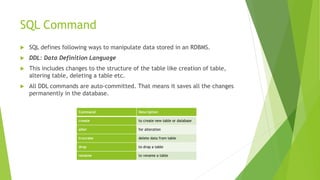
 SQL defines following ways to manipulate data stored in an RDBMS.
 DDL: Data Definition Language
 This includes changes to the structure of the table like creation of table,
altering table, deleting a table etc.
 All DDL commands are auto-committed. That means it saves all the changes
permanently in the database.
Command Description
create to create new table or database
alter for alteration
truncate delete data from table
drop to drop a table
rename to rename a table
DML(Data Manipulation Language)
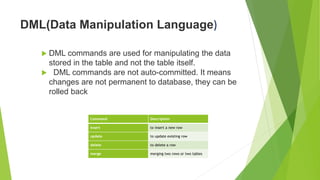
 DML commands are used for manipulating the data
stored in the table and not the table itself.
 DML commands are not auto-committed. It means
changes are not permanent to database, they can be
rolled back
Command Description
insert to insert a new row
update to update existing row
delete to delete a row
merge merging two rows or two tables
TCL: Transaction Control Language
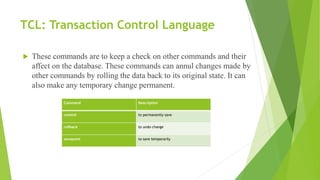
 These commands are to keep a check on other commands and their
affect on the database. These commands can annul changes made by
other commands by rolling the data back to its original state. It can
also make any temporary change permanent.
Command Description
commit to permanently save
rollback to undo change
savepoint to save temporarily
DCL: Data Control Language
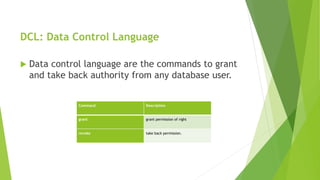
 Data control language are the commands to grant
and take back authority from any database user.
Command Description
grant grant permission of right
revoke take back permission.
DQL: Data Query Language
 Data query language is used to fetch data from tables based on
conditions that we can easily apply.
Command Description
select retrieve records from one or more
table
SET Operations in SQL
 SQL supports few Set operations which can be performed on the table data.
These are used to get meaningful results from data stored in the table, under
different special conditions.
 In this tutorial, we will cover 4 different types of SET operations, along with
example:
o UNION
o UNION ALL
o INTERSECT
o MINUS
UNION Operation
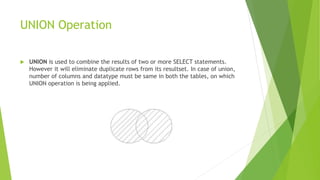
 UNION is used to combine the results of two or more SELECT statements.
However it will eliminate duplicate rows from its resultset. In case of union,
number of columns and datatype must be same in both the tables, on which
UNION operation is being applied.
UNION ALL
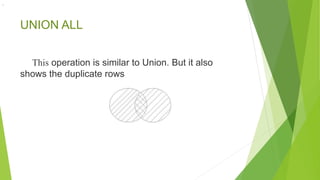
This operation is similar to Union. But it also
shows the duplicate rows
.
INTERSECT
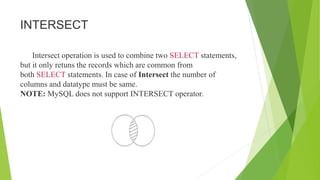
Intersect operation is used to combine two SELECT statements,
but it only retuns the records which are common from
both SELECT statements. In case of Intersect the number of
columns and datatype must be same.
NOTE: MySQL does not support INTERSECT operator.
Minus
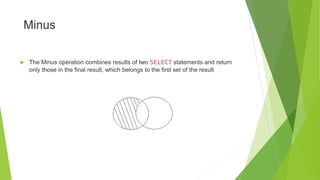
 The Minus operation combines results of two SELECT statements and return
only those in the final result, which belongs to the first set of the result
SQL | Join (Inner, Left, Right and Full Joins)
 A SQL Join statement is used to combine data or rows from two or more tables
based on a common field between them. Different types of Joins are:
 INNER JOIN
 LEFT JOIN
 RIGHT JOIN
 FULL JOIN
INNER JOIN
 INNER JOIN: The INNER JOIN keyword selects all rows from both the tables as long as the
condition satisfies. This keyword will create the result-set by combining all rows from both the
tables where the condition satisfies i.e value of the common field will be same.
Syntax:
 SELECT table1.column1,table1.column2,table2.column1,....
 FROM table1
 INNER JOIN table2
 ON table1.matching_column = table2.matching_column;
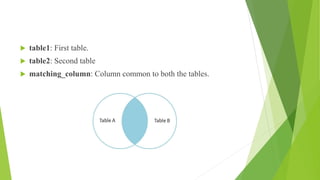
 table1: First table.
 table2: Second table
 matching_column: Column common to both the tables.
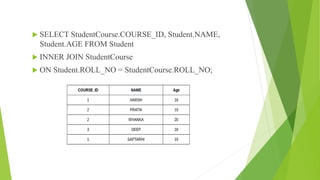
 SELECT StudentCourse.COURSE_ID, Student.NAME,
Student.AGE FROM Student
 INNER JOIN StudentCourse
 ON Student.ROLL_NO = StudentCourse.ROLL_NO;
LEFT JOIN
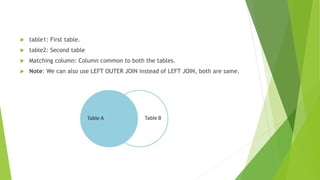
 LEFT JOIN: This join returns all the rows of the table on the left side of the
join and matching rows for the table on the right side of join. The rows for
which there is no matching row on right side, the result-set will contain null.
LEFT JOIN is also known as LEFT OUTER JOIN.Syntax:
 SELECT table1.column1,table1.column2,table2.column1,....
 FROM table1
 LEFT JOIN table2
 ON table1.matching_column = table2.matching_column;
 table1: First table.
 table2: Second table
 Matching column: Column common to both the tables.
 Note: We can also use LEFT OUTER JOIN instead of LEFT JOIN, both are same.
RIGHT JOIN
 RIGHT JOIN: RIGHT JOIN is similar to LEFT JOIN. This join returns all the rows
of the table on the right side of the join and matching rows for the table on
the left side of join. The rows for which there is no matching row on left side,
the result-set will contain null. RIGHT JOIN is also known as RIGHT OUTER
JOIN.
 Syntax:
 SELECT table1.column1,table1.column2,table2.column1,....
 FROM table1
 RIGHT JOIN table2
 ON table1.matching_column = table2.matching_column;
 table1: First table.
 table2: Second table
 matching_column: Column common to both the tables.
 Note: We can also use RIGHT OUTER JOIN instead of RIGHT JOIN, both are
same.
FULL JOIN
 FULL JOIN: FULL JOIN creates the result-set by combining result of both LEFT
JOIN and RIGHT JOIN. The result-set will contain all the rows from both the
tables. The rows for which there is no matching, the result-set will
contain NULL values.Syntax:
 SELECT table1.column1,table1.column2,table2.column1,....
 FROM table1
 FULL JOIN table2
 ON table1.matching_column = table2.matching_column;
 table1: First table.
 table2: Second table
 matching_column: Column common to both the tables.
Thank You…

Sql(structured query language)

  • 1.
  • 2.
    Introduction to SQL Structure Query Language(SQL) is a database query language used for storing and managing data in Relational DBMS. SQL was the first commercial language introduced for E.F Codd's Relational model of database. Today almost all RDBMS(MySql, Oracle, Infomix, Sybase, MS Access) use SQL as the standard database query language. SQL is used to perform all types of data operations in RDBMS.
  • 3.
    SQL Command  SQLdefines following ways to manipulate data stored in an RDBMS.  DDL: Data Definition Language  This includes changes to the structure of the table like creation of table, altering table, deleting a table etc.  All DDL commands are auto-committed. That means it saves all the changes permanently in the database. Command Description create to create new table or database alter for alteration truncate delete data from table drop to drop a table rename to rename a table
  • 4.
    DML(Data Manipulation Language) DML commands are used for manipulating the data stored in the table and not the table itself.  DML commands are not auto-committed. It means changes are not permanent to database, they can be rolled back Command Description insert to insert a new row update to update existing row delete to delete a row merge merging two rows or two tables
  • 5.
    TCL: Transaction ControlLanguage  These commands are to keep a check on other commands and their affect on the database. These commands can annul changes made by other commands by rolling the data back to its original state. It can also make any temporary change permanent. Command Description commit to permanently save rollback to undo change savepoint to save temporarily
  • 6.
    DCL: Data ControlLanguage  Data control language are the commands to grant and take back authority from any database user. Command Description grant grant permission of right revoke take back permission.
  • 7.
    DQL: Data QueryLanguage  Data query language is used to fetch data from tables based on conditions that we can easily apply. Command Description select retrieve records from one or more table
  • 8.
    SET Operations inSQL  SQL supports few Set operations which can be performed on the table data. These are used to get meaningful results from data stored in the table, under different special conditions.  In this tutorial, we will cover 4 different types of SET operations, along with example: o UNION o UNION ALL o INTERSECT o MINUS
  • 9.
    UNION Operation  UNIONis used to combine the results of two or more SELECT statements. However it will eliminate duplicate rows from its resultset. In case of union, number of columns and datatype must be same in both the tables, on which UNION operation is being applied.
  • 10.
    UNION ALL This operationis similar to Union. But it also shows the duplicate rows .
  • 11.
    INTERSECT Intersect operation isused to combine two SELECT statements, but it only retuns the records which are common from both SELECT statements. In case of Intersect the number of columns and datatype must be same. NOTE: MySQL does not support INTERSECT operator.
  • 12.
    Minus  The Minusoperation combines results of two SELECT statements and return only those in the final result, which belongs to the first set of the result
  • 13.
    SQL | Join(Inner, Left, Right and Full Joins)  A SQL Join statement is used to combine data or rows from two or more tables based on a common field between them. Different types of Joins are:  INNER JOIN  LEFT JOIN  RIGHT JOIN  FULL JOIN
  • 14.
    INNER JOIN  INNERJOIN: The INNER JOIN keyword selects all rows from both the tables as long as the condition satisfies. This keyword will create the result-set by combining all rows from both the tables where the condition satisfies i.e value of the common field will be same. Syntax:  SELECT table1.column1,table1.column2,table2.column1,....  FROM table1  INNER JOIN table2  ON table1.matching_column = table2.matching_column;
  • 15.
     table1: Firsttable.  table2: Second table  matching_column: Column common to both the tables.
  • 16.
     SELECT StudentCourse.COURSE_ID,Student.NAME, Student.AGE FROM Student  INNER JOIN StudentCourse  ON Student.ROLL_NO = StudentCourse.ROLL_NO;
  • 17.
    LEFT JOIN  LEFTJOIN: This join returns all the rows of the table on the left side of the join and matching rows for the table on the right side of join. The rows for which there is no matching row on right side, the result-set will contain null. LEFT JOIN is also known as LEFT OUTER JOIN.Syntax:  SELECT table1.column1,table1.column2,table2.column1,....  FROM table1  LEFT JOIN table2  ON table1.matching_column = table2.matching_column;
  • 18.
     table1: Firsttable.  table2: Second table  Matching column: Column common to both the tables.  Note: We can also use LEFT OUTER JOIN instead of LEFT JOIN, both are same.
  • 19.
    RIGHT JOIN  RIGHTJOIN: RIGHT JOIN is similar to LEFT JOIN. This join returns all the rows of the table on the right side of the join and matching rows for the table on the left side of join. The rows for which there is no matching row on left side, the result-set will contain null. RIGHT JOIN is also known as RIGHT OUTER JOIN.  Syntax:  SELECT table1.column1,table1.column2,table2.column1,....  FROM table1  RIGHT JOIN table2  ON table1.matching_column = table2.matching_column;
  • 20.
     table1: Firsttable.  table2: Second table  matching_column: Column common to both the tables.  Note: We can also use RIGHT OUTER JOIN instead of RIGHT JOIN, both are same.
  • 21.
    FULL JOIN  FULLJOIN: FULL JOIN creates the result-set by combining result of both LEFT JOIN and RIGHT JOIN. The result-set will contain all the rows from both the tables. The rows for which there is no matching, the result-set will contain NULL values.Syntax:  SELECT table1.column1,table1.column2,table2.column1,....  FROM table1  FULL JOIN table2  ON table1.matching_column = table2.matching_column;
  • 22.
     table1: Firsttable.  table2: Second table  matching_column: Column common to both the tables.
  • 23.