C H A P T E R
Troubleshooting
SQL Server
Athens Oct 23, 2015
Presenter introduction
 1982 - I have been started with computers.
 1988 - I started my professional carrier in computers industry.
 1996 - I have been started to work with SQL Server version 6.0
 1998 - I earned my first certification at Microsoft as Microsoft Certified
Solution Developer (3rd in Greece) and started my carrier as
Microsoft Certified Trainer (MCT) with more than 25.000 hours
of training until now!
 2010 - I became for first time Microsoft MVP on SQL Server
I created the SQL School Greece (www.sqlschool.gr)
 2012 - I became MCT Regional Lead by Microsoft Learning Program.
 2013 - I was certified as MCSE : Data Platform,
MCSE : Business Intelligence
Antonios
Chatzipavlis
Database Architect
SQL Server Evangelist
MCT, MCSE, MCITP, MCPD, MCSD, MCDBA,
MCSA, MCTS, MCAD, MCP, OCA, ITIL-F
Follow us in social media
Twitter : @antoniosch / @sqlschool
Facebook : fb/sqlschoolgr
YouTube : yt/user/achatzipavlis
LinkedIn : SQL School Greece group
Need help?
help@sqlschool.gr
Presentation outline
01: SQL Server Monitoring Overview
02: SQL Server Threading Model
03: Using Wait Statistics
04: Using Extended Events
05: Create your Baseline
C H A P T E R
01
SQL Server Monitoring Overview
 Why Monitor?
 Guidelines for Monitoring
 Monitoring Tools for SQL Server
Why Monitor?
 Diagnosing causes of performance issues
 Response Time
 Throughput of the system
 Detecting and resolving concurrency issues
 SQL Server uses locks to ensure data consistency.
 Identifying changing trends in resource utilization
 Capacity planning to identify the required hardware resources to support the
database workload.
 It is important to monitor resource utilization changes
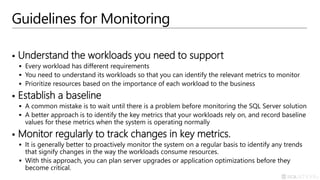
Guidelines for Monitoring
 Understand the workloads you need to support
 Every workload has different requirements
 You need to understand its workloads so that you can identify the relevant metrics to monitor
 Prioritize resources based on the importance of each workload to the business
 Establish a baseline
 A common mistake is to wait until there is a problem before monitoring the SQL Server solution
 A better approach is to identify the key metrics that your workloads rely on, and record baseline
values for these metrics when the system is operating normally
 Monitor regularly to track changes in key metrics.
 It is generally better to proactively monitor the system on a regular basis to identify any trends
that signify changes in the way the workloads consume resources.
 With this approach, you can plan server upgrades or application optimizations before they
become critical.
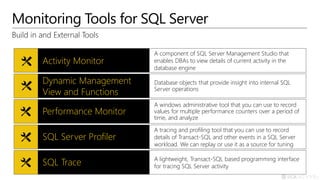
Monitoring Tools for SQL Server
Build in and External Tools
Activity Monitor
A component of SQL Server Management Studio that
enables DBAs to view details of current activity in the
database engine
Dynamic Management
View and Functions
Database objects that provide insight into internal SQL
Server operations
Performance Monitor
A windows administrative tool that you can use to record
values for multiple performance counters over a period of
time, and analyze results in a variety of chart
SQL Server Profiler
A tracing and profiling tool that you can use to record
details of Transact-SQL and other events in a SQL Server
workload. We can replay or use it as a source for tuning
SQL Trace A lightweight, Transact-SQL based programming interface
for tracing SQL Server activity
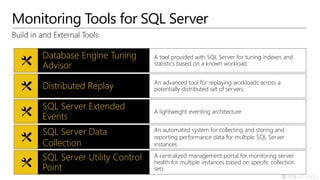
Monitoring Tools for SQL Server
Build in and External Tools
Database Engine Tuning
Advisor
A tool provided with SQL Server for tuning indexes and
statistics based on a known workload
SQL Server Utility Control
Point
A centralized management portal for monitoring server
health for multiple instances based on specific collection
sets
SQL Server Extended
Events
A lightweight eventing architecture.
SQL Server Data
Collection
An automated system for collecting and storing and
reporting performance data for multiple SQL Server
instances
Distributed Replay An advanced tool for replaying workloads across a
potentially distributed set of servers
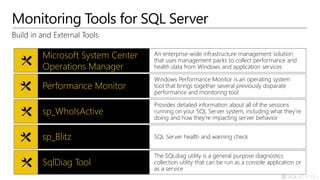
Monitoring Tools for SQL Server
Build in and External Tools
Microsoft System Center
Operations Manager
An enterprise-wide infrastructure management solution
that uses management packs to collect performance and
health data from Windows and application services
SqlDiag Tool
The SQLdiag utility is a general purpose diagnostics
collection utility that can be run as a console application or
as a service
sp_WhoIsActive
Provides detailed information about all of the sessions
running on your SQL Server system, including what they’re
doing and how they’re impacting server behavior
sp_Blitz SQL Server health and warning check
Performance Monitor
Windows Performance Monitor is an operating system
tool that brings together several previously disparate
performance and monitoring tool
Monitoring Tools for SQL Server
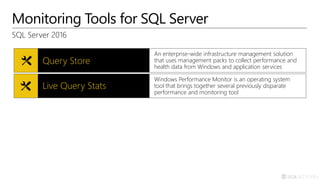
SQL Server 2016
Query Store
An enterprise-wide infrastructure management solution
that uses management packs to collect performance and
health data from Windows and application services
Live Query Stats
Windows Performance Monitor is an operating system
tool that brings together several previously disparate
performance and monitoring tool
C H A P T E R
02
SQL Server Threading Model
 Introduction
 What a thread is
 Thread Scheduling
 SQL Server Schedulers
 Thread States
 The Waiter List
 The Runnable Queue
Introduction
 SQL Server is an OS on Windows OS
 It performs and controls its own:
 Memory management
 I/O
 Scheduling
What a thread is
 A thread is unit of execution within a process
 Multiple threads can exist within a process
 Each is given small amount of processor time
 Waits while other threads execute (called scheduling)
 SQL Server uses OS threads to perform its work
 Called worker threads
 Dedicated threads exists
 Such as for performing checkpoints, deadlock monitoring, and ghost record cleanup
 Most are in a pool of threads that SQL Server uses to process user requests
(Working Threads)
Thread Scheduling
 SQL Server has its own thread scheduling
 Called non-preemptive scheduling
 Is more efficient than Windows scheduling
 Performed by the SQLOS layer of the Storage Engine
 Each processor core (logical or physical) has a scheduler
 A scheduler is responsible for managing the execution of work by threads
 Schedulers exist for user threads and for internal operations
 Use the sys.dm_os_schedulers DMV to view schedulers
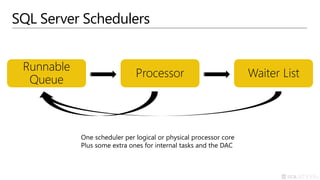
SQL Server Schedulers
Processor
Runnable
Queue
Waiter List
One scheduler per logical or physical processor core
Plus some extra ones for internal tasks and the DAC
Thread States
 RUNNING
 The thread is currently executing on the processor
 SUSPENDED
 The thread is currently on the Waiter List waiting for a resource
 RUNNABLE
 The thread is currently on the Runnable Queue waiting to execute on the
processor
The Waiter List
 Is an unordered list of threads that are suspended
 Any thread can be notified at any time that the resource it is waiting for is now
available
 No time limit for a thread on the waiter list
 Although execution timeouts or lock timeouts may take effect
 No limit on the number of threads on waiter list
 The sys.dm_os_waiting_tasks DMV
 Shows which threads are currently waiting and what they are waiting for
The Runnable Queue
 Is a strict First-In-First-Out (FIFO) queue
 Resource Governor exception
 The sys.dm_os_schedulers DMV shows the size of the
Runnable Queue in Runnable_tasks_count column
Examine Schedulers
02
Examine Schedulers
Examine Waiting Tasks
C H A P T E R
03
Using Wait Statistics
 Waits and Queues
 Wait Times
 DMVs for Waits
Waits and Queues
 Waits
 Wait is when a thread that's running on the processor cannot proceed because
it needs a resource and the resource that it needs is not available
 The thread state changed from RUNNING to SUSPENDED
 Moved to Waiter List and remains on the list until it became available
 Queues
 Is a generic term and means what's stopping the thread being able to get its
resource
 PAGEIOLATCH_XX : The I/O subsystem need to complete the I/O
 LCK_M_XX : Another thread holding an incompatible lock
 CXPACKET : Another thread needs to complete its portion of work
Wait Times
Wait time=Resource Wait time + Signal Wait time
 Wait time
 Is the time spent from when a thread is running on the processor (RUNNING)
moved to the Waiter List (SUSPENDED) and is being signaled and moving back
onto the runnable queue (RUNNABLE) and is going back to running
 Resource Wait time
 Time spent on the Waiter List with state SUSPENDED
 Signal Wait time
 Time spent on the Runnable Queue with state RUNNABLE
DMVs for Waits
 sys.dm_os_waiting_tasks
 Shows all threads that are currently suspended
 Think of it as the ‘what is happening right now?’ view of a server
 The first thing to run when approaching a ‘slow’ server
 sys.dm_os_wait_stats
 Shows aggregated wait statistics for all wait types
 Aggregated since the server started or the wait statistics were cleared
 Some math is required to make the results useful
 Calculating the resource wait time
 Calculating the average times rather than the total times
Using Waits DMVs
03
C H A P T E R
04
Using Extended Events
 Why Extended Events?
 Switch from SQL Trace to Xevents
 Extended Events Architecture
 Event Life Cycle
 Targets
Why Extended Events?
 It’s the FUTURE
 SQL Trace is a deprecated feature in SQL Server 2012
 This makes understanding XE crucial to supporting SQL Server in the future
 Less overhead
 Lightweight to minimize impact
 Provides minimum schema of data that is specific to the event being fired
 Events are filtered early in the firing lifecycle based on the predicates
 Flexibility and Power
 Allows complex configurations for event collection that simplify problem identification.
 Many events in more recent releases
Switch from SQL Trace to XEvents
 Events Mapping Query
 Column to Action Mapping Query
select xe.xe_event_name,st.name
from sys.trace_xe_event_map as xe
inner join sys.trace_events as st
on xe.trace_event_id = st.trace_event_id;
select xe.xe_action_name, tc.name
from sys.trace_xe_action_map as xe
inner join sys.trace_columns as tc
on xe.trace_column_id = tc.trace_column_id;
Extended Events Architecture
 Sessions
 Are a functional boundary for configuration of events
 Events
 Correspond to well-know points of code
 Predicates
 Boolean expressions that define the conditions required for an event to actually fire
 Actions
 Actions only execute after predicate evaluation determines the event will fire
 Targets
 Targets are event consumers
Event Life Cycle
Event point
encountered in code
Is Event Enabled
in a session Code Continues
Buffer Data for
Asynchronus Targets
Send to Synchronous
Targets Immediately
Execute Actions and
Collect data
(if applicable)
Are there
configurable
columns
Collect
non-configurable
column data
Passes Filter
Criteria (Predicate)
Collect Configurable
Column data
No
No
Yes
Yes
Yes
Targets
 Event counter
 Counts all specified events that occur during an Extended Events session.
 Use to obtain information about workload characteristics without adding the
overhead of full event collection.
 This is a synchronous target.
 Event file
 Use to write event session output from complete memory buffers to disk.
 This is an asynchronous target.
Targets
 Event pairing
 Many kinds of events occur in pairs, such as lock acquires and lock releases.
 Use to determine when a specified paired event does not occur in a matched
set.
 This is an asynchronous target.
 Event Tracing for Windows (ETW)
 Use to correlate SQL Server events with Windows operating system or
application event data.
 This is a synchronous target.
Targets
 Histogram
 Use to count the number of times that a specified event occurs, based on a
specified event column or action.
 This is an asynchronous target.
 Ring buffer
 Use to hold the event data in memory on a first-in first-out (FIFO) basis, or on a
per-event FIFO basis.
 This is an asynchronous target.
Use case scenarios of
Extended Events
04
C H A P T E R
05
Create your Baseline
Create Baseline
05
Summary
 SQL Server Monitoring Overview
 SQL Server Threading Model
 Using Wait Statistics
 Using Extended Events
 Create your Baseline
Questions?
Thank you!
SELECT
KNOWLEDGE
FROM
SQL SERVER
http://www.sqlschool.gr
Copyright © 2015 SQL School Greece
CHAPTER

Troubleshooting sql server

  • 1.
    C H AP T E R Troubleshooting SQL Server Athens Oct 23, 2015
  • 2.
    Presenter introduction  1982- I have been started with computers.  1988 - I started my professional carrier in computers industry.  1996 - I have been started to work with SQL Server version 6.0  1998 - I earned my first certification at Microsoft as Microsoft Certified Solution Developer (3rd in Greece) and started my carrier as Microsoft Certified Trainer (MCT) with more than 25.000 hours of training until now!  2010 - I became for first time Microsoft MVP on SQL Server I created the SQL School Greece (www.sqlschool.gr)  2012 - I became MCT Regional Lead by Microsoft Learning Program.  2013 - I was certified as MCSE : Data Platform, MCSE : Business Intelligence Antonios Chatzipavlis Database Architect SQL Server Evangelist MCT, MCSE, MCITP, MCPD, MCSD, MCDBA, MCSA, MCTS, MCAD, MCP, OCA, ITIL-F
  • 3.
    Follow us insocial media Twitter : @antoniosch / @sqlschool Facebook : fb/sqlschoolgr YouTube : yt/user/achatzipavlis LinkedIn : SQL School Greece group
  • 4.
  • 5.
    Presentation outline 01: SQLServer Monitoring Overview 02: SQL Server Threading Model 03: Using Wait Statistics 04: Using Extended Events 05: Create your Baseline
  • 6.
    C H AP T E R 01 SQL Server Monitoring Overview  Why Monitor?  Guidelines for Monitoring  Monitoring Tools for SQL Server
  • 7.
    Why Monitor?  Diagnosingcauses of performance issues  Response Time  Throughput of the system  Detecting and resolving concurrency issues  SQL Server uses locks to ensure data consistency.  Identifying changing trends in resource utilization  Capacity planning to identify the required hardware resources to support the database workload.  It is important to monitor resource utilization changes
  • 8.
    Guidelines for Monitoring Understand the workloads you need to support  Every workload has different requirements  You need to understand its workloads so that you can identify the relevant metrics to monitor  Prioritize resources based on the importance of each workload to the business  Establish a baseline  A common mistake is to wait until there is a problem before monitoring the SQL Server solution  A better approach is to identify the key metrics that your workloads rely on, and record baseline values for these metrics when the system is operating normally  Monitor regularly to track changes in key metrics.  It is generally better to proactively monitor the system on a regular basis to identify any trends that signify changes in the way the workloads consume resources.  With this approach, you can plan server upgrades or application optimizations before they become critical.
  • 9.
    Monitoring Tools forSQL Server Build in and External Tools Activity Monitor A component of SQL Server Management Studio that enables DBAs to view details of current activity in the database engine Dynamic Management View and Functions Database objects that provide insight into internal SQL Server operations Performance Monitor A windows administrative tool that you can use to record values for multiple performance counters over a period of time, and analyze results in a variety of chart SQL Server Profiler A tracing and profiling tool that you can use to record details of Transact-SQL and other events in a SQL Server workload. We can replay or use it as a source for tuning SQL Trace A lightweight, Transact-SQL based programming interface for tracing SQL Server activity
  • 10.
    Monitoring Tools forSQL Server Build in and External Tools Database Engine Tuning Advisor A tool provided with SQL Server for tuning indexes and statistics based on a known workload SQL Server Utility Control Point A centralized management portal for monitoring server health for multiple instances based on specific collection sets SQL Server Extended Events A lightweight eventing architecture. SQL Server Data Collection An automated system for collecting and storing and reporting performance data for multiple SQL Server instances Distributed Replay An advanced tool for replaying workloads across a potentially distributed set of servers
  • 11.
    Monitoring Tools forSQL Server Build in and External Tools Microsoft System Center Operations Manager An enterprise-wide infrastructure management solution that uses management packs to collect performance and health data from Windows and application services SqlDiag Tool The SQLdiag utility is a general purpose diagnostics collection utility that can be run as a console application or as a service sp_WhoIsActive Provides detailed information about all of the sessions running on your SQL Server system, including what they’re doing and how they’re impacting server behavior sp_Blitz SQL Server health and warning check Performance Monitor Windows Performance Monitor is an operating system tool that brings together several previously disparate performance and monitoring tool
  • 12.
    Monitoring Tools forSQL Server SQL Server 2016 Query Store An enterprise-wide infrastructure management solution that uses management packs to collect performance and health data from Windows and application services Live Query Stats Windows Performance Monitor is an operating system tool that brings together several previously disparate performance and monitoring tool
  • 13.
    C H AP T E R 02 SQL Server Threading Model  Introduction  What a thread is  Thread Scheduling  SQL Server Schedulers  Thread States  The Waiter List  The Runnable Queue
  • 14.
    Introduction  SQL Serveris an OS on Windows OS  It performs and controls its own:  Memory management  I/O  Scheduling
  • 15.
    What a threadis  A thread is unit of execution within a process  Multiple threads can exist within a process  Each is given small amount of processor time  Waits while other threads execute (called scheduling)  SQL Server uses OS threads to perform its work  Called worker threads  Dedicated threads exists  Such as for performing checkpoints, deadlock monitoring, and ghost record cleanup  Most are in a pool of threads that SQL Server uses to process user requests (Working Threads)
  • 16.
    Thread Scheduling  SQLServer has its own thread scheduling  Called non-preemptive scheduling  Is more efficient than Windows scheduling  Performed by the SQLOS layer of the Storage Engine  Each processor core (logical or physical) has a scheduler  A scheduler is responsible for managing the execution of work by threads  Schedulers exist for user threads and for internal operations  Use the sys.dm_os_schedulers DMV to view schedulers
  • 17.
    SQL Server Schedulers Processor Runnable Queue WaiterList One scheduler per logical or physical processor core Plus some extra ones for internal tasks and the DAC
  • 18.
    Thread States  RUNNING The thread is currently executing on the processor  SUSPENDED  The thread is currently on the Waiter List waiting for a resource  RUNNABLE  The thread is currently on the Runnable Queue waiting to execute on the processor
  • 19.
    The Waiter List Is an unordered list of threads that are suspended  Any thread can be notified at any time that the resource it is waiting for is now available  No time limit for a thread on the waiter list  Although execution timeouts or lock timeouts may take effect  No limit on the number of threads on waiter list  The sys.dm_os_waiting_tasks DMV  Shows which threads are currently waiting and what they are waiting for
  • 20.
    The Runnable Queue Is a strict First-In-First-Out (FIFO) queue  Resource Governor exception  The sys.dm_os_schedulers DMV shows the size of the Runnable Queue in Runnable_tasks_count column
  • 21.
  • 22.
    C H AP T E R 03 Using Wait Statistics  Waits and Queues  Wait Times  DMVs for Waits
  • 23.
    Waits and Queues Waits  Wait is when a thread that's running on the processor cannot proceed because it needs a resource and the resource that it needs is not available  The thread state changed from RUNNING to SUSPENDED  Moved to Waiter List and remains on the list until it became available  Queues  Is a generic term and means what's stopping the thread being able to get its resource  PAGEIOLATCH_XX : The I/O subsystem need to complete the I/O  LCK_M_XX : Another thread holding an incompatible lock  CXPACKET : Another thread needs to complete its portion of work
  • 24.
    Wait Times Wait time=ResourceWait time + Signal Wait time  Wait time  Is the time spent from when a thread is running on the processor (RUNNING) moved to the Waiter List (SUSPENDED) and is being signaled and moving back onto the runnable queue (RUNNABLE) and is going back to running  Resource Wait time  Time spent on the Waiter List with state SUSPENDED  Signal Wait time  Time spent on the Runnable Queue with state RUNNABLE
  • 25.
    DMVs for Waits sys.dm_os_waiting_tasks  Shows all threads that are currently suspended  Think of it as the ‘what is happening right now?’ view of a server  The first thing to run when approaching a ‘slow’ server  sys.dm_os_wait_stats  Shows aggregated wait statistics for all wait types  Aggregated since the server started or the wait statistics were cleared  Some math is required to make the results useful  Calculating the resource wait time  Calculating the average times rather than the total times
  • 26.
  • 27.
    C H AP T E R 04 Using Extended Events  Why Extended Events?  Switch from SQL Trace to Xevents  Extended Events Architecture  Event Life Cycle  Targets
  • 28.
    Why Extended Events? It’s the FUTURE  SQL Trace is a deprecated feature in SQL Server 2012  This makes understanding XE crucial to supporting SQL Server in the future  Less overhead  Lightweight to minimize impact  Provides minimum schema of data that is specific to the event being fired  Events are filtered early in the firing lifecycle based on the predicates  Flexibility and Power  Allows complex configurations for event collection that simplify problem identification.  Many events in more recent releases
  • 29.
    Switch from SQLTrace to XEvents  Events Mapping Query  Column to Action Mapping Query select xe.xe_event_name,st.name from sys.trace_xe_event_map as xe inner join sys.trace_events as st on xe.trace_event_id = st.trace_event_id; select xe.xe_action_name, tc.name from sys.trace_xe_action_map as xe inner join sys.trace_columns as tc on xe.trace_column_id = tc.trace_column_id;
  • 30.
    Extended Events Architecture Sessions  Are a functional boundary for configuration of events  Events  Correspond to well-know points of code  Predicates  Boolean expressions that define the conditions required for an event to actually fire  Actions  Actions only execute after predicate evaluation determines the event will fire  Targets  Targets are event consumers
  • 31.
    Event Life Cycle Eventpoint encountered in code Is Event Enabled in a session Code Continues Buffer Data for Asynchronus Targets Send to Synchronous Targets Immediately Execute Actions and Collect data (if applicable) Are there configurable columns Collect non-configurable column data Passes Filter Criteria (Predicate) Collect Configurable Column data No No Yes Yes Yes
  • 32.
    Targets  Event counter Counts all specified events that occur during an Extended Events session.  Use to obtain information about workload characteristics without adding the overhead of full event collection.  This is a synchronous target.  Event file  Use to write event session output from complete memory buffers to disk.  This is an asynchronous target.
  • 33.
    Targets  Event pairing Many kinds of events occur in pairs, such as lock acquires and lock releases.  Use to determine when a specified paired event does not occur in a matched set.  This is an asynchronous target.  Event Tracing for Windows (ETW)  Use to correlate SQL Server events with Windows operating system or application event data.  This is a synchronous target.
  • 34.
    Targets  Histogram  Useto count the number of times that a specified event occurs, based on a specified event column or action.  This is an asynchronous target.  Ring buffer  Use to hold the event data in memory on a first-in first-out (FIFO) basis, or on a per-event FIFO basis.  This is an asynchronous target.
  • 35.
    Use case scenariosof Extended Events 04
  • 36.
    C H AP T E R 05 Create your Baseline
  • 37.
  • 38.
    Summary  SQL ServerMonitoring Overview  SQL Server Threading Model  Using Wait Statistics  Using Extended Events  Create your Baseline
  • 39.
  • 40.