www.datanumen.com/outlook-repair/
6 Effective Techniques
to Troubleshoot
Outlook Problems
www.datanumen.com/outlook-repair/
• I have used Outlook for decades and in this
long period of time, I have met countless
Outlook errors that are triggered by diverse
factors.
• During the repair experience, I learn many
skills to estimate the reason behind the
error and finally work out the problem.
• So today, I’d like to share some techniques
with you.
www.datanumen.com/outlook-repair/
1. Archive Outlook Data
• If you have used Outlook for a long time
without cleaning any useless data like
emails, notes, contacts, then your Outlook
data file will have a risk of becoming
oversized and finally corrupt.
• Thereby, when Outlook misbehaves, you
should archive old data in the first time.
www.datanumen.com/outlook-repair/
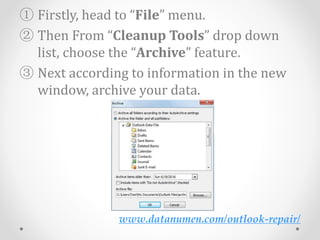
① Firstly, head to “File” menu.
② Then From “Cleanup Tools” drop down
list, choose the “Archive” feature.
③ Next according to information in the new
window, archive your data.
www.datanumen.com/outlook-repair/
2. Remove Wrong Outlook Add-ins
• Third party apps can install add-ins in
Outlook without permission.
• So if the add-in is conflict with the Outlook,
then it will lead to errors as well.
• Thus we have to disable faulty Outlook add-
ins in safe mode to see if the error is solved.
www.datanumen.com/outlook-repair/
① Launch Outlook in safe mode by “outlook
/safe” command.
② After that, go to “File” > “Options” > “Add-
ins” > “Go”.
③ At last, you can remove the doubtful add-
ins in the new window.
www.datanumen.com/outlook-repair/
3. Disable Antivirus Software Integration
• It’s believed that every computer user has
installed antivirus software on computer to
prevent virus attack.
• But in today’s case, the antivirus software
can be a factor that can slow or even
encumber Outlook normal running.
• Therefore if you meet unknown Outlook
problems, disabling antivirus software
integration is a good choice.
www.datanumen.com/outlook-repair/
4. Rebuild Outlook Profile
• Since Outlook profile can influence Outlook
normal functions, we can generate a new
one to have a shot when meeting outlook
errors.
① Go to “Control Panel” > “Mail” > “Show
Profiles” > “Add” to create a new profile.
② Then configure the email account as usual.
www.datanumen.com/outlook-repair/
① Next set the new profile as the default
profile.
② Restart Outlook at last.
www.datanumen.com/outlook-repair/
5. Check PST File via Scanpst.exe
• When above factors are not the real causes,
you probably face PST corruption.
• So it’s time to use repair tools to solve the
error.
• The first choice can be the inner tool called
Scanpst.exe.
www.datanumen.com/outlook-repair/
• Just locate it by searching in Windows
Explorer and follow its easy instruction to
complete the recovery process.
www.datanumen.com/outlook-repair/
6. Call in a Optimal Repair Tool
• Generally, the basic built-in tool can rarely
play its own role.
• It sometimes even can give rise to worse
situations.
• Hence you should prepare a more mighty
repair tool DataNumen Outlook Repair like
to help you get rid of the problem simply.
www.datanumen.com/outlook-repair/
Thank you !!!

6 Effective Techniques to Troubleshoot Outlook Problems

  • 1.
  • 2.
    www.datanumen.com/outlook-repair/ • I haveused Outlook for decades and in this long period of time, I have met countless Outlook errors that are triggered by diverse factors. • During the repair experience, I learn many skills to estimate the reason behind the error and finally work out the problem. • So today, I’d like to share some techniques with you.
  • 3.
    www.datanumen.com/outlook-repair/ 1. Archive OutlookData • If you have used Outlook for a long time without cleaning any useless data like emails, notes, contacts, then your Outlook data file will have a risk of becoming oversized and finally corrupt. • Thereby, when Outlook misbehaves, you should archive old data in the first time.
  • 4.
    www.datanumen.com/outlook-repair/ ① Firstly, headto “File” menu. ② Then From “Cleanup Tools” drop down list, choose the “Archive” feature. ③ Next according to information in the new window, archive your data.
  • 5.
    www.datanumen.com/outlook-repair/ 2. Remove WrongOutlook Add-ins • Third party apps can install add-ins in Outlook without permission. • So if the add-in is conflict with the Outlook, then it will lead to errors as well. • Thus we have to disable faulty Outlook add- ins in safe mode to see if the error is solved.
  • 6.
    www.datanumen.com/outlook-repair/ ① Launch Outlookin safe mode by “outlook /safe” command. ② After that, go to “File” > “Options” > “Add- ins” > “Go”. ③ At last, you can remove the doubtful add- ins in the new window.
  • 7.
    www.datanumen.com/outlook-repair/ 3. Disable AntivirusSoftware Integration • It’s believed that every computer user has installed antivirus software on computer to prevent virus attack. • But in today’s case, the antivirus software can be a factor that can slow or even encumber Outlook normal running. • Therefore if you meet unknown Outlook problems, disabling antivirus software integration is a good choice.
  • 8.
    www.datanumen.com/outlook-repair/ 4. Rebuild OutlookProfile • Since Outlook profile can influence Outlook normal functions, we can generate a new one to have a shot when meeting outlook errors. ① Go to “Control Panel” > “Mail” > “Show Profiles” > “Add” to create a new profile. ② Then configure the email account as usual.
  • 9.
    www.datanumen.com/outlook-repair/ ① Next setthe new profile as the default profile. ② Restart Outlook at last.
  • 10.
    www.datanumen.com/outlook-repair/ 5. Check PSTFile via Scanpst.exe • When above factors are not the real causes, you probably face PST corruption. • So it’s time to use repair tools to solve the error. • The first choice can be the inner tool called Scanpst.exe.
  • 11.
    www.datanumen.com/outlook-repair/ • Just locateit by searching in Windows Explorer and follow its easy instruction to complete the recovery process.
  • 12.
    www.datanumen.com/outlook-repair/ 6. Call ina Optimal Repair Tool • Generally, the basic built-in tool can rarely play its own role. • It sometimes even can give rise to worse situations. • Hence you should prepare a more mighty repair tool DataNumen Outlook Repair like to help you get rid of the problem simply.
  • 13.