www.datanumen.com/outlook-repair/www.datanumen.com/outlook-repair/
Tackle the Outlook error
“Unable to display the folder. The
file xxxx.pst could not be
accessed.”
www.datanumen.com/outlook-repair/www.datanumen.com/outlook-repair/
Many regular Outlook users are quite likely to
handle some harmless errors with facility.
But when it comes to some intractable problems,
the situation seems to be kind of difficult.
Moreover, some general errors in Outlook could
lead to serious issues if you don’t realize them in
time and take correct and effective measures.
www.datanumen.com/outlook-repair/www.datanumen.com/outlook-repair/
In this presentation, we will explore how to fix
following error completely.
www.datanumen.com/outlook-repair/www.datanumen.com/outlook-repair/
1.Rule out temporary anomaly or access conflict
When you encounter this error, you can start
from restarting the Outlook to attempting a
recovery.
Note: Before restarting, it is best to check if there
are any access conflicts.
After those steps, try to perform the previous
operation, if errors still persist, the underlying
problem probably is that your PST file is
corrupted.
In this case, it is better to look for recovery
software to fix the error.
www.datanumen.com/outlook-repair/www.datanumen.com/outlook-repair/
trytry
“ScanPST.exe” is offered with MS office and
located at Ms Office folder under Program files.
(1) Start the “ScanPST.exe”.
www.datanumen.com/outlook-repair/www.datanumen.com/outlook-repair/
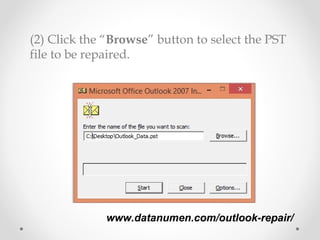
(2) Click the “Browse” button to select the PST
file to be repaired.
www.datanumen.com/outlook-repair/www.datanumen.com/outlook-repair/
(3) Next, click “Start” to begin the checking process.
The application will start checking the file and
show the status.
www.datanumen.com/outlook-repair/www.datanumen.com/outlook-repair/
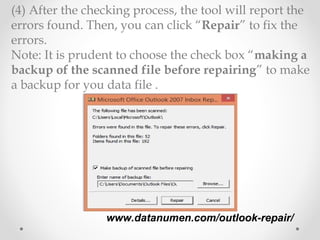
(4) After the checking process, the tool will report the
errors found. Then, you can click “Repair” to fix the
errors.
Note: It is prudent to choose the check box “making a
backup of the scanned file before repairing” to make
a backup for you data file .
www.datanumen.com/outlook-repair/www.datanumen.com/outlook-repair/
3.Go in for a specialized recovery tool3.Go in for a specialized recovery tool
• As the built-in program cannot completely
solve tough errors in most cases.
• More recommended option is looking for
a diplomatic tool like DataNumen
Outlook Repair to solve your problem
quickly.
www.datanumen.com/outlook-repair/www.datanumen.com/outlook-repair/
Thank You!!!Thank You!!!

3 Methods to Fix Outlook Error "Unable to display the folder"