How to Fix PST File ? 
Outlook Corruption Issues
Microsoft Outlook
Introduction to PST File 
PST file is a personal folder file in Microsoft Outlook. Usually, the PST files are located on a workstation's 
local hard drive. Though, it is possible to configure Outlook to store a .PST file on a network drive, but 
Microsoft doesn’t recommend this as certain types of network problems can result in .PST file corruption. 
Storing .PST files on a local hard drive means you could easily lose data if a hard drive gets damaged.
Location of PST File 
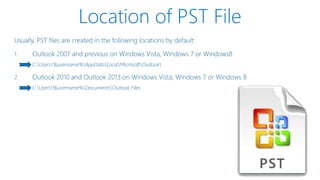
Usually, PST files are created in the following locations by default: 
1. Outlook 2007 and previous on Windows Vista, Windows 7 or Windows8 
C:Users%username%AppDataLocalMicrosoftOutlook 
2. Outlook 2010 and Outlook 2013 on Windows Vista, Windows 7 or Windows 8 
C:Users%username%DocumentsOutlook Files
Outlook PST File Location
Location of PST File 
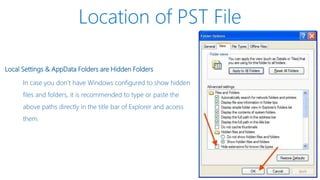
Local Settings & AppData Folders are Hidden Folders 
In case you don’t have Windows configured to show hidden 
files and folders, it is recommended to type or paste the 
above paths directly in the title bar of Explorer and access 
them.
Corruption 
Outlook PST File Damage Due To Some Reason
Outlook PST File Corruption 
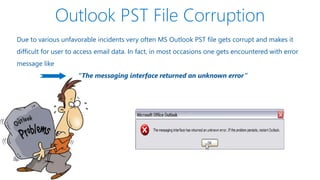
Due to various unfavorable incidents very often MS Outlook PST file gets corrupt and makes it 
difficult for user to access email data. In fact, in most occasions one gets encountered with error 
message like 
“The messaging interface returned an unknown error”
PST File Corruption 
Now, there could be various reasons responsible for the corruption of Outlook PST files such as : 
System crash 
Damage of Outlook program 
Up gradation to newer Windows version 
Abrupt shutdown of Outlook program 
Crossing of PST file size limitation
Reasons Of PST File Corruption 
Lost Damage Corrupted 
System 
crash 
Oversized
Solution 
Deal with Corrupt PST File
Solution to Deal With Corrupt PST File 
Dealing with situation, where the entire data file (PST) gets damaged or corrupt can be very 
annoying as MS Outlook refuses to open the file altogether. In this type of situation, it gets 
important to repair PST file as soon as possible. You can try a couple of the methods to resolve the 
issue like – 
Usage of Outlook Inbox Repair Tool 
Truncate Oversized PST File 
Third Party PST Recovery Tool
Outlook Inbox Repair Tool 
Scan and Repair Damage PST File
SCANPST.EXE File
Click on Start and carry out a 
normal Windows search for 
the following executable, 
scanpst.exe. Click o the 
Browse button and choose the 
required corrupt PST file.
After selecting the file, click on the Start Button.
Start Scanning.
Click on Repair Button now and 
start the repair process of the file.
Outlook PST File Corruption 
Hopefully your Inbox will be back to normal state. Usually SCANPST.exe successfully works with 
corrupt PST files, but at times it fail completely in resolving the corruption issue. 
SCANPST.EXE is very useful to fix minor issues from corrupt PST files and if 
it fails in resolving the issue then, PST files have severely gone corrupt.
Truncate Oversized PST File 
Reduce PST File Size
Frustrated 
Due to Oversize PST File Size
Oversized PST & OST Crop Tool 
In case, over sizing of PST file is the reason for PST file corruption then, you must trim it. You can 
use a tool from Microsoft called the Oversized PST and OST crop tool. This inbuilt tool performs the 
required operation by deleting about 25 MB or 50 MB of data from the file. 
After you truncate the file make sure to run the Inbox Repair Tool on the 
truncated file. 
Open the repaired .pst file in Outlook. 
In case the file does not open, abandon the truncated file, and once again repeat 
process with the original .pst file. 
Truncate more data than in the first attempt, and try 
the process again. 
Note: There are occasions when this tool can also delete some of your emails.
PST File Not Recover 
Lost Damage Corrupted System crash Oversized 
In Such Case, you can't be recoverd by Free/Manual tool
Try Kernel for PST Repair 
Resolving Outlook Issues
Kernel for Outlook PST Repair Tool 
If none of the methods works in resolving the issue, you can very well try out a third party 
program called Kernel for Outlook PST Repair software.
Kernel for Outlook PST Repair Tool 
The software has been smartly programmed and facilitates its user with an ideal solution to 
successfully restore and recover deleted emails, notes, calendar items, contacts and emails with 
attachments in just a matter of a few minutes.
Features 
This tool also has got some of the most exciting features like : 
Facilitates selection of items that user want to restore from the PST files 
Provides a search function to find out any specific mails related to specific keywords 
Capable of retaining email properties such as Subject, To, From, CC, BCC, Date and Time 
Allows saving recovered email items in MSG and EML file formats
Download 
Outlook PST Repair Tool
Download Now 
http://www.nucleustechnologies.com/Download-Microsoft-Outlook-Mails-Recovery-Software.php
Award Winning 
Software
Connect With Kernel Data Recovery 
Published by http://www.nucleustechnologies.com/Microsoft-Outlook-Mail-Recovery.html 
Linkedin http://www.linkedin.com/company/kernel-recovery-tools/ 
G plus https://plus.google.com/+Nucleustechnologies/posts 
Pinterest http://www.pinterest.com/kernelrecovery/ 
Youtube http://www.youtube.com/user/10nucleus 
FB Page https://www.facebook.com/kerneltools 
Twitter https://twitter.com/KernelRecovery/
Technical Support
Thank You
Repair pst

Repair pst

  • 1.
    How to FixPST File ? Outlook Corruption Issues
  • 2.
  • 3.
    Introduction to PSTFile PST file is a personal folder file in Microsoft Outlook. Usually, the PST files are located on a workstation's local hard drive. Though, it is possible to configure Outlook to store a .PST file on a network drive, but Microsoft doesn’t recommend this as certain types of network problems can result in .PST file corruption. Storing .PST files on a local hard drive means you could easily lose data if a hard drive gets damaged.
  • 4.
    Location of PSTFile Usually, PST files are created in the following locations by default: 1. Outlook 2007 and previous on Windows Vista, Windows 7 or Windows8 C:Users%username%AppDataLocalMicrosoftOutlook 2. Outlook 2010 and Outlook 2013 on Windows Vista, Windows 7 or Windows 8 C:Users%username%DocumentsOutlook Files
  • 5.
  • 6.
    Location of PSTFile Local Settings & AppData Folders are Hidden Folders In case you don’t have Windows configured to show hidden files and folders, it is recommended to type or paste the above paths directly in the title bar of Explorer and access them.
  • 7.
    Corruption Outlook PSTFile Damage Due To Some Reason
  • 8.
    Outlook PST FileCorruption Due to various unfavorable incidents very often MS Outlook PST file gets corrupt and makes it difficult for user to access email data. In fact, in most occasions one gets encountered with error message like “The messaging interface returned an unknown error”
  • 9.
    PST File Corruption Now, there could be various reasons responsible for the corruption of Outlook PST files such as : System crash Damage of Outlook program Up gradation to newer Windows version Abrupt shutdown of Outlook program Crossing of PST file size limitation
  • 10.
    Reasons Of PSTFile Corruption Lost Damage Corrupted System crash Oversized
  • 11.
    Solution Deal withCorrupt PST File
  • 12.
    Solution to DealWith Corrupt PST File Dealing with situation, where the entire data file (PST) gets damaged or corrupt can be very annoying as MS Outlook refuses to open the file altogether. In this type of situation, it gets important to repair PST file as soon as possible. You can try a couple of the methods to resolve the issue like – Usage of Outlook Inbox Repair Tool Truncate Oversized PST File Third Party PST Recovery Tool
  • 13.
    Outlook Inbox RepairTool Scan and Repair Damage PST File
  • 14.
  • 15.
    Click on Startand carry out a normal Windows search for the following executable, scanpst.exe. Click o the Browse button and choose the required corrupt PST file.
  • 16.
    After selecting thefile, click on the Start Button.
  • 17.
  • 18.
    Click on RepairButton now and start the repair process of the file.
  • 19.
    Outlook PST FileCorruption Hopefully your Inbox will be back to normal state. Usually SCANPST.exe successfully works with corrupt PST files, but at times it fail completely in resolving the corruption issue. SCANPST.EXE is very useful to fix minor issues from corrupt PST files and if it fails in resolving the issue then, PST files have severely gone corrupt.
  • 20.
    Truncate Oversized PSTFile Reduce PST File Size
  • 21.
    Frustrated Due toOversize PST File Size
  • 22.
    Oversized PST &OST Crop Tool In case, over sizing of PST file is the reason for PST file corruption then, you must trim it. You can use a tool from Microsoft called the Oversized PST and OST crop tool. This inbuilt tool performs the required operation by deleting about 25 MB or 50 MB of data from the file. After you truncate the file make sure to run the Inbox Repair Tool on the truncated file. Open the repaired .pst file in Outlook. In case the file does not open, abandon the truncated file, and once again repeat process with the original .pst file. Truncate more data than in the first attempt, and try the process again. Note: There are occasions when this tool can also delete some of your emails.
  • 23.
    PST File NotRecover Lost Damage Corrupted System crash Oversized In Such Case, you can't be recoverd by Free/Manual tool
  • 25.
    Try Kernel forPST Repair Resolving Outlook Issues
  • 26.
    Kernel for OutlookPST Repair Tool If none of the methods works in resolving the issue, you can very well try out a third party program called Kernel for Outlook PST Repair software.
  • 27.
    Kernel for OutlookPST Repair Tool The software has been smartly programmed and facilitates its user with an ideal solution to successfully restore and recover deleted emails, notes, calendar items, contacts and emails with attachments in just a matter of a few minutes.
  • 28.
    Features This toolalso has got some of the most exciting features like : Facilitates selection of items that user want to restore from the PST files Provides a search function to find out any specific mails related to specific keywords Capable of retaining email properties such as Subject, To, From, CC, BCC, Date and Time Allows saving recovered email items in MSG and EML file formats
  • 29.
  • 30.
  • 31.
  • 34.
    Connect With KernelData Recovery Published by http://www.nucleustechnologies.com/Microsoft-Outlook-Mail-Recovery.html Linkedin http://www.linkedin.com/company/kernel-recovery-tools/ G plus https://plus.google.com/+Nucleustechnologies/posts Pinterest http://www.pinterest.com/kernelrecovery/ Youtube http://www.youtube.com/user/10nucleus FB Page https://www.facebook.com/kerneltools Twitter https://twitter.com/KernelRecovery/
  • 35.
  • 36.

Editor's Notes

  • #4 Windows Experience is the code name for our design language It’s rooted in modern, Swiss design, and has the same emphasis on reduction, cleanliness, readability, simple and beautiful visuals.
  • #5 The way that this principle can be expressed in apps can be summed up by: Content before chrome Visual clarity
  • #6 8 traits of great Windows Store Apps I can get content from and share content with people I care about
  • #7 Windows Experience is the code name for our design language It’s rooted in modern, Swiss design, and has the same emphasis on reduction, cleanliness, readability, simple and beautiful visuals.
  • #8 8 traits of great Windows Store Apps I can get content from and share content with people I care about
  • #10 8 traits of great Windows Store Apps I can get content from and share content with people I care about
  • #11 8 traits of great Windows Store Apps I can get content from and share content with people I care about
  • #12 Integrate commands into the content
  • #14 For any app, content is the heart of any experience. Whether you’re designing a shopping, a food and dining, a media, a social app… Everything outside of the content are just tools to let people consume and interact with your content By leaving only the most relevant elements on screen, we help people focus on the content. Content before chrome is about taking away distractions and letting people be immersed in the things they love. It’s about letting the content, as opposed to the software, shine
  • #16 Semantic zoom is the quick, fluid way of jumping within a long list. You can view all the groups available, and they can be presented in a visual, content-focused way.
  • #17 Semantic zoom is the quick, fluid way of jumping within a long list. You can view all the groups available, and they can be presented in a visual, content-focused way.
  • #18 Semantic zoom is the quick, fluid way of jumping within a long list. You can view all the groups available, and they can be presented in a visual, content-focused way.
  • #19 Semantic zoom is the quick, fluid way of jumping within a long list. You can view all the groups available, and they can be presented in a visual, content-focused way.
  • #20 Semantic zoom is the quick, fluid way of jumping within a long list. You can view all the groups available, and they can be presented in a visual, content-focused way.
  • #21 8 traits of great Windows Store Apps I can get content from and share content with people I care about
  • #24 8 traits of great Windows Store Apps I can get content from and share content with people I care about
  • #25 Integrate commands into the content Remove the “remote controls”
  • #26 Remove lines and boxes as a way to group and organize content Use crisp visuals and avoid unnecessary graphical effects such as blurs and gradient on visuals
  • #28 8 traits of great Windows Store Apps I can get content from and share content with people I care about
  • #29 8 traits of great Windows Store Apps I can get content from and share content with people I care about
  • #30 8 traits of great Windows Store Apps I can get content from and share content with people I care about
  • #32 8 traits of great Windows Store Apps I can get content from and share content with people I care about
  • #34 8 traits of great Windows Store Apps I can get content from and share content with people I care about
  • #35 8 traits of great Windows Store Apps I can get content from and share content with people I care about
  • #37 8 traits of great Windows Store Apps I can get content from and share content with people I care about