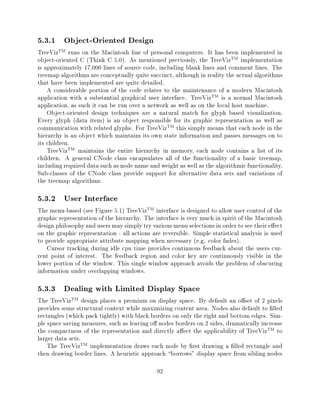

Abstract
Title of Dissertation:   Treemaps: Visualizing Hierarchical
                         and Categorical Data

                      Brian Scott Johnson, Doctor of Philosophy, 1993

Dissertation directed by: Professor Ben Shneiderman
                          Department of Computer Science


    Treemaps are a graphical method for the visualization of hierarchical and categorical
data sets. Treemap presentations of data shift mental workload from the cognitive to the
perceptual systems, taking advantage of the human visual processing system to increase the
bandwidth of the human-computer interface.
    E cient use of display space allows for the simultaneous presentation of thousands of
data records, as well as facilitating the presentation of semantic information. Treemaps
let users see the forest and the trees by providing local detail in the context of a global
overview, providing a visually engaging environment in which to analyze, search, explore
and manipulate large data sets.
    The treemap method of hierarchical visualization, at its core, is based on the property
of containment. This property of containment is a fundamental idea which powerfully en-
capsulates many of our reasons for constructing information hierarchies. All members of the
treemap family of algorithms partition multi-dimensional display spaces based on weighted
hierarchical data sets.
    In addition to generating treemaps and standard traditional hierarchical diagrams, the
treemap algorithms extend non-hierarchical techniques such as bar and pie charts into the
domain of hierarchical presentation. Treemap algorithms can be used to generate bar charts,
outlines, traditional 2-D node and link diagrams, pie charts, cone trees, cam trees, drum trees,
etc. Generating existing diagrams via treemap transformations is an exercise meant to show
the power, ease, and generality with which alternative presentations can be generated from
the basic treemap algorithms.
    Two controlled experiments with novice treemap users and real data highlight the strengths
of treemaps. The rst experiment with 12 subjects compares the Macintosh TreeVizTM im-
plementation of treemaps with the UNIX command line for questions dealing with a 530
node le hierarchy. Treemaps are shown to signi cantly reduce user performance times for
global le comparison tasks.
    A second experiment with 40 subjects compares treemaps with dynamic outlines for ques-
tions dealing with the allocation funds in the 1992 US Budget (357 node budget hierarchy).
Treemap users are 50% faster overall and as much as 8 times faster for speci c questions.
Treemaps: Visualizing Hierarchical
             and Categorical Data
                                    by
                         Brian Scott Johnson

       Dissertation submitted to the Faculty of the Graduate School
            of The University of Maryland in partial ful llment
                    of the requirements for the degree of
                            Doctor of Philosophy
                                    1993


Advisory Committee:
         Professor Ben Shneiderman, Chairman/Advisor
         Associate Professor Jim Hendler
         Associate Professor Dave Mount
         Associate Professor Kent Norman
         Assistant Research Scientist Catherine Plaisant
c Copyright by
Brian Scott Johnson
       1993
Dedication
  To Krista


     ii
Acknowledgements
     Time is a wasting asset. Most of us realize this truth too late to avoid
     spending a lot of time unwisely.
     Another way to look at life is as a shopping mall { not the usual kind
     where goods are purchased with money, but one where items such as
     worldly success, love of music, a strong backhand, close relationships
     with your family, a few good friends and countless other things are on
     sale.
     The commodity with which they are purchased is not money, but time.
     And as we have seen, contrary to the capitalist system of money and
     goods, every one of us has exactly the same amount of time in each
     hour, in each day, in each year.
     Bear in mind this message from the older generation to your younger
     one: The most priceless asset that can be accumulated in the course
     of any life is time well spent."
     Chief Justice Rehnquist, George Mason University Commencement,
     May 1993 as reported by the Washington Times, May 23, 1993
In graduate life as in real" life, the journey is as important than the destina-
tion. My journey through graduate school has been enjoyable and productive.
Absorbing the collective wisdom of the faculty, sta , and students here at Mary-
land takes time. I don't begrudge any of the time I've spent here at Maryland.
I have especially enjoyed coming through as one of Ben Shneiderman's rst three
Ph.D students with Andy Sears and Rich Potter. When I started working with
Ben I always felt that the farther o the true" path he thought I had strayed,
the more supportive and encouraging he was. Criticism was only constructive,
and however busy, he has always been able to make time for his students.
Dave Turo joined the lab and the work on treemaps two years ago and since then
I don't believe we've agreed on a single thing. This has of course resulted in
many productive debates during which we both determined how right we were,
while begrudgingly recognizing that the other, although bull-headed and mostly
wrong, had perhaps seized on some small sliver of the truth.
The thanks for this go to the many happy, supportive, threatening (graduate for
your own good or else:-), bright, intelligent, fun, loving, mischievous, courageous,
and overwhelmingly pleasant people that I have spent these years with.
Without a doubt these have been 6 of the best years of my life. Thanks to the
members of the Human-Computer Interaction Lab and all of my friends here in
Maryland. My time here at Maryland has been time well spent!
                                        iii
This dissertation has seemingly grown without bound. I sincerely appreciate the
time and comments that members of my committee and others in the HCIL have
so graciously provided with respect to this document.
Last but not least I would not be whom I am today were it not for my loving and
supportive wife Krista and parents Ruth and John. They have been supportive
and encouraging through all of these rst 28 years of life and school.


                                      iv
TABLE OF CONTENTS

Section                                                                                      Page
List of Tables                                                                                  xi
List of Figures                                                                                xii
List of Algorithms                                                                            xvi
1 Introduction                                                                                   2
  1.1   Motivation : : : : : : : : : : : : : : : : : : : : : : : : : : : : : : : : : : : : :      2
  1.2   Contribution   : : : : : : : : : : : : : : : : : : : : : : : : : : : : : : : : : : : :    3
  1.3   Bene ts  : : : : : : : : : : : : : : : : : : : : : : : : : : : : : : : : : : : : : :      4
  1.4   Scope  : : : : : : : : : : : : : : : : : : : : : : : : : : : : : : : : : : : : : : :      4
  1.5   Content  : : : : : : : : : : : : : : : : : : : : : : : : : : : : : : : : : : : : : :      4
2 Literature Review                                                                              6
  2.1 Depicting Hierarchy      : : : : : : : : : : : : : : : : : : : : : : : : : : : : : : : :    6
      2.1.1 Textual Hierarchy Presentations          : : : : : : : : : : : : : : : : : : : : :    7
      2.1.2 Graphic Hierarchy Presentations - Tree Diagrams              : : : : : : : : : : :    7
      2.1.3 Other Graphic Data Presentations             : : : : : : : : : : : : : : : : : : :    7
  2.2 Fisheye Views      : : : : : : : : : : : : : : : : : : : : : : : : : : : : : : : : : : :    8
  2.3 Data Structures      : : : : : : : : : : : : : : : : : : : : : : : : : : : : : : : : : :    8
  2.4 Mosaic Displays of Statistical Contingency Tables          : : : : : : : : : : : : : : :    9
  2.5 Hypertext    : : : : : : : : : : : : : : : : : : : : : : : : : : : : : : : : : : : : :      9
  2.6 Visualization      : : : : : : : : : : : : : : : : : : : : : : : : : : : : : : : : : : :    9
  2.7 Human Factors        : : : : : : : : : : : : : : : : : : : : : : : : : : : : : : : : : :   10
  2.8 Color and Sound        : : : : : : : : : : : : : : : : : : : : : : : : : : : : : : : : :   11
  2.9 Search Algorithms        : : : : : : : : : : : : : : : : : : : : : : : : : : : : : : : :   11
3 Treemap Origins                                                                                12
  3.1 Origin of the Treemap Concept          : : : : : : : : : : : : : : : : : : : : : : : : :   13
  3.2 Existing Techniques      : : : : : : : : : : : : : : : : : : : : : : : : : : : : : : : :   13
      3.2.1 Original Motivation        : : : : : : : : : : : : : : : : : : : : : : : : : : : :   15
      3.2.2 Listings and Outlines        : : : : : : : : : : : : : : : : : : : : : : : : : : :   16
                                                v
3.2.3 Tree Diagrams       : : : : : : : : : : : : : : : : : : : : : : : : : : : : : :     17
         3.2.4 Venn Diagrams       : : : : : : : : : : : : : : : : : : : : : : : : : : : : : :     20
         3.2.5 Bar Charts      : : : : : : : : : : : : : : : : : : : : : : : : : : : : : : : :     20
  3.3    Treemaps    : : : : : : : : : : : : : : : : : : : : : : : : : : : : : : : : : : : : :     21
  3.4    Visualizing Hierarchy   : : : : : : : : : : : : : : : : : : : : : : : : : : : : : : :     21
         3.4.1 Structural Information: Planar Partitionings of the Display Space             : :   26
         3.4.2 Content Information: Mapping Content to the Display               : : : : : : : :   27
  3.5    Tasks : : : : : : : : : : : : : : : : : : : : : : : : : : : : : : : : : : : : : : : :     28
  3.6    Data  : : : : : : : : : : : : : : : : : : : : : : : : : : : : : : : : : : : : : : : :     29
         3.6.1 Variability   : : : : : : : : : : : : : : : : : : : : : : : : : : : : : : : : :     29
         3.6.2 Data Resolution Bound       : : : : : : : : : : : : : : : : : : : : : : : : : :     29
         3.6.3 Treemap Display Limitations           : : : : : : : : : : : : : : : : : : : : : :   30
         3.6.4 Degenerate Cases      : : : : : : : : : : : : : : : : : : : : : : : : : : : : :     31
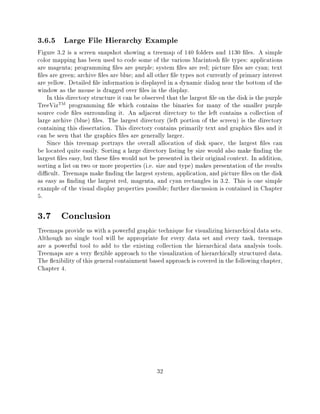
         3.6.5 Large File Hierarchy Example          : : : : : : : : : : : : : : : : : : : : : :   32
  3.7    Conclusion  : : : : : : : : : : : : : : : : : : : : : : : : : : : : : : : : : : : : :     32
4 Algorithms                                                                                       33
  4.1    Chapter Content     : : : : : : : : : : : : : : : : : : : : : : : : : : : : : : : : :     34
  4.2    Degrees of Interest: The Weighted Hierarchy         : : : : : : : : : : : : : : : : : :   35
  4.3    Partitioning  : : : : : : : : : : : : : : : : : : : : : : : : : : : : : : : : : : : :     36
  4.4    Tracking  : : : : : : : : : : : : : : : : : : : : : : : : : : : : : : : : : : : : : :     37
  4.5    One Dimensional Partitioning      : : : : : : : : : : : : : : : : : : : : : : : : : :     38
         4.5.1 Top-Down      : : : : : : : : : : : : : : : : : : : : : : : : : : : : : : : : :     41
  4.6    Two Dimensional Partitioning      : : : : : : : : : : : : : : : : : : : : : : : : : :     41
  4.7    N Dimensional Partitioning      : : : : : : : : : : : : : : : : : : : : : : : : : : :     42
  4.8    Treemap Dimensionality      : : : : : : : : : : : : : : : : : : : : : : : : : : : : :     45
  4.9    Parallel Algorithms   : : : : : : : : : : : : : : : : : : : : : : : : : : : : : : : :     45
  4.10   O sets  : : : : : : : : : : : : : : : : : : : : : : : : : : : : : : : : : : : : : : :     46
         4.10.1 Individual O sets    : : : : : : : : : : : : : : : : : : : : : : : : : : : : :     46
         4.10.2 Blocked O sets     : : : : : : : : : : : : : : : : : : : : : : : : : : : : : :     48
         4.10.3 O set Variations     : : : : : : : : : : : : : : : : : : : : : : : : : : : : :     48
         4.10.4 Preserving Structural Information        : : : : : : : : : : : : : : : : : : : :   52
  4.11   The Bounding Region       : : : : : : : : : : : : : : : : : : : : : : : : : : : : : :     53
         4.11.1 Partitioning Geometry      : : : : : : : : : : : : : : : : : : : : : : : : : :     53
         4.11.2 Rendering Geometry       : : : : : : : : : : : : : : : : : : : : : : : : : : :     54
         4.11.3 Tracking Geometry      : : : : : : : : : : : : : : : : : : : : : : : : : : : :     54
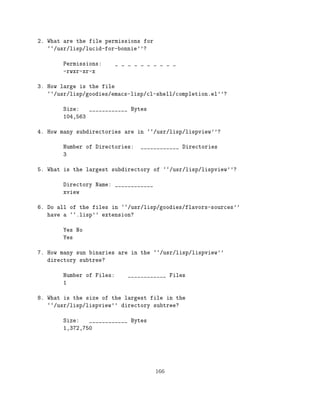
  4.12   Building on a Treemap Foundation        : : : : : : : : : : : : : : : : : : : : : : :     56
  4.13   Cartesian Coordinate Extensions       : : : : : : : : : : : : : : : : : : : : : : : :     56
         4.13.1 Outlines   : : : : : : : : : : : : : : : : : : : : : : : : : : : : : : : : : :     56
         4.13.2 Stacked Bar Charts     : : : : : : : : : : : : : : : : : : : : : : : : : : : :     61
         4.13.3 2-D Node and Link Diagrams           : : : : : : : : : : : : : : : : : : : : : :   61
         4.13.4 Extrusion into Higher Dimensions         : : : : : : : : : : : : : : : : : : : :   63

                                                vi
4.13.5 2+D Iconic Data Glyph Tilings of the Plane         : : : : : : : : : : : : : :   63
       4.13.6 Shadows of Higher Dimensions: Projected Bar Charts           : : : : : : : : :   66
       4.13.7 2+D Point Extrusions     : : : : : : : : : : : : : : : : : : : : : : : : : : :   66
  4.14 Polar Coordinates   : : : : : : : : : : : : : : : : : : : : : : : : : : : : : : : : :   67
       4.14.1 Hierarchical Pie Charts    : : : : : : : : : : : : : : : : : : : : : : : : : :   67
       4.14.2 Rendering Hierarchical Pie Charts      : : : : : : : : : : : : : : : : : : : :   70
       4.14.3 Polar Node and Link Diagrams         : : : : : : : : : : : : : : : : : : : : :   70
       4.14.4 3-D Polar Node and Link Diagrams         : : : : : : : : : : : : : : : : : : :   70
  4.15 Conclusion: : : : : : : : : : : : : : : : : : : : : : : : : : : : : : : : : : : : :     70
5 Interface Design                                                                             79
  5.1 Data Glyphs    : : : : : : : : : : : : : : : : : : : : : : : : : : : : : : : : : : : :   80
      5.1.1 Mapping Attributes       : : : : : : : : : : : : : : : : : : : : : : : : : : : :   81
      5.1.2 Variable Transformations       : : : : : : : : : : : : : : : : : : : : : : : : :   84
      5.1.3 Aspect Ratio       : : : : : : : : : : : : : : : : : : : : : : : : : : : : : : :   85
      5.1.4 O sets     : : : : : : : : : : : : : : : : : : : : : : : : : : : : : : : : : : :   85
      5.1.5 Sibling Nodes      : : : : : : : : : : : : : : : : : : : : : : : : : : : : : : :   86
      5.1.6 Dynamic Feedback         : : : : : : : : : : : : : : : : : : : : : : : : : : : :   86
  5.2 Dynamics   : : : : : : : : : : : : : : : : : : : : : : : : : : : : : : : : : : : : :     86
      5.2.1 Relativity and Dynamic Behavior          : : : : : : : : : : : : : : : : : : : :   86
      5.2.2 Node Insertion and Deletion        : : : : : : : : : : : : : : : : : : : : : : :   87
      5.2.3 Minimum Recalculation          : : : : : : : : : : : : : : : : : : : : : : : : :   88
      5.2.4 Point of View      : : : : : : : : : : : : : : : : : : : : : : : : : : : : : : :   88
      5.2.5 Zooming      : : : : : : : : : : : : : : : : : : : : : : : : : : : : : : : : : :   89
      5.2.6 Small Multiples      : : : : : : : : : : : : : : : : : : : : : : : : : : : : : :   89
      5.2.7 Animation      : : : : : : : : : : : : : : : : : : : : : : : : : : : : : : : : :   90
      5.2.8 Filtering & Linking      : : : : : : : : : : : : : : : : : : : : : : : : : : : :   90
  5.3 TreeVizTM Design and Development         : : : : : : : : : : : : : : : : : : : : : : :   91
      5.3.1 Object-Oriented Design         : : : : : : : : : : : : : : : : : : : : : : : : :   92
      5.3.2 User Interface     : : : : : : : : : : : : : : : : : : : : : : : : : : : : : : :   92
      5.3.3 Dealing with Limited Display Space         : : : : : : : : : : : : : : : : : : :   92
      5.3.4 Multiple Data Sets       : : : : : : : : : : : : : : : : : : : : : : : : : : : :   93
  5.4 Conclusion : : : : : : : : : : : : : : : : : : : : : : : : : : : : : : : : : : : : :     93
6 Categorical Data                                                                             94
  6.1 Related Work     : : : : : : : : : : : : : : : : : : : : : : : : : : : : : : : : : : :   94
  6.2 Hierarchical Decomposition       : : : : : : : : : : : : : : : : : : : : : : : : : : :   94
  6.3 Tabular" Treemaps       : : : : : : : : : : : : : : : : : : : : : : : : : : : : : : :   95
      6.3.1 Tra c Accidents Victims, in France, in 1958          : : : : : : : : : : : : : :   95
      6.3.2 Tra c Accidents Victims, in France, in 1958, by Vehicle Type             : : : :   96
      6.3.3 Tra c Accidents Victims, in France, in 1958, by Vehicle Type and Sex               97
      6.3.4 Tra c Accidents Victims, in France, in 1958, by Vehicle Type, Con-
             sequences, and Sex      : : : : : : : : : : : : : : : : : : : : : : : : : : : :   101
                                             vii
6.3.5 Tra c Accidents Victims, in France, in 1958, by Vehicle Type, Age,
            Sex, and Consequences                                              103
                                        : : : : : : : : : : : : : : : : : : : : : : : : : :

  6.4 Conclusion                                                               103
                  : : : : : : : : : : : : : : : : : : : : : : : : : : : : : : : : : : : : :


7 Directory Browsing Experiment                                                                  107
  7.1 Subjects  : : : : : : : : : : : : : : : : : : : : : : : : : : : : : : : : : : : : : :      107
  7.2 Method    : : : : : : : : : : : : : : : : : : : : : : : : : : : : : : : : : : : : : :      107
  7.3 Interface Treatments    : : : : : : : : : : : : : : : : : : : : : : : : : : : : : : :      109
      7.3.1 Treemap Interface     : : : : : : : : : : : : : : : : : : : : : : : : : : : : :      109
      7.3.2 Unix Interface    : : : : : : : : : : : : : : : : : : : : : : : : : : : : : : :      114
  7.4 Hypotheses    : : : : : : : : : : : : : : : : : : : : : : : : : : : : : : : : : : : :      114
  7.5 Questions and Data    : : : : : : : : : : : : : : : : : : : : : : : : : : : : : : : :      114
  7.6 Results : : : : : : : : : : : : : : : : : : : : : : : : : : : : : : : : : : : : : : :      114
      7.6.1 Timed Question Performance             : : : : : : : : : : : : : : : : : : : : : :   114
      7.6.2 Incidental Learning     : : : : : : : : : : : : : : : : : : : : : : : : : : : :      117
      7.6.3 Interface Satisfaction    : : : : : : : : : : : : : : : : : : : : : : : : : : :      117
  7.7 Multivariate Comparison     : : : : : : : : : : : : : : : : : : : : : : : : : : : : :      118
  7.8 Conclusion  : : : : : : : : : : : : : : : : : : : : : : : : : : : : : : : : : : : : :      120
8 US Budget Experiment                                                                           123
  8.1 Introduction  : : : : : : : : : : : : : : : : : : : : : : : : : : : : : : : : : : : :      123
  8.2 Perceptual Theory     : : : : : : : : : : : : : : : : : : : : : : : : : : : : : : : :      124
  8.3 Experimental Design     : : : : : : : : : : : : : : : : : : : : : : : : : : : : : : :      126
      8.3.1 Data    : : : : : : : : : : : : : : : : : : : : : : : : : : : : : : : : : : : :      126
      8.3.2 Tasks   : : : : : : : : : : : : : : : : : : : : : : : : : : : : : : : : : : : :      127
      8.3.3 Subjects    : : : : : : : : : : : : : : : : : : : : : : : : : : : : : : : : : :      128
      8.3.4 Method      : : : : : : : : : : : : : : : : : : : : : : : : : : : : : : : : : :      128
      8.3.5 Interface   : : : : : : : : : : : : : : : : : : : : : : : : : : : : : : : : : :      129
      8.3.6 Hypotheses      : : : : : : : : : : : : : : : : : : : : : : : : : : : : : : : :      137
  8.4 Results : : : : : : : : : : : : : : : : : : : : : : : : : : : : : : : : : : : : : : :      138
      8.4.1 Time    : : : : : : : : : : : : : : : : : : : : : : : : : : : : : : : : : : : :      145
      8.4.2 Errors    : : : : : : : : : : : : : : : : : : : : : : : : : : : : : : : : : : :      149
      8.4.3 Incidental Learning     : : : : : : : : : : : : : : : : : : : : : : : : : : : :      151
      8.4.4 Interface Satisfaction    : : : : : : : : : : : : : : : : : : : : : : : : : : :      152
      8.4.5 Observations      : : : : : : : : : : : : : : : : : : : : : : : : : : : : : : :      152
      8.4.6 Scroll Bars   : : : : : : : : : : : : : : : : : : : : : : : : : : : : : : : : :      157
  8.5 Scaleability  : : : : : : : : : : : : : : : : : : : : : : : : : : : : : : : : : : : :      157
  8.6 Future Research   : : : : : : : : : : : : : : : : : : : : : : : : : : : : : : : : : :      159
  8.7 Conclusion  : : : : : : : : : : : : : : : : : : : : : : : : : : : : : : : : : : : : :      159


                                            viii
9 Conclusion                                                                                     160
  9.1   Summary    : : : : : : : : : : : : : : : : : : : : : : : : : : : : : : : : : : : : :     160
  9.2   Contributions  : : : : : : : : : : : : : : : : : : : : : : : : : : : : : : : : : : :     160
  9.3   Discussion and Implications    : : : : : : : : : : : : : : : : : : : : : : : : : : :     162
  9.4   Limitations and Future Work      : : : : : : : : : : : : : : : : : : : : : : : : : :     162
  9.5   Conclusions  : : : : : : : : : : : : : : : : : : : : : : : : : : : : : : : : : : : :     163
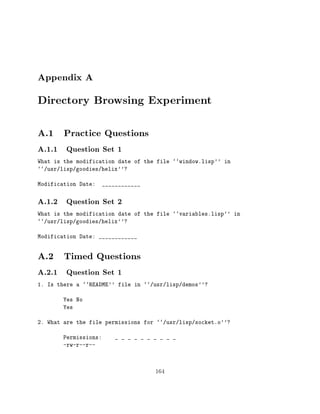
A Directory Browsing Experiment                                                                  164
  A.1 Practice Questions     : : : : : : : : : : : : : : : : : : : : : : : : : : : : : : : :     164
       A.1.1 Question Set 1      : : : : : : : : : : : : : : : : : : : : : : : : : : : : : :     164
       A.1.2 Question Set 2      : : : : : : : : : : : : : : : : : : : : : : : : : : : : : :     164
  A.2 Timed Questions      : : : : : : : : : : : : : : : : : : : : : : : : : : : : : : : : :     164
       A.2.1 Question Set 1      : : : : : : : : : : : : : : : : : : : : : : : : : : : : : :     164
       A.2.2 Question Set 2      : : : : : : : : : : : : : : : : : : : : : : : : : : : : : :     165
  A.3 Incidental Learning Questions      : : : : : : : : : : : : : : : : : : : : : : : : : :     167
  A.4 Interface Satisfaction Questions     : : : : : : : : : : : : : : : : : : : : : : : : :     167
  A.5 Advertisement    : : : : : : : : : : : : : : : : : : : : : : : : : : : : : : : : : : :     171
  A.6 Consent Form     : : : : : : : : : : : : : : : : : : : : : : : : : : : : : : : : : : :     172
  A.7 Background Questionnaire       : : : : : : : : : : : : : : : : : : : : : : : : : : : :     172
  A.8 UNIX Prerequisite Test     : : : : : : : : : : : : : : : : : : : : : : : : : : : : : :     174
  A.9 General Instructions     : : : : : : : : : : : : : : : : : : : : : : : : : : : : : : :     174
  A.10 Treemap Instructions    : : : : : : : : : : : : : : : : : : : : : : : : : : : : : : :     175
  A.11 UNIX Instructions     : : : : : : : : : : : : : : : : : : : : : : : : : : : : : : : :     176
  A.12 Timed Question Instructions     : : : : : : : : : : : : : : : : : : : : : : : : : : :     176
  A.13 Exit Instructions   : : : : : : : : : : : : : : : : : : : : : : : : : : : : : : : : :     177
  A.14 Statistics: : : : : : : : : : : : : : : : : : : : : : : : : : : : : : : : : : : : : :     178
       A.14.1 Timed Questions      : : : : : : : : : : : : : : : : : : : : : : : : : : : : :     178
       A.14.2 Incidental Learning Questions        : : : : : : : : : : : : : : : : : : : : : :   185
       A.14.3 Interface Satisfaction Questions      : : : : : : : : : : : : : : : : : : : : :    186
B US Budget Experiment                                                                           192
  B.1 Practice Questions     : : : : : : : : : : : : : : : : : : : : : : : : : : : : : : : :     192
  B.2 Timed Questions      : : : : : : : : : : : : : : : : : : : : : : : : : : : : : : : : :     194
  B.3 Incidental Learning Questions      : : : : : : : : : : : : : : : : : : : : : : : : : :     197
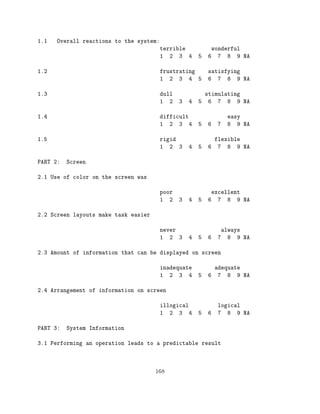
  B.4 Interface Satisfaction Questions     : : : : : : : : : : : : : : : : : : : : : : : : :     198
  B.5 Advertisement    : : : : : : : : : : : : : : : : : : : : : : : : : : : : : : : : : : :     202
  B.6 Consent Form     : : : : : : : : : : : : : : : : : : : : : : : : : : : : : : : : : : :     203
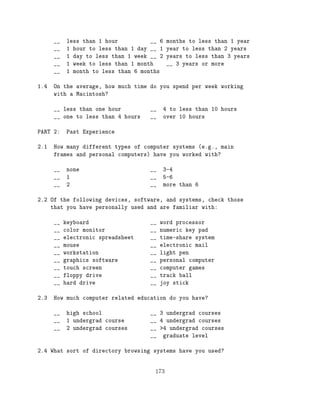
  B.7 Background Questionnaire       : : : : : : : : : : : : : : : : : : : : : : : : : : : :     204
  B.8 General Instructions     : : : : : : : : : : : : : : : : : : : : : : : : : : : : : : :     206
  B.9 Treemap Instructions     : : : : : : : : : : : : : : : : : : : : : : : : : : : : : : :     206
  B.10 Dynamic Outline Instructions      : : : : : : : : : : : : : : : : : : : : : : : : : :     207
  B.11 Practice Question Instructions    : : : : : : : : : : : : : : : : : : : : : : : : : :     208
  B.12 Timed Question Instructions     : : : : : : : : : : : : : : : : : : : : : : : : : : :     209
                                              ix
B.13 US Budget Experiment Observations         : : : : : : : : : : : : : : : : : : : : : :   210
       B.13.1 Treemap Observations      : : : : : : : : : : : : : : : : : : : : : : : : : :    210
       B.13.2 Dynamic Outline Observations       : : : : : : : : : : : : : : : : : : : : : :   221
C TreeVizTM 1.0 Manual                                                                         231
  C.1 Introduction  : : : : : : : : : : : : : : : : : : : : : : : : : : : : : : : : : : : :    231
  C.2 TreeViz   : : : : : : : : : : : : : : : : : : : : : : : : : : : : : : : : : : : : : :    231
  C.3 Visualizing Other Hierarchies     : : : : : : : : : : : : : : : : : : : : : : : : : :    233
  C.4 TreeViz Menu Organization       : : : : : : : : : : : : : : : : : : : : : : : : : : :    233
  C.5 TreeViz and Your Macintosh      : : : : : : : : : : : : : : : : : : : : : : : : : : :    236
  C.6 Example Tasks     : : : : : : : : : : : : : : : : : : : : : : : : : : : : : : : : : :    236
  C.7 Opening Plain Text Files    : : : : : : : : : : : : : : : : : : : : : : : : : : : : :    236
  C.8 Illustrating Hierarchy  : : : : : : : : : : : : : : : : : : : : : : : : : : : : : : :    237
  C.9 TreeViz Orders    : : : : : : : : : : : : : : : : : : : : : : : : : : : : : : : : : :    241
  C.10 Treemap Research   : : : : : : : : : : : : : : : : : : : : : : : : : : : : : : : : :    241


                                             x
LIST OF TABLES

Number                                                                                    Page
  3.1   Binary Tree Display Resolution  : : : : : : : : : : : : : : : : : : : : : : : : :      30
  6.1   Tra c Accidents by Vehicle Type   : : : : : : : : : : : : : : : : : : : : : : : :      96
  6.2   Tra c Accidents by Vehicle Type   : : : : : : : : : : : : : : : : : : : : : : : :      97
  6.3   Tra c Accidents by Vehicle Type and Sex       : : : : : : : : : : : : : : : : : : :    99
  6.4   Tra c Accidents by Vehicle Type, Sex, and Consequence         : : : : : : : : : : :   101
  6.5   Tra c Accidents by Vehicle Type, Sex, Consequence, and Age          : : : : : : : :   103
  7.1   Interface & Question Set Counterbalancing (repeats with period of 4)        : : : :   108
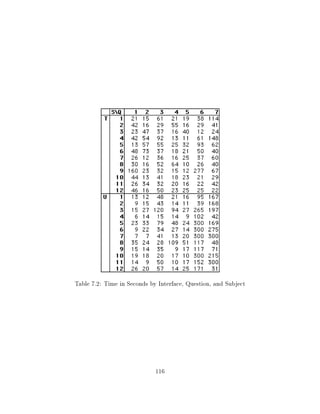
  7.2   Time in Seconds by Interface, Question, and Subject       : : : : : : : : : : : : :   116
  8.1   US Budget Experiment, Time per Question         : : : : : : : : : : : : : : : : : :   139
  8.2   US Budget Experiment, Time per Question Type          : : : : : : : : : : : : : : :   139
  8.3   US Budget Experiment, Errors per Question       : : : : : : : : : : : : : : : : : :   149
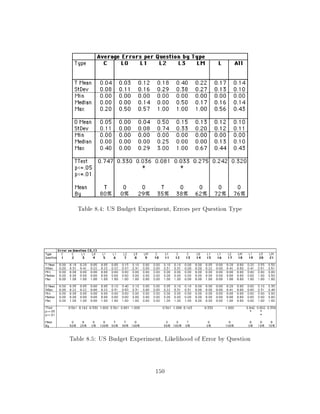
  8.4   US Budget Experiment, Errors per Question Type        : : : : : : : : : : : : : : :   150
  8.5   US Budget Experiment, Likelihood of Error by Question         : : : : : : : : : : :   150
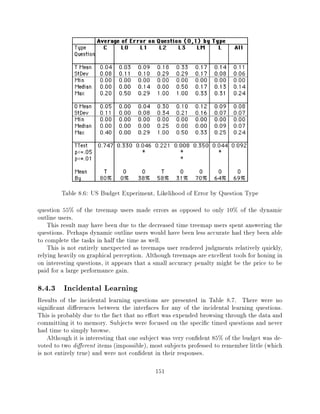
  8.6   US Budget Experiment, Likelihood of Error by Question Type          : : : : : : : :   151
  8.7   US Budget Experiment, Incidental Learning Results       : : : : : : : : : : : : : :   152
  8.8   US Budget Experiment, Quis Results      : : : : : : : : : : : : : : : : : : : : : :   153


                                           xi
LIST OF FIGURES

Number                                                                                       Page
  0.1    Tessellated Trees : : : : : : : : : : : : : : : : : : : : : : : : : : : : : : : : :      1
  3.1    Visual Properties of Presentations  : : : : : : : : : : : : : : : : : : : : : : : :     14
  3.2    File Hierarchy Treemap with 140 Directories and 1130 Files          : : : : : : : : :   15
  3.3    A-Z Full Text Representation    : : : : : : : : : : : : : : : : : : : : : : : : : :     17
  3.4    A-Z Outline : : : : : : : : : : : : : : : : : : : : : : : : : : : : : : : : : : : :     18
  3.5    A-Z Tree Diagram    : : : : : : : : : : : : : : : : : : : : : : : : : : : : : : : :     19
  3.6    A-Z Venn Diagram    : : : : : : : : : : : : : : : : : : : : : : : : : : : : : : : :     20
  3.7    A-Z Treemap with Separate Child O sets        : : : : : : : : : : : : : : : : : : : :   22
  3.8    A-Z Treemap with Common Child O sets            : : : : : : : : : : : : : : : : : : :   23
  3.9    A-Z Treemap with No Nesting O set         : : : : : : : : : : : : : : : : : : : : : :   24
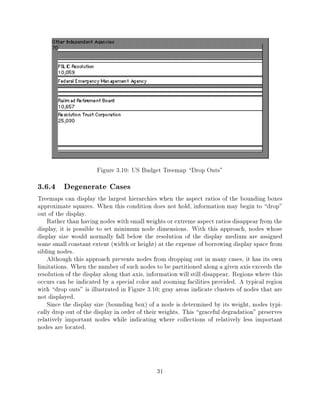
  3.10   US Budget Treemap Drop Outs"       : : : : : : : : : : : : : : : : : : : : : : : :     31
  4.1    Polar Treemap, Initial Partitioning of the A-Z Hierarchy        : : : : : : : : : : :   35
  4.2    Cartesian Treemap, Initial Partitioning of the A-Z Hierarchy        : : : : : : : : :   36
  4.3    Treemap of A-Z Hierarchy Leaf Nodes as a Relative Bar Chart           : : : : : : : :   38
  4.4    Treemap of A-Z Hierarchy as a Relative Bar Chart          : : : : : : : : : : : : : :   38
  4.5    Treemap of A-Z Hierarchy as a Relative Equal Weight Bar Chart             : : : : : :   39
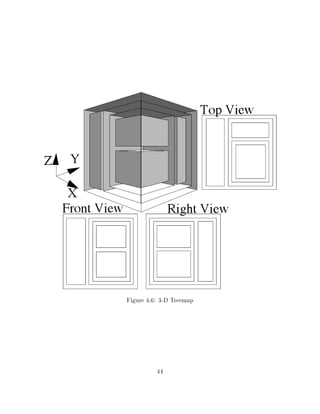
  4.6    3-D Treemap   : : : : : : : : : : : : : : : : : : : : : : : : : : : : : : : : : : :     44
  4.7    Nodes Nested Individually   : : : : : : : : : : : : : : : : : : : : : : : : : : : :     47
  4.8    Sibling Nodes Nested Together   : : : : : : : : : : : : : : : : : : : : : : : : : :     47
  4.9    Nodes Nested on Two Sides     : : : : : : : : : : : : : : : : : : : : : : : : : : :     47
  4.10   Nodes Not Nested  : : : : : : : : : : : : : : : : : : : : : : : : : : : : : : : : :     47
  4.11   US Budget Treemap: 2-D partitioning, large individual o set         : : : : : : : : :   48
  4.12   US Budget Treemap: 2-D partitioning, large combined o set           : : : : : : : : :   49
  4.13   US Budget Treemap: 2-D partitioning, medium combined o set              : : : : : : :   49
  4.14   US Budget Treemap: 2-D partitioning, small combined o set           : : : : : : : : :   50
  4.15   US Budget Treemap: 2-D partitioning, no o set         : : : : : : : : : : : : : : : :   50
  4.16   Degenerate Linear Hierarchy   : : : : : : : : : : : : : : : : : : : : : : : : : : :     52
  4.17   A-Z Rectangular Treemap with Nodes Rendered as Ovals            : : : : : : : : : : :   53
  4.18   A-Z Rectangular Treemap with Nodes Rendered as Ovals, Leaves Only               : : :   54
  4.19   A-Z Treemap Outlines": 1-D partitioning        : : : : : : : : : : : : : : : : : : :   57

                                             xii
4.20   A-Z Hierarchy as Nested Stacked Bar Chart Treemap            : : : : : : : : : : : : :    58
4.21   A-Z Hierarchy as Relative Stacked Bar Chart Treemap            : : : : : : : : : : : :    59
4.22   A-Z Hierarchy as Relative Stacked Leaf Bar Chart Treemap             : : : : : : : : :    60
4.23   Treemap of A-Z Hierarchy as Node-Link Tree Diagram             : : : : : : : : : : : :    61
4.24   US Budget Treemap: 1-D equally weighted partitioning           : : : : : : : : : : : :    62
4.25   US Budget Treemap: 1-D weighted partitioning           : : : : : : : : : : : : : : : :    62
4.26   2+D Top View  : : : : : : : : : : : : : : : : : : : : : : : : : : : : : : : : : : :       64
4.27   2+D Front View Bar Chart    : : : : : : : : : : : : : : : : : : : : : : : : : : : :       64
4.28   2+D Diagonal View   : : : : : : : : : : : : : : : : : : : : : : : : : : : : : : : :       65
4.29   2+D Multiple Views with Simulated Shadows            : : : : : : : : : : : : : : : : :    65
4.30   A-Z Hierarchy as a 2+D Iconic Data Glyphs          : : : : : : : : : : : : : : : : : :    66
4.31   Cartesian Coordinate Bar Chart Top View          : : : : : : : : : : : : : : : : : : :    67
4.32   Cartesian)Polar Coordinate Bar/Pie Chart Top View              : : : : : : : : : : : :    67
4.33   Polar Coordinate Pie Chart Top View        : : : : : : : : : : : : : : : : : : : : : :    68
4.34   Polar Coordinate Pie Chart Oblique View          : : : : : : : : : : : : : : : : : : :    68
4.35   Polar Coordinate Treemap, 1-D Angular & 2-D Angular/Radius Partitioning                   69
4.36   Polar Treemap (1-D Angular + Radius)           : : : : : : : : : : : : : : : : : : : :    71
4.37   Polar Treemap with Internal Lines Removed          : : : : : : : : : : : : : : : : : :    72
4.38   Spoked Polar Treemap    : : : : : : : : : : : : : : : : : : : : : : : : : : : : : :       73
4.39   Hollow Polar Treemap    : : : : : : : : : : : : : : : : : : : : : : : : : : : : : :       74
4.40   Cartesian Coordinates: 1-D Linear Partitioning         : : : : : : : : : : : : : : : :    74
4.41   Polar Coordinates: 1-D Angular Partitioning        : : : : : : : : : : : : : : : : : :    75
4.42   Polar Coordinates: 1-D Repeated Angular Partitioning           : : : : : : : : : : : :    75
4.43   Drum Tree (Polar Treemap: 1D Angle + Radius + Height)              : : : : : : : : : :    76
4.44   Cone Tree (Polar Treemap: 1D Angle + Radius + Height)              : : : : : : : : : :    76
4.45   Cam Tree (Polar Treemap: 1D Angle + Radius + Height)               : : : : : : : : : :    76
4.46   Nested Columns (1D Angle + Radius + Height)            : : : : : : : : : : : : : : : :    77
5.1    TreeVizTM Menus   : : : : : : : : : : : : : : : : : : : : : : : : : : : : : : : : :       80
5.2    Data Glyph Construction Widget Example           : : : : : : : : : : : : : : : : : : :    81
5.3    Relativity: Global E ects from Local Perturbations         : : : : : : : : : : : : : :    87
5.4    A-Z Small Multiples   : : : : : : : : : : : : : : : : : : : : : : : : : : : : : : :       89
5.5    A-Z Small Multiples, equally weighted nodes        : : : : : : : : : : : : : : : : : :    90
6.1    Tra c Accidents by Vehicle Type     : : : : : : : : : : : : : : : : : : : : : : : :       97
6.2    Tra c Accidents by Vehicle Type     : : : : : : : : : : : : : : : : : : : : : : : :       98
6.3    Tra c Accidents by Vehicle Type and Sex          : : : : : : : : : : : : : : : : : : :    99
6.4    Tra c Accidents by Vehicle Type and Sex          : : : : : : : : : : : : : : : : : : :   100
6.5    Tra c Accidents by Vehicle Type, Sex, and Consequence            : : : : : : : : : : :   102
6.6    Tra c Accidents by Vehicle Type, Sex, and Consequence            : : : : : : : : : : :   102
6.7    Tra c Accidents by Vehicle Type, Sex, Consequence, and Age             : : : : : : : :   104
6.8    Tra c Accidents by Vehicle Type, Sex, Consequence, and Age             : : : : : : : :   105
6.9    Tra c Accidents by Vehicle Type, Age, Sex, and Consequence             : : : : : : : :   106

                                           xiii
7.1    Treemap Interface Default View: Unit Weights         : : : : : : : : : : : : : : : : :   109
7.2    Treemap Interface Directory View: Unit Weights           : : : : : : : : : : : : : : :   110
7.3    Treemap Interface: Actual Weights      : : : : : : : : : : : : : : : : : : : : : : :     111
7.4    Treemap Interface: Square Root Weights         : : : : : : : : : : : : : : : : : : : :   112
7.5    Treemap Interface Directory View: Square Root Weights            : : : : : : : : : : :   113
7.6    Treemap Interface Interactive Feedback      : : : : : : : : : : : : : : : : : : : : :    113
7.7    Time in Seconds by Question      : : : : : : : : : : : : : : : : : : : : : : : : : :     115
7.8    Time in Seconds by Interface, Question, and Subject          : : : : : : : : : : : : :   118
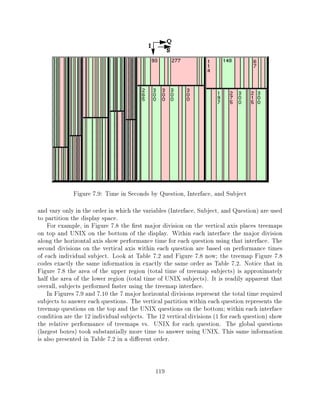
7.9    Time in Seconds by Question, Interface, and Subject          : : : : : : : : : : : : :   119
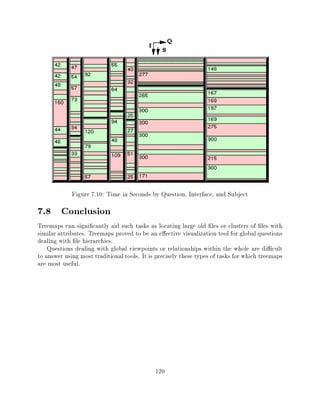
7.10   Time in Seconds by Question, Interface, and Subject          : : : : : : : : : : : : :   120
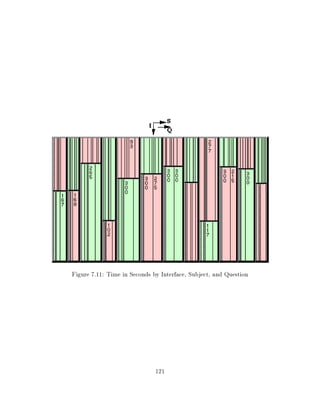
7.11   Time in Seconds by Interface, Subject, and Question          : : : : : : : : : : : : :   121
7.12   Time in Seconds by Interface, Subject, and Question          : : : : : : : : : : : : :   122
8.1    US Budget Treemap, Screen Snapshot          : : : : : : : : : : : : : : : : : : : : :    130
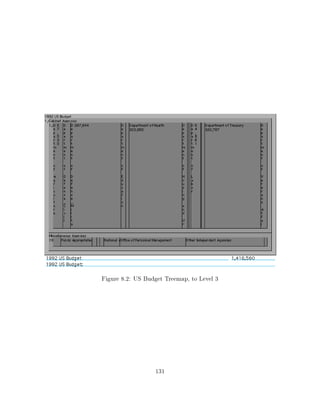
8.2    US Budget Treemap, to Level 3      : : : : : : : : : : : : : : : : : : : : : : : : :     131
8.3    US Budget Treemap, Miscellaneous Agencies Zoom             : : : : : : : : : : : : : :   132
8.4    US Budget Treemap, Zero O set        : : : : : : : : : : : : : : : : : : : : : : : :     133
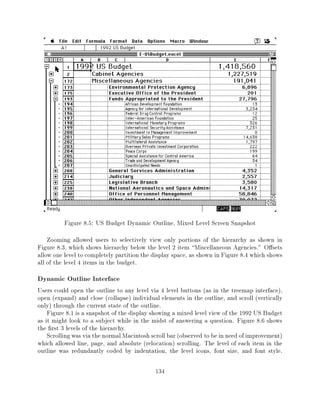
8.5    US Budget Dynamic Outline, Mixed Level Screen Snapshot             : : : : : : : : : :   134
8.6    US Budget Dynamic Outline, to Level 3          : : : : : : : : : : : : : : : : : : : :   135
8.7    US Budget Dynamic Outline, to level 4       : : : : : : : : : : : : : : : : : : : : :    136
8.8    Task and Testing Overview    : : : : : : : : : : : : : : : : : : : : : : : : : : : :     137
8.9    Sample Box Plot    : : : : : : : : : : : : : : : : : : : : : : : : : : : : : : : : :     140
8.10   US Budget Experiment Box Plots (Times in seconds for treemaps (t) and
       dynamic outlines (o) for Q#7, 8, 10, 14)       : : : : : : : : : : : : : : : : : : : :   141
8.11   US Budget Experiment Box Plots (Times in seconds for treemaps (t) and
       dynamic outlines (o) for Q#17, 18, 19, 21)       : : : : : : : : : : : : : : : : : : :   142
8.12   US Budget Experiment Box Plots (Average time analysis for Question Types
       L0, L2, L3)  : : : : : : : : : : : : : : : : : : : : : : : : : : : : : : : : : : : :     143
8.13   US Budget Experiment Box Plots (Average time analysis for Question Types
       LM, L, All)  : : : : : : : : : : : : : : : : : : : : : : : : : : : : : : : : : : : :     144
8.14   Average Time per Question for Treemaps (T) and Dynamic Outlines (O)                : :   145
8.15   Time in Seconds by Interface, Question, and Subject          : : : : : : : : : : : : :   146
8.16   Time in Seconds by Interface (Treemaps top, UNIX bottom), Question (1-21
       from left to right), and Subject (20 in each subcolumn)        : : : : : : : : : : : :   147
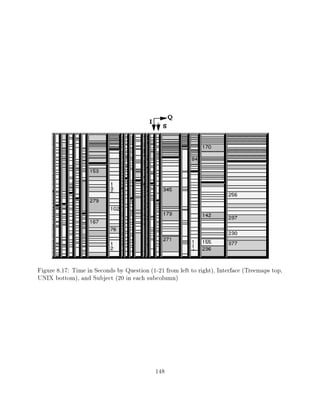
8.17   Time in Seconds by Question (1-21 from left to right), Interface (Treemaps
       top, UNIX bottom), and Subject (20 in each subcolumn)            : : : : : : : : : : :   148
8.18   US Budget Treemap, Dollar Size"       : : : : : : : : : : : : : : : : : : : : : : :     157
8.19   US Budget Treemap, Thumb Size"        : : : : : : : : : : : : : : : : : : : : : : :     158
8.20   US Budget Outline, Dollar Size"     : : : : : : : : : : : : : : : : : : : : : : : :     158
8.21   US Budget Outline, Thumb Size"        : : : : : : : : : : : : : : : : : : : : : : :     158
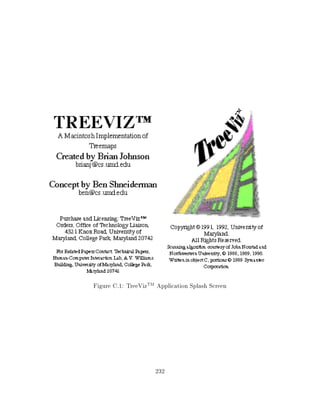
C.1    TreeVizTM Application Splash Screen        : : : : : : : : : : : : : : : : : : : : : :   232
C.2    TreeVizTM Manual A-Z Node-Link Diagram             : : : : : : : : : : : : : : : : : :   238

                                            xiv
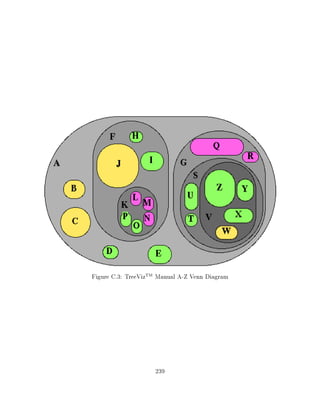
C.3 TreeVizTM Manual A-Z Venn Diagram   : : : : : : : : : : : : : : : : : : : : :   239
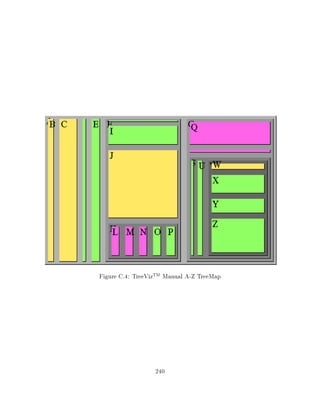
C.4 TreeVizTM Manual A-Z TreeMap  : : : : : : : : : : : : : : : : : : : : : : : :   240


                                  xv
LIST OF ALGORITHMS

Number                                                                                   Page
  4.1   N-D Tracking Algorithm   : : : : : : : : : : : : : : : : : : : : : : : : : : : : :   39
  4.2   1-D Partitioning Algorithm   : : : : : : : : : : : : : : : : : : : : : : : : : : :   40
  4.3   2-D Partitioning Algorithm   : : : : : : : : : : : : : : : : : : : : : : : : : : :   43
  4.4   N-D Parallel Partitioning Algorithm  : : : : : : : : : : : : : : : : : : : : : : :   46
  4.5   Nesting Algorithm  : : : : : : : : : : : : : : : : : : : : : : : : : : : : : : : :   51
  4.6   N-D Tracking Algorithm, taking into account rendering geometry         : : : : : :   55
  5.1   Dynamic Algorithm Psuedocode     : : : : : : : : : : : : : : : : : : : : : : : : :   88


                                           xvi
Treemaps: Visualizing Hierarchical
                             and Categorical Data
                              Brian Scott Johnson
                               February 14, 1995


    This comment page is not part of the dissertation.
Typeset by L TEX using the dissertation style by Pablo A. Straub, University of Maryland.
           a


                                           0
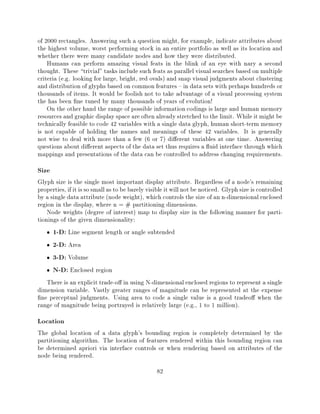
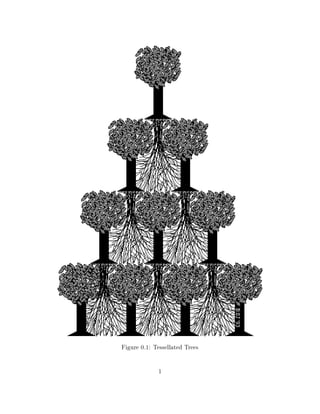
Figure 0.1: Tessellated Trees

             1
Chapter 1
Introduction
      Visualization is a method of computing. It transforms the symbolic into the
      geometric, enabling researchers to observe their simulations and computations.
      Visualization o ers a method for seeing the unseen. It enriches the process of
      scienti c discovery and fosters profound and unexpected insights. In many elds
      it is already revolutionizing the way scientists do science."
      McCormick, DeFanti, and Brown, et al. Visualization in Scienti c Computing,
      Computer Graphics, November 1987 ACM Siggraph
    Treemaps are a graphically based method for the visualization of hierarchical or categor-
ical data spaces. Treemap presentations of data shift mental workload from the cognitive to
the perceptual systems, taking advantage of the human visual processing system to increase
the bandwidth of the human-computer interface.
    Treemaps let users see the forest AND the trees by providing local detail in the context
of a global overview. E cient use of display space allows for the simultaneous presentation
of thousands of data records, as well as facilitating the presentation of semantic information.
Treemaps provide a visually engaging environment in which to analyze, search, explore and
manipulate large hierarchical and categorical data spaces.

1.1 Motivation
A large quantity of the world's information is hierarchically structured: manuals, outlines,
corporate organizations, family trees, directory structures, internet addressing, library cata-
loging, computer programs. Most people come to understand the content and organization
of these structures easily if they are small, but have great di culty if the structures are large.
Treemaps provide a framework for the visualization of hierarchical data spaces.
    This work was initially motivated by the lack of adequate tools for the visualization of
the large directory structures on hard disk drives. Building an adequate mental models of
3000 les, consuming 80 megabytes of disk space, used by 13 people proved to be a di cult
burden. There had to be a better way. The original treemap idea was spawned as a scheme
to slice up a rectangular display space in order to show the structure of the hierarchy as
                                                2
well as its content. The immediate goal was to see" how disk space was being used. The
research goal was to nd a better way to browse large hierarchical data spaces.

1.2 Contribution
The primary objective of this research is the e ective visualization of large bodies of hier-
archically structured information. E ective visualizations of large bodies of hierarchically
structured information can help users gain insight into relevant features of the data, construct
accurate mental models of the information, and search for regions of particular interest.
    Current hierarchical display techniques scale poorly and are poor tools for dealing with
large hierarchical data sets. In addition to scaling poorly existing techniques have generally
not been designed to deal with multi-dimensional data sets. The algorithms have generally
been designed to represent small static hierarchies on pieces of paper. They have not been
designed as interactive presentation techniques for large, complex data sets.
    The major contributions of this dissertation are the:
      Development of a uni ed theory of containment based hierarchical visualization,
      Implementation of interactive treemaps, and
      Controlled evaluation of interactive treemaps.
    Part of my contribution and a good deal of my motivation have been related to giving
treemaps a solid foundation. Establishing the treemap concept as legitimate new child in the
evolution of data graphics has provided a uni ed encapsulation of many previously existing
techniques.
    The idea of representing hierarchy via partitioned rectangles has been extended into a
general glyph based multi-variate hierarchical visualization technique capable of partitioning
display spaces of arbitrary dimensionality in any coordinate system.
    With combinations of partitioning dimensions, extrusions, o sets, weights, and rendering
geometries the generalized treemap algorithm developed in this dissertation can generate:
outlines, node and link tree diagrams, bar charts, stacked bar charts (XDU Dyk91]), pie
charts, hierarchical pie charts, drum trees CZP93], cone trees RMC91], cam trees , venn Di-
agrams, standard 2-D treemaps JS91] Shn92] Joh92], 2+D treemaps TJ92], 3-D treemaps,
and N-dimensional treemaps.
    This dissertation consists of two major pieces (and contributions). The rst develops the
basic treemap concept and provides an algorithmic foundation for a grand uni ed theory
of hierarchical visualization. The second provides experimental validation of the bene ts of
treemaps as an interactive visualization tool. These two pieces show the depth of the graph-
ical presentations treemaps are capable of generating and the breadth of their applicability
to the challenges facing today's computer users.


                                               3
1.3 Bene ts
Vast quantities of data are stored in either hierarchies or tables and people have great
di culty dealing with large bodies of such information. Alleviating this problem in any
signi cant way is a bene t to society which can potentially reduce the frustration and enhance
the abilities of innumerable users of information technology. Experiments with impartial
users and real data show that treemaps can provide signi cant bene ts.

1.4 Scope
This research deals only with hierarchically structured information, such as directory trees,
outlines, corporate organizational structures, etc. , and categorical (tabular, and relational)
information that can be organized hierarchically (often in multiple ways).

1.5 Content
Chapter 2 provides a review of related literature. Related topics in traditional computer
science research areas include data structure drawing algorithms, graphics algorithms, in-
terface design, hypertext, and search algorithms. Statisticians have always been concerned
with data presentations and a rich body of related work exists, including graphic visualiza-
tion and mosaic displays of contingency tables - which are close cousins to treemaps. The
  eld of human-computer interaction is necessarily interdisciplinary and the elds of human
perception (color theory and sound) as well as traditional human factors are also discussed.
    Chapter 3 discusses the basic concept of treemaps. This chapter covers the origin of 2-D
treemaps, the shortcomings of existing techniques, and the bene ts of the treemap approach
as well as its applicability.
    Chapter 4 presents a uni ed theory of hierarchical visualization and the generalized N-
dimensional treemap algorithms. Treemaps algorithms are also shown capable of generating
most existing hierarchical presentation.
    Chapter 5 discusses user control issues and interface design as they relate to treemaps.
Topics covered include the mapping of data attributes to display glyphs and the dynamic
capabilities of interactive treemap visualizations.
    Chapter 6 extends the concept of hierarchical treemap visualizations to the domain of
categorical and tabular data. This chapter discusses how tabular, relational, and categorical
data can be graphically presented and interactively manipulated.
    Treemaps have been evaluated via a series of formal experiments concentrating on the
their ability to provide users with a powerful tool for the presentation of hierarchically
structured data sets. These evaluations have shown that treemap visualizations can sig-
ni cantly reduce user performance times for certain types of identi cation and comparison
tasks. Chapters 7 and 8 present the results of two separate experiments comparing UNIX


                                              4
with treemaps for le management tasks and treemaps with dynamic outlines for budget
tasks.
    Chapter 9 concludes the dissertation and summarizes the bene ts and utility of the
treemap concept.


                                          5
Chapter 2
Literature Review
      For thousands and thousands of years people have been accumulating informa-
      tion - written and drawn records - on tangible media in visible locations. Yet
      now we have billions upon billions of records stored in an invisible way on media
      that in many cases are also invisible to their users...
      Even in the short history of the computer itself, however, the rise of huge in-
      formational data bases is a recent one. The computer was originally seen as a
      device for performing calculations, and the roots of these devices can be traced
      back hundreds of years..."
       Vei88]
    The presentation of hierarchy has a long tradition, stretching back to family trees tracking
royal lineage and tree-structured graphs in mathematical texts. A vibrant but much newer
 eld is that of computational visualization, presenting dynamic data coded via color, shape,
sound and other visual or auditory properties. The rich literature concerning human factors
and human-computer interaction can help bind the presentation of data to the needs of those
for whom the data holds meaning. The treemap drawing and tracking algorithms add to the
body of research concerning the graphic presentation of data.

2.1 Depicting Hierarchy
Presentations of hierarchical information range from those methods based entirely on text,
to methods based almost entirely on graphics. A rich body of literature concerning outlines,
tables of contents, and tree drawing already exists.
    With the advent of powerful graphically based computers it is now possible to interac-
tively present complicated data visualizations on personal computers. Treemaps are less
reliant on textual feedback than most previous methods, and lie on the graphic visualization
end of the text/graphic spectrum.


                                               6
2.1.1 Textual Hierarchy Presentations
Textual presentations of hierarchy deal primarily with outlines and tables of contents, but
include full text listing as well. A recent example of research concerning the browsing of
large tables of contents is that of CWMS93].

2.1.2 Graphic Hierarchy Presentations - Tree Diagrams
Graphic presentations of hierarchy have been primarily concerned with the drawing and
navigation of traditional node and link tree diagrams. Drawing concerns are based on com-
putation time and visual appeal. The research strives to quickly draw tree diagrams which
are aesthetically appealing BKW89] Moe90] WS79] RT81] SR83]. More recent work has
also dealt with the drawing of dynamic trees Moe90].
    Bruggeman and Wood build on the work of Reingold and Tilford. They make the point
that, It is a common understanding in book design that aesthetics and readability do not
necessarily coincide", and that readability is more important since conveying information is
the primary goal BKW89]. Their presentations are capable of making the structure of the
tree more obvious to the human eye, possibly at the expense of aesthetic pleasantness.
    Large tree diagrams are often drawn on a virtual plane much larger than the display
device. Beard and Walker deal with the problem of 2-D navigation BI90]. A key feature
of their work is an experimental analysis of human performance using two similar direct-
manipulation techniques. Experimental analysis is generally lacking in most visualization
work. Researchers often simply proclaim the expected bene ts of their technique, without
bene t of user testing. Robertson, Mackinlay and Card deal with the problem of limited
display space via the addition of a third dimension, extending the traditional planar tree
diagram to 3-D cone trees RMC91]. Kaugars deals with limited display space by selective
node display and compression of portions of the tree Kau92].
    Treemaps deal with a limited display space via space- lling approaches to the presentation
of hierarchy discussed in detail in this dissertation and in JS91] Shn92] TJ92]. Rectangular
Structure Charts (RSC's) are a text-based space- lling mosaic approach to drawing abstract
hierarchical structures Rit91].

2.1.3 Other Graphic Data Presentations
Data graphics is a broad eld of research. This section discusses some general presentation
approaches as well as presentations tailored to the domains of data structures and hypertext.
The section concludes with a brief survey of current visualization work. Card, Robertson,
and Mackinlay's information visualizer ideas embrace the concept of rooms containing related
information. Cone trees and perspective walls are two innovative concepts for the presen-
tation of hierarchical and linear data respectively CRM91] Cla91] MRC91], RMC91]. In
 Shn91] Shneiderman discusses visual user interfaces for information exploration, the ideas
presented here include graphical approaches to Boolean query formulation , dynamic query
facilities for data bases, and treemaps for the presentation of hierarchical information WS93]

                                              7
Shn91] JS91] Shn92] TJ92]. Chimera extends the concept of treemaps and space- lling
visualization to one dimensional value bars" Chi92].
    In Mac88] Mackinlay discusses the opportunities high-quality graphic displays provide,
along with the obligation they place on user interface designers. Cole highlights one of these
opportunities as he explains how computer graphics make mental models easier to form
and easier to explore" in the medical domain Col86].
    Fitter and Green lists requirements for good diagrammatic notations as well as explaining
why designers cannot turn to behavioral science for detailed guidance, but must make use of
empirical evaluations FG79]. Prior to these general diagrammatic observations Green and
Fitter dealt with the particular case of ow-charts as structured diagrams GF78]. Nassi
and Shneiderman extend ow charts towards a more compact space- lling representation in
 NS73]. In large or complex diagram detail in the neighborhood surrounding the current
focal point is often far more important than information further away, which is presumably
less relevant. Furnas explores this idea in his seminal work on  sheye views" Fur86].

2.2 Fisheye Views
No one wants to miss seeing the forest for the trees." Fisheye views are a graphical approach
to emphasizing the interesting" features of large data set Fur86] HCMM89] Kau92] SB92]
 SZB+92] Noi93]. Typically the degree of interest function is based on a geographic notion
of distance from a focal point.
    Fisheye views of abstract data are based on the simple, fundamental idea of making
prominent data items visually prominent by allocating display real estate in a weighted
manner. Treemaps can be thought of as adopting a distributed degree of interest function
applied to each node and based only on local properties of the node.

2.3 Data Structures
Kamada provides a framework for mapping abstract objects and relations to graphical objects
and relations via user-de ned mapping rules Kam88]. Translating domain data to display
data is a visualization technique discussed in greater detail in Chapter 5. Ding and Mateti
provide a framework for the automated drawing of data structure diagrams in DM90]. They
collect the various rules and factors of aesthetics that go into the drawing of data structures as
distilled from a variety of textbooks, and formulate these subjective factors into computable
objectives. Radack and Desai describe a system for graphically displaying data structures
during program execution RD88].
    A users mental model may depend on their current interests, as such there is not always a
best" interface structure for a given data set. In HH91] HH92], Henry and Hudson present
 exible interface techniques for providing user controlled views of data-rich applications and
graph layouts. Karrer and Scacchi KS90] describe a extensible tree/graph editor tool kit for
the rapid creation of editors as user-interfaces to information domains.

                                                8
Large graphs are di cult to draw and understand. A variety of algorithms for drawing
large graphs are presented in HH90] MRH91] SM91]. Of particular interest is the work of
Henry and Hudson, which provides hierarchical layouts of graphs and allows user interaction
to guide the nal form of the display. Sarkar SB92] provides some extensions to earlier
  sheye views of graphs.

2.4 Mosaic Displays of Statistical Contingency Tables
Statistician's have long been concerned with the presentation of data. Mosaic displays of
contingency tables are a close cousins have been developed for the graphical display of tabular
statistical contingency data HK81] Wan85] HK84].
    Mosaic displays are based on the hierarchical decomposition of categorical data sets. This
work overlaps signi cantly with the material presented in Chapter 6 on categorical treemaps,
although the two bodies of work were developed independently from di erent points of view.

2.5 Hypertext
When discussing hypertext systems one often hears of the lost in space" problem. Navigat-
ing through graphs is an inherently di cult task for most users. The cognitive aspects of
hypertext navigation are discussed by Dillon, McKnight, and Richardson in DMR90], and
by Edwards and Hardman in EH89]. A variety of researchers including BRS92] Tra89]
have approached this problem by creating hierarchical displays of the backbone" of the
hypertext graph. Lesk stresses interactive solutions, which seem more promising than trying
to get detailed queries right the rst time Les89].
    Other innovative approaches include the generation of mazes for users to navigate through
 Lm91] and displays of nested boxes Tra89]. Travers use of nested boxes is particularly
interesting as the displays are very similar to small treemaps . In particular, The intricate
structure of the knowledge base is conveyed by a combination of position, size, color, and
font cues" Tra89].

2.6 Visualization
We graphicists choreograph colored dots on a glass bottle so as to fool the eye and mind into
seeing desktops, spacecraft, molecules, and worlds that are not and never can be." Bro88]
    It has been argued for a long time the representation of a problem is of crucial impor-
tance to understanding and solving it. Equally accepted is the fact that the human visual
processing system is an incredible resource which can be applied directly to information
processing tasks given the right representation. In the past few systems taken advantage of
these insights. BFN86]
    The concerns of visualization are not those of computer graphics, nor are they those of
the ne arts, although both of these are relevant elds . Visualization is concerned with
                                              9
the use of computer images to convey information, and hence foster understanding BC90]
 Cox90], Ell90]. The visual display of quantitative information Tuf83] still comprises a large
portion of the eld, but the visualization of abstract objects and relations is equally important
important. Treemap visualization combines features of both quantitative visualization as well
as the visualization of objects and their relations. Brooks envision virtual-worlds research as
interactive graphics serving science, allowing users to grasp reality through illusion Bro88].
    Exploratory data analysis is exactly that { exploratory. A colleague occasionally likes
to ask if treemaps are a solution looking for a problem. This is easy to answer as treemaps
were motivated by the very practical problem of full hard disk drives (with hierarchical le
systems). But suppose the initial motivation were not so clear, are innovative visualization
techniques rst-class citizens if they nd solutions before they nd problems. The answer of
course is yes, and to see why one need only read Owen's Answers First, Then Questions"
 ND].
    By giving users a unique view of reality visualization interfaces can provide users with
answers for which they must then determine the right question. Just as a person walking
in the woods may not be looking for a beehive, but upon noticing many bees may ask why,
and determine that a beehive is nearby. A person looking at a treemap may notice a cluster
of large light boxes, ask why, and determine that newly hired employees in a particular
department are highly paid. 3-D treemap worlds may become one of these worlds that can
never be, but that nevertheless help us grasp the reality of our data through illusion.

2.7 Human Factors
The rst commandment of interface development is Know Thy User." Without a thorough
understanding of the intended users of a system, developers can not hope to create an inter-
face that suits their needs. In Wic88], Wickens discusses the basics of human information
processing, decision-making, and cognition. Whereas Lohse takes on the task of modeling
a particular domain, the underlying perceptual and cognitive processes that people use to
decode information in a graph Loh91]. Butler attempts to determine the e ect of spatial
ability on the subsequent navigation of a hierarchical data base. While Furnas makes the
case that: (1)some graphical interfaces are easy to learn and use, (2) special cognitive pro-
cesses are possible, and (3) perhaps (1) and (2) are related, i.e. perhaps graphical interfaces
are useful because they engage graphical reasoning Fur91].
    The design of quality graphic interfaces is a di cult process discussed in Hel87] RM90]
 SM90] Tul88]. In LR90], Langen discusses a development environment which supports an
iterative design process. End user exibility is discussed by Garneau and Holynski in their
work on interactively adapting graphic displays GH89]. Whereas Leung, and Kitakaze and
Kasahara focus on the more narrowly de ned domains of interfaces for map based diagrams
and CRT text blinking, respectively Leu89] KK87].
    Building a new interface is only half the battle, unfortunately it is the only half that
many new interfaces see. The other half is the evaluation of the interface JMWU91]. Lan-
dauer provides an overview of research methods in human-computer interaction. Explaining
                                              10
the di culties confronting developers of complex systems using formal tools of behavioral
research while emphasizing the need for analysis and iterative testing Lan88]. Shneiderman
also emphasizes the basics of human factors research, while also placing the glorious burden
of making the world a better place on the backs of computer professionals Shn80] Shn87]
 Shn90].
    The ip side of objective interface evaluation is subjective interface evaluation. Malone
tries to determine what makes computer games fun Mal81], while LaLomia and Sidowski,
and Chin, Diehl, and Norman discuss how to measure user satisfaction LS90] CDN88].

2.8 Color and Sound
Color can be used in graphical layouts to emphasize structure, encode domain information,
call attention to certain aspects of the layout, or simply for aesthetic reasons. Color can be a
potent tool for conveying information if applied thoughtfully, if applied poorly it can greatly
distract the user Hoa90] Liv92] Mac90] MMN88] Mei88] Ric91] RLS90]. Of particular
interest are the experimental studies of Hoadley, and of McDonald, Molander, and Noel.
Hoadley's results indicate that color improves time performance for tables, pie charts, and
bar graphs, and accuracy performance for pie charts and line graphs" Hoa90]. In contrast,
the results of McDonald et al. fail to nd advantages for color in categorical menu layouts.
    There is no reason to limit the information emanating from the computer side of the
human-computer interface to a purely visual domain. A good deal of research concerns the
use of auditory cues and auditory information for exploratory data analysis BNG89] Gav89]
 GS90] Jon89] MHK89] SBG90] Sor87]
    A panel at CHI'85 moderated by Buxton BBF+85] dealt with the issues of auditory
cues and auditory representations of data that is di cult to represent and/or understand
visually. Of particular interest are the use of auditory stimuli for visually impaired users and
the asynchronous, background quality of audio cues. Future interfaces may allow the users
to act within a data space instead of looking at a data space, in which case recent advances
in 3-D virtual acoustic may come into play WWK91].

2.9 Search Algorithms
Point location is one of the fundamental problems of computational geometry EGS86]
 Pre81] PT88], ST86] Ull92]. The problem is de ned as follows, given a planar graph with n
vertices and m edges, and a point p, identify the region which contains the point p. Treemaps
are of course a special case of planar graphs and point locations algorithms are particularly
relevant to tracking the location of the users current focal point (mouse tracking).


                                              11
Chapter 3
Treemap Origins
     One of the more tantalizing promises of visual information systems is the ability
     to spark understanding, insight, imagination, and creativity through the use of
     graphic representations and arrangements. Especially in cases where the visual
     arrangement shows relationships that we might not have thought of before, there
     is the potential for evoking creative processes similar to those eeting moments
     of instant understanding that `just come' to us. A major power of visual display
     is its ability to cause us to say, `Now I see'.
     If creative thinking is `seeing' things in a new or di erent light, for example, a
     system that can help assemble these new or di erent `pictures,' or juxtaposings
     of information, may indeed represent a dramatic change in the capabilities of
     information systems.
     In other words, original and creative thinking, in the sciences as well as the arts,
     has stemmed from the individual ability to imagine things and relationships, or
     to see something in the mind's eye. The very fact that we use a visual metaphor
     to express this reveals the close connection this has to physically seeing things.
     Obviously, we have no proof that a computerized system that creates pictures of
     conceptual relationships would be able to help initiate creativity and insight, but
     we do have the experience often enough of reaching a new conclusion because of
     a singular visual impression."
      Vei88]
    The treemap visualization method maps hierarchically structured data to display spaces
of any dimension in a space- lling manner, allowing for e cient use of the display space if
desired. Interactive control allows users to specify the presentation of both structural and
content information.
    This is in contrast to traditional static methods of displaying hierarchically structured
information, which are generally in exible, make poor use of display space, and hide content
from users. With the treemap method, sections of the hierarchy containing more important
information can be allocated more display space while portions of the hierarchy which are
less important to the speci c task at hand can be allocated less space Fur86] HH90].
                                             12
Treemaps are related to many other data graphic tools, including Venn diagrams, bar
charts, pie charts, and tree diagrams. Indeed the general treemap model is capable of
generating these existing presentations, as well as many more. In this chapter only the
original 2-D treemap will be discussed. Chapter 4 will discuss the treemap algorithms in a
more general N-Dimensional context.

3.1 Origin of the Treemap Concept
The original concept of partitioning a rectangular area to present hierarchical data is due to
Prof. Ben Shneiderman. Nassi and Shneiderman are the originators of Nassi-Shneiderman
Diagrams NS73], a clever tiling of rectangular display spaces showing the structure of ow
charts. Pondering the problem of our full hard disk drives Ben sketched out a plan on the
faculty lounge white board for partitioning a rectangular display in order to represent the
space usage of a hierarchical le system.
    This was the origin of the treemap concept. From this seed treemaps have grown into
forest of visualization techniques whose origins can be found distributed throughout the
science and graphics literature.
    The original 2-D algorithm Shn92] did not nest successive levels in the hierarchy. It was
sometimes di cult to parse out the structure of the hierarchy and there existed a many-
to-one mapping from data to display. Adding nesting o sets emphasized the structure of
the hierarchy and allowed a one-to-one mapping between data and display. This led to a
realization the treemaps were just" large weighted Venn diagrams. Collectively nesting
sibling nodes created treemaps which were just" nested collections of relative bar charts.
    Time, experience, and persistence have shown that treemaps are not a single idea or
inspiration but rather the core of an entire family of hierarchical visualization techniques.
The con uence of graphic design sophistication and raw computing power have created an
atmosphere ripe for the advancement of powerful graphical displays and interface techniques.
This dissertation lls that void for hierarchical data.

3.2 Existing Techniques
It is useful to place treemaps in the context of other related tools. People typically deal
with large bodies of information by categorizing the bits and pieces of information and
constructing abstractions - hierarchies. A great deal of information is hierarchically organized
and dealt with on a daily basis by legions of computer users. Hierarchies are a standard way
of dealing with data complexity.
    Traditional methods of dealing with hierarchies are ne for small hierarchies, small being
de ned as less than 100 items (nodes in the hierarchy). These traditional methods include
full text listings, outlines, Venn diagrams, bar charts, pie charts, and tree diagrams. It
is di cult for people to extract information from large hierarchical information structures


                                              13
Figure 3.1: Visual Properties of Presentations
using currently available methods as the navigation of the structure is a great burden and
content information is often hidden But90] VHW87] JS91] TJ92].
   Treemaps alleviate the following limitations of traditional presentations of hierarchical
data:
     Poor use of display space
     Di cult navigation
     Lack of a global perspective
     Di culty in presenting content and structure information simultaneously
    Treemaps provide an overall view of the entire hierarchy, making the navigation of large
hierarchies much easier. Displaying the entire information structure at once also allows
users to move to rapidly to any location in the data space. As Beard states in his paper on
navigating large two-dimensional spaces BI90],
     If the two-dimensional information space ts completely onto a display screen,
     there is no navigation problem ... Users are never lost because they can see the
     complete information space."
    Treemaps are capable of statically mapping entire hierarchical data spaces with thousands
of items onto 2-D display screens.
    Existing hierarchical presentation techniques can be classi ed as ranging from primarily
text based to primarily graphically based. Some techniques are completely text based, some
text based with overlaid graphics, and some graphically based with overlaid text. Few
systems are exclusively graphic, with little or no text. Treemaps lie nearer the graphical end
of this range as a graphically based technique with overlaid text.
                                             14
Figure 3.2: File Hierarchy Treemap with 140 Directories and 1130 Files
3.2.1 Original Motivation
   A map is primarily a functional thing, not designed in the rst place as a
   work of art nor to give visual pleasure. It may well be visually attractive as an
   illustration but its major task is to convey a speci c concept, from the author
   to reader, convincingly and accurately ... within a pre-determined rectangular
   space, whose size and proportions are xed ... the components of the design {
   some regular in shape, others irregular some of xed location, others exible
   { must be so arranged that rst, a well-balanced composition is achieved and
   second, visual signi cance is given to the most salient features by manipulating
   their size and weight, shape and character, in relation to other map features. The
   observer's eye should be drawn rst to those features of the greatest signi cance
   and thence led in a logical course round the remaining map detail so that the
   overall purpose of the map is readily comprehended. The components from which
   a map design is composed are ... Symbols which, by their position depict location
   by their size indicate importance or value and by their shape show the nature

                                          15
of features...
       Hod70]
   The lack of adequate tools for browsing and visualizing (mapping) large le hierarchies

(thousands of les) originally motivated this research.

   The following methods are widely available today:
      Command Line Listing (e.g. UNIX ls, DOS dir)
      Outlines (e.g. UNIX du, Macintosh Finder, Microsoft Windows)
      Windowing (e.g. Macintosh Finder, Microsoft Windows)
      Tree Drawings (e.g. OpenWindows File Manager)
    XDU, an X-Windows implementation of the UNIX du command is the only approach
which provides a visual representation of the relative sizes of les and directories Dyk91].
Outlines, tree drawings, and XDU can all be generated by the treemap algorithm, they are
simply speci c instantiations of the general treemap algorithm.
    Even moderately sized directory trees are di cult to visualize using standard operating
system interfaces. With command line interfaces such as UNIX ls or DOS dir, only the
immediate children of any directory are listed. An overall view of the directory tree must
be pieced together by traversing the various paths and listing the immediate children of the
currently active directory.
    Desktop metaphors and their windowing strategies are another alternative. One of the
problems with windows is that they often obscure each other, and users may spend much of
their time may be spent arranging windows. Also, the tree structure is not apparent unless
windows have been carefully placed. Desktop icons generally show only the type of the le.
Much richer visual mappings are possible but are generally not available.
    A small 26 node hierarchy labeled with the letters of the alphabet and random weights
(degrees of interest) will be used for illustrative purposes and hereafter referred to as the A-Z
hierarchy. This small hierarchy will appear in a number of gures in order to demonstrate
the wide variety of presentations that can be used depict even a simple hierarchical data set.
The A-Z depicted in Figures 3.5 through 3.9 contains 26 nodes, of these 6 are internal nodes
and 20 are les leaf nodes. This tree is structured so that among siblings nodes, leaf nodes
always precede internal nodes.

3.2.2 Listings and Outlines
The most textually oriented and least graphical presentation is the full text listing. In its
most basic form a full text listing need not have any visual organization other than a purely
linear string of characters. Figure 3.3 is an example of such listing.
    Listings are capable of providing detailed content information, but are generally very poor
at presenting structural information. Listings can provide structural information, but require
                                               16
(A 100 (B 5) (C 10) (D 4) (E 6) (F 35 (H 1) (I 6) (J 18) (K 10 (L 2 ) (M 2) (N 2) (O 2) (P
2))) (G 40 (Q 8) (R 2) (S 30 (T 2) (U 4) (V 24 (W 3) (X 6) (Y 5) (Z 10)))))
                         Figure 3.3: A-Z Full Text Representation
users to parse path information to arrive at a mental model of the structure. Alternatively,
many operating systems allow users to list each internal node of the hierarchy separately
(UNIX ls, Dos dir), but this requires users to manually traverse the hierarchy to determine
its structure.
    Structured text moves us up one level on this scale of visual organization. With structured
text the position of the text provides additional visual cues about the structure of the
hierarchy.
    In Figure 3.4 we see an outline view similar to the presentations provided by PCShell
under DOS, the UNIX command du, the Macintosh Finder, or Microsoft Windows. This
presentation requires 26 lines a structure with 1000 nodes would require 1000 lines.
    Outlines are an example of textual presentation moving towards a graphical presentation
via the structure and placement of the text. With nested outlines the position of text on
the line indicates the depth of the node in the hierarchy. This reduces visual clutter with no
loss of information.
    Redundant graphical cues can be added to outlines with little additional visual clutter,
resulting in a rudimentary form of graphic tree diagrams. These outline methods explicitly
provide both structural and content information, but since the structure (indentation) can
only be viewed a few lines at a time (one display page), it is often inadequate CWMS93].
    The number of display lines required to present a hierarchy with outline methods is
linearly proportional to the number of nodes in the hierarchy. These methods are often
inadequate for structures containing more than a few hundred nodes. A great deal of ef-
fort is required to achieve an mental model of the structure in large hierarchies using this
method. Interactive outlining techniques can dramatically extend the range of structured
text presentations.

3.2.3 Tree Diagrams
A richer degree of graphic organization brings us to the traditional tree diagram of Figure
3.5. This type of diagram is a hybrid of text and graphics, using text for content display and
graphics for the display of structure. Nodes are usually separated on a 2-D planar display
space and the structure of the hierarchy is often of primary interest.
    Tree drawing algorithms have traditionally sought e cient and esthetically pleasing meth-
ods for the layout of node and link diagrams. These layouts are based on static presentations
and are common in texts dealing with graph theory and data structures. They are excellent
visualization tools for small trees BKW89] HH90] HH91] Knu73] RMC91].
    However, these traditional node and link tree diagrams make poor use of the available
display space. In a typical tree drawing only 10-20% of the available pixels might be used to

                                              17
Figure 3.4: A-Z Outline

          18
Figure 3.5: A-Z Tree Diagram
draw the diagram, the remaining pixels constitute the background. For small tree diagrams
this poor use of space is acceptable, and traditional layout methods produce excellent results.
But for large trees, traditional node and link diagrams can not be drawn adequately in a
limited display space. Attempts to provide zooming and panning are only partially successful
 BI90] HH90].
    Another problem with tree diagrams is the lack of content information typically each
node has only a simple text label. More comprehensive node labeling quickly overwhelms
the display space for trees with more than a few nodes.
    The presentation of content information in current hierarchical presentation techniques
is usually text based. Although graphic presentations (such as tree diagrams) are capable
of making use of graphic representation techniques such as size, shape, and color. Unfor-
tunately, global views of large node and link tree diagrams require small nodes, so there is
often little space in which to provide graphic visual cues to node content.
    Figure 3.5 represents a weighted hierarchy, the data attributes for each node include
a label and weight. Take a moment to locate the largest leaf node in Figure 3.5. Most
traditional diagrams do not adequately support global browsing. The correct answer is node
J with weight 18. Now page ahead to Figures 3.6 { 3.9 and ask yourself the same question.
It is easy to see that J is the largest leaf in these presentations.


                                              19
Figure 3.6: A-Z Venn Diagram
3.2.4 Venn Diagrams
Figure 3.6 presents the A-Z hierarchy as a Venn diagram. Venn diagrams are a familiar and
often used set theoretic visualization technique. Hierarchical structures can be thought of as
set theoretic collections of nodes, using only the containment (subset) property where each
parent contains it children. Note that each node has been drawn proportionate to its size.
    The space required between ovals precludes this Venn diagram representation from serious
consideration for larger structures. It is di cult to control this space as ovals can not be
packed tightly. Venn diagrams, along with bar charts, are two of the closest ancestors of the
treemap.

3.2.5 Bar Charts
Business graphics such as bar charts and pie charts can not display hierarchical data in
a single chart. Collections of charts are often used to present related information. For
hierarchical information it is not uncommon to see a hierarchy of pie charts with the pie
chart for the topmost level being situated at the center of the display. A similar ordered
collection of relative bar and column charts provides us with the treemap of Figure 3.8.
Each parent has been divided up into a relative bar chart amongst its children based on
their weights.
                                             20
We have been moving towards more graphically oriented presentation techniques in the
text $ informal graphic presentation space of Figure 3.1. As the degree of textual parsing
required has dropped, so to has the textual clutter in the presentations. But although
the presentation of hierarchy has become cleaner and more immediately comprehensible in
many respects, improved visual organizations have thus far not greatly expanded our ability
to present greater quantities of information.
    Both text labels and graphic layout have thus far constrained the size of hierarchies that
may be presented in a xed space. The full utilization of graphical display attributes and the
space- lling layouts of treemaps allow the presentation of much larger hierarchies. Treemaps
extend the trend of progressively less emphasis on text and more emphasis on graphical
presentation

3.3 Treemaps
     ...which is repeated according to a particular system, always bearing in mind
     the principle that there may not be any 'empty spaces'..."
     M.C. Escher, his life and complete graphic work, p.55
    The original treemap is a method for presenting large hierarchical information spaces on
planar display areas of limited size JS91] Shn92]. 2-D treemaps are generated by recur-
sively slicing the display space into rectangular bounding boxes to convey global structure
(hierarchy) within each bounding box, individual node information is presented through
display attributes such as size and color. Treemaps combine features of multivariate coding
and display layout to present hierarchies in a richly visual environment which fosters relative
comparison of structures in the hierarchy.
    Figure 3.7 is a treemap which illustrates a more e cient use of space and is an excellent
tool for the visualization of small hierarchies. But even the small degree of nesting present
in this technique can render it unsuitable for the presentation of large hierarchies.
    Figure 3.9 eliminates the nesting o set used to separate objects at each level. The size
of each node in the treemap presentation of Figure 3.9 is strictly proportional to its weight.
This weight-proportionate distribution of display space is an important feature of treemaps.

3.4 Visualizing Hierarchy
     In other words, every act of seeing is a visual judgment. Judgments are some-
     times thought to be the monopoly of the intellect. But visual judgments are not
     contributions of the intellect, added after seeing is done. They are immediate
     and indispensable ingredients of the act of seeing itself...
     There has been a tendency among scientists to describe the experience of vision
     in analogy to the physical process. As far as seeing is concerned, the mind
     was assumed to perform much like a photographic camera. But if, instead of
                                              21
Figure 3.7: A-Z Treemap with Separate Child O sets


                       22
Figure 3.8: A-Z Treemap with Common Child O sets


                      23
Figure 3.9: A-Z Treemap with No Nesting O set


                     24
assuming things, scientists observe the facts with an unpredjudiced mind, they
      discover that vision is anything but a mechanical recording device. First of all,
      vision is not mere passive reception. The world of images does not simply imprint
      itself upon a faithfully sensitive organ. Rather, in looking at an object, we reach
      out for it. With an invisible nger we move through the space around us, go
      out to the distant places where things are found, touch them, catch them, scan
      their surfaces, trace their borders, explore their texture. It is an eminently active
      occupation."
       Arn69]
    Treemap visualizations make use of 100% of the available display space, mapping the
full hierarchy onto a rectangular display space in a space e cient manner. This e cient
use of space allows very large hierarchies to be displayed in their entirety and facilitates the
presentation of semantic information.
    E ective visualizations of large data sets can help users gain insight into relevant features
of the data, construct accurate mental models of the information, and locate regions of
particular interest. Treemaps let users see the forest AND the trees by providing local detail
in the context of a global overview.
    The main objectives of the treemap design are:
      Comprehension: The presentation method and its interactive feedback must facili-
      tate the rapid extraction of information with low perceptual and cognitive loads,
      E cient Space Utilization: E cient use of space is essential for the presentation
      of large information structures,
      User Control: Interactive control over the presentation of information and real time
      feedback are essential.
   Displaying a large hierarchy while fully utilizing space and conveying structural infor-
mation in a visually appealing and low cognitive load manner is a di cult task, as these
are often opposing goals. An interactive approach to drawing hierarchies allows users to
determine how the hierarchy is displayed. This control is essential, as it allows users to set
display properties (presentation variations, colors, borders, etc.) maximizing the utility of
the drawing based on their particular task.
   Treemaps provide a visually engaging environment in which to analyze and search data
spaces. Expanding the bandwidth of the human-computer interface by allowing users to
explore and manipulate large hierarchical and categorical data spaces.
   Sections 3.4.1 and 3.4.2 discuss the visualization of hierarchy structure and node content,
respectively.


                                               25
3.4.1 Structural Information: Planar Partitionings of the Dis-
      play Space
Tessellate to lay out, inlay, or pave in a mosaic pattern of small, square blocks { adj.
        arranged in a mosaic pattern tessellated.
         Gur86]
    Hierarchical information structures contain two kinds of information: structural informa-
tion associated with the organization of the hierarchy, and content information associated
with each node. Interactive nesting o sets provide explicit control over the trade-o s involved
in emphasizing structure vs_ ontent.
                            c
Bounding Regions
The treemap approach to the visualization of hierarchical structures partitions the display
space into collections of rectangular bounding boxes of decreasing size based on the structure
of the hierarchy. Treemaps create a mosaic of the nodes in the hierarchy, tiling (tesselatting)
a planar surface. Treemaps are based on the property of containment, the bounding box
of every node in the hierarchy always contains its children and is contained by its parent.
Sibling nodes do not overlap.
    Treemap displays look similar to the partition diagrams of quad-trees and k-D trees. The
key di erence is the direction of the transformation. Quad-trees create hierarchical struc-
tures to store 2-D images e ciently Ben75] Sam89] while 2-D treemaps present hierarchical
information structures e ciently on 2-D display surfaces.
    Treemaps require that a weight be assigned to each node, this weight is used to determine
the size of a nodes bounding box. The weight may represent a single domain property (such
as disk usage or le age for a directory tree), or a combination of domain properties (subject
to Property 4 below). A nodes weight (bounding box) determines its display size and can
be thought of as a measure of importance or degree of interest Fur86]. Unweighted"
hierarchical presentations can be generated by assigning identical weights to all leaf nodes.
    The following relationships between the structure of the hierarchy and the structure of
its treemap drawing always hold:
       Properties
   1. If Node1 is an ancestor of Node2, then the bounding box of Node1 completely encloses,
      or is equal to, the bounding box of Node2.
   2. The bounding boxes of two nodes intersect i one node is an ancestor of the other.
   3. Nodes occupy a display area strictly proportional to their weight 1.
   1Nested presentations borrow" space for o sets at the expense of strict proportionality. The space is
borrowed" from leaf nodes and used to display the parent node within which they are nested. Sibling
nodes are always proportional (local comparisons), but comparisons between nodes at di erent levels or with
di erent parents may not be strictly proportional

                                                    26
4. The weight of a node is greater than or equal to the sum of the weights of its children.
Nesting
Structural information is implicitly presented via the partitioning of the space. Explicit
structural information can be provided via visually nested boxes, links between bounding
boxes, and other rendering techniques. The actual bounding boxes may not be rendered to
the display, depending on the parameters chosen by the user.
    Nesting provides for the direct selection of all nodes, both internal and leaf. Although the
space required for nesting reduces the number of nodes which can be drawn in a given display
space, and hence reduces the size of the trees that can be adequately displayed compared to
non-nested drawings JS91] Tra89].
    A non-nested display explicitly provides direct selection only for leaf nodes, but tracking
feedback can provide detailed location and content information as well as further selection
facilities. Non-nested presentations cannot unambiguously depict internal nodes in degen-
erate linear sub-paths, as the bounding boxes of the internal nodes in the sub-path will be
identical (see Section 4.10.4). Tasks dependent on long chains of single child nodes require
nesting presentations or special treatments.

3.4.2 Content Information: Mapping Content to the Display
Treemaps are a glyph based visualization technique. Mapping data attributes to the display
properties of the glyphs (individually rendered nodes in the hierarchy) allows for the shifting
of cognitive load to the perceptual system. Shifting search e orts to the perceptual system
capitalizes on a well developed human visual processing capabilities. Appropriate coding of
the domain attributes can greatly improve comprehension, providing rapid visual searching,
sorting, and comparison on a global scale.
    Nodes may have a variety of types of associated content information, in which case
a rich set of mappings exists between content information (node attributes) and display
properties. The rendering of individual nodes within their bounding boxes determines the
content information statically presented in a treemap.
      Since human perception imposes an upper bound on the complexity of graphic
      representations, only a small number of relations can be shown." Kuh90]
    The number and variety of domain properties that can be statically coded in any graphic
presentation is limited. People typically have di culty remembering more than a half-dozen
separate variables simultaneously, although the working set of variables can be changed at
will. Interactive control of the drawing is therefore critical because the mapping of content
information to the display will vary depending on the information the user requires. Dy-
namic feedback can provide detailed information about the content of items in the display,
showing attributes not visible in the presentation as well as con rming attributes coded in
the presentation.

                                              27
Once the bounding box of a node is set, a variety of display properties determine how
the node is rendered within this bounding box. Visual display properties such as color (hue,
saturation, brightness), texture, shape, border, blinking, etc. are of primary interest, but
users are not limited to purely visual (and perceptually parallel) properties DM90]. Auditory
properties are generally presented serially in a dynamic fashion, they are especially useful
as redundant feedback to reinforce visual cues BNG89] Gav89] GS90] Jon89] MHK89]
 SBG90] Sor87].
   Color is the most important of the visual display properties (after size, which is deter-
mined via partitioning), and it can be an important aid to fast and accurate decision making
 Hoa90] Mac90] Ric91]. Visual properties may be statically presented in parallel.
Display Properties:
     Size: Single most important visual attribute,
     Color: Hue, Saturation, Value,
     Other: Shape, Border, Texture, Pattern, Audio.
   In a le hierarchy for example, les could have weights (display size) proportional to
their creation date, hue dependent on le type, color saturation dependent on their last
modi cation date, and pitch (tone heard while crossing border) based on size. Using this
scheme it is easy to locate old applications which have changed recently, and as the cursor
crosses into their bounding box a deep tone tells users that the le is large even before they
read the information displayed for le.

3.5 Tasks
Treemaps basically answer the question, How have resources been distributed?", or more
speci cally, How are the values of a given attribute distributed throughout the hierarchy?"
Fortunately this is often an interesting and important question to have answered!
   From a data analytic perspective we are interested in what tasks or questions about hi-
erarchical data treemaps support. Treemaps allow users to easily locate the most interesting
nodes anywhere in a tree, in context, while making rapid visual judgments. This is exactly
the sort of questions users might have about les on a computer or items in a budget: where
are the interesting (large, old, percent change, etc.) nodes, how interesting are they, and
what portion of the whole do they consume.
     Traditional displays show depth, but give little insight into totals or fractions.
     The challenge now is to gure out what questions it treemaps] answers well and
     what questions other techniques answer better. Then for any particular example
     you can decide what tool best extracts the information that the data analysts
     needs." Eic93]

                                             28
Treemaps can emulate most traditional hierarchical displays. This leads us to ask what
interaction techniques are required to allow an analyst to extract information about a hier-
archical data set from a treemap? This topic is covered is Chapter 5, which deals with the
design of a treemap based visualization interface.

3.6 Data
With regard to the physical structure of the data, what data sets are treemaps good for?
Since treemaps can generate most traditional displays, they are useful for most data sets.
2-D treemaps are particularly useful when dealing with larger data sets where traditional
display techniques break down. Treemaps are currently the only reasonable visualization
tool for large weighted hierarchical data sets.

3.6.1 Variability
Visualizations must accurately portray the structure and content of the data. A data set
devoid of interesting features should appear devoid of interesting features when visualized.
   The distribution of weights (degree of interest) in a data set is probably the single greatest
determinant of the applicability of treemaps. This is why treemaps work so well for le data.
For  atter" data it is often useful to scale the weights in a non-linear fashion in order to
exaggerate weight di erences and highlight features of interest.
   Display properties other than size, such as color, can be very e ective discriminators for
data attributes which have smaller ranges of magnitude.

3.6.2 Data Resolution Bound
Display resolution is a lesser problem as the least interesting (smallest) items should become
progressively less visually attractive. The average data density should allow for at least 100
pixels per glyph on average. This is an upper bound of about 3000 nodes on a 640x480 pixel
display.
    A typical display today might have a resolution of 640 pixels x 480 pixels, or roughly
300,000 pixels. Drawing an 80mb directory tree (weight = disk space) on such a display
requires that each pixel represent 260 bytes, i.e., there are roughly 4 pixels per Kilobyte.
Assuming that such a directory structure may contain roughly 3,000 les (as on one of our
lab's hard disks) implies that there are approximately 100 pixels per le on average. A box
with 10 pixels per side (roughly 4mm2) is easily selectable. This average case analysis is only
part of the story since le sizes may vary widely.
    The range of le sizes on hard disks often varies from a few hundred bytes to well over one
million bytes. In the treemap of Figure 3.2, groups of very small les become gray regions
as there is only enough space to draw their borders. Magni cation over these regions or
zooming can provide access to these les. But since the assignment of node weights (degree

                                               29
Table 3.1: Binary Tree Display Resolution
of interest) is user controlled, presumably the nodes with the greatest weights are of greatest
interest and the nodes with the smallest weights are of least interest.

3.6.3 Treemap Display Limitations
All static hierarchy presentations have limits as to the quantity of data they are capable of
presenting on a nite screen display. When these limits are reached, navigational techniques
such as scrolling or panning must be used, creating the potential for loss of context BI90].
Common character-based applications use a set number of lines to display the hierarchy.
Graphical tree diagrams have more leeway: depending upon the drawing algorithm and the
size of the display space, a hundred or so nodes can be adequately represented on screen
without the need for panning or zooming techniques.
    More recent graphical diagrams such as cone trees RMC91] increase the display limit
through the use of a virtual third dimension at the expense of increased navigation (in this
case, rotation).
    The number of nodes that can be displayed by a treemap can be an order of magnitude
greater than traditional graphical tree diagrams. This is the result of the tiled approach,
which packs the display space. Treemaps, though, have limits as well as with previous
presentation methods, zooming, panning, and animation can extend these limits.
    Table 3.1 indicates display limits for binary trees with non-overlapping nodes using tree-
maps and node-link tree diagrams . The formulas for node and link tree diagrams assume no
horizontal separation space for nodes on the leaf level and also assume enough vertical space
to display all tree levels. The treemap gures assume that all leaf node weights are equal,
which will generate square bounding boxes for this example. The italicized entries in Table
3.1 are smaller than the practical minimum node size they are included for completeness.
    Table 3.1 shows that treemaps (without o sets) are capable of statically displaying hier-
archies an order of magnitude larger than traditional node and link tree diagrams. It should
be noted that without o sets only the leaf nodes appear in the display. For example, Fig-
ure 3.9 illustrates the same tree as Figure 3.7 with o sets removed. The maximum size of
representable hierarchies decreases as o set size increases.


                                              30
Figure 3.10: US Budget Treemap Drop Outs"
3.6.4 Degenerate Cases
Treemaps can display the largest hierarchies when the aspect ratios of the bounding boxes
approximate squares. When this condition does not hold, information may begin to drop"
out of the display.
    Rather than having nodes with small weights or extreme aspect ratios disappear from the
display, it is possible to set minimum node dimensions. With this approach, nodes whose
display size would normally fall below the resolution of the display medium are assigned
some small constant extent (width or height) at the expense of borrowing display space from
sibling nodes.
    Although this approach prevents nodes from dropping out in many cases, it has its own
limitations. When the number of such nodes to be partitioned along a given axis exceeds the
resolution of the display along that axis, information will still disappear. Regions where this
occurs can be indicated by a special color and zooming facilities provided. A typical region
with drop outs" is illustrated in Figure 3.10 gray areas indicate clusters of nodes that are
not displayed.
    Since the display size (bounding box) of a node is determined by its weight, nodes typi-
cally drop out of the display in order of their weights. This graceful degradation" preserves
relatively important nodes while indicating where collections of relatively less important
nodes are located.


                                              31
3.6.5 Large File Hierarchy Example
Figure 3.2 is a screen snapshot showing a treemap of 140 folders and 1130 les. A simple
color mapping has been used to code some of the various Macintosh le types: applications
are magenta programming les are purple system les are red picture les are cyan text
  les are green archive les are blue and all other le types not currently of primary interest
are yellow. Detailed le information is displayed in a dynamic dialog near the bottom of the
window as the mouse is dragged over les in the display.
     In this directory structure it can be observed that the largest le on the disk is the purple
TreeVizTM programming le which contains the binaries for many of the smaller purple
source code les surrounding it. An adjacent directory to the left contains a collection of
large archive (blue) les. The largest directory (left portion of the screen) is the directory
containing this dissertation. This directory contains primarily text and graphics les and it
can be seen that the graphics les are generally larger.
     Since this treemap portrays the overall allocation of disk space, the largest les can
be located quite easily. Sorting a large directory listing by size would also make nding the
largest les easy, but these les would not be presented in their original context. In addition,
sorting a list on two or more properties (i.e. size and type) makes presentation of the results
di cult. Treemaps make nding the largest system, application, and picture les on the disk
as easy as nding the largest red, magenta, and cyan rectangles in 3.2. This is one simple
example of the visual display properties possible further discussion is contained in Chapter
5.

3.7 Conclusion
Treemaps provide us with a powerful graphic technique for visualizing hierarchical data sets.
Although no single tool will be appropriate for every data set and every task, treemaps
are a powerful tool to add to the existing collection the hierarchical data analysis tools.
Treemaps are a very exible approach to the visualization of hierarchically structured data.
The exibility of this general containment based approach is covered in the following chapter,
Chapter 4.


                                               32
Chapter 4
Algorithms
     What I cannot create, I do not understand."
     Richard Feynman, from J. Gleick, Genius: The Life and Science of Richard
     Feynman. Pantheon, New York, 1992
     The Architect, by his arrangement of forms, realizes an order which is pure
     creation of his spirit by forms and shapes he a ects our senses ... The Plan is
     the generator. Without a plan, you have lack or order and wilfulness. The Plan
     holds in itself the essence of sensation."
     Le Corbusier, Towards a New Architecture, 1931
     It is valiant to be simple. One of the essential characteristics of organic archi-
     tecture is a natural simplicity...Plainness, although simple, is not what I mean
     by simplicity. Simplicity is a clean, direct expression of that essential quality of
     the thing which is in the nature of the thing itself. The innate or organic pattern
     of the form of anything is that form which is thus truly simple."
     Frank Lloyd Wright, The Natural House, 1954
    Strict hierarchies have a limited and very rigid structure. The beauty and usefulness of
treemaps comes from harnessing this rigid structure as a plan for generating a beautifully
simple arrangement of forms. Treemaps are useful precisely because the arrangement of
graphic forms is strictly and simply driven by the data.
    Users must understand at every step how the graphic forms are related to the underlying
data. Algorithmic complexity must not show through to the interface. Indeed the require-
ment is even stronger, for the underlying algorithms which drive the graphic rendering must
be clean, elegant, and conceptually accessible to users.
    Having emphasized the importance of simplicity it must now be stated that the multi-
plicity of variations and extensions to the basic treemap visualization instrument enable us
to create a veritable symphony of hierarchical visualizations under the auspices of a grand"
uni ed treemap theory! This chapter presents the fundamental treemaps algorithms, relates

                                             33
these algorithms to existing techniques, and provides variations, extensions, and generaliza-
tions to the fundamental algorithms.
    With combinations of partitioning dimensions, extrusions, o sets, weights, and rendering
geometries the generalized treemap algorithm can generate:
   1. Outlines,
   2. Node and Link Tree Diagrams,
   3. Bar Charts,
   4. Stacked Bar Charts (XDU Dyk91]),
   5. Pie Charts,
   6. Hierarchical Pie Charts,
   7. Drum, Cone, and Cam Trees CZP93] RMC91],
   8. Venn Diagrams,
   9. Standard 2-D Treemaps, and
  10. 2+D , 3-D, and N-Dimensional Treemaps.
    These are only a few of the labeled points in the current design space of graphic hier-
archical presentations. Combinations of parameters and extensions to the general treemap
algorithm are capable of generating much more.
    Algorithms are given to partition the display space and track pointer location. The
algorithms are computationally e cient partitioning the display space in single traversal of
the hierarchy (O(n)). Cursor tracking is proportional to the depth of the hierarchy (O(logn)).
Extensions to the basic algorithms deal with alternate partitionings, categorical data sets
(Chapter 6), nesting o sets and extrusions, zooming, dynamic data sets, animation, and
non-planar presentations.

4.1 Chapter Content
This chapter leads the reader through a series of re nements and extensions to the basic
treemap algorithms, weaving together the big picture of containment based hierarchical
visualization along the way. An overview of the chapter will help these pieces drop into
place.
    The primary topics are partitioning the display space, cursor tracking, and graphic ren-
dering. These topics are interdependent, display space partitioning and graphic node render-
ing are often varied simultaneously to achieve speci c visualizations, cursor tracking always
follows.
    The basic layout of the chapter is as follows:
                                             34
Figure 4.1: Polar Treemap, Initial Partitioning of the A-Z Hierarchy
     Introduction to the general concept of weighted hierarchies, display space partitioning,
     and cursor tracking.
     Cartesian coordinate partitioning in 1, 2, and N dimensions.
     Rendering variations (extrusions, o sets, bounding regions).
     Generation of existing hierarchical presentation techniques.
     Coordinate system independence (polar coordinates).

4.2 Degrees of Interest: The Weighted Hierarchy
With the exception of those truly devoted to visualization techniques, any data visualization
technique is only as interesting as the data being presented. Information that does not
exist in the data can not suddenly be revealed by any visualization technique, the converse
is not true. Visualization is a powerful tool and our perceptual abilities can be misled in
any number of ways. It is the responsibility of the designer to ensure that a visualization
technique not introduce misleading artifacts into the visualization that are not present in
the data.
    Treemaps, like many other visualization techniques, can not be fully appreciated without
rich data sets. Where rich data set refers to the attributes of the nodes in the hierarchy.
This information varies but for general purposes it is assumed that at least a text label
representing the name of the node and a numeric value representing the nodes weight are
present.

                                             35
Figure 4.2: Cartesian Treemap, Initial Partitioning of the A-Z Hierarchy
   This numeric weight is important and can be thought of as a degree of interest. This
concept of emphasizing degree of interest is similar to the sheye concept Fur86], though
there are multiple distributed points of interest in treemaps. The pie and bar charts of
Figures 4.1 and 4.2 are examples of how treemaps use the weights of a collection of items as
a distributed degree of interest in a graphical representation.
   Along with the structure of the hierarchy, node weights will be used in the treemap
algorithms to partition the display space. In general the mapping of content information to
the display is independent of the basic structure of the diagram and will be covered separately
in Chapter 5.

4.3 Partitioning
     Subdivision is of the greatest biological value because on it depends the capacity
     to see objects. Goethe has observed the `Erscheinung und entzweien sind syn-
     onym' more explicitly, 'What comes into appearance must segregate in order to
     appear.'
     In the visual arts subdivision is an essential means of composition. It takes place
     at di erent levels, which in every work of art are organized in a hierarchy. A
     primary segregation establishes the main features of the work. The larger parts
     are again subdivided into smaller ones, and it is the task of the artist to adapt the
     degree and kind of the segregation and connections to the meaning he is trying
     to convey."
     This principle asserts that the degree to which parts of the pattern resemble each
     other in some perceptual quality will help determine the degree to which they
     are seen as belonging together."
      Arn69]

                                              36
A speci c graphic treemap presentation of a hierarchical data set is an instantiation of
any one of an entire family of related treemap algorithms. At the most fundamental level
the property that relates all elements of the treemap algorithmic family is the concept of
a containment based partitioning of a multi-dimensional display space based on a weighted
hierarchical data set.
    The treemap can be drawn during one pre-order pass through the tree in O(n) time where
n is the number of nodes in the hierarchy, assuming that node properties (weight, name, etc.)
have previously been computed or assigned. The treemap algorithms have been implemented
in object-oriented Think C on the Macintosh platform in the TreeVizTM application. The
Macintosh implementation is approximately 17,000 lines of code (including comments and
blank lines), although the basic algorithms are quite succinct. The implementation complex-
ity is largely due to the di culty of programming interactive graphical user interfaces with
today's technology.
    The drawing algorithm proceeds as follows:
   1. The node draws itself within its bounding region according to its display properties
       (weight, color, borders, etc.).
   2. The node sets new bounds and drawing properties for each of its children, and recur-
       sively sends each child a drawing command. The bounds of a node's children are a
       partitioning along one dimension of the region allocated to the parent node.
    A display space of only one dimension (a line) is the simplest case. The line is recur-
sively partitioned into a collection of nested line segments representing the structure of the
hierarchy. In 2-D a planar rectangular area will be partitioned into a collection of succes-
sively smaller rectangular areas completely tiling the display space. In 3-D a rectangular
solid is partitioned into a completely space- lling collection of smaller rectangular solids, and
for N dimensions an N-dimensional hypercube is partitioned into a collection of successively
smaller N-dimensional nested hypercubes completely lling the original N-dimensional space.
Algorithmic variations allow for alternative partitioning of the display space.

4.4 Tracking
Point (cursor) tracking algorithms facilitate real-time feedback about the hierarchy. Every
point in the drawing corresponds to a node in the hierarchy. While the current tracking
point is in a node, the node is selected and information about the node can be displayed.
    Cursor tracking for treemaps of all dimensions consists of locating the smallest bounding
region (line segment, rectangle, cube, ...) containing the current point. Since every parent
completely encloses all of its children and sibling nodes never overlap, this search consists
of a single descent through hierarchy. The descent begins at the root since every node is
contained in the bounding region of the root node.
    Finding the path to a node containing a given point is a simple descent through one path
in the tree, until the smallest enclosing bounding region is found. The path from the root
                                               37
Figure 4.3: Treemap of A-Z Hierarchy Leaf Nodes as a Relative Bar Chart


               Figure 4.4: Treemap of A-Z Hierarchy as a Relative Bar Chart
of the tree to the node associated with a given point in the display can be found in time
proportional to the depth of the node.
    We can expect this search to be of O(log n) on average assuming roughly balanced trees
of bounded degree. Even on a personal computer, as implemented in TreeVizTM on the
Apple Macintosh, the tracking algorithm is blindingly fast in comparison to human motor
movements for any hierarchy that can adequately be displayed.
    The N-D tracking algorithm (Algorithm 4.1) returns a path through the hierarchy from
the root to the node containing the given display point. It assumes the existence of a
generalized PointInBounds function which returns true if the given N-dimensional point is
inside the given N-dimensional bounding box.
    The N-D tracking algorithm (Algorithm 4.1) is the heart of treemap cursor tracking.
Extensions must deal with tracking behaviors, whether or not certain classes of nodes are
visible, rendering of nodes within their bounding boxes, etc.

4.5 One Dimensional Partitioning
One dimensional partitioning is the simplest application of the treemap partitioning al-
gorithms. The display space (a line segment) is partitioned into successively smaller line
segments based on the structure of the hierarchy being represented. The 1-D partitioning
algorithm of (Algorithm 4.2) partitions the display space such that the line segment of every
node in the hierarchy overlaps the line segments of all of its children but none of it's siblings.
    Algorithm 4.2 generates Figure 4.3, whose appearance is similar to a relative bar chart
(or Value Bar Chi92]) of the leaves of the A-Z hierarchy. From a conceptual point of view

                                               38
var PathList FindPath( aPoint)
{
        // Is point in this node?

    if ( PointInBounds( aPoint, itsBounds ) )
    {

               // Point is in this portion of the hierarchy

               // Is point in any of the nodes children?

        ForEach ( childNode ) Do
        {
            pathBelow = childNode->FindPath( aPoint )
            if ( pathBelow )
            {
                    // Point is a child of this node

                   return( InsertInList( this, pathBelow ) )
               }
        }

        // Point is in this node, but not in any of it's children

    return( NewList( this ) )

    } else {

            // Point is not in this portion of the hierarchy

        return( NULL )
    }
}


                            Algorithm 4.1: N-D Tracking Algorithm


        Figure 4.5: Treemap of A-Z Hierarchy as a Relative Equal Weight Bar Chart

                                              39
Main()
{
    root->SetBounds( GetBounds( display) )
    root->Partition()
}

Partition()
{
    currentSide = itsBounds 1].start
    cumulativeWeight = 0
    ForEach ( childNode ) Do
    {
        childNode->SetBounds( itsBounds )
        childNode->CalculateBounds( currentSide, cumulativeWeight )
        childNode->Partition()
    }
}

CalculateBounds( var currentSide, var cumulativeWeight )
{
    itsBounds 1].start = currentSide
    cumulativeWeight    = cumulativeWeight + itsWeight
    parentExtent        = itsParent->GetEnd() - itsParent->GetStart()
    itsBounds 1].end    = itsParent->GetStart() +
                            parentExtent * cumulativeWeight /
                            itsParent->GetStart()
    currentSide         = itsDimension 1].end
}


                       Algorithm 4.2: 1-D Partitioning Algorithm


                                             40
the width of this treemap has been partitioned in 1-D and extruded into the 2nd dimension
(height). Without nesting o sets or translucent leaf nodes the internal nodes in the hierarchy
are hidden by the leaf nodes in a treemap of any dimension.
    The TreeVizTM application which generated Figures 4.3 { 4.5, while only partitioning the
horizontal dimension, actually generates 2-D bounding boxes for every node in the hierarchy.
The partitioning has been extruded into a second dimension, which accounts for the nesting
o sets in the vertical dimension ( see Section 4.13.4). For this example we can view extrusion
into a second dimension as simply decreasing the height of a nodes line segment based on
the depth of the node in the hierarchy.
    Algorithm 4.2 presents only the heart of the treemap concept, the soul consists of the
endless variety of extensions which generate modi ed graphical representations such as the
nested bounding boxes of Figure 4.4 with the superimposed traditional tree diagram.

4.5.1 Top-Down
The top-down treemap is an instantiation of this general 1-D partitioning algorithm with
the 1-D elements extruded into 2-D areas. Development of the 1-D top-down algorithm was
motivated by the desire to preserve the structure (and user familiarity) of traditional tree
diagrams.
    Figure 4.4 illustrates a traditional tree structure overlaid on its top-down representation.
O sets are used to emphasize the hierarchy structure. The area in each bounding box
is determined by the weight attribute. For example, if the hierarchy in Figure 4.4 was an
organization chart with size representing salary, large boxes (leaves) would indicate employees
who are well paid.
    This approach to tiling planar areas limits recursive division to one dimension, and ac-
ceptable results are produced only for hierarchies of limited size. Hierarchies larger than 100
nodes overwhelm the top-down algorithm on typical displays. For example, the hierarchy
used in the treemap experiment by Turo contained 120 nodes in two-levels TJ92]. This hier-
archy could not be displayed using the general top-down algorithm due to limited horizontal
resolution a modi ed top-down approach solved this by partitioning the vertical axis at the
  nal level. This modi ed algorithm works well for hierarchies that are of a uniform, xed
depth.
    The main bene t of the 1-D partitionings is their ability to conform to traditional tree
diagram conventions. With small hierarchies, traditional tree diagrams may be used in
conjunction with top-down treemaps as in Figure 4.4, which fosters comparative analysis
while preserving traditional diagrammatic notation.

4.6 Two Dimensional Partitioning
      The great disadvantage of the proportional bar method is the very limited range
      of values it can accommodate. To cope with even a moderately large range some
      of the bars would have to be so long that they would occupy a disproportionate
                                              41
amount of space ... The use of two-dimensional symbol s] allows a vastly increased
     range of values to be accommodated ... The major disadvantage of proportional
     symbols is the di culty of estimating their value visually...."
      Hod70]
    Planar treemaps partitioned in two dimensions are the most useful case of the general
treemap concept. 2-D planar treemaps are a perfect t for the 2-D windows on today's
computing platforms. 1-D linear treemaps do not e ciently use the area of a 2-D display
and higher dimension partitionings have other problems (see Section 4.7).
    The 2-D algorithm partitions the planar display area along both its dimensions JS91].
Figure 3.8 displays the same hierarchy as in Figure 4.4, only drawn using the 2-D slice-and-
dice algorithm.
    The 2-D treemap partitioning algorithm applies the 1-D partitioning algorithm on alter-
nating dimensions at each level, producing a diagram similar to a collection of nested bar
charts or, if nodes are nested individually, a Venn diagram (see Chapter 3).
    This slice-and-dice treemap is very useful for presenting large hierarchies. Hierarchies
with more than 1000 nodes can be drawn on a 640x480 pixel display using 2-D slice-and-dice
partitioning (Figure 3.2).

4.7 N Dimensional Partitioning
     If an exceptionally wide range of data has to be dealt with it may be necessary
     to introduce a third dimension and to use proportional spheres or cubes. In this
     case, the volumes of the symbols are proportional to the values they represent.
     ... The use of volumetric symbols has a severe drawback in the extreme di culty
     of obtaining any kind of visual impression of comparative values."
      Hod70]
    The basic algorithms provide all of the exibility needed to construct treemaps (and track
a moving point) in a generalized N-Dimensional space. Algorithm 4.1 allows for the tracking
of a moving point in a collection of nested hypercubes in spaces of arbitrary dimension.
Algorithm 4.3 provides for the construction of treemaps (a nested collection of hyperboxes)
in any dimension simply by changing the value of the variable maxDimension to the desired
dimensionality.
    Treemaps partitioned on more than 2 dimensions do not allow users to step out of the
dimensionality of the treemap and look down" on the graphic representation from a separate
dimension.
    Since we live in a 3-D world our point of view is necessarily within" the partitioning
space of higher dimension treemaps (3 or more partitioning dimensions). Higher dimension
treemaps require transparent or translucent nodes in order to make internal partitions visible
from external points of view. Point of view can be interactively controlled and users can

                                             42
Main()
{
    root->SetBounds( GetBounds( display) )
    root->Partition( 0 )
}

Partition( partitionDimension )
{
    currentSide = itsBounds partitionDimension].start
    cumulativeWeight = 0
    ForEach ( childNode ) Do
    {
        childNode->SetBounds( itsBounds )
        childNode->CalculateBounds( partitionDimension, currentSide,
                                    cumulativeWeight )
        childNode->Partition( (partitionDimension + 1) mod maxDimension)
    }
}

CalculateBounds( partitionDimension, var currentSide, var cumulativeWeight )
{
pStart = itsParent->GetStart( partitionDimension )
pEnd = itsParent->GetEnd( partitionDimension )

    itsBounds partitionDimension].start = currentSide
    cumulativeWeight    = cumulativeWeight + itsWeight

    parentExtent        = pEnd - pStart
    itsBounds partitionDimension].end = pStart +
                                        parentExtent * cumulativeWeight /
                                        pStart
    currentSide         = itsBounds partitionDimension].end
}


                       Algorithm 4.3: 2-D Partitioning Algorithm


                                             43
Figure 4.6: 3-D Treemap


          44
y" through 3-D partitionings but global perspectives require external views of the entire
hierarchy.
    Looking at a 3-D cubic treemap from a 3-D perspective is similar to looking at a 2-
D maze of hedges from the 2-D perspective of a walking visitor. An excellent treatment of
dimensionality and point of view is provided by Edwin Abbot in Flatland , his classic account
of geometric gures living in 2-D planar world Abb52].
    2+D extruded" planar treemaps show promise as they also allow the user to look into
the partitioned 2-D planar display from a somewhat separate third dimension (covered in
Section 4.13.5).
    Figure 4.6 is an example of a treemap partitioned in 3 dimension with a small o set { a
true 3-D treemap. Note that the two boxes stacked in the Z dimension at the right, front edge
of the cube can not be detected in the top view projection. Nevertheless such constructs are
quite interesting and perhaps as experience with 3-D interfaces grows they may become more
attractive. Virtual reality interfaces to partitioned 3-D hierarchical visualizations similar to
treemaps are currently being implemented and evaluated RG93].
    Although we primarily discuss treemaps partitioned on fewer than 3 dimensions in this
dissertation, it should be noted that in general the ideas are applicable to treemaps of
arbitrary dimensionality.

4.8 Treemap Dimensionality
It is useful to make a distinction between the cardinality of the display space and the cardi-
nality of partitioning space. Often the cardinality of these two spaces will be di erent, i.e.
partition < display    (it is always the case that
                                                 partitioning    display).
     When fewer dimensions are used for partitioning than are available in the display space,
it is possible to extrude/extend the partitioned space into the remaining dimensions. Thus a
1-D linear partitioning can be extruded into 2-D nested bar chart, a 2-D planar partitioning
can be extruded into a 3-D city-scape", and a 1-D angular (polar coordinate) partitioning
can be extended into 2-D pie chart or a 3-D Drum Tree CZP93].
     Diagrams generated via extensions to the basic algorithms can be classi ed based on
coordinate system (e.g. cartesian or polar), dimensionality of the partitioning space, and
dimensionality of the display space.

4.9 Parallel Algorithms
    The treemap partitioning algorithms are ideally suited to parallelization in both compu-
tation and display. The bounding box of any node in the hierarchy can be thought of as
the root of a new sub-hierarchy. Hence partitioning computations and graphic display of the
sub-hierarchy are independent of other portions of the hierarchy. In fact the graphic par-
titionings of the treemap display itself provides a graphic presentation of how computation
can be partitioned and encapsulated.

                                              45
Partition( partitionDimension )
{
    currentSide = itsBounds partitionDimension].start
    cumulativeWeight = 0
    ForEach ( childNode ) Do
    {
        childNode->SetBounds( itsBounds )
        childNode->CalculateBounds( partitionDimension, currentSide,
                                    cumulativeWeight )
    }
    ParallelForEach ( childNode ) Do
    {
        childNode->Partition( (partitionDimension + 1) mod maxDimension)
    }
}


                    Algorithm 4.4: N-D Parallel Partitioning Algorithm
   Parallel computations may be forked o for each node of the hierarchy in a top-down
traversal. Algorithm 4.4 shows the minor modi cations necessary to provide for this massive
parallelization. Visualizations in which each node in the hierarchy is assigned to a node a
parallel processing architecture could provide a model for real-time visualization. In addition
to parallel computation, such a model would also need to provide e cient access to the
display device.

4.10 O sets
Nesting bounding regions within one another emphasizes the structure of the hierarchy. The
magnitude of the o sets is directly proportional to the display area allocated to the internal
nodes of the hierarchy and inversely proportional to the display area allocated to leaf nodes.
    Nesting o sets must be calculated by the treemap algorithm at partition time. Nodes
can be rendered graphically in many ways but must remain within their bounding regions
(see Figure 4.17 for an example of failed containment). For this reason adding o sets at
rendering time is only an alternative for leaf nodes in the hierarchy, the nested bounding
regions of internal nodes are required for the partitioning of their children.

4.10.1 Individual O sets
The simplest nesting algorithm o sets all sides of a nodes bounding region as illustrated in
Figures 4.7 and 4.11. In 1-D this sets in both sides, in 2-D all four sides, and in N-D all 2N
sides. Extrusions into non-partitioning dimensions can also be o set as in Figure 4.4, whose
1-D partitioning has been extruded into 2-D. Nesting every node individually produces 2-D
squared-o Venn diagrams (Figure 3.7).

                                              46
Figure 4.7: Nodes Nested Individually


Figure 4.8: Sibling Nodes Nested Together


 Figure 4.9: Nodes Nested on Two Sides


     Figure 4.10: Nodes Not Nested


                   47
Figure 4.11: US Budget Treemap: 2-D partitioning, large individual o set
4.10.2 Blocked O sets
Internal vs. leaf node display space can be varied by the type of o set as well as the size of the
o set. Uniform o sets applied to all sides (Figure 4.7) consume the most space consuming.
Nesting all children of an internal node as one block as in Figure 4.8 produces 2-D diagrams
similar to a collection of nested relative bar charts.
    Figure 4.9 provides explicit structural cues while compressing the display space allocated
to internal nodes to an even greater degree. Sibling nodes are nested as a collective block
but now on only 2 sides { N sides in a N-Dimensional partitioning.
    With the o set value set to 0 (pixels, cm, inches, ...) all of the various nesting strategies
are equivalent. Figure 4.10 is the leaf-only diagram equivalent to any of these nesting styles
with the o set value set to 0.

4.10.3 O set Variations
    The extensions of Algorithm 4.5 provide for the types of nesting o sets discussed in a
relatively straightforward manner. A call is made to ApplyOffsets for each node in the
hierarchy, this call o sets whatever sides of the bounding region the user has speci ed. If
sibling nodes are being o set as collective blocks, o sets are applied to the parent node to
o set (squeeze in") its children, the parent is partitioned amongst it's children, and then
the parent is re-expanded to its original bounding box.
    The o set functions must balance space constraints with o set types and sizes. For
example, it is physically impossible to set a rectangle of 20 pixels wide in by 15 pixels on

                                               48
Figure 4.12: US Budget Treemap: 2-D partitioning, large combined o set


Figure 4.13: US Budget Treemap: 2-D partitioning, medium combined o set


                                  49
Figure 4.14: US Budget Treemap: 2-D partitioning, small combined o set


      Figure 4.15: US Budget Treemap: 2-D partitioning, no o set


                                 50
Partition( partitionDimension )
{
ApplyOffset( itsBounds )
    currentSide = itsBounds partitionDimension].start
    cumulativeWeight = 0
    ForEach ( childNode ) Do
    {
        childNode->SetBounds( itsBounds )
        childNode->CalculateBounds( partitionDimension, currentSide,
                                    cumulativeWeight )
        childNode->Partition( (partitionDimension + 1) mod maxDimension)
    }
RetractOffset( itsBounds )
}

ApplyOffset( var nodeBounds )
{
Apply offsets to desired sides
}

RetractOffset( var nodeBounds )
{
    if ( Nesting Children as Collective Blocks )
        Retract previously appled offsets
}


                            Algorithm 4.5: Nesting Algorithm


                                           51
Figure 4.16: Degenerate Linear Hierarchy
both sides, a reasonable design compromise might be to set both sides in 1 of the nodes width
                                                                           4
(5 pixels). Variable o sets dependent on features of the data such as node depth can also
be supported. Variable o set which decrease with depth can highlight high levels structure
while still not excessively squeezing" lower level leaf nodes out of the display. Large o sets
at the rst levels of the hierarchy might aid users with the overall layout of the hierarchy,
while small o sets at levels deeper in the hierarchy allow for more e cient presentation of
detail.
    Figures 4.11 { 4.15 show how various o sets a ect the display of structure and detail for
a larger, more realistic data set, the 1992 US Budget Appropriations.

4.10.4 Preserving Structural Information
With nesting o sets there is a one-to-one relation between hierarchical data sets and their
treemap representations. Without nesting there is a many-to-one relation between hier-
archical data sets and their treemap representations. Figure 4.3 shows the 1-D treemap
represention of the A-Z hierarchy. Without nesting o sets this image would show a relative
bar chart of the weights of the leaves of the hierarchy, with no indication of the structure of
the hierarchy.
    In 2 dimensions the structure of the hierarchy can often be inferred, but not necessarily
uniquely, from the changes in the partitioning axes. For typical hierarchies and tasks this
is often quite adequate, especially when coupled with a dynamic display providing further
information about the currently selected item in the hierarchy.
    Degenerate hierarchies with long single branch paths or multiple symmetric sub-hierarchies
require nesting o sets in order to graphically portray the structure of the hierarchy. In the
worst case a single box in the treemap could represent an arbitrarily deep single branch
path and a checkerboard treemap could represent any of a number of hierarchical data sets.
Figure 4.16 shows how nesting a ects structural presentation of a degenerate hierarchy with
a series of internal nodes terminating in a single leaf node.


                                              52
Figure 4.17: A-Z Rectangular Treemap with Nodes Rendered as Ovals

4.11 The Bounding Region
Structurally every node in a treemap diagram is contained in a bounding hyperbox whose
position and size are determined by the structure of the hierarchy and the weights of the
nodes. Within this bounding hyperbox a node can be rendered to re ect attributes of the
data.
    Data attributes can be mapped to visual and auditory attributes such as node shape,
visibility, color, texture, sound, etc. For the purposes of this section we will be discussing
only node shape, a geometric feature which a ects partitioning and tracking.

4.11.1 Partitioning Geometry
Figure 4.17 shows a 2-D treemap where all nodes are rendered as ovals within their 2-D
bounding boxes. The TreeVizTM application that generated Figure 4.17 is based on nodes
rendered as rectangles, as such the ovals do no nest properly and tracking is based on the
boundaries of invisible rectangles, not the visible ovals.
    Nodes whose visual appearance does not correspond to their bounding region such as the
ovals of Figure 4.17 may require customized partitioning algorithm extensions. One such
extension involves partitioning a node based not on the nodes typical external bounding
region, but rather on the largest bounding region enclosed by the visual representation of
the nodes. These types of partitioning extensions can be viewed as alternate types of nesting
o sets.


                                             53
Figure 4.18: A-Z Rectangular Treemap with Nodes Rendered as Ovals, Leaves Only
4.11.2 Rendering Geometry
Dramatically varying graphic representations can be produced by varying only the shape
and location of a nodes rendering within its bounding box. Many of the extensions discussed
in the remainder of this chapter are achieved by varying the representation of a node within
its bounding box. With minor transformations the basic treemap algorithms can transform
plain vanilla treemaps into representations as diverse as traditional node and link diagrams,
stacked bar charts, hierarchical pie charts, and city-scapes.

4.11.3 Tracking Geometry
    However a node is rendered, it is essential that tracking and interactive feedback remain
synchronized with the nodes visual representation. If nodes are rendered as ovals, triangles,
starbursts, 3-D pyramids, or even invisible (not rendered at all) this fact must be taken into
account in the tracking algorithm.
    Algorithm 4.6 modi es the basic tracking algorithm to account for the visual represen-
tation of nodes. This algorithm returns the path to the node whose visual representation
contains the current tracking point. In contrast to Algorithm (4.1), Algorithm 4.6 may re-
turn NULL for the entire search. Whereas previously the point was at least contained by the
bounding region of the root (and still is), it is now possible for the point to be outside of the
visual representation of all nodes.
    Figure 4.18 is the A-Z hierarchy with the internal nodes hidden" and the leaf nodes
rendered as ovals. In diagrams such as Figure 4.18 the cursor will pass over empty space

                                               54
var PathList FindPath( aPoint)
{
// Is point in this node?

    if ( PointInBounds( aPoint, itsBounds ) )
    {

         // Point is in bounds of this node,
         // but not necessarily in it's visual representation

// Is point any any of the nodes children?

        ForEach ( childNode ) Do
        {
            pathBelow = childNode->FindPath( aPoint )
            if ( pathBelow )
            {
        // Point is in a child of this node
                return( InsertInList( this, pathBelow ) )
            }
        }

        // Point is in bounding box of this node,
        // but not in any of it's children

// Is point in visual representation of this node?

    if ( PointInRepresentation( aPoint, itsRepresentation ) )
    {
    return( NewList( this ) )
}
}

// Point is not in visual representation of any node
// in this portion of the hierarchy

    return( NULL )
}


     Algorithm 4.6: N-D Tracking Algorithm, taking into account rendering geometry


                                             55
(background) between nodes. This would also be the case in a traditionally rendered node
and link tree diagram.

4.12 Building on a Treemap Foundation
The treemap method of hierarchical visualization, at its core, is based on the property of
containment. This is a fundamental idea which powerfully encapsulates many of our reasons
for constructing information hierarchies. The following portions of this chapter show how a
variety of traditional diagrams and their novel but systematic extensions can be created via
simple treemap transformations.
    Simple treemap transformations can be used to generate bar charts (and XDU), out-
lines, traditional 2-D node and link diagrams, and Manhattanesque city-scapes. By simply
changing to polar coordinates and partitioning along an angular dimension, treemap trans-
formations yield pie charts and 3-D angular node and link diagrams (e.g. Cone, Cam, and
Drum Trees RMC91] CZP93]). In addition to generating the standard traditional hierar-
chical diagrams, treemaps provide a means to extend non-hierarchical techniques such as bar
and pie charts into the domain of hierarchical presentation.
    The goal here is not only to demonstrate that the treemap approach can generate ex-
isting diagrams, but to show the power and ease with which alternative presentations can
be generated once this technique has been adopted. Treemaps are based on containment,
relative partitioning, and mapping data attributes to display attributes (Chapter 5). These
are simple, fundamental ideas, but they are the building blocks with which an entire world
of unique and exciting visualizations can be built.

4.13 Cartesian Coordinate Extensions
4.13.1 Outlines
Outlines are simple 1-D treemaps partitioned on the vertical dimension, with uniform weights
and o sets applied to the top and left sides of every internal node. The treemaps of Figure
4.19 show:
   1. An outline,
   2. A weighted outline,
   3. An outline with an overlaid node and link tree diagram, and
   4. A weighted outline with an overlaid node and link tree diagram.


                                            56
Figure 4.19: A-Z Treemap Outlines": 1-D partitioning


                         57
Figure 4.20: A-Z Hierarchy as Nested Stacked Bar Chart Treemap


                             58
Figure 4.21: A-Z Hierarchy as Relative Stacked Bar Chart Treemap


                              59
Figure 4.22: A-Z Hierarchy as Relative Stacked Leaf Bar Chart Treemap


                                 60
Figure 4.23: Treemap of A-Z Hierarchy as Node-Link Tree Diagram
4.13.2 Stacked Bar Charts
Stacked bar charts are simple 1-D treemaps partitioned on either the horizontal of vertical
dimension, non-uniform weights produce relative stacked bar charts.
    The treemap algorithms can be used to generate a variety of extensions to traditional
bar charts. These range from relative bar charts which do not show the hierarchy, such as
Figures 4.2 and 4.3, to those which do show the hierarchical organization such as Figures
4.4, 4.5, 4.21, and 4.22. These are all 1-D partitionings of the horizontal dimension, which
have been extruded into the vertical dimension. Note that only the extent (width or height -
not area) of the data glyphs in the partitioned dimension is proportional to the node weight.
    Figures 4.4 and 4.5 are a hybrid treemaps, similar to both relative bar charts as well as
node and link diagrams. For these 1-D treemap presentations a node-link diagram has been
overlaid on a relative bar chart, technically speaking the nodes have been inset on all four
sides and links have been drawn between the bounding regions of parent nodes and their
children.
    The stacked relative bar chart" treemaps of Figures 4.21, 4.22, 4.4 are presentations
similar to those of the UNIX X Window tool XDU. XDU displays the output of the UNIX
du command as a series of relative bar charts in graphics window Dyk91]. Using the 1-D
partitioning algorithm, the hierarchy is partitioned along the horizontal dimension and nodes
are extruded into the second (vertical) dimension and rendered as xed height rectangles
sitting at the bottom of their bounding regions. Here again, it is essential that the tracking
algorithm track only the rendered rectangles and not the nodes bounding regions for these
stacked bar chart" treemaps.

4.13.3 2-D Node and Link Diagrams
Node and link diagrams are simple 1-D treemaps partitioned on either the horizontal of
vertical dimension, extruded into a 2nd dimension, with links drawn between parent nodes
and their children.
   By simply choosing an edge of the bounding hyperbox to call the origin, a traditional
node an link tree diagram can be drawn within the bounding boxes of a 1-D nested treemap
extruded into 2-D (see Section 4.5.1). The diagram is partitioned on either the horizontal or
vertical axis and either the top or left hand side (respectively) is extruded into the second

                                             61
Figure 4.24: US Budget Treemap: 1-D equally weighted partitioning


   Figure 4.25: US Budget Treemap: 1-D weighted partitioning


                               62
dimension and chosen as the origin, an o set is applied to this origin edge. The nodes graphic
representation is rendered in the center of the bounding box near the origin" edge and a
link is rendered from the origin of the parent to the origin of each of it's children.
    Figures 4.4, 4.5, 4.19, and 4.23 are treemap presentations of the A-Z hierarchy similar
to node and link tree diagrams. Note that leaf nodes in these treemaps never overlap in the
partitioned dimension (as they do in the hand-drawn node and link tree diagram of Figure
3.5).
    Figures 4.24 and 4.25 are 1-D node and link" treemaps of the 1992 US Budget. The
resolution of the partitioning dimension is a problem for large data sets when partitioning
only one dimension, as illustrated in these gures.

4.13.4 Extrusion into Higher Dimensions
A treemap produced by partitioning an N-dimensional space can always be extruded into
higher dimensions. 1-D partitioned line segments can be extruded into a 2nd dimension to
provide width, much like standard bar charts ( Figure 4.4). A 1-D treemap can also be
extruded into 3-D to produce graphic images similar to 3-D bar charts.
    If these extra dimensions are not used to encode additional information they can be
misleading. For example, the volumes of 3-D business charts are often misleading as the
only real information being encoded is usually one value along a single dimension { typically
only the height of the 3-D volumes has meaning!
    Data glyphs are a powerful technique for visualizing abstract data but care must be taken
in the construction of meaningful glyphs, and users must be made aware of what they are
looking at and how they should interpret it. In particular the perceptual dimension can be
coded either integrally or separably. With 2+D treemaps for example, the X and Y extents
(base area) of a volume might be used in an integral fashion to code one variable while the
Z extent (height) might code another variable. If the base area and height of a data glyph
are coding separate variables, it is essential that users not be misled into believing that the
volume of the data glyph has meaning - when in fact the glyphs in a 2-D treemap have
simply been extruded into 3-D to code an additional (and separate) variable.

4.13.5 2+D Iconic Data Glyph Tilings of the Plane
2+D treemaps are one of the most innovative and exciting research areas. A landscape
partitioned via the basic treemap algorithm and populated by iconic data glyphs might look
vaguely similar to an aerial view of Manhattan, with various features of the icons encoding
di erent attributes of the items in the data set. The primary bene t obtained by moving
from at rectangles to 3-D icons (boxes or pyramids) is the addition of icon features on which
to map data attributes. Figures 4.26 - 4.29 are examples of a 2-D treemap extruded into a
3rd dimension.
    In an interactive visualization, users would be free to smoothly move in towards blocks
of interest and around nodes of interest. Free movement of the perspective point can pro-

                                              63
Figure 4.26: 2+D Top View


Figure 4.27: 2+D Front View Bar Chart


                 64
Figure 4.28: 2+D Diagonal View


Figure 4.29: 2+D Multiple Views with Simulated Shadows


                         65
Figure 4.30: A-Z Hierarchy as a 2+D Iconic Data Glyphs
vide natural zooming and perspective. Local nodes, naturally de ned by nearness to the
perspective point, receive more display space, a natural sheye view. As is always the case
with treemaps, nodes with greater weights (more interesting data points) also receive greater
display space, as their base dimensions are greater.
    This work lays the ground work for researchers interested in virtual reality visualizations
of abstract data, perhaps in a spirit similar to that envisioned by William Gibson in his
science ction novel Neuromancer."

4.13.6 Shadows of Higher Dimensions: Projected Bar Charts
When the location of the viewers perspective point moves to near the horizon of 2+D treemap,
the tallest icons stand out. If this view is projected onto a 2-D wall a projected bar chart
of the icons heights is created. Figures 4.27 and 4.29 provide examples of these horizon and
projected bar chart" views.

4.13.7 2+D Point Extrusions
Extrusion to a single point in the third dimension creates pyramids, which do not occlude
one another as severely as extruded rectangles. More complex data glyphs also allow for
much richer mappings. For skewed (wavelike) pyramids the partitioned area can code one
                                              66
Figure 4.31: Cartesian Coordinate Bar Chart Top View


            Figure 4.32: Cartesian)Polar Coordinate Bar/Pie Chart Top View

variable (typically node weight), and glyph height, location of the apex, apex skew, and the
four sides (colors and textures) can code additional properties (similar to datajacks Cox90]).
Figure 4.30 illustrates such a 2+D treemap. True 3-D treemaps are volumes partitioned on
all 3 dimensions (see Section 4.7 and Figure 4.6).

4.14 Polar Coordinates
Although discussions thus far have dealt with cartesian coordinates, the N-D partitioning
and tracking algorithms discussed in Section 4.7 are applicable to any coordinate system
(cartesian, cylindrical, spherical, ...).
   For example, in the transformation from 2-D cartesian to 2-D polar coordinates, the axes
(x1, x2) simply refer to angle and radius instead of width and height. Informally, all the
images presented thus far can be converted into polar coordinates by simply squeezing one
edge in to a point, and swinging the adjacent edges out, up, and around until they meet
while letting the remaining edge stretch (see Figures 4.31, 4.32, and 4.33).

4.14.1 Hierarchical Pie Charts
                                             67
Figure 4.33: Polar Coordinate Pie Chart Top View


Figure 4.34: Polar Coordinate Pie Chart Oblique View


                        68
Figure 4.35: Polar Coordinate Treemap, 1-D Angular & 2-D Angular/Radius Partitioning


                                        69
Treemap based polar coordinate visualization enable the construction of pie chart" treemaps
which show the relative distribution of resources (as with traditional pie charts) as well as
the structure of the hierarchy. The relative weights of the nodes are represented by the
angle subtended by the node, and the extrusion (and nesting) in the 2nd radial dimension
reinforce the structural layout of the hierarchy. Polar treemaps are exactly analogous to
cartesian coordinate treemaps and discussions of nesting, etc., will not be repeated.

4.14.2 Rendering Hierarchical Pie Charts
Rendering variations can greatly increase (or decrease) the legibility of any treemap pre-
sentation. Figures 4.36 - 4.39 show a series of rendering variations - progressing from the
equivalent of stacked pie charts to the hollowed out (and arguably most legible) polar treemap
of Figure 4.39.
    Rich Potter created the rst pierarchy," similar to Figure 4.36, by nesting pie charts
generated in a spreadsheet program. Rich's fondness for his pierarchy" creation, and the
interesting cone, cam, and drum tree work at Xerox PARC RMC91] and the Univ. of Toronto
 CZP93] led to the extension of this treemap work into polar coordinates, motivating the
grand" uni ed theory of containment based hierarchical visualization (treemaps) presented
in this chapter.

4.14.3 Polar Node and Link Diagrams
The node and link diagrams in cartesian and polar coordinates (Figures 4.40 and 4.41)
can be generated by applying 1-D partitioning algorithm in either the horizontal or angular
dimensions, respectively. Figure 4.42 represents a slight polar coordinate system variation to
the 1-D partitioning algorithm which simply resets the angular partitioning on each recursive
call. These 1-D partitionings have all been extruded into a second dimension.

4.14.4 3-D Polar Node and Link Diagrams
Cone (Figure 4.44), Cam (Figure 4.45 RMC91]), and Drum (Figure 4.43 CZP93]) trees
can be generated by simply extruding these 2-D polar node and link diagrams into a third
dimension. Figure 4.46 is an example of how the bounding region might be calculated and
rendered in 3-D polar coordinates.

4.15 Conclusion
Containment based treemap algorithms are powerful enough to generate most existing hi-
erarchical representations as well as a great many new representations. In addition the
algorithms have been designed for interactive control and are exible enough to allow inter-
active manipulation.

                                             70
Figure 4.36: Polar Treemap (1-D Angular + Radius)


                       71
Figure 4.37: Polar Treemap with Internal Lines Removed


                         72
Figure 4.38: Spoked Polar Treemap


               73
Figure 4.39: Hollow Polar Treemap


Figure 4.40: Cartesian Coordinates: 1-D Linear Partitioning

                            74
Figure 4.41: Polar Coordinates: 1-D Angular Partitioning


Figure 4.42: Polar Coordinates: 1-D Repeated Angular Partitioning


                               75
Figure 4.43: Drum Tree (Polar Treemap: 1D Angle + Radius + Height)


Figure 4.44: Cone Tree (Polar Treemap: 1D Angle + Radius + Height)


Figure 4.45: Cam Tree (Polar Treemap: 1D Angle + Radius + Height)

                               76
Figure 4.46: Nested Columns (1D Angle + Radius + Height)


                          77
Coupled with the ability to emphasize nodes in the hierarchy based on a distributed
degree of interest, these ideas form the core of a powerful and extensible grand uni ed
theory of hierarchical visualization - the treemap.


                                          78
Chapter 5
Interface Design
     It is often said, for example, that creativity stems from the ability to formulate
     mentally new and di erent associations, often in a nonlogical and even subcon-
     scious process. If information systems can not only present stored information
     visually but also dynamically rearrange and reassociate items in a visual way, we
     might `see' things we might not have otherwise seen...
     Information maps, for example, should provide several arrangements of the same
     information, as the power of the computer has released stored information from
     the restrictions of physical proximity. They also must provide a complete overview,
     or world map, of all the information that is available through the system, which
     can be enormous, as well as the detail necessary to navigate to a chosen spot.
     It is quite likely that information maps will have some hierarchical properties or
     relative detail, as we are used to using maps that have varying levels of resolu-
     tion."
      Vei88]
    Static treemap presentations of hierarchy subsume many current hierarchical presentation
techniques (and their algorithms) and are capable of generating a great variety of new and
interesting presentations. But the real power of treemap based visualizations, from a users
point of view, is the ability to interactively mold and shape presentations based on changing
requirements. The principles discussed in this chapter are applicable to many information
visualization situations.
    This chapter presents some of the issues and requirements of a glyph based visualization
interfaces, and treemaps in particular. The appropriateness of some of the most fundamental
properties of the treemap interface developed here are evaluated in the studies discussed in
Chapters 7 & 8.
    The major topics covered are:
      Mapping data attributes to the display,
      Interface operations and feedback,

                                             79
Figure 5.1: TreeVizTM Menus
     Dynamic manipulations of the data, and the
     Design of the TreeVizTM application.

5.1 Data Glyphs
     Finally, there was a wholesome lesson in the discovery that vision is not a me-
     chanical recording of elements but the grasping of signi cant structural patterns
     ... In other words, here was scienti c support for the growing conviction that
     images of reality could be valid even though far removed from `realistic' sem-
     blance."
      Arn69]
    Data glyphs provide an elegant and powerful basis for graphic data visualizations Cox90].
Data glyphs are especially useful when creating visualizations of abstract data spaces which
have no physically based analog. Although even physically based direct visualizations, such
as atmospheric pressures in jet engine exhaust can be modeled as glyph based visualizations,
where the layout of the glyphs (individual pixels in the display) correspond to physical sensor
locations and a single variable (pressure) is mapped to a single display property (color).

                                              80
Figure 5.2: Data Glyph Construction Widget Example
   This dissertation is concerned with the di cult problem of constructing visualizations of
abstract data where convenient physical models are not readily available. Chapter 4 dealt
with how to organize and group the members of the chorus (position the glyphs). This
chapter deals with how to make them sing.

5.1.1 Mapping Attributes
Mapping attributes of the items in a data domain to glyph attributes in a visualization
domain is a powerful interactive visualization technique. The human visual processing system
is remarkably adept at tasks which would be quite di cult in non-visual domains. Experience
with TreeVizTM has shown that it is quite easy to locate the largest red rectangle in a eld

                                            81
of 2000 rectangles. Answering such a question might, for example, indicate attributes about
the highest volume, worst performing stock in an entire portfolio as well as its location and
whether there were many candidate nodes and how they were distributed.
    Humans can perform amazing visual feats in the blink of an eye with nary a second
thought. These trivial" tasks include such feats as parallel visual searches based on multiple
criteria (e.g. looking for large, bright, red ovals) and snap visual judgments about clustering
and distribution of glyphs based on common features { in data sets with perhaps hundreds or
thousands of items. It would be foolish not to take advantage of a visual processing system
the has been ne tuned by many thousands of years of evolution!
    On the other hand the range of possible information codings is large and human memory
resources and graphic display space are often already stretched to the limit. While it might be
technically feasible to code 42 variables with a single data glyph, human short-term memory
is not capable of holding the names and meanings of these 42 variables. It is generally
not wise to deal with more than a few (6 or 7) di erent variables at one time. Answering
questions about di erent aspects of the data set thus requires a uid interface through which
mappings and presentations of the data can be controlled to address changing requirements.
Size
Glyph size is the single most important display attribute. Regardless of a node's remaining
properties, if it is so small as to be barely visible it will not be noticed. Glyph size is controlled
by a single data attribute (node weight), which controls the size of an n-dimensional enclosed
region in the display, where n = # partitioning dimensions.
    Node weights (degree of interest) map to display size in the following manner for parti-
tionings of the given dimensionality:
      1-D: Line segment length or angle subtended
      2-D: Area
      3-D: Volume
      N-D: Enclosed region
    There is an explicit trade-o in using N-dimensional enclosed regions to represent a single
dimension variable. Vastly greater ranges of magnitude can be represented at the expense
  ne perceptual judgments. Using area to code a single value is a good tradeo when the
range of magnitude being portrayed is relatively large (e.g., 1 to 1 million).
Location
The global location of a data glyph's bounding region is completely determined by the
partitioning algorithm. The location of features rendered within this bounding region can
be determined apriori via interface controls or when rendering based on attributes of the
node being rendered.
                                                 82
The location the pyramid apex in the glyphs of Figure 4.30 can be used as an example of
locating features of the data glyph based on data attributes. For example, glyphs in a stock
portfolio visualization with higher rates of return might lean (location of apex) progressively
to the right while those with low rates of return might lean progressively farther to the left.
Nodes with average rates of return might stand straight up. Even physically remote regions
can be grouped together if they share common features (color, geometry, ...).
Color
Color is a complex aspect of human perception but it can be a very e ective if the palette
is well chosen. Quanti able attributes (placed on a numeric scale) work well with di erent
luminosity levels of the same hue (maintaining constant saturation). If a non-quanti able
attribute is to be displayed, the approach of assigning distinct hues to each attribute is
e ective. TreeVizTM utilizes evenly separated hues while maintaining constant saturation
and luminosity to depict di erent le types.
    User control over the color is of primary concern as color preference varies by task and
individual. Aesthetically pleasing color schemes can be preselected and accompanied by a
color key or chart for user reference Cox90]. One area of color control addresses the problem
of color de ciencies and monochrome monitors: providing a transformation to gray scales or
patterns alleviates the problem. Gray scale diagrams Fee91] show that even when distinct
hues are eliminated, information can be conveyed via gray scale.
Text
Text labels can be used to further orient the user if space is available. Small nodes may not
have space to include textual strings however, nodes that can provide textual signposts are
useful landmarks in a sea of boxes. TreeVizTM gives an indication of how text labels may
be utilized in a treemap application. In Figures 5.4 and 5.5 nodes in the diagram have text
labels (name and weight) in the upper left corner.
Shape
       Shape is one of the essential characteristics of objects grasped by the eyes. It
       refers to the spatial aspects of things, excepting location and orientation."
        Arn69]
    Glyph shapes are constrained by the partitioning algorithm bounding regions and the
size of the data set. Rectilinear glyph shapes are generally preferred for large data sets
partitioned into rectilinear bounding regions. Rectangles pack well and extremely compact
representations can be achieved.
    Within these constraints a variety of variations are possible, for example, node-link dia-
grams can be thought of as treemaps in which internal nodes glyphs are simply lines. Glyphs
may also be rendered as pyramids, ovals, or a variety of other shapes.

                                              83
Texture
Mapping texture (bumps, waves) to individual glyphs is generally not useful for small glyphs,
which is generally the case for large data sets. The arrangement of the glyphs themselves
can create texture on a global scale SBG90].
Sound
Hearing is an inherently linear process. The visual display properties that have been dis-
cussed rely on the inherent parallel aspects of the human visual processing system.
    Sound is well-suited to the linear process of tracking the users focal point (cursor). Data
attributes can be coded by audio cues when a data glyph is rst selected, while the glyph
remains selected, and when the glyph is deselected.
    Audio cues are particularly well suited to redundant codings of data attributes. While
only a few shades of any color can be distinguished accurately, 50-60 di erent tones can be
distinguished. Sound can be very rich (tone, pitch, attack, decay, timbre, ...) and users can
make quite ne distinctions between audio cues generated (tracked) in sequence.
    TreeVizTM allows users to (see Sound&Light" menu in Figure 5.1) use sound to redun-
dantly code color properties. Simple use of 30 tones (notes) above and below middle C allow
users to make quite ne distinctions in attributes such as le modi cation times that can
not be distinguished via color properties alone.
Other Properties
The variety of visual properties available is dependent on the types of glyphs being generated.
Glyphs can be skewed, lean, rotate, curve, etc... Figure 4.30 is one such example, in which
the individual glyphs are wave shaped pyramids in which the area of the base, height, apex
location, apex curvature, apex directionality, and properties of each side (color, texture) can
be used to code data attributes.

5.1.2 Variable Transformations
It may often be the case that original expressions of variables in the data domain are not well
suited to the visualization domain. In such cases the variables can be recoded or transformed
as they are mapped to the visualization domain.
    Function based attribute mapping allows the values in the data domain to be modi ed as
they are passed through to the display domain. Inversion is an example of one of the simplest
functions, which allows users to simply ip the domain attribute emphasis: instead of sales
people with the largest pro ts one might be interested in sales people with the smallest
pro ts.
    Logarithmic or power functions, analogous to log-scales in plots, have proven useful for
enhancing weighted degrees of interest in data sets and alleviating large discrepancies in wide
ranging data sets. Mathematically complex concepts such as mapping attributes through

                                              84
non-linear transformations in order to emphasize features of the data set can be treated
super cially (by providing an degree of interest slider for example) but knowledgeable users
deserve, and will demand, a more thorough treatment Tur93].

5.1.3 Aspect Ratio
Treemaps use a single numeric weight to determine the enclosed display region of a node
in the hierarchy. Perceptual di culties arise when comparisons are made between nodes
of di ering extents (e.g. height and width), as users cannot accurately gauge ne area
di erences between regions di ering in more than one dimension. The uniformly weighted
treemap of Figure 5.5 illustrates this problem { all of the leaf nodes have the same weight
(area), but their heights and widths di er.
    When representing node weights (a single dimension) in display spaces of 2, 3, or higher
dimensions there is an explicit perceptual tradeo between accuracy (aspect ratio variations)
and the range of magnitude covered.
    2-D representations are poor for comparing linear values that are similar, but they can
show greater ranges, a bene t in the case of le sizes which can range over six orders of
magnitude. Users may use display area to rapidly locate nodes of interest, which can then
be compared in detail via mouse tracking and dialog boxes.

5.1.4 O sets
Nesting o sets provide an explicit trade-o between seeing the forest (structure) and the
trees (individual glyphs).
    Treemaps convey structure via containment (nesting and grouping) in the same fashion as
Venn diagrams JS91] Tra89]. Nesting o sets give users control over the allocation of display
space between internal and leaf nodes. Larger o sets put greater emphasis on internal nodes
and hence the structure of the hierarchy smaller o sets emphasize leaf nodes. Without
o sets only leaf nodes are directly visible the internal structure of the hierarchy must be
inferred from text labels and the grouping of leaf nodes.
    Users viewing new hierarchies often need o sets in order to become familiar with the
global structure of the hierarchy. This allows for a broad overview of the structure of the
hierarchy while still allowing the most interesting leaves to show through.
    After a short period of use users generally prefer smaller o sets (0, 2, or 4 pixels), as
noted in the two experiments and by users of TreeVizTM . Small o sets provide a degree of
global context while still maximizing the display space available for the display of leaf nodes.
    Hierarchies are often used as grouping tools. Since treemaps always group sibling nodes
together it is not uncommon for users to eliminate nesting o sets entirely when they are
interested in content based questions, such as the properties of les in a le hierarchy.


                                              85
5.1.5 Sibling Nodes
The order in which sibling nodes (glyphs) are displayed within a parent can be used to
further orient the user or provide additional information about these nodes (node type,
rank, alphabetic order, etc.).
    A concern speci c to grouping sibling nodes in treemaps is that of display size. A very thin
node between much larger nodes tends to be visually lost. It is commonly the case that among
siblings, leaf nodes are far smaller than internal nodes (which contain other leaf nodes), it
is thus often useful to group internal and leaf nodes separately. It is also advantageous to
group leaf nodes together as a nested block (when o sets have been speci ed) instead of
nesting each individual leaf node. This nested block saves display space and also provides
further distinction between leaf and internal nodes.

5.1.6 Dynamic Feedback
Dynamic feedback allows the interactive aspects of a system to reinforce aspects of the
static visual representation as well as compensate for any perceived shortcomings. Dynamic
displays, path highlighting, and auditory information can all provide feedback about a user's
current point of interest. Interactive feedback is necessary because the number and variety
of domain properties that can be statically coded in a treemap is limited.
    TreeVizTM uses dynamic feedback in this fashion to display detailed information about
the item in the static representation currently under the cursor. Detailed information for
thousands of items could not possibly be displayed statically. In addition users can reinforce
their understanding of data glyph features such as size and color by observing how the values
of di erent items in the static visual representation are related to there detailed descriptions.

5.2 Dynamics
Direct manipulation interfaces and dynamic data require dynamic treemaps in order to deal
with hierarchies that may change over time.
    Visualization techniques are often read-only, but one way interaction is not mandated.
Users actions may be propagated back to the original data. Direct manipulation visualization
provides a uni ed interface through which the data can be both visualized and transformed.
    It is not di cult to imagine treemaps as a visual monitor of a dynamic hierarchy such
as a portfolio of stocks. Visually striking changes in the presentation of the hierarchy could
alert users to important changes in the hierarchy. The parallel and highly visual nature of
treemaps makes their use in monitoring situations particularly advantageous.

5.2.1 Relativity and Dynamic Behavior
Treemaps are a relative presentation method, like pie charts and stacked bars charts. They
allocate space in a relative manner, and as such are inherently susceptible to global recom-

                                               86
Figure 5.3: Relativity: Global E ects from Local Perturbations
putation. As illustrated in Figure 5.3 a local change in such a relative display has global
e ects.
    There are two classes of treemap operations:
   1. Global recalculation followed a global redraw, e.g., changing control parameters such
      as new o sets,
   2. Local recalculation followed by a global redraw OR multiple localized redraws (scaling
      and translation), e.g. node deletion or image resizing.
    Recalculation may be avoided by storing the geometry of the diagram and applying
transformations and scalings to local portions of the hierarchy.

5.2.2 Node Insertion and Deletion
In some cases users will have read-only access to the hierarchy being visualized, but in
many cases users will wish to directly manipulate the hierarchy. Direct manipulation of the
underlying data requires the insertion and deletion of nodes in the hierarchy. Movement of
nodes within the hierarchy can be accomplished via deletes and inserts
    When a node is inserted or deleted the change propagates throughout the entire hierarchy.
The initial local change propagates up through the hierarchy to the root of the hierarchy.
Animating the changes at each level as the algorithm progress up the hierarchy can show
the user how the initial change a ects various portions of the hierarchy. Since treemaps are
a relative presentation, local changes WILL propagate throughout the entire treemap. This
relative presentation is similar to pie-chart presentations, if one slice of the pie is removed
all others will become proportionately larger (Figure 5.3).
    Preserving context through changes is always an important usability concern. Visually
drawing the various steps (tweening) of the redisplay of the hierarchy after an insertion or
deletion can help maintain a sense of context for the changes.

                                              87
ChangeChildNode(theChild, theWeight)
{

Assign new weight to the child (0=delete)

    Divide bounding region proportionately amongst all children

    ReDraw each child

    parentNode->ChangeChildNode(thisNode, weight)
}

ReDraw ()
{

If (visual representation available)
Translate and scale to new bounding region
else
Recalculate and Draw
}


                        Algorithm 5.1: Dynamic Algorithm Psuedocode
5.2.3 Minimum Recalculation
In a dynamic environment it is useful to isolate global recomputation from local perturba-
tions such as node insertion, deletion, or size changes. Here we concentrate on minimizing
recomputation in a dynamic environment.
    The psuedo-code algorithm of Figure 5.1 propagates local changes up through the hierar-
chy to the root. At each level of the hierarchy the visual representations of the sub-hierarchies
of the sibling nodes of the changed node can be scaled and translated instead of completely
redrawn.

5.2.4 Point of View
Changing viewpoints provide a mechanism for focusing on particular portions and/or features
of the display. Moving in towards a point provides a natural zoom. In 3-D a moving point
of view can provide multiple views of the same display (see Figure 4.30) and a way to move
in and out of particular portions of the display space (see Figure 4.6).
    In 2+D geometry of Figure 4.30 a top, dead-center point of view provides a standard 2-D
treemap perspective and the height of the nodes is largely hidden. Viewed from front dead-
center the same geometry provides a view akin to bar charts. Viewing from the diagonal
provides a hybrid in which the 2-D treemap partitioning is evident as are the glyph heights.
    Changing points of view can be accommodated via graphics hardware or software. In
any case, viewing constructed solid geometries is an area well supported by today's graphics
                                               88
Figure 5.4: A-Z Small Multiples
machines.

5.2.5 Zooming
Zooming allows the promotion of any node to full display size (the zoomed node becoming the
new root of the displayed hierarchy), providing space for the presentation of small cluttered
regions. Navigational tools are a double-edged sword, for while they allow users to locate
regions of interest, they also cut o users from previous contextual features.
    Care should be taken to avoid disorienting the user. Zooming, therefore, should incor-
porate some traditional visual cues (such as zoom lines or increasing or decreasing rectangle
outlines) to identify what is being zoomed in or away from. For very large data sets it is
often useful to maintain both a global view and a separate local (zoomed) view.

5.2.6 Small Multiples
Treemaps promote relative comparisons and are particularly suited to the presentation of
small multiple views or animation when relative comparisons are desired. Treemaps allow
small multiple views to be presented by incorporating individual views into a larger meta-
hierarchy. Figures 5.4 and 5.5 are small multiples views of the A-Z hierarchy.


                                             89
Figure 5.5: A-Z Small Multiples, equally weighted nodes
5.2.7 Animation
         Motion is the strongest visual appeal to attention ... Motion implies a change
     in the conditions of the environment, and change may require reaction."
          Arn69]
    Animation with treemaps is one approach to visualizing relative changes over time. To-
day's graphics hardware makes it possible to visualize relative change on a global scale in
real time.
    Fast, smooth, real-time animation between views can solve some of the loss of context
problems currently associated with dynamic manipulations. For example, smooth real-time
navigation provides a continuous context shift rather than the abrupt loss of the context
currently experienced by users CRM91]. Animation can also help locate trends over time,
from the dynamics of government spending over the last 100 years to the dynamics of the
stock market this week.
    It is important to note once again that treemaps are a relative presentation technique.
As such items in an animation which appear to change may actually remain constant in an
absolute sense, as it may be that other items in the presentation are changing relative to the
item of interest.

5.2.8 Filtering & Linking
Filtering nodes allows users to concentrate on features of interest. Users may wish to see only
those nodes satisfying certain properties. Examples include: internal nodes, leaf nodes, spec-
                                              90
i ed branches of the hierarchy, nodes of certain depths or nodes with a particular attribute
(for example, all text les).
    Multiple linked views can provide insight not provided by any single view. At the very
least users should be able to simultaneously view the raw data used to generate the cur-
rently selected data glyph. Cursor tracking and the dynamic text display provide this basic
functionality.
    Providing multiple linked visualizations of the data set provides the capability necessary
to correlate di erent features of the data set. Selecting the glyphs with a common data
feature in one view might simultaneously select only glyphs correlated via some other data
feature in a separate view. For example, selecting expensive, warm points in a scatter plot
of national home prices might simultaneously highlight homes in southern California and
Hawaii in a separate map view BMMS91].
Dynamic Queries
Dynamic queries are the direct manipulation extension of textual database queries. Direct
manipulation widgets allow users to pose multiple, rapid, and reversible interactive queries,
tailoring their search based on the updates of the display. Dynamic queries are an instantia-
tion of general linked views, in which one of the views is typically an interface control widget
(button, slider, ...) which controls the presentation of data in the main view.
    For example, a user looking at a nancial portfolio containing 1000 bond issues could
easily manipulate a slider highlighting bonds in the display based on their rate of return.
With such a tool, trends in the data could be visualized by manipulating the slider and
watching the highlighting patterns uctuate across the display. In a similar vein, a direct
manipulation widget could be used to prune the data space. Perhaps this same hypothetical
user is interested only in bonds whose quality rating lies within a certain range. Instead of
zooming in on a particular region of the display the user could lter out all of the nodes
outside of the selected range.
    A capability that would allow users to specify queries and have the results shown by
highlighting or blinking matching bounding boxes is the most prevalent request. Issues here
relate to appropriate highlighting mechanisms and feedback to users WS92] BMMS91].

5.3 TreeVizTM Design and Development
The TreeVizTM application is quite general and was used to generate the majority of the
 gures in this dissertation. TreeVizTM is available to the public and has been in use for 3
years (see Appendix C for details).
   The general principles underlying treemaps and the TreeVizTM implementation are dis-
cussed throughout the dissertation. This section discusses some of the speci c details of the
TreeVizTM implementation.


                                              91
5.3.1 Object-Oriented Design
TreeVizTM runs on the Macintosh line of personal computers. It has been implemented in
object-oriented C (Think C 5.0). As mentioned previously, the TreeVizTM implementation
is approximately 17,000 lines of source code, including blank lines and comment lines. The
treemap algorithms are conceptually quite succinct, although in reality the actual algorithms
that have been implemented are quite detailed.
    A considerable portion of the code relates to the maintenance of a modern Macintosh
application with a substantial graphical user interface. TreeVizTM is a normal Macintosh
application, as such it can be run over a network as well as on the local host machine.
    Object-oriented design techniques are a natural match for glyph based visualization.
Every glyph (data item) is an object responsible for its graphic representation as well as
communication with related glyphs. For TreeVizTM this simply means that each node in the
hierarchy is an object which maintains its own state information and passes messages on to
its children.
    TreeVizTM maintains the entire hierarchy in memory, each node contains a list of its
children. A general CNode class encapsulates all of the functionality of a basic treemap,
including required data such as node name and weight as well as the algorithmic functionality.
Sub-classes of the CNode class provide support for alternative data sets and variations of
the treemap algorithms.

5.3.2 User Interface
The menu-based (see Figure 5.1) TreeVizTM interface is designed to allow user control of the
graphic representation of the hierarchy. The interface is very much in spirit of the Macintosh
design philosophy and users may simply try various menu selections in order to see their e ect
on the graphic representation - all actions are reversible. Simple statistical analysis is used
to provide appropriate attribute mapping when necessary (e.g. color fades).
    Cursor tracking during idle cpu time provides continuous feedback about the users cur-
rent point of interest. The feedback region and color key are continuously visible in the
lower portion of the window. This single window approach avoids the problem of obscuring
information under overlapping windows.

5.3.3 Dealing with Limited Display Space
The TreeVizTM design places a premium on display space. By default an o set of 2 pixels
provides some structural context while maximizing content area. Nodes also default to lled
rectangles (which pack tightly) with black borders on only the right and bottom edges. Sim-
ple space saving measures, such as leaving o nodes borders on 2 sides, dramatically increase
the compactness of the representation and directly a ect the applicability of TreeVizTM to
larger data sets.
    The TreeVizTM implementation draws each node by rst drawing a lled rectangle and
then drawing border lines. A heuristic approach borrows" display space from sibling nodes

                                              92
to avoid dropping small ( 1 pixel) nodes out of the display. Nodes whose width or height
                          <

is a single pixel are drawn with a dashed border to allow the ll color to show through. In
practice, groups of small nodes often occur in clumps" and this strategy allows the general
color of the collection to show through the stippled borders.

5.3.4 Multiple Data Sets
The design of the application is data driven, there is one window for each separate data set.
The data is either scanned directly from the hard disk or read in from a data le. Data
 les may represent the hierarchy either explicitly via a list of lists format, or implicitly via
a at le categorical data. In the case of a at le, the hierarchy is built via a hierarchical
decomposition of the data set based on categorical variables speci ed in the le header.
Macintosh File Hierarchies
TreeVizTM directly supports the visualization of le hierarchies on the Macintosh. Users
may select a folder from the standard Macintosh Open File" dialog box and TreeVizTM
will scan the le hierarchy below the selected folder directly from the hard disk and create
a treemap visualization (see Figure 3.2).
    TreeVizTM provides explicit support for mapping Macintosh le sizes, creation dates, and
modi cation dates to node weights, color saturations, and tones in the representation. By
default node weights represent le size and the color key shows le types. To free up space on
a full hard disk, for example, a user might map le sizes to node weights and fade node colors
(reduced saturation) based on le modi cation dates. This would quickly show space usage
(node sizes) on the disk while providing an indication of le type (hue) and age (saturation).

5.4 Conclusion
Direct control over constructions of the visualization can provide users with a deeper under-
standing of the presentation and improve their con dence in the information being presented
 HH90]. As with any interface, novice users should be able to work their way slowly and
gradually into the degree of control and complexity they are comfortable with.
   Tools are merely a means to an end. Treemaps are a exible interactive tool that provide
a means to extract usable information from large bodies of hierarchical data.
   People use tools to solve problems. Creating interactive tools that t people makes sense.
We will never achieve the best t, but interactive visualization tools such as treemaps are
a step in the right direction, providing people with dynamic control over high-bandwidth
communications.


                                              93
Chapter 6
Categorical Data
Treemaps are an e ective and e cient visualization technique not just for hierarchical data
spaces, but for any data space to which hierarchical decompositions can be applied. Hierar-
chically decomposable data spaces for which grouping and categorization are of interest have
quite natural treemap representations. These types of data spaces include tables, multi-way
tables, spreadsheets and databases.

6.1 Related Work
Statisticians have developed mosaic displays of contingency tables which are close cousins to
the treemap HK81] Wan85] HK84]. Mosaic displays are a graphic technique for displaying
the hierarchical decomposition of statistical variability typically presented in tabular contin-
gency tables. Although the focus is somewhat di erent and the two techniques were derived
independently, mosaic displays and categorical treemaps are largely equivalent.

6.2 Hierarchical Decomposition
When confronted with vast quantities of data people must organize their thoughts in order to
make sense of the information contained in the data. One way people organize their thoughts
is to organize their data, reorganize their data, and then re ne their reorganizations. A com-
mon and powerful organizing scheme often employed is that of categorization, or hierarchical
decomposition of the data into groups related by common features. Categorization in such
a fashion leads directly into the domain of treemaps - hierarchically structured data.
    Organizing data is the rst step of envisioning the information contained in the data,
holding the data in the minds eye and seeing what distinguishes di erent portions of the
data from one another, grasping the trends and exceptions. By categorizing and grouping
data we move from a sea of unique particulars into more abstract views of the data. Upon
arriving at the correct level of abstraction relevant decisions can be made.
    A key feature of treemaps is that when looking at a forest of abstractions and noting
global trends, the unique particulars are not lost.

                                              94
Interactive visualizations allow users to permute the groupings they imposed on the data,
looking for trends and anomalies. Interactive decompositions may support the categorization
and abstraction inherent in decision making
    Presented with a collection of data records each of which contains n attributes, their are
n! possible partionings of this data corresponding to the n! treemaps views.
    For example, if we have 3 attributes such as Vehicle, Age, and Sex, there are 6 unique
orderings of these attributes (e.g. VAS, VSA, AVS, ASV, SVA, SAV).
    Partitioning data in this manner results in uniform depth hierarchies if data points exist
in all categories. This standardization of the hierarchy is desired as the quantity of data and
the complexity of the layout demand that the user be able to rely on transferring assumptions
uniformly throughout the diagram.
Tours of the Data
When number of partition dimension for hierarchical decomposition is small it is possible
to automatically generate tours of all possible presentations. For complex data sets tech-
niques similar to multi-dimensional statistical grand tours may be used, where a series of
interesting" decompositions are automatically generated for the user BA86].
    Automatic permutations of multi-dimensional data are especially relevant to data spaces
of high dimensionality, as these data spaces are especially roomy" and users are unlikely to
stumble across interesting projections of the data by chance.

6.3 Tabular" Treemaps
Tables are excellent tools for looking up precise values but they are poor tools for making
global comparisons.
    Which cell in a table contains the largest value? This value can often be discovered by
the longest number in the table, which often makes its cell proportionately darker than most
of the other cells.
    Given any 2-D table, how can we pump up" the visual presentation of each cell to
accurately represent the value that it contains? Treemaps are one way to achieve this goal.

6.3.1 Tra c Accidents Victims, in France, in 1958
     Information can have 2, 3, ... n, components, and n can be quite large.
     It is su cient that one of the components be common to all of the
     data.
     Consider the following example:
           Analysis of highway accidents in France.
           INVARIANT|an accident victim.

                                              95
Table 6.1: Tra c Accidents by Vehicle Type
     J. Bertin, Semiology of Graphics
    Treemaps can be quite easily extended to present tabular data. A simple table with only
two organizing variables (rows and columns) can be thought of as being divided rst based
on one variable (e.g. row) and then divided one the other (e.g. column). This is equivalent
to a simple hierarchy split rst by row and then by column.
    An example will best illustrate this idea. The data in Tables 6.1, 6.3, 6.4, and 6.5
represent Tra c Accident Victims Ber83]. The graphs of Figures 6.1, 6.3, 6.5, and 6.7 for
this data have been taken directly from Ber83]. Treemap Figures 6.2, 6.4, 6.6, and 6.8 have
been constructed to mirror the layout of the cells in Tables 6.1-6.5. It should be noted that
these tables are multi-category tables, standard row by column tables are a simple subcase
with 2 categories.

6.3.2 Tra c Accidents Victims, in France, in 1958, by Vehicle
      Type
Table 6.1 groups individual tra c accident victims based on their mode of transport. We
see that motorcycles are responsible for the largest proportion of tra c accident victims.
We also see that bicycles account for the fewest tra c accident victims. With a little mental
calculation we see that there were roughly 2/3 (.6) as many bicycle tra c accident victims
as pedestrian tra c accident victims.
    Numeric tables are an excellent tool for presenting precise values but comparisons between
groups require numeric calculations. For this simple data set, position judgments CM84]
are most e cient for comparisons between groups. The simple bar graph of Figure 6.1 is
an example where users need only compare the positions of the tops of the bars in order to
make comparative judgments.
    A slightly less e ective method for presenting this data requires users to make judgments
of length, such as in a stacked bar or the treemap of Figure 6.2. The treemap of Figure
6.2 requires only length judgments as the vertical dimension is xed and only horizontal
extents vary. Although users are free to make comparisons based on areas, in the case of
sibling treemap nodes which share one common dimension, simple length judgments on the
non-common dimension are more accurate. Graphic data presentations such as graphs and
treemaps facilitate rapid comparisons at the expense of precise but mentally challenging
numeric calculations.
    Figure 6.2 is the simplest realistic case of a categorical treemap. In Figure 6.2 the
hierarchy being portrayed is given by the outline of Table 6.2.

                                             96
Table 6.2: Tra c Accidents by Vehicle Type


                           Figure 6.1: Tra c Accidents by Vehicle Type
    Notice that in Figure 6.2 the location of the elements in the treemap presentation are
in exactly the same relative locations as the table. At this level of division Figure 6.2 is a
single standard stacked bar chart. With appropriate labeling and a small data set it is not
necessary to lose any information when moving from a tabular representation to a graphic
representation. The precise values could have been placed on top of the bars in the graph
of Figure 6.1, or inside the individual treemap partitions of Figure 6.4. We will not see
the best features of graphic treemap representations until we get to the complicated tabular
representations which have no natural representation as simple bar graphs or plots.

6.3.3 Tra c Accidents Victims, in France, in 1958, by Vehicle
      Type and Sex
The Tra c Accident Victim data in Table 6.3, Figure 6.3, and Figure 6.4 represents a 3
level hierarchy. Level 0 is the root (all Tra c Accident Victims) level 1 partitions the data
space based on vehicle type and level 2 further subdivides the data space based on sex.
Progressive subdivision of the tabular data in Tables 6.3, 6.4, and 6.5 makes comparisons of
the higher level divisions increasingly more di cult. The simple bar graph of Figure 6.1 has
now become the stacked bar graph of Figure 6.3, still a standard construction at this level
of division. The treemap of Figure 6.2 has now become the treemap of Figure 6.4, now a
stacked bar chart in two dimensions. 1
   1At this point it is worth noting that the ordering of dimensions in Bertin's tables and graphs are not
necessarily consistent. Because of this and the presence of some small numeric errors, the data in the Tables
has been reworked. The original data source is the Ministere des Travaux Publics.

                                                     97
Figure 6.2: Tra c Accidents by Vehicle Type


                    98
Table 6.3: Tra c Accidents by Vehicle Type and Sex


                   Figure 6.3: Tra c Accidents by Vehicle Type and Sex
    Treemaps can be thought of as a series of nested, space- lling stacked bar charts. Al-
ternating stacked bar charts between the horizontal and vertical axes with each additional
variable would provides the reader with a generalized algorithm for constructing these tables
and graphs.
    In Figure 6.4 the width of each bar encodes the rst level division (vehicle type) and the
partitioning of each rst level divisions (vehicle type column) encodes the distribution of the
second level division (sex). First level comparisons are a little more di cult as length (or
area) must be compared, as opposed to position (or length) for the standard stacked bar
chart of Figure 6.3. But second level divisions (sex) are now much easier to compare between
 rst level division (vehicle type) as this is now a simple position judgment on a common scale,
as compared to the complicated proportion judgments of of two length judgments required
for the standard stacked bar of Figure 6.3.
    The question How do accident distributions between men and women vary by vehicle
type?" is greatly facilitated by the treemap presentation. Treemaps are not the most e cient
graphic data presentation technique for all data sets and questions, but for proportional
distribution questions and subdivided data sets they are a powerful tool. We will show two
more complex divisions of this data to illustrate this point.
    The addition of a third variable (Consequences of accident - death or injury) to Table
6.4 has brought us beyond the bounds of simple stacked bar graphs. A third variable has
forced the use of separate scales for deaths and injuries in the graph of Figure 6.5.
    The widths of the bars for deaths and injuries are indicative of the qualitative relationship
in their quantities. Comparisons between deaths and injuries can only be made by reading
values o of the respective scales and then comparing these values. It is a design artifact that
the narrow bar indicating 1232 male pedestrian deaths in Figure 6.5 is taller than the broad
bar indicating 15,470 male pedestrian injuries. With di erent scales the relative heights

                                               99
Figure 6.4: Tra c Accidents by Vehicle Type and Sex


                       100
Table 6.4: Tra c Accidents by Vehicle Type, Sex, and Consequence
between the death and injury bars could have drastically varying visual impact.
    The treemap of Figure 6.6 preserves a strict relationship between the number of accident
victims within a category and the area of the region representing that category. The scale
is set by the outermost rectangle, Tra c Accident Victims, in France, in 1958," which
represents all 184,162 accident victims (100%). Note that it is not only the individual cells
in Table 6.4 whose quantities are accurately represented by area, but all of the higher level
enclosing categories as well.
    Items, either individual cells or higher level enclosing cells, at the same level in the
categorization (i.e. hierarchy) will always have one dimension in common and hence can
be more accurately compared via a simple length judgment. In addition subcategories will
always be aligned relative stacked bars within a category, allowing for comparisons between
groups, such as the comparisons by Sex for Consequence" within each Vehicle Type"
and the comparison by Consequence" for Vehicle Type" within All Accident Victims".
For binary variables this utilizes our most accurate visual judgment, that of position along
a common scale, although in general only the rst and last partition in a series multiply
partitioned stacked bars will have an endpoint in common.
    In Figure 6.6 we see the following:
   1. Males injuries with motorcycles are the largest single accident group,
   2. Not only are men disproportionately represented for all Vehicle types, but they are
       more likely to be killed than women.

6.3.4 Tra c Accidents Victims, in France, in 1958, by Vehicle
      Type, Consequences, and Sex
In Table 6.5 and Figures 6.7, 6.8, and 6.9 we see that:
   1. The old and young are more likely to be involved in Pedestrian and Bicycle accidents,
   2. Middle aged people are involved in the majority of motorized vehicle accidents,
   3. The only category in which female accidents exceed male accidents is 50+ Pedestrian
      Injuries.
   4. The death/injury ratio is higher for older age groups.
                                            101
Figure 6.5: Tra c Accidents by Vehicle Type, Sex, and Consequence


Figure 6.6: Tra c Accidents by Vehicle Type, Sex, and Consequence


                              102
Table 6.5: Tra c Accidents by Vehicle Type, Sex, Consequence, and Age
   5. The proportion of male/female motorcycle injury ratio increases with every age group
      (see Figure 6.9).
    At this level of complexity the tabular data format is becoming increasingly di cult use,
but is often a necessary aid to the graphic diagrams. Treemaps have been designed as an
interactive visualization tool, by moving the cursor over the display users can see the data
values for any region on the display.

6.3.5 Tra c Accidents Victims, in France, in 1958, by Vehicle
      Type, Age, Sex, and Consequences
The observant reader might have noted that in the progression through Vehicle Type, Sex,
Consequence, and Age variables were added in a strict relative order one at a time, although
this need not be the case. The progression of this example could have proceeded in a number
of ways.
    We could have chosen any of the four variable for the rst partition of the data set,
any of the remaining three for the next partition, either of the remaining two for the third
partition, and nally only the remaining variable to add to the fourth partition. In fact there
are twenty-four (4! = 4*3*2*1 = 24) progressions we could have followed, corresponding to
the 24 unique presentation of this four variable data set with the given bins for each variable.

6.4 Conclusion
Treemaps allow users to permute the groupings they impose on the data, looking for trends
and anomalies, directly supporting the types of grouping and abstraction often associated
with insight.
                                              103
Figure 6.7: Tra c Accidents by Vehicle Type, Sex, Consequence, and Age
    Categorical treemaps have great potential as a multivariate exploratory data analysis
tools, but the interface ideas presented have not been extensively evaluated with impartial
users.
    The results of the experiments presented in Chapters 7 and 8 provide further examples
of the applicability of treemaps to non-hierarchical data.


                                           104
Figure 6.8: Tra c Accidents by Vehicle Type, Sex, Consequence, and Age


                                 105
Figure 6.9: Tra c Accidents by Vehicle Type, Age, Sex, and Consequence


                                 106
Chapter 7
Directory Browsing Experiment
     The purpose of computing is insight, not numbers."
     Richard Hamming
    This chapter presents and analyzes the results of the rst of two separate usability ex-
periments. Both experiments were designed to re ect real-world situations and needs. The
insight gained from these formal laboratory experiments can be used to guide future imple-
mentations of data visualization systems and treemaps, as the ultimate goal of this disser-
tation is to improve life for people who deal with hierarchical and categorical data.
    Lab members and colleagues have provided a great deal of support and enthusiasm for
hierarchical visualization with treemaps. But the real problems, questions, and answers lie
in the failures and successes of impartial users. Only usability studies and experiments with
actual subjects can con rm or deny a researcher's intuition.
    This initial usability study was conducted in fall of 1991. Experienced UNIX users were
asked to perform a number of timed tasked on a large directory structure. The UNIX com-
mand line interface was compared with the treemap interface in a counterbalanced order
within subject design. A large UNIX directory structure provided the hierarchically struc-
tured data. A range of questions were asked, it was expected that the treemap interface
would facilitate some queries and prove di cult to use for others. Observations of the sub-
jects were recorded and the insights gained shaped continuing research and implementation
e orts.

7.1 Subjects
All subjects all had at least one year of UNIX experience and no previous experience with
treemaps. The 12 subjects for this experiment were all experienced computer users a liated
with the University of Maryland.

7.2 Method
                                            107
I1    I2
                 Subject Q1 Q2 Q1 Q2
                    1     1 x x 2 (numbers indicate order)
                    2    x 2 1 x
                    3    x 1 2 x
                    4     2 x x 1
                   ...
                   12     2 x x 1
     Table 7.1: Interface & Question Set Counterbalancing (repeats with period of 4)

This experiment compares the treemap interface for the visualization of hierarchical informa-
tion with a standard command line interface (UNIX). It is within-subject counterbalanced
design with 12 subjects, there are three subjects per group. Subjects answered 7 timed
directory browsing questions with each interface. A 5 minute time limit was imposed, after
5 minutes the time was recorded as 300 seconds (5 minutes), an error noted, and the subject
was asked to move on to the next question.
    Independent Variables:
   1. I - Interface (2 treatments: UNIX vs. treemap)
   2. Q - Question Set (2 treatments)
    Dependent Variables:
      T - Time (for timed questions)
      A - Accuracy (for incidental learning questions)
      R - Satisfaction Rating (for interface satisfaction questions)
    Subjects used both interfaces and question sets in a counter-balanced order. For example
Subject #1 answered Question Set #1 using interface #1 and then answered Question Set
#2 using Interface #2. Subject #2 answered Question Set #1 using interface #2 and then
answered Question Set #2 using Interface #1, ... (see Table 7.1).
    The two interfaces are very di erent and e ects due to interface were expected. The two
questions sets are matched by question, e.g. question 1 in set A and question 1 in set B
are nearly identical. E ects due to the question set (question A1 vs. B1) were o set by
counterbalancing. The design required two question sets as subjects could not be asked to
answer the same question twice. Information retrieval tasks preclude having users repeat
the same task, unlike motor tasks where the same task can often be measured repeatedly.
The within subject design allowed users to make subjective comments and comparisons of
the interfaces used.


                                            108
Figure 7.1: Treemap Interface Default View: Unit Weights

7.3 Interface Treatments
7.3.1 Treemap Interface
This usability study was conducted early in the treemap development process and the im-
plementation lacked many of the features discussed in this dissertation. Subjects were able
to control 3 aspects of the presentation:
Visibility Whether Files, Directories, or both are visible,
O set Pixel o set (separate) between items,
Weight Transforms of the le size attribute.
    A color key coding the le type (binary, source, ...) was presented in a separate window.
While pressing the mouse button and moving the cursor in the display, a dialog box popped
up to provide standard UNIX type textual information (Figure 7.6). Users could not open,

                                            109
Figure 7.2: Treemap Interface Directory View: Unit Weights


                           110
Figure 7.3: Treemap Interface: Actual Weights


                    111
Figure 7.4: Treemap Interface: Square Root Weights


                       112
Figure 7.5: Treemap Interface Directory View: Square Root Weights


        Figure 7.6: Treemap Interface Interactive Feedback


                               113
close, or zoom in to speci c portions of the hierarchy. Only global views with global modi-
 cations to node visibility, o set, and weight were available. The display consisted solely of
shaded and colored rectangles, text was not statically presented in the display. Figures 7.1
{ 7.5 are examples of di erent global views of the data set. Figure 7.1 is the default view.

7.3.2 Unix Interface
The command line interface was BSD UNIX running the tcsh shell. Subjects were not
restricted in their use of shell commands. Subjects primarily used ls and cd, and paging
commands (more, less). Most subjects used command pipes and many created temporary
 les (ls -lr > temp more temp ...). As an example of more complicated commands
(probably the single most complicated command), one subject used ls -lR | awk fprint
$4g | sort -n | more to nd the largest le in a sub-portion of the le hierarchy.


7.4 Hypotheses
The questions tested di erent skills and it was expected that UNIX would be faster for
answering local questions and treemaps would be faster for answering global questions .
Local questions dealt with speci c les and global questions dealt with entire directory
structures. Questions were presented in order of increasing di culty within each question
set, with local questions preceding global questions .
    Interface E ect Hypothesis: Times (T) will be faster using the treemap interface for
global questions.
    Null Hypothesis: The interfaces will not a ect the time to answer a question.

7.5 Questions and Data
A directory hierarchy with 499 les and 31 directories was used. The rst 5 questions were
local in scope, dealing with particular les or directories. The last two question were global
in scope, dealing with entire sub-hierarchies of the data set. The questions are included in
Appendix A.

7.6 Results
7.6.1 Timed Question Performance
Results were analyzed using a 1-way repeated measures ANOVA. Figure 7.7 presents a bar
chart and Table 7.2 presents a tabular view of subject performance measured in seconds per
question. Figures 7.8 - 7.12 in Section 7.7 are treemap presentations of the data in Table
7.2.

                                             114
Figure 7.7: Time in Seconds by Question


                 115
Table 7.2: Time in Seconds by Interface, Question, and Subject


                             116
All local questions were correctly answered within the allotted time (5 minutes per ques-
tion). On the local questions, statistically signi cant performance time di erences ( P    :05
) were found for the rst two questions, which favored UNIX. Since subjects all had at least
one year of UNIX experience and no previous experience with treemaps other than the 15
minute training period, it is possible that this e ect may have been due to learning e ects.
Subjects performed comparably using either interface on the remaining questions that were
of local scope.
    A typical local question (question #1) was, Is there a ``README'' file in
``/usr/lisp/demos''? Answering this type of question with a command line interface
mainly involved reading and retyping the question correctly. This question could be answered
simply by typing ls /usr/lisp/demos/README. Treemap users needed to move through the
display while watching the dynamically changing text dialog.
    Since treemaps present the entire hierarchy at once it was hypothesized that treemaps
would be faster for questions that are global in scope. Global questions dealt with portions
of the hierarchy larger that single directories. Statistically signi cant performance time
di erences (P    : 05 ) were found for both global questions, favoring treemaps.
    A typical global question (question #6) was, How many sun binaries are in the
``/usr/lisp/goodies'' directory subtree? Answering this type of question with a
command line interface involved paging through global listing. With treemaps users need to
locate the region of interest and count the number of rectangles of a certain color ( le type).
    Error rate were also analyzed as many of the subjects were unable to answer these
questions correctly within the allotted time. Five subjects were unable to complete either
one or both of the global questions correctly. A total of six errors were made as one subject
could answer neither of the questions. All of the errors were made by subjects using UNIX.
UNIX users made statistically signi cantly more errors (    P    : 05 ). All users successfully
completed the global questions using the treemap interface, demonstrating the e ectiveness
of treemaps for global comparisons.

7.6.2 Incidental Learning
Subjects were asked to answer questions about the data set ( le hierarchy) from memory
after using the rst interface, but before using the second interface. Subjects answers were
analyzed for accuracy based on the interface (initial interface) they used. Subjects did
not perform signi cantly di erently based on interface. Accurately answering questions
from memory seemed to be a particularly di cult and error prone activity regardless of the
interface used.

7.6.3 Interface Satisfaction
The interface satisfaction questions found in Appendix A are based on the Questionnaire for
User Interface Satisfaction developed at the University of Maryland. Since a within groups
experimental design was used subjects could directly compare the two interfaces.

                                             117
Figure 7.8: Time in Seconds by Interface, Question, and Subject
    Subjects rated treemaps signi cantly better than UNIX on 10 of the 27 interface satis-
faction questions (8 atP    :01 , 2 atP    05 ). In depth statistical analysis is contained in
                                           :

Appendix A.
    In general subjects were satis ed with both interfaces. All subjects were regular UNIX
users and hence were quite familiar with UNIX. Subjects found treemaps signi cantly more
stimulating (as opposed to dull) to use.
    A few subjects remained after the experiment to use the treemap technique to visu-
alize their own personal UNIX directories. Visualizing their own information from a new
perspective proved to be both interesting and exciting.

7.7 Multivariate Comparison
Treemaps have potential as a multivariate exploratory data analysis tool. Hierarchies can
be created based on the degree of interest in a set of categorical variables as discussed in
Chapter 6. The display space is partitioned amongst the categorical levels of each variable
relative to their proportionate values. Treemaps can be generated either singly or as a series
of small multiples.
    Figures 7.8 - 7.12 are multiple presentations of subject performance in the treemap vs.
UNIX directory browsing experiment. These gures present the data from the experiment

                                               118
Figure 7.9: Time in Seconds by Question, Interface, and Subject
and vary only in the order in which the variables (Interface, Subject, and Question) are used
to partition the display space.
    For example, in Figure 7.8 the rst major division on the vertical axis places treemaps
on top and UNIX on the bottom of the display. Within each interface the major division
along the horizontal axis show performance time for each question using that interface. The
second divisions on the vertical axis within each question are based on performance times
of each individual subject. Look at Table 7.2 and Figure 7.8 now the treemap Figure 7.8
codes exactly the same information in exactly the same order as Table 7.2. Notice that in
Figure 7.8 the area of the upper region (total time of treemap subjects) is approximately
half the area of the lower region (total time of UNIX subjects). It is readily apparent that
overall, subjects performed faster using the treemap interface.
    In Figures 7.9 and 7.10 the 7 major horizontal divisions represent the total time required
subjects to answer each questions. The vertical partition within each question represents the
treemap questions on the top and the UNIX questions on the bottom within each interface
condition are the 12 individual subjects. The 12 vertical divisions (1 for each question) show
the relative performance of treemaps vs. UNIX for each question. The global questions
(largest boxes) took substantially more time to answer using UNIX. This same information
is also presented in Table 7.2 in a di erent order.


                                             119
Figure 7.10: Time in Seconds by Question, Interface, and Subject

7.8 Conclusion
Treemaps can signi cantly aid such tasks as locating large old les or clusters of les with
similar attributes. Treemaps proved to be an e ective visualization tool for global questions
dealing with le hierarchies.
    Questions dealing with global viewpoints or relationships within the whole are di cult
to answer using most traditional tools. It is precisely these types of tasks for which treemaps
are most useful.


                                             120
Figure 7.11: Time in Seconds by Interface, Subject, and Question


                              121
Figure 7.12: Time in Seconds by Interface, Subject, and Question


                              122
Chapter 8
US Budget Experiment
     The evidence supporting the notion that visual information systems may be
     a substantial improvement over textbased information systems is at the same
     time obvious and tenuous. On the obvious side, pictures have a long-standing
     reputation for encapsulating concepts that would take many words to explain.
     A well-conceived data graph, particularly, can quickly show the relationships of
     thousands and even millions of data points or observations. As Edward Tufte
     aptly demonstrated, `No other method for the display of statistical information
     is so powerful.' " Vei88]
     One must be careful not to fall into a conceptual trap by adopting accuracy as
     a criterion. We are not saying that the primary purpose of a graph is to convey
     numbers with as many decimal places as possible. We agree with Ehrenberg
     (1975) that if this were the only goal, tables would be better. The power of a
     graph is its ability to enable one to take in the quantitative information, organize
     it, and see patterns and structure not readily revealed by other means of studying
     the data." CM84]

8.1 Introduction
Our approach to visualization with treemaps relies on both theory and experimentation. This
chapter provides conclusive evidence that treemaps are an e ective hierarchical visualization
technique. This comparative study builds on the results of the rst treemap experiment
presented in Chapter 7, which con rmed that treemaps are valuable data presentation tools
for global location and comparison questions.
    This nal experiment has been designed to be simple, clear, and convincing in both the
experimental methods employed and the results achieved. The data set (1992 US Budget)
is an ideal real world testbed for treemaps. There are 357 nodes in this budget hierarchy
and dollar values (weight or degree of interest") for each line item in the budget vary quite
dramatically. With larger data sets treemaps should prove to be even more advantageous.
    In answer to the question Compared to what?" Treemaps are compared to a very
e ective dynamic outline interface provided in a popular spreadsheet application. This
                                             123
dynamic outline interface was selected for three reasons: 1) it a widely available and very
realistic interface for budget data, 2) this particular dynamic outline implementation is very
well done, and 3) I believe this dynamic outline interface to be the best commonly available
interface for this type of hierarchical budget data. This experiment compares a graphic
interface with overlaid text to a text system with overlaid graphics. 1
    Treemaps are compared to what I believed to be the most e ective existing interface.
Everyone has their own particular biases and additional studies evaluating other interfaces
for the tasks and data used in this study are welcomed. Traditional graphic node and link
tree diagrams are more cumbersome for this type of data, where the names of individual
budget items can be quite long (Executive O ce of the President") and where each budget
item also has an associated numeric value.
    The two interfaces are very di erent and e ects due to interface are expected. The design
of the experiment does not allow the speci c attribution of causes to these e ects except
to say that the treemap interface caused a decrease in performance times for this collection
of subjects, answering these questions, for this data set. Nevertheless I will provide my
observations and explain why I believe these subjects, questions, and data are characteristic
members of a more general class of problems for which treemaps are an excellent visualization
tool.
    My conclusion is that existing presentations of quantitative, hierarchically structured
data can be dramatically improved upon. I o er treemaps as an alternative and show that
this visualization technique can drastically reduce performance times for some common types
of queries.

8.2 Perceptual Theory
This section describes a set of hypothesis that deal with the extraction of both quantitative
and qualitative information from treemap based presentations. The theory is an attempt to
identify some of the types of tasks that treemaps are well suited for.
    Treemaps are a graphical method for presenting hierarchical or categorical data in context.
If context is not relevant then a whole host of other data presentation techniques enter into
the picture, many of which might be better suited for particular types of tasks than treemaps.
Treemaps are a glyph based visualization method, in the simplest case the data glyphs are
rectangles. In this experiment treemap users must locate the appropriate glyph(s) and read
o speci c values or make proportion judgments.
Location
All tasks require the location of one or more data glyphs in speci ed portions of the hierarchy.
This is facilitated by three features of the treemap:
   1. A global view which minimizes navigation and completely eliminates scrolling,
  1   A complete working copy of this experiment can be obtained by contacting the author.

                                                   124
2. The contiguous layout of local" portions of the hierarchy, and
   3. O sets, text labels, and a dynamic position based dialogs which provide both local
      (dialog) and global (labels and o sets) location information.
    Treemaps have the great advantage of presenting large hierarchies compactly. This allows
users to rapidly shift the focus of their attention to di erent portions of the data set. The
compact representation also maximizes the data glyph area (foreground) and minimizes
background. Great expanses of background (white space) are not needed to carry the data
signal (glyphs) as the glyphs are both the carrier and the signal.
Value
The location tasks for this experiment deal primarily with the location of high-value items
in the hierarchy. This is not as restrictive as it may seem, recall that the assignment of value
(or degree of interest) to items in the hierarchy is a powerful tool that can be interactively
controlled by the user (but was not for this experiment).
    Treemaps graphically represent the value (or degree of interest) of each item in the
hierarchy. 2-D treemaps code value by the total area of a rectangular glyph. Thus the
location of high-value items in the hierarchy is transformed into the perceptual task of
locating the rectangular glyphs with the largest areas. When an item of interest is found its
absolute value is a number which must be read by the user from the display.
    Experiments dealing with the ordering of elementary perceptual tasks indicate that there
are a number of methods superior to area for encoding values, such as position along a
common scale, position on non-aligned scales, length, and direction CM84] SH87]. Unfor-
tunately most alternative graphical representations of value are not congruent with our goal
of presenting data glyphs compactly and in context.
Comparison and Proportion
Encoding item values by the area of the data glyphs fosters relative comparisons. Judgments
of proportion have been transformed from a numeric task into a perceptual task. Rough
judgments in proportion are quite rapid perceptual tasks but ne distinctions continue to
rely on numeric values, as area comparisons between rectangles with varying aspect ratios
is di cult.
Distribution
Seeing the forest and the trees, or presenting a global view of the distribution of values in the
hierarchy is perhaps the single greatest bene t of treemaps. Unfortunately it is very di cult
to measure the gestalt impression provided by a particular presentation in a controlled ex-
periment. Treemaps a ord very low-risk browsing but this is a di cult hypothesis to test as
by their very de nition speci c tasks must be speci c. A well controlled experiment makes
questions and answers including words such as most" di cult.

                                              125
The speci c tasks dealing with location, value, comparison and proportion are all probes
into the more general question concerning any data set which is What does this data say?'
or How have the resources been distributed?"

8.3 Experimental Design
Treemaps as implemented in the TreeVizTM application on the Apple Macintosh (registered
TM of Apple Computer, Inc.) were compared with a dynamic outline as implemented in
Microsoft Excel 4.0 (registered TM of Microsoft, Inc.) on the Macintosh. A 357 item budget
hierarchy extracted from the 1992 US Budget served as the data set for the experiment. The
experiment was conducted during the summer of 1993.
    It was expected that treemaps would facilitate questions dealing with the distribution of
funds within the 1992 US Budget. The 1992 US Budget was chosen as the data set for this
experiment because it is relatively large and the values (budget appropriations) for items in
the hierarchy are widely distributed. Treemaps are especially useful for locating, comparing,
and analyzing weighted hierarchies. The questions users answered dealt primarily with the
nodes of high interest in the hierarchy, these are precisely the types of questions and data
for which treemaps are an excellent tool.

8.3.1 Data
A hierarchically structured budget was chosen as the data set for this experiment. The rst
4 levels of 1992 US Budget Appropriations hierarchy (357 items) were extracted from the
16,000 line text le made available on the Congressional Budget O ce bulletin board.
    A larger data set was desired but the lack of a clear pattern for nancial transfers below
level 4 in the original data set precluded straightforward analysis. The original 16,000 line
data le provides an overview of the budget through level 3 (USBudget:Agency:Department-
O ce) in the rst few pages and then leaves readers to their own devices for the remaining
thousands of lines of detail."
    One of these details is the fact that the Department of Treasury is one of the three largest
departments only because Interest on the Public Debt was fully 20% of the US Budget
Appropriations in 1992. In most hierarchical presentations this level 4 detail is merely 1 of
329 similar (and identically sized) level 4 items (nodes) in the hierarchy. In the original data
set it is merely one of 16,000 lines.
   Overview of US Budget by level:
  1.   Entire 1992 US Budget Appropriation
  2.   By Agency
  3.   By Department or O ce within Agencies
  4.   Individual Line Items.

                                              126
One might argue that the results of this study are applicable only to this particular data
set, with these particular questions and this particular group of subjects. This argument
of range restriction is valid, but too narrowly focused and perhaps similarly applicable to
any interface experiment. The data set, tasks, and users have been sampled from a realistic
population and are characteristic of many real-world situations.

8.3.2 Tasks
There were 10 practice questions about a small (36 node) ctitious Minnesota State Univer-
sity Budget. Question were timed only for practice and subjects were encouraged to take
their time. The rst questions were often repeated and subjects were asked to try di erent
strategies.
    Subjects had no contact with the US Budget data before the rst timed question. Sub-
jects answered 21 timed questions about the 1992 US Budget. Question were timed from
the press of the OK button until the subjects stated the correct response aloud. Comparison
(yes/no) questions were simply time until rst response.
   Types of Timed Questions:
      What is the value of X?
      Which X consumes the largest portion of Y?
      Which is larger: X or Y?
   Questions were categorized as follows:
      L0: Locate item given full descriptive path,
      L1: Locate item below (1 level) a given parent node,
      L2: Locate item 2 levels below a given node,
      L3: Locate item 3 levels below a given node (global search),
      LM: Locate a previous referenced item from memory,
      C: Compare to previously referenced items.
   Readers are encouraged to look through Appendix B in order to get a better idea of the
type of tasks users were asked to perform.


                                             127
8.3.3 Subjects
40 subjects were drawn from a population responding to electronically and physically posted
advertisements at the University of Maryland. All subjects had previous experience with
computers and a computer mouse, although this experience ranged from minimal word pro-
cessing to computer science graduate students. Demographic information was not speci cally
collected, although informal observations indicate that the subject pool roughly matched the
demographics of the university population as a whole. An unexpected concern was the En-
glish ability of subjects with backgrounds from around the world, the 2nd question for two
subjects was excluded from the analysis as the subjects misread the question.
    Subjects previous experience seemed to be no more a factor in performance variability
than did attitude, attentiveness during training, and general ability. A few subjects took the
phrase you should work as quickly and accurately as possible" to be a challenge and seemed
bent on conquering the US Budget appropriation invaders, but most simply performed much
as would be expected to at any job, they were reasonably diligent but not overly hyperactive.

8.3.4 Method
A between groups experimental design was used, with forty subjects split into two groups of
twenty. The between groups design provides for clear-cut, easily explained results and allows
the two groups of subjects to answer exactly the same sets of questions, which is important
for semantically meaningful information seeking tasks.
    One of the sources of variability in the previous experiment discussed in Chapter 7 was
that the within subject design did not allow subjects to answer the same questions with
each interface. Therefore two sets of matched questions were counterbalanced. The matched
questions were very similar but since they were not strictly identical the variability of the
questions contributed to the variability of the results.
    Subjects answered 21 questions within the interface and 8 incidental learning questions
from memory, without using either interface. Subjects were then asked to write down 5
things they remembered about the budget, complete the interface satisfaction rating, and
write down comments about the interface they used.
Experimental Design Description
     Treemaps vs. Dynamic Outline
     Between Groups (40 subjects in 2 groups of 20)
     Data: 357 Item Budget Hierarchy
     Time: 1 Hour
     Payment: $10


                                             128
Independent Variables
     I - Interface (2 treatments: treemap vs. dynamic outline)
     Q - Question (21 timed, 8 memory, and 25 interface satisfaction levels)
Dependent Variables
     T - Time (for timed questions)
     A - Accuracy (for timed and incidental learning questions)
     C - Con dence (for incidental learning questions)
     R - Satisfaction Rating (for interface satisfaction questions)

8.3.5 Interface
Users did not use the menu bar with either interface, all controls were available on the
display. In both interfaces users were able move through the hierarchy and select the levels
and items they were interested in.
    After the experiment users in both interface groups expressed a desire for color in the
interface. An explicit decision was made to avoid color and keep the interfaces as simple and
functionally similar as possible. Customizations for the budget data (bells and whistles")
would most certainly have been useful, especially for the graphic interface. Users often
seemed to think that both interfaces had been custom designed for looking at budget data
and didn't realize that they were general purpose tools capable of handling hierarchical data
of any type.
Treemap Interface
Treemaps have already been covered in detail and only their application to this data set
will be covered here. Controls for zooming (double-click to zoom in, button to zoom out),
level selection via 4 level buttons, and o set selection via 4 buttons were available on the
display. Zooming via double clicking was problematic for some users not accustomed to the
Macintosh. Figure 8.1 is a screenprint of the display showing the entire 1992 US Budget as
presented to subjects when starting each question (all levels open with large o set).
    Text and values were placed in boxes large enough to display them and as usual the name,
value, and path to the node currently under the cursor were displayed at near the bottom
of the screen. The percentage of the whole value usually displayed, while being especially
useful for budget judgments, was removed as there was no similar functionality available
with the dynamic outline.
    Internal divisions in the budget were 3 shades of gray with darker shades indicating
deeper levels, level 4 items were white. The choice of black text on the darkest shade of gray
was probably not optimal. Figure 8.2 shows the rst 3 levels of the hierarchy.
                                             129
Figure 8.1: US Budget Treemap, Screen Snapshot


                     130
Figure 8.2: US Budget Treemap, to Level 3


                  131
Figure 8.3: US Budget Treemap, Miscellaneous Agencies Zoom


                           132
Figure 8.4: US Budget Treemap, Zero O set


                  133
Figure 8.5: US Budget Dynamic Outline, Mixed Level Screen Snapshot
    Zooming allowed users to selectively view only portions of the hierarchy as shown in
Figure 8.3, which shows hierarchy below the level 2 item Miscellaneous Agencies." O sets
allow one level to completely partition the display space, as shown in Figure 8.4 which shows
all of the level 4 items in the budget.
Dynamic Outline Interface
Users could open the outline to any level via 4 level buttons (as in the treemap interface),
open (expand) and close (collapse) individual elements in the outline, and scroll (vertically
only) through the current state of the outline.
    Figure 8.1 is a snapshot of the display showing a mixed level view of the 1992 US Budget
as it might look to a subject while in the midst of answering a question. Figure 8.6 shows
the rst 3 levels of the hierarchy.
    Scrolling was via the normal Macintosh scroll bar (observed to be in need of improvement)
which allowed line, page, and absolute (relocation) scrolling. The level of each item in the
outline was redundantly coded by indentation, the level icons, font size, and font style.

                                            134
Figure 8.6: US Budget Dynamic Outline, to Level 3


                      135
Figure 8.7: US Budget Dynamic Outline, to level 4


                      136
Treemap Strong Points                 Tested By
             Highlight Important Information All Questions
             Navigation                       Location Questions
             Global View                      Global Search Questions
             Large Hierarchy                  Location Questions
             Memory                           Retention Questions
             Detail View                      Comparison Questions
             In Context                       Constrained Search Questions
             Show Hierarchy                   Constrained Search Questions
                         Figure 8.8: Task and Testing Overview
Internal divisions in the budget were indicated by larger (decreasing size with depth) boldface
fonts.
    Figure 8.7 shows the entire budget as it was presented to users at the start of each
question. Users could users the vertical scrollbar to move through the hierarchy. The entire
1992 US Budget is 14 pages in a fully opened outline view.
    The data set was not unduly large with 1 level 1 item, 2 level 2 items, 25 level 3 items,
and 329 level 4 items. When viewing the rst 3 levels, only 5 level 3 items were not visible
on the rst page. This generally minimized scrolling when searching for items in the rst
3 levels and allowed rapid location of level 4 items when given (the usual case) information
about their location. 29 level 4 items could be displayed on one screen, with all levels of the
budget open the 357 items in the budget required 14 pages.

8.3.6 Hypotheses
The goals of this experiment were to prove that:
   1. This community of users could learn treemaps with 10-15 minutes of training, and
   2. Treemap users would perform signi cantly better than users of the commercially avail-
      able dynamic outline tool.
    The questions test di erent skills and it was expected that treemaps would be faster and
more accurate for answering all questions types, and all individual questions except the 2nd
timed question.
    Interface E ect Hypotheses: Users will perform signi cantly better (Time, Accuracy,
Con dence, Rating) with the treemap interface,
    Null Hypotheses: The interface will not signi cantly a ect user performance.
Hypotheses by Question Type
Question Type:L0-3, Location by description
                                             137
Hypothesis: Users will be able to locate new areas of high interest faster with treemaps.
Reason: Visual perception. Finding largest treemap areas is a rapid visual task which
requires little navigation.
Question Type:LM
Hypothesis: Users will be able to return to previous areas of high interest by memory
faster with treemaps.
Reason: Visual perception, no navigation, spatial memory.
Question Type: C, Comparison
Hypothesis: Users will be able to make rough comparisons of high interest areas faster
with treemaps.
Reason: Visual perception, little navigation, spatial memory, can see things in context.
Question Type: I, Incidental Learning
Hypothesis: Users will have a better mental model of the data set after using the graphical
treemap interface as evidenced by improved accuracy on incidental learning questions.
Reason: Visual memory, ability to see entire data space.
Question Type:I, Incidental Learning
Hypothesis: Users will be more con dent of their mental model of the data set after using
the graphical treemap interface as evidenced by improved con dence ratings on incidental
learning questions.
Reason: Visual memory, ability to see entire data space.

8.4 Results
Treemaps are far faster than dynamic outlines (arguably the best commercially available tool
for this data set), slightly more di cult to learn (based on observation and user comments),
and not signi cantly more error prone overall (although results indicate that care is required).
Overall treemap users took only 50% of the time required by users of the dynamic outline
interface and in the most dramatic case treemap users took only 12% of the time required
by dynamic outline users (both signi cant at the    P    01 level).
                                                         :

    Users generally liked both interfaces. Dynamic outlines were easily adopted and users
could always forego the dynamic aspects and revert to scrolling through a standard out-
line. Standard outlines and tables of contents are quite common and users had no trouble
understanding the presentation of the budget in outline form.
    The treemap interface was completely new to users, who never-the-less learned quite
quickly (in general), and many felt it was quite easy to use. That these novice users per-
forming realistic tasks generally found treemaps quite easy to use is a remarkable victory in
and of itself!


                                              138
Table 8.1: US Budget Experiment, Time per Question


Table 8.2: US Budget Experiment, Time per Question Type

                         139
Figure 8.9: Sample Box Plot


           140
Figure 8.10: US Budget Experiment Box Plots (Times in seconds for treemaps (t) and
dynamic outlines (o) for Q#7, 8, 10, 14)


                                       141
Figure 8.11: US Budget Experiment Box Plots (Times in seconds for treemaps (t) and
dynamic outlines (o) for Q#17, 18, 19, 21)


                                       142
Figure 8.12: US Budget Experiment Box Plots (Average time analysis for Question Types
L0, L2, L3)


                                        143
Figure 8.13: US Budget Experiment Box Plots (Average time analysis for Question Types
LM, L, All)


                                        144
Figure 8.14: Average Time per Question for Treemaps (T) and Dynamic Outlines (O)

8.4.1 Time
Performance Time Analysis
The mean time required to answer each question was 18 seconds for treemap users (StDev.
5.9), while dynamic outline users took 36.3 seconds (StDev 16.9) (Table 8.2 and Figures
8.12, 8.13 & 8.14). This is a statistically signi cant di erence at the      01 level.
                                                                                  P     :

    Treemap users were signi cantly faster (         01 ) for 8 of the 21 questions (Table 8.1
                                                     P     :

and Figures 8.10 & 8.10) with an e ect size ranging from 12-58% (from two to nearly ten
times faster!) of the time required by dynamic outline users. 2
    As expected treemap users performed best (relatively speaking) on global questions (L2,
L3, LM). The only notable except was question #19, in which users were asked to determine
the number of items exceeding a speci c threshold. Treemaps users took longer on this
question (54 seconds) than on any other question. Although still faster (not signi cantly)
than dynamic outline users, subjects were confronted with all of the level 4 items at once,
which had dramatically di erent aspect ratios.
    The following question (#20, the most di cult) asked users to rank order the seven
largest level 4 items located in question #19. Treemap users took 51 seconds (mean) while
dynamic outline users required 170 (signi cant at          01 ). These 7 budget items account
                                                           P     :

for fully 62% of the 1992 US Budget. This question answered the question Where does the
money go?!"
    Dynamic outline users were not signi cantly faster for any of the questions or question
types. An e ect in favor of dynamic outlines had been predicted for Question #2 but failed
   2 Figure 8.9 provides a brief graphical explanation of statistical box plots. Box plots are shown only for
questions with statistically signi cantly di erent mean performance times.

                                                    145
Figure 8.15: Time in Seconds by Interface, Question, and Subject
to materialize. This question dealt with the items labels (Did a certain group of items all
start with the same word). Although treemaps are not well suited to this task users managed
well enough reading the awkward text in the boxes (many boxes had vertical text or were
too narrow for any text) and watching the display at the bottom of the screen. Opened
correctly, the dynamic outline presented all of the items on one screen contiguously and it
was immediately apparent that they all started with Department of ..."
Individual Subject Times
Figures 8.15, 8.16, and 8.17 present the raw time in seconds for each question in both tabular
and treemap format, respectively. The information is split into categories (or a multi-way
table) rst by Interface (Treemap above Dynamic Outline), then by Question (#1 - #21
from left to right), and nally by Subject. Although the treemap cannot statically depict
the precision of the individual values in the table, it allows rapid judgments as to which
interface was faster overall, and comparisons of time by interface, question, and subject.
                                             146
Figure 8.16: Time in Seconds by Interface (Treemaps top, UNIX bottom), Question (1-21
from left to right), and Subject (20 in each subcolumn)


                                        147
Figure 8.17: Time in Seconds by Question (1-21 from left to right), Interface (Treemaps top,
UNIX bottom), and Subject (20 in each subcolumn)


                                            148
Table 8.3: US Budget Experiment, Errors per Question
Minimum and Maximum Times
Minimum times were also analyzed as an indication of expert pro ciency. Minimum were
obtained by subjects using the treemap interface for all questions except 2, 3, and 9 (a tie).
    Treemaps posted the slowest times for 7 questions, while dynamic outlines posted the
slowest times for 14 questions. Worst case performance varies tremendously and can be
indicative of a number of things:
   1. The ability to get lost,
   2. Ine cient support for some types of questions, and
   3. A slow interface.
Both of the interfaces were relatively fast, although their response times could be improved.
    Slow dynamic outline times were generally the result of slow strategies (although users did
sometimes get lost). On at least one memorable occasion a treemap users became hopelessly
lost for over a minute, but then recovered to the original layout and located the correct
answer in near average time (about 20 seconds).

8.4.2 Errors
Errors were analyzed in two ways:
   1. Frequency: counting the number of erroneous responses for each question (integer
      valued Tables 8.3 & 8.4), and
   2. Existence: marking a question erroneous or not (boolean valued Tables 8.5 & 8.6).
    Analysis indicates that treemaps users were slightly more prone to errors. Although the
only signi cant di erence (the  P    01 level of signi cance is used throughout this chapter
                                     :

due to the large number tests) was on question #20 (discussed in Section 8.4.1). On this
                                             149
Table 8.4: US Budget Experiment, Errors per Question Type


Table 8.5: US Budget Experiment, Likelihood of Error by Question


                              150
Table 8.6: US Budget Experiment, Likelihood of Error by Question Type
question 55% of the treemap users made errors as opposed to only 10% of the dynamic
outline users.
    This result may have been due to the decreased time treemap users spent answering the
questions. Perhaps dynamic outline users would have been less accurate had they been able
to complete the tasks in half the time as well.
    This is not entirely unexpected as treemaps user rendered judgments relatively quickly,
relying heavily on graphical perception. Although treemaps are excellent tools for honing in
on interesting questions, it appears that a small accuracy penalty might be the price to be
paid for a large performance gain.

8.4.3 Incidental Learning
Results of the incidental learning questions are presented in Table 8.7. There were no
signi cant di erences between the interfaces for any of the incidental learning questions.
This is probably due to the fact that no e ort was expended browsing through the data and
committing it to memory. Subjects were focused on the speci c timed questions and never
had time to simply browse.
    Although it is interesting that one subject was very con dent 85% of the budget was de-
voted to two di erent items (impossible), most subjects professed to remember little (which
is not entirely true) and were not con dent in their responses.

                                            151
Table 8.7: US Budget Experiment, Incidental Learning Results
   Since treemap users spent 50% less time answering questions about the budget it is
perhaps promising that their retention did not su er. In fact treemap subjects committed to
memory (without trying) just as much information as the dynamic outline subjects in only
half the time.
    If this portion of the experiment were to be repeated subjects should be given 2 minutes
to simply browse through the budget with the understanding that they would be asked
Where does the money go?" from memory at the end of those 2 minutes.

8.4.4 Interface Satisfaction
The interface satisfaction questions found in Appendix B are based on the Questionnaire for
User Interface Satisfaction developed at the University of Maryland. Since a between groups
experimental design was used subjects could not directly compare the two interfaces.
    Of the 25 interface satisfaction questions the interfaces were rated signi cantly di erently
on only one ( P     : 01 ). Under overall system reactions, subjects found treemaps to be
signi cantly more stimulating" (as opposed to dull") to use than the dynamic outline.
    In general subjects were pleased with both interfaces. Subjects found the interfaces easy
to use and comments were generally positive.
    One of the goals of this experiment was to show that average computer users could learn
and use treemaps to accomplish realistic tasks. It is therefore noteable that subjects found
treemaps, a completely new interface, easy to learn and use.

8.4.5 Observations
Readers are again encouraged to look through Appendix B in order to get a better idea of
the types of comments recorded by the administrator and participants in this experiment.
                                              152
Table 8.8: US Budget Experiment, Quis Results

                    153
Subject Observations on the 1992 US Budget
After the incidental learning questions subjects were asked to write down 5 things that they
remembered about the budget (see Appendix B).
    It is di cult to make sweeping generalizations about subjects memories about the data
set. Perhaps the most noticeable, and expected, common feature is that subjects tended to
remember items in the budget that they had been asked questions about.
    Treemaps tend to emphasize certain portions of the budget (arguably the most impor-
tant" portions) whereas dynamic outlines tend to emphasize all portions of the budget more
or less equally. An interesting feature of outlines is that any disproportionate emphasis seems
to favor items nearer the top of the outline.
    Treemaps seemed to favor relative comparisons and a greater disregard for the large
number of small items in the budget. Whereas the dynamic outlines seemed to favor recol-
lections of interesting individual (perhaps relatively insigni cant) items in the budget and
of the large number of items in the budget.
    One of the treemap subjects commented that I was surprised that there weren't so many
level 4 items that they would fail to t on the screen (or, that at least many of them were
legible)." Although most of the level 4 items did indeed t on the screen, the interface does
not emphasize the large number of insigni cant" items being squeezed out of the display
(most get a 1 pixel dashed border to indicate their existence).
    Similarly one of the dynamic outline subjects noted that Washington Metropolitan (or
whatever) Transit Authority (WMATA) is on the budget." This item is indeed in the budget
but receives such a trivial allocation of funds that treemap users would be hard pressed to
  nd it unless told exactly where to look.
    It is important to note that it would be di cult to decide whether these arbitrarily"
selected observations are signi cant. As mentioned earlier, for both interfaces, subjects
tended to remember features of the data set that they had been asked about.
Subject Observations on the Interfaces
Subjects often provided quite lengthy commentaries on the interface they used. These are
de nitely worth reading (Appendix B). Many of the subjects seemed to view the interfaces
as dedicated budget visualization tools and their comments often re ect this. In this section
I shall merely highlight some of the most interesting comments.
Interesting Treemap Comments
     Some areas were relatively much lower than I had thought { such as education."
     I feel that this GUI would de nitely grow on me. Anyone could be a pro after just a
     couple of hours."
     I found it visually frustrating, but it worked in a logical, straightforward manner,
     so that was good. i.e. vertical vs. horizontal names, partial vs. complete numerical

                                             154
values, overwhelming (!) number of boxes." This subject was very fast, taking on
average only 10 seconds per question!]
I thought it was confusing at rst with the zoom and o set features but then became
very comfortable with the interface. I would make the screen bigger so that the small
boxes will be bigger."
I like the way the value changed with every movement of the mouse. The fact that bud-
get items were displayed by their value was very helpful (value as percent of screen)."
The use of boxes with varying height and width is confusing..."
Very fast and responsive. Proportionality of windows made it easy to tell which was
larger, but only in largest windows of each level. Di cult to read text in smaller
windows. Would be easier to use with larger screen. Puts lots of information within
easy reach and enables you to easily discern relationships between di erent boxes (but
only for larger boxes). The smallest boxes (level 4) seemed to get in the way at times."
The interface may have been a little easier to follow had it been a) in color and b)
actually layed out in tree-format. However, I think the fact that everything was always
on the screen (i.e. no scroll bars) gives a user con dence in knowing where everything
is and not wasting time going back and forth over a screen. Otherwise, the system
seems quite easy to learn with minimal instruction and very exible to use. The fact
that minimal commands are required is, I think, a very outstanding feature."
Proportional areas for item values are good for visual comparison."
Most interesting thing about the system is not its ability to help you nd a speci c
info. Rather the relationships between the sizes of speci c categories and ??] the
structure of the categories. Found getting to speci c item #'s tedious. I liked the
Big picture. I wanted to get an even Bigger more detailed Picture and surf around.
Perhaps a 3D display." This subject was the fastest treemap user.]
In general, I liked the system a lot and learned something about the US budget, which
has always been a mystery to me. The interface was easy to use (just 1 or 2 clicks
on the mouse) and after about 10 minutes training with the investigator showing me
alternate ways to look up data in the hierarchy, I was to go to the real Budget (the
US Budget). After this experiment, I am more likely to use a mouse interface since
it is becoming more natural to me with practise, and I do usually prefer visual data
(pictures and words) to reams of tables of data. The proportional sizing of the boxes
(items in budget) helped me to estimate visually the largest to smallest before looking
at the value in the box. Room for improvement: use a larger screen (e.g., 14'-19') if it
 doesn't] mess the graphics aspect of your program so that, more values and titles of
the smaller boxes can be seen."

                                       155
Interesting Dynamic Outline Comments
      One problem w answering most level 4 questions is inability to t enough data on the
      screen easily."
      Interface was poor for nding the n largest items (especially determining their order)."
      Interface was very plain and one-dimensional. Graphics - such as pie charts - would
      have answered questions better. Need a way to view `entire' spreadsheet at once, even
      if it is miniaturized."
      Pretty straightforward and easy to use."
      The system was easy to move around in."
      Very nice, easy to use, can be learned quickly. Can be very useful in organizing an
      outline. I liked it, not frustrating."
      Very user friendly, clear presentation. Fairly quick, only a few moments of very brief
      lag. Simple to use."
      I think the users should be able to specify what format will be used to view the data
      (not always an outline, but also graphs, etc.)."
      Excellent interface - easy to use for someone of my experience"
      It seems like it's a really simple and nice `system' to learn, but it's not very powerful
      to nd things ... Perhaps it ought to have commands to do that and be more powerful
      (even a straight text le containing a list may be easier to search for details better
      using, um, le utilities like grep, " awk," and so on) but it is a nice way to visualize
      data."
General Interface Observations
Users of both interfaces wanted the option of sorting by value as well as sorting alphabetically.
They also wanted a color interface.
    Subjects previous experience with outlines in the normal course of life made them quite
comfortable with the dynamic outline interface, which is re ected in their comments relating
to its ease of use. Although some of subjects had previously heard of treemaps, none of the
subjects had ever used a treemap based interface. The treemap interface was quite foreign to
most users, whose comments tended to indicate that they thought the interface would grow
on them." Treemaps users were very interested in the interface, and thought the interface
was quite stimulating," as re ected in the interface satisfaction ratings.
    Interested users were shown both interfaces after the experiment was completed. Those
interested enough were given a brief whirlwind treemap tour (scaleability, outlines, node-
link diagrams, polar coordinates, Venn diagrams, 1-2-3D, color, sound, ...). This managed

                                              156
Figure 8.18: US Budget Treemap, Dollar Size"
to bring a wide grin to every single face! This grin came (and often stayed) at di erent
points for people from di erent disciplines. Everyone liked the versatility and color, engineers
and mathematicians loved a practical application of polar coordinates (fancy pie charts!),
dreamers liked 3D and animation.

8.4.6 Scroll Bars
The Macintosh scroll bar performed poorly in this experiment. Users can confront the endless
page swap when paging up or down (scroll box toggles above and below cursor position) -
especially at the bottom of the bar after scrolling through a document. There is no indication
of the relative size of the portion of the document currently in view (which dramatically
a ects scroll box movement when paging). Users must move between extreme ends of the
scroll bar to move one line at a time in opposite directions. Directly moving the scroll box
results in random" relocation in the document which typically does not continuously scroll
the view, allowing the user to see where they are going. Thus long jumps in the document
are similar to walking with your eyes closed and periodically opening them to see where you
are.
    While better scroll bars would help dynamic outlines they are only one small component.
Treemaps try to foster rapid global searches which avoid serial scanning of text.

8.5 Scaleability
One of the many useful advantages that graphically based approaches (treemaps) have over
text based approaches is that of scaleability. Beyond a certain minimum size, text is simply
illegible. Figures 8.18-8.21 show the 1992 US Budget when scaled to the size of either a
dollar bill or thumb in both treemap and outline form.

                                              157
Figure 8.19: US Budget Treemap, Thumb Size"


 Figure 8.20: US Budget Outline, Dollar Size"


Figure 8.21: US Budget Outline, Thumb Size"


                     158
The treemap images (even thumb-sized) still show a global view of the entire budget
at level 4. The 7 largest items in the budget can still read o " in order quite quickly -
even at thumb size! Treemaps do rely on textual presentation for displaying the attributes
of particular items while tracking cursor location, although information about only a single
item is required.
    Scaling the text-based outline allows for fewer lines per display, even if the size of the
text shrinks to a minimum legible size. Reading small text is problematic, and there is still
no acceptable method for providing a global text-based overview.

8.6 Future Research
As indicated earlier this study compares treemaps to only one other interface, for one data
set and one set of tasks. Obviously there is a great deal of ground left to cover. The following
are some of the interesting questions raised by this study:
      Are dynamic outlines really the best available alternative tool?
      Are treemaps a good tool for all hierarchical data sets?
      What types of tasks are treemaps most suited to?
      How can existing tools be combined to provide even better hybrid tools for visualizing
      hierarchical data?

8.7 Conclusion
Treemaps have been shown to be a powerful and interesting hierarchical visualization tool,
both algorithmically and from a graphical perception point of view. These experiments have
also shown them to be quite powerful and practical tool for users of all skills and abilities.
    Treemaps are not merely signi cantly faster than one of the best business tools available
today, they are twice as fast. For questions concerning relative allocations of resources,
treemaps are a very e ective visualization tool.


                                              159
Chapter 9
Conclusion
      For an idea to be fashionable is ominous, since it must afterwards be always
      old-fashioned."
      Produced by UNIX Fortune Command, University of Maryland, 1993

9.1 Summary
E ective visualizations of large data sets can help users gain insight into relevant features of
the data, construct accurate mental models of the information presented, and locate regions
of particular interest. Treemaps are based on simple, fundamental ideas, but they are the
building blocks with which an entire world of unique and exciting visualizations can be built.

9.2 Contributions
Visualization of abstract data in highly interactive environments is an emerging eld. The
main contribution of this dissertation is the establishment of a rm foundation for treemaps.
Treemaps have been quite successful and some of the basic design, implementation, and
evaluation choices are generally applicable.
Compact Representation
Visualization is an emerging interdisciplinary eld with shaky scienti c underpinnings. Peo-
ple know a good visualization when they see one but constructing good visualizations is still
more of an art than a science.
    Abstract data visualization has not been well represented within the eld visualization
in general. Abstract data spaces lack the natural physical representations of more direct
visualizations such as uid ow and medical imaging. The di culty in designing e ective,
compact representation is perhaps one of the reasons novel visualizations of abstract data
are so di cult to create.


                                              160
Treemaps provide a number of valuable concepts worthy of consideration by other re-
searchers within the arena of abstract data visualization. Among the most important of
these is the pre-eminence of compact representation.
    Interaction is an incredibly powerful tool which is often hobbled by the lack of e ective
underlying representations. Representations suitable for the presentation of small data sets
do not automagically scale to larger data sets with the addition of user interaction. Adding
interaction to representations designed for small data sets generally results in systems for
larger data sets in which the majority of a users e ort is devoted to navigation
    The rectangles of 2-D treemaps are quite simple data glyphs, far richer and more complex
data glyphs can be created. But nested rectangles pack very compactly and simple, compact
representations combined with interaction can create very rich and e ective visualizations of
abstract data.
Design
Treemaps have been designed as an interactive visualization system in which interaction
adds value to the underlying visual representation and is not used as a crutch to support its
  aws. It is easy, but ine ective, to use interaction to compensate for shortcomings in other
areas of interactive systems.
    Users control and manipulate the representation based on their information needs. The
underlying algorithms support these interactive modi cations to the representation of the
data. Real-time feedback tied to the users focal point (cursor) allows the presentation of
information unavailable in the static representation.
    The integration of compact representation and high interactivity packs more information
into the available communications bandwidth than could be achieved by either technique
alone. Developing appropriate compact representations is the bottleneck in the design of
e ective abstract data visualization systems.
Algorithms
Treemaps are based on a family of algorithms which generate containment based partitionings
of multi-dimensional display spaces. These algorithms been shown to have great versatility
and demonstrated utility.
    The algorithms are generally applicable to glyph based visualization of abstract hierar-
chical data. The endless possibilities for mapping data attributes to glyph features make
this a very appealing approach to the visualization of abstract data.
    Algorithms must be designed to support easy extensibility, controllability, and interac-
tivity - interaction cannot be tacked onto existing algorithms. Flexible algorithms designed
for interactive control are at the core of treemap visualizations.


                                            161
Evaluation
As previously mentioned, visualization is still more of an art than a science. E ective
visualizations are obvious" to their creators and are rarely formally evaluated. Treemaps
have been the subject of repeatable, controlled evaluation with impartial subjects. This type
of evaluation is common in related disciplines and can serve as a model for other researchers
in the visualization eld.

9.3 Discussion and Implications
As information spaces grow in size, the need for treemaps and other similar data visualization
tools will only increase. The quantity and complexity of the information we have access to
will continue to grow. While the quantity and complexity of the information with which we
are capable of directly dealing will remain static. Human memory is no more powerful now
than it was when when we needed to keep track of where the bu alo roamed. Only our tools
and our ability to generate new tools has grown.
    Hierarchical data organizations have proven to be of enduring value. Treemaps are capa-
ble of dealing with any hierarchical data, ranging from le hierarchies, to software visualiza-
tion, business organization, medical clinical trials, sales gures, stock portfolios, and budget
allocations.

9.4 Limitations and Future Work
Treemaps visualizations are limited to hierarchical data sets and hierarchical decompositions
of categorical data. Treemaps show how unwieldy hierarchical node and link diagrams can
be replaced by e ective, highly interactive compact representations. Replacing unwieldy
node and link representation of arbitrary graphs by e ective, highly interactive compact
representation remains an elusive goal and open research area.
    A foundation has been laid for display spaces arbitrary dimensionality in a variety of coor-
dinate systems dealing with any hierarchical or categorical data space. This solid foundation
belies the fact that treemaps have only been evaluated for 2-D display spaces in cartesian
coordinates for a limited set of data domains. Researchers are encouraged to repeat and
expand upon both the implementations and users studies presented here.
    Animated 2+D treemaps are perhaps one of the most interesting and as yet untested
areas for future work. 2+D treemaps present the opportunity for the construction of richer
data glyphs while still maintaining relatively compact representation. Treemaps in display
spaces beyond 2-D also place the users point of view within the display space and allow
interactive control over the viewpoint.


                                              162
9.5 Conclusions
The mind is a terrible thing to waste. Evolution has devoted a large portion of our minds to
the acquisition of information about the world we live in - via vision. Compact, interactive
glyph based approaches to the visualization of large abstract data sets have enormous po-
tential. Even the small portions of this potential that have been tapped so far have shown
great utility.
   We are rushing headlong towards a future in which the world will be at our ngertips.
Yet our capacity to acquire, retain, and recall information are not expanding. If the current
data explosion is to be transformed into a knowledge revolution, we must continue to develop
and improve tools for extracting information from large bodies of data.


                                            163
Appendix A
Directory Browsing Experiment
A.1 Practice Questions
A.1.1 Question Set 1
What is the modification date of the file ``window.lisp'' in
``/usr/lisp/goodies/helix''?

Modification Date:     ____________


A.1.2 Question Set 2
What is the modification date of the file ``variables.lisp'' in
``/usr/lisp/goodies/helix''?

Modification Date: ____________


A.2 Timed Questions
A.2.1 Question Set 1
1. Is there a ``README'' file in ``/usr/lisp/demos''?

        Yes No
        Yes

2. What are the file permissions for ``/usr/lisp/socket.o''?

        Permissions:       _ _ _ _ _ _ _ _ _ _
        -rw-r--r--


                                       164
3. How large is the file
   ``/usr/lisp/goodies/emacs-lisp/cmu-comint- ilisp2/comint.el''?

        Size:    ____________ Bytes
        56,035

4. How many subdirectories are in
   ``/usr/lisp/docu-mentation-examples''?

        Number of Directories: ____________ Directories
        7
5. What is the smallest subdirectory of
   ``/usr/lisp/documentation-examples''?

        Directory Name: ____________
        loop-examples

6. Do all of the files in ``/usr/lisp/goodies/benchmarks'' have a
   ``.lisp'' extension?

        Yes No
        No

7. How many sun binaries are in the ``/usr/lisp/goodies''
   directory subtree?

        Number of Files:     ____________ Files
        20

8. What is the size of the largest file in the
   ``/usr/lisp/goodies'' directory subtree?

        Size: ____________ Bytes
        379,692


A.2.2 Question Set 2
1. Is there a ``README'' file in ``/usr/lisp/patches''?

        Yes No
        No


                                       165
2. What are the file permissions for
   ``/usr/lisp/lucid-for-bonnie''?

        Permissions:       _ _ _ _ _ _ _ _ _ _
        -rwxr-xr-x

3. How large is the file
   ``/usr/lisp/goodies/emacs-lisp/cl-shell/completion.el''?

        Size:   ____________ Bytes
        104,563

4. How many subdirectories are in ``/usr/lisp/lispview''?

        Number of Directories:     ____________ Directories
        3

5. What is the largest subdirectory of ``/usr/lisp/lispview''?

        Directory Name: ____________
        xview

6. Do all of the files in ``/usr/lisp/goodies/flavors-sources''
   have a ``.lisp'' extension?

        Yes No
        Yes

7. How many sun binaries are in the ``/usr/lisp/lispview''
   directory subtree?

        Number of Files:      ____________ Files
        1

8. What is the size of the largest file in the
   ``/usr/lisp/lispview'' directory subtree?

        Size:   ____________ Bytes
        1,372,750


                                       166
A.3 Incidental Learning Questions
 Please answer the following questions about the
general nature of the directory structure to the best of your
ability. Try to give a specific answer for each question. This is
the only time you will be asked to answer questions about the
/usr/lisp directory structure from memory. Do not count ``.'' and
``..'' directories in questions pertaining to directories.

1. What is the deepest level of this tree (number of directories
   in the deepest path, e.g., /usr/lisp is 2 deep)?

2. What is the greatest breadth (number of children of a single
   directory) achieved in this tree?

3. How many files are at the root level in the /usr/lisp
   directory?

4. How many directories are at the root level in the /usr/lisp
   directory?

5. How many files are in the entire /usr/lisp directory
   structure?

6. How many directories are in the entire /usr/lisp directory
   structure?

7. What percentage of the files in the entire /usr/lisp directory
   structure were .lisp files?

8. What was the average date of last modification for files?


A.4 Interface Satisfaction Questions
Please circle the numbers which most appropriately reflect your
impressions about this interface based on your experiences during
this experiment. Not Applicable = NA. There is room on the last
page for your written comments.

PART 1:   Overall User Reactions


                                    167
1.1   Overall reactions to the system:
                                         terrible               wonderful
                                         1 2 3 4        5   6     7 8 9 NA

1.2                                      frustrating        satisfying
                                         1 2 3 4 5          6 7 8 9 NA

1.3                                      dull             stimulating
                                         1 2    3   4   5 6 7 8 9 NA

1.4                                      difficult                   easy
                                         1 2 3 4        5   6    7   8 9 NA

1.5                                      rigid                flexible
                                         1 2 3      4   5   6 7 8 9 NA

PART 2:   Screen

2.1 Use of color on the screen was

                                         poor                excellent
                                         1 2    3   4   5   6 7 8 9 NA

2.2 Screen layouts make task easier

                                         never                    always
                                         1 2 3      4   5   6    7 8 9 NA

2.3 Amount of information that can be displayed on screen

                                         inadequate           adequate
                                         1 2 3 4        5   6 7 8 9 NA

2.4 Arrangement of information on screen

                                         illogical               logical
                                         1 2 3 4        5   6    7 8 9 NA

PART 3:   System Information

3.1 Performing an operation leads to a predictable result


                                      168
never                   always
                                       1 2 3      4   5   6   7 8 9 NA

3.2 User can control amount of feedback

                                       never                   always
                                       1 2 3      4   5   6   7 8 9 NA

PART 4:   Learning

4.1 Learning to operate the system

                                       difficult                  easy
                                       1 2 3 4        5   6   7   8 9 NA

4.2 Getting started

                                       difficult                  easy
                                       1 2 3 4        5   6   7   8 9 NA

4.3 Learning advanced features

                                       difficult                  easy
                                       1 2 3 4        5   6   7   8 9 NA

4.4 Time to learn to use the system

                                       slow                       fast
                                       1 2    3   4   5   6   7   8 9 NA

4.5 Exploration of features by trial and error

                                       discouraging encouraging
                                       1 2 3 4 5 6 7 8 9 NA

4.6 Exploration of features

                                       risky                      safe
                                       1 2 3      4   5   6   7   8 9 NA

4.7 Discovering new features


                                      169
difficult                 easy
                                      1 2 3 4      5   6   7    8 9 NA

4.8 Remembering names and use of commands

                                      difficult                 easy
                                      1 2 3 4      5   6   7    8 9 NA

4.9 Tasks are performed in a straight-forward manner

                                      never                 always
                                      1 2 3    4   5   6   7 8 9 NA


4.10 Number of steps per task

                                      too many         just right
                                      1 2 3 4      5   6 7 8 9 NA

4.11 Steps to complete a task follow a logical sequence

                                      rarely                   always
                                      1 2 3    4   5   6   7     8 9 NA

PART 5:   Program Capabilities

5.1 General system speed

                                      too slow       fast enough
                                      1 2 3 4      5 6 7 8 9 NA

5.2 The needs of both experienced and inexperienced users are
    taken into consideration

                                      never                    always
                                      1 2 3    4   5   6   7     8 9 NA

5.3 Novices can accomplish tasks knowing only a few commands

                                      with difficulty          easily
                                      1 2 3 4 5 6          7     8 9 NA


                                    170
5.4 Experts can use features/shortcuts

                                         with difficulty    easily
                                         1 2 3 4 5 6       7 8 9 NA

Part 6: User's Comments

Please write any comments about the interface you used in the
space below.


A.5 Advertisement
Information Visualization Experiment

Be a participant
Support a fellow researcher
Get an insiders view of a real, live HCIL experiment

Experienced UNIX users are needed for a Hierarchical Information
Visualization Experiment.

Participants will use both the UNIX command line and Tree-Maps (a
space-filling hierarchical visualization approach) interfaces to
answer questions about a large UNIX directory.

Participants will be trained in the Tree-Map approach, but must
already be experienced UNIX users. An experienced UNIX user is
defined here as a person with more than 1 year of UNIX
experience, and someone who is familiar with file directories,
cd, ls (and it's more useful options), grep, pipes, etc.

As a participant you will get to be a part of the cutting edge
science. You'll see how human factors experiments are conducted
and you get to participate in the shaping of an innovative new
visualization method. YOUR input will shape the future of this
technology.

Sign up below or send mail to brianj@cs


                                       171
A.6 Consent Form
1. I have freely volunteered to participate in this experiment.

2. I have been informed in advance as to what my tasks would be
and what procedures will be followed.

3. I have been given the opportunity to ask questions, and have
had my questions answered to my satisfaction.

4. I am aware that I have the right to withdraw consent and
discontinue participation at any time, without prejudice.

5. My signature below may be taken as affirmation that I have
read and understood this consent agreement prior to participation
in the experiment.

Printed Name               Signature                  Date

______________________________________________________


A.7 Background Questionnaire
Age:    ______

Sex:        __   male   __ female

PART 1:      Type of System to be Rated

1.1    How long have you worked with computers?

       __    1 year to less than 2 years         __   3 years or more
       __    2 years to less than 3 years

1.2    On the average, how much time do you spend per week working
       with a computer?

       __ less than one hour              __   4 to less than 10 hours
       __ one to less than 4 hours        __   over 10 hours

1.3    How long have you worked with a Macintosh?


                                           172
__   less than 1 hour          __ 6   months to less than 1 year
      __   1 hour to less than 1 day __ 1   year to less than 2 years
      __   1 day to less than 1 week __ 2   years to less than 3 years
      __   1 week to less than 1 month      __ 3 years or more
      __   1 month to less than 6 months

1.4   On the average, how much time do you spend per week working
      with a Macintosh?

      __ less than one hour          __   4 to less than 10 hours
      __ one to less than 4 hours    __   over 10 hours

PART 2:    Past Experience

2.1   How many different types of computer systems (e.g., main
      frames and personal computers) have you worked with?

      __   none                      __   3-4
      __   1                         __   5-6
      __   2                         __   more than 6

2.2 Of the following devices, software, and systems, check those
    that you have personally used and are familiar with:

      __   keyboard                  __   word processor
      __   color monitor             __   numeric key pad
      __   electronic spreadsheet    __   time-share system
      __   mouse                     __   electronic mail
      __   workstation               __   light pen
      __   graphics software         __   personal computer
      __   touch screen              __   computer games
      __   floppy drive              __   track ball
      __   hard drive                __   joy stick

2.3   How much computer related education do you have?

      __   high school               __ 3 undergrad courses
      __   1 undergrad course        __ 4 undergrad courses
      __   2 undergrad courses       __ >4 undergrad courses
                                     __ graduate level

2.4 What sort of directory browsing systems have you used?


                                      173
__   Command Line (UNIX)          __   Macintosh Desktop
     __   Trees                        __   Microsoft Windows
     __   Outlines                     __   Other (please list)


A.8 UNIX Prerequisite Test
The following questions are used to assure the same general level
of experience for all experimental subjects.

1. Do you have more than one year of UNIX experience? Yes No

2. Do you have any form of visual color deficiency? Yes No

3. Do you have any prior knowledge of the /usr/lisp directory
structure? Yes No

4. How could you get help about the UNIX command "more"?

5. If you are in the directory "/foo/bar1", how could you get to
the directory "/foo/bar2"?

6. What UNIX command would show all of the files in a directory,
including `dotfiles', with information about file permissions and
modification times?

7. How could you determine the number of lines containing the
string "foo" in the file "bar"?

8. What does the command "grep john phone-list | more" do?

9.   What does the UNIX command "du" do?


A.9 General Instructions
During the experiment you will be asked to answer questions about
a UNIX directory structure using two different interfaces.

The experiment will take approximately one hour to complete:

1.   General Instruction and Consent                      (5 minutes)


                                        174
2.     Training and timed questions with 1st Interface   (25 minutes)
3.     Incidental learning tasks                         (5 minutes)
4.     Training and timed questions with 2nd Interface   (25 minutes)

Before you begin to answer each question you will be asked to
read the question aloud. If you are unsure of the meaning of a
question feel free to ask the administrator for clarification.
The administrator of the experiment can not help you complete the
tasks once you have started.

An audio recording of the experiment will be made, you will be
encouraged to verbally express your thoughts.

Portions of the experiment will be timed. You should work as
quickly and accurately as possible when answering timed
questions.

If you have any further questions please ask the administrator
now.


A.10 Treemap Instructions
This is your time to practice and explore. Make sure you try all
of the menu options. After you have used and understand each menu
option check it off on the list below.

Ask the administrator any questions you may have as you practice.

Double-click on the title bar to practice opening and closing the
treemap window.

Show
       ____ Files & Directories
       ____ Files Only
       ____ Directories Only

Offset
    ____ None
    ____ 1, 2, 4, and 8 Pixels

Weight
    ____ Actual


                                       175
____ Square Root
    ____ Cube Root
    ____ Unit


A.11 UNIX Instructions
You will be using BSD UNIX with the tcsh command shell. The
terminal emulation window is 30 lines by 80 columns. You will be
able to use the Macintosh scrollbar and cut, copy, and paste
commands.

You may use any UNIX command from the command line. You may not
use an editor (vi, emacs). Temporary files may be created in the
/tmp directory.

You may practice using the terminal now.

Double-click on the title bar to practice opening and closing the
shell window.

Scroll the window backward and forward.    Cut and paste a word.


A.12 Timed Question Instructions
You will be asked to answer timed questions about the /usr/lisp
directory structure. Questions will pertain to both specific
directories and entire directory subtrees. Make sure you read
each question carefully.

Before you begin to answer each question you will be asked if you
understand the meaning of the question. If you have any doubts
about the information a specific question is asking for do not
hesitate to ask the administrator. The administrator of the
experiment can not help you complete the task once you have
started.

These questions will be timed. You should work as quickly and
accurately as possible. If an incorrect response is given you
will be asked to continue. If you have not located the correct
answer within 5 minutes you will be asked to stop and move on to
the next question.


                                    176
Double clicking on a window's title bar will open and close the
window. You will be timed from the opening of the interface
window to the closing of the interface window for each question.

The protocol is as follows:

1.   Read question aloud

2.   Tell the administrator what the question is asking for.

3.   Double click on title bar to open the interface window.

4.   Search for answer ...

5.   Tell the administrator the answer to the question.

6. If the answer is incorrect the administrator will ask you to
   continue

         ... goto 4.

7.   Double click on title bar to close interface window.

If you have any further questions please ask the administrator
now.


A.13 Exit Instructions
Thank you for your participation. If you would like to receive a
summary of the results, a complete copy of the ensuing paper, or
if you would like to proof read a copy of the paper please jot
down your name and email address in the space below. To ensure
your privacy this page will be kept separately from any
experimental results.

To ensure the validity of this experiment please do not discuss
the experiment with future subjects.

I would be happy to discuss any observations you may have.


                                     177
I would just love to show you your home UNIX directory structure
with the TreeViz application if you're interested.


A.14 Statistics
A.14.1 Timed Questions


                                    178
179
180
181
182
183
184
A.14.2 Incidental Learning Questions


                             185
A.14.3 Interface Satisfaction Questions


                              186
187
188
189
190
191
Appendix B
US Budget Experiment
B.1 Practice Questions
1. At level 2 which is larger:   ``Academic Departments'' or
   ``Miscellaneous Agencies?''
                    Answer:      Academic Departments
                    Rank:        1st Agency
                    Predicted:   T
                    Type:        C

2. Do the names of all of the level 3 items under
   ``Miscellaneous Agencies'' contain the word ``Office?''
                    Answer:    No
                    Rank:
                    Predicted: O
                    Type:      C

3. What is the name of the largest Department (level 3) under
   ``Academic Departments?''
                    Answer:    Department of Computer Science
                    Rank:      1st Department
                    Predicted: T
                    Type:      L1

4. What is the value of ``Faculty Salaries'' (level 4) under
   the ``Department of Computer Science?''
                    Answer:    20,114
                    Rank:      2nd Overall
                    Predicted: T
                    Type:      L0


                                      192
5. What is the name of the largest level 4 item under the
   ``Department of Education?''
                    Answer:     Office of Postsecondary
                                Education
                    Rank:       4thOverall
                    Predicted: T
                    Type:       L1

6. What is the name of the largest level 4 item in the entire
   ``Minnesota State University'' budget?
                    Answer:    Football
                    Rank:      1st Overall
                    Predicted: T
                    Type:      L3

7. What is the value of ``Office of Postsecondary Education''
                    Answer:    10,697
                    Rank:      1st Overall
                    Predicted: T
                    Type:      LM

8. Name all of the level 2 items in order of decreasing
   value?
                    Answer:    Academic, Miscellaneous
                    Rank:      Top 2
                    Predicted: T
                    Type:      L1

9. Name all of the level 3 items in order of decreasing
   value?
                    Answer:    Sports, Computer Science,
                               Education, Agriculture,
                               General Services, Exec. Office
                    Rank:      Top 6
                    Predicted: T
                    Type:      L2

10. Name the 10 largest level 4 items in order of decreasing
    value?
                    Answer:    Football, Faculty Salaries, Off.
                               Postsecondary, Graduate Students,


                                    193
Off. Special Ed., Departmental
                               Offices, Forest Service,
                               Personal Property, Departmental
                               Administration, Compensation of
                               the President
                    Rank:      Top 10
                    Predicted: T
                    Type:      L3


B.2 Timed Questions
1. At level 2 which is larger:   ``Cabinet Agencies'' or
   ``Miscellaneous Agencies?''
                    Answer:      Cabinet Agencies
                    Rank:        1st Agency
                    Predicted:   T
                    Type:        C

2. Do the names of all of the level 3 items under ``Cabinet
   Agencies'' start with the word ``Department''?
                    Answer:    Yes
                    Rank:
                    Predicted: E
                    Type:      C

3. What is the name of the largest Department (level 3) under
   ``Cabinet Agencies?''
                    Answer:    Department of Treasury
                    Rank:      1st Department
                    Predicted: T
                    Type:      L1

4. What is the value of ``Health Care Financing
   Administration'' (level 4) under ``Department of Health?''
                    Answer:    242,594
                    Rank:      2nd Overall
                    Predicted: T
                    Type:      L0

5. What is the name of the largest level 4 item under
   ``Department of Defense_Military?''


                                      194
Answer:      Operations and Maintenance
                    Rank:        3rd Overall
                    Predicted:   T
                    Type:        L1

6. What is the name of the largest level 4 item under
   ``Department of Defense_Civil?''
                    Answer:    Military Retirement
                    Rank:      9th Overall
                    Predicted: T
                    Type:      L1

7. What is the name of the largest level 4 item under
   ``Miscellaneous Agencies?''
                    Answer:    Office of Personnel Management
                    Rank:      6th Overall
                    Predicted: T
                    Type:      L2

8. What is the name of the largest level 4 item in the entire
   ``1992 US Budget?''
                    Answer:    Interest on the Public Debt
                    Rank:      1st Overall
                    Predicted: T
                    Type:      L3

9. What is the value of ``Department of Treasury'' (level 3)?
                    Answer:    320,787
                    Rank:      1st Department
                    Predicted: T
                    Type:      LM

10. In the ``Department of Defense_Military'' which level 4
    item is larger: ``Research and Development'' or
    ``Procurement?''
                     Answer:    Procurement
                     Rank:      5th Overall
                     Predicted: T
                     Type:      C

11. What is the name of the 2nd largest Department (level 3)
    under ``Cabinet Agencies?''


                                      195
Answer:      Department of Health
                    Rank:        2nd Department
                    Predicted:   T
                    Type:        L1

12. Is ``Interest on the Public Debt'' more than half of the
    ``Department of Treasury?''
                    Answer:     Yes
                    Rank:
                    Predicted: T
                    Type:       C

13. Are ``Cabinet Agencies'' more than half of the ``1992 US
    Budget?''
                    Answer:    Yes
                    Rank:
                    Predicted: T
                    Type:      C

14. What is the value of ``Procurement'' (level 4) under
    ``Department of Defense_Military?''
                    Answer:    62,953
                    Rank:      5th Overall
                    Predicted: T
                    Type:      L0

15. What is the name of the 3rd largest Department under
    ``Cabinet Agencies?''
                    Answer:    Department of Defense_Military
                    Rank:      3rd Department
                    Predicted: T
                    Type:      L1

16. What is the name of the largest level 4 item under
    ``Department of Labor?''
                    Answer:    Employment and Training
                               Administration
                    Rank:      7th Overall
                    Predicted: T
                    Type:      L1

17. What is the name of the 2nd largest level 4 item under


                                      196
``Miscellaneous Agencies?''
                    Answer:     Resolution Trust Corporation
                    Rank:       12th Overall
                    Predicted: T
                    Type:       L2

18. What is the value of ``Interest on the Public Debt?''
                    Answer:    292,330
                    Rank:      1st Overall
                    Predicted: T
                    Type:      LM

19. What is the name of the largest level 4 item under ``Other
    Independent Agencies'' in ``Miscellaneous Agencies?''
                    Answer:    RTC
                    Rank:      5th Overall
                    Predicted: T
                    Type:      L1

20. How many level 4 items exceed 50,000?
                    Answer:    7
                    Rank:      Top 7 Overall
                    Predicted: T
                    Type:      L3

21. Name the 7 level 4 items exceeding 50,000 in order of
    decreasing value?
                    Answer:    Interest, Health, Operation and
                               Maintenance, Military Personel,
                               Procurement, Office of Personal,
                               Employment
                    Rank:      Top 7 Overall
                    Predicted: T
                    Type:      LM


B.3 Incidental Learning Questions
Please answer the following questions about the general nature of
the US Budget to the best of your ability based on observations
made during this experiment (i.e. not on previous knowledge).


                                     197
Give a specific answer for each question. This is the only time
you will be asked to answer questions about the US Budget from
memory. Answer every question, the answers are your best guess.

                                        not confident     confident
                                         1 2 3 4 5       6 7 8 9

                                                Answer   Confidence

1. What percent of the US Budget is             ______   __________
   "Interest on the Public Debt?"

2. What percent of the US Budget is the         ______   __________
   "Department of Treasury?"

3. What percent of the US Budget is the         ______   __________
   "National Space Council?"

4. What percent of the US Budget is the         ______   __________
   "Department of Defense_Military?"

5. What percent of the US Budget is the         ______   __________
   "Department of Defense_Civil?"

6. What percent of the US Budget is the         ______   __________
   "Department of Commerce?"

7. What percent of the US Budget is the         ______   __________
   "Department of Health?"

8. What percent of the US Budget is the         ______   __________
   "Bureau of Alcohol, Tobacco and Firearms?"


B.4 Interface Satisfaction Questions
Please circle the numbers which most appropriately reflect your
impressions about this interface based on your experiences during
this experiment. Not Applicable = NA. There is room on the last
page for your written comments.


                                      198
PART 1:    Overall User Reactions

1.1   Overall reactions to the system:
                                         terrible               wonderful
                                         1 2 3 4        5   6     7 8 9 NA

1.2                                      frustrating        satisfying
                                         1 2 3 4 5          6 7 8 9 NA

1.3                                      dull             stimulating
                                         1 2    3   4   5 6 7 8 9 NA

1.4                                      difficult                    easy
                                         1 2 3 4        5   6    7    8 9 NA

1.5                                      rigid                flexible
                                         1 2 3      4   5   6 7 8 9 NA

PART 2:   Screen

2.1 Screen layouts make task easier

                                         never                    always
                                         1 2 3      4   5   6    7 8 9 NA

2.2 Amount of information that can be displayed on screen

                                         inadequate           adequate
                                         1 2 3 4        5   6 7 8 9 NA

2.3 Arrangement of information on screen

                                         illogical               logical
                                         1 2 3 4        5   6    7 8 9 NA

PART 3:   System Information

3.1 Performing an operation leads to a predictable result

                                         never                       always
                                         1 2 3      4   5   6    7     8 9 NA


                                      199
3.2 User can control amount of feedback

                                       never                   always
                                       1 2 3      4   5   6   7 8 9 NA

PART 4:   Learning

4.1 Learning to operate the system

                                       difficult                  easy
                                       1 2 3 4        5   6   7   8 9 NA

4.2 Getting started

                                       difficult                  easy
                                       1 2 3 4        5   6   7   8 9 NA

4.3 Learning advanced features

                                       difficult                  easy
                                       1 2 3 4        5   6   7   8 9 NA

4.4 Time to learn to use the system

                                       slow                       fast
                                       1 2    3   4   5   6   7   8 9 NA

4.5 Exploration of features by trial and error

                                       discouraging encouraging
                                       1 2 3 4 5 6 7 8 9 NA

4.6 Exploration of features

                                       risky                      safe
                                       1 2 3      4   5   6   7   8 9 NA

4.7 Discovering new features

                                       difficult                  easy
                                       1 2 3 4        5   6   7   8 9 NA


                                      200
4.8 Remembering names and use of commands

                                         difficult                 easy
                                         1 2 3 4      5   6   7    8 9 NA


4.9 Tasks are performed in a straight-forward manner

                                         never                    always
                                         1 2 3    4   5   6   7     8 9 NA


4.10 Number of steps per task

                                         too many         just right
                                         1 2 3 4      5   6 7 8 9 NA

4.11 Steps to complete a task follow a logical sequence

                                         rarely                   always
                                         1 2 3    4   5   6   7     8 9 NA

PART 5:   Program Capabilities

5.1 General system speed

                                         too slow         fast enough
                                         1 2 3 4      5    6 7 8 9 NA

5.2 The needs of both experienced and inexperienced users are
    taken into consideration

                                         never                    always
                                         1 2 3    4   5   6   7     8 9 NA

5.3 Novices can accomplish tasks knowing only a few commands

                                         with difficulty          easily
                                         1 2 3 4 5 6          7     8 9 NA

5.4 Experts can use features/shortcuts


                                    201
with difficulty    easily
                                       1 2 3 4 5 6       7 8 9 NA

Part 6: User's Comments

Please write any comments about the interface you used in the
space below.


B.5 Advertisement
                       Visualize The Future!
                             Earn $10!
                        Subjects Needed for

            Interactive Data Visualization Experiment


This is your opportunity to:
  Participate in state of the art data visualization research,
  Learn about experimental methods in Computer Science,
  Visit the Human-Computer Interaction Laboratory, and
  Help a fellow university colleague.

Requires:
  Previous experience with a computer mouse,
  Fluent english,
  One hour of your time.

When:      July 26 -> August 6

You will be asked to answer a series of questions about the 1992
US Budget using one of two different computer interfaces. There
will be time for you to ask questions about the other interface
or the lab in general after the experiment.


Contact:

Brian Johnson             3174 A.V. Williams Bldg.


                                     202
brianj@cs.umd.edu        Computer Science Department
405-2725 (office)        University of Maryland
864-3890 (home)          College Park, MD 20742


B.6 Consent Form
Experiment Title: Visualizing Relative Differences
                  in Hierarchical Data

Investigators: Brian Johnson
               Ben Shneiderman
               Human-Computer Interaction Lab
               Center for Automation Research
               University of Maryland at College Park
               Tel: (301) 405-2725

Purpose:
  This experiment is designed to test the effectivness of a new
  computer interface for presenting data graphically. In this
  experiment you will be asked to answer a series of questions
  using either the treemap interface or a dynamic outline
  spreadsheet interface.

Procedure and Task Summary:
  You will:
       Read and sign this consent form,
       Complete a questionnaire about your general computer
         background,
       Be trained with the interface you will be using,
       Be given a set of tasks to perform ( time and errors
         will be recorded),
       Complete a questionnaire regarding the interface used
         and your preferences,
       Have any questions you may have answered,
  The entire experiment should take less than an hour.

1.I have freely volunteered to participate in this experiment.
2.I have been informed in advance as to what my task(s) would be
  and what procedures would be followed.
3.I have been given the opportunity to ask questions, and have


                                    203
had my questions answered to my satisfaction.
4.I am aware that I have the right to withdraw consent and
  discontinue participation at any time, without prejudice.
5.I am aware that all information collected in the study is
  confidential, and that my name will not be used in any report
  or data file.
6.My signature below may be taken as affirmation of all of the
  above, prior to participation.


Printed Name:       ______________________

Signature:          ______________________

Date:               ______________________


B.7 Background Questionnaire
Do you have previous experience with            a computer mouse?

        Yes        No

PART 1:       Type of System to be Rated

1.1     How long have you worked with computers?

        __    1 year to less than 2 years         __   3 years or more
        __    2 years to less than 3 years

1.2     On the average, how much time do you spend per week working
        with a computer?

        __ less than one hour              __   4 to less than 10 hours
        __ one to less than 4 hours        __   over 10 hours

1.3     How long have you worked with a Macintosh?

        __    less than 1 hour          __ 6 months to less than 1 year
        __    1 hour to less than 1 day __ 1 year to less than 2 years
        __    1 day to less than 1 week __ 2 years to less than 3 years


                                            204
__   1 week to less than 1 month __ 3 years or more
      __   1 month to less than 6 months

1.4   On the average, how much time do you spend per week working
      with a Macintosh?

      __ less than one hour         __   4 to less than 10 hours
      __ one to less than 4 hours   __   over 10 hours

PART 2:    Past Experience

2.1   How many different types of computer systems (e.g., main
      frames and personal computers) have you worked with?

      __   none                     __   3-4
      __   1                        __   5-6
      __   2                        __   more than 6

2.2 Of the following devices, software, and systems, check those
    that you have personally used and are familiar with:

      __   keyboard                 __   word processor
      __   color monitor            __   numeric key pad
      __   electronic spreadsheet   __   time-share system
      __   mouse                    __   electronic mai
      __   workstation              __   light pen
      __   graphics software        __   personal computer
      __   touch screen             __   computer games
      __   floppy drive             __   track ball
      __   hard drive               __   joy stick

2.3   How much computer related education do you have?

      __   high school              __ 3 undergrad courses
      __   1 undergrad course       __ 4 undergrad courses
      __   2 undergrad courses      __ >4 undergrad courses
                                    __ graduate level

2.4   Have you ever used an electronic spreadsheet program?

      __   Yes                      __   No


                                      205
2.5   Have you ever used an outline program (including Macintosh
      System 7)?

      __   Yes                      __   No

2.6   Have you ever used a treemap program?

      __   Yes                      __   No


B.8 General Instructions
During the experiment you will be asked to answer budget
questions using one of two different computer interfaces. It is
the interfaces that are being evaluated, not you.

The experiment will take approximately   one hour to complete:
    1.General Instruction and consent    (5   minutes)
    2.Training                           (10 minutes)
    3.Questions                          (30 minutes)
    4.Satisfaction survey and comments   (5   minutes)

A video recording of the computer display will be made during the
experiment.

The experiment will be timed. You should work as quickly and
accurately as possible when answering questions.

If you have any further questions please ask the administrator
now.


B.9 Treemap Instructions
All of the controls you need are on the display - you will not
use any of the menus.

You will be answering questions relating to hierarchically
structured budgets. Questions will often ask about a particular


                                     206
level in the hierarchy.

The administrator will now demonstrate the interface.

  o   Items under a common parent node are sorted alphabetically.

  o   The value of an item is determined by adding up the values

      of its sub-items.

  o   Different depth levels can be displayed.

  o   You can move to different portions of the hierarchy.

  o   Levels 1-3 get progressively darker and level 4 is white.

  o   Double click to zoom in. and press "Zoom Out" to zoom out.

  o   Item sizes represent their value.

  o   Offsets grow and shrink deeper items, large offsets distort

      item sizes.

  o   The dialog shows the path to the current item, its name, and

      its size.

  o   Text appears inside boxes if they are big enough (either

      across or down).


Ask the administrator any questions you may have while watching.

You will now have some time to "play" with the interface and get
used to how works.


B.10 Dynamic Outline Instructions

                                     207
All of the controls you need are on the display - you will not
use any of the menus.

You will be answering questions relating to hierarchically
structured budgets. Questions will often ask about a particular
level in the hierarchy.

The administrator will now demonstrate the interface.

  o   Items under a common parent node are sorted alphabetically.

  o   The value of an item is determined by adding up the values

      of its sub-items.

  o   Different depth levels can be displayed.

  o   You can move to different portions of the hierarchy.

  o   The +/- buttons open an item to its previous state and close

      an item.

  o   Scroll the display with the vertical scrollbar.

  o   Items are one per line.

  o   Item levels are indicated by indentation.

  o   Item values are all the same column.


Ask the administrator any questions you may have while watching.

You will now have some time to "play" with the interface and get
used to how works.


B.11 Practice Question Instructions
You will be answering practice questions about the Minnesota


                                     208
State University budget.

The protocol is as follows:
1.   Read the question
2.   Make sure you understand what the question is asking for.
3.   Determine the answer to the question.
4.   Tell the administrator the your answer.
5.   If the answer is incorrect the administrator please continue

These practice questions will be not be timed.   Feel free to ask
questions at any time.

Make sure you read each question carefully.   Ask for
clarification if necessary.

The administrator will now demonstrate by showing you several
ways in which to answer the first practice question.

If you have any further questions please ask the administrator
now.


B.12 Timed Question Instructions
                   Timed Question Instructions

You will be asked to answer timed questions about   the 1992 US
Budget.

These questions will be timed from the press of the "OK" button
until the correct answer is stated aloud. You should work as
quickly and accurately as possible while answering each question.

Before you begin to answer each question make sure that you
completely understand the question.

Take your time reading the question. If you are unsure of the
meaning of a question feel free to ask the administrator for
clarification.

The administrator of the experiment can not help you complete a


                                    209
task once you have started working on a question.

You do not need hurry between questions.

If you have any further questions please ask the administrator
now.


B.13 US Budget Experiment Observations
This section contains the textual data gathered in during the US Budget experiment. Subject
comments have been entered verbatim, including subjects grammar and spelling errors. At
times editorial comments have been enclosed e.g, like this] in square brackets. The data is
presented by subject, with the data for subjects in each interface grouped together in order
to foster comparisons between the interfaces. The format of the data is as follows:
Subject XY        where X indicates the interface condition (T-treemap, O-dynamic outline)
and Y is the subject number]
Administrator Comments:
   Observations of the administrator.
Subject Budget Comments:
  1.   Subjects were asked to write down 5 things about the 1992 US Budget
  2.   from memory. Subjects completed this portion of the experiment after
  3.   the Incidental Learning questions. They were asked to write down
  4.   whatever they remembered.
  5.   - indicates an empty entry
Subject Interface Comments:
  These are the subjects comments on the interface. Subjects often wrote quite long com-
mentaries with very little prompting.

B.13.1 Treemap Observations
Subject T1
Administrator Comments:
   Quite and careful. CS grad
Subject Budget Comments:

                                            210
1.   It had a mis. part.
  2.   It had military defense.
  3.   It had civil defense.
  4.   It had a treasury.
  5.   It had departments.
Subject Interface Comments:
   It was ne, easy to learn and use

Subject T3
Administrator Comments:
   Quite, CS ugrad?
Subject Budget Comments:
  1.   Interest on the national debt is larger than I thought.
  2.   hadn't thought of the Department of Defense having a civilian component.
  3.   Didn't know there were that many miscellaneous agencies."
  4.   Didn't know the Treasury Department was such a large component of the budget.
  5.   I thought defense spending would be higher
Subject Interface Comments:
   I seemed to heave the most problems with questions involving level 4. The greyscale was
helpful sometimes but a color interface would probably be more user friendly. I liked the
paths for each area of information and the double-click zoom was helpful on more than one
occasion. I was shown the areas in separated form before I started the practice question.
That format should be permanent. The o set feature would be more helpful if the boxes
were not centered inside an area. For example gure with only top-left o set] would allow
more room for text than centered gure with o set on all 4 sides].

Subject T5
Administrator Comments:
   Knows quad trees from Samet's course.
Subject Budget Comments:
  1. Military budget is very high relative to other areas.
  2. Overall, the budget is lower than I had expected.

                                            211
3. Some areas were relatively much lower than I had thought { such as education.
  4. I was not surprised to see how defense" budget looked proportional to non-R&D areas.
  5. Many of the subdivisions (level 4) seemed to show allocations For supporting the
     government. shows ine ciencies.
Subject Interface Comments:
   Overall, I liked the interface. However, a few things confused me. When an area was
too small to contain a value, especially when positioned at the top of the display, I tended
to overlook it. Maybe mark these areas with something? Also, while areas re ected their
values with size, they were sized relative to only those areas with the same parent. This
was tricky when comparing values of areas with di erent parents. I feel that this GUI would
de nitely grow on me. Anyone could be a pro after just a couple of hours.

Subject T7
Administrator Comments:
   CS Ph.D. Following top-down strategy almost exclusively.
Subject Budget Comments:
  1.   Size of interest on debt.
  2.   Size of Defense-Civil.
  3.   Size of Treasury Department.
  4.   Size of Resolution Trust.
  5.   Size of Military Pensions.
Subject Interface Comments:
   -

Subject T9
Administrator Comments:
  Fast with treemaps! Virtually no computer experience. Very careful & fast. Good
memory.
Subject Budget Comments:
  1. It seemed like things involving Personnel" consumed lg. amts. of budget.
  2. The US Debt is awfully expensive.
  3. I didn't realize the cabinets took up most of the budget (as opp. to whatever the other
     level 2 item was).
                                            212
4. The budget looks on a screen much the way I had always assumed: high defense, high
     debt pmts., high social programs.
  5. I was surprised that there weren't so many level 4 items that they would fail to t on
     the screen (or, that at least many of them were legible).
Subject Interface Comments:
   I found it visually frustrating, but it worked in a logical, straightforward manner, so
that was good. i.e. vertical vs. horizontal names, partial vs. complete numerical values,
overwhelming (!) number of boxes.

Subject T11
Administrator Comments:
   Level 3 is pretty dark - I shouldn't have black text on such a dark shade of gray.
Subject Budget Comments:
  1. Dept. of Treasury was larger than expected.
  2. Military spending was not that large of a percentage of the budget, but still seemed a
     bit much.
  3. Interest on Public dept. seemed large.
  4. The number of small departments was small, but not surprisingly so.
  5. I gured Misc. spending would be larger.
Subject Interface Comments:
    It was interesting working with the software package. The layout in level 4 can be a bit
confusing. For example, if one wanted to look at all level 4 items and compare them to one
another, one needs to look carefully. The way that size (amt of $) is represented by height
makes this type of analysis a bit confusing. It could be represented in divisions that closest
resemble a square. I suppose working with the software longer would make someone more
able to deal with the problem of large level 4 analysis.

Subject T13
Administrator Comments:
   Top-down strategy at times.
Subject Budget Comments:
  1. The largest chunk of money was spent nancing the debt.
  2. That the department of defense did civil work.
  3. That most of the money is spent through cabinet agencies."
                                             213
4. That there are so many di erent programs.
  5. That the numbers are not higher ed. values were in millions of $'s].
Subject Interface Comments:
    I thought it was confusing at rst with the zoom and o set features but then became
very comfortable with the interface. I would make the screen bigger so that the small boxes
will be bigger.

Subject T15
Administrator Comments:
   Impatient & hyperactive with the mouse.
Subject Budget Comments:
  1.   Military spending very large.
  2.   Civil Agencies about 70% of budget.
  3.   Civilians in Military spending high.
  4.   Didn't see congressional salaries (senators, congressman, president, etc.).
  5.   Dept. of Transportation is budgeted about middle-of-the-road.
Subject Interface Comments:
   I like the way the value changed with every movement of the mouse. The fact that budget
items were displayed by their value was very helpful (value as percent of screen).

Subject T17
Administrator Comments:
   -
Subject Budget Comments:
  1.   I thought a higher percentage of the budget would have been Military.
  2.   It was not as complex as I expected.
  3.   I don't recall seeing a budget for the Pres. or Congressmen.
  4.   The department of the Treasury was larger than I expected.
  5.   No disaster relief was immediately evident.


                                              214
Subject Interface Comments:
     The use of boxes with varying height and width is confusing, variance of all subsections
within a category should all be in a single dimension. When viewing a screen that is cluttered
it is easy to miss items that are important. You also need to look not only left to right but
top to bottom to be assured that you have seen everything.

Subject T19
Administrator Comments:
   -
Subject Budget Comments:
  1. I answered the questions by using my visual short term memory so I really didn't care
     about what the context was. Anything surprising?
  2. Well, assuming the units were million $ 1.18 trillion $ is not bad...
  3. I'm also surprised of the size of public debt. (Was it 280 billion?)
  4. Size of the agriculture was high too.
  5. Last thing was the size of health. I thought is was much smaller (It was in the top
     three, which I didn't expect).
Subject Interface Comments:
   The only bad comment I'd make is: I don't remember anything about US Budget. Yes,
my memory is extremely bad but if you work hard on it, it would remember a few things.
Otherwise the system seems ne...

Subject T21
Administrator Comments:
   CS ugrad.
Subject Budget Comments:
  1.   Interest on the Public Debt was a big chunk of the budget.
  2.   We spend to much on defense.
  3.   The budget as a whole was small.
  4.   Miscellaneous Agencies was kinda small.
  5.   Tons of di erent agencies that are very small.


                                             215
Subject Interface Comments:
      It was pretty good, though at some pts. the screen became a little crowded. Thats about
it.

Subject T23
Administrator Comments:
      CS ugrad.
Subject Budget Comments:
      1.   The public debt is the largest part of the budget.
      2.   The department of defense military is smaller than I expected.
      3.   Health care is larger than I expected.
      4.   There are more divisions than I expected.
      5.   Interesting that all divisions of cabinet start with the word Department."
Subject Interface Comments:
    Very fast and responsive. Proportionality of windows made it easy to tell which was
larger, but only in largest windows of each level. Di cult to read text in smaller windows.
Would be easier to use with larger screen. Puts lots of information within easy reach and
enables you to easily discern relationships between di erent boxes (but only for larger boxes).
The smallest boxes (level 4) seemed to get in the way at times.

Subject T25
Administrator Comments:
      Fast after start, learning quickly (must have been slow at start).
Subject Budget Comments:
      1. The defense budget is broken down into civil and military sections.
      2. The interest on the public debt is grouped w/ a cabinet agency.
      3. That expenses (major) only go four levels deep { I thought they would go further.
      4. That the OPM is a major part of its parent agency (though I can't remember that
         agency).
      5. That misc. agencies form a relatively small part of the budget.


                                                 216
Subject Interface Comments:
    The interface may have been a little easier to follow had it been a) in color and b) actually
layed out in tree-format. However, I think the fact that everything was always on the screen
(i.e. no scroll bars) gives a user con dence in knowing where everything is and not wasting
time going back and forth over a screen. Otherwise, the system seems quite easy to learn
with minimal instruction and very exible to use. The fact that minimal commands are
required is, I think, a very outstanding feature.

Subject T27
Administrator Comments:
   Older, responsible for PC site system maintenance. Wants monitor at eye level (he's tall)
and items shaded by size.
Subject Budget Comments:
  1.   Damn little, sorry.
  2.   -
  3.   -
  4.   -
  5.   -
Subject Interface Comments:
   Defaulting to Alphabetic organization is restrictive - user should be able to specify other
ordering. 14" screen ok, larger w?? recommended for deep trees. User should be able to
shade terms at will. Q 4.5 QUIS] implys user exploration, little point to this if test format
begins with complete overview. Screen height and angle was xed which bothered this tall
subject.

Subject T29
Administrator Comments:
    Psych Ph.D. Black text on dark background is hard to read. Colons do not adequately
delimit the path string.
Subject Budget Comments:
  1.   Admin expenses were such a high % of Dept of Defense Military."
  2.   Interest on the Public Debt" was a rather large item.
  3.   Dept of Defense was divided into Civilian" & Military."
  4.   There were many small items that I don't even remember the names of.

                                              217
5. It had fewer major Departments than I thought it would.
Subject Interface Comments:
   Proportional areas for item values are good for visual comparison. Vertical labels, In-
complete labels, & No labels are a pain and make it harder to remember things, although
Di erent shaped boxes" were confusing - much easier when all were stacked w/in a level.
Multiple ways of getting to an answer made it harder to learn at rst, but more exible later.
Pathway noted at bottom was useful for checking where I was at times. understandable to
accommodate (see previous sentence).

Subject T31
Administrator Comments:
    Older (40+) and VERY unfamiliar with mouse! Holds mouse at bottom between thumb
and index nger. Oldest subject so far. doesn't like to touch the mouse. Can hardly operate
mouse - especially double-clicking. Bright and quick when info. is on the screen. Dead
in the water when he gets lost. This subject often clicked the OK button, put his elbows
on the desk, one hand under chin and other pointing at screen, and then answered the
question! Used treemap as a static image whenever possible - quite successful when this
strategy worked.
Subject Budget Comments:
  1. Major categories included Defense, Treasury, health and almost equally Interest on the
     Public Debt.
  2. Military included Procurement, and the largest subsection was Civil Defense.
  3. The interest on the public debt was almost as large as the budget for the Dept. of
     Health.
  4. Miscellaneous Agencies were larger than Commerce and the next four smaller agencies
     combined (or were smaller agencies combined).
  5. Health & Education seemed to be just slightly smaller than the combined Military
     budget.
Subject Interface Comments:
   Interesting experiment - lost control of sequence twice with exasperating time failure.
Learning the system would be great. the menu of a mac, which I hadn't seen in several
years, looks complete and exciting to use - to learn the capabilities of the system.

Subject T33
Administrator Comments:
   Needed more training.
Subject Budget Comments:
                                            218
1.   Huge amount of public debt.
  2.   The procurement in Dept of Defense Military seems large within defense budget.
  3.   -
  4.   -
  5.   -
Subject Interface Comments:
   Vertical words are hard to read. Switching up (see graphs) & down (see names) take
time. Displaying names on the top of the screen should be an option provided to users.
Alphabetical ordering might not be the best arrangement. hot set - allowing users to choose
some items, not all of items to display at a time. Might be a useful option (i.e. the hierarchy
should not be too broad). 4-level depth seems good, have you tried 3-level depth, or 5-level
depth. The area proportion display has no use for small amounts of items compared to their
neighbors. color, graying seemed to me improvable.

Subject T35
Administrator Comments:
   CS Ph.D. Hyperactive mouser.
Subject Budget Comments:
  1.   Di erentiation between DOD Civ and DOD Mil.
  2.   Size of Dept of Health.
  3.   RTC in Misc Agencies, not Treasury.
  4.   Size of Debt Relative to other expenditures at Dept of Treasury.
  5.   The large portion of the budget that is at Cabinet level agencies.
Subject Interface Comments:
   Most interesting thing about the system is not its ability to help you nd a speci c info.
Rather the relationships between the sizes of speci c categories and ??] the structure of the
categories. Found getting to speci c item #'s tedious. I liked the Big picture. I wanted to
get an even Bigger more detailed Picture and surf around. Perhaps a 3D display.

Subject T37
Administrator Comments:
    No CS experience (husband a CS grad). Slow double click. Non-mac users have a lot
of trouble with double clicks - perhaps I should have made zoom a single click for this
experiment.
Subject Budget Comments:
                                             219
1. Interest on public Dept." seems to take a large portion of the budget which is very
     much necessary.
  2. -
  3. -
  4. -
  5. -
Subject Interface Comments:
    The interface is quite applicable to a frequent users of computers. Even then some of the
titles squeezed in, take some time to get used to and be familiar with!

Subject T39
Administrator Comments:
   Math grad? I don't like the yes/no questions - di cult to tell whether subject really
knew the correct answer (for the proper reasons). Subject tilts head to read vertical text,
even though character are stacked (won in pilot vote) and not actually rotated 90 degrees.
Subject Budget Comments:
  1.    20% (292,00../1,481,..) of the budget goes toward interest.
  2.   I did not know the Dept. of Defense was split separately into military and civil partions.
  3.   The O ce of Personnel management uses a sizeable chunk of the budget.
  4.   The RTC also has a relatively big budget.
  5.   The Dept of Health and Dept of Treasury should be audited in order to streamline
       them and make them more e cient/e ective.
Subject Interface Comments:
    In general, I liked the system a lot and learned something about the US budget, which
has always been a mystery to me. The interface was easy to use (just 1 or 2 clicks on the
mouse) and after about 10 minutes training with the investigator showing me alternate ways
to look up data in the hierarchy, I was to go to the real Budget (the US Budget). After this
experiment, I am more likely to use a mouse interface since it is becoming more natural to me
with practise, and I do usually prefer visual data (pictures and words) to reams of tables of
data. The proportional sizing of the boxes (items in budget) helped me to estimate visually
the largest to smallest before looking at the value in the box. Room for improvement: use a
larger screen (eg 14'-19') if it mess the graphics aspect of your program so that, more values
and titles of the smaller boxes can be seen.


                                               220
B.13.2 Dynamic Outline Observations
Subject O2
Administrator Comments:
   Fast and aggressive. CS Ph.D.
Subject Budget Comments:
  1.   Interest on the Public debt is so BIG
  2.   Washington Metropolitan (or whatever) Transit Authority (WMATA) is on the budget.
  3.   Health care Financing Admin. is so BIG.
  4.   Military Retirement is under Defense Civil.
  5.   There are a powerful lot of Cabinet Departments.
Subject Interface Comments:
    One problem w answering most level 4 questions is inability to t enough data on the
screen easily. Maybe computer scratchpad" on which to stick copies of items from di erent
screens?
Subject O4
Administrator Comments:
   CS Grad.
Subject Budget Comments:
  1. I did not realize how large a portion of the budget was given to interest on the nat'l
     debt.
  2. I did not realize there were two main categories.
  3. I did not realize DOD budget had a civil and military component.
  4. I didn't realize how much money the gov't spends (more than I would have expected).
  5. I didn't realize how many departments & agencies there were (too many in my opinion).
Subject Interface Comments:
    Interface was poor for nding the n largest items (especially determining their order). I
also disliked how the user could end up in a blank part of the spreadsheet when all of the
levels were closed up. The dynamic outline controls were useful for hiding and accessing the
di erent levels of information. however, it didn't seem like the best way to do it.
Subject O6
Administrator Comments:
   Thrashed with scrollbar, started out using arrows almost exclusively.
Subject Budget Comments:
                                            221
1.   The largest expense is interest on debt.
  2.   Second largest is health care.
  3.   Military is not as large as one would think.
  4.   A lot is spent on operations & maintenance.
  5.   Miscellaneous Agencies is a pretty big expense.
Subject Interface Comments:
   For these type of questions should sort by value and not by name. The +/- on the side
are inconvenient, would rather click on the actual name.

Subject O8
Administrator Comments:
  CS Ph.D. Using level 3 sizes to nd level 4 large items almost exclusively. Great Memory!
Remembered procurement value nearly correctly before even looking!
Subject Budget Comments:
  1.   The cabinet agencies are the most nancially consuming.
  2.   Health Care and Military Departments are roughly equal.
  3.   The Interest of Public Dept is a major portion of the budget.
  4.   The military uses more for Defense than Civil.
  5.   The entire Budget is 1,414,000.
Subject Interface Comments:
   Interface was very plain and one-dimensional. Graphics - such as pie charts - would have
answered questions better. Need a way to view entire" spreadsheet at once, even if it is
miniaturized. No way to tell where the current screen is in the entire spreadsheet.

Subject O10
Administrator Comments:
    Little computer experience. Thrashed a bit with scroll bar (toggled around click point
at times).
Subject Budget Comments:
  1. Surprised that there was a decent" % allocated towards education.
  2. Not surprised about how much was allocated to defense & military.
  3. Surprised that there was even a category called Interest of Public Debt."
                                             222
4. It was interesting to see all of the categories that the budget is broken down into.
  5. And also surprising that a decent portion was allotted to Health issues.
Subject Interface Comments:
   It took me about half way through the test before I caught on - relatively speaking! Many
times what I thought would happen when i pressed the mouse did not happen! The box on
the scroll bar really had me frustrated! It moved down almost to where the mouse was each
time I clicked the mouse! It would have been easier if it just stayed in position. Going from
page to page with so much info was kind of confusing - maybe if the next page you went to
was colored or high-lited di erently it might be easier to follow.

Subject O12
Administrator Comments:
   Good memory. Remembered Interest on Debt for Q12, didn't look it up and didn't know
where it was on later questions.
Subject Budget Comments:
  1.   The health is bigger than I thought.
  2.   The NASA budget is small (not in percentage but in value).
  3.   There were only 2 items with more than 50000$.
  4.   -
  5.   -
Subject Interface Comments:
   It is nice but I would like to change the order of the data, for example sort on budget
and not on alphabetical order.

Subject O14
Administrator Comments:
   -
Subject Budget Comments:
  1.   Interest on the Public Debt is the largest item.
  2.   Health nancing is very big.
  3.   Too many Miscellaneous Departments.
  4.   Defense Military and Defense Civil are separate.
  5.   Space-station-? its one item on the budget.
                                            223
Subject Interface Comments:
   Pretty straightforward and easy to use.

Subject O16
Administrator Comments:
   CS Ph.D. Used level 3 to nd large level 4 items.
Subject Budget Comments:
  1. Dept. of Defense is broken down into 2 items DOD Civil and DOD Military.
  2. There is a 250,000 budget item that is not Interest on Debt of Military Spending ed.
     Health Care].
  3. DOD Military spends so little on soldier salary.
  4. Such a high percentage of the budget goes to cabinet agencies.
  5. Interest on the Public Debt is handled by Treasury Dept.
Subject Interface Comments:
   The system was easy to move around in. I would have preferred to have been able to
remove level 4 items from the screen.

Subject O18
Administrator Comments:
       English. A little trouble with the scroll bar.
Subject Budget Comments:
  1.    Interior on the Public debt 290,000
  2.    Procurement 29,000
  3.    Employment and personnel 10,000
  4.    Heat care and resources 50,000
  5.    NASA 100,000
Subject Interface Comments:
    The interface should be encouraged to make more development, but it can involve more
functions, i.e. sorting, cutting. The scrolling of long screen sometimes is not easy to be
feedback.

Subject O20
Administrator Comments:
   -
Subject Budget Comments:
                                                224
1.   Many level fours.
  2.   Interest on Public Debt highest level 4.
  3.   More money in cabinet agencies.
  4.   The other level two agencies had many small value level 4's.
  5.   Two di erent defense departments.
Subject Interface Comments:
   Very nice, easy to use, can be learned quickly. Can be very useful in organizing an
outline. I liked it, not frustrating. Maybe an option to sort the values in decreasing order
could improve the interface.

Subject O22
Administrator Comments:
   CS Grad.
Subject Budget Comments:
  1.   Spend a lot on health care.
  2.   There seemed like a lot of nickeling and diming" in the budget.
  3.   Lots of 0's
  4.   How you can look at a long list of of #'s and they blend well enough to forget them.
  5.   It can be put in a semi-readable format.
Subject Interface Comments:
    Choices should be selectable for left & right handers, or on the right always. Pressing the
level shouldn't bring up the last way it was stored. Was plain to look at. Level #'s could
have been bigger. Keyboard short cuts would help a lot.

Subject O24
Administrator Comments:
   Psych/Soc ugrad. Subject has to continually cross the entire width of the screen to move
from the level control buttons to the scroll bar.
Subject Budget Comments:
  1. Health care costs (high).
  2. Retired veterans cost (high).
  3. So many Depts.
                                             225
4. Military Defense was not as high as I thought.
  5. Military Civil Defense was not as high as I thought.
Subject Interface Comments:
   Very user friendly, clear presentation. Fairly quick, only a few moments of very brief lag.
Simple to use.

Subject O26
Administrator Comments:
    CS ugrad. Outline scroll box "jumps" down halfway to Misc. Agencies when Cabinet
Agencies are closed. Subjects don't seem to notice or care and I must admit that only noticed
this "feature" now after 13 outline subjects and years of using the outline feature at home
balancing my checkbook!
Subject Budget Comments:
  1. There are so many other" agencies.
  2. EPA doesn't have much money going towards it.
  3. We are still putting a lot of money towards defense, even though we're not really at
     war.
  4. I didn't notice anything much regarding education - which is probably important for
     our country's future.
  5. We still have a lot of money in the Dept. of Treasury even with the de cit.
Subject Interface Comments:
   I would have liked it better if the screen was a colour monitor, and if for each level 4 of
the outline a di erent colour was used (as well as font). I think that some of the questions
took a long time to search for the answers. Maybe a command could be made to allow the
user to list values (top 5 largest/smallest, or specify the number). And I think the users
should be able to specify what format will be used to view the data (not always an outline,
but also graphs, etc.). I also think the systems access time was too slow.

Subject O28
Administrator Comments:
   Scrolls a lot with arrows and picks up scroll box. This user need a better scroll bar!
Subject Budget Comments:
  1. Numerous categories of Dept of Agriculture.
  2. About 7 things over 50k.

                                             226
3. 3 of the 7 things over 50k were in one of the level 3 departments.
  4. The relative number of items (level 4) spread across departments (level 3) are not
     roughly equal. One dept. may have many more items than another. makes budget
     planning more di cult with larger # of items but more hierarchical.
  5. Tree has many leaves but few initial children.
Subject Interface Comments:
   System speed was fast enough. Allowing more capability to ip screenfuls of information
w/o using scroll bar would have been helpful. As applied to the questions, naturally being
able to sort by items within level or upon di erent keys would have been extremely helpful.
Alphabetical ordering is ok, being able to ip columns might have been nice, e.g. putting
values in column 1, then maybe having it sort there, maintain hierarchical structure or
quick exits. More use of keybd would have helped, (more de nite idea of which portion of
spreadsheet you were looking at). Bigger buttons.

Subject O30
Administrator Comments:
   Often goes to level 2 (for no reason) and hesitates, then level 3.
Subject Budget Comments:
  1.   RTC large value relative to others.
  2.   FSLIC also large value rel. to others.
  3.   Many 0" values.
  4.   Maint. & Op. was in 10 most costliest.
  5.   Interest on Pub. Debt large value.
Subject Interface Comments:
   Sometimes it was hard to get information the right line at level four. I would mistake the
next line up/down for the one I wanted. Also reading over from the info to the data led to
the same prob. at level 4. Maybe type size could be bigger for level four. It seemed fuzzy"
and small.

Subject O32
Administrator Comments:
   Soc. student. Picking up scroll thumb & missing items! Closing level 3 items until
correct one comes into view.
Subject Budget Comments:

                                             227
1. There was a far greater amount of money going to cabinet agencies than I would have
     guessed.
  2. The military receives a larger % of the budget than I had thought was the case.
  3. The interest on the public debt is unnecessarily large, NOT surprising.
  4. There are more government agencies than I was aware of, or more accurately, had ever
     thought of as government agencies.
  5. It was somewhat di cult to think of these gures as representing a concrete US budget,
     since I was not given a scale to consider these gures along with.
Subject Interface Comments:
    Excellent interface - easy to use for someone of my experience, and I suspect also for
someone with less behind the mouse" time. however, a way to sort data according to
selection criteria (decreasing order?") would be nice, and a way to eliminate higher level
headings would be very useful. i spent a lot of time scrolling through useless 2nd and 3rd
level information while I was trying to analyze level 4 information - a little annoying &
distracting.

Subject O34
Administrator Comments:
   Ambitious and con dent - strong handshake. Using scroll bar arrows almost exclusively.
Subjects have to move back and forth between controls on left side of screen and scroll bar
on right side. This subject closed level 3 item, scrolled, closed another, scrolled, ... A lot of
back and forth mouse mileage.
Subject Budget Comments:
  1.   The largest expenditure was interest on the debt.
  2.   I don't remember seeing much related to welfare, not much money spent there.
  3.   Seemed to be a lot of items with very low amounts, zero to ve.
  4.   Department of defense accounted for a large chunk of budget. Not too surprising.
  5.   The president had a section of the budget, but I did not see any expenditures for
       congress.
Subject Interface Comments:
   When comparing numbers from di erent labels (i.e. trying to see how much a department
took from entire budget) the di erent font sizes can be misleading. Comparing a 7 digit
number in large font to one in small font I initially thought the small font was only a thousand,
when is was a million. the ability to expand/collapse individual categories was nice, but their

                                              228
interaction with the number buttons at the top was a bit confusing. I understood the initial
explanation, but in practice it seemed a little unpredictable.

Subject O36
Administrator Comments:
   Young (high school/college dual student), antsy, fast clicks.
Subject Budget Comments:
  1.   Health insurance was a LOT.
  2.   The interest on the debt was most of the Treasury Dept's budget.
  3.   Congress supervises a lot (memorial funds).
  4.   Most of the budget is under cabinet positions.
  5.   D.O. Defense spends almost (well 2/3rds I think) as under procurement than on mili-
       tary personnel.
Subject Interface Comments:
    It seems like it's a really simple and nice system" to learn, but it's not very powerful
to nd things. eg I had to write things down on paper to nd say top 10 level 4 items."
Perhaps it ought to have commands to do that and be more powerful (even a straight text
 le containing a list may be easier to search for details better using, um, le utilities like
grep, " awk," and so on) but it is a nice way to visualize data.

Subject O38
Administrator Comments:
    Little computer experience, mostly word processing (PC & Mac). Not using top-down
strategy at all. Scrolling through everything - exclusively with arrows. Never used +/- open
& close buttons. Likes to touch screen (as do I) and follow nger down lists of items. Clicks
level 4 when starting - just to make sure I guess.
Subject Budget Comments:
  1.   Public debt was high.
  2.   The budget is not usually focused towards the public.
  3.   There is a high percentage of funds allocated towards Treasury.
  4.   There is also a high percentage of funds allowed for military.
  5.   there aren't however as many funds allowed for education and public interest as there
       are for treasury and defense.

                                            229
Subject Interface Comments:
   It was easy to use the system. I did nd that you must be very alert at answering the
questions. If you are not then you can answer too quickly. As a result, you may give the
wrong answer. The experience was very stimulating as well as educational.

Subject O40
Administrator Comments:
   Engineering grad, Russian, using good strategies.
Subject Budget Comments:
  1.   Huge amount of National debt.
  2.   Large expenses for Health Care.
  3.   Relatively small (comparing to ex USSR) expenses for National Defense.
  4.   Relatively small (comparing to ex USSR) expenses for Space
  5.   -
Subject Interface Comments:
    It would be helpful if the interface allows user to sort items in the order of decreasing
(increasing) value within given level.


                                            230
Appendix C
TreeVizTM 1.0 Manual
C.1 Introduction
Visualization has been receiving a great deal of attention in recent years. There are many
reasons for this but chief among them is the simple observation that humans have di culty
extracting meaningful information from large volumes of data.
    Visualization tools such as treemaps can expand the bandwidth of the human-computer
interface. Our increasing ability to produce, disseminate, and collect information has created
a demand for tools which aid in the analysis of this information. Treemaps graphically
encode hierarchically structured information, and users analyze and search this graphical
information space.
    Treemaps map hierarchies onto rectangular display spaces in a space- lling manner, pro-
ducing a hierarchical representation similar to a squared-o Venn diagram. This e cient
use of space allows for the display of very large hierarchies (thousands of nodes). Interactive
control facilitates the presentation of both structural (such as nesting o sets) and content
(display properties such as color mapping) information. Appendix A contains gures illus-
trating the progression from traditional tree diagrams to treemaps.
    Hierarchical information structures have long been natural ways of organization and
space- lling approaches to their visualization have great potential. The treemap algorithms
are general and the possibilities for mapping information about individual nodes to the
display are appealing. Treemaps can aid decision making processes by helping users create
accurate mental models of the content and structure of hierarchical information spaces.

C.2 TreeViz
TreeViz is a Macintosh implementation of treemaps. It was developed at the University of
Maryland Human-Computer Interaction lab by Brian Johnson as part of his dissertation
work on visualizing hierarchical information. The concept was rst proposed by his advisor
Ben Shneiderman, head of the Human-Computer Interaction Lab.
   The treemap concept itself is quite general. TreeViz is intended primarily for visualizing

                                             231
Figure C.1: TreeVizTM Application Splash Screen


                     232
Macintosh hierarchical le structures, a hierarchical information space which is accessible to
many computer users. Throughout this document directories and les will often be referred
to as internal nodes and leaf nodes respectively. This is because treemaps are a general tool
and TreeViz is evolving in this general direction.

C.3 Visualizing Other Hierarchies
TreeViz is a general treemap visualization tool. TreeViz will read plain text les containing
hierarchical representations of user data. Node attributes in these hierarchies are limited to
a node name and weight only. Users may license the technology for customization if desired.
The variety of potential applications is quite large, ranging from directory structure browsing
to corporate hierarchies and nancial portfolio analysis.

C.4 TreeViz Menu Organization
A description of the TreeViz menus and their contents follows.
File The le menu is used to bring information into and out of the TreeViz application.
   New Select a new directory or volume to visualize.
    Open Open a plain text le of your own. The hierarchy must be in the format detailed
later in this document.
   Close Close the current hierarchy window.
   Save Picture/ Save Picture As Save the image as a standard Macintosh color picture
(PICT2).
   Page Setup / Print Standard print dialogs.
   Quit Close all windows and exit the TreeViz application.
Edit Only the show clipboard functionality is provided.
    Show Clipboard Show the current contents of the clipboard. This feature is currently
of little use as relates to TreeViz.


                                             233
View The view menu determines the basic look of the treemap. How the hierarchy will be
represented, which nodes will be visible and whether connecting links and text labels will be
provided.
   Slice & Dice Partition display space alternately along both the horizontal and vertical
axes.
   Top Down Partition the display space only along the horizontal axis.
   All Nodes Show all nodes, both internal (directories) and leaves ( les).
   Internal Nodes Show only internal nodes (Macintosh directories).
   Leaf Nodes Show only leaf nodes (Macintosh les).
   Tree Lines Draw lines connecting the top center of each node with the top center of
its parent.
   Text Labels Place name label on node if space permits.
   TreeViz Defaults Reset all menu options.
O sets The o set menu determines the degree to which child nodes will be nested within
their parents and which nodes to nest.
   1, 2, 4, 8, 16 Pixels Nesting o set for child nodes within their parent.
   All Nodes Nest all nodes.
   Internal Nodes Only nest internal (directory) nodes, pack leaf ( le) nodes together.
Weight The weight menu determines the relative display sizes of nodes in the hierarchy
and which node attribute on which to base the display size.
   Constant Assign each leaf node a constant weight of 1. All nodes will have the same
display space area, although aspect ratios will vary.
   Size Assign each leaf node a a weight equal to its size (in bytes).
   Creation Assign each leaf node a a weight equal to its creation date (as age in seconds).
                                            234
Modi cation Assign each leaf node a a weight equal to its modi cation date (as age
in seconds).
    Invert Invert weights, the range of weight values is simply ipped about it's midpoint.
Small values become large and large values become small.
    Unscaled Leave weights as assigned..
    Scaled... Scale weights according to input user speci ed power. Powers greater than
1.0 exaggerate node di erences, powers between 0 and 1 diminish node di erences.
Sound&Light
    Size, Creation, Modi cation Attribute on which to base node color and tone prop-
erties.
    Invert Invert color and tone values.
    Normal Hue based on le type, color saturation and lightness are constant.
    Fade Vary color saturation based on size, creation, or modi cation.
    Darken Vary color lightness based on size, creation, or modi cation.
    Tracking Sound Play" nodes while tracking. Sound features are not available on low
end Macs.
    Drawing Sound Play" nodes while drawing. Sound features are not available on low
end Macs.
Misc.
    Node Shape... Determines node shape when drawn within its bounding box.
    Node Border... Width of node border
   Pop Zoom Stack Zoom back one step. Internal nodes can be zoomed to full size by
double clicking on them when o sets have been speci ed.
    Depth Bound Depth at which drawing is discontinued.
                                           235
Draw Force redraw.

C.5 TreeViz and Your Macintosh
Sound is not available on lower end Macintosh models. Sound has been tested on most MacII
models and the Quadras, sound will not work on the LC. Memory requirements will increase
for large hierarchies, a general rule of thumb is to allocate about 1k per node. System 6
does not allow the selection of entire disks in the le picker dialog, only folders. To view an
entire disk move everything to a single folder.

C.6 Example Tasks
Disk Space Usage: Select TreeViz Defaults. The are of each le is proportional to its
disk space usage. Specifying a nesting o set enhance presentation of the hierarchy structure
and allow zooming.
Find Big Old Files: What you want to do here is locate les with large le sizes and
old modi cation dates. Select TreeViz Defaults, this will show the large les. Now select
Modi cation Date and Fade from the Sound&Light menu. This will fade the color of les
based on their modi cation dates. Large pale les are what you are looking for.
   Explore and combine various menu combinations. Can you nd les created long ago
that haven't been modi ed recently (Hint: set weight based on creation date). There are
many combinations.

C.7 Opening Plain Text Files
Plain text le of your other hierarchies must be in the format detailed below. This is simply
a parenthesized outline format. This nested list of lists format is similar to lisp notation an
allows portions of the hierarchy to be moved or inserted in other hierarchy.
    Each node is consists of a name and an positive integral weight. Node names may include
spaces if enclosed in quotation marks, e.g. Brian Johnson". The name and weight portions
of a node must be separated by whitespace (spaces, tabs, or carriage returns). The le must
be plain text, i.e., it must not be a word processor speci c le. The weights of leaf nodes are
summed up to determine the weights of internal nodes, as such weights explicitly assigned
to internal nodes are only placeholders. the following example hierarchy are the same.
    (    (general)
         (A 100
             (B 5)
             (C 10)
             (D 4)

                                             236
(E   6)
              (F   35
                   (H   1)
                   (I   6)
                   (J   18)
                   (K   10
                        (L    2)
                        (M    2)
                        (N    2)
                        (O    2)
                        (P    2)
                   )
              )
               (G 40
                  (Q    8)
                  (R    2)
                  (S    30
                        (T    2)
                        (U    4)
                        (V    24
                              (W   3)
                              (X   6)
                              (Y   5)
                              (Z   10)
                        )
                   )
              )
         )
    )

    is equivalent to
    ((general)(A 1(B 5)(C 10)(D 4)(E 6)(F 1(H 1)(I 6)(J 18)(K 1(L 2)(M 2)(N 2)(O 2)(P
2)))(G 1(Q 8)(R 2)(S 1(T 2)(U 4)(V 1(W 3)(X 6)(Y 5)(Z 10))))))

C.8 Illustrating Hierarchy
The following three gures depict the same 26 node hierarchy. They are respectively:
   1) Typical Tree Diagram
   Which leaf node has the largest weight? This is not an easy question to answer with this
type of diagram.
   2) Venn Diagram
   Hand drawn, node areas are not strictly proportionate.
                                           237
Figure C.2: TreeVizTM Manual A-Z Node-Link Diagram


                       238
Figure C.3: TreeVizTM Manual A-Z Venn Diagram


                    239
Figure C.4: TreeVizTM Manual A-Z TreeMap


                  240
3) TreeViz Treemap
   The gures will appear in color on color monitors.

C.9 TreeViz Orders
TreeViz: A Macintosh Implementation of Treemaps
    The University of Maryland is distributing TreeViz through the O ce of Technology
Liaison. The TreeViz program runs on all color Macintoshes and is accompanied by a small
user manual. TreeViz is written in object oriented Think C on the Macintosh, source code
licenses are available.
Purchasing and Licensing:
TreeViz Orders
Office of Technology Liaison
4312 Knox Road
University of Maryland
College Park, MD 20742

(301) 405-4208
FAX: (301) 314-9871

    Submit a US bank check or money order for US25(30 overseas) made out to the "O ce
of Technology Liaison" (no cash please).

C.10 Treemap Research
Related Technical Papers:
    Brian Johnson and Ben Shneiderman. Tree-maps: A Space-Filling Approach to the
Visualization of Hierarchical Information Structures. Proc. IEEE Visualization'91 (San
Diego, California, October 1991), 284-291.
    Ben Shneiderman. Visual User Interfaces for Information Exploration. Technical Report
CAR-TR-577, CS-TR-2748, August 1991.
    Ben Shneiderman. Tree visualization with Tree-maps: A 2-d space- lling approach. ACM
Transaction on Graphics (11)1 (January 1992), 92-99.
    Ben Shneiderman. Designing the User Interface - Strategies for the E ective Human-
Computer Interaction, Second Edition. Addison Wesley, Reading, Massachusetts, 1992,
Chapter 11, Information Exploration Tools, 432-434.
    Brian Johnson. TreeViz: Treemap Visualization of Hierarchically Structured Informa-
tion. Proc. ACM CHI'92 (Monterey, CA, May 1992), 369-370.
    Dave Turo and Brian Johnson. Improving the Visualization of Hierarchies with Treemaps:
Design Issues and Experimentation. May 1992, CAR-TR-626, CS-TR-2901, Department of
Computer Science, University of Maryland.
                                           241
This implementation is part of Brian Johnson's Ph.D. work on the visual representation
of hierarchical information spaces. Persons with similar research concerns should contact:
    Brian Johnson
    Human-Computer Interaction Laboratory
    Department of Computer Science
    University of Maryland
    College Park, MD 20742
    brianj@cs.umd.edu


                                           242
Bibliography
Abb52]  Edwin A. Abbott. Flatland. Dover Publications, Inc., New York, NY, 1952.
Arn69]  Rudolf Arnheim. Art and Visual Perception. University of California Press,
        Berkeley, California, 1969.
BA86]   Andreas Buja and Daniel Asimov. Grand tour methods: An outline. In D.M.
        Allen, editor, Computing Science and the Interface: Proceedings of the17th Sym-
        posium on the Interface, pages 63{67. Elsevier Science Publishers B.V. (North-
        Holland), 1986.
BBF+85] William Buxton, Sara A. Bly, Steven P. Frysinger, David Lunney, Douglass L.
        Mansur, Joseph J. Mezrich, and Robert C. Morrison. Communicating with
        sound. In Proceedings of the ACM Conference on Human Factors in Computing
        Systems, 1985.
BC90]   Judith R. Brown and Steve Cunningham. Visualization in higher education.
        Academic Computing, page 24, March 1990.
Ben75]  J. L. Bentley. Multidimensional binary search trees used for associative search-
        ing. Communications of the ACM, 18(9):509{517, September 1975.
Ber83]  Jacques Bertin. The Semiology of Graphics. University of Wisconsin Press,
        Madison, Wisconsin, 1983.
BFN86] Heinz-Dieter Bocker, Gerhard Fischer, and Helga Nieper. The enhancement
        of understanding through visual representations. In Proceedings of the ACM
        Conference on Human Factors in Computing Systems, pages 44{50, 1986.
BI90]   David V. Beard and John Q. Walker II. Navigational techniques to improve the
        display of large two-dimensional spaces. Behavior & Information Technology,
        9(6):451{466, 1990.
BKW89] A. Bruggemann-Klein and D. Wood. Drawing trees nicely with tex. Electronic
        Publishing, 2(2):101{115, July 1989.


                                          243
BMMS91] Andreas Buja, John Alan McDonald, John Michalak, and Werner Stuetzle. In-
        teractive data visualization using focusing and linking. In Proceedings of the
        IEEE Conference on Visualization, pages 156{163, 1991.
BNG89] Megan L. Brown, Sandra L. Newsome, and Ephraim P. Glinert. An experiment
        into the use of auditory cues to reduce visual workload. In Proceedings of the
        ACM Conference on Human Factors in Computing Systems, pages 339{346,
        1989.
Bro88]  Frederick P. Brooks, Jr. Grasping reality through illusion - interactive graphics
        serving science. In Proceedings of the ACM Conference on Human Factors in
        Computing Systems, Plenary Address, pages 1{11, 1988.
BRS92] Rodrigo A. Botafogo, Ehud Rivlin, and Ben Shneiderman. Structural analysis
        of hypertexts: Identifying hierarchies and useful metrics. ACM Transaction on
        Information Systems, 10(2):142{180, April 1992.
But90]  Scott A. Butler. The e ect of method of instruction and spatial visualization
        ability on the subsequent navigation of a hierarchical data base. Technical Re-
        port CAR-TR-488, CS-TR-2398, Human-Computer Interaction Lab, Dept. of
        Computer Science, Univ. of Maryland at College Park, February 1990.
CDN88] John P. Chin, Virginia A. Diehl, and Kent L. Norman. Development of an
        instrument measuring user satisfaction of the human-computer interface. In
        Proceedings of the ACM Conference on Human Factors in Computing Systems,
        1988.
Chi92]  Richard Chimera. Value bars: An information visualization and navigation tool
        for multi-attribute listings and tables. In Proceedings of the ACM Conference
        on Human Factors in Computing Systems, pages 293{294, October 1992.
Cla91]  Mark A. Clarkson. An easier interface. BYTE, pages 277{282, February 1991.
CM84]   William S. Cleveland and Robert McGill. Graphical perception: Theory, exper-
        imentation, and application to the development of graphical methods. Journal
        of the American Statistical Association, 79(387):531{554, September 1984.
Col86]  William G. Cole. Medical cognitive graphics. In Proceedings of the ACM Con-
        ference on Human Factors in Computing Systems, pages 91{95, 1986.
Cox90] Donna J. Cox. The art of scienti c visualization. Academic Computing, page 20,
        March 1990.
CRM91] Stuart K. Card, George G. Robertson, and Jock D. Mackinlay. The information
        visualizer, an information workspace. In Proceedings of the ACM Conference on
        Human Factors in Computing Systems, pages 181{188, 1991.
                                          244
CWMS93] Richard Chimera, Kay Wolman, Sharon Mark, and Ben Shneiderman. Eval-
        uation of three interfaces for browsing hierarchical tables of contents. ACM
        Transaction on Information Systems, 1993. to appear.
CZP93] M. Chignell, S. Zuberec, and F. Poblete. An exploration in the design space
        of three dimensional hierarchies. In Proceedings of the Human Factors Society,
        1993.
DM90]   Chen Ding and Prabhaker Mateti. A framework for the automated draw-
        ing of data structure diagrams. IEEE Transactions on Software Engineering,
        16(5):543{557, May 1990.
DMR90] Andrew Dillon, Cli McKnight, and John Richardson. Navigation in hypertext:
        A critical review of the concept. In Human-Computer Interaction { INTERACT,
        pages 587{592, 1990.
Dyk91] Phillip Dykstra. Xdu - display the output of du in an x window. included in
        the MIT X11R5 distribution, September 1991. Version 1.0.
EGS86] Herbert Edelsbrunner, Leonidas J. Guibas, and Jorge Stolf. Optimal point
        location in a monotone subdivision. SIAM Journal of Computing, 15(2):317{
        340, May 1986.
EH89]   Deborah M Edwards and Lynda Hardman. lost in hyperspace": Cognitive
        mapping and navigation in a hypertext environment. In booktitle?, chapter 7,
        pages 105{125. pub?, 1989.
Ehr75]  A. S. C. Ehrenberg. Data Reduction: Analyzing and Interpreting Statistical
        Data. John Wiley, 1975.
Eic93]  Steve Eick. Personal communication. eick@research.att.com, 1993.
Ell90]  Richard Ellson. Visualization at work. Academic Computing, page 26, March
        1990.
Fee91]  William R. Feeney. Gray scale diagrams as business charts. In Proceedings of
        the IEEE Conference on Visualization, pages 140{147, 1991.
FG79]   M. Fitter and T. R. Green. When do diagrams make good computer languages?
        International Journal of Man-Machine Studies, 11:235{260, 1979.
Fur86]  George W. Furnas. Generalized sheye views. In Proceedings of the ACM Con-
        ference on Human Factors in Computing Systems, pages 16{23, 1986.
Fur91]  George W. Furnas. New graphical reasoning models for understanding graph-
        ical interfaces. In Proceedings of the ACM Conference on Human Factors in
        Computing Systems, 71-78, 1991.
                                         245
Gav89]  William W. Gaver. The sonic nder: An interface that uses auditory icons.
        International Journal of Human-Computer Interaction, 4(1):67{94, 1989.
GF78]   T. R. G. Green and Mike Fitter. Can ow-charts be bettered? - the case
        for structure diagrams. Memo 219, MRC Social and Applied Psychology
        Unit,University of She eld, She eld S10 2TN, 1978.
GH89]   R. W. Garneau and M. Holynski. The interactive adaptability of graphics dis-
        plays. In G. Salvendy and M. J. Smith, editors, Designing and Using Human-
        Computer Interfaces and Knowledge Based Systems, pages 321{328. Elsevier
        Science, 1989.
GS90]   William W. Gaver and Randall B. Smith. Auditory icons in large-scale collab-
        orative environments. In Human-Computer Interaction { INTERACT, pages
        735{740, 1990.
Gur86] David Bernard Guralnik, editor. Webster's New World Dictionary of the Amer-
        ican Language. Prentice Hall, second college edition, 1986.
HCMM89] J. G. Hollands, T. T. Carey, M. L. Matthews, and C. A. McCann. Presenting
        a graphical network: A comparison of performance using sheye and scrolling
        views. In G. Salvendy and M. J. Smith, editors, Designing and Using Human-
        Computer Interfaces and Knowledge Based Systems, pages 313{320. Elsevier
        Science, Amsterdam, 1989.
Hel87]  Martin G. Helander. Design of visual displays. In Gavriel Salvendy, editor,
        Handbook of Human Factors, number 5.1 in 5. Equipment and Workplace Design,
        pages 507{548. John Wiley & Sons, New York, NY, 1987.
HH90]   Tyson R. Henry and Scott E. Hudson. Viewing large graphs. Technical Report
        90-13, Department of Computer Science, University of Arizona, Tucson, AZ,
        May 1990.
HH91]   Tyson R. Henry and Scott E. Hudson. Interactive graph layout. In Proceedings of
        the ACM SIGGRAPH Symposium on User Interface Software and Technology,
        pages 55{64, 1991.
HH92]   Tyson R. Henry and Scott E. Hudson. End user controlled interfaces: Creating
        multiple view interfaces for data-rich applications. Technical Report TR 92-04,
        Department of Computer Science, University of Arizona, Tucson, AZ, 1992.
HK81]   J.A. Hartigan and B. Kleiner. Mosaics for contingency tables. In The Com-
        puter Science and Statistics 13th Symposium on the Interface, pages 268{273.
        Springer-Verlag, 1981.


                                         246
HK84]   J.A. Hartigan and Beat Kleiner. A mosaic of televison ratings. The American
        Statistician, 38(1):32{35, February 1984.
Hoa90] Ellen D. Hoadley. Investigating the e ects of color. Communications of the
        ACM, 33(2):120{139, February 1990.
Hod70] A. G. Hodgkiss. Maps for Books and Theses. Pica Press, New York, 1970.
JMWU91] Robin Je ries, James R. Miller, Cathleen Wharton, and Kathy M. Uyeda. User
        interface evaluation in the real world: A comparison of four techniques. In
        Proceedings of the ACM Conference on Human Factors in Computing Systems,
        pages 119{124, 1991.
Joh92]  Brian Johnson. Treeviz: Treemap visualization of hierarchically structured infor-
        mation. In Proceedings of the ACM Conference on Human Factors in Computing
        Systems, pages 369{370, 1992.
Jon89]  Dylan Jones. The sonic interface. In Work with Computers: Organizational,
        Management, Stress and Health Aspects. Elsevier Science, 1989.
JS91]   Brian Johnson and Ben Shneiderman. Tree-maps: A space- lling approach to
        the visualization of hierarchical information structures. In Proceedings of the
        IEEE Conference on Visualization, pages 284{291, October 1991.
Kam88] Tomihisa Kamada. On Visualization of Abstract Objects and Relations. PhD
        thesis, University of Tokyo, Department of Information Science, 7-3-1 Hongo,
        Bunkyo-ku, Tokyo, 113 JAPAN, December 1988.
Kau92] Karlis Kaugars. Bass and cat: Two sheye views of trees. Technical Report
        NMSU-TR-92-CS-06, Department of Computer Science,New Mexico State Uni-
        versity, Las Cruces, NM, March 1992.
KK87]   Seiji Kitakaze and Yutaka Kasahara. Designing optimum CRT text blinking for
        video image presentation. In Proceedings of ACM CHI+GI'87 Conference on
        Human Factors in Computing Systems and Graphics Interface, pages 1{6, 1987.
Knu73] D. Knuth. Fundamental Algorithms, Volume 1 of the Art of Computer Program-
        ming. Addison-Wesley, Reading, Massachusetts, 2nd edition, 1973.
KS90]   Anthony Karrer and Walt Scacchi. Requirements for an extensible object-
        oriented tree/graph editor. In Proceedings of the ACM SIGGRAPH Symposium
        on User Interface Software and Technology, pages 84{90, 1990.
Kuh90] Werner Kuhn. Editing spatial relations. In Prooceedings of the 4th International
        Symposium on Spatial Data Handling, pages 323{432, 1990.


                                          247
Lan88]   Thomas K. Landauer. Research methods in human-computer interaction. In
         Handbook of Human-Computer Interaction, chapter 42, pages 905{928. Elsevier
         Science, Amsterdam, 1988.
Les89]   Michael Lesk. What to do when there's too much information. In Proceedings
         of the ACM Conference on Hypertext, pages 305{318, 1989.
Leu89]   Y. K. Leung. Human-computer interface techniques for map based diagrams. In
         G. Salvendy and M. J. Smith, editors, Designing and Using Human-Computer
         Interfaces and Knowledge Based Systems, pages 361{368. Elsevier Science, Am-
         sterdam, 1989.
Liv92]   Lori A. Livingston. Vigilance in a long-term cognitive computing task: The
         e ects of subject strategy and screen colour on performance. In I. Tomek, editor,
         Proceedings of the International Conference on Computer Assisted Learning,
         pages 405{416. Springer-Verlag, 1992.
Lm91]    Patrick Lai and Udi manber. Flying through hypertext. Technical Report TR
         91-10, Department of Computer Science, University of Arizona, Tucson, AZ,
         April 1991.
Loh91]   Jerry Lohse. A cognitive model for the perception and understanding of graphs.
         In Proceedings of the ACM Conference on Human Factors in Computing Sys-
         tems, pages 137{143, 1991.
LR90]    M. Langen and G. Rau. A development environment for the design of multi-
         modal, colourgraphic human-computer interfaces. In Human-Computer Inter-
         action { INTERACT, pages 1021{1024, 1990.
LS90]    Mary J. LaLomia and Joseph B. Sidowski. Measurements of computer satis-
         faction. International Journal of Human-Computer Interaction, 2(3):231{253,
         1990.
Mac88]   Jock Mackinlay. Applying a theory of graphical presentation to the graphic
         design of user interfaces. In Proceedings of the ACM SIGGRAPH Symposium
         on User Interface Software, pages 179{189, 1988.
Mac90]   Lindsay W. MacDonald. Using colour e ectively in displays for computer-human
         interface. DISPLAYS, pages 129{142, July 1990.
Mal81]   Thomas W. Malone. What makes computer games fun? BYTE, page 258,
         December 1981.
Mei88]   Barbara J. Meier. Ace: A color expert system for user interface design. In
         Proceedings of the ACM SIGGRAPH Symposium on User Interface Software,
         pages 117{128, 1988.
                                         248
MHK89] H. Matoba, F. Hirabayshi, and Y. Kasahara. Issues in auditory interfaces man-
       agement: An extra channel for computer applications. In M. J. Smith and
       G. Salvendy, editors, Working with Computers: Organizational, management,
       Stress and health Aspects, pages 429{435. Elsevier Science, Amsterdam, 1989.
MMN88] James E. McDonald, Mark E. Molander, and Ronald W. Noel. Color-coding
       categories in menus. In Proceedings of the ACM Conference on Human Factors
       in Computing Systems, pages 101{106, 1988.
Moe90] Sven Moen. Drawing dynamic trees. IEEE Software, pages 21{28, July 1990.
MRC91] Jock D. Mackinlay, George G. Robertson, and Stuart K. Card. The perspec-
       tive wall: Detail and context smoothly integrated. In Proceedings of the ACM
       Conference on Human Factors in Computing Systems, pages 173{177, 1991.
MRH91] Eli B. Messinger, Lawerence A. Rowe, and Robert R. Henry. A divide-and-
       conquer algorithm for the automatic layout of large directed graphs. IEEE
       Transactions on Systems, Man, and Cybernetics, 21(1):1{12, January 1991.
ND]    David Owen (Ed. Donald A. Norman and Stephen W. Draper). User Centered
       System Design: Answers First, Then Questions, chapter 17, pages 361{375.
Noi93] Emanuel G. Noik. Layout-independent sheye views of nested graphs. In Visual
       Languages, 1993.
NS73]  I. Nassi and B. Shneiderman. Flowchart techniques for structured programming.
       SIGPLAN Notices, 8(8), August 1973.
Pre81] F. P. Preparata. A new approach to planar point location. SIAM Journal of
       Computing, 10:473{482, 1981.
PT88]  Franco P. Preparata and Roberto Tamassia. Fully dynamic techniques for point
       location and transitive closure in planar structures. In Proceedings of the IEEE
       Symposium on Foundations of Computer Science, pages 558{567, 1988.
RD88]  Gerald M. Radack and Tejas Desai. Akrti: A system for drawing data structures.
       IEEE Languages and Automation, pages 116{120, 1988.
RG93]  Jun Rekimoto and Mark Green. The information cube: Using transparency in
       3d information visualization. Extended Abstract, 1993.
Ric91] John F. Rice. Ten rules for color coding. Information Display, 7(3):12{14, March
       1991.
Rit91] Ken Ritchie. A general method for visualizing abstract structures. In IEEE
       Transactions on Systems, Man, and Cybernetics, 1991.

                                         249
RLS90]   Peter A. Rhodes, M. Ronnier Luo, and A. R. Scrivner. Colour model integration
         and visualization. In Human-Computer Interaction { INTERACT, pages 725{
         728, 1990.
RM90]    Steven F. Roth and Joe Mattis. Data characterization for intelligent graphics
         presentation. In Proceedings of the ACM Conference on Human Factors in
         Computing Systems, pages 193{200, 1990.
RMC91]   George G. Robertson, Jock D. Mackinlay, and Stuart K. Card. Cone trees:
         Animated 3d visualizations of hierarchical information. In Proceedings of the
         ACM Conference on Human Factors in Computing Systems, pages 189{194,
         1991.
RT81]    E. M. Reingold and J. S. Tilford. Tidier drawings of trees. IEEE Transactions
         on Software Engineering, 7(2):223{228, March 1981.
Sam89]   Hanan J. Samet. Design and Analysis of Spatial Data Structures: Quadtrees, Oc-
         trees, and other Hierarchical Methods. Addison-Wesley, Reading, Massachusetts,
         1989.
SB92]    Manojit Sarkar and Marc H. Brown. Graphical sheye views of graphs. In
         Proceedings of the ACM Conference on Human Factors in Computing Systems,
         1992.
SBG90]   Stuart Smith, R. Daniel Bergon, and Georges G. Grinstein. Stereophonic and
         surface sound generation for exploratory data analysis. In Proceedings of the
         ACM Conference on Human Factors in Computing Systems, pages 125{132,
         1990.
SH87]    David Simkin and Reid Hastie. An information-processing analysis of graph
         perception. Journal of the American Statistical Association, 82(398):454{464,
         June 1987.
Shn80]   Ben Shneiderman. Software Psychology: Human Factors in Computer and In-
         formation Systems. Winthrop, Cambridge, MA, 1980.
Shn87]   Ben Shneiderman. Designing the User Interface: Strategies for E ective Human-
         Computer Interaction. Addison-Wesley, Reading, Massachusetts, 1987.
Shn90]   Ben Shneiderman. Human values and the future of technology: A declaration
         of empowerment. In ACM SIGCAS Conference: Computers and the Quality of
         Life, 1990.
Shn91]   Ben Shneiderman. Visual user interfaces for information exploration. In Pro-
         ceedings of ASIS, July 1991.

                                        250
Shn92]  Ben Shneiderman. Tree visualization with tree-maps: A 2-d space- lling ap-
        proach. ACM Transaction on Graphics, 11(1):92{99, January 1992.
SM90]   Kozo Sugiyama and Kazou Misue. Good graphic interfaces for good idea orga-
        nizers. In INTERACT, pages 521{526, 1990.
SM91]   Kozo Sugiyama and Kazuo Misue. Visualization of structural information: Au-
        tomatic drawing of compound digraphs. IEEE Transactions on Systems, Man,
        and Cybernetics, 21(4):876{892, July 1991.
Sor87]  Robert D. Sorkin. Design of auditory and tactile displays. In Gavriel Salvendy,
        editor, Handbook of Human Factors, number 5.2 in 5. Equipment and Workplace
        Design, pages 549{576. John Wiley & Sons, New York, NY, 1987.
SR83]   K. J. Supowit and E. M. Reingold. The complexity of drawing trees nicely. Acta
        Informatica, 18(4):377{392, 1983.
ST86]   Neil Sarnak and Robert E. Tarjan. Planar point location using persistent search
        trees. Communications of the ACM, 29(7):669{679, July 1986.
SZB+92] Doug Schafer, Zhengping Zuo, Lyn Bartram, John Dill, Shell Dubs, Saul Green-
        berg, and Mark Roseman. Comparing sheye and full-zoom techniques for
        navigation of hierarchically clustered networks. Technical Report 92/491/29,
        Department of Computer Science, University of Calgary, November 1992. 12
        pages.
TJ92]   Dave Turo and Brian Johnson. Improving the visualization of hierarchies with
        treemaps: Design issues and experimentation. In Proceedings of the IEEE Con-
        ference on Visualization, pages 124{131, October 1992.
Tra89]  Michael Travers. A visual representation for knowledge structures. In Proceed-
        ings of the ACM Conference on Hypertext, pages 147{158, 1989.
Tuf83]  E. R. Tufte. The Visual Display of Quantitative Information. Graphics Press,
        Cheshire, CT, 1983.
Tul88]  Thomas S. Tullis. Screen design. In Handbook of Human-Computer Interaction,
        chapter 18, pages 377{411. Elsevier, 1988.
Tur93]  David Turo. Enhancing treemap displays via distortion and animation: Algo-
        rithms and experimental evaluation. Master's thesis, University of Maryland at
        College Park, October 1993.
Ull92]  Je rey K. Ullman. Algorithms for multiple-target tracking. American Scientist,
        80:128{141, March 1992.


                                         251
Vei88] Richard H. Veith. Visual Information Systems: The Power of Graphics and
       Video. G. K. Hall & Co., Boston, MA, 1988.
VHW87] Kim J. Vicente, Brian C. Hayes, and Robert C. Williges. Assaying and isolating
       individual di erences in searching a hierarchical le system. Human Factors,
       29(3):349{359, 1987.
Wan85] C. Ming Wang. Applications and computing of mosaics. Computational Statis-
       tics & Data Analysis 3, 1985.
Wic88] Christopher D. Wickens. Information processing, decision-making, and cogni-
       tion. In Human FactorsFundamentals, chapter 2.2, pages 74{107. 1988.
WS79]  C. Wetherell and A. Shannon. Tidy drawings of trees. IEEE Transactions on
       Software Engineering, SE-5(9):514{520, September 1979.
WS92]  Christopher Williamson and Ben Shneiderman. The dynamic home nder: Eval-
       uating dynamic queries in a real-estate information exploration system. In ACM
       SIGIR, 1992.
WS93]  William J. Weiland and Ben Shneiderman. A graphical query interface based
       on aggregation/generalization hierarchies. Info Systems, 18(4):215{232, 1993.
WWK91] Elizabeth M. Wenzel, Fredric L. Wightman, and Doris J. Kistler. Localization
       with non-individualized virtual acoustic display cues. In Proceedings of the ACM
       Conference on Human Factors in Computing Systems, pages 351{359, 1991.


                                         252

Treemaps: Visualizing Hierarchical and Categorical Data

  • 1.
    Abstract Title of Dissertation: Treemaps: Visualizing Hierarchical and Categorical Data Brian Scott Johnson, Doctor of Philosophy, 1993 Dissertation directed by: Professor Ben Shneiderman Department of Computer Science Treemaps are a graphical method for the visualization of hierarchical and categorical data sets. Treemap presentations of data shift mental workload from the cognitive to the perceptual systems, taking advantage of the human visual processing system to increase the bandwidth of the human-computer interface. E cient use of display space allows for the simultaneous presentation of thousands of data records, as well as facilitating the presentation of semantic information. Treemaps let users see the forest and the trees by providing local detail in the context of a global overview, providing a visually engaging environment in which to analyze, search, explore and manipulate large data sets. The treemap method of hierarchical visualization, at its core, is based on the property of containment. This property of containment is a fundamental idea which powerfully en- capsulates many of our reasons for constructing information hierarchies. All members of the treemap family of algorithms partition multi-dimensional display spaces based on weighted hierarchical data sets. In addition to generating treemaps and standard traditional hierarchical diagrams, the treemap algorithms extend non-hierarchical techniques such as bar and pie charts into the domain of hierarchical presentation. Treemap algorithms can be used to generate bar charts, outlines, traditional 2-D node and link diagrams, pie charts, cone trees, cam trees, drum trees, etc. Generating existing diagrams via treemap transformations is an exercise meant to show
  • 2.
    the power, ease,and generality with which alternative presentations can be generated from the basic treemap algorithms. Two controlled experiments with novice treemap users and real data highlight the strengths of treemaps. The rst experiment with 12 subjects compares the Macintosh TreeVizTM im- plementation of treemaps with the UNIX command line for questions dealing with a 530 node le hierarchy. Treemaps are shown to signi cantly reduce user performance times for global le comparison tasks. A second experiment with 40 subjects compares treemaps with dynamic outlines for ques- tions dealing with the allocation funds in the 1992 US Budget (357 node budget hierarchy). Treemap users are 50% faster overall and as much as 8 times faster for speci c questions.
  • 3.
    Treemaps: Visualizing Hierarchical and Categorical Data by Brian Scott Johnson Dissertation submitted to the Faculty of the Graduate School of The University of Maryland in partial ful llment of the requirements for the degree of Doctor of Philosophy 1993 Advisory Committee: Professor Ben Shneiderman, Chairman/Advisor Associate Professor Jim Hendler Associate Professor Dave Mount Associate Professor Kent Norman Assistant Research Scientist Catherine Plaisant
  • 4.
    c Copyright by BrianScott Johnson 1993
  • 5.
    Dedication ToKrista ii
  • 6.
    Acknowledgements Time is a wasting asset. Most of us realize this truth too late to avoid spending a lot of time unwisely. Another way to look at life is as a shopping mall { not the usual kind where goods are purchased with money, but one where items such as worldly success, love of music, a strong backhand, close relationships with your family, a few good friends and countless other things are on sale. The commodity with which they are purchased is not money, but time. And as we have seen, contrary to the capitalist system of money and goods, every one of us has exactly the same amount of time in each hour, in each day, in each year. Bear in mind this message from the older generation to your younger one: The most priceless asset that can be accumulated in the course of any life is time well spent." Chief Justice Rehnquist, George Mason University Commencement, May 1993 as reported by the Washington Times, May 23, 1993 In graduate life as in real" life, the journey is as important than the destina- tion. My journey through graduate school has been enjoyable and productive. Absorbing the collective wisdom of the faculty, sta , and students here at Mary- land takes time. I don't begrudge any of the time I've spent here at Maryland. I have especially enjoyed coming through as one of Ben Shneiderman's rst three Ph.D students with Andy Sears and Rich Potter. When I started working with Ben I always felt that the farther o the true" path he thought I had strayed, the more supportive and encouraging he was. Criticism was only constructive, and however busy, he has always been able to make time for his students. Dave Turo joined the lab and the work on treemaps two years ago and since then I don't believe we've agreed on a single thing. This has of course resulted in many productive debates during which we both determined how right we were, while begrudgingly recognizing that the other, although bull-headed and mostly wrong, had perhaps seized on some small sliver of the truth. The thanks for this go to the many happy, supportive, threatening (graduate for your own good or else:-), bright, intelligent, fun, loving, mischievous, courageous, and overwhelmingly pleasant people that I have spent these years with. Without a doubt these have been 6 of the best years of my life. Thanks to the members of the Human-Computer Interaction Lab and all of my friends here in Maryland. My time here at Maryland has been time well spent! iii
  • 7.
    This dissertation hasseemingly grown without bound. I sincerely appreciate the time and comments that members of my committee and others in the HCIL have so graciously provided with respect to this document. Last but not least I would not be whom I am today were it not for my loving and supportive wife Krista and parents Ruth and John. They have been supportive and encouraging through all of these rst 28 years of life and school. iv
  • 8.
    TABLE OF CONTENTS Section Page List of Tables xi List of Figures xii List of Algorithms xvi 1 Introduction 2 1.1 Motivation : : : : : : : : : : : : : : : : : : : : : : : : : : : : : : : : : : : : : 2 1.2 Contribution : : : : : : : : : : : : : : : : : : : : : : : : : : : : : : : : : : : : 3 1.3 Bene ts : : : : : : : : : : : : : : : : : : : : : : : : : : : : : : : : : : : : : : 4 1.4 Scope : : : : : : : : : : : : : : : : : : : : : : : : : : : : : : : : : : : : : : : 4 1.5 Content : : : : : : : : : : : : : : : : : : : : : : : : : : : : : : : : : : : : : : 4 2 Literature Review 6 2.1 Depicting Hierarchy : : : : : : : : : : : : : : : : : : : : : : : : : : : : : : : : 6 2.1.1 Textual Hierarchy Presentations : : : : : : : : : : : : : : : : : : : : : 7 2.1.2 Graphic Hierarchy Presentations - Tree Diagrams : : : : : : : : : : : 7 2.1.3 Other Graphic Data Presentations : : : : : : : : : : : : : : : : : : : 7 2.2 Fisheye Views : : : : : : : : : : : : : : : : : : : : : : : : : : : : : : : : : : : 8 2.3 Data Structures : : : : : : : : : : : : : : : : : : : : : : : : : : : : : : : : : : 8 2.4 Mosaic Displays of Statistical Contingency Tables : : : : : : : : : : : : : : : 9 2.5 Hypertext : : : : : : : : : : : : : : : : : : : : : : : : : : : : : : : : : : : : : 9 2.6 Visualization : : : : : : : : : : : : : : : : : : : : : : : : : : : : : : : : : : : 9 2.7 Human Factors : : : : : : : : : : : : : : : : : : : : : : : : : : : : : : : : : : 10 2.8 Color and Sound : : : : : : : : : : : : : : : : : : : : : : : : : : : : : : : : : 11 2.9 Search Algorithms : : : : : : : : : : : : : : : : : : : : : : : : : : : : : : : : 11 3 Treemap Origins 12 3.1 Origin of the Treemap Concept : : : : : : : : : : : : : : : : : : : : : : : : : 13 3.2 Existing Techniques : : : : : : : : : : : : : : : : : : : : : : : : : : : : : : : : 13 3.2.1 Original Motivation : : : : : : : : : : : : : : : : : : : : : : : : : : : : 15 3.2.2 Listings and Outlines : : : : : : : : : : : : : : : : : : : : : : : : : : : 16 v
  • 9.
    3.2.3 Tree Diagrams : : : : : : : : : : : : : : : : : : : : : : : : : : : : : : 17 3.2.4 Venn Diagrams : : : : : : : : : : : : : : : : : : : : : : : : : : : : : : 20 3.2.5 Bar Charts : : : : : : : : : : : : : : : : : : : : : : : : : : : : : : : : 20 3.3 Treemaps : : : : : : : : : : : : : : : : : : : : : : : : : : : : : : : : : : : : : 21 3.4 Visualizing Hierarchy : : : : : : : : : : : : : : : : : : : : : : : : : : : : : : : 21 3.4.1 Structural Information: Planar Partitionings of the Display Space : : 26 3.4.2 Content Information: Mapping Content to the Display : : : : : : : : 27 3.5 Tasks : : : : : : : : : : : : : : : : : : : : : : : : : : : : : : : : : : : : : : : : 28 3.6 Data : : : : : : : : : : : : : : : : : : : : : : : : : : : : : : : : : : : : : : : : 29 3.6.1 Variability : : : : : : : : : : : : : : : : : : : : : : : : : : : : : : : : : 29 3.6.2 Data Resolution Bound : : : : : : : : : : : : : : : : : : : : : : : : : : 29 3.6.3 Treemap Display Limitations : : : : : : : : : : : : : : : : : : : : : : 30 3.6.4 Degenerate Cases : : : : : : : : : : : : : : : : : : : : : : : : : : : : : 31 3.6.5 Large File Hierarchy Example : : : : : : : : : : : : : : : : : : : : : : 32 3.7 Conclusion : : : : : : : : : : : : : : : : : : : : : : : : : : : : : : : : : : : : : 32 4 Algorithms 33 4.1 Chapter Content : : : : : : : : : : : : : : : : : : : : : : : : : : : : : : : : : 34 4.2 Degrees of Interest: The Weighted Hierarchy : : : : : : : : : : : : : : : : : : 35 4.3 Partitioning : : : : : : : : : : : : : : : : : : : : : : : : : : : : : : : : : : : : 36 4.4 Tracking : : : : : : : : : : : : : : : : : : : : : : : : : : : : : : : : : : : : : : 37 4.5 One Dimensional Partitioning : : : : : : : : : : : : : : : : : : : : : : : : : : 38 4.5.1 Top-Down : : : : : : : : : : : : : : : : : : : : : : : : : : : : : : : : : 41 4.6 Two Dimensional Partitioning : : : : : : : : : : : : : : : : : : : : : : : : : : 41 4.7 N Dimensional Partitioning : : : : : : : : : : : : : : : : : : : : : : : : : : : 42 4.8 Treemap Dimensionality : : : : : : : : : : : : : : : : : : : : : : : : : : : : : 45 4.9 Parallel Algorithms : : : : : : : : : : : : : : : : : : : : : : : : : : : : : : : : 45 4.10 O sets : : : : : : : : : : : : : : : : : : : : : : : : : : : : : : : : : : : : : : : 46 4.10.1 Individual O sets : : : : : : : : : : : : : : : : : : : : : : : : : : : : : 46 4.10.2 Blocked O sets : : : : : : : : : : : : : : : : : : : : : : : : : : : : : : 48 4.10.3 O set Variations : : : : : : : : : : : : : : : : : : : : : : : : : : : : : 48 4.10.4 Preserving Structural Information : : : : : : : : : : : : : : : : : : : : 52 4.11 The Bounding Region : : : : : : : : : : : : : : : : : : : : : : : : : : : : : : 53 4.11.1 Partitioning Geometry : : : : : : : : : : : : : : : : : : : : : : : : : : 53 4.11.2 Rendering Geometry : : : : : : : : : : : : : : : : : : : : : : : : : : : 54 4.11.3 Tracking Geometry : : : : : : : : : : : : : : : : : : : : : : : : : : : : 54 4.12 Building on a Treemap Foundation : : : : : : : : : : : : : : : : : : : : : : : 56 4.13 Cartesian Coordinate Extensions : : : : : : : : : : : : : : : : : : : : : : : : 56 4.13.1 Outlines : : : : : : : : : : : : : : : : : : : : : : : : : : : : : : : : : : 56 4.13.2 Stacked Bar Charts : : : : : : : : : : : : : : : : : : : : : : : : : : : : 61 4.13.3 2-D Node and Link Diagrams : : : : : : : : : : : : : : : : : : : : : : 61 4.13.4 Extrusion into Higher Dimensions : : : : : : : : : : : : : : : : : : : : 63 vi
  • 10.
    4.13.5 2+D IconicData Glyph Tilings of the Plane : : : : : : : : : : : : : : 63 4.13.6 Shadows of Higher Dimensions: Projected Bar Charts : : : : : : : : : 66 4.13.7 2+D Point Extrusions : : : : : : : : : : : : : : : : : : : : : : : : : : : 66 4.14 Polar Coordinates : : : : : : : : : : : : : : : : : : : : : : : : : : : : : : : : : 67 4.14.1 Hierarchical Pie Charts : : : : : : : : : : : : : : : : : : : : : : : : : : 67 4.14.2 Rendering Hierarchical Pie Charts : : : : : : : : : : : : : : : : : : : : 70 4.14.3 Polar Node and Link Diagrams : : : : : : : : : : : : : : : : : : : : : 70 4.14.4 3-D Polar Node and Link Diagrams : : : : : : : : : : : : : : : : : : : 70 4.15 Conclusion: : : : : : : : : : : : : : : : : : : : : : : : : : : : : : : : : : : : : 70 5 Interface Design 79 5.1 Data Glyphs : : : : : : : : : : : : : : : : : : : : : : : : : : : : : : : : : : : : 80 5.1.1 Mapping Attributes : : : : : : : : : : : : : : : : : : : : : : : : : : : : 81 5.1.2 Variable Transformations : : : : : : : : : : : : : : : : : : : : : : : : : 84 5.1.3 Aspect Ratio : : : : : : : : : : : : : : : : : : : : : : : : : : : : : : : 85 5.1.4 O sets : : : : : : : : : : : : : : : : : : : : : : : : : : : : : : : : : : : 85 5.1.5 Sibling Nodes : : : : : : : : : : : : : : : : : : : : : : : : : : : : : : : 86 5.1.6 Dynamic Feedback : : : : : : : : : : : : : : : : : : : : : : : : : : : : 86 5.2 Dynamics : : : : : : : : : : : : : : : : : : : : : : : : : : : : : : : : : : : : : 86 5.2.1 Relativity and Dynamic Behavior : : : : : : : : : : : : : : : : : : : : 86 5.2.2 Node Insertion and Deletion : : : : : : : : : : : : : : : : : : : : : : : 87 5.2.3 Minimum Recalculation : : : : : : : : : : : : : : : : : : : : : : : : : 88 5.2.4 Point of View : : : : : : : : : : : : : : : : : : : : : : : : : : : : : : : 88 5.2.5 Zooming : : : : : : : : : : : : : : : : : : : : : : : : : : : : : : : : : : 89 5.2.6 Small Multiples : : : : : : : : : : : : : : : : : : : : : : : : : : : : : : 89 5.2.7 Animation : : : : : : : : : : : : : : : : : : : : : : : : : : : : : : : : : 90 5.2.8 Filtering & Linking : : : : : : : : : : : : : : : : : : : : : : : : : : : : 90 5.3 TreeVizTM Design and Development : : : : : : : : : : : : : : : : : : : : : : : 91 5.3.1 Object-Oriented Design : : : : : : : : : : : : : : : : : : : : : : : : : 92 5.3.2 User Interface : : : : : : : : : : : : : : : : : : : : : : : : : : : : : : : 92 5.3.3 Dealing with Limited Display Space : : : : : : : : : : : : : : : : : : : 92 5.3.4 Multiple Data Sets : : : : : : : : : : : : : : : : : : : : : : : : : : : : 93 5.4 Conclusion : : : : : : : : : : : : : : : : : : : : : : : : : : : : : : : : : : : : : 93 6 Categorical Data 94 6.1 Related Work : : : : : : : : : : : : : : : : : : : : : : : : : : : : : : : : : : : 94 6.2 Hierarchical Decomposition : : : : : : : : : : : : : : : : : : : : : : : : : : : 94 6.3 Tabular" Treemaps : : : : : : : : : : : : : : : : : : : : : : : : : : : : : : : 95 6.3.1 Tra c Accidents Victims, in France, in 1958 : : : : : : : : : : : : : : 95 6.3.2 Tra c Accidents Victims, in France, in 1958, by Vehicle Type : : : : 96 6.3.3 Tra c Accidents Victims, in France, in 1958, by Vehicle Type and Sex 97 6.3.4 Tra c Accidents Victims, in France, in 1958, by Vehicle Type, Con- sequences, and Sex : : : : : : : : : : : : : : : : : : : : : : : : : : : : 101 vii
  • 11.
    6.3.5 Tra cAccidents Victims, in France, in 1958, by Vehicle Type, Age, Sex, and Consequences 103 : : : : : : : : : : : : : : : : : : : : : : : : : : 6.4 Conclusion 103 : : : : : : : : : : : : : : : : : : : : : : : : : : : : : : : : : : : : : 7 Directory Browsing Experiment 107 7.1 Subjects : : : : : : : : : : : : : : : : : : : : : : : : : : : : : : : : : : : : : : 107 7.2 Method : : : : : : : : : : : : : : : : : : : : : : : : : : : : : : : : : : : : : : 107 7.3 Interface Treatments : : : : : : : : : : : : : : : : : : : : : : : : : : : : : : : 109 7.3.1 Treemap Interface : : : : : : : : : : : : : : : : : : : : : : : : : : : : : 109 7.3.2 Unix Interface : : : : : : : : : : : : : : : : : : : : : : : : : : : : : : : 114 7.4 Hypotheses : : : : : : : : : : : : : : : : : : : : : : : : : : : : : : : : : : : : 114 7.5 Questions and Data : : : : : : : : : : : : : : : : : : : : : : : : : : : : : : : : 114 7.6 Results : : : : : : : : : : : : : : : : : : : : : : : : : : : : : : : : : : : : : : : 114 7.6.1 Timed Question Performance : : : : : : : : : : : : : : : : : : : : : : 114 7.6.2 Incidental Learning : : : : : : : : : : : : : : : : : : : : : : : : : : : : 117 7.6.3 Interface Satisfaction : : : : : : : : : : : : : : : : : : : : : : : : : : : 117 7.7 Multivariate Comparison : : : : : : : : : : : : : : : : : : : : : : : : : : : : : 118 7.8 Conclusion : : : : : : : : : : : : : : : : : : : : : : : : : : : : : : : : : : : : : 120 8 US Budget Experiment 123 8.1 Introduction : : : : : : : : : : : : : : : : : : : : : : : : : : : : : : : : : : : : 123 8.2 Perceptual Theory : : : : : : : : : : : : : : : : : : : : : : : : : : : : : : : : 124 8.3 Experimental Design : : : : : : : : : : : : : : : : : : : : : : : : : : : : : : : 126 8.3.1 Data : : : : : : : : : : : : : : : : : : : : : : : : : : : : : : : : : : : : 126 8.3.2 Tasks : : : : : : : : : : : : : : : : : : : : : : : : : : : : : : : : : : : : 127 8.3.3 Subjects : : : : : : : : : : : : : : : : : : : : : : : : : : : : : : : : : : 128 8.3.4 Method : : : : : : : : : : : : : : : : : : : : : : : : : : : : : : : : : : 128 8.3.5 Interface : : : : : : : : : : : : : : : : : : : : : : : : : : : : : : : : : : 129 8.3.6 Hypotheses : : : : : : : : : : : : : : : : : : : : : : : : : : : : : : : : 137 8.4 Results : : : : : : : : : : : : : : : : : : : : : : : : : : : : : : : : : : : : : : : 138 8.4.1 Time : : : : : : : : : : : : : : : : : : : : : : : : : : : : : : : : : : : : 145 8.4.2 Errors : : : : : : : : : : : : : : : : : : : : : : : : : : : : : : : : : : : 149 8.4.3 Incidental Learning : : : : : : : : : : : : : : : : : : : : : : : : : : : : 151 8.4.4 Interface Satisfaction : : : : : : : : : : : : : : : : : : : : : : : : : : : 152 8.4.5 Observations : : : : : : : : : : : : : : : : : : : : : : : : : : : : : : : 152 8.4.6 Scroll Bars : : : : : : : : : : : : : : : : : : : : : : : : : : : : : : : : : 157 8.5 Scaleability : : : : : : : : : : : : : : : : : : : : : : : : : : : : : : : : : : : : 157 8.6 Future Research : : : : : : : : : : : : : : : : : : : : : : : : : : : : : : : : : : 159 8.7 Conclusion : : : : : : : : : : : : : : : : : : : : : : : : : : : : : : : : : : : : : 159 viii
  • 12.
    9 Conclusion 160 9.1 Summary : : : : : : : : : : : : : : : : : : : : : : : : : : : : : : : : : : : : : 160 9.2 Contributions : : : : : : : : : : : : : : : : : : : : : : : : : : : : : : : : : : : 160 9.3 Discussion and Implications : : : : : : : : : : : : : : : : : : : : : : : : : : : 162 9.4 Limitations and Future Work : : : : : : : : : : : : : : : : : : : : : : : : : : 162 9.5 Conclusions : : : : : : : : : : : : : : : : : : : : : : : : : : : : : : : : : : : : 163 A Directory Browsing Experiment 164 A.1 Practice Questions : : : : : : : : : : : : : : : : : : : : : : : : : : : : : : : : 164 A.1.1 Question Set 1 : : : : : : : : : : : : : : : : : : : : : : : : : : : : : : 164 A.1.2 Question Set 2 : : : : : : : : : : : : : : : : : : : : : : : : : : : : : : 164 A.2 Timed Questions : : : : : : : : : : : : : : : : : : : : : : : : : : : : : : : : : 164 A.2.1 Question Set 1 : : : : : : : : : : : : : : : : : : : : : : : : : : : : : : 164 A.2.2 Question Set 2 : : : : : : : : : : : : : : : : : : : : : : : : : : : : : : 165 A.3 Incidental Learning Questions : : : : : : : : : : : : : : : : : : : : : : : : : : 167 A.4 Interface Satisfaction Questions : : : : : : : : : : : : : : : : : : : : : : : : : 167 A.5 Advertisement : : : : : : : : : : : : : : : : : : : : : : : : : : : : : : : : : : : 171 A.6 Consent Form : : : : : : : : : : : : : : : : : : : : : : : : : : : : : : : : : : : 172 A.7 Background Questionnaire : : : : : : : : : : : : : : : : : : : : : : : : : : : : 172 A.8 UNIX Prerequisite Test : : : : : : : : : : : : : : : : : : : : : : : : : : : : : : 174 A.9 General Instructions : : : : : : : : : : : : : : : : : : : : : : : : : : : : : : : 174 A.10 Treemap Instructions : : : : : : : : : : : : : : : : : : : : : : : : : : : : : : : 175 A.11 UNIX Instructions : : : : : : : : : : : : : : : : : : : : : : : : : : : : : : : : 176 A.12 Timed Question Instructions : : : : : : : : : : : : : : : : : : : : : : : : : : : 176 A.13 Exit Instructions : : : : : : : : : : : : : : : : : : : : : : : : : : : : : : : : : 177 A.14 Statistics: : : : : : : : : : : : : : : : : : : : : : : : : : : : : : : : : : : : : : 178 A.14.1 Timed Questions : : : : : : : : : : : : : : : : : : : : : : : : : : : : : 178 A.14.2 Incidental Learning Questions : : : : : : : : : : : : : : : : : : : : : : 185 A.14.3 Interface Satisfaction Questions : : : : : : : : : : : : : : : : : : : : : 186 B US Budget Experiment 192 B.1 Practice Questions : : : : : : : : : : : : : : : : : : : : : : : : : : : : : : : : 192 B.2 Timed Questions : : : : : : : : : : : : : : : : : : : : : : : : : : : : : : : : : 194 B.3 Incidental Learning Questions : : : : : : : : : : : : : : : : : : : : : : : : : : 197 B.4 Interface Satisfaction Questions : : : : : : : : : : : : : : : : : : : : : : : : : 198 B.5 Advertisement : : : : : : : : : : : : : : : : : : : : : : : : : : : : : : : : : : : 202 B.6 Consent Form : : : : : : : : : : : : : : : : : : : : : : : : : : : : : : : : : : : 203 B.7 Background Questionnaire : : : : : : : : : : : : : : : : : : : : : : : : : : : : 204 B.8 General Instructions : : : : : : : : : : : : : : : : : : : : : : : : : : : : : : : 206 B.9 Treemap Instructions : : : : : : : : : : : : : : : : : : : : : : : : : : : : : : : 206 B.10 Dynamic Outline Instructions : : : : : : : : : : : : : : : : : : : : : : : : : : 207 B.11 Practice Question Instructions : : : : : : : : : : : : : : : : : : : : : : : : : : 208 B.12 Timed Question Instructions : : : : : : : : : : : : : : : : : : : : : : : : : : : 209 ix
  • 13.
    B.13 US BudgetExperiment Observations : : : : : : : : : : : : : : : : : : : : : : 210 B.13.1 Treemap Observations : : : : : : : : : : : : : : : : : : : : : : : : : : 210 B.13.2 Dynamic Outline Observations : : : : : : : : : : : : : : : : : : : : : : 221 C TreeVizTM 1.0 Manual 231 C.1 Introduction : : : : : : : : : : : : : : : : : : : : : : : : : : : : : : : : : : : : 231 C.2 TreeViz : : : : : : : : : : : : : : : : : : : : : : : : : : : : : : : : : : : : : : 231 C.3 Visualizing Other Hierarchies : : : : : : : : : : : : : : : : : : : : : : : : : : 233 C.4 TreeViz Menu Organization : : : : : : : : : : : : : : : : : : : : : : : : : : : 233 C.5 TreeViz and Your Macintosh : : : : : : : : : : : : : : : : : : : : : : : : : : : 236 C.6 Example Tasks : : : : : : : : : : : : : : : : : : : : : : : : : : : : : : : : : : 236 C.7 Opening Plain Text Files : : : : : : : : : : : : : : : : : : : : : : : : : : : : : 236 C.8 Illustrating Hierarchy : : : : : : : : : : : : : : : : : : : : : : : : : : : : : : : 237 C.9 TreeViz Orders : : : : : : : : : : : : : : : : : : : : : : : : : : : : : : : : : : 241 C.10 Treemap Research : : : : : : : : : : : : : : : : : : : : : : : : : : : : : : : : : 241 x
  • 14.
    LIST OF TABLES Number Page 3.1 Binary Tree Display Resolution : : : : : : : : : : : : : : : : : : : : : : : : : 30 6.1 Tra c Accidents by Vehicle Type : : : : : : : : : : : : : : : : : : : : : : : : 96 6.2 Tra c Accidents by Vehicle Type : : : : : : : : : : : : : : : : : : : : : : : : 97 6.3 Tra c Accidents by Vehicle Type and Sex : : : : : : : : : : : : : : : : : : : 99 6.4 Tra c Accidents by Vehicle Type, Sex, and Consequence : : : : : : : : : : : 101 6.5 Tra c Accidents by Vehicle Type, Sex, Consequence, and Age : : : : : : : : 103 7.1 Interface & Question Set Counterbalancing (repeats with period of 4) : : : : 108 7.2 Time in Seconds by Interface, Question, and Subject : : : : : : : : : : : : : 116 8.1 US Budget Experiment, Time per Question : : : : : : : : : : : : : : : : : : 139 8.2 US Budget Experiment, Time per Question Type : : : : : : : : : : : : : : : 139 8.3 US Budget Experiment, Errors per Question : : : : : : : : : : : : : : : : : : 149 8.4 US Budget Experiment, Errors per Question Type : : : : : : : : : : : : : : : 150 8.5 US Budget Experiment, Likelihood of Error by Question : : : : : : : : : : : 150 8.6 US Budget Experiment, Likelihood of Error by Question Type : : : : : : : : 151 8.7 US Budget Experiment, Incidental Learning Results : : : : : : : : : : : : : : 152 8.8 US Budget Experiment, Quis Results : : : : : : : : : : : : : : : : : : : : : : 153 xi
  • 15.
    LIST OF FIGURES Number Page 0.1 Tessellated Trees : : : : : : : : : : : : : : : : : : : : : : : : : : : : : : : : : 1 3.1 Visual Properties of Presentations : : : : : : : : : : : : : : : : : : : : : : : : 14 3.2 File Hierarchy Treemap with 140 Directories and 1130 Files : : : : : : : : : 15 3.3 A-Z Full Text Representation : : : : : : : : : : : : : : : : : : : : : : : : : : 17 3.4 A-Z Outline : : : : : : : : : : : : : : : : : : : : : : : : : : : : : : : : : : : : 18 3.5 A-Z Tree Diagram : : : : : : : : : : : : : : : : : : : : : : : : : : : : : : : : 19 3.6 A-Z Venn Diagram : : : : : : : : : : : : : : : : : : : : : : : : : : : : : : : : 20 3.7 A-Z Treemap with Separate Child O sets : : : : : : : : : : : : : : : : : : : : 22 3.8 A-Z Treemap with Common Child O sets : : : : : : : : : : : : : : : : : : : 23 3.9 A-Z Treemap with No Nesting O set : : : : : : : : : : : : : : : : : : : : : : 24 3.10 US Budget Treemap Drop Outs" : : : : : : : : : : : : : : : : : : : : : : : : 31 4.1 Polar Treemap, Initial Partitioning of the A-Z Hierarchy : : : : : : : : : : : 35 4.2 Cartesian Treemap, Initial Partitioning of the A-Z Hierarchy : : : : : : : : : 36 4.3 Treemap of A-Z Hierarchy Leaf Nodes as a Relative Bar Chart : : : : : : : : 38 4.4 Treemap of A-Z Hierarchy as a Relative Bar Chart : : : : : : : : : : : : : : 38 4.5 Treemap of A-Z Hierarchy as a Relative Equal Weight Bar Chart : : : : : : 39 4.6 3-D Treemap : : : : : : : : : : : : : : : : : : : : : : : : : : : : : : : : : : : 44 4.7 Nodes Nested Individually : : : : : : : : : : : : : : : : : : : : : : : : : : : : 47 4.8 Sibling Nodes Nested Together : : : : : : : : : : : : : : : : : : : : : : : : : : 47 4.9 Nodes Nested on Two Sides : : : : : : : : : : : : : : : : : : : : : : : : : : : 47 4.10 Nodes Not Nested : : : : : : : : : : : : : : : : : : : : : : : : : : : : : : : : : 47 4.11 US Budget Treemap: 2-D partitioning, large individual o set : : : : : : : : : 48 4.12 US Budget Treemap: 2-D partitioning, large combined o set : : : : : : : : : 49 4.13 US Budget Treemap: 2-D partitioning, medium combined o set : : : : : : : 49 4.14 US Budget Treemap: 2-D partitioning, small combined o set : : : : : : : : : 50 4.15 US Budget Treemap: 2-D partitioning, no o set : : : : : : : : : : : : : : : : 50 4.16 Degenerate Linear Hierarchy : : : : : : : : : : : : : : : : : : : : : : : : : : : 52 4.17 A-Z Rectangular Treemap with Nodes Rendered as Ovals : : : : : : : : : : : 53 4.18 A-Z Rectangular Treemap with Nodes Rendered as Ovals, Leaves Only : : : 54 4.19 A-Z Treemap Outlines": 1-D partitioning : : : : : : : : : : : : : : : : : : : 57 xii
  • 16.
    4.20 A-Z Hierarchy as Nested Stacked Bar Chart Treemap : : : : : : : : : : : : : 58 4.21 A-Z Hierarchy as Relative Stacked Bar Chart Treemap : : : : : : : : : : : : 59 4.22 A-Z Hierarchy as Relative Stacked Leaf Bar Chart Treemap : : : : : : : : : 60 4.23 Treemap of A-Z Hierarchy as Node-Link Tree Diagram : : : : : : : : : : : : 61 4.24 US Budget Treemap: 1-D equally weighted partitioning : : : : : : : : : : : : 62 4.25 US Budget Treemap: 1-D weighted partitioning : : : : : : : : : : : : : : : : 62 4.26 2+D Top View : : : : : : : : : : : : : : : : : : : : : : : : : : : : : : : : : : : 64 4.27 2+D Front View Bar Chart : : : : : : : : : : : : : : : : : : : : : : : : : : : : 64 4.28 2+D Diagonal View : : : : : : : : : : : : : : : : : : : : : : : : : : : : : : : : 65 4.29 2+D Multiple Views with Simulated Shadows : : : : : : : : : : : : : : : : : 65 4.30 A-Z Hierarchy as a 2+D Iconic Data Glyphs : : : : : : : : : : : : : : : : : : 66 4.31 Cartesian Coordinate Bar Chart Top View : : : : : : : : : : : : : : : : : : : 67 4.32 Cartesian)Polar Coordinate Bar/Pie Chart Top View : : : : : : : : : : : : 67 4.33 Polar Coordinate Pie Chart Top View : : : : : : : : : : : : : : : : : : : : : : 68 4.34 Polar Coordinate Pie Chart Oblique View : : : : : : : : : : : : : : : : : : : 68 4.35 Polar Coordinate Treemap, 1-D Angular & 2-D Angular/Radius Partitioning 69 4.36 Polar Treemap (1-D Angular + Radius) : : : : : : : : : : : : : : : : : : : : 71 4.37 Polar Treemap with Internal Lines Removed : : : : : : : : : : : : : : : : : : 72 4.38 Spoked Polar Treemap : : : : : : : : : : : : : : : : : : : : : : : : : : : : : : 73 4.39 Hollow Polar Treemap : : : : : : : : : : : : : : : : : : : : : : : : : : : : : : 74 4.40 Cartesian Coordinates: 1-D Linear Partitioning : : : : : : : : : : : : : : : : 74 4.41 Polar Coordinates: 1-D Angular Partitioning : : : : : : : : : : : : : : : : : : 75 4.42 Polar Coordinates: 1-D Repeated Angular Partitioning : : : : : : : : : : : : 75 4.43 Drum Tree (Polar Treemap: 1D Angle + Radius + Height) : : : : : : : : : : 76 4.44 Cone Tree (Polar Treemap: 1D Angle + Radius + Height) : : : : : : : : : : 76 4.45 Cam Tree (Polar Treemap: 1D Angle + Radius + Height) : : : : : : : : : : 76 4.46 Nested Columns (1D Angle + Radius + Height) : : : : : : : : : : : : : : : : 77 5.1 TreeVizTM Menus : : : : : : : : : : : : : : : : : : : : : : : : : : : : : : : : : 80 5.2 Data Glyph Construction Widget Example : : : : : : : : : : : : : : : : : : : 81 5.3 Relativity: Global E ects from Local Perturbations : : : : : : : : : : : : : : 87 5.4 A-Z Small Multiples : : : : : : : : : : : : : : : : : : : : : : : : : : : : : : : 89 5.5 A-Z Small Multiples, equally weighted nodes : : : : : : : : : : : : : : : : : : 90 6.1 Tra c Accidents by Vehicle Type : : : : : : : : : : : : : : : : : : : : : : : : 97 6.2 Tra c Accidents by Vehicle Type : : : : : : : : : : : : : : : : : : : : : : : : 98 6.3 Tra c Accidents by Vehicle Type and Sex : : : : : : : : : : : : : : : : : : : 99 6.4 Tra c Accidents by Vehicle Type and Sex : : : : : : : : : : : : : : : : : : : 100 6.5 Tra c Accidents by Vehicle Type, Sex, and Consequence : : : : : : : : : : : 102 6.6 Tra c Accidents by Vehicle Type, Sex, and Consequence : : : : : : : : : : : 102 6.7 Tra c Accidents by Vehicle Type, Sex, Consequence, and Age : : : : : : : : 104 6.8 Tra c Accidents by Vehicle Type, Sex, Consequence, and Age : : : : : : : : 105 6.9 Tra c Accidents by Vehicle Type, Age, Sex, and Consequence : : : : : : : : 106 xiii
  • 17.
    7.1 Treemap Interface Default View: Unit Weights : : : : : : : : : : : : : : : : : 109 7.2 Treemap Interface Directory View: Unit Weights : : : : : : : : : : : : : : : 110 7.3 Treemap Interface: Actual Weights : : : : : : : : : : : : : : : : : : : : : : : 111 7.4 Treemap Interface: Square Root Weights : : : : : : : : : : : : : : : : : : : : 112 7.5 Treemap Interface Directory View: Square Root Weights : : : : : : : : : : : 113 7.6 Treemap Interface Interactive Feedback : : : : : : : : : : : : : : : : : : : : : 113 7.7 Time in Seconds by Question : : : : : : : : : : : : : : : : : : : : : : : : : : 115 7.8 Time in Seconds by Interface, Question, and Subject : : : : : : : : : : : : : 118 7.9 Time in Seconds by Question, Interface, and Subject : : : : : : : : : : : : : 119 7.10 Time in Seconds by Question, Interface, and Subject : : : : : : : : : : : : : 120 7.11 Time in Seconds by Interface, Subject, and Question : : : : : : : : : : : : : 121 7.12 Time in Seconds by Interface, Subject, and Question : : : : : : : : : : : : : 122 8.1 US Budget Treemap, Screen Snapshot : : : : : : : : : : : : : : : : : : : : : 130 8.2 US Budget Treemap, to Level 3 : : : : : : : : : : : : : : : : : : : : : : : : : 131 8.3 US Budget Treemap, Miscellaneous Agencies Zoom : : : : : : : : : : : : : : 132 8.4 US Budget Treemap, Zero O set : : : : : : : : : : : : : : : : : : : : : : : : 133 8.5 US Budget Dynamic Outline, Mixed Level Screen Snapshot : : : : : : : : : : 134 8.6 US Budget Dynamic Outline, to Level 3 : : : : : : : : : : : : : : : : : : : : 135 8.7 US Budget Dynamic Outline, to level 4 : : : : : : : : : : : : : : : : : : : : : 136 8.8 Task and Testing Overview : : : : : : : : : : : : : : : : : : : : : : : : : : : : 137 8.9 Sample Box Plot : : : : : : : : : : : : : : : : : : : : : : : : : : : : : : : : : 140 8.10 US Budget Experiment Box Plots (Times in seconds for treemaps (t) and dynamic outlines (o) for Q#7, 8, 10, 14) : : : : : : : : : : : : : : : : : : : : 141 8.11 US Budget Experiment Box Plots (Times in seconds for treemaps (t) and dynamic outlines (o) for Q#17, 18, 19, 21) : : : : : : : : : : : : : : : : : : : 142 8.12 US Budget Experiment Box Plots (Average time analysis for Question Types L0, L2, L3) : : : : : : : : : : : : : : : : : : : : : : : : : : : : : : : : : : : : 143 8.13 US Budget Experiment Box Plots (Average time analysis for Question Types LM, L, All) : : : : : : : : : : : : : : : : : : : : : : : : : : : : : : : : : : : : 144 8.14 Average Time per Question for Treemaps (T) and Dynamic Outlines (O) : : 145 8.15 Time in Seconds by Interface, Question, and Subject : : : : : : : : : : : : : 146 8.16 Time in Seconds by Interface (Treemaps top, UNIX bottom), Question (1-21 from left to right), and Subject (20 in each subcolumn) : : : : : : : : : : : : 147 8.17 Time in Seconds by Question (1-21 from left to right), Interface (Treemaps top, UNIX bottom), and Subject (20 in each subcolumn) : : : : : : : : : : : 148 8.18 US Budget Treemap, Dollar Size" : : : : : : : : : : : : : : : : : : : : : : : 157 8.19 US Budget Treemap, Thumb Size" : : : : : : : : : : : : : : : : : : : : : : : 158 8.20 US Budget Outline, Dollar Size" : : : : : : : : : : : : : : : : : : : : : : : : 158 8.21 US Budget Outline, Thumb Size" : : : : : : : : : : : : : : : : : : : : : : : 158 C.1 TreeVizTM Application Splash Screen : : : : : : : : : : : : : : : : : : : : : : 232 C.2 TreeVizTM Manual A-Z Node-Link Diagram : : : : : : : : : : : : : : : : : : 238 xiv
  • 18.
    C.3 TreeVizTM ManualA-Z Venn Diagram : : : : : : : : : : : : : : : : : : : : : 239 C.4 TreeVizTM Manual A-Z TreeMap : : : : : : : : : : : : : : : : : : : : : : : : 240 xv
  • 19.
    LIST OF ALGORITHMS Number Page 4.1 N-D Tracking Algorithm : : : : : : : : : : : : : : : : : : : : : : : : : : : : : 39 4.2 1-D Partitioning Algorithm : : : : : : : : : : : : : : : : : : : : : : : : : : : 40 4.3 2-D Partitioning Algorithm : : : : : : : : : : : : : : : : : : : : : : : : : : : 43 4.4 N-D Parallel Partitioning Algorithm : : : : : : : : : : : : : : : : : : : : : : : 46 4.5 Nesting Algorithm : : : : : : : : : : : : : : : : : : : : : : : : : : : : : : : : 51 4.6 N-D Tracking Algorithm, taking into account rendering geometry : : : : : : 55 5.1 Dynamic Algorithm Psuedocode : : : : : : : : : : : : : : : : : : : : : : : : : 88 xvi
  • 20.
    Treemaps: Visualizing Hierarchical and Categorical Data Brian Scott Johnson February 14, 1995 This comment page is not part of the dissertation. Typeset by L TEX using the dissertation style by Pablo A. Straub, University of Maryland. a 0
  • 21.
  • 22.
    Chapter 1 Introduction Visualization is a method of computing. It transforms the symbolic into the geometric, enabling researchers to observe their simulations and computations. Visualization o ers a method for seeing the unseen. It enriches the process of scienti c discovery and fosters profound and unexpected insights. In many elds it is already revolutionizing the way scientists do science." McCormick, DeFanti, and Brown, et al. Visualization in Scienti c Computing, Computer Graphics, November 1987 ACM Siggraph Treemaps are a graphically based method for the visualization of hierarchical or categor- ical data spaces. Treemap presentations of data shift mental workload from the cognitive to the perceptual systems, taking advantage of the human visual processing system to increase the bandwidth of the human-computer interface. Treemaps let users see the forest AND the trees by providing local detail in the context of a global overview. E cient use of display space allows for the simultaneous presentation of thousands of data records, as well as facilitating the presentation of semantic information. Treemaps provide a visually engaging environment in which to analyze, search, explore and manipulate large hierarchical and categorical data spaces. 1.1 Motivation A large quantity of the world's information is hierarchically structured: manuals, outlines, corporate organizations, family trees, directory structures, internet addressing, library cata- loging, computer programs. Most people come to understand the content and organization of these structures easily if they are small, but have great di culty if the structures are large. Treemaps provide a framework for the visualization of hierarchical data spaces. This work was initially motivated by the lack of adequate tools for the visualization of the large directory structures on hard disk drives. Building an adequate mental models of 3000 les, consuming 80 megabytes of disk space, used by 13 people proved to be a di cult burden. There had to be a better way. The original treemap idea was spawned as a scheme to slice up a rectangular display space in order to show the structure of the hierarchy as 2
  • 23.
    well as itscontent. The immediate goal was to see" how disk space was being used. The research goal was to nd a better way to browse large hierarchical data spaces. 1.2 Contribution The primary objective of this research is the e ective visualization of large bodies of hier- archically structured information. E ective visualizations of large bodies of hierarchically structured information can help users gain insight into relevant features of the data, construct accurate mental models of the information, and search for regions of particular interest. Current hierarchical display techniques scale poorly and are poor tools for dealing with large hierarchical data sets. In addition to scaling poorly existing techniques have generally not been designed to deal with multi-dimensional data sets. The algorithms have generally been designed to represent small static hierarchies on pieces of paper. They have not been designed as interactive presentation techniques for large, complex data sets. The major contributions of this dissertation are the: Development of a uni ed theory of containment based hierarchical visualization, Implementation of interactive treemaps, and Controlled evaluation of interactive treemaps. Part of my contribution and a good deal of my motivation have been related to giving treemaps a solid foundation. Establishing the treemap concept as legitimate new child in the evolution of data graphics has provided a uni ed encapsulation of many previously existing techniques. The idea of representing hierarchy via partitioned rectangles has been extended into a general glyph based multi-variate hierarchical visualization technique capable of partitioning display spaces of arbitrary dimensionality in any coordinate system. With combinations of partitioning dimensions, extrusions, o sets, weights, and rendering geometries the generalized treemap algorithm developed in this dissertation can generate: outlines, node and link tree diagrams, bar charts, stacked bar charts (XDU Dyk91]), pie charts, hierarchical pie charts, drum trees CZP93], cone trees RMC91], cam trees , venn Di- agrams, standard 2-D treemaps JS91] Shn92] Joh92], 2+D treemaps TJ92], 3-D treemaps, and N-dimensional treemaps. This dissertation consists of two major pieces (and contributions). The rst develops the basic treemap concept and provides an algorithmic foundation for a grand uni ed theory of hierarchical visualization. The second provides experimental validation of the bene ts of treemaps as an interactive visualization tool. These two pieces show the depth of the graph- ical presentations treemaps are capable of generating and the breadth of their applicability to the challenges facing today's computer users. 3
  • 24.
    1.3 Bene ts Vastquantities of data are stored in either hierarchies or tables and people have great di culty dealing with large bodies of such information. Alleviating this problem in any signi cant way is a bene t to society which can potentially reduce the frustration and enhance the abilities of innumerable users of information technology. Experiments with impartial users and real data show that treemaps can provide signi cant bene ts. 1.4 Scope This research deals only with hierarchically structured information, such as directory trees, outlines, corporate organizational structures, etc. , and categorical (tabular, and relational) information that can be organized hierarchically (often in multiple ways). 1.5 Content Chapter 2 provides a review of related literature. Related topics in traditional computer science research areas include data structure drawing algorithms, graphics algorithms, in- terface design, hypertext, and search algorithms. Statisticians have always been concerned with data presentations and a rich body of related work exists, including graphic visualiza- tion and mosaic displays of contingency tables - which are close cousins to treemaps. The eld of human-computer interaction is necessarily interdisciplinary and the elds of human perception (color theory and sound) as well as traditional human factors are also discussed. Chapter 3 discusses the basic concept of treemaps. This chapter covers the origin of 2-D treemaps, the shortcomings of existing techniques, and the bene ts of the treemap approach as well as its applicability. Chapter 4 presents a uni ed theory of hierarchical visualization and the generalized N- dimensional treemap algorithms. Treemaps algorithms are also shown capable of generating most existing hierarchical presentation. Chapter 5 discusses user control issues and interface design as they relate to treemaps. Topics covered include the mapping of data attributes to display glyphs and the dynamic capabilities of interactive treemap visualizations. Chapter 6 extends the concept of hierarchical treemap visualizations to the domain of categorical and tabular data. This chapter discusses how tabular, relational, and categorical data can be graphically presented and interactively manipulated. Treemaps have been evaluated via a series of formal experiments concentrating on the their ability to provide users with a powerful tool for the presentation of hierarchically structured data sets. These evaluations have shown that treemap visualizations can sig- ni cantly reduce user performance times for certain types of identi cation and comparison tasks. Chapters 7 and 8 present the results of two separate experiments comparing UNIX 4
  • 25.
    with treemaps forle management tasks and treemaps with dynamic outlines for budget tasks. Chapter 9 concludes the dissertation and summarizes the bene ts and utility of the treemap concept. 5
  • 26.
    Chapter 2 Literature Review For thousands and thousands of years people have been accumulating informa- tion - written and drawn records - on tangible media in visible locations. Yet now we have billions upon billions of records stored in an invisible way on media that in many cases are also invisible to their users... Even in the short history of the computer itself, however, the rise of huge in- formational data bases is a recent one. The computer was originally seen as a device for performing calculations, and the roots of these devices can be traced back hundreds of years..." Vei88] The presentation of hierarchy has a long tradition, stretching back to family trees tracking royal lineage and tree-structured graphs in mathematical texts. A vibrant but much newer eld is that of computational visualization, presenting dynamic data coded via color, shape, sound and other visual or auditory properties. The rich literature concerning human factors and human-computer interaction can help bind the presentation of data to the needs of those for whom the data holds meaning. The treemap drawing and tracking algorithms add to the body of research concerning the graphic presentation of data. 2.1 Depicting Hierarchy Presentations of hierarchical information range from those methods based entirely on text, to methods based almost entirely on graphics. A rich body of literature concerning outlines, tables of contents, and tree drawing already exists. With the advent of powerful graphically based computers it is now possible to interac- tively present complicated data visualizations on personal computers. Treemaps are less reliant on textual feedback than most previous methods, and lie on the graphic visualization end of the text/graphic spectrum. 6
  • 27.
    2.1.1 Textual HierarchyPresentations Textual presentations of hierarchy deal primarily with outlines and tables of contents, but include full text listing as well. A recent example of research concerning the browsing of large tables of contents is that of CWMS93]. 2.1.2 Graphic Hierarchy Presentations - Tree Diagrams Graphic presentations of hierarchy have been primarily concerned with the drawing and navigation of traditional node and link tree diagrams. Drawing concerns are based on com- putation time and visual appeal. The research strives to quickly draw tree diagrams which are aesthetically appealing BKW89] Moe90] WS79] RT81] SR83]. More recent work has also dealt with the drawing of dynamic trees Moe90]. Bruggeman and Wood build on the work of Reingold and Tilford. They make the point that, It is a common understanding in book design that aesthetics and readability do not necessarily coincide", and that readability is more important since conveying information is the primary goal BKW89]. Their presentations are capable of making the structure of the tree more obvious to the human eye, possibly at the expense of aesthetic pleasantness. Large tree diagrams are often drawn on a virtual plane much larger than the display device. Beard and Walker deal with the problem of 2-D navigation BI90]. A key feature of their work is an experimental analysis of human performance using two similar direct- manipulation techniques. Experimental analysis is generally lacking in most visualization work. Researchers often simply proclaim the expected bene ts of their technique, without bene t of user testing. Robertson, Mackinlay and Card deal with the problem of limited display space via the addition of a third dimension, extending the traditional planar tree diagram to 3-D cone trees RMC91]. Kaugars deals with limited display space by selective node display and compression of portions of the tree Kau92]. Treemaps deal with a limited display space via space- lling approaches to the presentation of hierarchy discussed in detail in this dissertation and in JS91] Shn92] TJ92]. Rectangular Structure Charts (RSC's) are a text-based space- lling mosaic approach to drawing abstract hierarchical structures Rit91]. 2.1.3 Other Graphic Data Presentations Data graphics is a broad eld of research. This section discusses some general presentation approaches as well as presentations tailored to the domains of data structures and hypertext. The section concludes with a brief survey of current visualization work. Card, Robertson, and Mackinlay's information visualizer ideas embrace the concept of rooms containing related information. Cone trees and perspective walls are two innovative concepts for the presen- tation of hierarchical and linear data respectively CRM91] Cla91] MRC91], RMC91]. In Shn91] Shneiderman discusses visual user interfaces for information exploration, the ideas presented here include graphical approaches to Boolean query formulation , dynamic query facilities for data bases, and treemaps for the presentation of hierarchical information WS93] 7
  • 28.
    Shn91] JS91] Shn92]TJ92]. Chimera extends the concept of treemaps and space- lling visualization to one dimensional value bars" Chi92]. In Mac88] Mackinlay discusses the opportunities high-quality graphic displays provide, along with the obligation they place on user interface designers. Cole highlights one of these opportunities as he explains how computer graphics make mental models easier to form and easier to explore" in the medical domain Col86]. Fitter and Green lists requirements for good diagrammatic notations as well as explaining why designers cannot turn to behavioral science for detailed guidance, but must make use of empirical evaluations FG79]. Prior to these general diagrammatic observations Green and Fitter dealt with the particular case of ow-charts as structured diagrams GF78]. Nassi and Shneiderman extend ow charts towards a more compact space- lling representation in NS73]. In large or complex diagram detail in the neighborhood surrounding the current focal point is often far more important than information further away, which is presumably less relevant. Furnas explores this idea in his seminal work on sheye views" Fur86]. 2.2 Fisheye Views No one wants to miss seeing the forest for the trees." Fisheye views are a graphical approach to emphasizing the interesting" features of large data set Fur86] HCMM89] Kau92] SB92] SZB+92] Noi93]. Typically the degree of interest function is based on a geographic notion of distance from a focal point. Fisheye views of abstract data are based on the simple, fundamental idea of making prominent data items visually prominent by allocating display real estate in a weighted manner. Treemaps can be thought of as adopting a distributed degree of interest function applied to each node and based only on local properties of the node. 2.3 Data Structures Kamada provides a framework for mapping abstract objects and relations to graphical objects and relations via user-de ned mapping rules Kam88]. Translating domain data to display data is a visualization technique discussed in greater detail in Chapter 5. Ding and Mateti provide a framework for the automated drawing of data structure diagrams in DM90]. They collect the various rules and factors of aesthetics that go into the drawing of data structures as distilled from a variety of textbooks, and formulate these subjective factors into computable objectives. Radack and Desai describe a system for graphically displaying data structures during program execution RD88]. A users mental model may depend on their current interests, as such there is not always a best" interface structure for a given data set. In HH91] HH92], Henry and Hudson present exible interface techniques for providing user controlled views of data-rich applications and graph layouts. Karrer and Scacchi KS90] describe a extensible tree/graph editor tool kit for the rapid creation of editors as user-interfaces to information domains. 8
  • 29.
    Large graphs aredi cult to draw and understand. A variety of algorithms for drawing large graphs are presented in HH90] MRH91] SM91]. Of particular interest is the work of Henry and Hudson, which provides hierarchical layouts of graphs and allows user interaction to guide the nal form of the display. Sarkar SB92] provides some extensions to earlier sheye views of graphs. 2.4 Mosaic Displays of Statistical Contingency Tables Statistician's have long been concerned with the presentation of data. Mosaic displays of contingency tables are a close cousins have been developed for the graphical display of tabular statistical contingency data HK81] Wan85] HK84]. Mosaic displays are based on the hierarchical decomposition of categorical data sets. This work overlaps signi cantly with the material presented in Chapter 6 on categorical treemaps, although the two bodies of work were developed independently from di erent points of view. 2.5 Hypertext When discussing hypertext systems one often hears of the lost in space" problem. Navigat- ing through graphs is an inherently di cult task for most users. The cognitive aspects of hypertext navigation are discussed by Dillon, McKnight, and Richardson in DMR90], and by Edwards and Hardman in EH89]. A variety of researchers including BRS92] Tra89] have approached this problem by creating hierarchical displays of the backbone" of the hypertext graph. Lesk stresses interactive solutions, which seem more promising than trying to get detailed queries right the rst time Les89]. Other innovative approaches include the generation of mazes for users to navigate through Lm91] and displays of nested boxes Tra89]. Travers use of nested boxes is particularly interesting as the displays are very similar to small treemaps . In particular, The intricate structure of the knowledge base is conveyed by a combination of position, size, color, and font cues" Tra89]. 2.6 Visualization We graphicists choreograph colored dots on a glass bottle so as to fool the eye and mind into seeing desktops, spacecraft, molecules, and worlds that are not and never can be." Bro88] It has been argued for a long time the representation of a problem is of crucial impor- tance to understanding and solving it. Equally accepted is the fact that the human visual processing system is an incredible resource which can be applied directly to information processing tasks given the right representation. In the past few systems taken advantage of these insights. BFN86] The concerns of visualization are not those of computer graphics, nor are they those of the ne arts, although both of these are relevant elds . Visualization is concerned with 9
  • 30.
    the use ofcomputer images to convey information, and hence foster understanding BC90] Cox90], Ell90]. The visual display of quantitative information Tuf83] still comprises a large portion of the eld, but the visualization of abstract objects and relations is equally important important. Treemap visualization combines features of both quantitative visualization as well as the visualization of objects and their relations. Brooks envision virtual-worlds research as interactive graphics serving science, allowing users to grasp reality through illusion Bro88]. Exploratory data analysis is exactly that { exploratory. A colleague occasionally likes to ask if treemaps are a solution looking for a problem. This is easy to answer as treemaps were motivated by the very practical problem of full hard disk drives (with hierarchical le systems). But suppose the initial motivation were not so clear, are innovative visualization techniques rst-class citizens if they nd solutions before they nd problems. The answer of course is yes, and to see why one need only read Owen's Answers First, Then Questions" ND]. By giving users a unique view of reality visualization interfaces can provide users with answers for which they must then determine the right question. Just as a person walking in the woods may not be looking for a beehive, but upon noticing many bees may ask why, and determine that a beehive is nearby. A person looking at a treemap may notice a cluster of large light boxes, ask why, and determine that newly hired employees in a particular department are highly paid. 3-D treemap worlds may become one of these worlds that can never be, but that nevertheless help us grasp the reality of our data through illusion. 2.7 Human Factors The rst commandment of interface development is Know Thy User." Without a thorough understanding of the intended users of a system, developers can not hope to create an inter- face that suits their needs. In Wic88], Wickens discusses the basics of human information processing, decision-making, and cognition. Whereas Lohse takes on the task of modeling a particular domain, the underlying perceptual and cognitive processes that people use to decode information in a graph Loh91]. Butler attempts to determine the e ect of spatial ability on the subsequent navigation of a hierarchical data base. While Furnas makes the case that: (1)some graphical interfaces are easy to learn and use, (2) special cognitive pro- cesses are possible, and (3) perhaps (1) and (2) are related, i.e. perhaps graphical interfaces are useful because they engage graphical reasoning Fur91]. The design of quality graphic interfaces is a di cult process discussed in Hel87] RM90] SM90] Tul88]. In LR90], Langen discusses a development environment which supports an iterative design process. End user exibility is discussed by Garneau and Holynski in their work on interactively adapting graphic displays GH89]. Whereas Leung, and Kitakaze and Kasahara focus on the more narrowly de ned domains of interfaces for map based diagrams and CRT text blinking, respectively Leu89] KK87]. Building a new interface is only half the battle, unfortunately it is the only half that many new interfaces see. The other half is the evaluation of the interface JMWU91]. Lan- dauer provides an overview of research methods in human-computer interaction. Explaining 10
  • 31.
    the di cultiesconfronting developers of complex systems using formal tools of behavioral research while emphasizing the need for analysis and iterative testing Lan88]. Shneiderman also emphasizes the basics of human factors research, while also placing the glorious burden of making the world a better place on the backs of computer professionals Shn80] Shn87] Shn90]. The ip side of objective interface evaluation is subjective interface evaluation. Malone tries to determine what makes computer games fun Mal81], while LaLomia and Sidowski, and Chin, Diehl, and Norman discuss how to measure user satisfaction LS90] CDN88]. 2.8 Color and Sound Color can be used in graphical layouts to emphasize structure, encode domain information, call attention to certain aspects of the layout, or simply for aesthetic reasons. Color can be a potent tool for conveying information if applied thoughtfully, if applied poorly it can greatly distract the user Hoa90] Liv92] Mac90] MMN88] Mei88] Ric91] RLS90]. Of particular interest are the experimental studies of Hoadley, and of McDonald, Molander, and Noel. Hoadley's results indicate that color improves time performance for tables, pie charts, and bar graphs, and accuracy performance for pie charts and line graphs" Hoa90]. In contrast, the results of McDonald et al. fail to nd advantages for color in categorical menu layouts. There is no reason to limit the information emanating from the computer side of the human-computer interface to a purely visual domain. A good deal of research concerns the use of auditory cues and auditory information for exploratory data analysis BNG89] Gav89] GS90] Jon89] MHK89] SBG90] Sor87] A panel at CHI'85 moderated by Buxton BBF+85] dealt with the issues of auditory cues and auditory representations of data that is di cult to represent and/or understand visually. Of particular interest are the use of auditory stimuli for visually impaired users and the asynchronous, background quality of audio cues. Future interfaces may allow the users to act within a data space instead of looking at a data space, in which case recent advances in 3-D virtual acoustic may come into play WWK91]. 2.9 Search Algorithms Point location is one of the fundamental problems of computational geometry EGS86] Pre81] PT88], ST86] Ull92]. The problem is de ned as follows, given a planar graph with n vertices and m edges, and a point p, identify the region which contains the point p. Treemaps are of course a special case of planar graphs and point locations algorithms are particularly relevant to tracking the location of the users current focal point (mouse tracking). 11
  • 32.
    Chapter 3 Treemap Origins One of the more tantalizing promises of visual information systems is the ability to spark understanding, insight, imagination, and creativity through the use of graphic representations and arrangements. Especially in cases where the visual arrangement shows relationships that we might not have thought of before, there is the potential for evoking creative processes similar to those eeting moments of instant understanding that `just come' to us. A major power of visual display is its ability to cause us to say, `Now I see'. If creative thinking is `seeing' things in a new or di erent light, for example, a system that can help assemble these new or di erent `pictures,' or juxtaposings of information, may indeed represent a dramatic change in the capabilities of information systems. In other words, original and creative thinking, in the sciences as well as the arts, has stemmed from the individual ability to imagine things and relationships, or to see something in the mind's eye. The very fact that we use a visual metaphor to express this reveals the close connection this has to physically seeing things. Obviously, we have no proof that a computerized system that creates pictures of conceptual relationships would be able to help initiate creativity and insight, but we do have the experience often enough of reaching a new conclusion because of a singular visual impression." Vei88] The treemap visualization method maps hierarchically structured data to display spaces of any dimension in a space- lling manner, allowing for e cient use of the display space if desired. Interactive control allows users to specify the presentation of both structural and content information. This is in contrast to traditional static methods of displaying hierarchically structured information, which are generally in exible, make poor use of display space, and hide content from users. With the treemap method, sections of the hierarchy containing more important information can be allocated more display space while portions of the hierarchy which are less important to the speci c task at hand can be allocated less space Fur86] HH90]. 12
  • 33.
    Treemaps are relatedto many other data graphic tools, including Venn diagrams, bar charts, pie charts, and tree diagrams. Indeed the general treemap model is capable of generating these existing presentations, as well as many more. In this chapter only the original 2-D treemap will be discussed. Chapter 4 will discuss the treemap algorithms in a more general N-Dimensional context. 3.1 Origin of the Treemap Concept The original concept of partitioning a rectangular area to present hierarchical data is due to Prof. Ben Shneiderman. Nassi and Shneiderman are the originators of Nassi-Shneiderman Diagrams NS73], a clever tiling of rectangular display spaces showing the structure of ow charts. Pondering the problem of our full hard disk drives Ben sketched out a plan on the faculty lounge white board for partitioning a rectangular display in order to represent the space usage of a hierarchical le system. This was the origin of the treemap concept. From this seed treemaps have grown into forest of visualization techniques whose origins can be found distributed throughout the science and graphics literature. The original 2-D algorithm Shn92] did not nest successive levels in the hierarchy. It was sometimes di cult to parse out the structure of the hierarchy and there existed a many- to-one mapping from data to display. Adding nesting o sets emphasized the structure of the hierarchy and allowed a one-to-one mapping between data and display. This led to a realization the treemaps were just" large weighted Venn diagrams. Collectively nesting sibling nodes created treemaps which were just" nested collections of relative bar charts. Time, experience, and persistence have shown that treemaps are not a single idea or inspiration but rather the core of an entire family of hierarchical visualization techniques. The con uence of graphic design sophistication and raw computing power have created an atmosphere ripe for the advancement of powerful graphical displays and interface techniques. This dissertation lls that void for hierarchical data. 3.2 Existing Techniques It is useful to place treemaps in the context of other related tools. People typically deal with large bodies of information by categorizing the bits and pieces of information and constructing abstractions - hierarchies. A great deal of information is hierarchically organized and dealt with on a daily basis by legions of computer users. Hierarchies are a standard way of dealing with data complexity. Traditional methods of dealing with hierarchies are ne for small hierarchies, small being de ned as less than 100 items (nodes in the hierarchy). These traditional methods include full text listings, outlines, Venn diagrams, bar charts, pie charts, and tree diagrams. It is di cult for people to extract information from large hierarchical information structures 13
  • 34.
    Figure 3.1: VisualProperties of Presentations using currently available methods as the navigation of the structure is a great burden and content information is often hidden But90] VHW87] JS91] TJ92]. Treemaps alleviate the following limitations of traditional presentations of hierarchical data: Poor use of display space Di cult navigation Lack of a global perspective Di culty in presenting content and structure information simultaneously Treemaps provide an overall view of the entire hierarchy, making the navigation of large hierarchies much easier. Displaying the entire information structure at once also allows users to move to rapidly to any location in the data space. As Beard states in his paper on navigating large two-dimensional spaces BI90], If the two-dimensional information space ts completely onto a display screen, there is no navigation problem ... Users are never lost because they can see the complete information space." Treemaps are capable of statically mapping entire hierarchical data spaces with thousands of items onto 2-D display screens. Existing hierarchical presentation techniques can be classi ed as ranging from primarily text based to primarily graphically based. Some techniques are completely text based, some text based with overlaid graphics, and some graphically based with overlaid text. Few systems are exclusively graphic, with little or no text. Treemaps lie nearer the graphical end of this range as a graphically based technique with overlaid text. 14
  • 35.
    Figure 3.2: FileHierarchy Treemap with 140 Directories and 1130 Files 3.2.1 Original Motivation A map is primarily a functional thing, not designed in the rst place as a work of art nor to give visual pleasure. It may well be visually attractive as an illustration but its major task is to convey a speci c concept, from the author to reader, convincingly and accurately ... within a pre-determined rectangular space, whose size and proportions are xed ... the components of the design { some regular in shape, others irregular some of xed location, others exible { must be so arranged that rst, a well-balanced composition is achieved and second, visual signi cance is given to the most salient features by manipulating their size and weight, shape and character, in relation to other map features. The observer's eye should be drawn rst to those features of the greatest signi cance and thence led in a logical course round the remaining map detail so that the overall purpose of the map is readily comprehended. The components from which a map design is composed are ... Symbols which, by their position depict location by their size indicate importance or value and by their shape show the nature 15
  • 36.
    of features... Hod70] The lack of adequate tools for browsing and visualizing (mapping) large le hierarchies (thousands of les) originally motivated this research. The following methods are widely available today: Command Line Listing (e.g. UNIX ls, DOS dir) Outlines (e.g. UNIX du, Macintosh Finder, Microsoft Windows) Windowing (e.g. Macintosh Finder, Microsoft Windows) Tree Drawings (e.g. OpenWindows File Manager) XDU, an X-Windows implementation of the UNIX du command is the only approach which provides a visual representation of the relative sizes of les and directories Dyk91]. Outlines, tree drawings, and XDU can all be generated by the treemap algorithm, they are simply speci c instantiations of the general treemap algorithm. Even moderately sized directory trees are di cult to visualize using standard operating system interfaces. With command line interfaces such as UNIX ls or DOS dir, only the immediate children of any directory are listed. An overall view of the directory tree must be pieced together by traversing the various paths and listing the immediate children of the currently active directory. Desktop metaphors and their windowing strategies are another alternative. One of the problems with windows is that they often obscure each other, and users may spend much of their time may be spent arranging windows. Also, the tree structure is not apparent unless windows have been carefully placed. Desktop icons generally show only the type of the le. Much richer visual mappings are possible but are generally not available. A small 26 node hierarchy labeled with the letters of the alphabet and random weights (degrees of interest) will be used for illustrative purposes and hereafter referred to as the A-Z hierarchy. This small hierarchy will appear in a number of gures in order to demonstrate the wide variety of presentations that can be used depict even a simple hierarchical data set. The A-Z depicted in Figures 3.5 through 3.9 contains 26 nodes, of these 6 are internal nodes and 20 are les leaf nodes. This tree is structured so that among siblings nodes, leaf nodes always precede internal nodes. 3.2.2 Listings and Outlines The most textually oriented and least graphical presentation is the full text listing. In its most basic form a full text listing need not have any visual organization other than a purely linear string of characters. Figure 3.3 is an example of such listing. Listings are capable of providing detailed content information, but are generally very poor at presenting structural information. Listings can provide structural information, but require 16
  • 37.
    (A 100 (B5) (C 10) (D 4) (E 6) (F 35 (H 1) (I 6) (J 18) (K 10 (L 2 ) (M 2) (N 2) (O 2) (P 2))) (G 40 (Q 8) (R 2) (S 30 (T 2) (U 4) (V 24 (W 3) (X 6) (Y 5) (Z 10))))) Figure 3.3: A-Z Full Text Representation users to parse path information to arrive at a mental model of the structure. Alternatively, many operating systems allow users to list each internal node of the hierarchy separately (UNIX ls, Dos dir), but this requires users to manually traverse the hierarchy to determine its structure. Structured text moves us up one level on this scale of visual organization. With structured text the position of the text provides additional visual cues about the structure of the hierarchy. In Figure 3.4 we see an outline view similar to the presentations provided by PCShell under DOS, the UNIX command du, the Macintosh Finder, or Microsoft Windows. This presentation requires 26 lines a structure with 1000 nodes would require 1000 lines. Outlines are an example of textual presentation moving towards a graphical presentation via the structure and placement of the text. With nested outlines the position of text on the line indicates the depth of the node in the hierarchy. This reduces visual clutter with no loss of information. Redundant graphical cues can be added to outlines with little additional visual clutter, resulting in a rudimentary form of graphic tree diagrams. These outline methods explicitly provide both structural and content information, but since the structure (indentation) can only be viewed a few lines at a time (one display page), it is often inadequate CWMS93]. The number of display lines required to present a hierarchy with outline methods is linearly proportional to the number of nodes in the hierarchy. These methods are often inadequate for structures containing more than a few hundred nodes. A great deal of ef- fort is required to achieve an mental model of the structure in large hierarchies using this method. Interactive outlining techniques can dramatically extend the range of structured text presentations. 3.2.3 Tree Diagrams A richer degree of graphic organization brings us to the traditional tree diagram of Figure 3.5. This type of diagram is a hybrid of text and graphics, using text for content display and graphics for the display of structure. Nodes are usually separated on a 2-D planar display space and the structure of the hierarchy is often of primary interest. Tree drawing algorithms have traditionally sought e cient and esthetically pleasing meth- ods for the layout of node and link diagrams. These layouts are based on static presentations and are common in texts dealing with graph theory and data structures. They are excellent visualization tools for small trees BKW89] HH90] HH91] Knu73] RMC91]. However, these traditional node and link tree diagrams make poor use of the available display space. In a typical tree drawing only 10-20% of the available pixels might be used to 17
  • 38.
    Figure 3.4: A-ZOutline 18
  • 39.
    Figure 3.5: A-ZTree Diagram draw the diagram, the remaining pixels constitute the background. For small tree diagrams this poor use of space is acceptable, and traditional layout methods produce excellent results. But for large trees, traditional node and link diagrams can not be drawn adequately in a limited display space. Attempts to provide zooming and panning are only partially successful BI90] HH90]. Another problem with tree diagrams is the lack of content information typically each node has only a simple text label. More comprehensive node labeling quickly overwhelms the display space for trees with more than a few nodes. The presentation of content information in current hierarchical presentation techniques is usually text based. Although graphic presentations (such as tree diagrams) are capable of making use of graphic representation techniques such as size, shape, and color. Unfor- tunately, global views of large node and link tree diagrams require small nodes, so there is often little space in which to provide graphic visual cues to node content. Figure 3.5 represents a weighted hierarchy, the data attributes for each node include a label and weight. Take a moment to locate the largest leaf node in Figure 3.5. Most traditional diagrams do not adequately support global browsing. The correct answer is node J with weight 18. Now page ahead to Figures 3.6 { 3.9 and ask yourself the same question. It is easy to see that J is the largest leaf in these presentations. 19
  • 40.
    Figure 3.6: A-ZVenn Diagram 3.2.4 Venn Diagrams Figure 3.6 presents the A-Z hierarchy as a Venn diagram. Venn diagrams are a familiar and often used set theoretic visualization technique. Hierarchical structures can be thought of as set theoretic collections of nodes, using only the containment (subset) property where each parent contains it children. Note that each node has been drawn proportionate to its size. The space required between ovals precludes this Venn diagram representation from serious consideration for larger structures. It is di cult to control this space as ovals can not be packed tightly. Venn diagrams, along with bar charts, are two of the closest ancestors of the treemap. 3.2.5 Bar Charts Business graphics such as bar charts and pie charts can not display hierarchical data in a single chart. Collections of charts are often used to present related information. For hierarchical information it is not uncommon to see a hierarchy of pie charts with the pie chart for the topmost level being situated at the center of the display. A similar ordered collection of relative bar and column charts provides us with the treemap of Figure 3.8. Each parent has been divided up into a relative bar chart amongst its children based on their weights. 20
  • 41.
    We have beenmoving towards more graphically oriented presentation techniques in the text $ informal graphic presentation space of Figure 3.1. As the degree of textual parsing required has dropped, so to has the textual clutter in the presentations. But although the presentation of hierarchy has become cleaner and more immediately comprehensible in many respects, improved visual organizations have thus far not greatly expanded our ability to present greater quantities of information. Both text labels and graphic layout have thus far constrained the size of hierarchies that may be presented in a xed space. The full utilization of graphical display attributes and the space- lling layouts of treemaps allow the presentation of much larger hierarchies. Treemaps extend the trend of progressively less emphasis on text and more emphasis on graphical presentation 3.3 Treemaps ...which is repeated according to a particular system, always bearing in mind the principle that there may not be any 'empty spaces'..." M.C. Escher, his life and complete graphic work, p.55 The original treemap is a method for presenting large hierarchical information spaces on planar display areas of limited size JS91] Shn92]. 2-D treemaps are generated by recur- sively slicing the display space into rectangular bounding boxes to convey global structure (hierarchy) within each bounding box, individual node information is presented through display attributes such as size and color. Treemaps combine features of multivariate coding and display layout to present hierarchies in a richly visual environment which fosters relative comparison of structures in the hierarchy. Figure 3.7 is a treemap which illustrates a more e cient use of space and is an excellent tool for the visualization of small hierarchies. But even the small degree of nesting present in this technique can render it unsuitable for the presentation of large hierarchies. Figure 3.9 eliminates the nesting o set used to separate objects at each level. The size of each node in the treemap presentation of Figure 3.9 is strictly proportional to its weight. This weight-proportionate distribution of display space is an important feature of treemaps. 3.4 Visualizing Hierarchy In other words, every act of seeing is a visual judgment. Judgments are some- times thought to be the monopoly of the intellect. But visual judgments are not contributions of the intellect, added after seeing is done. They are immediate and indispensable ingredients of the act of seeing itself... There has been a tendency among scientists to describe the experience of vision in analogy to the physical process. As far as seeing is concerned, the mind was assumed to perform much like a photographic camera. But if, instead of 21
  • 42.
    Figure 3.7: A-ZTreemap with Separate Child O sets 22
  • 43.
    Figure 3.8: A-ZTreemap with Common Child O sets 23
  • 44.
    Figure 3.9: A-ZTreemap with No Nesting O set 24
  • 45.
    assuming things, scientistsobserve the facts with an unpredjudiced mind, they discover that vision is anything but a mechanical recording device. First of all, vision is not mere passive reception. The world of images does not simply imprint itself upon a faithfully sensitive organ. Rather, in looking at an object, we reach out for it. With an invisible nger we move through the space around us, go out to the distant places where things are found, touch them, catch them, scan their surfaces, trace their borders, explore their texture. It is an eminently active occupation." Arn69] Treemap visualizations make use of 100% of the available display space, mapping the full hierarchy onto a rectangular display space in a space e cient manner. This e cient use of space allows very large hierarchies to be displayed in their entirety and facilitates the presentation of semantic information. E ective visualizations of large data sets can help users gain insight into relevant features of the data, construct accurate mental models of the information, and locate regions of particular interest. Treemaps let users see the forest AND the trees by providing local detail in the context of a global overview. The main objectives of the treemap design are: Comprehension: The presentation method and its interactive feedback must facili- tate the rapid extraction of information with low perceptual and cognitive loads, E cient Space Utilization: E cient use of space is essential for the presentation of large information structures, User Control: Interactive control over the presentation of information and real time feedback are essential. Displaying a large hierarchy while fully utilizing space and conveying structural infor- mation in a visually appealing and low cognitive load manner is a di cult task, as these are often opposing goals. An interactive approach to drawing hierarchies allows users to determine how the hierarchy is displayed. This control is essential, as it allows users to set display properties (presentation variations, colors, borders, etc.) maximizing the utility of the drawing based on their particular task. Treemaps provide a visually engaging environment in which to analyze and search data spaces. Expanding the bandwidth of the human-computer interface by allowing users to explore and manipulate large hierarchical and categorical data spaces. Sections 3.4.1 and 3.4.2 discuss the visualization of hierarchy structure and node content, respectively. 25
  • 46.
    3.4.1 Structural Information:Planar Partitionings of the Dis- play Space Tessellate to lay out, inlay, or pave in a mosaic pattern of small, square blocks { adj. arranged in a mosaic pattern tessellated. Gur86] Hierarchical information structures contain two kinds of information: structural informa- tion associated with the organization of the hierarchy, and content information associated with each node. Interactive nesting o sets provide explicit control over the trade-o s involved in emphasizing structure vs_ ontent. c Bounding Regions The treemap approach to the visualization of hierarchical structures partitions the display space into collections of rectangular bounding boxes of decreasing size based on the structure of the hierarchy. Treemaps create a mosaic of the nodes in the hierarchy, tiling (tesselatting) a planar surface. Treemaps are based on the property of containment, the bounding box of every node in the hierarchy always contains its children and is contained by its parent. Sibling nodes do not overlap. Treemap displays look similar to the partition diagrams of quad-trees and k-D trees. The key di erence is the direction of the transformation. Quad-trees create hierarchical struc- tures to store 2-D images e ciently Ben75] Sam89] while 2-D treemaps present hierarchical information structures e ciently on 2-D display surfaces. Treemaps require that a weight be assigned to each node, this weight is used to determine the size of a nodes bounding box. The weight may represent a single domain property (such as disk usage or le age for a directory tree), or a combination of domain properties (subject to Property 4 below). A nodes weight (bounding box) determines its display size and can be thought of as a measure of importance or degree of interest Fur86]. Unweighted" hierarchical presentations can be generated by assigning identical weights to all leaf nodes. The following relationships between the structure of the hierarchy and the structure of its treemap drawing always hold: Properties 1. If Node1 is an ancestor of Node2, then the bounding box of Node1 completely encloses, or is equal to, the bounding box of Node2. 2. The bounding boxes of two nodes intersect i one node is an ancestor of the other. 3. Nodes occupy a display area strictly proportional to their weight 1. 1Nested presentations borrow" space for o sets at the expense of strict proportionality. The space is borrowed" from leaf nodes and used to display the parent node within which they are nested. Sibling nodes are always proportional (local comparisons), but comparisons between nodes at di erent levels or with di erent parents may not be strictly proportional 26
  • 47.
    4. The weightof a node is greater than or equal to the sum of the weights of its children. Nesting Structural information is implicitly presented via the partitioning of the space. Explicit structural information can be provided via visually nested boxes, links between bounding boxes, and other rendering techniques. The actual bounding boxes may not be rendered to the display, depending on the parameters chosen by the user. Nesting provides for the direct selection of all nodes, both internal and leaf. Although the space required for nesting reduces the number of nodes which can be drawn in a given display space, and hence reduces the size of the trees that can be adequately displayed compared to non-nested drawings JS91] Tra89]. A non-nested display explicitly provides direct selection only for leaf nodes, but tracking feedback can provide detailed location and content information as well as further selection facilities. Non-nested presentations cannot unambiguously depict internal nodes in degen- erate linear sub-paths, as the bounding boxes of the internal nodes in the sub-path will be identical (see Section 4.10.4). Tasks dependent on long chains of single child nodes require nesting presentations or special treatments. 3.4.2 Content Information: Mapping Content to the Display Treemaps are a glyph based visualization technique. Mapping data attributes to the display properties of the glyphs (individually rendered nodes in the hierarchy) allows for the shifting of cognitive load to the perceptual system. Shifting search e orts to the perceptual system capitalizes on a well developed human visual processing capabilities. Appropriate coding of the domain attributes can greatly improve comprehension, providing rapid visual searching, sorting, and comparison on a global scale. Nodes may have a variety of types of associated content information, in which case a rich set of mappings exists between content information (node attributes) and display properties. The rendering of individual nodes within their bounding boxes determines the content information statically presented in a treemap. Since human perception imposes an upper bound on the complexity of graphic representations, only a small number of relations can be shown." Kuh90] The number and variety of domain properties that can be statically coded in any graphic presentation is limited. People typically have di culty remembering more than a half-dozen separate variables simultaneously, although the working set of variables can be changed at will. Interactive control of the drawing is therefore critical because the mapping of content information to the display will vary depending on the information the user requires. Dy- namic feedback can provide detailed information about the content of items in the display, showing attributes not visible in the presentation as well as con rming attributes coded in the presentation. 27
  • 48.
    Once the boundingbox of a node is set, a variety of display properties determine how the node is rendered within this bounding box. Visual display properties such as color (hue, saturation, brightness), texture, shape, border, blinking, etc. are of primary interest, but users are not limited to purely visual (and perceptually parallel) properties DM90]. Auditory properties are generally presented serially in a dynamic fashion, they are especially useful as redundant feedback to reinforce visual cues BNG89] Gav89] GS90] Jon89] MHK89] SBG90] Sor87]. Color is the most important of the visual display properties (after size, which is deter- mined via partitioning), and it can be an important aid to fast and accurate decision making Hoa90] Mac90] Ric91]. Visual properties may be statically presented in parallel. Display Properties: Size: Single most important visual attribute, Color: Hue, Saturation, Value, Other: Shape, Border, Texture, Pattern, Audio. In a le hierarchy for example, les could have weights (display size) proportional to their creation date, hue dependent on le type, color saturation dependent on their last modi cation date, and pitch (tone heard while crossing border) based on size. Using this scheme it is easy to locate old applications which have changed recently, and as the cursor crosses into their bounding box a deep tone tells users that the le is large even before they read the information displayed for le. 3.5 Tasks Treemaps basically answer the question, How have resources been distributed?", or more speci cally, How are the values of a given attribute distributed throughout the hierarchy?" Fortunately this is often an interesting and important question to have answered! From a data analytic perspective we are interested in what tasks or questions about hi- erarchical data treemaps support. Treemaps allow users to easily locate the most interesting nodes anywhere in a tree, in context, while making rapid visual judgments. This is exactly the sort of questions users might have about les on a computer or items in a budget: where are the interesting (large, old, percent change, etc.) nodes, how interesting are they, and what portion of the whole do they consume. Traditional displays show depth, but give little insight into totals or fractions. The challenge now is to gure out what questions it treemaps] answers well and what questions other techniques answer better. Then for any particular example you can decide what tool best extracts the information that the data analysts needs." Eic93] 28
  • 49.
    Treemaps can emulatemost traditional hierarchical displays. This leads us to ask what interaction techniques are required to allow an analyst to extract information about a hier- archical data set from a treemap? This topic is covered is Chapter 5, which deals with the design of a treemap based visualization interface. 3.6 Data With regard to the physical structure of the data, what data sets are treemaps good for? Since treemaps can generate most traditional displays, they are useful for most data sets. 2-D treemaps are particularly useful when dealing with larger data sets where traditional display techniques break down. Treemaps are currently the only reasonable visualization tool for large weighted hierarchical data sets. 3.6.1 Variability Visualizations must accurately portray the structure and content of the data. A data set devoid of interesting features should appear devoid of interesting features when visualized. The distribution of weights (degree of interest) in a data set is probably the single greatest determinant of the applicability of treemaps. This is why treemaps work so well for le data. For atter" data it is often useful to scale the weights in a non-linear fashion in order to exaggerate weight di erences and highlight features of interest. Display properties other than size, such as color, can be very e ective discriminators for data attributes which have smaller ranges of magnitude. 3.6.2 Data Resolution Bound Display resolution is a lesser problem as the least interesting (smallest) items should become progressively less visually attractive. The average data density should allow for at least 100 pixels per glyph on average. This is an upper bound of about 3000 nodes on a 640x480 pixel display. A typical display today might have a resolution of 640 pixels x 480 pixels, or roughly 300,000 pixels. Drawing an 80mb directory tree (weight = disk space) on such a display requires that each pixel represent 260 bytes, i.e., there are roughly 4 pixels per Kilobyte. Assuming that such a directory structure may contain roughly 3,000 les (as on one of our lab's hard disks) implies that there are approximately 100 pixels per le on average. A box with 10 pixels per side (roughly 4mm2) is easily selectable. This average case analysis is only part of the story since le sizes may vary widely. The range of le sizes on hard disks often varies from a few hundred bytes to well over one million bytes. In the treemap of Figure 3.2, groups of very small les become gray regions as there is only enough space to draw their borders. Magni cation over these regions or zooming can provide access to these les. But since the assignment of node weights (degree 29
  • 50.
    Table 3.1: BinaryTree Display Resolution of interest) is user controlled, presumably the nodes with the greatest weights are of greatest interest and the nodes with the smallest weights are of least interest. 3.6.3 Treemap Display Limitations All static hierarchy presentations have limits as to the quantity of data they are capable of presenting on a nite screen display. When these limits are reached, navigational techniques such as scrolling or panning must be used, creating the potential for loss of context BI90]. Common character-based applications use a set number of lines to display the hierarchy. Graphical tree diagrams have more leeway: depending upon the drawing algorithm and the size of the display space, a hundred or so nodes can be adequately represented on screen without the need for panning or zooming techniques. More recent graphical diagrams such as cone trees RMC91] increase the display limit through the use of a virtual third dimension at the expense of increased navigation (in this case, rotation). The number of nodes that can be displayed by a treemap can be an order of magnitude greater than traditional graphical tree diagrams. This is the result of the tiled approach, which packs the display space. Treemaps, though, have limits as well as with previous presentation methods, zooming, panning, and animation can extend these limits. Table 3.1 indicates display limits for binary trees with non-overlapping nodes using tree- maps and node-link tree diagrams . The formulas for node and link tree diagrams assume no horizontal separation space for nodes on the leaf level and also assume enough vertical space to display all tree levels. The treemap gures assume that all leaf node weights are equal, which will generate square bounding boxes for this example. The italicized entries in Table 3.1 are smaller than the practical minimum node size they are included for completeness. Table 3.1 shows that treemaps (without o sets) are capable of statically displaying hier- archies an order of magnitude larger than traditional node and link tree diagrams. It should be noted that without o sets only the leaf nodes appear in the display. For example, Fig- ure 3.9 illustrates the same tree as Figure 3.7 with o sets removed. The maximum size of representable hierarchies decreases as o set size increases. 30
  • 51.
    Figure 3.10: USBudget Treemap Drop Outs" 3.6.4 Degenerate Cases Treemaps can display the largest hierarchies when the aspect ratios of the bounding boxes approximate squares. When this condition does not hold, information may begin to drop" out of the display. Rather than having nodes with small weights or extreme aspect ratios disappear from the display, it is possible to set minimum node dimensions. With this approach, nodes whose display size would normally fall below the resolution of the display medium are assigned some small constant extent (width or height) at the expense of borrowing display space from sibling nodes. Although this approach prevents nodes from dropping out in many cases, it has its own limitations. When the number of such nodes to be partitioned along a given axis exceeds the resolution of the display along that axis, information will still disappear. Regions where this occurs can be indicated by a special color and zooming facilities provided. A typical region with drop outs" is illustrated in Figure 3.10 gray areas indicate clusters of nodes that are not displayed. Since the display size (bounding box) of a node is determined by its weight, nodes typi- cally drop out of the display in order of their weights. This graceful degradation" preserves relatively important nodes while indicating where collections of relatively less important nodes are located. 31
  • 52.
    3.6.5 Large FileHierarchy Example Figure 3.2 is a screen snapshot showing a treemap of 140 folders and 1130 les. A simple color mapping has been used to code some of the various Macintosh le types: applications are magenta programming les are purple system les are red picture les are cyan text les are green archive les are blue and all other le types not currently of primary interest are yellow. Detailed le information is displayed in a dynamic dialog near the bottom of the window as the mouse is dragged over les in the display. In this directory structure it can be observed that the largest le on the disk is the purple TreeVizTM programming le which contains the binaries for many of the smaller purple source code les surrounding it. An adjacent directory to the left contains a collection of large archive (blue) les. The largest directory (left portion of the screen) is the directory containing this dissertation. This directory contains primarily text and graphics les and it can be seen that the graphics les are generally larger. Since this treemap portrays the overall allocation of disk space, the largest les can be located quite easily. Sorting a large directory listing by size would also make nding the largest les easy, but these les would not be presented in their original context. In addition, sorting a list on two or more properties (i.e. size and type) makes presentation of the results di cult. Treemaps make nding the largest system, application, and picture les on the disk as easy as nding the largest red, magenta, and cyan rectangles in 3.2. This is one simple example of the visual display properties possible further discussion is contained in Chapter 5. 3.7 Conclusion Treemaps provide us with a powerful graphic technique for visualizing hierarchical data sets. Although no single tool will be appropriate for every data set and every task, treemaps are a powerful tool to add to the existing collection the hierarchical data analysis tools. Treemaps are a very exible approach to the visualization of hierarchically structured data. The exibility of this general containment based approach is covered in the following chapter, Chapter 4. 32
  • 53.
    Chapter 4 Algorithms What I cannot create, I do not understand." Richard Feynman, from J. Gleick, Genius: The Life and Science of Richard Feynman. Pantheon, New York, 1992 The Architect, by his arrangement of forms, realizes an order which is pure creation of his spirit by forms and shapes he a ects our senses ... The Plan is the generator. Without a plan, you have lack or order and wilfulness. The Plan holds in itself the essence of sensation." Le Corbusier, Towards a New Architecture, 1931 It is valiant to be simple. One of the essential characteristics of organic archi- tecture is a natural simplicity...Plainness, although simple, is not what I mean by simplicity. Simplicity is a clean, direct expression of that essential quality of the thing which is in the nature of the thing itself. The innate or organic pattern of the form of anything is that form which is thus truly simple." Frank Lloyd Wright, The Natural House, 1954 Strict hierarchies have a limited and very rigid structure. The beauty and usefulness of treemaps comes from harnessing this rigid structure as a plan for generating a beautifully simple arrangement of forms. Treemaps are useful precisely because the arrangement of graphic forms is strictly and simply driven by the data. Users must understand at every step how the graphic forms are related to the underlying data. Algorithmic complexity must not show through to the interface. Indeed the require- ment is even stronger, for the underlying algorithms which drive the graphic rendering must be clean, elegant, and conceptually accessible to users. Having emphasized the importance of simplicity it must now be stated that the multi- plicity of variations and extensions to the basic treemap visualization instrument enable us to create a veritable symphony of hierarchical visualizations under the auspices of a grand" uni ed treemap theory! This chapter presents the fundamental treemaps algorithms, relates 33
  • 54.
    these algorithms toexisting techniques, and provides variations, extensions, and generaliza- tions to the fundamental algorithms. With combinations of partitioning dimensions, extrusions, o sets, weights, and rendering geometries the generalized treemap algorithm can generate: 1. Outlines, 2. Node and Link Tree Diagrams, 3. Bar Charts, 4. Stacked Bar Charts (XDU Dyk91]), 5. Pie Charts, 6. Hierarchical Pie Charts, 7. Drum, Cone, and Cam Trees CZP93] RMC91], 8. Venn Diagrams, 9. Standard 2-D Treemaps, and 10. 2+D , 3-D, and N-Dimensional Treemaps. These are only a few of the labeled points in the current design space of graphic hier- archical presentations. Combinations of parameters and extensions to the general treemap algorithm are capable of generating much more. Algorithms are given to partition the display space and track pointer location. The algorithms are computationally e cient partitioning the display space in single traversal of the hierarchy (O(n)). Cursor tracking is proportional to the depth of the hierarchy (O(logn)). Extensions to the basic algorithms deal with alternate partitionings, categorical data sets (Chapter 6), nesting o sets and extrusions, zooming, dynamic data sets, animation, and non-planar presentations. 4.1 Chapter Content This chapter leads the reader through a series of re nements and extensions to the basic treemap algorithms, weaving together the big picture of containment based hierarchical visualization along the way. An overview of the chapter will help these pieces drop into place. The primary topics are partitioning the display space, cursor tracking, and graphic ren- dering. These topics are interdependent, display space partitioning and graphic node render- ing are often varied simultaneously to achieve speci c visualizations, cursor tracking always follows. The basic layout of the chapter is as follows: 34
  • 55.
    Figure 4.1: PolarTreemap, Initial Partitioning of the A-Z Hierarchy Introduction to the general concept of weighted hierarchies, display space partitioning, and cursor tracking. Cartesian coordinate partitioning in 1, 2, and N dimensions. Rendering variations (extrusions, o sets, bounding regions). Generation of existing hierarchical presentation techniques. Coordinate system independence (polar coordinates). 4.2 Degrees of Interest: The Weighted Hierarchy With the exception of those truly devoted to visualization techniques, any data visualization technique is only as interesting as the data being presented. Information that does not exist in the data can not suddenly be revealed by any visualization technique, the converse is not true. Visualization is a powerful tool and our perceptual abilities can be misled in any number of ways. It is the responsibility of the designer to ensure that a visualization technique not introduce misleading artifacts into the visualization that are not present in the data. Treemaps, like many other visualization techniques, can not be fully appreciated without rich data sets. Where rich data set refers to the attributes of the nodes in the hierarchy. This information varies but for general purposes it is assumed that at least a text label representing the name of the node and a numeric value representing the nodes weight are present. 35
  • 56.
    Figure 4.2: CartesianTreemap, Initial Partitioning of the A-Z Hierarchy This numeric weight is important and can be thought of as a degree of interest. This concept of emphasizing degree of interest is similar to the sheye concept Fur86], though there are multiple distributed points of interest in treemaps. The pie and bar charts of Figures 4.1 and 4.2 are examples of how treemaps use the weights of a collection of items as a distributed degree of interest in a graphical representation. Along with the structure of the hierarchy, node weights will be used in the treemap algorithms to partition the display space. In general the mapping of content information to the display is independent of the basic structure of the diagram and will be covered separately in Chapter 5. 4.3 Partitioning Subdivision is of the greatest biological value because on it depends the capacity to see objects. Goethe has observed the `Erscheinung und entzweien sind syn- onym' more explicitly, 'What comes into appearance must segregate in order to appear.' In the visual arts subdivision is an essential means of composition. It takes place at di erent levels, which in every work of art are organized in a hierarchy. A primary segregation establishes the main features of the work. The larger parts are again subdivided into smaller ones, and it is the task of the artist to adapt the degree and kind of the segregation and connections to the meaning he is trying to convey." This principle asserts that the degree to which parts of the pattern resemble each other in some perceptual quality will help determine the degree to which they are seen as belonging together." Arn69] 36
  • 57.
    A speci cgraphic treemap presentation of a hierarchical data set is an instantiation of any one of an entire family of related treemap algorithms. At the most fundamental level the property that relates all elements of the treemap algorithmic family is the concept of a containment based partitioning of a multi-dimensional display space based on a weighted hierarchical data set. The treemap can be drawn during one pre-order pass through the tree in O(n) time where n is the number of nodes in the hierarchy, assuming that node properties (weight, name, etc.) have previously been computed or assigned. The treemap algorithms have been implemented in object-oriented Think C on the Macintosh platform in the TreeVizTM application. The Macintosh implementation is approximately 17,000 lines of code (including comments and blank lines), although the basic algorithms are quite succinct. The implementation complex- ity is largely due to the di culty of programming interactive graphical user interfaces with today's technology. The drawing algorithm proceeds as follows: 1. The node draws itself within its bounding region according to its display properties (weight, color, borders, etc.). 2. The node sets new bounds and drawing properties for each of its children, and recur- sively sends each child a drawing command. The bounds of a node's children are a partitioning along one dimension of the region allocated to the parent node. A display space of only one dimension (a line) is the simplest case. The line is recur- sively partitioned into a collection of nested line segments representing the structure of the hierarchy. In 2-D a planar rectangular area will be partitioned into a collection of succes- sively smaller rectangular areas completely tiling the display space. In 3-D a rectangular solid is partitioned into a completely space- lling collection of smaller rectangular solids, and for N dimensions an N-dimensional hypercube is partitioned into a collection of successively smaller N-dimensional nested hypercubes completely lling the original N-dimensional space. Algorithmic variations allow for alternative partitioning of the display space. 4.4 Tracking Point (cursor) tracking algorithms facilitate real-time feedback about the hierarchy. Every point in the drawing corresponds to a node in the hierarchy. While the current tracking point is in a node, the node is selected and information about the node can be displayed. Cursor tracking for treemaps of all dimensions consists of locating the smallest bounding region (line segment, rectangle, cube, ...) containing the current point. Since every parent completely encloses all of its children and sibling nodes never overlap, this search consists of a single descent through hierarchy. The descent begins at the root since every node is contained in the bounding region of the root node. Finding the path to a node containing a given point is a simple descent through one path in the tree, until the smallest enclosing bounding region is found. The path from the root 37
  • 58.
    Figure 4.3: Treemapof A-Z Hierarchy Leaf Nodes as a Relative Bar Chart Figure 4.4: Treemap of A-Z Hierarchy as a Relative Bar Chart of the tree to the node associated with a given point in the display can be found in time proportional to the depth of the node. We can expect this search to be of O(log n) on average assuming roughly balanced trees of bounded degree. Even on a personal computer, as implemented in TreeVizTM on the Apple Macintosh, the tracking algorithm is blindingly fast in comparison to human motor movements for any hierarchy that can adequately be displayed. The N-D tracking algorithm (Algorithm 4.1) returns a path through the hierarchy from the root to the node containing the given display point. It assumes the existence of a generalized PointInBounds function which returns true if the given N-dimensional point is inside the given N-dimensional bounding box. The N-D tracking algorithm (Algorithm 4.1) is the heart of treemap cursor tracking. Extensions must deal with tracking behaviors, whether or not certain classes of nodes are visible, rendering of nodes within their bounding boxes, etc. 4.5 One Dimensional Partitioning One dimensional partitioning is the simplest application of the treemap partitioning al- gorithms. The display space (a line segment) is partitioned into successively smaller line segments based on the structure of the hierarchy being represented. The 1-D partitioning algorithm of (Algorithm 4.2) partitions the display space such that the line segment of every node in the hierarchy overlaps the line segments of all of its children but none of it's siblings. Algorithm 4.2 generates Figure 4.3, whose appearance is similar to a relative bar chart (or Value Bar Chi92]) of the leaves of the A-Z hierarchy. From a conceptual point of view 38
  • 59.
    var PathList FindPath(aPoint) { // Is point in this node? if ( PointInBounds( aPoint, itsBounds ) ) { // Point is in this portion of the hierarchy // Is point in any of the nodes children? ForEach ( childNode ) Do { pathBelow = childNode->FindPath( aPoint ) if ( pathBelow ) { // Point is a child of this node return( InsertInList( this, pathBelow ) ) } } // Point is in this node, but not in any of it's children return( NewList( this ) ) } else { // Point is not in this portion of the hierarchy return( NULL ) } } Algorithm 4.1: N-D Tracking Algorithm Figure 4.5: Treemap of A-Z Hierarchy as a Relative Equal Weight Bar Chart 39
  • 60.
    Main() { root->SetBounds( GetBounds( display) ) root->Partition() } Partition() { currentSide = itsBounds 1].start cumulativeWeight = 0 ForEach ( childNode ) Do { childNode->SetBounds( itsBounds ) childNode->CalculateBounds( currentSide, cumulativeWeight ) childNode->Partition() } } CalculateBounds( var currentSide, var cumulativeWeight ) { itsBounds 1].start = currentSide cumulativeWeight = cumulativeWeight + itsWeight parentExtent = itsParent->GetEnd() - itsParent->GetStart() itsBounds 1].end = itsParent->GetStart() + parentExtent * cumulativeWeight / itsParent->GetStart() currentSide = itsDimension 1].end } Algorithm 4.2: 1-D Partitioning Algorithm 40
  • 61.
    the width ofthis treemap has been partitioned in 1-D and extruded into the 2nd dimension (height). Without nesting o sets or translucent leaf nodes the internal nodes in the hierarchy are hidden by the leaf nodes in a treemap of any dimension. The TreeVizTM application which generated Figures 4.3 { 4.5, while only partitioning the horizontal dimension, actually generates 2-D bounding boxes for every node in the hierarchy. The partitioning has been extruded into a second dimension, which accounts for the nesting o sets in the vertical dimension ( see Section 4.13.4). For this example we can view extrusion into a second dimension as simply decreasing the height of a nodes line segment based on the depth of the node in the hierarchy. Algorithm 4.2 presents only the heart of the treemap concept, the soul consists of the endless variety of extensions which generate modi ed graphical representations such as the nested bounding boxes of Figure 4.4 with the superimposed traditional tree diagram. 4.5.1 Top-Down The top-down treemap is an instantiation of this general 1-D partitioning algorithm with the 1-D elements extruded into 2-D areas. Development of the 1-D top-down algorithm was motivated by the desire to preserve the structure (and user familiarity) of traditional tree diagrams. Figure 4.4 illustrates a traditional tree structure overlaid on its top-down representation. O sets are used to emphasize the hierarchy structure. The area in each bounding box is determined by the weight attribute. For example, if the hierarchy in Figure 4.4 was an organization chart with size representing salary, large boxes (leaves) would indicate employees who are well paid. This approach to tiling planar areas limits recursive division to one dimension, and ac- ceptable results are produced only for hierarchies of limited size. Hierarchies larger than 100 nodes overwhelm the top-down algorithm on typical displays. For example, the hierarchy used in the treemap experiment by Turo contained 120 nodes in two-levels TJ92]. This hier- archy could not be displayed using the general top-down algorithm due to limited horizontal resolution a modi ed top-down approach solved this by partitioning the vertical axis at the nal level. This modi ed algorithm works well for hierarchies that are of a uniform, xed depth. The main bene t of the 1-D partitionings is their ability to conform to traditional tree diagram conventions. With small hierarchies, traditional tree diagrams may be used in conjunction with top-down treemaps as in Figure 4.4, which fosters comparative analysis while preserving traditional diagrammatic notation. 4.6 Two Dimensional Partitioning The great disadvantage of the proportional bar method is the very limited range of values it can accommodate. To cope with even a moderately large range some of the bars would have to be so long that they would occupy a disproportionate 41
  • 62.
    amount of space... The use of two-dimensional symbol s] allows a vastly increased range of values to be accommodated ... The major disadvantage of proportional symbols is the di culty of estimating their value visually...." Hod70] Planar treemaps partitioned in two dimensions are the most useful case of the general treemap concept. 2-D planar treemaps are a perfect t for the 2-D windows on today's computing platforms. 1-D linear treemaps do not e ciently use the area of a 2-D display and higher dimension partitionings have other problems (see Section 4.7). The 2-D algorithm partitions the planar display area along both its dimensions JS91]. Figure 3.8 displays the same hierarchy as in Figure 4.4, only drawn using the 2-D slice-and- dice algorithm. The 2-D treemap partitioning algorithm applies the 1-D partitioning algorithm on alter- nating dimensions at each level, producing a diagram similar to a collection of nested bar charts or, if nodes are nested individually, a Venn diagram (see Chapter 3). This slice-and-dice treemap is very useful for presenting large hierarchies. Hierarchies with more than 1000 nodes can be drawn on a 640x480 pixel display using 2-D slice-and-dice partitioning (Figure 3.2). 4.7 N Dimensional Partitioning If an exceptionally wide range of data has to be dealt with it may be necessary to introduce a third dimension and to use proportional spheres or cubes. In this case, the volumes of the symbols are proportional to the values they represent. ... The use of volumetric symbols has a severe drawback in the extreme di culty of obtaining any kind of visual impression of comparative values." Hod70] The basic algorithms provide all of the exibility needed to construct treemaps (and track a moving point) in a generalized N-Dimensional space. Algorithm 4.1 allows for the tracking of a moving point in a collection of nested hypercubes in spaces of arbitrary dimension. Algorithm 4.3 provides for the construction of treemaps (a nested collection of hyperboxes) in any dimension simply by changing the value of the variable maxDimension to the desired dimensionality. Treemaps partitioned on more than 2 dimensions do not allow users to step out of the dimensionality of the treemap and look down" on the graphic representation from a separate dimension. Since we live in a 3-D world our point of view is necessarily within" the partitioning space of higher dimension treemaps (3 or more partitioning dimensions). Higher dimension treemaps require transparent or translucent nodes in order to make internal partitions visible from external points of view. Point of view can be interactively controlled and users can 42
  • 63.
    Main() { root->SetBounds( GetBounds( display) ) root->Partition( 0 ) } Partition( partitionDimension ) { currentSide = itsBounds partitionDimension].start cumulativeWeight = 0 ForEach ( childNode ) Do { childNode->SetBounds( itsBounds ) childNode->CalculateBounds( partitionDimension, currentSide, cumulativeWeight ) childNode->Partition( (partitionDimension + 1) mod maxDimension) } } CalculateBounds( partitionDimension, var currentSide, var cumulativeWeight ) { pStart = itsParent->GetStart( partitionDimension ) pEnd = itsParent->GetEnd( partitionDimension ) itsBounds partitionDimension].start = currentSide cumulativeWeight = cumulativeWeight + itsWeight parentExtent = pEnd - pStart itsBounds partitionDimension].end = pStart + parentExtent * cumulativeWeight / pStart currentSide = itsBounds partitionDimension].end } Algorithm 4.3: 2-D Partitioning Algorithm 43
  • 64.
    Figure 4.6: 3-DTreemap 44
  • 65.
    y" through 3-Dpartitionings but global perspectives require external views of the entire hierarchy. Looking at a 3-D cubic treemap from a 3-D perspective is similar to looking at a 2- D maze of hedges from the 2-D perspective of a walking visitor. An excellent treatment of dimensionality and point of view is provided by Edwin Abbot in Flatland , his classic account of geometric gures living in 2-D planar world Abb52]. 2+D extruded" planar treemaps show promise as they also allow the user to look into the partitioned 2-D planar display from a somewhat separate third dimension (covered in Section 4.13.5). Figure 4.6 is an example of a treemap partitioned in 3 dimension with a small o set { a true 3-D treemap. Note that the two boxes stacked in the Z dimension at the right, front edge of the cube can not be detected in the top view projection. Nevertheless such constructs are quite interesting and perhaps as experience with 3-D interfaces grows they may become more attractive. Virtual reality interfaces to partitioned 3-D hierarchical visualizations similar to treemaps are currently being implemented and evaluated RG93]. Although we primarily discuss treemaps partitioned on fewer than 3 dimensions in this dissertation, it should be noted that in general the ideas are applicable to treemaps of arbitrary dimensionality. 4.8 Treemap Dimensionality It is useful to make a distinction between the cardinality of the display space and the cardi- nality of partitioning space. Often the cardinality of these two spaces will be di erent, i.e. partition < display (it is always the case that partitioning display). When fewer dimensions are used for partitioning than are available in the display space, it is possible to extrude/extend the partitioned space into the remaining dimensions. Thus a 1-D linear partitioning can be extruded into 2-D nested bar chart, a 2-D planar partitioning can be extruded into a 3-D city-scape", and a 1-D angular (polar coordinate) partitioning can be extended into 2-D pie chart or a 3-D Drum Tree CZP93]. Diagrams generated via extensions to the basic algorithms can be classi ed based on coordinate system (e.g. cartesian or polar), dimensionality of the partitioning space, and dimensionality of the display space. 4.9 Parallel Algorithms The treemap partitioning algorithms are ideally suited to parallelization in both compu- tation and display. The bounding box of any node in the hierarchy can be thought of as the root of a new sub-hierarchy. Hence partitioning computations and graphic display of the sub-hierarchy are independent of other portions of the hierarchy. In fact the graphic par- titionings of the treemap display itself provides a graphic presentation of how computation can be partitioned and encapsulated. 45
  • 66.
    Partition( partitionDimension ) { currentSide = itsBounds partitionDimension].start cumulativeWeight = 0 ForEach ( childNode ) Do { childNode->SetBounds( itsBounds ) childNode->CalculateBounds( partitionDimension, currentSide, cumulativeWeight ) } ParallelForEach ( childNode ) Do { childNode->Partition( (partitionDimension + 1) mod maxDimension) } } Algorithm 4.4: N-D Parallel Partitioning Algorithm Parallel computations may be forked o for each node of the hierarchy in a top-down traversal. Algorithm 4.4 shows the minor modi cations necessary to provide for this massive parallelization. Visualizations in which each node in the hierarchy is assigned to a node a parallel processing architecture could provide a model for real-time visualization. In addition to parallel computation, such a model would also need to provide e cient access to the display device. 4.10 O sets Nesting bounding regions within one another emphasizes the structure of the hierarchy. The magnitude of the o sets is directly proportional to the display area allocated to the internal nodes of the hierarchy and inversely proportional to the display area allocated to leaf nodes. Nesting o sets must be calculated by the treemap algorithm at partition time. Nodes can be rendered graphically in many ways but must remain within their bounding regions (see Figure 4.17 for an example of failed containment). For this reason adding o sets at rendering time is only an alternative for leaf nodes in the hierarchy, the nested bounding regions of internal nodes are required for the partitioning of their children. 4.10.1 Individual O sets The simplest nesting algorithm o sets all sides of a nodes bounding region as illustrated in Figures 4.7 and 4.11. In 1-D this sets in both sides, in 2-D all four sides, and in N-D all 2N sides. Extrusions into non-partitioning dimensions can also be o set as in Figure 4.4, whose 1-D partitioning has been extruded into 2-D. Nesting every node individually produces 2-D squared-o Venn diagrams (Figure 3.7). 46
  • 67.
    Figure 4.7: NodesNested Individually Figure 4.8: Sibling Nodes Nested Together Figure 4.9: Nodes Nested on Two Sides Figure 4.10: Nodes Not Nested 47
  • 68.
    Figure 4.11: USBudget Treemap: 2-D partitioning, large individual o set 4.10.2 Blocked O sets Internal vs. leaf node display space can be varied by the type of o set as well as the size of the o set. Uniform o sets applied to all sides (Figure 4.7) consume the most space consuming. Nesting all children of an internal node as one block as in Figure 4.8 produces 2-D diagrams similar to a collection of nested relative bar charts. Figure 4.9 provides explicit structural cues while compressing the display space allocated to internal nodes to an even greater degree. Sibling nodes are nested as a collective block but now on only 2 sides { N sides in a N-Dimensional partitioning. With the o set value set to 0 (pixels, cm, inches, ...) all of the various nesting strategies are equivalent. Figure 4.10 is the leaf-only diagram equivalent to any of these nesting styles with the o set value set to 0. 4.10.3 O set Variations The extensions of Algorithm 4.5 provide for the types of nesting o sets discussed in a relatively straightforward manner. A call is made to ApplyOffsets for each node in the hierarchy, this call o sets whatever sides of the bounding region the user has speci ed. If sibling nodes are being o set as collective blocks, o sets are applied to the parent node to o set (squeeze in") its children, the parent is partitioned amongst it's children, and then the parent is re-expanded to its original bounding box. The o set functions must balance space constraints with o set types and sizes. For example, it is physically impossible to set a rectangle of 20 pixels wide in by 15 pixels on 48
  • 69.
    Figure 4.12: USBudget Treemap: 2-D partitioning, large combined o set Figure 4.13: US Budget Treemap: 2-D partitioning, medium combined o set 49
  • 70.
    Figure 4.14: USBudget Treemap: 2-D partitioning, small combined o set Figure 4.15: US Budget Treemap: 2-D partitioning, no o set 50
  • 71.
    Partition( partitionDimension ) { ApplyOffset(itsBounds ) currentSide = itsBounds partitionDimension].start cumulativeWeight = 0 ForEach ( childNode ) Do { childNode->SetBounds( itsBounds ) childNode->CalculateBounds( partitionDimension, currentSide, cumulativeWeight ) childNode->Partition( (partitionDimension + 1) mod maxDimension) } RetractOffset( itsBounds ) } ApplyOffset( var nodeBounds ) { Apply offsets to desired sides } RetractOffset( var nodeBounds ) { if ( Nesting Children as Collective Blocks ) Retract previously appled offsets } Algorithm 4.5: Nesting Algorithm 51
  • 72.
    Figure 4.16: DegenerateLinear Hierarchy both sides, a reasonable design compromise might be to set both sides in 1 of the nodes width 4 (5 pixels). Variable o sets dependent on features of the data such as node depth can also be supported. Variable o set which decrease with depth can highlight high levels structure while still not excessively squeezing" lower level leaf nodes out of the display. Large o sets at the rst levels of the hierarchy might aid users with the overall layout of the hierarchy, while small o sets at levels deeper in the hierarchy allow for more e cient presentation of detail. Figures 4.11 { 4.15 show how various o sets a ect the display of structure and detail for a larger, more realistic data set, the 1992 US Budget Appropriations. 4.10.4 Preserving Structural Information With nesting o sets there is a one-to-one relation between hierarchical data sets and their treemap representations. Without nesting there is a many-to-one relation between hier- archical data sets and their treemap representations. Figure 4.3 shows the 1-D treemap represention of the A-Z hierarchy. Without nesting o sets this image would show a relative bar chart of the weights of the leaves of the hierarchy, with no indication of the structure of the hierarchy. In 2 dimensions the structure of the hierarchy can often be inferred, but not necessarily uniquely, from the changes in the partitioning axes. For typical hierarchies and tasks this is often quite adequate, especially when coupled with a dynamic display providing further information about the currently selected item in the hierarchy. Degenerate hierarchies with long single branch paths or multiple symmetric sub-hierarchies require nesting o sets in order to graphically portray the structure of the hierarchy. In the worst case a single box in the treemap could represent an arbitrarily deep single branch path and a checkerboard treemap could represent any of a number of hierarchical data sets. Figure 4.16 shows how nesting a ects structural presentation of a degenerate hierarchy with a series of internal nodes terminating in a single leaf node. 52
  • 73.
    Figure 4.17: A-ZRectangular Treemap with Nodes Rendered as Ovals 4.11 The Bounding Region Structurally every node in a treemap diagram is contained in a bounding hyperbox whose position and size are determined by the structure of the hierarchy and the weights of the nodes. Within this bounding hyperbox a node can be rendered to re ect attributes of the data. Data attributes can be mapped to visual and auditory attributes such as node shape, visibility, color, texture, sound, etc. For the purposes of this section we will be discussing only node shape, a geometric feature which a ects partitioning and tracking. 4.11.1 Partitioning Geometry Figure 4.17 shows a 2-D treemap where all nodes are rendered as ovals within their 2-D bounding boxes. The TreeVizTM application that generated Figure 4.17 is based on nodes rendered as rectangles, as such the ovals do no nest properly and tracking is based on the boundaries of invisible rectangles, not the visible ovals. Nodes whose visual appearance does not correspond to their bounding region such as the ovals of Figure 4.17 may require customized partitioning algorithm extensions. One such extension involves partitioning a node based not on the nodes typical external bounding region, but rather on the largest bounding region enclosed by the visual representation of the nodes. These types of partitioning extensions can be viewed as alternate types of nesting o sets. 53
  • 74.
    Figure 4.18: A-ZRectangular Treemap with Nodes Rendered as Ovals, Leaves Only 4.11.2 Rendering Geometry Dramatically varying graphic representations can be produced by varying only the shape and location of a nodes rendering within its bounding box. Many of the extensions discussed in the remainder of this chapter are achieved by varying the representation of a node within its bounding box. With minor transformations the basic treemap algorithms can transform plain vanilla treemaps into representations as diverse as traditional node and link diagrams, stacked bar charts, hierarchical pie charts, and city-scapes. 4.11.3 Tracking Geometry However a node is rendered, it is essential that tracking and interactive feedback remain synchronized with the nodes visual representation. If nodes are rendered as ovals, triangles, starbursts, 3-D pyramids, or even invisible (not rendered at all) this fact must be taken into account in the tracking algorithm. Algorithm 4.6 modi es the basic tracking algorithm to account for the visual represen- tation of nodes. This algorithm returns the path to the node whose visual representation contains the current tracking point. In contrast to Algorithm (4.1), Algorithm 4.6 may re- turn NULL for the entire search. Whereas previously the point was at least contained by the bounding region of the root (and still is), it is now possible for the point to be outside of the visual representation of all nodes. Figure 4.18 is the A-Z hierarchy with the internal nodes hidden" and the leaf nodes rendered as ovals. In diagrams such as Figure 4.18 the cursor will pass over empty space 54
  • 75.
    var PathList FindPath(aPoint) { // Is point in this node? if ( PointInBounds( aPoint, itsBounds ) ) { // Point is in bounds of this node, // but not necessarily in it's visual representation // Is point any any of the nodes children? ForEach ( childNode ) Do { pathBelow = childNode->FindPath( aPoint ) if ( pathBelow ) { // Point is in a child of this node return( InsertInList( this, pathBelow ) ) } } // Point is in bounding box of this node, // but not in any of it's children // Is point in visual representation of this node? if ( PointInRepresentation( aPoint, itsRepresentation ) ) { return( NewList( this ) ) } } // Point is not in visual representation of any node // in this portion of the hierarchy return( NULL ) } Algorithm 4.6: N-D Tracking Algorithm, taking into account rendering geometry 55
  • 76.
    (background) between nodes.This would also be the case in a traditionally rendered node and link tree diagram. 4.12 Building on a Treemap Foundation The treemap method of hierarchical visualization, at its core, is based on the property of containment. This is a fundamental idea which powerfully encapsulates many of our reasons for constructing information hierarchies. The following portions of this chapter show how a variety of traditional diagrams and their novel but systematic extensions can be created via simple treemap transformations. Simple treemap transformations can be used to generate bar charts (and XDU), out- lines, traditional 2-D node and link diagrams, and Manhattanesque city-scapes. By simply changing to polar coordinates and partitioning along an angular dimension, treemap trans- formations yield pie charts and 3-D angular node and link diagrams (e.g. Cone, Cam, and Drum Trees RMC91] CZP93]). In addition to generating the standard traditional hierar- chical diagrams, treemaps provide a means to extend non-hierarchical techniques such as bar and pie charts into the domain of hierarchical presentation. The goal here is not only to demonstrate that the treemap approach can generate ex- isting diagrams, but to show the power and ease with which alternative presentations can be generated once this technique has been adopted. Treemaps are based on containment, relative partitioning, and mapping data attributes to display attributes (Chapter 5). These are simple, fundamental ideas, but they are the building blocks with which an entire world of unique and exciting visualizations can be built. 4.13 Cartesian Coordinate Extensions 4.13.1 Outlines Outlines are simple 1-D treemaps partitioned on the vertical dimension, with uniform weights and o sets applied to the top and left sides of every internal node. The treemaps of Figure 4.19 show: 1. An outline, 2. A weighted outline, 3. An outline with an overlaid node and link tree diagram, and 4. A weighted outline with an overlaid node and link tree diagram. 56
  • 77.
    Figure 4.19: A-ZTreemap Outlines": 1-D partitioning 57
  • 78.
    Figure 4.20: A-ZHierarchy as Nested Stacked Bar Chart Treemap 58
  • 79.
    Figure 4.21: A-ZHierarchy as Relative Stacked Bar Chart Treemap 59
  • 80.
    Figure 4.22: A-ZHierarchy as Relative Stacked Leaf Bar Chart Treemap 60
  • 81.
    Figure 4.23: Treemapof A-Z Hierarchy as Node-Link Tree Diagram 4.13.2 Stacked Bar Charts Stacked bar charts are simple 1-D treemaps partitioned on either the horizontal of vertical dimension, non-uniform weights produce relative stacked bar charts. The treemap algorithms can be used to generate a variety of extensions to traditional bar charts. These range from relative bar charts which do not show the hierarchy, such as Figures 4.2 and 4.3, to those which do show the hierarchical organization such as Figures 4.4, 4.5, 4.21, and 4.22. These are all 1-D partitionings of the horizontal dimension, which have been extruded into the vertical dimension. Note that only the extent (width or height - not area) of the data glyphs in the partitioned dimension is proportional to the node weight. Figures 4.4 and 4.5 are a hybrid treemaps, similar to both relative bar charts as well as node and link diagrams. For these 1-D treemap presentations a node-link diagram has been overlaid on a relative bar chart, technically speaking the nodes have been inset on all four sides and links have been drawn between the bounding regions of parent nodes and their children. The stacked relative bar chart" treemaps of Figures 4.21, 4.22, 4.4 are presentations similar to those of the UNIX X Window tool XDU. XDU displays the output of the UNIX du command as a series of relative bar charts in graphics window Dyk91]. Using the 1-D partitioning algorithm, the hierarchy is partitioned along the horizontal dimension and nodes are extruded into the second (vertical) dimension and rendered as xed height rectangles sitting at the bottom of their bounding regions. Here again, it is essential that the tracking algorithm track only the rendered rectangles and not the nodes bounding regions for these stacked bar chart" treemaps. 4.13.3 2-D Node and Link Diagrams Node and link diagrams are simple 1-D treemaps partitioned on either the horizontal of vertical dimension, extruded into a 2nd dimension, with links drawn between parent nodes and their children. By simply choosing an edge of the bounding hyperbox to call the origin, a traditional node an link tree diagram can be drawn within the bounding boxes of a 1-D nested treemap extruded into 2-D (see Section 4.5.1). The diagram is partitioned on either the horizontal or vertical axis and either the top or left hand side (respectively) is extruded into the second 61
  • 82.
    Figure 4.24: USBudget Treemap: 1-D equally weighted partitioning Figure 4.25: US Budget Treemap: 1-D weighted partitioning 62
  • 83.
    dimension and chosenas the origin, an o set is applied to this origin edge. The nodes graphic representation is rendered in the center of the bounding box near the origin" edge and a link is rendered from the origin of the parent to the origin of each of it's children. Figures 4.4, 4.5, 4.19, and 4.23 are treemap presentations of the A-Z hierarchy similar to node and link tree diagrams. Note that leaf nodes in these treemaps never overlap in the partitioned dimension (as they do in the hand-drawn node and link tree diagram of Figure 3.5). Figures 4.24 and 4.25 are 1-D node and link" treemaps of the 1992 US Budget. The resolution of the partitioning dimension is a problem for large data sets when partitioning only one dimension, as illustrated in these gures. 4.13.4 Extrusion into Higher Dimensions A treemap produced by partitioning an N-dimensional space can always be extruded into higher dimensions. 1-D partitioned line segments can be extruded into a 2nd dimension to provide width, much like standard bar charts ( Figure 4.4). A 1-D treemap can also be extruded into 3-D to produce graphic images similar to 3-D bar charts. If these extra dimensions are not used to encode additional information they can be misleading. For example, the volumes of 3-D business charts are often misleading as the only real information being encoded is usually one value along a single dimension { typically only the height of the 3-D volumes has meaning! Data glyphs are a powerful technique for visualizing abstract data but care must be taken in the construction of meaningful glyphs, and users must be made aware of what they are looking at and how they should interpret it. In particular the perceptual dimension can be coded either integrally or separably. With 2+D treemaps for example, the X and Y extents (base area) of a volume might be used in an integral fashion to code one variable while the Z extent (height) might code another variable. If the base area and height of a data glyph are coding separate variables, it is essential that users not be misled into believing that the volume of the data glyph has meaning - when in fact the glyphs in a 2-D treemap have simply been extruded into 3-D to code an additional (and separate) variable. 4.13.5 2+D Iconic Data Glyph Tilings of the Plane 2+D treemaps are one of the most innovative and exciting research areas. A landscape partitioned via the basic treemap algorithm and populated by iconic data glyphs might look vaguely similar to an aerial view of Manhattan, with various features of the icons encoding di erent attributes of the items in the data set. The primary bene t obtained by moving from at rectangles to 3-D icons (boxes or pyramids) is the addition of icon features on which to map data attributes. Figures 4.26 - 4.29 are examples of a 2-D treemap extruded into a 3rd dimension. In an interactive visualization, users would be free to smoothly move in towards blocks of interest and around nodes of interest. Free movement of the perspective point can pro- 63
  • 84.
    Figure 4.26: 2+DTop View Figure 4.27: 2+D Front View Bar Chart 64
  • 85.
    Figure 4.28: 2+DDiagonal View Figure 4.29: 2+D Multiple Views with Simulated Shadows 65
  • 86.
    Figure 4.30: A-ZHierarchy as a 2+D Iconic Data Glyphs vide natural zooming and perspective. Local nodes, naturally de ned by nearness to the perspective point, receive more display space, a natural sheye view. As is always the case with treemaps, nodes with greater weights (more interesting data points) also receive greater display space, as their base dimensions are greater. This work lays the ground work for researchers interested in virtual reality visualizations of abstract data, perhaps in a spirit similar to that envisioned by William Gibson in his science ction novel Neuromancer." 4.13.6 Shadows of Higher Dimensions: Projected Bar Charts When the location of the viewers perspective point moves to near the horizon of 2+D treemap, the tallest icons stand out. If this view is projected onto a 2-D wall a projected bar chart of the icons heights is created. Figures 4.27 and 4.29 provide examples of these horizon and projected bar chart" views. 4.13.7 2+D Point Extrusions Extrusion to a single point in the third dimension creates pyramids, which do not occlude one another as severely as extruded rectangles. More complex data glyphs also allow for much richer mappings. For skewed (wavelike) pyramids the partitioned area can code one 66
  • 87.
    Figure 4.31: CartesianCoordinate Bar Chart Top View Figure 4.32: Cartesian)Polar Coordinate Bar/Pie Chart Top View variable (typically node weight), and glyph height, location of the apex, apex skew, and the four sides (colors and textures) can code additional properties (similar to datajacks Cox90]). Figure 4.30 illustrates such a 2+D treemap. True 3-D treemaps are volumes partitioned on all 3 dimensions (see Section 4.7 and Figure 4.6). 4.14 Polar Coordinates Although discussions thus far have dealt with cartesian coordinates, the N-D partitioning and tracking algorithms discussed in Section 4.7 are applicable to any coordinate system (cartesian, cylindrical, spherical, ...). For example, in the transformation from 2-D cartesian to 2-D polar coordinates, the axes (x1, x2) simply refer to angle and radius instead of width and height. Informally, all the images presented thus far can be converted into polar coordinates by simply squeezing one edge in to a point, and swinging the adjacent edges out, up, and around until they meet while letting the remaining edge stretch (see Figures 4.31, 4.32, and 4.33). 4.14.1 Hierarchical Pie Charts 67
  • 88.
    Figure 4.33: PolarCoordinate Pie Chart Top View Figure 4.34: Polar Coordinate Pie Chart Oblique View 68
  • 89.
    Figure 4.35: PolarCoordinate Treemap, 1-D Angular & 2-D Angular/Radius Partitioning 69
  • 90.
    Treemap based polarcoordinate visualization enable the construction of pie chart" treemaps which show the relative distribution of resources (as with traditional pie charts) as well as the structure of the hierarchy. The relative weights of the nodes are represented by the angle subtended by the node, and the extrusion (and nesting) in the 2nd radial dimension reinforce the structural layout of the hierarchy. Polar treemaps are exactly analogous to cartesian coordinate treemaps and discussions of nesting, etc., will not be repeated. 4.14.2 Rendering Hierarchical Pie Charts Rendering variations can greatly increase (or decrease) the legibility of any treemap pre- sentation. Figures 4.36 - 4.39 show a series of rendering variations - progressing from the equivalent of stacked pie charts to the hollowed out (and arguably most legible) polar treemap of Figure 4.39. Rich Potter created the rst pierarchy," similar to Figure 4.36, by nesting pie charts generated in a spreadsheet program. Rich's fondness for his pierarchy" creation, and the interesting cone, cam, and drum tree work at Xerox PARC RMC91] and the Univ. of Toronto CZP93] led to the extension of this treemap work into polar coordinates, motivating the grand" uni ed theory of containment based hierarchical visualization (treemaps) presented in this chapter. 4.14.3 Polar Node and Link Diagrams The node and link diagrams in cartesian and polar coordinates (Figures 4.40 and 4.41) can be generated by applying 1-D partitioning algorithm in either the horizontal or angular dimensions, respectively. Figure 4.42 represents a slight polar coordinate system variation to the 1-D partitioning algorithm which simply resets the angular partitioning on each recursive call. These 1-D partitionings have all been extruded into a second dimension. 4.14.4 3-D Polar Node and Link Diagrams Cone (Figure 4.44), Cam (Figure 4.45 RMC91]), and Drum (Figure 4.43 CZP93]) trees can be generated by simply extruding these 2-D polar node and link diagrams into a third dimension. Figure 4.46 is an example of how the bounding region might be calculated and rendered in 3-D polar coordinates. 4.15 Conclusion Containment based treemap algorithms are powerful enough to generate most existing hi- erarchical representations as well as a great many new representations. In addition the algorithms have been designed for interactive control and are exible enough to allow inter- active manipulation. 70
  • 91.
    Figure 4.36: PolarTreemap (1-D Angular + Radius) 71
  • 92.
    Figure 4.37: PolarTreemap with Internal Lines Removed 72
  • 93.
    Figure 4.38: SpokedPolar Treemap 73
  • 94.
    Figure 4.39: HollowPolar Treemap Figure 4.40: Cartesian Coordinates: 1-D Linear Partitioning 74
  • 95.
    Figure 4.41: PolarCoordinates: 1-D Angular Partitioning Figure 4.42: Polar Coordinates: 1-D Repeated Angular Partitioning 75
  • 96.
    Figure 4.43: DrumTree (Polar Treemap: 1D Angle + Radius + Height) Figure 4.44: Cone Tree (Polar Treemap: 1D Angle + Radius + Height) Figure 4.45: Cam Tree (Polar Treemap: 1D Angle + Radius + Height) 76
  • 97.
    Figure 4.46: NestedColumns (1D Angle + Radius + Height) 77
  • 98.
    Coupled with theability to emphasize nodes in the hierarchy based on a distributed degree of interest, these ideas form the core of a powerful and extensible grand uni ed theory of hierarchical visualization - the treemap. 78
  • 99.
    Chapter 5 Interface Design It is often said, for example, that creativity stems from the ability to formulate mentally new and di erent associations, often in a nonlogical and even subcon- scious process. If information systems can not only present stored information visually but also dynamically rearrange and reassociate items in a visual way, we might `see' things we might not have otherwise seen... Information maps, for example, should provide several arrangements of the same information, as the power of the computer has released stored information from the restrictions of physical proximity. They also must provide a complete overview, or world map, of all the information that is available through the system, which can be enormous, as well as the detail necessary to navigate to a chosen spot. It is quite likely that information maps will have some hierarchical properties or relative detail, as we are used to using maps that have varying levels of resolu- tion." Vei88] Static treemap presentations of hierarchy subsume many current hierarchical presentation techniques (and their algorithms) and are capable of generating a great variety of new and interesting presentations. But the real power of treemap based visualizations, from a users point of view, is the ability to interactively mold and shape presentations based on changing requirements. The principles discussed in this chapter are applicable to many information visualization situations. This chapter presents some of the issues and requirements of a glyph based visualization interfaces, and treemaps in particular. The appropriateness of some of the most fundamental properties of the treemap interface developed here are evaluated in the studies discussed in Chapters 7 & 8. The major topics covered are: Mapping data attributes to the display, Interface operations and feedback, 79
  • 100.
    Figure 5.1: TreeVizTMMenus Dynamic manipulations of the data, and the Design of the TreeVizTM application. 5.1 Data Glyphs Finally, there was a wholesome lesson in the discovery that vision is not a me- chanical recording of elements but the grasping of signi cant structural patterns ... In other words, here was scienti c support for the growing conviction that images of reality could be valid even though far removed from `realistic' sem- blance." Arn69] Data glyphs provide an elegant and powerful basis for graphic data visualizations Cox90]. Data glyphs are especially useful when creating visualizations of abstract data spaces which have no physically based analog. Although even physically based direct visualizations, such as atmospheric pressures in jet engine exhaust can be modeled as glyph based visualizations, where the layout of the glyphs (individual pixels in the display) correspond to physical sensor locations and a single variable (pressure) is mapped to a single display property (color). 80
  • 101.
    Figure 5.2: DataGlyph Construction Widget Example This dissertation is concerned with the di cult problem of constructing visualizations of abstract data where convenient physical models are not readily available. Chapter 4 dealt with how to organize and group the members of the chorus (position the glyphs). This chapter deals with how to make them sing. 5.1.1 Mapping Attributes Mapping attributes of the items in a data domain to glyph attributes in a visualization domain is a powerful interactive visualization technique. The human visual processing system is remarkably adept at tasks which would be quite di cult in non-visual domains. Experience with TreeVizTM has shown that it is quite easy to locate the largest red rectangle in a eld 81
  • 102.
    of 2000 rectangles.Answering such a question might, for example, indicate attributes about the highest volume, worst performing stock in an entire portfolio as well as its location and whether there were many candidate nodes and how they were distributed. Humans can perform amazing visual feats in the blink of an eye with nary a second thought. These trivial" tasks include such feats as parallel visual searches based on multiple criteria (e.g. looking for large, bright, red ovals) and snap visual judgments about clustering and distribution of glyphs based on common features { in data sets with perhaps hundreds or thousands of items. It would be foolish not to take advantage of a visual processing system the has been ne tuned by many thousands of years of evolution! On the other hand the range of possible information codings is large and human memory resources and graphic display space are often already stretched to the limit. While it might be technically feasible to code 42 variables with a single data glyph, human short-term memory is not capable of holding the names and meanings of these 42 variables. It is generally not wise to deal with more than a few (6 or 7) di erent variables at one time. Answering questions about di erent aspects of the data set thus requires a uid interface through which mappings and presentations of the data can be controlled to address changing requirements. Size Glyph size is the single most important display attribute. Regardless of a node's remaining properties, if it is so small as to be barely visible it will not be noticed. Glyph size is controlled by a single data attribute (node weight), which controls the size of an n-dimensional enclosed region in the display, where n = # partitioning dimensions. Node weights (degree of interest) map to display size in the following manner for parti- tionings of the given dimensionality: 1-D: Line segment length or angle subtended 2-D: Area 3-D: Volume N-D: Enclosed region There is an explicit trade-o in using N-dimensional enclosed regions to represent a single dimension variable. Vastly greater ranges of magnitude can be represented at the expense ne perceptual judgments. Using area to code a single value is a good tradeo when the range of magnitude being portrayed is relatively large (e.g., 1 to 1 million). Location The global location of a data glyph's bounding region is completely determined by the partitioning algorithm. The location of features rendered within this bounding region can be determined apriori via interface controls or when rendering based on attributes of the node being rendered. 82
  • 103.
    The location thepyramid apex in the glyphs of Figure 4.30 can be used as an example of locating features of the data glyph based on data attributes. For example, glyphs in a stock portfolio visualization with higher rates of return might lean (location of apex) progressively to the right while those with low rates of return might lean progressively farther to the left. Nodes with average rates of return might stand straight up. Even physically remote regions can be grouped together if they share common features (color, geometry, ...). Color Color is a complex aspect of human perception but it can be a very e ective if the palette is well chosen. Quanti able attributes (placed on a numeric scale) work well with di erent luminosity levels of the same hue (maintaining constant saturation). If a non-quanti able attribute is to be displayed, the approach of assigning distinct hues to each attribute is e ective. TreeVizTM utilizes evenly separated hues while maintaining constant saturation and luminosity to depict di erent le types. User control over the color is of primary concern as color preference varies by task and individual. Aesthetically pleasing color schemes can be preselected and accompanied by a color key or chart for user reference Cox90]. One area of color control addresses the problem of color de ciencies and monochrome monitors: providing a transformation to gray scales or patterns alleviates the problem. Gray scale diagrams Fee91] show that even when distinct hues are eliminated, information can be conveyed via gray scale. Text Text labels can be used to further orient the user if space is available. Small nodes may not have space to include textual strings however, nodes that can provide textual signposts are useful landmarks in a sea of boxes. TreeVizTM gives an indication of how text labels may be utilized in a treemap application. In Figures 5.4 and 5.5 nodes in the diagram have text labels (name and weight) in the upper left corner. Shape Shape is one of the essential characteristics of objects grasped by the eyes. It refers to the spatial aspects of things, excepting location and orientation." Arn69] Glyph shapes are constrained by the partitioning algorithm bounding regions and the size of the data set. Rectilinear glyph shapes are generally preferred for large data sets partitioned into rectilinear bounding regions. Rectangles pack well and extremely compact representations can be achieved. Within these constraints a variety of variations are possible, for example, node-link dia- grams can be thought of as treemaps in which internal nodes glyphs are simply lines. Glyphs may also be rendered as pyramids, ovals, or a variety of other shapes. 83
  • 104.
    Texture Mapping texture (bumps,waves) to individual glyphs is generally not useful for small glyphs, which is generally the case for large data sets. The arrangement of the glyphs themselves can create texture on a global scale SBG90]. Sound Hearing is an inherently linear process. The visual display properties that have been dis- cussed rely on the inherent parallel aspects of the human visual processing system. Sound is well-suited to the linear process of tracking the users focal point (cursor). Data attributes can be coded by audio cues when a data glyph is rst selected, while the glyph remains selected, and when the glyph is deselected. Audio cues are particularly well suited to redundant codings of data attributes. While only a few shades of any color can be distinguished accurately, 50-60 di erent tones can be distinguished. Sound can be very rich (tone, pitch, attack, decay, timbre, ...) and users can make quite ne distinctions between audio cues generated (tracked) in sequence. TreeVizTM allows users to (see Sound&Light" menu in Figure 5.1) use sound to redun- dantly code color properties. Simple use of 30 tones (notes) above and below middle C allow users to make quite ne distinctions in attributes such as le modi cation times that can not be distinguished via color properties alone. Other Properties The variety of visual properties available is dependent on the types of glyphs being generated. Glyphs can be skewed, lean, rotate, curve, etc... Figure 4.30 is one such example, in which the individual glyphs are wave shaped pyramids in which the area of the base, height, apex location, apex curvature, apex directionality, and properties of each side (color, texture) can be used to code data attributes. 5.1.2 Variable Transformations It may often be the case that original expressions of variables in the data domain are not well suited to the visualization domain. In such cases the variables can be recoded or transformed as they are mapped to the visualization domain. Function based attribute mapping allows the values in the data domain to be modi ed as they are passed through to the display domain. Inversion is an example of one of the simplest functions, which allows users to simply ip the domain attribute emphasis: instead of sales people with the largest pro ts one might be interested in sales people with the smallest pro ts. Logarithmic or power functions, analogous to log-scales in plots, have proven useful for enhancing weighted degrees of interest in data sets and alleviating large discrepancies in wide ranging data sets. Mathematically complex concepts such as mapping attributes through 84
  • 105.
    non-linear transformations inorder to emphasize features of the data set can be treated super cially (by providing an degree of interest slider for example) but knowledgeable users deserve, and will demand, a more thorough treatment Tur93]. 5.1.3 Aspect Ratio Treemaps use a single numeric weight to determine the enclosed display region of a node in the hierarchy. Perceptual di culties arise when comparisons are made between nodes of di ering extents (e.g. height and width), as users cannot accurately gauge ne area di erences between regions di ering in more than one dimension. The uniformly weighted treemap of Figure 5.5 illustrates this problem { all of the leaf nodes have the same weight (area), but their heights and widths di er. When representing node weights (a single dimension) in display spaces of 2, 3, or higher dimensions there is an explicit perceptual tradeo between accuracy (aspect ratio variations) and the range of magnitude covered. 2-D representations are poor for comparing linear values that are similar, but they can show greater ranges, a bene t in the case of le sizes which can range over six orders of magnitude. Users may use display area to rapidly locate nodes of interest, which can then be compared in detail via mouse tracking and dialog boxes. 5.1.4 O sets Nesting o sets provide an explicit trade-o between seeing the forest (structure) and the trees (individual glyphs). Treemaps convey structure via containment (nesting and grouping) in the same fashion as Venn diagrams JS91] Tra89]. Nesting o sets give users control over the allocation of display space between internal and leaf nodes. Larger o sets put greater emphasis on internal nodes and hence the structure of the hierarchy smaller o sets emphasize leaf nodes. Without o sets only leaf nodes are directly visible the internal structure of the hierarchy must be inferred from text labels and the grouping of leaf nodes. Users viewing new hierarchies often need o sets in order to become familiar with the global structure of the hierarchy. This allows for a broad overview of the structure of the hierarchy while still allowing the most interesting leaves to show through. After a short period of use users generally prefer smaller o sets (0, 2, or 4 pixels), as noted in the two experiments and by users of TreeVizTM . Small o sets provide a degree of global context while still maximizing the display space available for the display of leaf nodes. Hierarchies are often used as grouping tools. Since treemaps always group sibling nodes together it is not uncommon for users to eliminate nesting o sets entirely when they are interested in content based questions, such as the properties of les in a le hierarchy. 85
  • 106.
    5.1.5 Sibling Nodes Theorder in which sibling nodes (glyphs) are displayed within a parent can be used to further orient the user or provide additional information about these nodes (node type, rank, alphabetic order, etc.). A concern speci c to grouping sibling nodes in treemaps is that of display size. A very thin node between much larger nodes tends to be visually lost. It is commonly the case that among siblings, leaf nodes are far smaller than internal nodes (which contain other leaf nodes), it is thus often useful to group internal and leaf nodes separately. It is also advantageous to group leaf nodes together as a nested block (when o sets have been speci ed) instead of nesting each individual leaf node. This nested block saves display space and also provides further distinction between leaf and internal nodes. 5.1.6 Dynamic Feedback Dynamic feedback allows the interactive aspects of a system to reinforce aspects of the static visual representation as well as compensate for any perceived shortcomings. Dynamic displays, path highlighting, and auditory information can all provide feedback about a user's current point of interest. Interactive feedback is necessary because the number and variety of domain properties that can be statically coded in a treemap is limited. TreeVizTM uses dynamic feedback in this fashion to display detailed information about the item in the static representation currently under the cursor. Detailed information for thousands of items could not possibly be displayed statically. In addition users can reinforce their understanding of data glyph features such as size and color by observing how the values of di erent items in the static visual representation are related to there detailed descriptions. 5.2 Dynamics Direct manipulation interfaces and dynamic data require dynamic treemaps in order to deal with hierarchies that may change over time. Visualization techniques are often read-only, but one way interaction is not mandated. Users actions may be propagated back to the original data. Direct manipulation visualization provides a uni ed interface through which the data can be both visualized and transformed. It is not di cult to imagine treemaps as a visual monitor of a dynamic hierarchy such as a portfolio of stocks. Visually striking changes in the presentation of the hierarchy could alert users to important changes in the hierarchy. The parallel and highly visual nature of treemaps makes their use in monitoring situations particularly advantageous. 5.2.1 Relativity and Dynamic Behavior Treemaps are a relative presentation method, like pie charts and stacked bars charts. They allocate space in a relative manner, and as such are inherently susceptible to global recom- 86
  • 107.
    Figure 5.3: Relativity:Global E ects from Local Perturbations putation. As illustrated in Figure 5.3 a local change in such a relative display has global e ects. There are two classes of treemap operations: 1. Global recalculation followed a global redraw, e.g., changing control parameters such as new o sets, 2. Local recalculation followed by a global redraw OR multiple localized redraws (scaling and translation), e.g. node deletion or image resizing. Recalculation may be avoided by storing the geometry of the diagram and applying transformations and scalings to local portions of the hierarchy. 5.2.2 Node Insertion and Deletion In some cases users will have read-only access to the hierarchy being visualized, but in many cases users will wish to directly manipulate the hierarchy. Direct manipulation of the underlying data requires the insertion and deletion of nodes in the hierarchy. Movement of nodes within the hierarchy can be accomplished via deletes and inserts When a node is inserted or deleted the change propagates throughout the entire hierarchy. The initial local change propagates up through the hierarchy to the root of the hierarchy. Animating the changes at each level as the algorithm progress up the hierarchy can show the user how the initial change a ects various portions of the hierarchy. Since treemaps are a relative presentation, local changes WILL propagate throughout the entire treemap. This relative presentation is similar to pie-chart presentations, if one slice of the pie is removed all others will become proportionately larger (Figure 5.3). Preserving context through changes is always an important usability concern. Visually drawing the various steps (tweening) of the redisplay of the hierarchy after an insertion or deletion can help maintain a sense of context for the changes. 87
  • 108.
    ChangeChildNode(theChild, theWeight) { Assign newweight to the child (0=delete) Divide bounding region proportionately amongst all children ReDraw each child parentNode->ChangeChildNode(thisNode, weight) } ReDraw () { If (visual representation available) Translate and scale to new bounding region else Recalculate and Draw } Algorithm 5.1: Dynamic Algorithm Psuedocode 5.2.3 Minimum Recalculation In a dynamic environment it is useful to isolate global recomputation from local perturba- tions such as node insertion, deletion, or size changes. Here we concentrate on minimizing recomputation in a dynamic environment. The psuedo-code algorithm of Figure 5.1 propagates local changes up through the hierar- chy to the root. At each level of the hierarchy the visual representations of the sub-hierarchies of the sibling nodes of the changed node can be scaled and translated instead of completely redrawn. 5.2.4 Point of View Changing viewpoints provide a mechanism for focusing on particular portions and/or features of the display. Moving in towards a point provides a natural zoom. In 3-D a moving point of view can provide multiple views of the same display (see Figure 4.30) and a way to move in and out of particular portions of the display space (see Figure 4.6). In 2+D geometry of Figure 4.30 a top, dead-center point of view provides a standard 2-D treemap perspective and the height of the nodes is largely hidden. Viewed from front dead- center the same geometry provides a view akin to bar charts. Viewing from the diagonal provides a hybrid in which the 2-D treemap partitioning is evident as are the glyph heights. Changing points of view can be accommodated via graphics hardware or software. In any case, viewing constructed solid geometries is an area well supported by today's graphics 88
  • 109.
    Figure 5.4: A-ZSmall Multiples machines. 5.2.5 Zooming Zooming allows the promotion of any node to full display size (the zoomed node becoming the new root of the displayed hierarchy), providing space for the presentation of small cluttered regions. Navigational tools are a double-edged sword, for while they allow users to locate regions of interest, they also cut o users from previous contextual features. Care should be taken to avoid disorienting the user. Zooming, therefore, should incor- porate some traditional visual cues (such as zoom lines or increasing or decreasing rectangle outlines) to identify what is being zoomed in or away from. For very large data sets it is often useful to maintain both a global view and a separate local (zoomed) view. 5.2.6 Small Multiples Treemaps promote relative comparisons and are particularly suited to the presentation of small multiple views or animation when relative comparisons are desired. Treemaps allow small multiple views to be presented by incorporating individual views into a larger meta- hierarchy. Figures 5.4 and 5.5 are small multiples views of the A-Z hierarchy. 89
  • 110.
    Figure 5.5: A-ZSmall Multiples, equally weighted nodes 5.2.7 Animation Motion is the strongest visual appeal to attention ... Motion implies a change in the conditions of the environment, and change may require reaction." Arn69] Animation with treemaps is one approach to visualizing relative changes over time. To- day's graphics hardware makes it possible to visualize relative change on a global scale in real time. Fast, smooth, real-time animation between views can solve some of the loss of context problems currently associated with dynamic manipulations. For example, smooth real-time navigation provides a continuous context shift rather than the abrupt loss of the context currently experienced by users CRM91]. Animation can also help locate trends over time, from the dynamics of government spending over the last 100 years to the dynamics of the stock market this week. It is important to note once again that treemaps are a relative presentation technique. As such items in an animation which appear to change may actually remain constant in an absolute sense, as it may be that other items in the presentation are changing relative to the item of interest. 5.2.8 Filtering & Linking Filtering nodes allows users to concentrate on features of interest. Users may wish to see only those nodes satisfying certain properties. Examples include: internal nodes, leaf nodes, spec- 90
  • 111.
    i ed branchesof the hierarchy, nodes of certain depths or nodes with a particular attribute (for example, all text les). Multiple linked views can provide insight not provided by any single view. At the very least users should be able to simultaneously view the raw data used to generate the cur- rently selected data glyph. Cursor tracking and the dynamic text display provide this basic functionality. Providing multiple linked visualizations of the data set provides the capability necessary to correlate di erent features of the data set. Selecting the glyphs with a common data feature in one view might simultaneously select only glyphs correlated via some other data feature in a separate view. For example, selecting expensive, warm points in a scatter plot of national home prices might simultaneously highlight homes in southern California and Hawaii in a separate map view BMMS91]. Dynamic Queries Dynamic queries are the direct manipulation extension of textual database queries. Direct manipulation widgets allow users to pose multiple, rapid, and reversible interactive queries, tailoring their search based on the updates of the display. Dynamic queries are an instantia- tion of general linked views, in which one of the views is typically an interface control widget (button, slider, ...) which controls the presentation of data in the main view. For example, a user looking at a nancial portfolio containing 1000 bond issues could easily manipulate a slider highlighting bonds in the display based on their rate of return. With such a tool, trends in the data could be visualized by manipulating the slider and watching the highlighting patterns uctuate across the display. In a similar vein, a direct manipulation widget could be used to prune the data space. Perhaps this same hypothetical user is interested only in bonds whose quality rating lies within a certain range. Instead of zooming in on a particular region of the display the user could lter out all of the nodes outside of the selected range. A capability that would allow users to specify queries and have the results shown by highlighting or blinking matching bounding boxes is the most prevalent request. Issues here relate to appropriate highlighting mechanisms and feedback to users WS92] BMMS91]. 5.3 TreeVizTM Design and Development The TreeVizTM application is quite general and was used to generate the majority of the gures in this dissertation. TreeVizTM is available to the public and has been in use for 3 years (see Appendix C for details). The general principles underlying treemaps and the TreeVizTM implementation are dis- cussed throughout the dissertation. This section discusses some of the speci c details of the TreeVizTM implementation. 91
  • 112.
    5.3.1 Object-Oriented Design TreeVizTMruns on the Macintosh line of personal computers. It has been implemented in object-oriented C (Think C 5.0). As mentioned previously, the TreeVizTM implementation is approximately 17,000 lines of source code, including blank lines and comment lines. The treemap algorithms are conceptually quite succinct, although in reality the actual algorithms that have been implemented are quite detailed. A considerable portion of the code relates to the maintenance of a modern Macintosh application with a substantial graphical user interface. TreeVizTM is a normal Macintosh application, as such it can be run over a network as well as on the local host machine. Object-oriented design techniques are a natural match for glyph based visualization. Every glyph (data item) is an object responsible for its graphic representation as well as communication with related glyphs. For TreeVizTM this simply means that each node in the hierarchy is an object which maintains its own state information and passes messages on to its children. TreeVizTM maintains the entire hierarchy in memory, each node contains a list of its children. A general CNode class encapsulates all of the functionality of a basic treemap, including required data such as node name and weight as well as the algorithmic functionality. Sub-classes of the CNode class provide support for alternative data sets and variations of the treemap algorithms. 5.3.2 User Interface The menu-based (see Figure 5.1) TreeVizTM interface is designed to allow user control of the graphic representation of the hierarchy. The interface is very much in spirit of the Macintosh design philosophy and users may simply try various menu selections in order to see their e ect on the graphic representation - all actions are reversible. Simple statistical analysis is used to provide appropriate attribute mapping when necessary (e.g. color fades). Cursor tracking during idle cpu time provides continuous feedback about the users cur- rent point of interest. The feedback region and color key are continuously visible in the lower portion of the window. This single window approach avoids the problem of obscuring information under overlapping windows. 5.3.3 Dealing with Limited Display Space The TreeVizTM design places a premium on display space. By default an o set of 2 pixels provides some structural context while maximizing content area. Nodes also default to lled rectangles (which pack tightly) with black borders on only the right and bottom edges. Sim- ple space saving measures, such as leaving o nodes borders on 2 sides, dramatically increase the compactness of the representation and directly a ect the applicability of TreeVizTM to larger data sets. The TreeVizTM implementation draws each node by rst drawing a lled rectangle and then drawing border lines. A heuristic approach borrows" display space from sibling nodes 92
  • 113.
    to avoid droppingsmall ( 1 pixel) nodes out of the display. Nodes whose width or height < is a single pixel are drawn with a dashed border to allow the ll color to show through. In practice, groups of small nodes often occur in clumps" and this strategy allows the general color of the collection to show through the stippled borders. 5.3.4 Multiple Data Sets The design of the application is data driven, there is one window for each separate data set. The data is either scanned directly from the hard disk or read in from a data le. Data les may represent the hierarchy either explicitly via a list of lists format, or implicitly via a at le categorical data. In the case of a at le, the hierarchy is built via a hierarchical decomposition of the data set based on categorical variables speci ed in the le header. Macintosh File Hierarchies TreeVizTM directly supports the visualization of le hierarchies on the Macintosh. Users may select a folder from the standard Macintosh Open File" dialog box and TreeVizTM will scan the le hierarchy below the selected folder directly from the hard disk and create a treemap visualization (see Figure 3.2). TreeVizTM provides explicit support for mapping Macintosh le sizes, creation dates, and modi cation dates to node weights, color saturations, and tones in the representation. By default node weights represent le size and the color key shows le types. To free up space on a full hard disk, for example, a user might map le sizes to node weights and fade node colors (reduced saturation) based on le modi cation dates. This would quickly show space usage (node sizes) on the disk while providing an indication of le type (hue) and age (saturation). 5.4 Conclusion Direct control over constructions of the visualization can provide users with a deeper under- standing of the presentation and improve their con dence in the information being presented HH90]. As with any interface, novice users should be able to work their way slowly and gradually into the degree of control and complexity they are comfortable with. Tools are merely a means to an end. Treemaps are a exible interactive tool that provide a means to extract usable information from large bodies of hierarchical data. People use tools to solve problems. Creating interactive tools that t people makes sense. We will never achieve the best t, but interactive visualization tools such as treemaps are a step in the right direction, providing people with dynamic control over high-bandwidth communications. 93
  • 114.
    Chapter 6 Categorical Data Treemapsare an e ective and e cient visualization technique not just for hierarchical data spaces, but for any data space to which hierarchical decompositions can be applied. Hierar- chically decomposable data spaces for which grouping and categorization are of interest have quite natural treemap representations. These types of data spaces include tables, multi-way tables, spreadsheets and databases. 6.1 Related Work Statisticians have developed mosaic displays of contingency tables which are close cousins to the treemap HK81] Wan85] HK84]. Mosaic displays are a graphic technique for displaying the hierarchical decomposition of statistical variability typically presented in tabular contin- gency tables. Although the focus is somewhat di erent and the two techniques were derived independently, mosaic displays and categorical treemaps are largely equivalent. 6.2 Hierarchical Decomposition When confronted with vast quantities of data people must organize their thoughts in order to make sense of the information contained in the data. One way people organize their thoughts is to organize their data, reorganize their data, and then re ne their reorganizations. A com- mon and powerful organizing scheme often employed is that of categorization, or hierarchical decomposition of the data into groups related by common features. Categorization in such a fashion leads directly into the domain of treemaps - hierarchically structured data. Organizing data is the rst step of envisioning the information contained in the data, holding the data in the minds eye and seeing what distinguishes di erent portions of the data from one another, grasping the trends and exceptions. By categorizing and grouping data we move from a sea of unique particulars into more abstract views of the data. Upon arriving at the correct level of abstraction relevant decisions can be made. A key feature of treemaps is that when looking at a forest of abstractions and noting global trends, the unique particulars are not lost. 94
  • 115.
    Interactive visualizations allowusers to permute the groupings they imposed on the data, looking for trends and anomalies. Interactive decompositions may support the categorization and abstraction inherent in decision making Presented with a collection of data records each of which contains n attributes, their are n! possible partionings of this data corresponding to the n! treemaps views. For example, if we have 3 attributes such as Vehicle, Age, and Sex, there are 6 unique orderings of these attributes (e.g. VAS, VSA, AVS, ASV, SVA, SAV). Partitioning data in this manner results in uniform depth hierarchies if data points exist in all categories. This standardization of the hierarchy is desired as the quantity of data and the complexity of the layout demand that the user be able to rely on transferring assumptions uniformly throughout the diagram. Tours of the Data When number of partition dimension for hierarchical decomposition is small it is possible to automatically generate tours of all possible presentations. For complex data sets tech- niques similar to multi-dimensional statistical grand tours may be used, where a series of interesting" decompositions are automatically generated for the user BA86]. Automatic permutations of multi-dimensional data are especially relevant to data spaces of high dimensionality, as these data spaces are especially roomy" and users are unlikely to stumble across interesting projections of the data by chance. 6.3 Tabular" Treemaps Tables are excellent tools for looking up precise values but they are poor tools for making global comparisons. Which cell in a table contains the largest value? This value can often be discovered by the longest number in the table, which often makes its cell proportionately darker than most of the other cells. Given any 2-D table, how can we pump up" the visual presentation of each cell to accurately represent the value that it contains? Treemaps are one way to achieve this goal. 6.3.1 Tra c Accidents Victims, in France, in 1958 Information can have 2, 3, ... n, components, and n can be quite large. It is su cient that one of the components be common to all of the data. Consider the following example: Analysis of highway accidents in France. INVARIANT|an accident victim. 95
  • 116.
    Table 6.1: Trac Accidents by Vehicle Type J. Bertin, Semiology of Graphics Treemaps can be quite easily extended to present tabular data. A simple table with only two organizing variables (rows and columns) can be thought of as being divided rst based on one variable (e.g. row) and then divided one the other (e.g. column). This is equivalent to a simple hierarchy split rst by row and then by column. An example will best illustrate this idea. The data in Tables 6.1, 6.3, 6.4, and 6.5 represent Tra c Accident Victims Ber83]. The graphs of Figures 6.1, 6.3, 6.5, and 6.7 for this data have been taken directly from Ber83]. Treemap Figures 6.2, 6.4, 6.6, and 6.8 have been constructed to mirror the layout of the cells in Tables 6.1-6.5. It should be noted that these tables are multi-category tables, standard row by column tables are a simple subcase with 2 categories. 6.3.2 Tra c Accidents Victims, in France, in 1958, by Vehicle Type Table 6.1 groups individual tra c accident victims based on their mode of transport. We see that motorcycles are responsible for the largest proportion of tra c accident victims. We also see that bicycles account for the fewest tra c accident victims. With a little mental calculation we see that there were roughly 2/3 (.6) as many bicycle tra c accident victims as pedestrian tra c accident victims. Numeric tables are an excellent tool for presenting precise values but comparisons between groups require numeric calculations. For this simple data set, position judgments CM84] are most e cient for comparisons between groups. The simple bar graph of Figure 6.1 is an example where users need only compare the positions of the tops of the bars in order to make comparative judgments. A slightly less e ective method for presenting this data requires users to make judgments of length, such as in a stacked bar or the treemap of Figure 6.2. The treemap of Figure 6.2 requires only length judgments as the vertical dimension is xed and only horizontal extents vary. Although users are free to make comparisons based on areas, in the case of sibling treemap nodes which share one common dimension, simple length judgments on the non-common dimension are more accurate. Graphic data presentations such as graphs and treemaps facilitate rapid comparisons at the expense of precise but mentally challenging numeric calculations. Figure 6.2 is the simplest realistic case of a categorical treemap. In Figure 6.2 the hierarchy being portrayed is given by the outline of Table 6.2. 96
  • 117.
    Table 6.2: Trac Accidents by Vehicle Type Figure 6.1: Tra c Accidents by Vehicle Type Notice that in Figure 6.2 the location of the elements in the treemap presentation are in exactly the same relative locations as the table. At this level of division Figure 6.2 is a single standard stacked bar chart. With appropriate labeling and a small data set it is not necessary to lose any information when moving from a tabular representation to a graphic representation. The precise values could have been placed on top of the bars in the graph of Figure 6.1, or inside the individual treemap partitions of Figure 6.4. We will not see the best features of graphic treemap representations until we get to the complicated tabular representations which have no natural representation as simple bar graphs or plots. 6.3.3 Tra c Accidents Victims, in France, in 1958, by Vehicle Type and Sex The Tra c Accident Victim data in Table 6.3, Figure 6.3, and Figure 6.4 represents a 3 level hierarchy. Level 0 is the root (all Tra c Accident Victims) level 1 partitions the data space based on vehicle type and level 2 further subdivides the data space based on sex. Progressive subdivision of the tabular data in Tables 6.3, 6.4, and 6.5 makes comparisons of the higher level divisions increasingly more di cult. The simple bar graph of Figure 6.1 has now become the stacked bar graph of Figure 6.3, still a standard construction at this level of division. The treemap of Figure 6.2 has now become the treemap of Figure 6.4, now a stacked bar chart in two dimensions. 1 1At this point it is worth noting that the ordering of dimensions in Bertin's tables and graphs are not necessarily consistent. Because of this and the presence of some small numeric errors, the data in the Tables has been reworked. The original data source is the Ministere des Travaux Publics. 97
  • 118.
    Figure 6.2: Trac Accidents by Vehicle Type 98
  • 119.
    Table 6.3: Trac Accidents by Vehicle Type and Sex Figure 6.3: Tra c Accidents by Vehicle Type and Sex Treemaps can be thought of as a series of nested, space- lling stacked bar charts. Al- ternating stacked bar charts between the horizontal and vertical axes with each additional variable would provides the reader with a generalized algorithm for constructing these tables and graphs. In Figure 6.4 the width of each bar encodes the rst level division (vehicle type) and the partitioning of each rst level divisions (vehicle type column) encodes the distribution of the second level division (sex). First level comparisons are a little more di cult as length (or area) must be compared, as opposed to position (or length) for the standard stacked bar chart of Figure 6.3. But second level divisions (sex) are now much easier to compare between rst level division (vehicle type) as this is now a simple position judgment on a common scale, as compared to the complicated proportion judgments of of two length judgments required for the standard stacked bar of Figure 6.3. The question How do accident distributions between men and women vary by vehicle type?" is greatly facilitated by the treemap presentation. Treemaps are not the most e cient graphic data presentation technique for all data sets and questions, but for proportional distribution questions and subdivided data sets they are a powerful tool. We will show two more complex divisions of this data to illustrate this point. The addition of a third variable (Consequences of accident - death or injury) to Table 6.4 has brought us beyond the bounds of simple stacked bar graphs. A third variable has forced the use of separate scales for deaths and injuries in the graph of Figure 6.5. The widths of the bars for deaths and injuries are indicative of the qualitative relationship in their quantities. Comparisons between deaths and injuries can only be made by reading values o of the respective scales and then comparing these values. It is a design artifact that the narrow bar indicating 1232 male pedestrian deaths in Figure 6.5 is taller than the broad bar indicating 15,470 male pedestrian injuries. With di erent scales the relative heights 99
  • 120.
    Figure 6.4: Trac Accidents by Vehicle Type and Sex 100
  • 121.
    Table 6.4: Trac Accidents by Vehicle Type, Sex, and Consequence between the death and injury bars could have drastically varying visual impact. The treemap of Figure 6.6 preserves a strict relationship between the number of accident victims within a category and the area of the region representing that category. The scale is set by the outermost rectangle, Tra c Accident Victims, in France, in 1958," which represents all 184,162 accident victims (100%). Note that it is not only the individual cells in Table 6.4 whose quantities are accurately represented by area, but all of the higher level enclosing categories as well. Items, either individual cells or higher level enclosing cells, at the same level in the categorization (i.e. hierarchy) will always have one dimension in common and hence can be more accurately compared via a simple length judgment. In addition subcategories will always be aligned relative stacked bars within a category, allowing for comparisons between groups, such as the comparisons by Sex for Consequence" within each Vehicle Type" and the comparison by Consequence" for Vehicle Type" within All Accident Victims". For binary variables this utilizes our most accurate visual judgment, that of position along a common scale, although in general only the rst and last partition in a series multiply partitioned stacked bars will have an endpoint in common. In Figure 6.6 we see the following: 1. Males injuries with motorcycles are the largest single accident group, 2. Not only are men disproportionately represented for all Vehicle types, but they are more likely to be killed than women. 6.3.4 Tra c Accidents Victims, in France, in 1958, by Vehicle Type, Consequences, and Sex In Table 6.5 and Figures 6.7, 6.8, and 6.9 we see that: 1. The old and young are more likely to be involved in Pedestrian and Bicycle accidents, 2. Middle aged people are involved in the majority of motorized vehicle accidents, 3. The only category in which female accidents exceed male accidents is 50+ Pedestrian Injuries. 4. The death/injury ratio is higher for older age groups. 101
  • 122.
    Figure 6.5: Trac Accidents by Vehicle Type, Sex, and Consequence Figure 6.6: Tra c Accidents by Vehicle Type, Sex, and Consequence 102
  • 123.
    Table 6.5: Trac Accidents by Vehicle Type, Sex, Consequence, and Age 5. The proportion of male/female motorcycle injury ratio increases with every age group (see Figure 6.9). At this level of complexity the tabular data format is becoming increasingly di cult use, but is often a necessary aid to the graphic diagrams. Treemaps have been designed as an interactive visualization tool, by moving the cursor over the display users can see the data values for any region on the display. 6.3.5 Tra c Accidents Victims, in France, in 1958, by Vehicle Type, Age, Sex, and Consequences The observant reader might have noted that in the progression through Vehicle Type, Sex, Consequence, and Age variables were added in a strict relative order one at a time, although this need not be the case. The progression of this example could have proceeded in a number of ways. We could have chosen any of the four variable for the rst partition of the data set, any of the remaining three for the next partition, either of the remaining two for the third partition, and nally only the remaining variable to add to the fourth partition. In fact there are twenty-four (4! = 4*3*2*1 = 24) progressions we could have followed, corresponding to the 24 unique presentation of this four variable data set with the given bins for each variable. 6.4 Conclusion Treemaps allow users to permute the groupings they impose on the data, looking for trends and anomalies, directly supporting the types of grouping and abstraction often associated with insight. 103
  • 124.
    Figure 6.7: Trac Accidents by Vehicle Type, Sex, Consequence, and Age Categorical treemaps have great potential as a multivariate exploratory data analysis tools, but the interface ideas presented have not been extensively evaluated with impartial users. The results of the experiments presented in Chapters 7 and 8 provide further examples of the applicability of treemaps to non-hierarchical data. 104
  • 125.
    Figure 6.8: Trac Accidents by Vehicle Type, Sex, Consequence, and Age 105
  • 126.
    Figure 6.9: Trac Accidents by Vehicle Type, Age, Sex, and Consequence 106
  • 127.
    Chapter 7 Directory BrowsingExperiment The purpose of computing is insight, not numbers." Richard Hamming This chapter presents and analyzes the results of the rst of two separate usability ex- periments. Both experiments were designed to re ect real-world situations and needs. The insight gained from these formal laboratory experiments can be used to guide future imple- mentations of data visualization systems and treemaps, as the ultimate goal of this disser- tation is to improve life for people who deal with hierarchical and categorical data. Lab members and colleagues have provided a great deal of support and enthusiasm for hierarchical visualization with treemaps. But the real problems, questions, and answers lie in the failures and successes of impartial users. Only usability studies and experiments with actual subjects can con rm or deny a researcher's intuition. This initial usability study was conducted in fall of 1991. Experienced UNIX users were asked to perform a number of timed tasked on a large directory structure. The UNIX com- mand line interface was compared with the treemap interface in a counterbalanced order within subject design. A large UNIX directory structure provided the hierarchically struc- tured data. A range of questions were asked, it was expected that the treemap interface would facilitate some queries and prove di cult to use for others. Observations of the sub- jects were recorded and the insights gained shaped continuing research and implementation e orts. 7.1 Subjects All subjects all had at least one year of UNIX experience and no previous experience with treemaps. The 12 subjects for this experiment were all experienced computer users a liated with the University of Maryland. 7.2 Method 107
  • 128.
    I1 I2 Subject Q1 Q2 Q1 Q2 1 1 x x 2 (numbers indicate order) 2 x 2 1 x 3 x 1 2 x 4 2 x x 1 ... 12 2 x x 1 Table 7.1: Interface & Question Set Counterbalancing (repeats with period of 4) This experiment compares the treemap interface for the visualization of hierarchical informa- tion with a standard command line interface (UNIX). It is within-subject counterbalanced design with 12 subjects, there are three subjects per group. Subjects answered 7 timed directory browsing questions with each interface. A 5 minute time limit was imposed, after 5 minutes the time was recorded as 300 seconds (5 minutes), an error noted, and the subject was asked to move on to the next question. Independent Variables: 1. I - Interface (2 treatments: UNIX vs. treemap) 2. Q - Question Set (2 treatments) Dependent Variables: T - Time (for timed questions) A - Accuracy (for incidental learning questions) R - Satisfaction Rating (for interface satisfaction questions) Subjects used both interfaces and question sets in a counter-balanced order. For example Subject #1 answered Question Set #1 using interface #1 and then answered Question Set #2 using Interface #2. Subject #2 answered Question Set #1 using interface #2 and then answered Question Set #2 using Interface #1, ... (see Table 7.1). The two interfaces are very di erent and e ects due to interface were expected. The two questions sets are matched by question, e.g. question 1 in set A and question 1 in set B are nearly identical. E ects due to the question set (question A1 vs. B1) were o set by counterbalancing. The design required two question sets as subjects could not be asked to answer the same question twice. Information retrieval tasks preclude having users repeat the same task, unlike motor tasks where the same task can often be measured repeatedly. The within subject design allowed users to make subjective comments and comparisons of the interfaces used. 108
  • 129.
    Figure 7.1: TreemapInterface Default View: Unit Weights 7.3 Interface Treatments 7.3.1 Treemap Interface This usability study was conducted early in the treemap development process and the im- plementation lacked many of the features discussed in this dissertation. Subjects were able to control 3 aspects of the presentation: Visibility Whether Files, Directories, or both are visible, O set Pixel o set (separate) between items, Weight Transforms of the le size attribute. A color key coding the le type (binary, source, ...) was presented in a separate window. While pressing the mouse button and moving the cursor in the display, a dialog box popped up to provide standard UNIX type textual information (Figure 7.6). Users could not open, 109
  • 130.
    Figure 7.2: TreemapInterface Directory View: Unit Weights 110
  • 131.
    Figure 7.3: TreemapInterface: Actual Weights 111
  • 132.
    Figure 7.4: TreemapInterface: Square Root Weights 112
  • 133.
    Figure 7.5: TreemapInterface Directory View: Square Root Weights Figure 7.6: Treemap Interface Interactive Feedback 113
  • 134.
    close, or zoomin to speci c portions of the hierarchy. Only global views with global modi- cations to node visibility, o set, and weight were available. The display consisted solely of shaded and colored rectangles, text was not statically presented in the display. Figures 7.1 { 7.5 are examples of di erent global views of the data set. Figure 7.1 is the default view. 7.3.2 Unix Interface The command line interface was BSD UNIX running the tcsh shell. Subjects were not restricted in their use of shell commands. Subjects primarily used ls and cd, and paging commands (more, less). Most subjects used command pipes and many created temporary les (ls -lr > temp more temp ...). As an example of more complicated commands (probably the single most complicated command), one subject used ls -lR | awk fprint $4g | sort -n | more to nd the largest le in a sub-portion of the le hierarchy. 7.4 Hypotheses The questions tested di erent skills and it was expected that UNIX would be faster for answering local questions and treemaps would be faster for answering global questions . Local questions dealt with speci c les and global questions dealt with entire directory structures. Questions were presented in order of increasing di culty within each question set, with local questions preceding global questions . Interface E ect Hypothesis: Times (T) will be faster using the treemap interface for global questions. Null Hypothesis: The interfaces will not a ect the time to answer a question. 7.5 Questions and Data A directory hierarchy with 499 les and 31 directories was used. The rst 5 questions were local in scope, dealing with particular les or directories. The last two question were global in scope, dealing with entire sub-hierarchies of the data set. The questions are included in Appendix A. 7.6 Results 7.6.1 Timed Question Performance Results were analyzed using a 1-way repeated measures ANOVA. Figure 7.7 presents a bar chart and Table 7.2 presents a tabular view of subject performance measured in seconds per question. Figures 7.8 - 7.12 in Section 7.7 are treemap presentations of the data in Table 7.2. 114
  • 135.
    Figure 7.7: Timein Seconds by Question 115
  • 136.
    Table 7.2: Timein Seconds by Interface, Question, and Subject 116
  • 137.
    All local questionswere correctly answered within the allotted time (5 minutes per ques- tion). On the local questions, statistically signi cant performance time di erences ( P :05 ) were found for the rst two questions, which favored UNIX. Since subjects all had at least one year of UNIX experience and no previous experience with treemaps other than the 15 minute training period, it is possible that this e ect may have been due to learning e ects. Subjects performed comparably using either interface on the remaining questions that were of local scope. A typical local question (question #1) was, Is there a ``README'' file in ``/usr/lisp/demos''? Answering this type of question with a command line interface mainly involved reading and retyping the question correctly. This question could be answered simply by typing ls /usr/lisp/demos/README. Treemap users needed to move through the display while watching the dynamically changing text dialog. Since treemaps present the entire hierarchy at once it was hypothesized that treemaps would be faster for questions that are global in scope. Global questions dealt with portions of the hierarchy larger that single directories. Statistically signi cant performance time di erences (P : 05 ) were found for both global questions, favoring treemaps. A typical global question (question #6) was, How many sun binaries are in the ``/usr/lisp/goodies'' directory subtree? Answering this type of question with a command line interface involved paging through global listing. With treemaps users need to locate the region of interest and count the number of rectangles of a certain color ( le type). Error rate were also analyzed as many of the subjects were unable to answer these questions correctly within the allotted time. Five subjects were unable to complete either one or both of the global questions correctly. A total of six errors were made as one subject could answer neither of the questions. All of the errors were made by subjects using UNIX. UNIX users made statistically signi cantly more errors ( P : 05 ). All users successfully completed the global questions using the treemap interface, demonstrating the e ectiveness of treemaps for global comparisons. 7.6.2 Incidental Learning Subjects were asked to answer questions about the data set ( le hierarchy) from memory after using the rst interface, but before using the second interface. Subjects answers were analyzed for accuracy based on the interface (initial interface) they used. Subjects did not perform signi cantly di erently based on interface. Accurately answering questions from memory seemed to be a particularly di cult and error prone activity regardless of the interface used. 7.6.3 Interface Satisfaction The interface satisfaction questions found in Appendix A are based on the Questionnaire for User Interface Satisfaction developed at the University of Maryland. Since a within groups experimental design was used subjects could directly compare the two interfaces. 117
  • 138.
    Figure 7.8: Timein Seconds by Interface, Question, and Subject Subjects rated treemaps signi cantly better than UNIX on 10 of the 27 interface satis- faction questions (8 atP :01 , 2 atP 05 ). In depth statistical analysis is contained in : Appendix A. In general subjects were satis ed with both interfaces. All subjects were regular UNIX users and hence were quite familiar with UNIX. Subjects found treemaps signi cantly more stimulating (as opposed to dull) to use. A few subjects remained after the experiment to use the treemap technique to visu- alize their own personal UNIX directories. Visualizing their own information from a new perspective proved to be both interesting and exciting. 7.7 Multivariate Comparison Treemaps have potential as a multivariate exploratory data analysis tool. Hierarchies can be created based on the degree of interest in a set of categorical variables as discussed in Chapter 6. The display space is partitioned amongst the categorical levels of each variable relative to their proportionate values. Treemaps can be generated either singly or as a series of small multiples. Figures 7.8 - 7.12 are multiple presentations of subject performance in the treemap vs. UNIX directory browsing experiment. These gures present the data from the experiment 118
  • 139.
    Figure 7.9: Timein Seconds by Question, Interface, and Subject and vary only in the order in which the variables (Interface, Subject, and Question) are used to partition the display space. For example, in Figure 7.8 the rst major division on the vertical axis places treemaps on top and UNIX on the bottom of the display. Within each interface the major division along the horizontal axis show performance time for each question using that interface. The second divisions on the vertical axis within each question are based on performance times of each individual subject. Look at Table 7.2 and Figure 7.8 now the treemap Figure 7.8 codes exactly the same information in exactly the same order as Table 7.2. Notice that in Figure 7.8 the area of the upper region (total time of treemap subjects) is approximately half the area of the lower region (total time of UNIX subjects). It is readily apparent that overall, subjects performed faster using the treemap interface. In Figures 7.9 and 7.10 the 7 major horizontal divisions represent the total time required subjects to answer each questions. The vertical partition within each question represents the treemap questions on the top and the UNIX questions on the bottom within each interface condition are the 12 individual subjects. The 12 vertical divisions (1 for each question) show the relative performance of treemaps vs. UNIX for each question. The global questions (largest boxes) took substantially more time to answer using UNIX. This same information is also presented in Table 7.2 in a di erent order. 119
  • 140.
    Figure 7.10: Timein Seconds by Question, Interface, and Subject 7.8 Conclusion Treemaps can signi cantly aid such tasks as locating large old les or clusters of les with similar attributes. Treemaps proved to be an e ective visualization tool for global questions dealing with le hierarchies. Questions dealing with global viewpoints or relationships within the whole are di cult to answer using most traditional tools. It is precisely these types of tasks for which treemaps are most useful. 120
  • 141.
    Figure 7.11: Timein Seconds by Interface, Subject, and Question 121
  • 142.
    Figure 7.12: Timein Seconds by Interface, Subject, and Question 122
  • 143.
    Chapter 8 US BudgetExperiment The evidence supporting the notion that visual information systems may be a substantial improvement over textbased information systems is at the same time obvious and tenuous. On the obvious side, pictures have a long-standing reputation for encapsulating concepts that would take many words to explain. A well-conceived data graph, particularly, can quickly show the relationships of thousands and even millions of data points or observations. As Edward Tufte aptly demonstrated, `No other method for the display of statistical information is so powerful.' " Vei88] One must be careful not to fall into a conceptual trap by adopting accuracy as a criterion. We are not saying that the primary purpose of a graph is to convey numbers with as many decimal places as possible. We agree with Ehrenberg (1975) that if this were the only goal, tables would be better. The power of a graph is its ability to enable one to take in the quantitative information, organize it, and see patterns and structure not readily revealed by other means of studying the data." CM84] 8.1 Introduction Our approach to visualization with treemaps relies on both theory and experimentation. This chapter provides conclusive evidence that treemaps are an e ective hierarchical visualization technique. This comparative study builds on the results of the rst treemap experiment presented in Chapter 7, which con rmed that treemaps are valuable data presentation tools for global location and comparison questions. This nal experiment has been designed to be simple, clear, and convincing in both the experimental methods employed and the results achieved. The data set (1992 US Budget) is an ideal real world testbed for treemaps. There are 357 nodes in this budget hierarchy and dollar values (weight or degree of interest") for each line item in the budget vary quite dramatically. With larger data sets treemaps should prove to be even more advantageous. In answer to the question Compared to what?" Treemaps are compared to a very e ective dynamic outline interface provided in a popular spreadsheet application. This 123
  • 144.
    dynamic outline interfacewas selected for three reasons: 1) it a widely available and very realistic interface for budget data, 2) this particular dynamic outline implementation is very well done, and 3) I believe this dynamic outline interface to be the best commonly available interface for this type of hierarchical budget data. This experiment compares a graphic interface with overlaid text to a text system with overlaid graphics. 1 Treemaps are compared to what I believed to be the most e ective existing interface. Everyone has their own particular biases and additional studies evaluating other interfaces for the tasks and data used in this study are welcomed. Traditional graphic node and link tree diagrams are more cumbersome for this type of data, where the names of individual budget items can be quite long (Executive O ce of the President") and where each budget item also has an associated numeric value. The two interfaces are very di erent and e ects due to interface are expected. The design of the experiment does not allow the speci c attribution of causes to these e ects except to say that the treemap interface caused a decrease in performance times for this collection of subjects, answering these questions, for this data set. Nevertheless I will provide my observations and explain why I believe these subjects, questions, and data are characteristic members of a more general class of problems for which treemaps are an excellent visualization tool. My conclusion is that existing presentations of quantitative, hierarchically structured data can be dramatically improved upon. I o er treemaps as an alternative and show that this visualization technique can drastically reduce performance times for some common types of queries. 8.2 Perceptual Theory This section describes a set of hypothesis that deal with the extraction of both quantitative and qualitative information from treemap based presentations. The theory is an attempt to identify some of the types of tasks that treemaps are well suited for. Treemaps are a graphical method for presenting hierarchical or categorical data in context. If context is not relevant then a whole host of other data presentation techniques enter into the picture, many of which might be better suited for particular types of tasks than treemaps. Treemaps are a glyph based visualization method, in the simplest case the data glyphs are rectangles. In this experiment treemap users must locate the appropriate glyph(s) and read o speci c values or make proportion judgments. Location All tasks require the location of one or more data glyphs in speci ed portions of the hierarchy. This is facilitated by three features of the treemap: 1. A global view which minimizes navigation and completely eliminates scrolling, 1 A complete working copy of this experiment can be obtained by contacting the author. 124
  • 145.
    2. The contiguouslayout of local" portions of the hierarchy, and 3. O sets, text labels, and a dynamic position based dialogs which provide both local (dialog) and global (labels and o sets) location information. Treemaps have the great advantage of presenting large hierarchies compactly. This allows users to rapidly shift the focus of their attention to di erent portions of the data set. The compact representation also maximizes the data glyph area (foreground) and minimizes background. Great expanses of background (white space) are not needed to carry the data signal (glyphs) as the glyphs are both the carrier and the signal. Value The location tasks for this experiment deal primarily with the location of high-value items in the hierarchy. This is not as restrictive as it may seem, recall that the assignment of value (or degree of interest) to items in the hierarchy is a powerful tool that can be interactively controlled by the user (but was not for this experiment). Treemaps graphically represent the value (or degree of interest) of each item in the hierarchy. 2-D treemaps code value by the total area of a rectangular glyph. Thus the location of high-value items in the hierarchy is transformed into the perceptual task of locating the rectangular glyphs with the largest areas. When an item of interest is found its absolute value is a number which must be read by the user from the display. Experiments dealing with the ordering of elementary perceptual tasks indicate that there are a number of methods superior to area for encoding values, such as position along a common scale, position on non-aligned scales, length, and direction CM84] SH87]. Unfor- tunately most alternative graphical representations of value are not congruent with our goal of presenting data glyphs compactly and in context. Comparison and Proportion Encoding item values by the area of the data glyphs fosters relative comparisons. Judgments of proportion have been transformed from a numeric task into a perceptual task. Rough judgments in proportion are quite rapid perceptual tasks but ne distinctions continue to rely on numeric values, as area comparisons between rectangles with varying aspect ratios is di cult. Distribution Seeing the forest and the trees, or presenting a global view of the distribution of values in the hierarchy is perhaps the single greatest bene t of treemaps. Unfortunately it is very di cult to measure the gestalt impression provided by a particular presentation in a controlled ex- periment. Treemaps a ord very low-risk browsing but this is a di cult hypothesis to test as by their very de nition speci c tasks must be speci c. A well controlled experiment makes questions and answers including words such as most" di cult. 125
  • 146.
    The speci ctasks dealing with location, value, comparison and proportion are all probes into the more general question concerning any data set which is What does this data say?' or How have the resources been distributed?" 8.3 Experimental Design Treemaps as implemented in the TreeVizTM application on the Apple Macintosh (registered TM of Apple Computer, Inc.) were compared with a dynamic outline as implemented in Microsoft Excel 4.0 (registered TM of Microsoft, Inc.) on the Macintosh. A 357 item budget hierarchy extracted from the 1992 US Budget served as the data set for the experiment. The experiment was conducted during the summer of 1993. It was expected that treemaps would facilitate questions dealing with the distribution of funds within the 1992 US Budget. The 1992 US Budget was chosen as the data set for this experiment because it is relatively large and the values (budget appropriations) for items in the hierarchy are widely distributed. Treemaps are especially useful for locating, comparing, and analyzing weighted hierarchies. The questions users answered dealt primarily with the nodes of high interest in the hierarchy, these are precisely the types of questions and data for which treemaps are an excellent tool. 8.3.1 Data A hierarchically structured budget was chosen as the data set for this experiment. The rst 4 levels of 1992 US Budget Appropriations hierarchy (357 items) were extracted from the 16,000 line text le made available on the Congressional Budget O ce bulletin board. A larger data set was desired but the lack of a clear pattern for nancial transfers below level 4 in the original data set precluded straightforward analysis. The original 16,000 line data le provides an overview of the budget through level 3 (USBudget:Agency:Department- O ce) in the rst few pages and then leaves readers to their own devices for the remaining thousands of lines of detail." One of these details is the fact that the Department of Treasury is one of the three largest departments only because Interest on the Public Debt was fully 20% of the US Budget Appropriations in 1992. In most hierarchical presentations this level 4 detail is merely 1 of 329 similar (and identically sized) level 4 items (nodes) in the hierarchy. In the original data set it is merely one of 16,000 lines. Overview of US Budget by level: 1. Entire 1992 US Budget Appropriation 2. By Agency 3. By Department or O ce within Agencies 4. Individual Line Items. 126
  • 147.
    One might arguethat the results of this study are applicable only to this particular data set, with these particular questions and this particular group of subjects. This argument of range restriction is valid, but too narrowly focused and perhaps similarly applicable to any interface experiment. The data set, tasks, and users have been sampled from a realistic population and are characteristic of many real-world situations. 8.3.2 Tasks There were 10 practice questions about a small (36 node) ctitious Minnesota State Univer- sity Budget. Question were timed only for practice and subjects were encouraged to take their time. The rst questions were often repeated and subjects were asked to try di erent strategies. Subjects had no contact with the US Budget data before the rst timed question. Sub- jects answered 21 timed questions about the 1992 US Budget. Question were timed from the press of the OK button until the subjects stated the correct response aloud. Comparison (yes/no) questions were simply time until rst response. Types of Timed Questions: What is the value of X? Which X consumes the largest portion of Y? Which is larger: X or Y? Questions were categorized as follows: L0: Locate item given full descriptive path, L1: Locate item below (1 level) a given parent node, L2: Locate item 2 levels below a given node, L3: Locate item 3 levels below a given node (global search), LM: Locate a previous referenced item from memory, C: Compare to previously referenced items. Readers are encouraged to look through Appendix B in order to get a better idea of the type of tasks users were asked to perform. 127
  • 148.
    8.3.3 Subjects 40 subjectswere drawn from a population responding to electronically and physically posted advertisements at the University of Maryland. All subjects had previous experience with computers and a computer mouse, although this experience ranged from minimal word pro- cessing to computer science graduate students. Demographic information was not speci cally collected, although informal observations indicate that the subject pool roughly matched the demographics of the university population as a whole. An unexpected concern was the En- glish ability of subjects with backgrounds from around the world, the 2nd question for two subjects was excluded from the analysis as the subjects misread the question. Subjects previous experience seemed to be no more a factor in performance variability than did attitude, attentiveness during training, and general ability. A few subjects took the phrase you should work as quickly and accurately as possible" to be a challenge and seemed bent on conquering the US Budget appropriation invaders, but most simply performed much as would be expected to at any job, they were reasonably diligent but not overly hyperactive. 8.3.4 Method A between groups experimental design was used, with forty subjects split into two groups of twenty. The between groups design provides for clear-cut, easily explained results and allows the two groups of subjects to answer exactly the same sets of questions, which is important for semantically meaningful information seeking tasks. One of the sources of variability in the previous experiment discussed in Chapter 7 was that the within subject design did not allow subjects to answer the same questions with each interface. Therefore two sets of matched questions were counterbalanced. The matched questions were very similar but since they were not strictly identical the variability of the questions contributed to the variability of the results. Subjects answered 21 questions within the interface and 8 incidental learning questions from memory, without using either interface. Subjects were then asked to write down 5 things they remembered about the budget, complete the interface satisfaction rating, and write down comments about the interface they used. Experimental Design Description Treemaps vs. Dynamic Outline Between Groups (40 subjects in 2 groups of 20) Data: 357 Item Budget Hierarchy Time: 1 Hour Payment: $10 128
  • 149.
    Independent Variables I - Interface (2 treatments: treemap vs. dynamic outline) Q - Question (21 timed, 8 memory, and 25 interface satisfaction levels) Dependent Variables T - Time (for timed questions) A - Accuracy (for timed and incidental learning questions) C - Con dence (for incidental learning questions) R - Satisfaction Rating (for interface satisfaction questions) 8.3.5 Interface Users did not use the menu bar with either interface, all controls were available on the display. In both interfaces users were able move through the hierarchy and select the levels and items they were interested in. After the experiment users in both interface groups expressed a desire for color in the interface. An explicit decision was made to avoid color and keep the interfaces as simple and functionally similar as possible. Customizations for the budget data (bells and whistles") would most certainly have been useful, especially for the graphic interface. Users often seemed to think that both interfaces had been custom designed for looking at budget data and didn't realize that they were general purpose tools capable of handling hierarchical data of any type. Treemap Interface Treemaps have already been covered in detail and only their application to this data set will be covered here. Controls for zooming (double-click to zoom in, button to zoom out), level selection via 4 level buttons, and o set selection via 4 buttons were available on the display. Zooming via double clicking was problematic for some users not accustomed to the Macintosh. Figure 8.1 is a screenprint of the display showing the entire 1992 US Budget as presented to subjects when starting each question (all levels open with large o set). Text and values were placed in boxes large enough to display them and as usual the name, value, and path to the node currently under the cursor were displayed at near the bottom of the screen. The percentage of the whole value usually displayed, while being especially useful for budget judgments, was removed as there was no similar functionality available with the dynamic outline. Internal divisions in the budget were 3 shades of gray with darker shades indicating deeper levels, level 4 items were white. The choice of black text on the darkest shade of gray was probably not optimal. Figure 8.2 shows the rst 3 levels of the hierarchy. 129
  • 150.
    Figure 8.1: USBudget Treemap, Screen Snapshot 130
  • 151.
    Figure 8.2: USBudget Treemap, to Level 3 131
  • 152.
    Figure 8.3: USBudget Treemap, Miscellaneous Agencies Zoom 132
  • 153.
    Figure 8.4: USBudget Treemap, Zero O set 133
  • 154.
    Figure 8.5: USBudget Dynamic Outline, Mixed Level Screen Snapshot Zooming allowed users to selectively view only portions of the hierarchy as shown in Figure 8.3, which shows hierarchy below the level 2 item Miscellaneous Agencies." O sets allow one level to completely partition the display space, as shown in Figure 8.4 which shows all of the level 4 items in the budget. Dynamic Outline Interface Users could open the outline to any level via 4 level buttons (as in the treemap interface), open (expand) and close (collapse) individual elements in the outline, and scroll (vertically only) through the current state of the outline. Figure 8.1 is a snapshot of the display showing a mixed level view of the 1992 US Budget as it might look to a subject while in the midst of answering a question. Figure 8.6 shows the rst 3 levels of the hierarchy. Scrolling was via the normal Macintosh scroll bar (observed to be in need of improvement) which allowed line, page, and absolute (relocation) scrolling. The level of each item in the outline was redundantly coded by indentation, the level icons, font size, and font style. 134
  • 155.
    Figure 8.6: USBudget Dynamic Outline, to Level 3 135
  • 156.
    Figure 8.7: USBudget Dynamic Outline, to level 4 136
  • 157.
    Treemap Strong Points Tested By Highlight Important Information All Questions Navigation Location Questions Global View Global Search Questions Large Hierarchy Location Questions Memory Retention Questions Detail View Comparison Questions In Context Constrained Search Questions Show Hierarchy Constrained Search Questions Figure 8.8: Task and Testing Overview Internal divisions in the budget were indicated by larger (decreasing size with depth) boldface fonts. Figure 8.7 shows the entire budget as it was presented to users at the start of each question. Users could users the vertical scrollbar to move through the hierarchy. The entire 1992 US Budget is 14 pages in a fully opened outline view. The data set was not unduly large with 1 level 1 item, 2 level 2 items, 25 level 3 items, and 329 level 4 items. When viewing the rst 3 levels, only 5 level 3 items were not visible on the rst page. This generally minimized scrolling when searching for items in the rst 3 levels and allowed rapid location of level 4 items when given (the usual case) information about their location. 29 level 4 items could be displayed on one screen, with all levels of the budget open the 357 items in the budget required 14 pages. 8.3.6 Hypotheses The goals of this experiment were to prove that: 1. This community of users could learn treemaps with 10-15 minutes of training, and 2. Treemap users would perform signi cantly better than users of the commercially avail- able dynamic outline tool. The questions test di erent skills and it was expected that treemaps would be faster and more accurate for answering all questions types, and all individual questions except the 2nd timed question. Interface E ect Hypotheses: Users will perform signi cantly better (Time, Accuracy, Con dence, Rating) with the treemap interface, Null Hypotheses: The interface will not signi cantly a ect user performance. Hypotheses by Question Type Question Type:L0-3, Location by description 137
  • 158.
    Hypothesis: Users willbe able to locate new areas of high interest faster with treemaps. Reason: Visual perception. Finding largest treemap areas is a rapid visual task which requires little navigation. Question Type:LM Hypothesis: Users will be able to return to previous areas of high interest by memory faster with treemaps. Reason: Visual perception, no navigation, spatial memory. Question Type: C, Comparison Hypothesis: Users will be able to make rough comparisons of high interest areas faster with treemaps. Reason: Visual perception, little navigation, spatial memory, can see things in context. Question Type: I, Incidental Learning Hypothesis: Users will have a better mental model of the data set after using the graphical treemap interface as evidenced by improved accuracy on incidental learning questions. Reason: Visual memory, ability to see entire data space. Question Type:I, Incidental Learning Hypothesis: Users will be more con dent of their mental model of the data set after using the graphical treemap interface as evidenced by improved con dence ratings on incidental learning questions. Reason: Visual memory, ability to see entire data space. 8.4 Results Treemaps are far faster than dynamic outlines (arguably the best commercially available tool for this data set), slightly more di cult to learn (based on observation and user comments), and not signi cantly more error prone overall (although results indicate that care is required). Overall treemap users took only 50% of the time required by users of the dynamic outline interface and in the most dramatic case treemap users took only 12% of the time required by dynamic outline users (both signi cant at the P 01 level). : Users generally liked both interfaces. Dynamic outlines were easily adopted and users could always forego the dynamic aspects and revert to scrolling through a standard out- line. Standard outlines and tables of contents are quite common and users had no trouble understanding the presentation of the budget in outline form. The treemap interface was completely new to users, who never-the-less learned quite quickly (in general), and many felt it was quite easy to use. That these novice users per- forming realistic tasks generally found treemaps quite easy to use is a remarkable victory in and of itself! 138
  • 159.
    Table 8.1: USBudget Experiment, Time per Question Table 8.2: US Budget Experiment, Time per Question Type 139
  • 160.
    Figure 8.9: SampleBox Plot 140
  • 161.
    Figure 8.10: USBudget Experiment Box Plots (Times in seconds for treemaps (t) and dynamic outlines (o) for Q#7, 8, 10, 14) 141
  • 162.
    Figure 8.11: USBudget Experiment Box Plots (Times in seconds for treemaps (t) and dynamic outlines (o) for Q#17, 18, 19, 21) 142
  • 163.
    Figure 8.12: USBudget Experiment Box Plots (Average time analysis for Question Types L0, L2, L3) 143
  • 164.
    Figure 8.13: USBudget Experiment Box Plots (Average time analysis for Question Types LM, L, All) 144
  • 165.
    Figure 8.14: AverageTime per Question for Treemaps (T) and Dynamic Outlines (O) 8.4.1 Time Performance Time Analysis The mean time required to answer each question was 18 seconds for treemap users (StDev. 5.9), while dynamic outline users took 36.3 seconds (StDev 16.9) (Table 8.2 and Figures 8.12, 8.13 & 8.14). This is a statistically signi cant di erence at the 01 level. P : Treemap users were signi cantly faster ( 01 ) for 8 of the 21 questions (Table 8.1 P : and Figures 8.10 & 8.10) with an e ect size ranging from 12-58% (from two to nearly ten times faster!) of the time required by dynamic outline users. 2 As expected treemap users performed best (relatively speaking) on global questions (L2, L3, LM). The only notable except was question #19, in which users were asked to determine the number of items exceeding a speci c threshold. Treemaps users took longer on this question (54 seconds) than on any other question. Although still faster (not signi cantly) than dynamic outline users, subjects were confronted with all of the level 4 items at once, which had dramatically di erent aspect ratios. The following question (#20, the most di cult) asked users to rank order the seven largest level 4 items located in question #19. Treemap users took 51 seconds (mean) while dynamic outline users required 170 (signi cant at 01 ). These 7 budget items account P : for fully 62% of the 1992 US Budget. This question answered the question Where does the money go?!" Dynamic outline users were not signi cantly faster for any of the questions or question types. An e ect in favor of dynamic outlines had been predicted for Question #2 but failed 2 Figure 8.9 provides a brief graphical explanation of statistical box plots. Box plots are shown only for questions with statistically signi cantly di erent mean performance times. 145
  • 166.
    Figure 8.15: Timein Seconds by Interface, Question, and Subject to materialize. This question dealt with the items labels (Did a certain group of items all start with the same word). Although treemaps are not well suited to this task users managed well enough reading the awkward text in the boxes (many boxes had vertical text or were too narrow for any text) and watching the display at the bottom of the screen. Opened correctly, the dynamic outline presented all of the items on one screen contiguously and it was immediately apparent that they all started with Department of ..." Individual Subject Times Figures 8.15, 8.16, and 8.17 present the raw time in seconds for each question in both tabular and treemap format, respectively. The information is split into categories (or a multi-way table) rst by Interface (Treemap above Dynamic Outline), then by Question (#1 - #21 from left to right), and nally by Subject. Although the treemap cannot statically depict the precision of the individual values in the table, it allows rapid judgments as to which interface was faster overall, and comparisons of time by interface, question, and subject. 146
  • 167.
    Figure 8.16: Timein Seconds by Interface (Treemaps top, UNIX bottom), Question (1-21 from left to right), and Subject (20 in each subcolumn) 147
  • 168.
    Figure 8.17: Timein Seconds by Question (1-21 from left to right), Interface (Treemaps top, UNIX bottom), and Subject (20 in each subcolumn) 148
  • 169.
    Table 8.3: USBudget Experiment, Errors per Question Minimum and Maximum Times Minimum times were also analyzed as an indication of expert pro ciency. Minimum were obtained by subjects using the treemap interface for all questions except 2, 3, and 9 (a tie). Treemaps posted the slowest times for 7 questions, while dynamic outlines posted the slowest times for 14 questions. Worst case performance varies tremendously and can be indicative of a number of things: 1. The ability to get lost, 2. Ine cient support for some types of questions, and 3. A slow interface. Both of the interfaces were relatively fast, although their response times could be improved. Slow dynamic outline times were generally the result of slow strategies (although users did sometimes get lost). On at least one memorable occasion a treemap users became hopelessly lost for over a minute, but then recovered to the original layout and located the correct answer in near average time (about 20 seconds). 8.4.2 Errors Errors were analyzed in two ways: 1. Frequency: counting the number of erroneous responses for each question (integer valued Tables 8.3 & 8.4), and 2. Existence: marking a question erroneous or not (boolean valued Tables 8.5 & 8.6). Analysis indicates that treemaps users were slightly more prone to errors. Although the only signi cant di erence (the P 01 level of signi cance is used throughout this chapter : due to the large number tests) was on question #20 (discussed in Section 8.4.1). On this 149
  • 170.
    Table 8.4: USBudget Experiment, Errors per Question Type Table 8.5: US Budget Experiment, Likelihood of Error by Question 150
  • 171.
    Table 8.6: USBudget Experiment, Likelihood of Error by Question Type question 55% of the treemap users made errors as opposed to only 10% of the dynamic outline users. This result may have been due to the decreased time treemap users spent answering the questions. Perhaps dynamic outline users would have been less accurate had they been able to complete the tasks in half the time as well. This is not entirely unexpected as treemaps user rendered judgments relatively quickly, relying heavily on graphical perception. Although treemaps are excellent tools for honing in on interesting questions, it appears that a small accuracy penalty might be the price to be paid for a large performance gain. 8.4.3 Incidental Learning Results of the incidental learning questions are presented in Table 8.7. There were no signi cant di erences between the interfaces for any of the incidental learning questions. This is probably due to the fact that no e ort was expended browsing through the data and committing it to memory. Subjects were focused on the speci c timed questions and never had time to simply browse. Although it is interesting that one subject was very con dent 85% of the budget was de- voted to two di erent items (impossible), most subjects professed to remember little (which is not entirely true) and were not con dent in their responses. 151
  • 172.
    Table 8.7: USBudget Experiment, Incidental Learning Results Since treemap users spent 50% less time answering questions about the budget it is perhaps promising that their retention did not su er. In fact treemap subjects committed to memory (without trying) just as much information as the dynamic outline subjects in only half the time. If this portion of the experiment were to be repeated subjects should be given 2 minutes to simply browse through the budget with the understanding that they would be asked Where does the money go?" from memory at the end of those 2 minutes. 8.4.4 Interface Satisfaction The interface satisfaction questions found in Appendix B are based on the Questionnaire for User Interface Satisfaction developed at the University of Maryland. Since a between groups experimental design was used subjects could not directly compare the two interfaces. Of the 25 interface satisfaction questions the interfaces were rated signi cantly di erently on only one ( P : 01 ). Under overall system reactions, subjects found treemaps to be signi cantly more stimulating" (as opposed to dull") to use than the dynamic outline. In general subjects were pleased with both interfaces. Subjects found the interfaces easy to use and comments were generally positive. One of the goals of this experiment was to show that average computer users could learn and use treemaps to accomplish realistic tasks. It is therefore noteable that subjects found treemaps, a completely new interface, easy to learn and use. 8.4.5 Observations Readers are again encouraged to look through Appendix B in order to get a better idea of the types of comments recorded by the administrator and participants in this experiment. 152
  • 173.
    Table 8.8: USBudget Experiment, Quis Results 153
  • 174.
    Subject Observations onthe 1992 US Budget After the incidental learning questions subjects were asked to write down 5 things that they remembered about the budget (see Appendix B). It is di cult to make sweeping generalizations about subjects memories about the data set. Perhaps the most noticeable, and expected, common feature is that subjects tended to remember items in the budget that they had been asked questions about. Treemaps tend to emphasize certain portions of the budget (arguably the most impor- tant" portions) whereas dynamic outlines tend to emphasize all portions of the budget more or less equally. An interesting feature of outlines is that any disproportionate emphasis seems to favor items nearer the top of the outline. Treemaps seemed to favor relative comparisons and a greater disregard for the large number of small items in the budget. Whereas the dynamic outlines seemed to favor recol- lections of interesting individual (perhaps relatively insigni cant) items in the budget and of the large number of items in the budget. One of the treemap subjects commented that I was surprised that there weren't so many level 4 items that they would fail to t on the screen (or, that at least many of them were legible)." Although most of the level 4 items did indeed t on the screen, the interface does not emphasize the large number of insigni cant" items being squeezed out of the display (most get a 1 pixel dashed border to indicate their existence). Similarly one of the dynamic outline subjects noted that Washington Metropolitan (or whatever) Transit Authority (WMATA) is on the budget." This item is indeed in the budget but receives such a trivial allocation of funds that treemap users would be hard pressed to nd it unless told exactly where to look. It is important to note that it would be di cult to decide whether these arbitrarily" selected observations are signi cant. As mentioned earlier, for both interfaces, subjects tended to remember features of the data set that they had been asked about. Subject Observations on the Interfaces Subjects often provided quite lengthy commentaries on the interface they used. These are de nitely worth reading (Appendix B). Many of the subjects seemed to view the interfaces as dedicated budget visualization tools and their comments often re ect this. In this section I shall merely highlight some of the most interesting comments. Interesting Treemap Comments Some areas were relatively much lower than I had thought { such as education." I feel that this GUI would de nitely grow on me. Anyone could be a pro after just a couple of hours." I found it visually frustrating, but it worked in a logical, straightforward manner, so that was good. i.e. vertical vs. horizontal names, partial vs. complete numerical 154
  • 175.
    values, overwhelming (!)number of boxes." This subject was very fast, taking on average only 10 seconds per question!] I thought it was confusing at rst with the zoom and o set features but then became very comfortable with the interface. I would make the screen bigger so that the small boxes will be bigger." I like the way the value changed with every movement of the mouse. The fact that bud- get items were displayed by their value was very helpful (value as percent of screen)." The use of boxes with varying height and width is confusing..." Very fast and responsive. Proportionality of windows made it easy to tell which was larger, but only in largest windows of each level. Di cult to read text in smaller windows. Would be easier to use with larger screen. Puts lots of information within easy reach and enables you to easily discern relationships between di erent boxes (but only for larger boxes). The smallest boxes (level 4) seemed to get in the way at times." The interface may have been a little easier to follow had it been a) in color and b) actually layed out in tree-format. However, I think the fact that everything was always on the screen (i.e. no scroll bars) gives a user con dence in knowing where everything is and not wasting time going back and forth over a screen. Otherwise, the system seems quite easy to learn with minimal instruction and very exible to use. The fact that minimal commands are required is, I think, a very outstanding feature." Proportional areas for item values are good for visual comparison." Most interesting thing about the system is not its ability to help you nd a speci c info. Rather the relationships between the sizes of speci c categories and ??] the structure of the categories. Found getting to speci c item #'s tedious. I liked the Big picture. I wanted to get an even Bigger more detailed Picture and surf around. Perhaps a 3D display." This subject was the fastest treemap user.] In general, I liked the system a lot and learned something about the US budget, which has always been a mystery to me. The interface was easy to use (just 1 or 2 clicks on the mouse) and after about 10 minutes training with the investigator showing me alternate ways to look up data in the hierarchy, I was to go to the real Budget (the US Budget). After this experiment, I am more likely to use a mouse interface since it is becoming more natural to me with practise, and I do usually prefer visual data (pictures and words) to reams of tables of data. The proportional sizing of the boxes (items in budget) helped me to estimate visually the largest to smallest before looking at the value in the box. Room for improvement: use a larger screen (e.g., 14'-19') if it doesn't] mess the graphics aspect of your program so that, more values and titles of the smaller boxes can be seen." 155
  • 176.
    Interesting Dynamic OutlineComments One problem w answering most level 4 questions is inability to t enough data on the screen easily." Interface was poor for nding the n largest items (especially determining their order)." Interface was very plain and one-dimensional. Graphics - such as pie charts - would have answered questions better. Need a way to view `entire' spreadsheet at once, even if it is miniaturized." Pretty straightforward and easy to use." The system was easy to move around in." Very nice, easy to use, can be learned quickly. Can be very useful in organizing an outline. I liked it, not frustrating." Very user friendly, clear presentation. Fairly quick, only a few moments of very brief lag. Simple to use." I think the users should be able to specify what format will be used to view the data (not always an outline, but also graphs, etc.)." Excellent interface - easy to use for someone of my experience" It seems like it's a really simple and nice `system' to learn, but it's not very powerful to nd things ... Perhaps it ought to have commands to do that and be more powerful (even a straight text le containing a list may be easier to search for details better using, um, le utilities like grep, " awk," and so on) but it is a nice way to visualize data." General Interface Observations Users of both interfaces wanted the option of sorting by value as well as sorting alphabetically. They also wanted a color interface. Subjects previous experience with outlines in the normal course of life made them quite comfortable with the dynamic outline interface, which is re ected in their comments relating to its ease of use. Although some of subjects had previously heard of treemaps, none of the subjects had ever used a treemap based interface. The treemap interface was quite foreign to most users, whose comments tended to indicate that they thought the interface would grow on them." Treemaps users were very interested in the interface, and thought the interface was quite stimulating," as re ected in the interface satisfaction ratings. Interested users were shown both interfaces after the experiment was completed. Those interested enough were given a brief whirlwind treemap tour (scaleability, outlines, node- link diagrams, polar coordinates, Venn diagrams, 1-2-3D, color, sound, ...). This managed 156
  • 177.
    Figure 8.18: USBudget Treemap, Dollar Size" to bring a wide grin to every single face! This grin came (and often stayed) at di erent points for people from di erent disciplines. Everyone liked the versatility and color, engineers and mathematicians loved a practical application of polar coordinates (fancy pie charts!), dreamers liked 3D and animation. 8.4.6 Scroll Bars The Macintosh scroll bar performed poorly in this experiment. Users can confront the endless page swap when paging up or down (scroll box toggles above and below cursor position) - especially at the bottom of the bar after scrolling through a document. There is no indication of the relative size of the portion of the document currently in view (which dramatically a ects scroll box movement when paging). Users must move between extreme ends of the scroll bar to move one line at a time in opposite directions. Directly moving the scroll box results in random" relocation in the document which typically does not continuously scroll the view, allowing the user to see where they are going. Thus long jumps in the document are similar to walking with your eyes closed and periodically opening them to see where you are. While better scroll bars would help dynamic outlines they are only one small component. Treemaps try to foster rapid global searches which avoid serial scanning of text. 8.5 Scaleability One of the many useful advantages that graphically based approaches (treemaps) have over text based approaches is that of scaleability. Beyond a certain minimum size, text is simply illegible. Figures 8.18-8.21 show the 1992 US Budget when scaled to the size of either a dollar bill or thumb in both treemap and outline form. 157
  • 178.
    Figure 8.19: USBudget Treemap, Thumb Size" Figure 8.20: US Budget Outline, Dollar Size" Figure 8.21: US Budget Outline, Thumb Size" 158
  • 179.
    The treemap images(even thumb-sized) still show a global view of the entire budget at level 4. The 7 largest items in the budget can still read o " in order quite quickly - even at thumb size! Treemaps do rely on textual presentation for displaying the attributes of particular items while tracking cursor location, although information about only a single item is required. Scaling the text-based outline allows for fewer lines per display, even if the size of the text shrinks to a minimum legible size. Reading small text is problematic, and there is still no acceptable method for providing a global text-based overview. 8.6 Future Research As indicated earlier this study compares treemaps to only one other interface, for one data set and one set of tasks. Obviously there is a great deal of ground left to cover. The following are some of the interesting questions raised by this study: Are dynamic outlines really the best available alternative tool? Are treemaps a good tool for all hierarchical data sets? What types of tasks are treemaps most suited to? How can existing tools be combined to provide even better hybrid tools for visualizing hierarchical data? 8.7 Conclusion Treemaps have been shown to be a powerful and interesting hierarchical visualization tool, both algorithmically and from a graphical perception point of view. These experiments have also shown them to be quite powerful and practical tool for users of all skills and abilities. Treemaps are not merely signi cantly faster than one of the best business tools available today, they are twice as fast. For questions concerning relative allocations of resources, treemaps are a very e ective visualization tool. 159
  • 180.
    Chapter 9 Conclusion For an idea to be fashionable is ominous, since it must afterwards be always old-fashioned." Produced by UNIX Fortune Command, University of Maryland, 1993 9.1 Summary E ective visualizations of large data sets can help users gain insight into relevant features of the data, construct accurate mental models of the information presented, and locate regions of particular interest. Treemaps are based on simple, fundamental ideas, but they are the building blocks with which an entire world of unique and exciting visualizations can be built. 9.2 Contributions Visualization of abstract data in highly interactive environments is an emerging eld. The main contribution of this dissertation is the establishment of a rm foundation for treemaps. Treemaps have been quite successful and some of the basic design, implementation, and evaluation choices are generally applicable. Compact Representation Visualization is an emerging interdisciplinary eld with shaky scienti c underpinnings. Peo- ple know a good visualization when they see one but constructing good visualizations is still more of an art than a science. Abstract data visualization has not been well represented within the eld visualization in general. Abstract data spaces lack the natural physical representations of more direct visualizations such as uid ow and medical imaging. The di culty in designing e ective, compact representation is perhaps one of the reasons novel visualizations of abstract data are so di cult to create. 160
  • 181.
    Treemaps provide anumber of valuable concepts worthy of consideration by other re- searchers within the arena of abstract data visualization. Among the most important of these is the pre-eminence of compact representation. Interaction is an incredibly powerful tool which is often hobbled by the lack of e ective underlying representations. Representations suitable for the presentation of small data sets do not automagically scale to larger data sets with the addition of user interaction. Adding interaction to representations designed for small data sets generally results in systems for larger data sets in which the majority of a users e ort is devoted to navigation The rectangles of 2-D treemaps are quite simple data glyphs, far richer and more complex data glyphs can be created. But nested rectangles pack very compactly and simple, compact representations combined with interaction can create very rich and e ective visualizations of abstract data. Design Treemaps have been designed as an interactive visualization system in which interaction adds value to the underlying visual representation and is not used as a crutch to support its aws. It is easy, but ine ective, to use interaction to compensate for shortcomings in other areas of interactive systems. Users control and manipulate the representation based on their information needs. The underlying algorithms support these interactive modi cations to the representation of the data. Real-time feedback tied to the users focal point (cursor) allows the presentation of information unavailable in the static representation. The integration of compact representation and high interactivity packs more information into the available communications bandwidth than could be achieved by either technique alone. Developing appropriate compact representations is the bottleneck in the design of e ective abstract data visualization systems. Algorithms Treemaps are based on a family of algorithms which generate containment based partitionings of multi-dimensional display spaces. These algorithms been shown to have great versatility and demonstrated utility. The algorithms are generally applicable to glyph based visualization of abstract hierar- chical data. The endless possibilities for mapping data attributes to glyph features make this a very appealing approach to the visualization of abstract data. Algorithms must be designed to support easy extensibility, controllability, and interac- tivity - interaction cannot be tacked onto existing algorithms. Flexible algorithms designed for interactive control are at the core of treemap visualizations. 161
  • 182.
    Evaluation As previously mentioned,visualization is still more of an art than a science. E ective visualizations are obvious" to their creators and are rarely formally evaluated. Treemaps have been the subject of repeatable, controlled evaluation with impartial subjects. This type of evaluation is common in related disciplines and can serve as a model for other researchers in the visualization eld. 9.3 Discussion and Implications As information spaces grow in size, the need for treemaps and other similar data visualization tools will only increase. The quantity and complexity of the information we have access to will continue to grow. While the quantity and complexity of the information with which we are capable of directly dealing will remain static. Human memory is no more powerful now than it was when when we needed to keep track of where the bu alo roamed. Only our tools and our ability to generate new tools has grown. Hierarchical data organizations have proven to be of enduring value. Treemaps are capa- ble of dealing with any hierarchical data, ranging from le hierarchies, to software visualiza- tion, business organization, medical clinical trials, sales gures, stock portfolios, and budget allocations. 9.4 Limitations and Future Work Treemaps visualizations are limited to hierarchical data sets and hierarchical decompositions of categorical data. Treemaps show how unwieldy hierarchical node and link diagrams can be replaced by e ective, highly interactive compact representations. Replacing unwieldy node and link representation of arbitrary graphs by e ective, highly interactive compact representation remains an elusive goal and open research area. A foundation has been laid for display spaces arbitrary dimensionality in a variety of coor- dinate systems dealing with any hierarchical or categorical data space. This solid foundation belies the fact that treemaps have only been evaluated for 2-D display spaces in cartesian coordinates for a limited set of data domains. Researchers are encouraged to repeat and expand upon both the implementations and users studies presented here. Animated 2+D treemaps are perhaps one of the most interesting and as yet untested areas for future work. 2+D treemaps present the opportunity for the construction of richer data glyphs while still maintaining relatively compact representation. Treemaps in display spaces beyond 2-D also place the users point of view within the display space and allow interactive control over the viewpoint. 162
  • 183.
    9.5 Conclusions The mindis a terrible thing to waste. Evolution has devoted a large portion of our minds to the acquisition of information about the world we live in - via vision. Compact, interactive glyph based approaches to the visualization of large abstract data sets have enormous po- tential. Even the small portions of this potential that have been tapped so far have shown great utility. We are rushing headlong towards a future in which the world will be at our ngertips. Yet our capacity to acquire, retain, and recall information are not expanding. If the current data explosion is to be transformed into a knowledge revolution, we must continue to develop and improve tools for extracting information from large bodies of data. 163
  • 184.
    Appendix A Directory BrowsingExperiment A.1 Practice Questions A.1.1 Question Set 1 What is the modification date of the file ``window.lisp'' in ``/usr/lisp/goodies/helix''? Modification Date: ____________ A.1.2 Question Set 2 What is the modification date of the file ``variables.lisp'' in ``/usr/lisp/goodies/helix''? Modification Date: ____________ A.2 Timed Questions A.2.1 Question Set 1 1. Is there a ``README'' file in ``/usr/lisp/demos''? Yes No Yes 2. What are the file permissions for ``/usr/lisp/socket.o''? Permissions: _ _ _ _ _ _ _ _ _ _ -rw-r--r-- 164
  • 185.
    3. How largeis the file ``/usr/lisp/goodies/emacs-lisp/cmu-comint- ilisp2/comint.el''? Size: ____________ Bytes 56,035 4. How many subdirectories are in ``/usr/lisp/docu-mentation-examples''? Number of Directories: ____________ Directories 7 5. What is the smallest subdirectory of ``/usr/lisp/documentation-examples''? Directory Name: ____________ loop-examples 6. Do all of the files in ``/usr/lisp/goodies/benchmarks'' have a ``.lisp'' extension? Yes No No 7. How many sun binaries are in the ``/usr/lisp/goodies'' directory subtree? Number of Files: ____________ Files 20 8. What is the size of the largest file in the ``/usr/lisp/goodies'' directory subtree? Size: ____________ Bytes 379,692 A.2.2 Question Set 2 1. Is there a ``README'' file in ``/usr/lisp/patches''? Yes No No 165
  • 186.
    2. What arethe file permissions for ``/usr/lisp/lucid-for-bonnie''? Permissions: _ _ _ _ _ _ _ _ _ _ -rwxr-xr-x 3. How large is the file ``/usr/lisp/goodies/emacs-lisp/cl-shell/completion.el''? Size: ____________ Bytes 104,563 4. How many subdirectories are in ``/usr/lisp/lispview''? Number of Directories: ____________ Directories 3 5. What is the largest subdirectory of ``/usr/lisp/lispview''? Directory Name: ____________ xview 6. Do all of the files in ``/usr/lisp/goodies/flavors-sources'' have a ``.lisp'' extension? Yes No Yes 7. How many sun binaries are in the ``/usr/lisp/lispview'' directory subtree? Number of Files: ____________ Files 1 8. What is the size of the largest file in the ``/usr/lisp/lispview'' directory subtree? Size: ____________ Bytes 1,372,750 166
  • 187.
    A.3 Incidental LearningQuestions Please answer the following questions about the general nature of the directory structure to the best of your ability. Try to give a specific answer for each question. This is the only time you will be asked to answer questions about the /usr/lisp directory structure from memory. Do not count ``.'' and ``..'' directories in questions pertaining to directories. 1. What is the deepest level of this tree (number of directories in the deepest path, e.g., /usr/lisp is 2 deep)? 2. What is the greatest breadth (number of children of a single directory) achieved in this tree? 3. How many files are at the root level in the /usr/lisp directory? 4. How many directories are at the root level in the /usr/lisp directory? 5. How many files are in the entire /usr/lisp directory structure? 6. How many directories are in the entire /usr/lisp directory structure? 7. What percentage of the files in the entire /usr/lisp directory structure were .lisp files? 8. What was the average date of last modification for files? A.4 Interface Satisfaction Questions Please circle the numbers which most appropriately reflect your impressions about this interface based on your experiences during this experiment. Not Applicable = NA. There is room on the last page for your written comments. PART 1: Overall User Reactions 167
  • 188.
    1.1 Overall reactions to the system: terrible wonderful 1 2 3 4 5 6 7 8 9 NA 1.2 frustrating satisfying 1 2 3 4 5 6 7 8 9 NA 1.3 dull stimulating 1 2 3 4 5 6 7 8 9 NA 1.4 difficult easy 1 2 3 4 5 6 7 8 9 NA 1.5 rigid flexible 1 2 3 4 5 6 7 8 9 NA PART 2: Screen 2.1 Use of color on the screen was poor excellent 1 2 3 4 5 6 7 8 9 NA 2.2 Screen layouts make task easier never always 1 2 3 4 5 6 7 8 9 NA 2.3 Amount of information that can be displayed on screen inadequate adequate 1 2 3 4 5 6 7 8 9 NA 2.4 Arrangement of information on screen illogical logical 1 2 3 4 5 6 7 8 9 NA PART 3: System Information 3.1 Performing an operation leads to a predictable result 168
  • 189.
    never always 1 2 3 4 5 6 7 8 9 NA 3.2 User can control amount of feedback never always 1 2 3 4 5 6 7 8 9 NA PART 4: Learning 4.1 Learning to operate the system difficult easy 1 2 3 4 5 6 7 8 9 NA 4.2 Getting started difficult easy 1 2 3 4 5 6 7 8 9 NA 4.3 Learning advanced features difficult easy 1 2 3 4 5 6 7 8 9 NA 4.4 Time to learn to use the system slow fast 1 2 3 4 5 6 7 8 9 NA 4.5 Exploration of features by trial and error discouraging encouraging 1 2 3 4 5 6 7 8 9 NA 4.6 Exploration of features risky safe 1 2 3 4 5 6 7 8 9 NA 4.7 Discovering new features 169
  • 190.
    difficult easy 1 2 3 4 5 6 7 8 9 NA 4.8 Remembering names and use of commands difficult easy 1 2 3 4 5 6 7 8 9 NA 4.9 Tasks are performed in a straight-forward manner never always 1 2 3 4 5 6 7 8 9 NA 4.10 Number of steps per task too many just right 1 2 3 4 5 6 7 8 9 NA 4.11 Steps to complete a task follow a logical sequence rarely always 1 2 3 4 5 6 7 8 9 NA PART 5: Program Capabilities 5.1 General system speed too slow fast enough 1 2 3 4 5 6 7 8 9 NA 5.2 The needs of both experienced and inexperienced users are taken into consideration never always 1 2 3 4 5 6 7 8 9 NA 5.3 Novices can accomplish tasks knowing only a few commands with difficulty easily 1 2 3 4 5 6 7 8 9 NA 170
  • 191.
    5.4 Experts canuse features/shortcuts with difficulty easily 1 2 3 4 5 6 7 8 9 NA Part 6: User's Comments Please write any comments about the interface you used in the space below. A.5 Advertisement Information Visualization Experiment Be a participant Support a fellow researcher Get an insiders view of a real, live HCIL experiment Experienced UNIX users are needed for a Hierarchical Information Visualization Experiment. Participants will use both the UNIX command line and Tree-Maps (a space-filling hierarchical visualization approach) interfaces to answer questions about a large UNIX directory. Participants will be trained in the Tree-Map approach, but must already be experienced UNIX users. An experienced UNIX user is defined here as a person with more than 1 year of UNIX experience, and someone who is familiar with file directories, cd, ls (and it's more useful options), grep, pipes, etc. As a participant you will get to be a part of the cutting edge science. You'll see how human factors experiments are conducted and you get to participate in the shaping of an innovative new visualization method. YOUR input will shape the future of this technology. Sign up below or send mail to brianj@cs 171
  • 192.
    A.6 Consent Form 1.I have freely volunteered to participate in this experiment. 2. I have been informed in advance as to what my tasks would be and what procedures will be followed. 3. I have been given the opportunity to ask questions, and have had my questions answered to my satisfaction. 4. I am aware that I have the right to withdraw consent and discontinue participation at any time, without prejudice. 5. My signature below may be taken as affirmation that I have read and understood this consent agreement prior to participation in the experiment. Printed Name Signature Date ______________________________________________________ A.7 Background Questionnaire Age: ______ Sex: __ male __ female PART 1: Type of System to be Rated 1.1 How long have you worked with computers? __ 1 year to less than 2 years __ 3 years or more __ 2 years to less than 3 years 1.2 On the average, how much time do you spend per week working with a computer? __ less than one hour __ 4 to less than 10 hours __ one to less than 4 hours __ over 10 hours 1.3 How long have you worked with a Macintosh? 172
  • 193.
    __ less than 1 hour __ 6 months to less than 1 year __ 1 hour to less than 1 day __ 1 year to less than 2 years __ 1 day to less than 1 week __ 2 years to less than 3 years __ 1 week to less than 1 month __ 3 years or more __ 1 month to less than 6 months 1.4 On the average, how much time do you spend per week working with a Macintosh? __ less than one hour __ 4 to less than 10 hours __ one to less than 4 hours __ over 10 hours PART 2: Past Experience 2.1 How many different types of computer systems (e.g., main frames and personal computers) have you worked with? __ none __ 3-4 __ 1 __ 5-6 __ 2 __ more than 6 2.2 Of the following devices, software, and systems, check those that you have personally used and are familiar with: __ keyboard __ word processor __ color monitor __ numeric key pad __ electronic spreadsheet __ time-share system __ mouse __ electronic mail __ workstation __ light pen __ graphics software __ personal computer __ touch screen __ computer games __ floppy drive __ track ball __ hard drive __ joy stick 2.3 How much computer related education do you have? __ high school __ 3 undergrad courses __ 1 undergrad course __ 4 undergrad courses __ 2 undergrad courses __ >4 undergrad courses __ graduate level 2.4 What sort of directory browsing systems have you used? 173
  • 194.
    __ Command Line (UNIX) __ Macintosh Desktop __ Trees __ Microsoft Windows __ Outlines __ Other (please list) A.8 UNIX Prerequisite Test The following questions are used to assure the same general level of experience for all experimental subjects. 1. Do you have more than one year of UNIX experience? Yes No 2. Do you have any form of visual color deficiency? Yes No 3. Do you have any prior knowledge of the /usr/lisp directory structure? Yes No 4. How could you get help about the UNIX command "more"? 5. If you are in the directory "/foo/bar1", how could you get to the directory "/foo/bar2"? 6. What UNIX command would show all of the files in a directory, including `dotfiles', with information about file permissions and modification times? 7. How could you determine the number of lines containing the string "foo" in the file "bar"? 8. What does the command "grep john phone-list | more" do? 9. What does the UNIX command "du" do? A.9 General Instructions During the experiment you will be asked to answer questions about a UNIX directory structure using two different interfaces. The experiment will take approximately one hour to complete: 1. General Instruction and Consent (5 minutes) 174
  • 195.
    2. Training and timed questions with 1st Interface (25 minutes) 3. Incidental learning tasks (5 minutes) 4. Training and timed questions with 2nd Interface (25 minutes) Before you begin to answer each question you will be asked to read the question aloud. If you are unsure of the meaning of a question feel free to ask the administrator for clarification. The administrator of the experiment can not help you complete the tasks once you have started. An audio recording of the experiment will be made, you will be encouraged to verbally express your thoughts. Portions of the experiment will be timed. You should work as quickly and accurately as possible when answering timed questions. If you have any further questions please ask the administrator now. A.10 Treemap Instructions This is your time to practice and explore. Make sure you try all of the menu options. After you have used and understand each menu option check it off on the list below. Ask the administrator any questions you may have as you practice. Double-click on the title bar to practice opening and closing the treemap window. Show ____ Files & Directories ____ Files Only ____ Directories Only Offset ____ None ____ 1, 2, 4, and 8 Pixels Weight ____ Actual 175
  • 196.
    ____ Square Root ____ Cube Root ____ Unit A.11 UNIX Instructions You will be using BSD UNIX with the tcsh command shell. The terminal emulation window is 30 lines by 80 columns. You will be able to use the Macintosh scrollbar and cut, copy, and paste commands. You may use any UNIX command from the command line. You may not use an editor (vi, emacs). Temporary files may be created in the /tmp directory. You may practice using the terminal now. Double-click on the title bar to practice opening and closing the shell window. Scroll the window backward and forward. Cut and paste a word. A.12 Timed Question Instructions You will be asked to answer timed questions about the /usr/lisp directory structure. Questions will pertain to both specific directories and entire directory subtrees. Make sure you read each question carefully. Before you begin to answer each question you will be asked if you understand the meaning of the question. If you have any doubts about the information a specific question is asking for do not hesitate to ask the administrator. The administrator of the experiment can not help you complete the task once you have started. These questions will be timed. You should work as quickly and accurately as possible. If an incorrect response is given you will be asked to continue. If you have not located the correct answer within 5 minutes you will be asked to stop and move on to the next question. 176
  • 197.
    Double clicking ona window's title bar will open and close the window. You will be timed from the opening of the interface window to the closing of the interface window for each question. The protocol is as follows: 1. Read question aloud 2. Tell the administrator what the question is asking for. 3. Double click on title bar to open the interface window. 4. Search for answer ... 5. Tell the administrator the answer to the question. 6. If the answer is incorrect the administrator will ask you to continue ... goto 4. 7. Double click on title bar to close interface window. If you have any further questions please ask the administrator now. A.13 Exit Instructions Thank you for your participation. If you would like to receive a summary of the results, a complete copy of the ensuing paper, or if you would like to proof read a copy of the paper please jot down your name and email address in the space below. To ensure your privacy this page will be kept separately from any experimental results. To ensure the validity of this experiment please do not discuss the experiment with future subjects. I would be happy to discuss any observations you may have. 177
  • 198.
    I would justlove to show you your home UNIX directory structure with the TreeViz application if you're interested. A.14 Statistics A.14.1 Timed Questions 178
  • 199.
  • 200.
  • 201.
  • 202.
  • 203.
  • 204.
  • 205.
  • 206.
  • 207.
  • 208.
  • 209.
  • 210.
  • 211.
  • 212.
    Appendix B US BudgetExperiment B.1 Practice Questions 1. At level 2 which is larger: ``Academic Departments'' or ``Miscellaneous Agencies?'' Answer: Academic Departments Rank: 1st Agency Predicted: T Type: C 2. Do the names of all of the level 3 items under ``Miscellaneous Agencies'' contain the word ``Office?'' Answer: No Rank: Predicted: O Type: C 3. What is the name of the largest Department (level 3) under ``Academic Departments?'' Answer: Department of Computer Science Rank: 1st Department Predicted: T Type: L1 4. What is the value of ``Faculty Salaries'' (level 4) under the ``Department of Computer Science?'' Answer: 20,114 Rank: 2nd Overall Predicted: T Type: L0 192
  • 213.
    5. What isthe name of the largest level 4 item under the ``Department of Education?'' Answer: Office of Postsecondary Education Rank: 4thOverall Predicted: T Type: L1 6. What is the name of the largest level 4 item in the entire ``Minnesota State University'' budget? Answer: Football Rank: 1st Overall Predicted: T Type: L3 7. What is the value of ``Office of Postsecondary Education'' Answer: 10,697 Rank: 1st Overall Predicted: T Type: LM 8. Name all of the level 2 items in order of decreasing value? Answer: Academic, Miscellaneous Rank: Top 2 Predicted: T Type: L1 9. Name all of the level 3 items in order of decreasing value? Answer: Sports, Computer Science, Education, Agriculture, General Services, Exec. Office Rank: Top 6 Predicted: T Type: L2 10. Name the 10 largest level 4 items in order of decreasing value? Answer: Football, Faculty Salaries, Off. Postsecondary, Graduate Students, 193
  • 214.
    Off. Special Ed.,Departmental Offices, Forest Service, Personal Property, Departmental Administration, Compensation of the President Rank: Top 10 Predicted: T Type: L3 B.2 Timed Questions 1. At level 2 which is larger: ``Cabinet Agencies'' or ``Miscellaneous Agencies?'' Answer: Cabinet Agencies Rank: 1st Agency Predicted: T Type: C 2. Do the names of all of the level 3 items under ``Cabinet Agencies'' start with the word ``Department''? Answer: Yes Rank: Predicted: E Type: C 3. What is the name of the largest Department (level 3) under ``Cabinet Agencies?'' Answer: Department of Treasury Rank: 1st Department Predicted: T Type: L1 4. What is the value of ``Health Care Financing Administration'' (level 4) under ``Department of Health?'' Answer: 242,594 Rank: 2nd Overall Predicted: T Type: L0 5. What is the name of the largest level 4 item under ``Department of Defense_Military?'' 194
  • 215.
    Answer: Operations and Maintenance Rank: 3rd Overall Predicted: T Type: L1 6. What is the name of the largest level 4 item under ``Department of Defense_Civil?'' Answer: Military Retirement Rank: 9th Overall Predicted: T Type: L1 7. What is the name of the largest level 4 item under ``Miscellaneous Agencies?'' Answer: Office of Personnel Management Rank: 6th Overall Predicted: T Type: L2 8. What is the name of the largest level 4 item in the entire ``1992 US Budget?'' Answer: Interest on the Public Debt Rank: 1st Overall Predicted: T Type: L3 9. What is the value of ``Department of Treasury'' (level 3)? Answer: 320,787 Rank: 1st Department Predicted: T Type: LM 10. In the ``Department of Defense_Military'' which level 4 item is larger: ``Research and Development'' or ``Procurement?'' Answer: Procurement Rank: 5th Overall Predicted: T Type: C 11. What is the name of the 2nd largest Department (level 3) under ``Cabinet Agencies?'' 195
  • 216.
    Answer: Department of Health Rank: 2nd Department Predicted: T Type: L1 12. Is ``Interest on the Public Debt'' more than half of the ``Department of Treasury?'' Answer: Yes Rank: Predicted: T Type: C 13. Are ``Cabinet Agencies'' more than half of the ``1992 US Budget?'' Answer: Yes Rank: Predicted: T Type: C 14. What is the value of ``Procurement'' (level 4) under ``Department of Defense_Military?'' Answer: 62,953 Rank: 5th Overall Predicted: T Type: L0 15. What is the name of the 3rd largest Department under ``Cabinet Agencies?'' Answer: Department of Defense_Military Rank: 3rd Department Predicted: T Type: L1 16. What is the name of the largest level 4 item under ``Department of Labor?'' Answer: Employment and Training Administration Rank: 7th Overall Predicted: T Type: L1 17. What is the name of the 2nd largest level 4 item under 196
  • 217.
    ``Miscellaneous Agencies?'' Answer: Resolution Trust Corporation Rank: 12th Overall Predicted: T Type: L2 18. What is the value of ``Interest on the Public Debt?'' Answer: 292,330 Rank: 1st Overall Predicted: T Type: LM 19. What is the name of the largest level 4 item under ``Other Independent Agencies'' in ``Miscellaneous Agencies?'' Answer: RTC Rank: 5th Overall Predicted: T Type: L1 20. How many level 4 items exceed 50,000? Answer: 7 Rank: Top 7 Overall Predicted: T Type: L3 21. Name the 7 level 4 items exceeding 50,000 in order of decreasing value? Answer: Interest, Health, Operation and Maintenance, Military Personel, Procurement, Office of Personal, Employment Rank: Top 7 Overall Predicted: T Type: LM B.3 Incidental Learning Questions Please answer the following questions about the general nature of the US Budget to the best of your ability based on observations made during this experiment (i.e. not on previous knowledge). 197
  • 218.
    Give a specificanswer for each question. This is the only time you will be asked to answer questions about the US Budget from memory. Answer every question, the answers are your best guess. not confident confident 1 2 3 4 5 6 7 8 9 Answer Confidence 1. What percent of the US Budget is ______ __________ "Interest on the Public Debt?" 2. What percent of the US Budget is the ______ __________ "Department of Treasury?" 3. What percent of the US Budget is the ______ __________ "National Space Council?" 4. What percent of the US Budget is the ______ __________ "Department of Defense_Military?" 5. What percent of the US Budget is the ______ __________ "Department of Defense_Civil?" 6. What percent of the US Budget is the ______ __________ "Department of Commerce?" 7. What percent of the US Budget is the ______ __________ "Department of Health?" 8. What percent of the US Budget is the ______ __________ "Bureau of Alcohol, Tobacco and Firearms?" B.4 Interface Satisfaction Questions Please circle the numbers which most appropriately reflect your impressions about this interface based on your experiences during this experiment. Not Applicable = NA. There is room on the last page for your written comments. 198
  • 219.
    PART 1: Overall User Reactions 1.1 Overall reactions to the system: terrible wonderful 1 2 3 4 5 6 7 8 9 NA 1.2 frustrating satisfying 1 2 3 4 5 6 7 8 9 NA 1.3 dull stimulating 1 2 3 4 5 6 7 8 9 NA 1.4 difficult easy 1 2 3 4 5 6 7 8 9 NA 1.5 rigid flexible 1 2 3 4 5 6 7 8 9 NA PART 2: Screen 2.1 Screen layouts make task easier never always 1 2 3 4 5 6 7 8 9 NA 2.2 Amount of information that can be displayed on screen inadequate adequate 1 2 3 4 5 6 7 8 9 NA 2.3 Arrangement of information on screen illogical logical 1 2 3 4 5 6 7 8 9 NA PART 3: System Information 3.1 Performing an operation leads to a predictable result never always 1 2 3 4 5 6 7 8 9 NA 199
  • 220.
    3.2 User cancontrol amount of feedback never always 1 2 3 4 5 6 7 8 9 NA PART 4: Learning 4.1 Learning to operate the system difficult easy 1 2 3 4 5 6 7 8 9 NA 4.2 Getting started difficult easy 1 2 3 4 5 6 7 8 9 NA 4.3 Learning advanced features difficult easy 1 2 3 4 5 6 7 8 9 NA 4.4 Time to learn to use the system slow fast 1 2 3 4 5 6 7 8 9 NA 4.5 Exploration of features by trial and error discouraging encouraging 1 2 3 4 5 6 7 8 9 NA 4.6 Exploration of features risky safe 1 2 3 4 5 6 7 8 9 NA 4.7 Discovering new features difficult easy 1 2 3 4 5 6 7 8 9 NA 200
  • 221.
    4.8 Remembering namesand use of commands difficult easy 1 2 3 4 5 6 7 8 9 NA 4.9 Tasks are performed in a straight-forward manner never always 1 2 3 4 5 6 7 8 9 NA 4.10 Number of steps per task too many just right 1 2 3 4 5 6 7 8 9 NA 4.11 Steps to complete a task follow a logical sequence rarely always 1 2 3 4 5 6 7 8 9 NA PART 5: Program Capabilities 5.1 General system speed too slow fast enough 1 2 3 4 5 6 7 8 9 NA 5.2 The needs of both experienced and inexperienced users are taken into consideration never always 1 2 3 4 5 6 7 8 9 NA 5.3 Novices can accomplish tasks knowing only a few commands with difficulty easily 1 2 3 4 5 6 7 8 9 NA 5.4 Experts can use features/shortcuts 201
  • 222.
    with difficulty easily 1 2 3 4 5 6 7 8 9 NA Part 6: User's Comments Please write any comments about the interface you used in the space below. B.5 Advertisement Visualize The Future! Earn $10! Subjects Needed for Interactive Data Visualization Experiment This is your opportunity to: Participate in state of the art data visualization research, Learn about experimental methods in Computer Science, Visit the Human-Computer Interaction Laboratory, and Help a fellow university colleague. Requires: Previous experience with a computer mouse, Fluent english, One hour of your time. When: July 26 -> August 6 You will be asked to answer a series of questions about the 1992 US Budget using one of two different computer interfaces. There will be time for you to ask questions about the other interface or the lab in general after the experiment. Contact: Brian Johnson 3174 A.V. Williams Bldg. 202
  • 223.
    brianj@cs.umd.edu Computer Science Department 405-2725 (office) University of Maryland 864-3890 (home) College Park, MD 20742 B.6 Consent Form Experiment Title: Visualizing Relative Differences in Hierarchical Data Investigators: Brian Johnson Ben Shneiderman Human-Computer Interaction Lab Center for Automation Research University of Maryland at College Park Tel: (301) 405-2725 Purpose: This experiment is designed to test the effectivness of a new computer interface for presenting data graphically. In this experiment you will be asked to answer a series of questions using either the treemap interface or a dynamic outline spreadsheet interface. Procedure and Task Summary: You will: Read and sign this consent form, Complete a questionnaire about your general computer background, Be trained with the interface you will be using, Be given a set of tasks to perform ( time and errors will be recorded), Complete a questionnaire regarding the interface used and your preferences, Have any questions you may have answered, The entire experiment should take less than an hour. 1.I have freely volunteered to participate in this experiment. 2.I have been informed in advance as to what my task(s) would be and what procedures would be followed. 3.I have been given the opportunity to ask questions, and have 203
  • 224.
    had my questionsanswered to my satisfaction. 4.I am aware that I have the right to withdraw consent and discontinue participation at any time, without prejudice. 5.I am aware that all information collected in the study is confidential, and that my name will not be used in any report or data file. 6.My signature below may be taken as affirmation of all of the above, prior to participation. Printed Name: ______________________ Signature: ______________________ Date: ______________________ B.7 Background Questionnaire Do you have previous experience with a computer mouse? Yes No PART 1: Type of System to be Rated 1.1 How long have you worked with computers? __ 1 year to less than 2 years __ 3 years or more __ 2 years to less than 3 years 1.2 On the average, how much time do you spend per week working with a computer? __ less than one hour __ 4 to less than 10 hours __ one to less than 4 hours __ over 10 hours 1.3 How long have you worked with a Macintosh? __ less than 1 hour __ 6 months to less than 1 year __ 1 hour to less than 1 day __ 1 year to less than 2 years __ 1 day to less than 1 week __ 2 years to less than 3 years 204
  • 225.
    __ 1 week to less than 1 month __ 3 years or more __ 1 month to less than 6 months 1.4 On the average, how much time do you spend per week working with a Macintosh? __ less than one hour __ 4 to less than 10 hours __ one to less than 4 hours __ over 10 hours PART 2: Past Experience 2.1 How many different types of computer systems (e.g., main frames and personal computers) have you worked with? __ none __ 3-4 __ 1 __ 5-6 __ 2 __ more than 6 2.2 Of the following devices, software, and systems, check those that you have personally used and are familiar with: __ keyboard __ word processor __ color monitor __ numeric key pad __ electronic spreadsheet __ time-share system __ mouse __ electronic mai __ workstation __ light pen __ graphics software __ personal computer __ touch screen __ computer games __ floppy drive __ track ball __ hard drive __ joy stick 2.3 How much computer related education do you have? __ high school __ 3 undergrad courses __ 1 undergrad course __ 4 undergrad courses __ 2 undergrad courses __ >4 undergrad courses __ graduate level 2.4 Have you ever used an electronic spreadsheet program? __ Yes __ No 205
  • 226.
    2.5 Have you ever used an outline program (including Macintosh System 7)? __ Yes __ No 2.6 Have you ever used a treemap program? __ Yes __ No B.8 General Instructions During the experiment you will be asked to answer budget questions using one of two different computer interfaces. It is the interfaces that are being evaluated, not you. The experiment will take approximately one hour to complete: 1.General Instruction and consent (5 minutes) 2.Training (10 minutes) 3.Questions (30 minutes) 4.Satisfaction survey and comments (5 minutes) A video recording of the computer display will be made during the experiment. The experiment will be timed. You should work as quickly and accurately as possible when answering questions. If you have any further questions please ask the administrator now. B.9 Treemap Instructions All of the controls you need are on the display - you will not use any of the menus. You will be answering questions relating to hierarchically structured budgets. Questions will often ask about a particular 206
  • 227.
    level in thehierarchy. The administrator will now demonstrate the interface. o Items under a common parent node are sorted alphabetically. o The value of an item is determined by adding up the values of its sub-items. o Different depth levels can be displayed. o You can move to different portions of the hierarchy. o Levels 1-3 get progressively darker and level 4 is white. o Double click to zoom in. and press "Zoom Out" to zoom out. o Item sizes represent their value. o Offsets grow and shrink deeper items, large offsets distort item sizes. o The dialog shows the path to the current item, its name, and its size. o Text appears inside boxes if they are big enough (either across or down). Ask the administrator any questions you may have while watching. You will now have some time to "play" with the interface and get used to how works. B.10 Dynamic Outline Instructions 207
  • 228.
    All of thecontrols you need are on the display - you will not use any of the menus. You will be answering questions relating to hierarchically structured budgets. Questions will often ask about a particular level in the hierarchy. The administrator will now demonstrate the interface. o Items under a common parent node are sorted alphabetically. o The value of an item is determined by adding up the values of its sub-items. o Different depth levels can be displayed. o You can move to different portions of the hierarchy. o The +/- buttons open an item to its previous state and close an item. o Scroll the display with the vertical scrollbar. o Items are one per line. o Item levels are indicated by indentation. o Item values are all the same column. Ask the administrator any questions you may have while watching. You will now have some time to "play" with the interface and get used to how works. B.11 Practice Question Instructions You will be answering practice questions about the Minnesota 208
  • 229.
    State University budget. Theprotocol is as follows: 1. Read the question 2. Make sure you understand what the question is asking for. 3. Determine the answer to the question. 4. Tell the administrator the your answer. 5. If the answer is incorrect the administrator please continue These practice questions will be not be timed. Feel free to ask questions at any time. Make sure you read each question carefully. Ask for clarification if necessary. The administrator will now demonstrate by showing you several ways in which to answer the first practice question. If you have any further questions please ask the administrator now. B.12 Timed Question Instructions Timed Question Instructions You will be asked to answer timed questions about the 1992 US Budget. These questions will be timed from the press of the "OK" button until the correct answer is stated aloud. You should work as quickly and accurately as possible while answering each question. Before you begin to answer each question make sure that you completely understand the question. Take your time reading the question. If you are unsure of the meaning of a question feel free to ask the administrator for clarification. The administrator of the experiment can not help you complete a 209
  • 230.
    task once youhave started working on a question. You do not need hurry between questions. If you have any further questions please ask the administrator now. B.13 US Budget Experiment Observations This section contains the textual data gathered in during the US Budget experiment. Subject comments have been entered verbatim, including subjects grammar and spelling errors. At times editorial comments have been enclosed e.g, like this] in square brackets. The data is presented by subject, with the data for subjects in each interface grouped together in order to foster comparisons between the interfaces. The format of the data is as follows: Subject XY where X indicates the interface condition (T-treemap, O-dynamic outline) and Y is the subject number] Administrator Comments: Observations of the administrator. Subject Budget Comments: 1. Subjects were asked to write down 5 things about the 1992 US Budget 2. from memory. Subjects completed this portion of the experiment after 3. the Incidental Learning questions. They were asked to write down 4. whatever they remembered. 5. - indicates an empty entry Subject Interface Comments: These are the subjects comments on the interface. Subjects often wrote quite long com- mentaries with very little prompting. B.13.1 Treemap Observations Subject T1 Administrator Comments: Quite and careful. CS grad Subject Budget Comments: 210
  • 231.
    1. It had a mis. part. 2. It had military defense. 3. It had civil defense. 4. It had a treasury. 5. It had departments. Subject Interface Comments: It was ne, easy to learn and use Subject T3 Administrator Comments: Quite, CS ugrad? Subject Budget Comments: 1. Interest on the national debt is larger than I thought. 2. hadn't thought of the Department of Defense having a civilian component. 3. Didn't know there were that many miscellaneous agencies." 4. Didn't know the Treasury Department was such a large component of the budget. 5. I thought defense spending would be higher Subject Interface Comments: I seemed to heave the most problems with questions involving level 4. The greyscale was helpful sometimes but a color interface would probably be more user friendly. I liked the paths for each area of information and the double-click zoom was helpful on more than one occasion. I was shown the areas in separated form before I started the practice question. That format should be permanent. The o set feature would be more helpful if the boxes were not centered inside an area. For example gure with only top-left o set] would allow more room for text than centered gure with o set on all 4 sides]. Subject T5 Administrator Comments: Knows quad trees from Samet's course. Subject Budget Comments: 1. Military budget is very high relative to other areas. 2. Overall, the budget is lower than I had expected. 211
  • 232.
    3. Some areaswere relatively much lower than I had thought { such as education. 4. I was not surprised to see how defense" budget looked proportional to non-R&D areas. 5. Many of the subdivisions (level 4) seemed to show allocations For supporting the government. shows ine ciencies. Subject Interface Comments: Overall, I liked the interface. However, a few things confused me. When an area was too small to contain a value, especially when positioned at the top of the display, I tended to overlook it. Maybe mark these areas with something? Also, while areas re ected their values with size, they were sized relative to only those areas with the same parent. This was tricky when comparing values of areas with di erent parents. I feel that this GUI would de nitely grow on me. Anyone could be a pro after just a couple of hours. Subject T7 Administrator Comments: CS Ph.D. Following top-down strategy almost exclusively. Subject Budget Comments: 1. Size of interest on debt. 2. Size of Defense-Civil. 3. Size of Treasury Department. 4. Size of Resolution Trust. 5. Size of Military Pensions. Subject Interface Comments: - Subject T9 Administrator Comments: Fast with treemaps! Virtually no computer experience. Very careful & fast. Good memory. Subject Budget Comments: 1. It seemed like things involving Personnel" consumed lg. amts. of budget. 2. The US Debt is awfully expensive. 3. I didn't realize the cabinets took up most of the budget (as opp. to whatever the other level 2 item was). 212
  • 233.
    4. The budgetlooks on a screen much the way I had always assumed: high defense, high debt pmts., high social programs. 5. I was surprised that there weren't so many level 4 items that they would fail to t on the screen (or, that at least many of them were legible). Subject Interface Comments: I found it visually frustrating, but it worked in a logical, straightforward manner, so that was good. i.e. vertical vs. horizontal names, partial vs. complete numerical values, overwhelming (!) number of boxes. Subject T11 Administrator Comments: Level 3 is pretty dark - I shouldn't have black text on such a dark shade of gray. Subject Budget Comments: 1. Dept. of Treasury was larger than expected. 2. Military spending was not that large of a percentage of the budget, but still seemed a bit much. 3. Interest on Public dept. seemed large. 4. The number of small departments was small, but not surprisingly so. 5. I gured Misc. spending would be larger. Subject Interface Comments: It was interesting working with the software package. The layout in level 4 can be a bit confusing. For example, if one wanted to look at all level 4 items and compare them to one another, one needs to look carefully. The way that size (amt of $) is represented by height makes this type of analysis a bit confusing. It could be represented in divisions that closest resemble a square. I suppose working with the software longer would make someone more able to deal with the problem of large level 4 analysis. Subject T13 Administrator Comments: Top-down strategy at times. Subject Budget Comments: 1. The largest chunk of money was spent nancing the debt. 2. That the department of defense did civil work. 3. That most of the money is spent through cabinet agencies." 213
  • 234.
    4. That thereare so many di erent programs. 5. That the numbers are not higher ed. values were in millions of $'s]. Subject Interface Comments: I thought it was confusing at rst with the zoom and o set features but then became very comfortable with the interface. I would make the screen bigger so that the small boxes will be bigger. Subject T15 Administrator Comments: Impatient & hyperactive with the mouse. Subject Budget Comments: 1. Military spending very large. 2. Civil Agencies about 70% of budget. 3. Civilians in Military spending high. 4. Didn't see congressional salaries (senators, congressman, president, etc.). 5. Dept. of Transportation is budgeted about middle-of-the-road. Subject Interface Comments: I like the way the value changed with every movement of the mouse. The fact that budget items were displayed by their value was very helpful (value as percent of screen). Subject T17 Administrator Comments: - Subject Budget Comments: 1. I thought a higher percentage of the budget would have been Military. 2. It was not as complex as I expected. 3. I don't recall seeing a budget for the Pres. or Congressmen. 4. The department of the Treasury was larger than I expected. 5. No disaster relief was immediately evident. 214
  • 235.
    Subject Interface Comments: The use of boxes with varying height and width is confusing, variance of all subsections within a category should all be in a single dimension. When viewing a screen that is cluttered it is easy to miss items that are important. You also need to look not only left to right but top to bottom to be assured that you have seen everything. Subject T19 Administrator Comments: - Subject Budget Comments: 1. I answered the questions by using my visual short term memory so I really didn't care about what the context was. Anything surprising? 2. Well, assuming the units were million $ 1.18 trillion $ is not bad... 3. I'm also surprised of the size of public debt. (Was it 280 billion?) 4. Size of the agriculture was high too. 5. Last thing was the size of health. I thought is was much smaller (It was in the top three, which I didn't expect). Subject Interface Comments: The only bad comment I'd make is: I don't remember anything about US Budget. Yes, my memory is extremely bad but if you work hard on it, it would remember a few things. Otherwise the system seems ne... Subject T21 Administrator Comments: CS ugrad. Subject Budget Comments: 1. Interest on the Public Debt was a big chunk of the budget. 2. We spend to much on defense. 3. The budget as a whole was small. 4. Miscellaneous Agencies was kinda small. 5. Tons of di erent agencies that are very small. 215
  • 236.
    Subject Interface Comments: It was pretty good, though at some pts. the screen became a little crowded. Thats about it. Subject T23 Administrator Comments: CS ugrad. Subject Budget Comments: 1. The public debt is the largest part of the budget. 2. The department of defense military is smaller than I expected. 3. Health care is larger than I expected. 4. There are more divisions than I expected. 5. Interesting that all divisions of cabinet start with the word Department." Subject Interface Comments: Very fast and responsive. Proportionality of windows made it easy to tell which was larger, but only in largest windows of each level. Di cult to read text in smaller windows. Would be easier to use with larger screen. Puts lots of information within easy reach and enables you to easily discern relationships between di erent boxes (but only for larger boxes). The smallest boxes (level 4) seemed to get in the way at times. Subject T25 Administrator Comments: Fast after start, learning quickly (must have been slow at start). Subject Budget Comments: 1. The defense budget is broken down into civil and military sections. 2. The interest on the public debt is grouped w/ a cabinet agency. 3. That expenses (major) only go four levels deep { I thought they would go further. 4. That the OPM is a major part of its parent agency (though I can't remember that agency). 5. That misc. agencies form a relatively small part of the budget. 216
  • 237.
    Subject Interface Comments: The interface may have been a little easier to follow had it been a) in color and b) actually layed out in tree-format. However, I think the fact that everything was always on the screen (i.e. no scroll bars) gives a user con dence in knowing where everything is and not wasting time going back and forth over a screen. Otherwise, the system seems quite easy to learn with minimal instruction and very exible to use. The fact that minimal commands are required is, I think, a very outstanding feature. Subject T27 Administrator Comments: Older, responsible for PC site system maintenance. Wants monitor at eye level (he's tall) and items shaded by size. Subject Budget Comments: 1. Damn little, sorry. 2. - 3. - 4. - 5. - Subject Interface Comments: Defaulting to Alphabetic organization is restrictive - user should be able to specify other ordering. 14" screen ok, larger w?? recommended for deep trees. User should be able to shade terms at will. Q 4.5 QUIS] implys user exploration, little point to this if test format begins with complete overview. Screen height and angle was xed which bothered this tall subject. Subject T29 Administrator Comments: Psych Ph.D. Black text on dark background is hard to read. Colons do not adequately delimit the path string. Subject Budget Comments: 1. Admin expenses were such a high % of Dept of Defense Military." 2. Interest on the Public Debt" was a rather large item. 3. Dept of Defense was divided into Civilian" & Military." 4. There were many small items that I don't even remember the names of. 217
  • 238.
    5. It hadfewer major Departments than I thought it would. Subject Interface Comments: Proportional areas for item values are good for visual comparison. Vertical labels, In- complete labels, & No labels are a pain and make it harder to remember things, although Di erent shaped boxes" were confusing - much easier when all were stacked w/in a level. Multiple ways of getting to an answer made it harder to learn at rst, but more exible later. Pathway noted at bottom was useful for checking where I was at times. understandable to accommodate (see previous sentence). Subject T31 Administrator Comments: Older (40+) and VERY unfamiliar with mouse! Holds mouse at bottom between thumb and index nger. Oldest subject so far. doesn't like to touch the mouse. Can hardly operate mouse - especially double-clicking. Bright and quick when info. is on the screen. Dead in the water when he gets lost. This subject often clicked the OK button, put his elbows on the desk, one hand under chin and other pointing at screen, and then answered the question! Used treemap as a static image whenever possible - quite successful when this strategy worked. Subject Budget Comments: 1. Major categories included Defense, Treasury, health and almost equally Interest on the Public Debt. 2. Military included Procurement, and the largest subsection was Civil Defense. 3. The interest on the public debt was almost as large as the budget for the Dept. of Health. 4. Miscellaneous Agencies were larger than Commerce and the next four smaller agencies combined (or were smaller agencies combined). 5. Health & Education seemed to be just slightly smaller than the combined Military budget. Subject Interface Comments: Interesting experiment - lost control of sequence twice with exasperating time failure. Learning the system would be great. the menu of a mac, which I hadn't seen in several years, looks complete and exciting to use - to learn the capabilities of the system. Subject T33 Administrator Comments: Needed more training. Subject Budget Comments: 218
  • 239.
    1. Huge amount of public debt. 2. The procurement in Dept of Defense Military seems large within defense budget. 3. - 4. - 5. - Subject Interface Comments: Vertical words are hard to read. Switching up (see graphs) & down (see names) take time. Displaying names on the top of the screen should be an option provided to users. Alphabetical ordering might not be the best arrangement. hot set - allowing users to choose some items, not all of items to display at a time. Might be a useful option (i.e. the hierarchy should not be too broad). 4-level depth seems good, have you tried 3-level depth, or 5-level depth. The area proportion display has no use for small amounts of items compared to their neighbors. color, graying seemed to me improvable. Subject T35 Administrator Comments: CS Ph.D. Hyperactive mouser. Subject Budget Comments: 1. Di erentiation between DOD Civ and DOD Mil. 2. Size of Dept of Health. 3. RTC in Misc Agencies, not Treasury. 4. Size of Debt Relative to other expenditures at Dept of Treasury. 5. The large portion of the budget that is at Cabinet level agencies. Subject Interface Comments: Most interesting thing about the system is not its ability to help you nd a speci c info. Rather the relationships between the sizes of speci c categories and ??] the structure of the categories. Found getting to speci c item #'s tedious. I liked the Big picture. I wanted to get an even Bigger more detailed Picture and surf around. Perhaps a 3D display. Subject T37 Administrator Comments: No CS experience (husband a CS grad). Slow double click. Non-mac users have a lot of trouble with double clicks - perhaps I should have made zoom a single click for this experiment. Subject Budget Comments: 219
  • 240.
    1. Interest onpublic Dept." seems to take a large portion of the budget which is very much necessary. 2. - 3. - 4. - 5. - Subject Interface Comments: The interface is quite applicable to a frequent users of computers. Even then some of the titles squeezed in, take some time to get used to and be familiar with! Subject T39 Administrator Comments: Math grad? I don't like the yes/no questions - di cult to tell whether subject really knew the correct answer (for the proper reasons). Subject tilts head to read vertical text, even though character are stacked (won in pilot vote) and not actually rotated 90 degrees. Subject Budget Comments: 1. 20% (292,00../1,481,..) of the budget goes toward interest. 2. I did not know the Dept. of Defense was split separately into military and civil partions. 3. The O ce of Personnel management uses a sizeable chunk of the budget. 4. The RTC also has a relatively big budget. 5. The Dept of Health and Dept of Treasury should be audited in order to streamline them and make them more e cient/e ective. Subject Interface Comments: In general, I liked the system a lot and learned something about the US budget, which has always been a mystery to me. The interface was easy to use (just 1 or 2 clicks on the mouse) and after about 10 minutes training with the investigator showing me alternate ways to look up data in the hierarchy, I was to go to the real Budget (the US Budget). After this experiment, I am more likely to use a mouse interface since it is becoming more natural to me with practise, and I do usually prefer visual data (pictures and words) to reams of tables of data. The proportional sizing of the boxes (items in budget) helped me to estimate visually the largest to smallest before looking at the value in the box. Room for improvement: use a larger screen (eg 14'-19') if it mess the graphics aspect of your program so that, more values and titles of the smaller boxes can be seen. 220
  • 241.
    B.13.2 Dynamic OutlineObservations Subject O2 Administrator Comments: Fast and aggressive. CS Ph.D. Subject Budget Comments: 1. Interest on the Public debt is so BIG 2. Washington Metropolitan (or whatever) Transit Authority (WMATA) is on the budget. 3. Health care Financing Admin. is so BIG. 4. Military Retirement is under Defense Civil. 5. There are a powerful lot of Cabinet Departments. Subject Interface Comments: One problem w answering most level 4 questions is inability to t enough data on the screen easily. Maybe computer scratchpad" on which to stick copies of items from di erent screens? Subject O4 Administrator Comments: CS Grad. Subject Budget Comments: 1. I did not realize how large a portion of the budget was given to interest on the nat'l debt. 2. I did not realize there were two main categories. 3. I did not realize DOD budget had a civil and military component. 4. I didn't realize how much money the gov't spends (more than I would have expected). 5. I didn't realize how many departments & agencies there were (too many in my opinion). Subject Interface Comments: Interface was poor for nding the n largest items (especially determining their order). I also disliked how the user could end up in a blank part of the spreadsheet when all of the levels were closed up. The dynamic outline controls were useful for hiding and accessing the di erent levels of information. however, it didn't seem like the best way to do it. Subject O6 Administrator Comments: Thrashed with scrollbar, started out using arrows almost exclusively. Subject Budget Comments: 221
  • 242.
    1. The largest expense is interest on debt. 2. Second largest is health care. 3. Military is not as large as one would think. 4. A lot is spent on operations & maintenance. 5. Miscellaneous Agencies is a pretty big expense. Subject Interface Comments: For these type of questions should sort by value and not by name. The +/- on the side are inconvenient, would rather click on the actual name. Subject O8 Administrator Comments: CS Ph.D. Using level 3 sizes to nd level 4 large items almost exclusively. Great Memory! Remembered procurement value nearly correctly before even looking! Subject Budget Comments: 1. The cabinet agencies are the most nancially consuming. 2. Health Care and Military Departments are roughly equal. 3. The Interest of Public Dept is a major portion of the budget. 4. The military uses more for Defense than Civil. 5. The entire Budget is 1,414,000. Subject Interface Comments: Interface was very plain and one-dimensional. Graphics - such as pie charts - would have answered questions better. Need a way to view entire" spreadsheet at once, even if it is miniaturized. No way to tell where the current screen is in the entire spreadsheet. Subject O10 Administrator Comments: Little computer experience. Thrashed a bit with scroll bar (toggled around click point at times). Subject Budget Comments: 1. Surprised that there was a decent" % allocated towards education. 2. Not surprised about how much was allocated to defense & military. 3. Surprised that there was even a category called Interest of Public Debt." 222
  • 243.
    4. It wasinteresting to see all of the categories that the budget is broken down into. 5. And also surprising that a decent portion was allotted to Health issues. Subject Interface Comments: It took me about half way through the test before I caught on - relatively speaking! Many times what I thought would happen when i pressed the mouse did not happen! The box on the scroll bar really had me frustrated! It moved down almost to where the mouse was each time I clicked the mouse! It would have been easier if it just stayed in position. Going from page to page with so much info was kind of confusing - maybe if the next page you went to was colored or high-lited di erently it might be easier to follow. Subject O12 Administrator Comments: Good memory. Remembered Interest on Debt for Q12, didn't look it up and didn't know where it was on later questions. Subject Budget Comments: 1. The health is bigger than I thought. 2. The NASA budget is small (not in percentage but in value). 3. There were only 2 items with more than 50000$. 4. - 5. - Subject Interface Comments: It is nice but I would like to change the order of the data, for example sort on budget and not on alphabetical order. Subject O14 Administrator Comments: - Subject Budget Comments: 1. Interest on the Public Debt is the largest item. 2. Health nancing is very big. 3. Too many Miscellaneous Departments. 4. Defense Military and Defense Civil are separate. 5. Space-station-? its one item on the budget. 223
  • 244.
    Subject Interface Comments: Pretty straightforward and easy to use. Subject O16 Administrator Comments: CS Ph.D. Used level 3 to nd large level 4 items. Subject Budget Comments: 1. Dept. of Defense is broken down into 2 items DOD Civil and DOD Military. 2. There is a 250,000 budget item that is not Interest on Debt of Military Spending ed. Health Care]. 3. DOD Military spends so little on soldier salary. 4. Such a high percentage of the budget goes to cabinet agencies. 5. Interest on the Public Debt is handled by Treasury Dept. Subject Interface Comments: The system was easy to move around in. I would have preferred to have been able to remove level 4 items from the screen. Subject O18 Administrator Comments: English. A little trouble with the scroll bar. Subject Budget Comments: 1. Interior on the Public debt 290,000 2. Procurement 29,000 3. Employment and personnel 10,000 4. Heat care and resources 50,000 5. NASA 100,000 Subject Interface Comments: The interface should be encouraged to make more development, but it can involve more functions, i.e. sorting, cutting. The scrolling of long screen sometimes is not easy to be feedback. Subject O20 Administrator Comments: - Subject Budget Comments: 224
  • 245.
    1. Many level fours. 2. Interest on Public Debt highest level 4. 3. More money in cabinet agencies. 4. The other level two agencies had many small value level 4's. 5. Two di erent defense departments. Subject Interface Comments: Very nice, easy to use, can be learned quickly. Can be very useful in organizing an outline. I liked it, not frustrating. Maybe an option to sort the values in decreasing order could improve the interface. Subject O22 Administrator Comments: CS Grad. Subject Budget Comments: 1. Spend a lot on health care. 2. There seemed like a lot of nickeling and diming" in the budget. 3. Lots of 0's 4. How you can look at a long list of of #'s and they blend well enough to forget them. 5. It can be put in a semi-readable format. Subject Interface Comments: Choices should be selectable for left & right handers, or on the right always. Pressing the level shouldn't bring up the last way it was stored. Was plain to look at. Level #'s could have been bigger. Keyboard short cuts would help a lot. Subject O24 Administrator Comments: Psych/Soc ugrad. Subject has to continually cross the entire width of the screen to move from the level control buttons to the scroll bar. Subject Budget Comments: 1. Health care costs (high). 2. Retired veterans cost (high). 3. So many Depts. 225
  • 246.
    4. Military Defensewas not as high as I thought. 5. Military Civil Defense was not as high as I thought. Subject Interface Comments: Very user friendly, clear presentation. Fairly quick, only a few moments of very brief lag. Simple to use. Subject O26 Administrator Comments: CS ugrad. Outline scroll box "jumps" down halfway to Misc. Agencies when Cabinet Agencies are closed. Subjects don't seem to notice or care and I must admit that only noticed this "feature" now after 13 outline subjects and years of using the outline feature at home balancing my checkbook! Subject Budget Comments: 1. There are so many other" agencies. 2. EPA doesn't have much money going towards it. 3. We are still putting a lot of money towards defense, even though we're not really at war. 4. I didn't notice anything much regarding education - which is probably important for our country's future. 5. We still have a lot of money in the Dept. of Treasury even with the de cit. Subject Interface Comments: I would have liked it better if the screen was a colour monitor, and if for each level 4 of the outline a di erent colour was used (as well as font). I think that some of the questions took a long time to search for the answers. Maybe a command could be made to allow the user to list values (top 5 largest/smallest, or specify the number). And I think the users should be able to specify what format will be used to view the data (not always an outline, but also graphs, etc.). I also think the systems access time was too slow. Subject O28 Administrator Comments: Scrolls a lot with arrows and picks up scroll box. This user need a better scroll bar! Subject Budget Comments: 1. Numerous categories of Dept of Agriculture. 2. About 7 things over 50k. 226
  • 247.
    3. 3 ofthe 7 things over 50k were in one of the level 3 departments. 4. The relative number of items (level 4) spread across departments (level 3) are not roughly equal. One dept. may have many more items than another. makes budget planning more di cult with larger # of items but more hierarchical. 5. Tree has many leaves but few initial children. Subject Interface Comments: System speed was fast enough. Allowing more capability to ip screenfuls of information w/o using scroll bar would have been helpful. As applied to the questions, naturally being able to sort by items within level or upon di erent keys would have been extremely helpful. Alphabetical ordering is ok, being able to ip columns might have been nice, e.g. putting values in column 1, then maybe having it sort there, maintain hierarchical structure or quick exits. More use of keybd would have helped, (more de nite idea of which portion of spreadsheet you were looking at). Bigger buttons. Subject O30 Administrator Comments: Often goes to level 2 (for no reason) and hesitates, then level 3. Subject Budget Comments: 1. RTC large value relative to others. 2. FSLIC also large value rel. to others. 3. Many 0" values. 4. Maint. & Op. was in 10 most costliest. 5. Interest on Pub. Debt large value. Subject Interface Comments: Sometimes it was hard to get information the right line at level four. I would mistake the next line up/down for the one I wanted. Also reading over from the info to the data led to the same prob. at level 4. Maybe type size could be bigger for level four. It seemed fuzzy" and small. Subject O32 Administrator Comments: Soc. student. Picking up scroll thumb & missing items! Closing level 3 items until correct one comes into view. Subject Budget Comments: 227
  • 248.
    1. There wasa far greater amount of money going to cabinet agencies than I would have guessed. 2. The military receives a larger % of the budget than I had thought was the case. 3. The interest on the public debt is unnecessarily large, NOT surprising. 4. There are more government agencies than I was aware of, or more accurately, had ever thought of as government agencies. 5. It was somewhat di cult to think of these gures as representing a concrete US budget, since I was not given a scale to consider these gures along with. Subject Interface Comments: Excellent interface - easy to use for someone of my experience, and I suspect also for someone with less behind the mouse" time. however, a way to sort data according to selection criteria (decreasing order?") would be nice, and a way to eliminate higher level headings would be very useful. i spent a lot of time scrolling through useless 2nd and 3rd level information while I was trying to analyze level 4 information - a little annoying & distracting. Subject O34 Administrator Comments: Ambitious and con dent - strong handshake. Using scroll bar arrows almost exclusively. Subjects have to move back and forth between controls on left side of screen and scroll bar on right side. This subject closed level 3 item, scrolled, closed another, scrolled, ... A lot of back and forth mouse mileage. Subject Budget Comments: 1. The largest expenditure was interest on the debt. 2. I don't remember seeing much related to welfare, not much money spent there. 3. Seemed to be a lot of items with very low amounts, zero to ve. 4. Department of defense accounted for a large chunk of budget. Not too surprising. 5. The president had a section of the budget, but I did not see any expenditures for congress. Subject Interface Comments: When comparing numbers from di erent labels (i.e. trying to see how much a department took from entire budget) the di erent font sizes can be misleading. Comparing a 7 digit number in large font to one in small font I initially thought the small font was only a thousand, when is was a million. the ability to expand/collapse individual categories was nice, but their 228
  • 249.
    interaction with thenumber buttons at the top was a bit confusing. I understood the initial explanation, but in practice it seemed a little unpredictable. Subject O36 Administrator Comments: Young (high school/college dual student), antsy, fast clicks. Subject Budget Comments: 1. Health insurance was a LOT. 2. The interest on the debt was most of the Treasury Dept's budget. 3. Congress supervises a lot (memorial funds). 4. Most of the budget is under cabinet positions. 5. D.O. Defense spends almost (well 2/3rds I think) as under procurement than on mili- tary personnel. Subject Interface Comments: It seems like it's a really simple and nice system" to learn, but it's not very powerful to nd things. eg I had to write things down on paper to nd say top 10 level 4 items." Perhaps it ought to have commands to do that and be more powerful (even a straight text le containing a list may be easier to search for details better using, um, le utilities like grep, " awk," and so on) but it is a nice way to visualize data. Subject O38 Administrator Comments: Little computer experience, mostly word processing (PC & Mac). Not using top-down strategy at all. Scrolling through everything - exclusively with arrows. Never used +/- open & close buttons. Likes to touch screen (as do I) and follow nger down lists of items. Clicks level 4 when starting - just to make sure I guess. Subject Budget Comments: 1. Public debt was high. 2. The budget is not usually focused towards the public. 3. There is a high percentage of funds allocated towards Treasury. 4. There is also a high percentage of funds allowed for military. 5. there aren't however as many funds allowed for education and public interest as there are for treasury and defense. 229
  • 250.
    Subject Interface Comments: It was easy to use the system. I did nd that you must be very alert at answering the questions. If you are not then you can answer too quickly. As a result, you may give the wrong answer. The experience was very stimulating as well as educational. Subject O40 Administrator Comments: Engineering grad, Russian, using good strategies. Subject Budget Comments: 1. Huge amount of National debt. 2. Large expenses for Health Care. 3. Relatively small (comparing to ex USSR) expenses for National Defense. 4. Relatively small (comparing to ex USSR) expenses for Space 5. - Subject Interface Comments: It would be helpful if the interface allows user to sort items in the order of decreasing (increasing) value within given level. 230
  • 251.
    Appendix C TreeVizTM 1.0Manual C.1 Introduction Visualization has been receiving a great deal of attention in recent years. There are many reasons for this but chief among them is the simple observation that humans have di culty extracting meaningful information from large volumes of data. Visualization tools such as treemaps can expand the bandwidth of the human-computer interface. Our increasing ability to produce, disseminate, and collect information has created a demand for tools which aid in the analysis of this information. Treemaps graphically encode hierarchically structured information, and users analyze and search this graphical information space. Treemaps map hierarchies onto rectangular display spaces in a space- lling manner, pro- ducing a hierarchical representation similar to a squared-o Venn diagram. This e cient use of space allows for the display of very large hierarchies (thousands of nodes). Interactive control facilitates the presentation of both structural (such as nesting o sets) and content (display properties such as color mapping) information. Appendix A contains gures illus- trating the progression from traditional tree diagrams to treemaps. Hierarchical information structures have long been natural ways of organization and space- lling approaches to their visualization have great potential. The treemap algorithms are general and the possibilities for mapping information about individual nodes to the display are appealing. Treemaps can aid decision making processes by helping users create accurate mental models of the content and structure of hierarchical information spaces. C.2 TreeViz TreeViz is a Macintosh implementation of treemaps. It was developed at the University of Maryland Human-Computer Interaction lab by Brian Johnson as part of his dissertation work on visualizing hierarchical information. The concept was rst proposed by his advisor Ben Shneiderman, head of the Human-Computer Interaction Lab. The treemap concept itself is quite general. TreeViz is intended primarily for visualizing 231
  • 252.
    Figure C.1: TreeVizTMApplication Splash Screen 232
  • 253.
    Macintosh hierarchical lestructures, a hierarchical information space which is accessible to many computer users. Throughout this document directories and les will often be referred to as internal nodes and leaf nodes respectively. This is because treemaps are a general tool and TreeViz is evolving in this general direction. C.3 Visualizing Other Hierarchies TreeViz is a general treemap visualization tool. TreeViz will read plain text les containing hierarchical representations of user data. Node attributes in these hierarchies are limited to a node name and weight only. Users may license the technology for customization if desired. The variety of potential applications is quite large, ranging from directory structure browsing to corporate hierarchies and nancial portfolio analysis. C.4 TreeViz Menu Organization A description of the TreeViz menus and their contents follows. File The le menu is used to bring information into and out of the TreeViz application. New Select a new directory or volume to visualize. Open Open a plain text le of your own. The hierarchy must be in the format detailed later in this document. Close Close the current hierarchy window. Save Picture/ Save Picture As Save the image as a standard Macintosh color picture (PICT2). Page Setup / Print Standard print dialogs. Quit Close all windows and exit the TreeViz application. Edit Only the show clipboard functionality is provided. Show Clipboard Show the current contents of the clipboard. This feature is currently of little use as relates to TreeViz. 233
  • 254.
    View The viewmenu determines the basic look of the treemap. How the hierarchy will be represented, which nodes will be visible and whether connecting links and text labels will be provided. Slice & Dice Partition display space alternately along both the horizontal and vertical axes. Top Down Partition the display space only along the horizontal axis. All Nodes Show all nodes, both internal (directories) and leaves ( les). Internal Nodes Show only internal nodes (Macintosh directories). Leaf Nodes Show only leaf nodes (Macintosh les). Tree Lines Draw lines connecting the top center of each node with the top center of its parent. Text Labels Place name label on node if space permits. TreeViz Defaults Reset all menu options. O sets The o set menu determines the degree to which child nodes will be nested within their parents and which nodes to nest. 1, 2, 4, 8, 16 Pixels Nesting o set for child nodes within their parent. All Nodes Nest all nodes. Internal Nodes Only nest internal (directory) nodes, pack leaf ( le) nodes together. Weight The weight menu determines the relative display sizes of nodes in the hierarchy and which node attribute on which to base the display size. Constant Assign each leaf node a constant weight of 1. All nodes will have the same display space area, although aspect ratios will vary. Size Assign each leaf node a a weight equal to its size (in bytes). Creation Assign each leaf node a a weight equal to its creation date (as age in seconds). 234
  • 255.
    Modi cation Assigneach leaf node a a weight equal to its modi cation date (as age in seconds). Invert Invert weights, the range of weight values is simply ipped about it's midpoint. Small values become large and large values become small. Unscaled Leave weights as assigned.. Scaled... Scale weights according to input user speci ed power. Powers greater than 1.0 exaggerate node di erences, powers between 0 and 1 diminish node di erences. Sound&Light Size, Creation, Modi cation Attribute on which to base node color and tone prop- erties. Invert Invert color and tone values. Normal Hue based on le type, color saturation and lightness are constant. Fade Vary color saturation based on size, creation, or modi cation. Darken Vary color lightness based on size, creation, or modi cation. Tracking Sound Play" nodes while tracking. Sound features are not available on low end Macs. Drawing Sound Play" nodes while drawing. Sound features are not available on low end Macs. Misc. Node Shape... Determines node shape when drawn within its bounding box. Node Border... Width of node border Pop Zoom Stack Zoom back one step. Internal nodes can be zoomed to full size by double clicking on them when o sets have been speci ed. Depth Bound Depth at which drawing is discontinued. 235
  • 256.
    Draw Force redraw. C.5TreeViz and Your Macintosh Sound is not available on lower end Macintosh models. Sound has been tested on most MacII models and the Quadras, sound will not work on the LC. Memory requirements will increase for large hierarchies, a general rule of thumb is to allocate about 1k per node. System 6 does not allow the selection of entire disks in the le picker dialog, only folders. To view an entire disk move everything to a single folder. C.6 Example Tasks Disk Space Usage: Select TreeViz Defaults. The are of each le is proportional to its disk space usage. Specifying a nesting o set enhance presentation of the hierarchy structure and allow zooming. Find Big Old Files: What you want to do here is locate les with large le sizes and old modi cation dates. Select TreeViz Defaults, this will show the large les. Now select Modi cation Date and Fade from the Sound&Light menu. This will fade the color of les based on their modi cation dates. Large pale les are what you are looking for. Explore and combine various menu combinations. Can you nd les created long ago that haven't been modi ed recently (Hint: set weight based on creation date). There are many combinations. C.7 Opening Plain Text Files Plain text le of your other hierarchies must be in the format detailed below. This is simply a parenthesized outline format. This nested list of lists format is similar to lisp notation an allows portions of the hierarchy to be moved or inserted in other hierarchy. Each node is consists of a name and an positive integral weight. Node names may include spaces if enclosed in quotation marks, e.g. Brian Johnson". The name and weight portions of a node must be separated by whitespace (spaces, tabs, or carriage returns). The le must be plain text, i.e., it must not be a word processor speci c le. The weights of leaf nodes are summed up to determine the weights of internal nodes, as such weights explicitly assigned to internal nodes are only placeholders. the following example hierarchy are the same. ( (general) (A 100 (B 5) (C 10) (D 4) 236
  • 257.
    (E 6) (F 35 (H 1) (I 6) (J 18) (K 10 (L 2) (M 2) (N 2) (O 2) (P 2) ) ) (G 40 (Q 8) (R 2) (S 30 (T 2) (U 4) (V 24 (W 3) (X 6) (Y 5) (Z 10) ) ) ) ) ) is equivalent to ((general)(A 1(B 5)(C 10)(D 4)(E 6)(F 1(H 1)(I 6)(J 18)(K 1(L 2)(M 2)(N 2)(O 2)(P 2)))(G 1(Q 8)(R 2)(S 1(T 2)(U 4)(V 1(W 3)(X 6)(Y 5)(Z 10)))))) C.8 Illustrating Hierarchy The following three gures depict the same 26 node hierarchy. They are respectively: 1) Typical Tree Diagram Which leaf node has the largest weight? This is not an easy question to answer with this type of diagram. 2) Venn Diagram Hand drawn, node areas are not strictly proportionate. 237
  • 258.
    Figure C.2: TreeVizTMManual A-Z Node-Link Diagram 238
  • 259.
    Figure C.3: TreeVizTMManual A-Z Venn Diagram 239
  • 260.
    Figure C.4: TreeVizTMManual A-Z TreeMap 240
  • 261.
    3) TreeViz Treemap The gures will appear in color on color monitors. C.9 TreeViz Orders TreeViz: A Macintosh Implementation of Treemaps The University of Maryland is distributing TreeViz through the O ce of Technology Liaison. The TreeViz program runs on all color Macintoshes and is accompanied by a small user manual. TreeViz is written in object oriented Think C on the Macintosh, source code licenses are available. Purchasing and Licensing: TreeViz Orders Office of Technology Liaison 4312 Knox Road University of Maryland College Park, MD 20742 (301) 405-4208 FAX: (301) 314-9871 Submit a US bank check or money order for US25(30 overseas) made out to the "O ce of Technology Liaison" (no cash please). C.10 Treemap Research Related Technical Papers: Brian Johnson and Ben Shneiderman. Tree-maps: A Space-Filling Approach to the Visualization of Hierarchical Information Structures. Proc. IEEE Visualization'91 (San Diego, California, October 1991), 284-291. Ben Shneiderman. Visual User Interfaces for Information Exploration. Technical Report CAR-TR-577, CS-TR-2748, August 1991. Ben Shneiderman. Tree visualization with Tree-maps: A 2-d space- lling approach. ACM Transaction on Graphics (11)1 (January 1992), 92-99. Ben Shneiderman. Designing the User Interface - Strategies for the E ective Human- Computer Interaction, Second Edition. Addison Wesley, Reading, Massachusetts, 1992, Chapter 11, Information Exploration Tools, 432-434. Brian Johnson. TreeViz: Treemap Visualization of Hierarchically Structured Informa- tion. Proc. ACM CHI'92 (Monterey, CA, May 1992), 369-370. Dave Turo and Brian Johnson. Improving the Visualization of Hierarchies with Treemaps: Design Issues and Experimentation. May 1992, CAR-TR-626, CS-TR-2901, Department of Computer Science, University of Maryland. 241
  • 262.
    This implementation ispart of Brian Johnson's Ph.D. work on the visual representation of hierarchical information spaces. Persons with similar research concerns should contact: Brian Johnson Human-Computer Interaction Laboratory Department of Computer Science University of Maryland College Park, MD 20742 brianj@cs.umd.edu 242
  • 263.
    Bibliography Abb52] EdwinA. Abbott. Flatland. Dover Publications, Inc., New York, NY, 1952. Arn69] Rudolf Arnheim. Art and Visual Perception. University of California Press, Berkeley, California, 1969. BA86] Andreas Buja and Daniel Asimov. Grand tour methods: An outline. In D.M. Allen, editor, Computing Science and the Interface: Proceedings of the17th Sym- posium on the Interface, pages 63{67. Elsevier Science Publishers B.V. (North- Holland), 1986. BBF+85] William Buxton, Sara A. Bly, Steven P. Frysinger, David Lunney, Douglass L. Mansur, Joseph J. Mezrich, and Robert C. Morrison. Communicating with sound. In Proceedings of the ACM Conference on Human Factors in Computing Systems, 1985. BC90] Judith R. Brown and Steve Cunningham. Visualization in higher education. Academic Computing, page 24, March 1990. Ben75] J. L. Bentley. Multidimensional binary search trees used for associative search- ing. Communications of the ACM, 18(9):509{517, September 1975. Ber83] Jacques Bertin. The Semiology of Graphics. University of Wisconsin Press, Madison, Wisconsin, 1983. BFN86] Heinz-Dieter Bocker, Gerhard Fischer, and Helga Nieper. The enhancement of understanding through visual representations. In Proceedings of the ACM Conference on Human Factors in Computing Systems, pages 44{50, 1986. BI90] David V. Beard and John Q. Walker II. Navigational techniques to improve the display of large two-dimensional spaces. Behavior & Information Technology, 9(6):451{466, 1990. BKW89] A. Bruggemann-Klein and D. Wood. Drawing trees nicely with tex. Electronic Publishing, 2(2):101{115, July 1989. 243
  • 264.
    BMMS91] Andreas Buja,John Alan McDonald, John Michalak, and Werner Stuetzle. In- teractive data visualization using focusing and linking. In Proceedings of the IEEE Conference on Visualization, pages 156{163, 1991. BNG89] Megan L. Brown, Sandra L. Newsome, and Ephraim P. Glinert. An experiment into the use of auditory cues to reduce visual workload. In Proceedings of the ACM Conference on Human Factors in Computing Systems, pages 339{346, 1989. Bro88] Frederick P. Brooks, Jr. Grasping reality through illusion - interactive graphics serving science. In Proceedings of the ACM Conference on Human Factors in Computing Systems, Plenary Address, pages 1{11, 1988. BRS92] Rodrigo A. Botafogo, Ehud Rivlin, and Ben Shneiderman. Structural analysis of hypertexts: Identifying hierarchies and useful metrics. ACM Transaction on Information Systems, 10(2):142{180, April 1992. But90] Scott A. Butler. The e ect of method of instruction and spatial visualization ability on the subsequent navigation of a hierarchical data base. Technical Re- port CAR-TR-488, CS-TR-2398, Human-Computer Interaction Lab, Dept. of Computer Science, Univ. of Maryland at College Park, February 1990. CDN88] John P. Chin, Virginia A. Diehl, and Kent L. Norman. Development of an instrument measuring user satisfaction of the human-computer interface. In Proceedings of the ACM Conference on Human Factors in Computing Systems, 1988. Chi92] Richard Chimera. Value bars: An information visualization and navigation tool for multi-attribute listings and tables. In Proceedings of the ACM Conference on Human Factors in Computing Systems, pages 293{294, October 1992. Cla91] Mark A. Clarkson. An easier interface. BYTE, pages 277{282, February 1991. CM84] William S. Cleveland and Robert McGill. Graphical perception: Theory, exper- imentation, and application to the development of graphical methods. Journal of the American Statistical Association, 79(387):531{554, September 1984. Col86] William G. Cole. Medical cognitive graphics. In Proceedings of the ACM Con- ference on Human Factors in Computing Systems, pages 91{95, 1986. Cox90] Donna J. Cox. The art of scienti c visualization. Academic Computing, page 20, March 1990. CRM91] Stuart K. Card, George G. Robertson, and Jock D. Mackinlay. The information visualizer, an information workspace. In Proceedings of the ACM Conference on Human Factors in Computing Systems, pages 181{188, 1991. 244
  • 265.
    CWMS93] Richard Chimera,Kay Wolman, Sharon Mark, and Ben Shneiderman. Eval- uation of three interfaces for browsing hierarchical tables of contents. ACM Transaction on Information Systems, 1993. to appear. CZP93] M. Chignell, S. Zuberec, and F. Poblete. An exploration in the design space of three dimensional hierarchies. In Proceedings of the Human Factors Society, 1993. DM90] Chen Ding and Prabhaker Mateti. A framework for the automated draw- ing of data structure diagrams. IEEE Transactions on Software Engineering, 16(5):543{557, May 1990. DMR90] Andrew Dillon, Cli McKnight, and John Richardson. Navigation in hypertext: A critical review of the concept. In Human-Computer Interaction { INTERACT, pages 587{592, 1990. Dyk91] Phillip Dykstra. Xdu - display the output of du in an x window. included in the MIT X11R5 distribution, September 1991. Version 1.0. EGS86] Herbert Edelsbrunner, Leonidas J. Guibas, and Jorge Stolf. Optimal point location in a monotone subdivision. SIAM Journal of Computing, 15(2):317{ 340, May 1986. EH89] Deborah M Edwards and Lynda Hardman. lost in hyperspace": Cognitive mapping and navigation in a hypertext environment. In booktitle?, chapter 7, pages 105{125. pub?, 1989. Ehr75] A. S. C. Ehrenberg. Data Reduction: Analyzing and Interpreting Statistical Data. John Wiley, 1975. Eic93] Steve Eick. Personal communication. eick@research.att.com, 1993. Ell90] Richard Ellson. Visualization at work. Academic Computing, page 26, March 1990. Fee91] William R. Feeney. Gray scale diagrams as business charts. In Proceedings of the IEEE Conference on Visualization, pages 140{147, 1991. FG79] M. Fitter and T. R. Green. When do diagrams make good computer languages? International Journal of Man-Machine Studies, 11:235{260, 1979. Fur86] George W. Furnas. Generalized sheye views. In Proceedings of the ACM Con- ference on Human Factors in Computing Systems, pages 16{23, 1986. Fur91] George W. Furnas. New graphical reasoning models for understanding graph- ical interfaces. In Proceedings of the ACM Conference on Human Factors in Computing Systems, 71-78, 1991. 245
  • 266.
    Gav89] WilliamW. Gaver. The sonic nder: An interface that uses auditory icons. International Journal of Human-Computer Interaction, 4(1):67{94, 1989. GF78] T. R. G. Green and Mike Fitter. Can ow-charts be bettered? - the case for structure diagrams. Memo 219, MRC Social and Applied Psychology Unit,University of She eld, She eld S10 2TN, 1978. GH89] R. W. Garneau and M. Holynski. The interactive adaptability of graphics dis- plays. In G. Salvendy and M. J. Smith, editors, Designing and Using Human- Computer Interfaces and Knowledge Based Systems, pages 321{328. Elsevier Science, 1989. GS90] William W. Gaver and Randall B. Smith. Auditory icons in large-scale collab- orative environments. In Human-Computer Interaction { INTERACT, pages 735{740, 1990. Gur86] David Bernard Guralnik, editor. Webster's New World Dictionary of the Amer- ican Language. Prentice Hall, second college edition, 1986. HCMM89] J. G. Hollands, T. T. Carey, M. L. Matthews, and C. A. McCann. Presenting a graphical network: A comparison of performance using sheye and scrolling views. In G. Salvendy and M. J. Smith, editors, Designing and Using Human- Computer Interfaces and Knowledge Based Systems, pages 313{320. Elsevier Science, Amsterdam, 1989. Hel87] Martin G. Helander. Design of visual displays. In Gavriel Salvendy, editor, Handbook of Human Factors, number 5.1 in 5. Equipment and Workplace Design, pages 507{548. John Wiley & Sons, New York, NY, 1987. HH90] Tyson R. Henry and Scott E. Hudson. Viewing large graphs. Technical Report 90-13, Department of Computer Science, University of Arizona, Tucson, AZ, May 1990. HH91] Tyson R. Henry and Scott E. Hudson. Interactive graph layout. In Proceedings of the ACM SIGGRAPH Symposium on User Interface Software and Technology, pages 55{64, 1991. HH92] Tyson R. Henry and Scott E. Hudson. End user controlled interfaces: Creating multiple view interfaces for data-rich applications. Technical Report TR 92-04, Department of Computer Science, University of Arizona, Tucson, AZ, 1992. HK81] J.A. Hartigan and B. Kleiner. Mosaics for contingency tables. In The Com- puter Science and Statistics 13th Symposium on the Interface, pages 268{273. Springer-Verlag, 1981. 246
  • 267.
    HK84] J.A. Hartigan and Beat Kleiner. A mosaic of televison ratings. The American Statistician, 38(1):32{35, February 1984. Hoa90] Ellen D. Hoadley. Investigating the e ects of color. Communications of the ACM, 33(2):120{139, February 1990. Hod70] A. G. Hodgkiss. Maps for Books and Theses. Pica Press, New York, 1970. JMWU91] Robin Je ries, James R. Miller, Cathleen Wharton, and Kathy M. Uyeda. User interface evaluation in the real world: A comparison of four techniques. In Proceedings of the ACM Conference on Human Factors in Computing Systems, pages 119{124, 1991. Joh92] Brian Johnson. Treeviz: Treemap visualization of hierarchically structured infor- mation. In Proceedings of the ACM Conference on Human Factors in Computing Systems, pages 369{370, 1992. Jon89] Dylan Jones. The sonic interface. In Work with Computers: Organizational, Management, Stress and Health Aspects. Elsevier Science, 1989. JS91] Brian Johnson and Ben Shneiderman. Tree-maps: A space- lling approach to the visualization of hierarchical information structures. In Proceedings of the IEEE Conference on Visualization, pages 284{291, October 1991. Kam88] Tomihisa Kamada. On Visualization of Abstract Objects and Relations. PhD thesis, University of Tokyo, Department of Information Science, 7-3-1 Hongo, Bunkyo-ku, Tokyo, 113 JAPAN, December 1988. Kau92] Karlis Kaugars. Bass and cat: Two sheye views of trees. Technical Report NMSU-TR-92-CS-06, Department of Computer Science,New Mexico State Uni- versity, Las Cruces, NM, March 1992. KK87] Seiji Kitakaze and Yutaka Kasahara. Designing optimum CRT text blinking for video image presentation. In Proceedings of ACM CHI+GI'87 Conference on Human Factors in Computing Systems and Graphics Interface, pages 1{6, 1987. Knu73] D. Knuth. Fundamental Algorithms, Volume 1 of the Art of Computer Program- ming. Addison-Wesley, Reading, Massachusetts, 2nd edition, 1973. KS90] Anthony Karrer and Walt Scacchi. Requirements for an extensible object- oriented tree/graph editor. In Proceedings of the ACM SIGGRAPH Symposium on User Interface Software and Technology, pages 84{90, 1990. Kuh90] Werner Kuhn. Editing spatial relations. In Prooceedings of the 4th International Symposium on Spatial Data Handling, pages 323{432, 1990. 247
  • 268.
    Lan88] Thomas K. Landauer. Research methods in human-computer interaction. In Handbook of Human-Computer Interaction, chapter 42, pages 905{928. Elsevier Science, Amsterdam, 1988. Les89] Michael Lesk. What to do when there's too much information. In Proceedings of the ACM Conference on Hypertext, pages 305{318, 1989. Leu89] Y. K. Leung. Human-computer interface techniques for map based diagrams. In G. Salvendy and M. J. Smith, editors, Designing and Using Human-Computer Interfaces and Knowledge Based Systems, pages 361{368. Elsevier Science, Am- sterdam, 1989. Liv92] Lori A. Livingston. Vigilance in a long-term cognitive computing task: The e ects of subject strategy and screen colour on performance. In I. Tomek, editor, Proceedings of the International Conference on Computer Assisted Learning, pages 405{416. Springer-Verlag, 1992. Lm91] Patrick Lai and Udi manber. Flying through hypertext. Technical Report TR 91-10, Department of Computer Science, University of Arizona, Tucson, AZ, April 1991. Loh91] Jerry Lohse. A cognitive model for the perception and understanding of graphs. In Proceedings of the ACM Conference on Human Factors in Computing Sys- tems, pages 137{143, 1991. LR90] M. Langen and G. Rau. A development environment for the design of multi- modal, colourgraphic human-computer interfaces. In Human-Computer Inter- action { INTERACT, pages 1021{1024, 1990. LS90] Mary J. LaLomia and Joseph B. Sidowski. Measurements of computer satis- faction. International Journal of Human-Computer Interaction, 2(3):231{253, 1990. Mac88] Jock Mackinlay. Applying a theory of graphical presentation to the graphic design of user interfaces. In Proceedings of the ACM SIGGRAPH Symposium on User Interface Software, pages 179{189, 1988. Mac90] Lindsay W. MacDonald. Using colour e ectively in displays for computer-human interface. DISPLAYS, pages 129{142, July 1990. Mal81] Thomas W. Malone. What makes computer games fun? BYTE, page 258, December 1981. Mei88] Barbara J. Meier. Ace: A color expert system for user interface design. In Proceedings of the ACM SIGGRAPH Symposium on User Interface Software, pages 117{128, 1988. 248
  • 269.
    MHK89] H. Matoba,F. Hirabayshi, and Y. Kasahara. Issues in auditory interfaces man- agement: An extra channel for computer applications. In M. J. Smith and G. Salvendy, editors, Working with Computers: Organizational, management, Stress and health Aspects, pages 429{435. Elsevier Science, Amsterdam, 1989. MMN88] James E. McDonald, Mark E. Molander, and Ronald W. Noel. Color-coding categories in menus. In Proceedings of the ACM Conference on Human Factors in Computing Systems, pages 101{106, 1988. Moe90] Sven Moen. Drawing dynamic trees. IEEE Software, pages 21{28, July 1990. MRC91] Jock D. Mackinlay, George G. Robertson, and Stuart K. Card. The perspec- tive wall: Detail and context smoothly integrated. In Proceedings of the ACM Conference on Human Factors in Computing Systems, pages 173{177, 1991. MRH91] Eli B. Messinger, Lawerence A. Rowe, and Robert R. Henry. A divide-and- conquer algorithm for the automatic layout of large directed graphs. IEEE Transactions on Systems, Man, and Cybernetics, 21(1):1{12, January 1991. ND] David Owen (Ed. Donald A. Norman and Stephen W. Draper). User Centered System Design: Answers First, Then Questions, chapter 17, pages 361{375. Noi93] Emanuel G. Noik. Layout-independent sheye views of nested graphs. In Visual Languages, 1993. NS73] I. Nassi and B. Shneiderman. Flowchart techniques for structured programming. SIGPLAN Notices, 8(8), August 1973. Pre81] F. P. Preparata. A new approach to planar point location. SIAM Journal of Computing, 10:473{482, 1981. PT88] Franco P. Preparata and Roberto Tamassia. Fully dynamic techniques for point location and transitive closure in planar structures. In Proceedings of the IEEE Symposium on Foundations of Computer Science, pages 558{567, 1988. RD88] Gerald M. Radack and Tejas Desai. Akrti: A system for drawing data structures. IEEE Languages and Automation, pages 116{120, 1988. RG93] Jun Rekimoto and Mark Green. The information cube: Using transparency in 3d information visualization. Extended Abstract, 1993. Ric91] John F. Rice. Ten rules for color coding. Information Display, 7(3):12{14, March 1991. Rit91] Ken Ritchie. A general method for visualizing abstract structures. In IEEE Transactions on Systems, Man, and Cybernetics, 1991. 249
  • 270.
    RLS90] Peter A. Rhodes, M. Ronnier Luo, and A. R. Scrivner. Colour model integration and visualization. In Human-Computer Interaction { INTERACT, pages 725{ 728, 1990. RM90] Steven F. Roth and Joe Mattis. Data characterization for intelligent graphics presentation. In Proceedings of the ACM Conference on Human Factors in Computing Systems, pages 193{200, 1990. RMC91] George G. Robertson, Jock D. Mackinlay, and Stuart K. Card. Cone trees: Animated 3d visualizations of hierarchical information. In Proceedings of the ACM Conference on Human Factors in Computing Systems, pages 189{194, 1991. RT81] E. M. Reingold and J. S. Tilford. Tidier drawings of trees. IEEE Transactions on Software Engineering, 7(2):223{228, March 1981. Sam89] Hanan J. Samet. Design and Analysis of Spatial Data Structures: Quadtrees, Oc- trees, and other Hierarchical Methods. Addison-Wesley, Reading, Massachusetts, 1989. SB92] Manojit Sarkar and Marc H. Brown. Graphical sheye views of graphs. In Proceedings of the ACM Conference on Human Factors in Computing Systems, 1992. SBG90] Stuart Smith, R. Daniel Bergon, and Georges G. Grinstein. Stereophonic and surface sound generation for exploratory data analysis. In Proceedings of the ACM Conference on Human Factors in Computing Systems, pages 125{132, 1990. SH87] David Simkin and Reid Hastie. An information-processing analysis of graph perception. Journal of the American Statistical Association, 82(398):454{464, June 1987. Shn80] Ben Shneiderman. Software Psychology: Human Factors in Computer and In- formation Systems. Winthrop, Cambridge, MA, 1980. Shn87] Ben Shneiderman. Designing the User Interface: Strategies for E ective Human- Computer Interaction. Addison-Wesley, Reading, Massachusetts, 1987. Shn90] Ben Shneiderman. Human values and the future of technology: A declaration of empowerment. In ACM SIGCAS Conference: Computers and the Quality of Life, 1990. Shn91] Ben Shneiderman. Visual user interfaces for information exploration. In Pro- ceedings of ASIS, July 1991. 250
  • 271.
    Shn92] BenShneiderman. Tree visualization with tree-maps: A 2-d space- lling ap- proach. ACM Transaction on Graphics, 11(1):92{99, January 1992. SM90] Kozo Sugiyama and Kazou Misue. Good graphic interfaces for good idea orga- nizers. In INTERACT, pages 521{526, 1990. SM91] Kozo Sugiyama and Kazuo Misue. Visualization of structural information: Au- tomatic drawing of compound digraphs. IEEE Transactions on Systems, Man, and Cybernetics, 21(4):876{892, July 1991. Sor87] Robert D. Sorkin. Design of auditory and tactile displays. In Gavriel Salvendy, editor, Handbook of Human Factors, number 5.2 in 5. Equipment and Workplace Design, pages 549{576. John Wiley & Sons, New York, NY, 1987. SR83] K. J. Supowit and E. M. Reingold. The complexity of drawing trees nicely. Acta Informatica, 18(4):377{392, 1983. ST86] Neil Sarnak and Robert E. Tarjan. Planar point location using persistent search trees. Communications of the ACM, 29(7):669{679, July 1986. SZB+92] Doug Schafer, Zhengping Zuo, Lyn Bartram, John Dill, Shell Dubs, Saul Green- berg, and Mark Roseman. Comparing sheye and full-zoom techniques for navigation of hierarchically clustered networks. Technical Report 92/491/29, Department of Computer Science, University of Calgary, November 1992. 12 pages. TJ92] Dave Turo and Brian Johnson. Improving the visualization of hierarchies with treemaps: Design issues and experimentation. In Proceedings of the IEEE Con- ference on Visualization, pages 124{131, October 1992. Tra89] Michael Travers. A visual representation for knowledge structures. In Proceed- ings of the ACM Conference on Hypertext, pages 147{158, 1989. Tuf83] E. R. Tufte. The Visual Display of Quantitative Information. Graphics Press, Cheshire, CT, 1983. Tul88] Thomas S. Tullis. Screen design. In Handbook of Human-Computer Interaction, chapter 18, pages 377{411. Elsevier, 1988. Tur93] David Turo. Enhancing treemap displays via distortion and animation: Algo- rithms and experimental evaluation. Master's thesis, University of Maryland at College Park, October 1993. Ull92] Je rey K. Ullman. Algorithms for multiple-target tracking. American Scientist, 80:128{141, March 1992. 251
  • 272.
    Vei88] Richard H.Veith. Visual Information Systems: The Power of Graphics and Video. G. K. Hall & Co., Boston, MA, 1988. VHW87] Kim J. Vicente, Brian C. Hayes, and Robert C. Williges. Assaying and isolating individual di erences in searching a hierarchical le system. Human Factors, 29(3):349{359, 1987. Wan85] C. Ming Wang. Applications and computing of mosaics. Computational Statis- tics & Data Analysis 3, 1985. Wic88] Christopher D. Wickens. Information processing, decision-making, and cogni- tion. In Human FactorsFundamentals, chapter 2.2, pages 74{107. 1988. WS79] C. Wetherell and A. Shannon. Tidy drawings of trees. IEEE Transactions on Software Engineering, SE-5(9):514{520, September 1979. WS92] Christopher Williamson and Ben Shneiderman. The dynamic home nder: Eval- uating dynamic queries in a real-estate information exploration system. In ACM SIGIR, 1992. WS93] William J. Weiland and Ben Shneiderman. A graphical query interface based on aggregation/generalization hierarchies. Info Systems, 18(4):215{232, 1993. WWK91] Elizabeth M. Wenzel, Fredric L. Wightman, and Doris J. Kistler. Localization with non-individualized virtual acoustic display cues. In Proceedings of the ACM Conference on Human Factors in Computing Systems, pages 351{359, 1991. 252