Download as PPS, PPTX
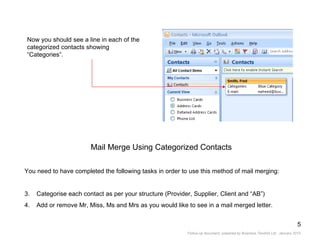
![Open Outlook Contacts and go to your regular view “Address Cards”. Click on View – Current View – Customize Current View. Or Click on the link on the left pain “Customize Current View” Next you will see this dialog box [Customize View: Address Cards] Select the button “Fields…” Showing Categories within the “Address Cards” View](https://image.slidesharecdn.com/trainingfollowupdocument-12639033275787-phpapp02/85/Training-Follow-Up-Document-3-320.jpg)
![Next you will see this dialog box: [Show Fields]. Ensure you highlight “Follow-Up Flag” within the second drop down list. Ensure the “Select available fields from:” shows “Frequently-used fields”. Select “Categories” within the available fields and then click the “Add” button. Now click OK on this dialog box and again on the next dialog box.](https://image.slidesharecdn.com/trainingfollowupdocument-12639033275787-phpapp02/85/Training-Follow-Up-Document-4-320.jpg)


![Microsoft Office Training Prepared By: Naheed Hanif, Business Tendrils Ltd Telephone: 020 865 2688 Email: [email_address] www.businesstendrils.com](https://image.slidesharecdn.com/trainingfollowupdocument-12639033275787-phpapp02/85/Training-Follow-Up-Document-14-320.jpg)

The document provides instructions on various Microsoft Outlook features for organizing contacts and email, including: 1) Customizing the Address Cards view to display contact categories. 2) Performing mail merges using categorized contacts, including inserting company names and different greetings. 3) Creating a filing structure in Outlook using personal folders and subfolders, and setting up rules to automatically file emails. 4) The limitations of rules based on email age and the need for add-ons to run rules between specific date ranges.


