Introdution:
 A joystick is a personal computer peripheral or general
control device consisting of a handheld stick that pivots
about one end and transmits its angle in two or three
dimensions to a computer. Most joysticks are two-
dimensional, having two axes of movement (similar to a
mouse), but three-dimensional joysticks do exist. A
joystick is generally configured so that moving the stick
left or right signals movement along the X axis, and
moving it forward (up) or back (down) signals movement
along the Y axis. In joysticks that are configured for
three-dimensional movement, twisting the stick left
(counter-clockwise) or right (clockwise) signals
movement along the Z axis. These three axis - X Y and Z -
are, in relation to an aircraft, roll, pitch, and
yaw.Joysticks are often used to control games, and
usually have one or more push-buttons whose state can
also be read by the computer. Most I/O interface cards
for PCs have a joystick (game control) port. Joysticks
were popular throughout the mid-1990s for playing the
Descent series and flight-simulators, although they have
declined with the rise of first-person shooters which
instead promote the mouse and keyboard. Modern
joysticks (as of 2003) mostly use a USB interface for
connection to the PC. The term joystick has become a
synonym for game controllers that can be connected to
the computer since the computer defines the input as a
"joystick input". Apart for controlling games, joysticks are
also used for controlling machines such as elevators,
cranes, trucks, powered wheelchairs and some zero
turning radius lawn mowers.
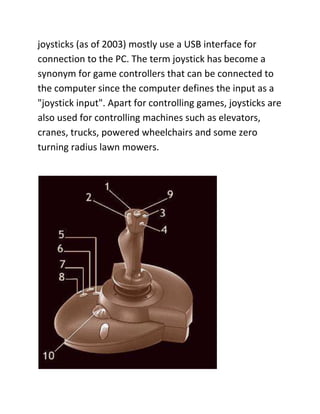
1. (Trigger) release brakes
2. Cycle views
3. Elevator trim down
4. Elevator trim up
5. Extend flaps
6. Retract flaps
7. Drop objects
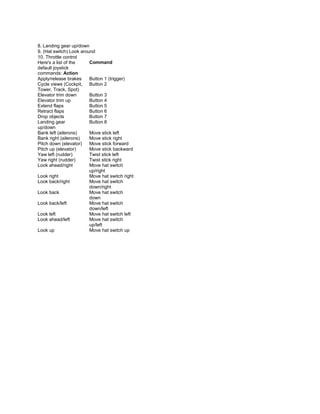
8. Landing gear up/down
9. (Hat switch) Look around
10. Throttle control
Here's a list of the     Command
default joystick
commands: Action
Apply/release brakes     Button 1 (trigger)
Cycle views (Cockpit, Button 2
Tower, Track, Spot)
Elevator trim down       Button 3
Elevator trim up         Button 4
Extend flaps             Button 5
Retract flaps            Button 6
Drop objects             Button 7
Landing gear             Button 8
up/down
Bank left (ailerons)     Move stick left
Bank right (ailerons)    Move stick right
Pitch down (elevator)    Move stick forward
Pitch up (elevator)      Move stick backward
Yaw left (rudder)        Twist stick left
Yaw right (rudder)       Twist stick right
Look ahead/right         Move hat switch
                         up/right
Look right               Move hat switch right
Look back/right          Move hat switch
                         down/right
Look back                Move hat switch
                         down
Look back/left           Move hat switch
                         down/left
Look left                Move hat switch left
Look ahead/left          Move hat switch
                         up/left
Look up                  Move hat switch up

Joystick

  • 1.
    Introdution: A joystickis a personal computer peripheral or general control device consisting of a handheld stick that pivots about one end and transmits its angle in two or three dimensions to a computer. Most joysticks are two- dimensional, having two axes of movement (similar to a mouse), but three-dimensional joysticks do exist. A joystick is generally configured so that moving the stick left or right signals movement along the X axis, and moving it forward (up) or back (down) signals movement along the Y axis. In joysticks that are configured for three-dimensional movement, twisting the stick left (counter-clockwise) or right (clockwise) signals movement along the Z axis. These three axis - X Y and Z - are, in relation to an aircraft, roll, pitch, and yaw.Joysticks are often used to control games, and usually have one or more push-buttons whose state can also be read by the computer. Most I/O interface cards for PCs have a joystick (game control) port. Joysticks were popular throughout the mid-1990s for playing the Descent series and flight-simulators, although they have declined with the rise of first-person shooters which instead promote the mouse and keyboard. Modern
  • 2.
    joysticks (as of2003) mostly use a USB interface for connection to the PC. The term joystick has become a synonym for game controllers that can be connected to the computer since the computer defines the input as a "joystick input". Apart for controlling games, joysticks are also used for controlling machines such as elevators, cranes, trucks, powered wheelchairs and some zero turning radius lawn mowers.
  • 3.
    1. (Trigger) releasebrakes 2. Cycle views 3. Elevator trim down 4. Elevator trim up 5. Extend flaps 6. Retract flaps 7. Drop objects
  • 4.
    8. Landing gearup/down 9. (Hat switch) Look around 10. Throttle control Here's a list of the Command default joystick commands: Action Apply/release brakes Button 1 (trigger) Cycle views (Cockpit, Button 2 Tower, Track, Spot) Elevator trim down Button 3 Elevator trim up Button 4 Extend flaps Button 5 Retract flaps Button 6 Drop objects Button 7 Landing gear Button 8 up/down Bank left (ailerons) Move stick left Bank right (ailerons) Move stick right Pitch down (elevator) Move stick forward Pitch up (elevator) Move stick backward Yaw left (rudder) Twist stick left Yaw right (rudder) Twist stick right Look ahead/right Move hat switch up/right Look right Move hat switch right Look back/right Move hat switch down/right Look back Move hat switch down Look back/left Move hat switch down/left Look left Move hat switch left Look ahead/left Move hat switch up/left Look up Move hat switch up