#6 Madrid — 25.11.2015
Program
• Slides
• Demo(s)
• Workshop
• Fun
Us
Nicolas Lesconnec
Developer & Maker Evangelist
Anthony Charbonnier
Startup Relations Manager
Jon Regueiro
Support Engineer
ABOUT SIGFOX
About SIGFOX
• SIGFOX has invented a radiocommunication
protocol
• SIGFOX is operating a global network
• SIGFOX does not sell hardware components
• SIGFOX does not build connected solutions
New possibilities
• Direct Internet connection.
• No battery drain. Years of autonomy.
• Detect. Send. Receive.
• No configuration
In a nutshell
• Power on
• Send a message
• It’s picked up by n of our base stations
• Instantly forwarded to your own server
• That’s it
Complexity
• AT$SF=0123456789
• No pairing or configuration of any kind
• HTTP request to your server
Proof
Why SIGFOX
• Hub-based technologies are not compatible with
independent devices
• Need for a protocol designed for the IoT, and
not one tweaked to address it.
Core concepts
• Energy efficiency
• Very Long Range
• Out of the box connectivity
• Outdoor + Indoor
• Two-way communication
• Low bandwidth, small messages
• Ultra Narrow Band
Energy efficiency
• Tx : ~25/30 mA for a few seconds
• 99.x% of the time, device is silent
• Idle consumption is key
• Idle : a few µA
Very Long Range
• Countryside : Tens of kms
• Cities : A few kms
• Direct line of sight : wow !
Out of the box
• Network is serving the devices, not the other
way round
• Device simply sends a frame, message is
detected by n base stations
• Message is validated / deduplicated by our
backend
Outdoor + indoor
• 868MHz has good propagation properties
• Radio waves are not magic
• Consider ~20dB of attenuation indoor, and
~30dB for light underground or tricky buildings
Two-way communication
• Send updates to your device(s)
• Default behaviour: wake up, send, back to sleep
• No passive Rx mode
• Device can receive a message upon request
• Every communication is instigated by the device
Low bandwidth
• 100 bits / s
• 12 bytes per message
12 bytes !?
• Yes. Seriously. 12 bytes.
• This is the available payload.
• You can put a lot of info in 96 bits
• 2^96 is a 30ish-digit number.
• 8 billions of billions of billions of possible values
Payload examples
• Full GPS Coordinates : 6 bytes
• Temperature : 2 bytes
• State reporting : 1 byte
• Hearbeat, update request : 0 byte
How frequently ?
• 140 times a day
140 times / day
• Not a technology limit
• Compliant with the European regulation: 1% duty
cycle
Money
• Most pricey subscription: €14/year
• A couple of devices, 140 messages/day
• The higher volume, the lower the price
• The lower number of messages, the lower the price
• Down to €1/year for large volumes & a couple of
messages/day
• Startup plan : €8/year, as if already 30k devices.
Security
Security
• Each device is identified by a unique ID on the
network
• Each message is signed
• Servers managed by ourselves, in 2 french
datacenters.
• Security is never finished, permanent effort.
Signature
• Each message is accompanied by an hashed
signature, made from :
• the device id
• the device PK (unknown to the user)
• the payload
• internal increment
Signature
• Replayed messages
• Altered messages
• Spoofed messages
Encryption
• By default, the payload is not encrypted
• Encryption cost a lot of energy
• No « one size fits all » solution.
• Up to you to use the encryption most suited to
your case
Radio properties
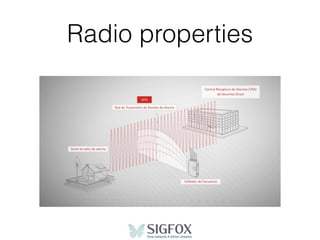
• Great resistance to interferors
• Very difficult to jam
• Interception is hard
• UNB
• Unpredictable frequency
Radio properties
Ultra Narrow Band
Ultra Narrow Band
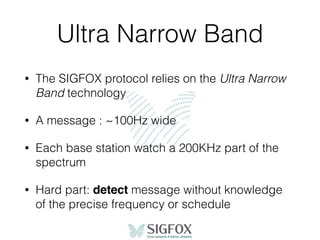
• The SIGFOX protocol relies on the Ultra Narrow
Band technology
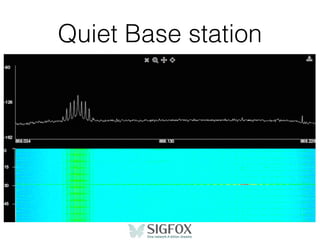
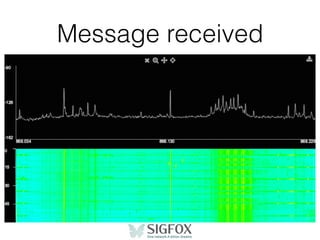
• A message : ~100Hz wide
• Each base station watch a 200KHz part of the
spectrum
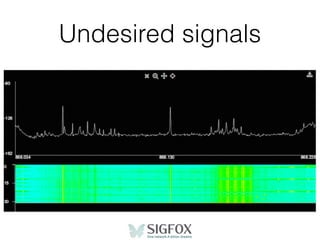
• Hard part: detect message without knowledge
of the precise frequency or schedule
Ultra Narrow Band
• Why Ultra Narrow Band ?
• Easy analogy : cars vs motorbikes
Quiet Base station
Undesired signals
Message received
Frequency used
• SIGFOX uses unlicensed sub-GHz bands :
• 868MHz in Europe
• 902MHz in the US
Unlicensed != unregulated
• SIGFOX complies with both ETSI (Europe) &
FCC (US) regulations
• ETSI : 1% duty cycle
• FCC : duration of emission
Coverage
Global network
• Roaming is included in the basic subscription
• Your device can switch from one country to
another without additional charges.
Current - Nationwide
• France
• Netherlands
• Spain
• UK
Current - cities
• Bogota
• Dublin
• Milan
• Munich
• Santiago
• San Francisco
• …
Rollout in progress
• Belgium
• Denmark
• Italy
• Luxembourg
• Portugal
• USA
USA
• Currently: San Francisco
• Early 2016 : 10 majors cities, including Atlanta,
Boston, Chicago, Dallas, Houston, Los Angeles
• And we’re just starting :)
Hello World
Hello World
• Send a dummy message
• Check it on the SIGFOX website
• Forward it through the callback mechanism
• Store message in a database
• Display list of recorded events
Use cases
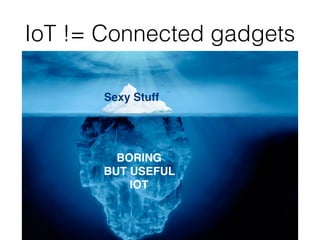
IoT != Connected gadgets
Sexy Stuff
BORING
BUT USEFUL
IOT
Good use cases
• Not that talkative devices : small messages
every now and then
• Independent devices
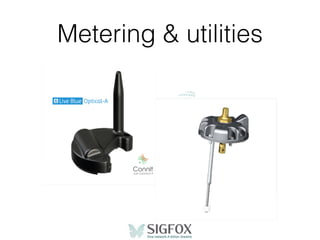
Metering & utilities
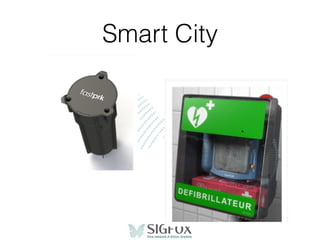
Smart City
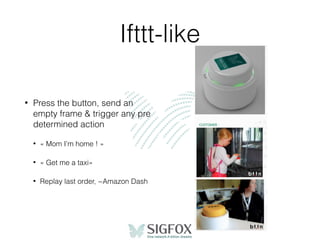
Ifttt-like
• Press the button, send an
empty frame & trigger any pre
determined action
• « Mom I’m home ! »
• « Get me a taxi»
• Replay last order, ~Amazon Dash
More
• Assisted .. and Predictive Maintenance
• Logistics : GPS Tracking
• Security
• Healthcare, stay-at-home people
DIY Projects
• Connected wine cellar. Because french.
• Connected cat food dispenser. Because cats.
• Kitchen garden: temperature, moisture, …
• GPS Tracking of anything
You ?
• You can build a PoC very quickly
• Lot of funny stuff to make
• And lot of $$$ to make too ;)
• KISS, dumb device means:
• Cheap
• Less prone to failure
Hardware
Hardware SIGFOX
• SIGFOX is not a hardware vendor
• Many established partners offer SIGFOX-ready
chips: Atmel, TI, Silicon Labs, Axsem, Atim, …
• Most Sub-GHz radio transceivers are
compatible, it’s just about a software upgrade.
Prototyping
• Arduino : Snootlab, SmartEverything
• Raspberry Pi : Yadom
• Can be bought one unit a time
• Get started within minutes
• Not for industrial use
Modules
• Easy to work with : AT commands
• Price range from ~10 to 20€
• Evaluation boards available from
manufacturers : Adeunis, Telecom Design,
Telit, ..
SoC, transceivers
• Texas Instruments, Atmel, SiLabs, Axsem, ..
• Cheap, a few $
• More complex to work with if not familiar
• Certification needed if you don’t stick to the
provided ref design.
Antenna
• Critical when doing radio
• 868MHz -> best case is 17cm (lambda/2)
• Helicoidal, patch, … antennas possible.
Cloud
Get your data
• Part of the standard service.
• 3 ways
• View - website
• Pull - HTTP API
• Push - HTTP Callback
Common use case :
push callbacks
• Get notified each time of your devices send a
message
• Can trigger whatever you want : alarm,
notification, data processing, …
• Example here: http://github.com/nicolsc/sigfox-
callback-demo
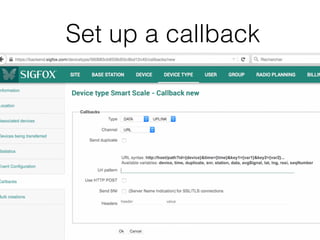
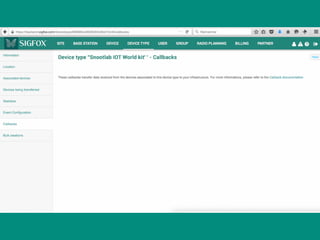
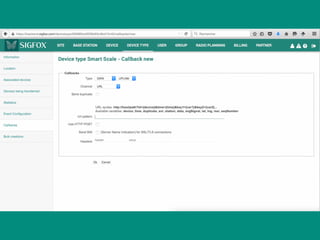
Set up a callback
Downlink
• Message sent to a device can be
• Automatic with a pre configuration
• Sent from your own server
Downlink auto
• Simply set what message you want to send back
• Hardcoded
• Time, Station ID, .. for sync purposes
Downlink callback
• Same mechanism than the uplink callback
• Set up an URL
• An when called, send your 8-byte frame within
the response body
Real demo
Connected RFID reader
• Standard 125KHz RFID reader & tags
• Once a tag is detected, send its ID through
SIGFOX
• Update a live dashboard
• Do something else :)
Resources
• https://github.com/ameltech/
• + Checkout github.com/nicolsc/sigfox-* for some
demos & sample codes
First steps with the
SmartEverything
Register
• http://backend.sigfox.com/activate
• Click SmartEverything
• Enter the device id of your board + the provided PAC
number
• Check http://10.0.0.118:1234/
• Operator : select SIGFOX_Spain
• Enter your personal info
Getting started
• Plug the SmartEverything board using a micro USB cable
• Plug the antenna ;)
• Check that it’s recognised by your computer
• $ ls /dev/tty.*
• Windows
• Launch Powershell
• > [System.IO.Ports.SerialPort]::getportnames()
Arduino setup
• Install the Arduino Zero core
• Tools > Boards > Board Manager
• Install the ASME core
• Tools > Boards > Manager (Again !), filter on type=Partner
• Choose the SmartEverything Board Type
• Tools > Boards
• Install the libs associated to each sensor (... and to the SIGFOX module)
• Sketch > Include Library > Manage Libraries ; Filter on
Type=Partner ; install each library
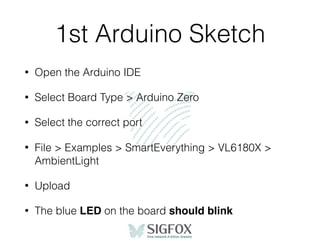
1st Arduino Sketch
• Open the Arduino IDE
• Select Board Type > Arduino Zero
• Select the correct port
• File > Examples > SmartEverything > VL6180X >
AmbientLight
• Upload
• The blue LED on the board should blink
Hello World
• File > Examples > SmartEverything > Sigfox >
DataModeEU
• Upload
Check message
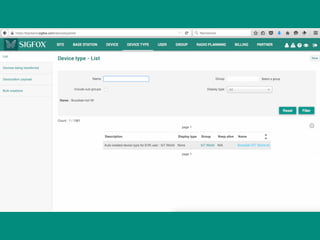
• http://backend.sigfox.com
• Navigate to the « device » menu
• Click on the device ID
• « Devices messages »
Set up a callback
Don’t have a server ?
• https://github.com/nicolsc/sigfox-callback-demo
• Git clone & push to your server
• Or simply click « Deploy to Heroku »
Downlink
How does it work ?
• The Module send the frame, then sleep for 20s
• Then it enters Rx mode
• Waits 20s for a response
• Quits Rx mode & goes to deep sleep
Request a downlink
• Use the AT$SF command, with an additional
parameters
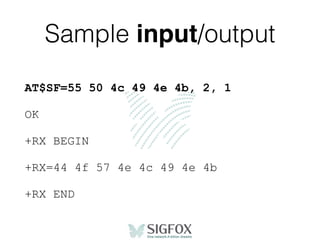
• AT$SF = [hex byte]*, 2, 1
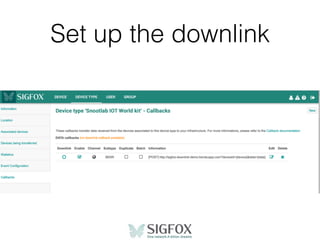
Set up the downlink
Handle the response
• When entering Rx mode, the module will display
• +RX BEGIN
• Received frame will be displayed as
• +RX=[hex byte] [hex byte]…
• When leaving Rx mode, it will display
• +RX END
Handle the response
• Detect an input line starting with +RX= & parse it
as a series of hex bytes
• If no downlink message has been sent, you’ll
have no +RX= line, just the BEGIN & END flags
Sample input/output
AT$SF=55 50 4c 49 4e 4b, 2, 1
OK
+RX BEGIN
+RX=44 4f 57 4e 4c 49 4e 4b
+RX END
Contribute
Share
• Please share what you’ll make with SIGFOX
• Hackster.io, instructables, github … your move.
• Q&A
• http://sigfox.cloud.answerhub.com/
• Keep in touch :
• nicolas.lesconnec@sigfox.com
• twitter: @nlesconnec

SIGFOX Makers Tour - Madrid

  • 1.
    #6 Madrid —25.11.2015
  • 2.
  • 3.
    Us Nicolas Lesconnec Developer &Maker Evangelist Anthony Charbonnier Startup Relations Manager Jon Regueiro Support Engineer
  • 4.
  • 5.
    About SIGFOX • SIGFOXhas invented a radiocommunication protocol • SIGFOX is operating a global network • SIGFOX does not sell hardware components • SIGFOX does not build connected solutions
  • 6.
    New possibilities • DirectInternet connection. • No battery drain. Years of autonomy. • Detect. Send. Receive. • No configuration
  • 7.
    In a nutshell •Power on • Send a message • It’s picked up by n of our base stations • Instantly forwarded to your own server • That’s it
  • 8.
    Complexity • AT$SF=0123456789 • Nopairing or configuration of any kind • HTTP request to your server
  • 9.
  • 10.
    Why SIGFOX • Hub-basedtechnologies are not compatible with independent devices • Need for a protocol designed for the IoT, and not one tweaked to address it.
  • 11.
    Core concepts • Energyefficiency • Very Long Range • Out of the box connectivity • Outdoor + Indoor • Two-way communication • Low bandwidth, small messages • Ultra Narrow Band
  • 12.
    Energy efficiency • Tx: ~25/30 mA for a few seconds • 99.x% of the time, device is silent • Idle consumption is key • Idle : a few µA
  • 13.
    Very Long Range •Countryside : Tens of kms • Cities : A few kms • Direct line of sight : wow !
  • 14.
    Out of thebox • Network is serving the devices, not the other way round • Device simply sends a frame, message is detected by n base stations • Message is validated / deduplicated by our backend
  • 15.
    Outdoor + indoor •868MHz has good propagation properties • Radio waves are not magic • Consider ~20dB of attenuation indoor, and ~30dB for light underground or tricky buildings
  • 16.
    Two-way communication • Sendupdates to your device(s) • Default behaviour: wake up, send, back to sleep • No passive Rx mode • Device can receive a message upon request • Every communication is instigated by the device
  • 17.
    Low bandwidth • 100bits / s • 12 bytes per message
  • 18.
    12 bytes !? •Yes. Seriously. 12 bytes. • This is the available payload. • You can put a lot of info in 96 bits • 2^96 is a 30ish-digit number. • 8 billions of billions of billions of possible values
  • 19.
    Payload examples • FullGPS Coordinates : 6 bytes • Temperature : 2 bytes • State reporting : 1 byte • Hearbeat, update request : 0 byte
  • 20.
    How frequently ? •140 times a day
  • 21.
    140 times /day • Not a technology limit • Compliant with the European regulation: 1% duty cycle
  • 22.
    Money • Most priceysubscription: €14/year • A couple of devices, 140 messages/day • The higher volume, the lower the price • The lower number of messages, the lower the price • Down to €1/year for large volumes & a couple of messages/day • Startup plan : €8/year, as if already 30k devices.
  • 23.
  • 24.
    Security • Each deviceis identified by a unique ID on the network • Each message is signed • Servers managed by ourselves, in 2 french datacenters. • Security is never finished, permanent effort.
  • 25.
    Signature • Each messageis accompanied by an hashed signature, made from : • the device id • the device PK (unknown to the user) • the payload • internal increment
  • 26.
    Signature • Replayed messages •Altered messages • Spoofed messages
  • 27.
    Encryption • By default,the payload is not encrypted • Encryption cost a lot of energy • No « one size fits all » solution. • Up to you to use the encryption most suited to your case
  • 28.
    Radio properties • Greatresistance to interferors • Very difficult to jam • Interception is hard • UNB • Unpredictable frequency
  • 29.
  • 30.
  • 31.
    Ultra Narrow Band •The SIGFOX protocol relies on the Ultra Narrow Band technology • A message : ~100Hz wide • Each base station watch a 200KHz part of the spectrum • Hard part: detect message without knowledge of the precise frequency or schedule
  • 32.
    Ultra Narrow Band •Why Ultra Narrow Band ? • Easy analogy : cars vs motorbikes
  • 33.
  • 34.
  • 35.
  • 36.
    Frequency used • SIGFOXuses unlicensed sub-GHz bands : • 868MHz in Europe • 902MHz in the US
  • 37.
    Unlicensed != unregulated •SIGFOX complies with both ETSI (Europe) & FCC (US) regulations • ETSI : 1% duty cycle • FCC : duration of emission
  • 38.
  • 39.
    Global network • Roamingis included in the basic subscription • Your device can switch from one country to another without additional charges.
  • 40.
    Current - Nationwide •France • Netherlands • Spain • UK
  • 41.
    Current - cities •Bogota • Dublin • Milan • Munich • Santiago • San Francisco • …
  • 42.
    Rollout in progress •Belgium • Denmark • Italy • Luxembourg • Portugal • USA
  • 43.
    USA • Currently: SanFrancisco • Early 2016 : 10 majors cities, including Atlanta, Boston, Chicago, Dallas, Houston, Los Angeles • And we’re just starting :)
  • 45.
  • 46.
    Hello World • Senda dummy message • Check it on the SIGFOX website • Forward it through the callback mechanism • Store message in a database • Display list of recorded events
  • 47.
  • 48.
    IoT != Connectedgadgets Sexy Stuff BORING BUT USEFUL IOT
  • 49.
    Good use cases •Not that talkative devices : small messages every now and then • Independent devices
  • 50.
  • 51.
  • 52.
    Ifttt-like • Press thebutton, send an empty frame & trigger any pre determined action • « Mom I’m home ! » • « Get me a taxi» • Replay last order, ~Amazon Dash
  • 53.
    More • Assisted ..and Predictive Maintenance • Logistics : GPS Tracking • Security • Healthcare, stay-at-home people
  • 54.
    DIY Projects • Connectedwine cellar. Because french. • Connected cat food dispenser. Because cats. • Kitchen garden: temperature, moisture, … • GPS Tracking of anything
  • 55.
    You ? • Youcan build a PoC very quickly • Lot of funny stuff to make • And lot of $$$ to make too ;) • KISS, dumb device means: • Cheap • Less prone to failure
  • 56.
  • 57.
    Hardware SIGFOX • SIGFOXis not a hardware vendor • Many established partners offer SIGFOX-ready chips: Atmel, TI, Silicon Labs, Axsem, Atim, … • Most Sub-GHz radio transceivers are compatible, it’s just about a software upgrade.
  • 58.
    Prototyping • Arduino :Snootlab, SmartEverything • Raspberry Pi : Yadom • Can be bought one unit a time • Get started within minutes • Not for industrial use
  • 59.
    Modules • Easy towork with : AT commands • Price range from ~10 to 20€ • Evaluation boards available from manufacturers : Adeunis, Telecom Design, Telit, ..
  • 60.
    SoC, transceivers • TexasInstruments, Atmel, SiLabs, Axsem, .. • Cheap, a few $ • More complex to work with if not familiar • Certification needed if you don’t stick to the provided ref design.
  • 61.
    Antenna • Critical whendoing radio • 868MHz -> best case is 17cm (lambda/2) • Helicoidal, patch, … antennas possible.
  • 62.
  • 63.
    Get your data •Part of the standard service. • 3 ways • View - website • Pull - HTTP API • Push - HTTP Callback
  • 64.
    Common use case: push callbacks • Get notified each time of your devices send a message • Can trigger whatever you want : alarm, notification, data processing, … • Example here: http://github.com/nicolsc/sigfox- callback-demo
  • 65.
    Set up acallback
  • 66.
    Downlink • Message sentto a device can be • Automatic with a pre configuration • Sent from your own server
  • 67.
    Downlink auto • Simplyset what message you want to send back • Hardcoded • Time, Station ID, .. for sync purposes
  • 68.
    Downlink callback • Samemechanism than the uplink callback • Set up an URL • An when called, send your 8-byte frame within the response body
  • 70.
  • 71.
    Connected RFID reader •Standard 125KHz RFID reader & tags • Once a tag is detected, send its ID through SIGFOX • Update a live dashboard • Do something else :)
  • 73.
    Resources • https://github.com/ameltech/ • +Checkout github.com/nicolsc/sigfox-* for some demos & sample codes
  • 74.
    First steps withthe SmartEverything
  • 75.
    Register • http://backend.sigfox.com/activate • ClickSmartEverything • Enter the device id of your board + the provided PAC number • Check http://10.0.0.118:1234/ • Operator : select SIGFOX_Spain • Enter your personal info
  • 76.
    Getting started • Plugthe SmartEverything board using a micro USB cable • Plug the antenna ;) • Check that it’s recognised by your computer • $ ls /dev/tty.* • Windows • Launch Powershell • > [System.IO.Ports.SerialPort]::getportnames()
  • 77.
    Arduino setup • Installthe Arduino Zero core • Tools > Boards > Board Manager • Install the ASME core • Tools > Boards > Manager (Again !), filter on type=Partner • Choose the SmartEverything Board Type • Tools > Boards • Install the libs associated to each sensor (... and to the SIGFOX module) • Sketch > Include Library > Manage Libraries ; Filter on Type=Partner ; install each library
  • 78.
    1st Arduino Sketch •Open the Arduino IDE • Select Board Type > Arduino Zero • Select the correct port • File > Examples > SmartEverything > VL6180X > AmbientLight • Upload • The blue LED on the board should blink
  • 79.
    Hello World • File> Examples > SmartEverything > Sigfox > DataModeEU • Upload
  • 80.
    Check message • http://backend.sigfox.com •Navigate to the « device » menu • Click on the device ID • « Devices messages »
  • 81.
    Set up acallback
  • 82.
    Don’t have aserver ? • https://github.com/nicolsc/sigfox-callback-demo • Git clone & push to your server • Or simply click « Deploy to Heroku »
  • 86.
  • 87.
    How does itwork ? • The Module send the frame, then sleep for 20s • Then it enters Rx mode • Waits 20s for a response • Quits Rx mode & goes to deep sleep
  • 88.
    Request a downlink •Use the AT$SF command, with an additional parameters • AT$SF = [hex byte]*, 2, 1
  • 89.
    Set up thedownlink
  • 90.
    Handle the response •When entering Rx mode, the module will display • +RX BEGIN • Received frame will be displayed as • +RX=[hex byte] [hex byte]… • When leaving Rx mode, it will display • +RX END
  • 91.
    Handle the response •Detect an input line starting with +RX= & parse it as a series of hex bytes • If no downlink message has been sent, you’ll have no +RX= line, just the BEGIN & END flags
  • 92.
    Sample input/output AT$SF=55 504c 49 4e 4b, 2, 1 OK +RX BEGIN +RX=44 4f 57 4e 4c 49 4e 4b +RX END
  • 93.
  • 94.
    Share • Please sharewhat you’ll make with SIGFOX • Hackster.io, instructables, github … your move. • Q&A • http://sigfox.cloud.answerhub.com/ • Keep in touch : • nicolas.lesconnec@sigfox.com • twitter: @nlesconnec