




HTML5/Mobile Web Development
Top Ten Tips and Tricks


                               1
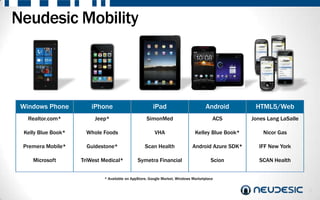
Neudesic Mobility


 Windows Phone         iPhone                         iPad                         Android        HTML5/Web
   Realtor.com*          Jeep*                    SimonMed                            ACS        Jones Lang LaSalle

 Kelly Blue Book*    Whole Foods                       VHA                   Kelley Blue Book*       Nicor Gas

 Premera Mobile*      Guidestone*                 Scan Health              Android Azure SDK*      IFF New York

    Microsoft       TriWest Medical*          Symetra Financial                      Scion         SCAN Health


                            * Available on AppStore, Google Market, Windows Marketplace

                                                                                                                      2
Top Ten Tips and Tricks


                          3
Mobile Web or Hybrid?
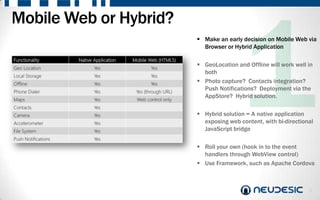
                         Make an early decision on Mobile Web via
                          Browser or Hybrid Application

                         GeoLocation and Offline will work well in
                          both
                         Photo capture? Contacts integration?
                          Push Notifications? Deployment via the
                          AppStore? Hybrid solution.

                         Hybrid solution = A native application
                          exposing web content, with bi-directional
                          JavaScript bridge

                         Roll your own (hook in to the event
                          handlers through WebView control)
                         Use Framework, such as Apache Cordova


                                                                 4
Mobile Web or Hybrid?
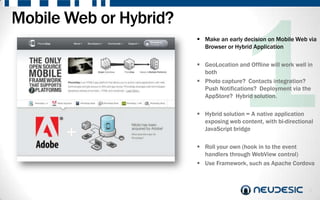
                         Make an early decision on Mobile Web via
                          Browser or Hybrid Application

                         GeoLocation and Offline will work well in
                          both
                         Photo capture? Contacts integration?
                          Push Notifications? Deployment via the
                          AppStore? Hybrid solution.

                         Hybrid solution = A native application
                          exposing web content, with bi-directional
                          JavaScript bridge

                         Roll your own (hook in to the event
                          handlers through WebView control)
                         Use Framework, such as Apache Cordova


                                                                 5
Development and Testing Environment
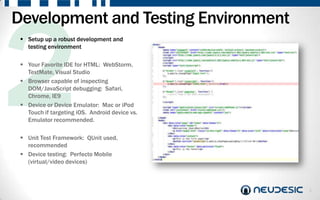
  Setup up a robust development and
   testing environment

  Your Favorite IDE for HTML: WebStorm,
   TextMate, Visual Studio
  Browser capable of inspecting
   DOM/JavaScript debugging: Safari,
   Chrome, IE9
  Device or Device Emulator: Mac or iPod
   Touch if targeting iOS. Android device vs.
   Emulator recommended.

  Unit Test Framework: QUnit used,
   recommended
  Device testing: Perfecto Mobile
   (virtual/video devices)


                                                6
Client Side and Navigation
                                                              Use Client Side JavaScript instead of
                                                               Server-Side Scripts

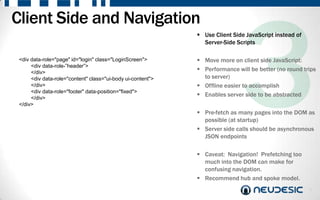
 <div data-role="page" id="login" class="LoginScreen">        Move more on client side JavaScript:
      <div data-role-”header”>
      </div>
                                                              Performance will be better (no round trips
      <div data-role="content" class="ui-body ui-content">     to server)
      </div>                                                  Offline easier to accomplish
      <div data-role="footer" data-position="fixed">
      </div>
                                                              Enables server side to be abstracted
 </div>
                                                              Pre-fetch as many pages into the DOM as
                                                               possible (at startup)
                                                              Server side calls should be asynchronous
                                                               JSON endpoints

                                                              Caveat: Navigation! Prefetching too
                                                               much into the DOM can make for
                                                               confusing navigation.
                                                              Recommend hub and spoke model.
                                                                                                       7
Offline Support
  Design for running offline

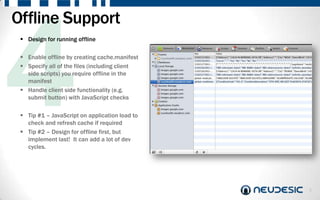
  Enable offline by creating cache.manifest
  Specify all of the files (including client
   side scripts) you require offline in the
   manifest
  Handle client side functionality (e.g.
   submit button) with JavaScript checks

  Tip #1 – JavaScript on application load to
   check and refresh cache if required
  Tip #2 – Design for offline first, but
   implement last! It can add a lot of dev
   cycles.


                                                8
UI Framework
                Carefully select the right UI Framework
                 for your needs

                jQuery Mobile (most popular open source)
                Sencha (most popular commercial)

                Index common controls that you believe
                 the application might use
                Build control matrix (see left)
                Use the demo sites/test pages to see how
                 the controls render on devices
                Realize that controls will be “85%” close
                 to native

                Also think about styling and themes (e.g.
                 swatches in jQuery Mobile)


                                                           9
Mapping
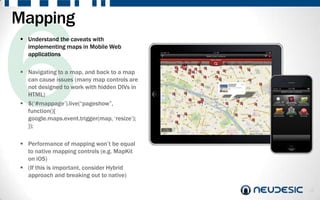
 Understand the caveats with
  implementing maps in Mobile Web
  applications

 Navigating to a map, and back to a map
  can cause issues (many map controls are
  not designed to work with hidden DIVs in
  HTML)
 $(„#mappage‟).live(“pageshow”,
  function(){
  google.maps.event.trigger(map, „resize‟);
  });

 Performance of mapping won‟t be equal
  to native mapping controls (e.g. MapKit
  on iOS)
 (If this is important, consider Hybrid
  approach and breaking out to native)

                                              10
Non Standard UI Elements
                        Think ahead on the non-standard UI
                         elements that you are likely to need

                        Watch out for controls that don‟t exist…
                        Tables and Grids are especially difficult to
                         find and implement in Mobile Web
                         applications
                        Before creating a custom control, can you
                         use a more native control instead?

                        Don‟t re-invent the wheel…
                        Many 3rd Party JavaScript controls work
                         well within Mobile Web framework
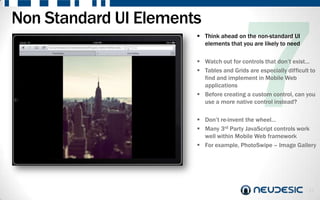
                        For example, PhotoSwipe – Image Gallery


                                                                  11
Packaging
  Make your mobile web app look and feel
   like it belongs with the other native
   applications. (Even if you don‟t go with
   the Hybrid approach)

  Don‟t show the address bar! Instead, use
   the <viewport …/> meta tag to force the
   application to run in full screen mode

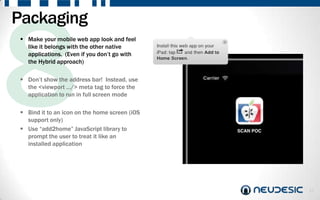
  Bind it to an icon on the home screen (iOS
   support only)
  Use “add2home” JavaScript library to
   prompt the user to treat it like an
   installed application


                                                12
Authentication    Don‟t go creating your own username and
                   password database!

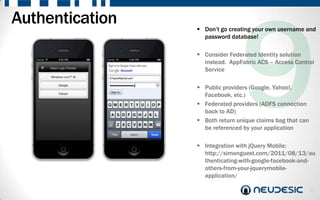
                  Consider Federated Identity solution
                   instead. AppFabric ACS – Access Control
                   Service

                  Public providers (Google, Yahoo!,
                   Facebook, etc.)
                  Federated providers (ADFS connection
                   back to AD)
                  Both return unique claims bag that can
                   be referenced by your application

                  Integration with jQuery Mobile:
                   http://simonguest.com/2011/08/13/au
                   thenticating-with-google-facebook-and-
                   others-from-your-jquerymobile-
                   application/

                                                            13
Performance
  Make your mobile web application
   perform well!

  Three main culprits for affecting
   performance on Mobile Web applications:

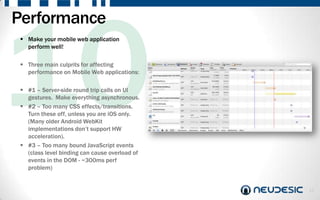
  #1 – Server-side round trip calls on UI
   gestures. Make everything asynchronous.
  #2 – Too many CSS effects/transitions.
   Turn these off, unless you are iOS only.
   (Many older Android WebKit
   implementations don‟t support HW
   acceleration).
  #3 – Too many bound JavaScript events
   (class level binding can cause overload of
   events in the DOM - ~300ms perf
   problem)


                                                14
Why Neudesic?


                15
Mobility Highlights
   Deep Experience of HTML5/Mobile Web Applications for Multiple Devices
   Microsoft Mobility Partner of the Year 2011
   Development Partner for the Windows Azure SDK for iOS/Android
   Development Partner for the Amazon AWS SDK for Windows Phone 7
   Culture of Attracting the Best Mobility Talent


                                                                            16
Neudesic Recognition


   National Systems Integrator


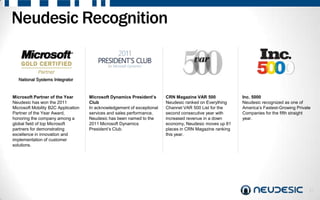
Microsoft Partner of the Year        Microsoft Dynamics President’s      CRN Magazine VAR 500             Inc. 5000
Neudesic has won the 2011            Club                                Neudesic ranked on Everything    Neudesic recognized as one of
Microsoft Mobility B2C Application   In acknowledgement of exceptional   Channel VAR 500 List for the     America’s Fastest-Growing Private
Partner of the Year Award,           services and sales performance,     second consecutive year with     Companies for the fifth straight
honoring the company among a         Neudesic has been named to the      increased revenue in a down      year.
global field of top Microsoft        2011 Microsoft Dynamics             economy, Neudesic moves up 81
partners for demonstrating           President’s Club.                   places in CRN Magazine ranking
excellence in innovation and                                             this year.
implementation of customer
solutions.


                                                                                                                                          17
Thank You
       Simon Guest
Director, Mobility Solutions
      Neudesic, LLC

simon.guest@neudesic.com
      @simonguest
                               18

Top Ten Tips for HTML5/Mobile Web Development

  • 1.
    HTML5/Mobile Web Development TopTen Tips and Tricks 1
  • 2.
    Neudesic Mobility WindowsPhone iPhone iPad Android HTML5/Web Realtor.com* Jeep* SimonMed ACS Jones Lang LaSalle Kelly Blue Book* Whole Foods VHA Kelley Blue Book* Nicor Gas Premera Mobile* Guidestone* Scan Health Android Azure SDK* IFF New York Microsoft TriWest Medical* Symetra Financial Scion SCAN Health * Available on AppStore, Google Market, Windows Marketplace 2
  • 3.
    Top Ten Tipsand Tricks 3
  • 4.
    Mobile Web orHybrid?  Make an early decision on Mobile Web via Browser or Hybrid Application  GeoLocation and Offline will work well in both  Photo capture? Contacts integration? Push Notifications? Deployment via the AppStore? Hybrid solution.  Hybrid solution = A native application exposing web content, with bi-directional JavaScript bridge  Roll your own (hook in to the event handlers through WebView control)  Use Framework, such as Apache Cordova 4
  • 5.
    Mobile Web orHybrid?  Make an early decision on Mobile Web via Browser or Hybrid Application  GeoLocation and Offline will work well in both  Photo capture? Contacts integration? Push Notifications? Deployment via the AppStore? Hybrid solution.  Hybrid solution = A native application exposing web content, with bi-directional JavaScript bridge  Roll your own (hook in to the event handlers through WebView control)  Use Framework, such as Apache Cordova 5
  • 6.
    Development and TestingEnvironment  Setup up a robust development and testing environment  Your Favorite IDE for HTML: WebStorm, TextMate, Visual Studio  Browser capable of inspecting DOM/JavaScript debugging: Safari, Chrome, IE9  Device or Device Emulator: Mac or iPod Touch if targeting iOS. Android device vs. Emulator recommended.  Unit Test Framework: QUnit used, recommended  Device testing: Perfecto Mobile (virtual/video devices) 6
  • 7.
    Client Side andNavigation  Use Client Side JavaScript instead of Server-Side Scripts <div data-role="page" id="login" class="LoginScreen">  Move more on client side JavaScript: <div data-role-”header”> </div>  Performance will be better (no round trips <div data-role="content" class="ui-body ui-content"> to server) </div>  Offline easier to accomplish <div data-role="footer" data-position="fixed"> </div>  Enables server side to be abstracted </div>  Pre-fetch as many pages into the DOM as possible (at startup)  Server side calls should be asynchronous JSON endpoints  Caveat: Navigation! Prefetching too much into the DOM can make for confusing navigation.  Recommend hub and spoke model. 7
  • 8.
    Offline Support Design for running offline  Enable offline by creating cache.manifest  Specify all of the files (including client side scripts) you require offline in the manifest  Handle client side functionality (e.g. submit button) with JavaScript checks  Tip #1 – JavaScript on application load to check and refresh cache if required  Tip #2 – Design for offline first, but implement last! It can add a lot of dev cycles. 8
  • 9.
    UI Framework  Carefully select the right UI Framework for your needs  jQuery Mobile (most popular open source)  Sencha (most popular commercial)  Index common controls that you believe the application might use  Build control matrix (see left)  Use the demo sites/test pages to see how the controls render on devices  Realize that controls will be “85%” close to native  Also think about styling and themes (e.g. swatches in jQuery Mobile) 9
  • 10.
    Mapping  Understand thecaveats with implementing maps in Mobile Web applications  Navigating to a map, and back to a map can cause issues (many map controls are not designed to work with hidden DIVs in HTML)  $(„#mappage‟).live(“pageshow”, function(){ google.maps.event.trigger(map, „resize‟); });  Performance of mapping won‟t be equal to native mapping controls (e.g. MapKit on iOS)  (If this is important, consider Hybrid approach and breaking out to native) 10
  • 11.
    Non Standard UIElements  Think ahead on the non-standard UI elements that you are likely to need  Watch out for controls that don‟t exist…  Tables and Grids are especially difficult to find and implement in Mobile Web applications  Before creating a custom control, can you use a more native control instead?  Don‟t re-invent the wheel…  Many 3rd Party JavaScript controls work well within Mobile Web framework  For example, PhotoSwipe – Image Gallery 11
  • 12.
    Packaging  Makeyour mobile web app look and feel like it belongs with the other native applications. (Even if you don‟t go with the Hybrid approach)  Don‟t show the address bar! Instead, use the <viewport …/> meta tag to force the application to run in full screen mode  Bind it to an icon on the home screen (iOS support only)  Use “add2home” JavaScript library to prompt the user to treat it like an installed application 12
  • 13.
    Authentication  Don‟t go creating your own username and password database!  Consider Federated Identity solution instead. AppFabric ACS – Access Control Service  Public providers (Google, Yahoo!, Facebook, etc.)  Federated providers (ADFS connection back to AD)  Both return unique claims bag that can be referenced by your application  Integration with jQuery Mobile: http://simonguest.com/2011/08/13/au thenticating-with-google-facebook-and- others-from-your-jquerymobile- application/ 13
  • 14.
    Performance  Makeyour mobile web application perform well!  Three main culprits for affecting performance on Mobile Web applications:  #1 – Server-side round trip calls on UI gestures. Make everything asynchronous.  #2 – Too many CSS effects/transitions. Turn these off, unless you are iOS only. (Many older Android WebKit implementations don‟t support HW acceleration).  #3 – Too many bound JavaScript events (class level binding can cause overload of events in the DOM - ~300ms perf problem) 14
  • 15.
  • 16.
    Mobility Highlights  Deep Experience of HTML5/Mobile Web Applications for Multiple Devices  Microsoft Mobility Partner of the Year 2011  Development Partner for the Windows Azure SDK for iOS/Android  Development Partner for the Amazon AWS SDK for Windows Phone 7  Culture of Attracting the Best Mobility Talent 16
  • 17.
    Neudesic Recognition National Systems Integrator Microsoft Partner of the Year Microsoft Dynamics President’s CRN Magazine VAR 500 Inc. 5000 Neudesic has won the 2011 Club Neudesic ranked on Everything Neudesic recognized as one of Microsoft Mobility B2C Application In acknowledgement of exceptional Channel VAR 500 List for the America’s Fastest-Growing Private Partner of the Year Award, services and sales performance, second consecutive year with Companies for the fifth straight honoring the company among a Neudesic has been named to the increased revenue in a down year. global field of top Microsoft 2011 Microsoft Dynamics economy, Neudesic moves up 81 partners for demonstrating President’s Club. places in CRN Magazine ranking excellence in innovation and this year. implementation of customer solutions. 17
  • 18.
    Thank You Simon Guest Director, Mobility Solutions Neudesic, LLC simon.guest@neudesic.com @simonguest 18

Editor's Notes

  • #18 *Microsoft Partner of the Year (2011)Neudesic has won the 2011 Microsoft Mobility B2C Application Partner of the Year Award, honoring the company among a global field of top Microsoft partners for demonstrating excellence in innovation and implementation of customer solutions. Partner of the Year Finalist (2010)Neudesic has been nominated as a Microsoft Partner of the Year Finalist in two categories, being named as one of the top three solution providers in two areas of the Microsoft technology platform.  Microsoft Convergence Customer Excellence Award (2010) Neudesic was recognized by Microsoft at their annual Microsoft Dynamics Convergence conference for achieving Excellence in Innovation in Microsoft Dynamics CRM. *Microsoft Dynamics President’s Club (2011)In acknowledgement of exceptional services and sales performance, Neudesic has been named to the 2011 Microsoft Dynamics President’s Club. *CRN Magazine VAR 500 (2011) Neudesic ranked on Everything Channel VAR 500 List for the second consecutive year with increased revenue in a down economy, Neudesic moves up 81 places in CRN Magazine ranking this year. *Inc. 5000 (2007, 2008, 2009, 2010, 2011 ) Neudesic recognized as one of America’s Fastest-Growing Private Companies for the fifth straight year.