HTML5
iPhone App
    - HTML5
    - JavaScript
    - Web App
    - jQTouch
    - PhoneGap

                   http://xguru.net
•
•   - http://xguru.net

•   - @xguru
• Web Applications ?

• HTML5

• iPhone Web Application

• PhoneGap                 Native
Web Apps
Web Applications
Web Applications

•     iPhone   App Store
Web Applications

•     iPhone   App Store

•                 Web
Web Applications

•              iPhone            App Store

•                                     Web

•              Web App > Native

    ★ PhoneGap , Titanium Mobile , QuickConnect , NimbleKit
Web Applications

•              iPhone            App Store

•                                     Web

•              Web App > Native

    ★ PhoneGap , Titanium Mobile , QuickConnect , NimbleKit

• iAd         HTML5
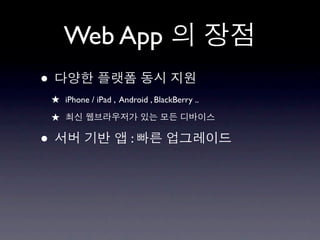
Web App
Web App
•
    ★ iPhone / iPad , Android , BlackBerry ..
    ★
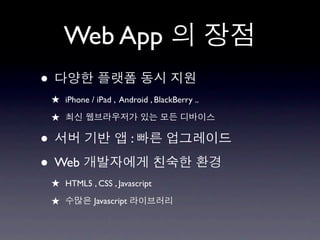
Web App
•
    ★ iPhone / iPad , Android , BlackBerry ..
    ★

•                         :
Web App
•
    ★ iPhone / iPad , Android , BlackBerry ..
    ★

•                           :

• Web
    ★ HTML5 , CSS , Javascript
    ★          Javascript
HTML5
HTML5   ?
HTML5       ?


        .
HTML5                                                 ?


                                            .

Even Google was not rich enough to support all of
the different mobile platforms from Apple’s AppStore
to those of the BlackBerry, Windows Mobile, Android
and the many variations of the Nokia platform

- Vic Gundotra, Google Engineering VP
What is HTML5 ?


•   http://dev.xguru.net/html5
       HTML5
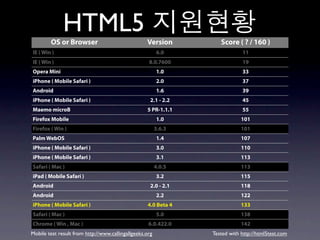
HTML5
        OS or Browser                              Version          Score ( ? / 160 )
IE ( Win )                                               6.0                 11
IE ( Win )                                          8.0.7600                 19
Opera Mini                                               1.0                 33
iPhone ( Mobile Safari )                                 2.0                 37
Android                                                  1.6                 39
iPhone ( Mobile Safari )                             2.1 - 2.2               45
Maemo microB                                       5 PR-1.1.1                55
Firefox Mobile                                           1.0                 101
Firefox ( Win )                                          3.6.3               101
Palm WebOS                                               1.4                 107
iPhone ( Mobile Safari )                                 3.0                 110
iPhone ( Mobile Safari )                                 3.1                 113
Safari ( Mac )                                           4.0.5               113
iPad ( Mobile Safari )                                   3.2                 115
Android                                              2.0 - 2.1               118
Android                                                  2.2                 122
iPhone ( Mobile Safari )                            4.0 Beta 4               133
Safari ( Mac )                                           5.0                 138
Chrome ( Win , Mac )                                6.0.422.0                142
Mobile test result from http://www.callingallgeeks.org           Tested with http://html5test.com
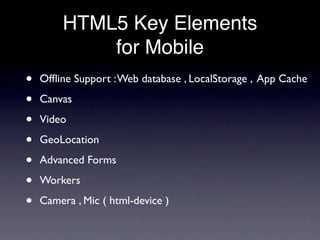
HTML5 Key Elements
            for Mobile
•   Offline Support : Web database , LocalStorage , App Cache

•   Canvas

•   Video

•   GeoLocation

•   Advanced Forms

•   Workers

•   Camera , Mic ( html-device )
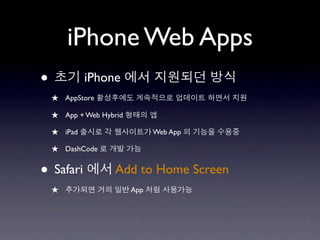
iPhone Web Apps
iPhone Web Apps
•            iPhone
    ★ AppStore
    ★ App + Web Hybrid
    ★ iPad                     Web App

    ★ DashCode

• Safari            Add to Home Screen
    ★                    App
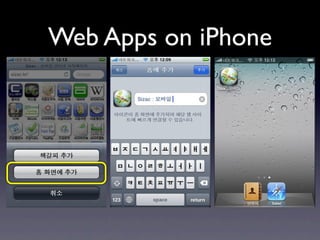
Web Apps on iPhone
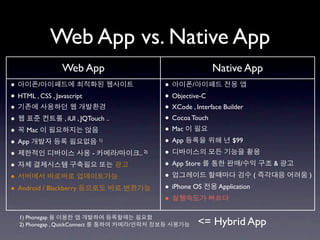
Web App vs. Native App
                   Web App                                            Native App
•       /                                              •        /
• HTML , CSS , Javascript                              • Objective-C
•                                                      • XCode , Interface Builder
•                 , iUI , JQTouch ..                   • Cocoa Touch
• Mac                                                  • Mac
• App                           1)
                                                       • App                  $99

•                            -         /       .. 2)   •
•                                                      • App Store               /     &

•                                                      •                           (       )

• Android / Blackberry                                 • iPhone OS Application
                                                       •
   1) Phonegap
   2) Phonegap , QuickConnect              /                     <= Hybrid App
iPhone Web App                                                   #0
•            CSS

    <link media="only screen and (max-device-width: 480px)" href="mobile.css" type=
    "text/css" rel="stylesheet">

    <link media="screen and (min-device-width: 481px)" href="standard.css" type="text/
    css" rel="stylesheet">


•     User Agent
Mozilla/5.0 (iPod; U; CPU like Mac OS X; en) AppleWebKit/420.1 (KHTML, like Gecko)
Version/3.0 Mobile/4A93 Safari/419.3

Mozilla/5.0 (iPhone; U; CPU like Mac OS X; en) AppleWebKit/420+ (KHTML, like Gecko)
Version/3.0 Mobile/1A543 Safari/419.3

Mozilla/5.0 (iPad; U; CPU OS 3_2 like Mac OS X; en-us) AppleWebKit/531.21.10 (KHTML,
like Gecko) Version/4.0.4 Mobile/7B334b Safari/531.21.10

     javascript : if((navigator.userAgent.match(/iPhone/i)) { }

     PHP : if (strpos($_SERVER['HTTP_USER_AGENT'],'iPad') !== false) { }
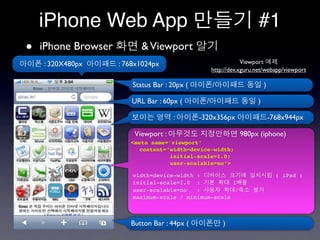
iPhone Web App                                                     #1
•   iPhone Browser          & Viewport
    : 320X480px      : 768x1024px                                Viewport
                                                     http://dev.xguru.net/webapp/viewport

                         Status Bar : 20px (         /                    )

                        URL Bar : 60px (         /                    )

                                       :       -320x356px                     -768x944px

                         Viewport :                            980px (iphone)
                        <meta name=‘viewport’
                           content=‘width=device-width;
                                    initial-scale=1.0;
                                    user-scalable=no’>

                         width=device-width :                                   ( iPad )
                         initial-scale=1.0 :           1
                         user-scalable=no   :           /
                         maximum-scale / minimum-scale


                        Button Bar : 44px (              )
iPhone Web App                                                              #2
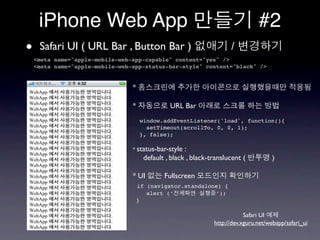
•    Safari UI ( URL Bar , Button Bar )
    <meta name="apple-mobile-web-app-capable" content="yes" />
                                                                      /
    <meta name="apple-mobile-web-app-status-bar-style" content="black" />


                                 *

                                 *              URL Bar
                                     window.addEventListener('load', function(){
                                       setTimeout(scrollTo, 0, 0, 1);
                                     }, false);

                                 * status-bar-style   :
                                       default , black , black-translucent (          )

                                 * UI         Fullscreen
                                     if (navigator.standalone) {
                                        alert (‘            ’);
                                     }

                                                                            Safari UI
                                                                http://dev.xguru.net/webapp/safari_ui
iPhone Web App                                                    #3
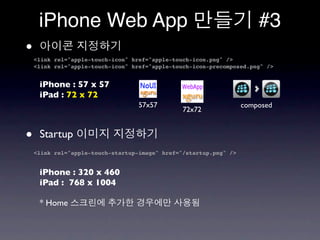
•   <link rel="apple-touch-icon" href="apple-touch-icon.png" />
    <link rel="apple-touch-icon" href="apple-touch-icon-precomposed.png" />


     iPhone : 57 x 57
     iPad : 72 x 72
                                   57x57                           composed
                                                72x72


•    Startup
    <link rel="apple-touch-startup-image" href="/startup.png" />


     iPhone : 320 x 460
     iPad : 768 x 1004

     * Home
iPhone Web App                                           #4
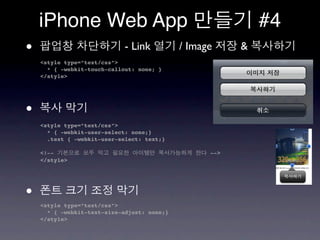
•                            - Link          / Image     &
    <style type=”text/css”>
      * { -webkit-touch-callout: none; }
    </style>


•
    <style type=”text/css”>
      * { -webkit-user-select: none;}
      .text { -webkit-user-select: text;}

    <!--                                           -->
    </style>


•
    <style type=”text/css”>
      * { -webkit-text-size-adjust: none;}
    </style>
iPhone Web App                                             #5
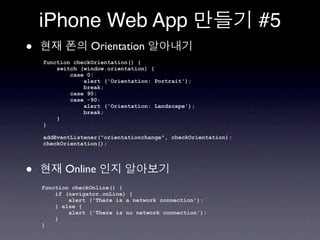
•                 Orientation
    function checkOrientation() {
        switch (window.orientation) {
            case 0:
                alert ('Orientation: Portrait');
                break;
            case 90:
            case -90:
                alert ('Orientation: Landscape');
                break;
        }
    }

    addEventListener("orientationchange", checkOrientation);
    checkOrientation();


•          Online
    function checkOnline() {
        if (navigator.onLine) {
            alert ('There is a network connection');
        } else {
            alert ('There is no network connection');
        }
    }
iPhone Web App                          #6
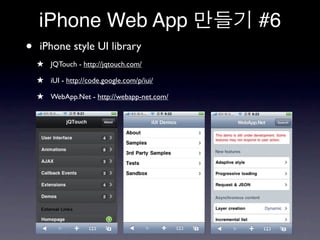
•   iPhone style UI library
    ★ JQTouch - http://jqtouch.com/
    ★ iUI - http://code.google.com/p/iui/
    ★ WebApp.Net - http://webapp-net.com/
iUI #1
•                                       ( UITableView )

•   UI

•   iPod Touch / 3G

•                                  ( de facto standard )

•   http://code.google.com/p/iui
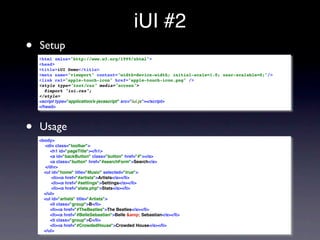
iUI #2
•   Setup
    <html xmlns="http://www.w3.org/1999/xhtml">
    <head>
    <title>iUI Demo</title>
    <meta name="viewport" content="width=device-width; initial-scale=1.0; user-scalable=0;"/>
    <link rel="apple-touch-icon" href="apple-touch-icon.png" />
    <style type="text/css" media="screen">
       @import "iui.css";
    </style>
    <script type="application/x-javascript" src="iui.js"></script>
    </head>


•   Usage
    <body>
      <div class="toolbar">
         <h1 id="pageTitle"></h1>
         <a id="backButton" class="button" href="#"></a>
         <a class="button" href="#searchForm">Search</a>
      </div>
      <ul id="home" title="Music" selected="true">
          <li><a href="#artists">Artists</a></li>
          <li><a href="#settings">Settings</a></li>
          <li><a href="stats.php">Stats</a></li>
      </ul>
      <ul id="artists" title="Artists">
         <li class="group">B</li>
         <li><a href="#TheBeatles">The Beatles</a></li>
         <li><a href="#BelleSebastian">Belle &amp; Sebastian</a></li>
         <li class="group">C</li>
         <li><a href="#CrowdedHouse">Crowded House</a></li>
      </ul>
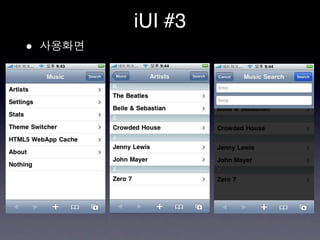
iUI #3
•
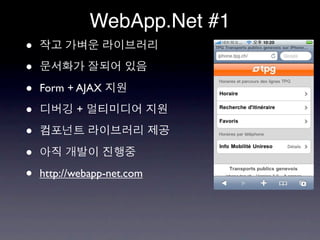
WebApp.Net #1
•
•
•   Form + AJAX

•          +

•
•
•   http://webapp-net.com
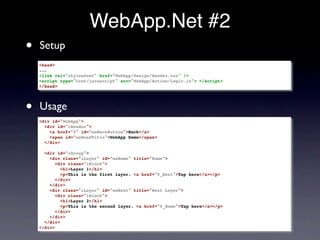
WebApp.Net #2
•   Setup
    <head>
    ...
    <link rel="stylesheet" href="WebApp/Design/Render.css" />
    <script type="text/javascript" scr="WebApp/Action/Logic.js"> </script>
    </head>


•   Usage
    <div id="WebApp">
      <div id="iHeader">
        <a href="#" id="waBackButton">Back</a>
        <span id="waHeadTitle">WebApp Demo</span>
      </div>

      <div id="iGroup">
        <div class="iLayer" id="waHome" title="Home">
           <div class="iBlock">
             <h1>Layer 1</h1>
             <p>This is the first layer. <a href="#_Next">Tap here</a></p>
           </div>
        </div>
        <div class="iLayer" id="waNext" title="Next Layer">
           <div class="iBlock">
             <h1>Layer 2</h1>
             <p>This is the second layer. <a href="#_Home">Tap here</a></p>
           </div>
        </div>
      </div>
    </div>
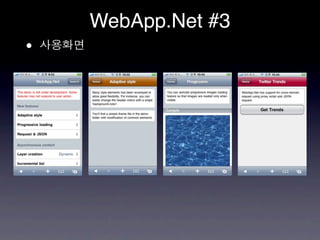
WebApp.Net #3
•
JQTouch #1
•   jQuery                    ,

•   Native

•   CallBack Events , Theme   , Swipe Detection

•            Extension

•   http://jqtouch.com
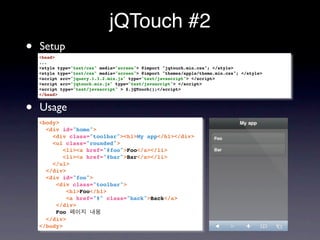
jQTouch #2
•   Setup
    <head>
    ...
    <style type="text/css" media="screen"> @import "jqtouch.min.css"; </style>
    <style type="text/css" media="screen"> @import "themes/apple/theme.min.css"; </style>
    <script src="jquery.1.3.2.min.js" type="text/javascript"> </script>
    <script src="jqtouch.min.js" type="text/javascript"> </script>
    <script type="text/javascript" > $.jQTouch();</script>
    </head>


•   Usage
    <body>
      <div id="home">
        <div class="toolbar"><h1>My app</h1></div>
        <ul class="rounded">
           <li><a href="#foo">Foo</a></li>
           <li><a href="#bar">Bar</a></li>
        </ul>
      </div>
      <div id="foo">
         <div class="toolbar">
            <h1>Foo</h1>
            <a href="#" class="back">Back</a>
         </div>
         Foo
      </div>
    </body>
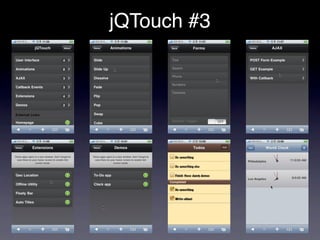
jQTouch #3
jQTouch #4
•
    <head>
    ...
    <script type="text/javascript" > $.jQTouch();</script>
    </head>


    $.jqTouch({
       icon: "path/to/apple-touch-icon.png",
       startupScreen: "path/to/startup-image.png",
       statusBar: "default|black|black-translucent",
       addGlossToIcon: true|false,
       fullScreen: true|false,
       fixedViewport: true|false,
       preloadImages: ["img1.png","img2.png", ...],
       ...
    });
jQTouch #5
•   8
    ★ slide, slideup, dissolve, fade, flip, pop, swap, cube

•                                        class
    ★ <a href=”#foo” class=”dissolve”>Foo</a>

•                  slide

•   Back

        <div id="home">
          <div class="toolbar"><h1>My app</h1></div>
          <ul class="rounded">
             <li><a href="#foo" class="dissolve">Foo</a></li>
             <li><a href="#bar">Bar</a></li>
          </ul>
        </div>
jQTouch #6
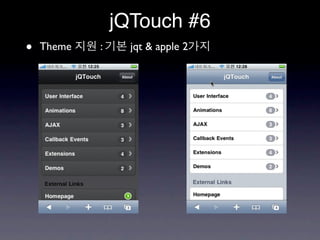
•   Theme   :     jqt & apple 2
PhoneGap
PhoneGap #1
•   Cross Platform Mobile Application Framework

•   HTML+Javascript       Web App            Container

•   Web App           Native App

•         Web App                   Device
    Javascript
PhoneGap #2
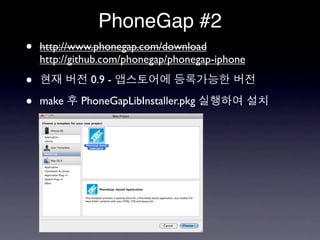
•   http://www.phonegap.com/download
    http://github.com/phonegap/phonegap-iphone

•             0.9 -

•   make    PhoneGapLibInstaller.pkg
PhoneGap #3
PhoneGap #4
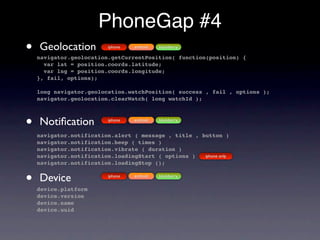
•   Geolocation           iphone   android   blackberry

    navigator.geolocation.getCurrentPosition( function(position) {
      var lat = position.coords.latitude;
      var lng = position.coords.longitude;
    }, fail, options);

    long navigator.geolocation.watchPosition( success , fail , options );
    navigator.geolocation.clearWatch( long watchId );


•   Notification           iphone   android   blackberry


    navigator.notification.alert ( message , title , button )
    navigator.notification.beep ( times )
    navigator.notification.vibrate ( duration )
    navigator.notification.loadingStart ( options )   iphone only
    navigator.notification.loadingStop ();


•   Device
    device.platform
                          iphone   android   blackberry


    device.version
    device.name
    device.uuid
PhoneGap #5
•   Accelerometer               iphone      android   blackberry ( OS 4.7   )

    long navigator.accelerometer.watchAcceleration( success , fail , options );
    navigator.accelerometer.clearWatch( long watchId );

    successFunction(a) { var x = a.x ; var y = a.y ; var z = a.z }

•   Camera           iphone   android    blackberry


    navigator.camera.getPicture( success , fail , options );


    <img style="width:60px;height:60px" id="test_img" src="" /> 
    <button onclick="getPicture()">From Camera</button>
    <button onclick="getPicture(PictureSourceType.PHOTO_LIBRARY)">From Photo Library</button>

    function PictureSourceType() {};
    PictureSourceType.PHOTO_LIBRARY = 0; PictureSourceType.CAMERA = 1;
    function getPicture(sourceType) {
         var options = { quality: 10 };
         if (sourceType != undefined) { options["sourceType"] = sourceType; }
         navigator.camera.getPicture(getPicture_Success, null, options);
    };
     
    function getPicture_Success(img) {
         alert("getpic success");
         document.getElementById("test_img").src = "data:image/jpeg;base64," + img;
    }
PhoneGap #6
•   Contacts              iphone    android    blackberry

navigator.contact.contactsCount ( function(num) { alert(num); } , fail );
navigator.contact.getAllContacts( function(contactsArray) {} , fail , options );
navigator.contact.chooseContact ( function(contact) {} , options );
navigator.contact.displayContact(contactsArray[x].recordID , fail, options );
navigator.contact.removeContact(contactsArray[x].recordID , succ , fail );
var nc = { 'firstName':'   ', 'lastName' : ' ', 'phoneNumber': '555-5555' };
navigator.contact.newContact(nc , succ );

•   Magnetometer          iphone

navigator.compass.watchHeading ( function(a) {
 var compass_magnetic = a.magneticHeading;
 var compass_true = a.trueHeading;
 var compass_accuracy = a.headingAccuracy; } , fail , options );

•   Network Availability           iphone     blackberry

navigator.network.isReachable(“www.google.com”, reachable_callback);

function reachable_callback(rc) {
  var internetConnection = rc.internetConnectionStatus;
  var localWiFiConnection= rc.localWifiConnectionStatus;
// NetworkStatus.NOT_REACHABLE = 0;
// NetworkStatus.REACHABLE_VIA_CARRIER_DATA_NETWORK = 1;
// NetworkStatus.REACHABLE_VIA_WIFI_NETWORK = 2;
}
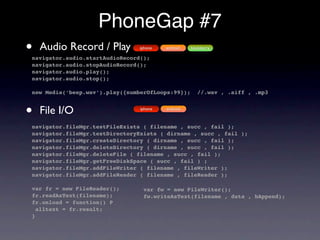
PhoneGap #7
•   Audio Record / Play         iphone

navigator.audio.startAudioRecord();
                                         android   blackberry


navigator.audio.stopAudioRecord();
navigator.audio.play();
navigator.audio.stop();

new Media(‘beep.wav’).play({numberOfLoops:99});       //.wav , .aiff , .mp3


•   File I/O                    iphone   android


navigator.fileMgr.testFileExists ( filename , succ , fail );
navigator.fileMgr.testDirectoryExists ( dirname , succ , fail );
navigator.fileMgr.createDirectory ( dirname , succ , fail );
navigator.fileMgr.deleteDirectory ( dirname , succ , fail );
navigator.fileMgr.deleteFile ( filename , succ , fail );
navigator.fileMgr.getFreeDiskSpace ( succ , fail ) ;
navigator.fileMgr.addFileWriter ( filename , fileWriter );
navigator.fileMgr.addFileReader ( filename , fileReader );

var fr = new FileReader();       var fw = new FileWriter();
fr.readAsText(filename);         fw.writeAsText(filename , data , bAppend);
fr.onload = function() P
  alltext = fr.result;
}
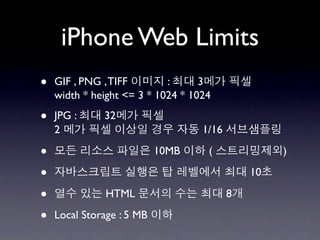
iPhone Web Limits
•   GIF , PNG , TIFF        :      3
    width * height <= 3 * 1024 * 1024

•   JPG :     32
    2                              1/16

•                          10MB     (              )

•                                             10

•              HTML                       8

•   Local Storage : 5 MB
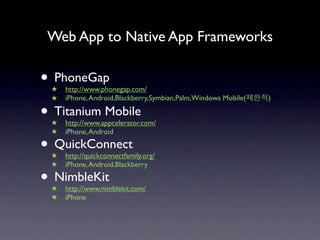
Web App to Native App Frameworks

• PhoneGap
 ★   http://www.phonegap.com/
 ★   iPhone, Android,Blackberry,Symbian,Palm,Windows Mobile(   )

• Titanium Mobile
 ★   http://www.appcelerator.com/
 ★   iPhone, Android

• QuickConnect
 ★   http://quickconnectfamily.org/
 ★   iPhone, Android,Blackberry

• NimbleKit
 ★   http://www.nimblekit.com/
 ★   iPhone
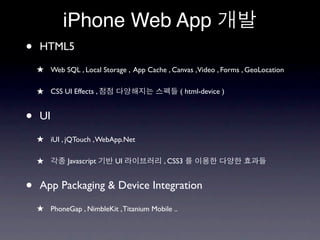
iPhone Web App
•   HTML5
    ★ Web SQL , Local Storage , App Cache , Canvas ,Video , Forms , GeoLocation

    ★ CSS UI Effects ,                            ( html-device )


•   UI

    ★ iUI , jQTouch , WebApp.Net

    ★        Javascript    UI             , CSS3


•   App Packaging & Device Integration

    ★ PhoneGap , NimbleKit , Titanium Mobile ..
!
email : guru @ xguru.net
twitter : @xguru
References
•   http://code.google.com/p/html5-slides/

•   http://rakaz.nl/2009/09/iphone-webapps-101-detecting-essential-information-about-your-iphone.html

•   http://developer.apple.com/safari/library/documentation/appleapplications/Reference/SafariWebContent/

•   http://building-iphone-apps.labs.oreilly.com/

•   http://www.phonegap.com/

•   http://quickconnectfamily.org/

•   http://www.appcelerator.com/products/titanium-mobile-application-development/

•   http://www.slideshare.net/akosma/webtuesday-mobile-web-applications-framework-overview

HTML5 로 iPhone App 만들기

  • 1.
    HTML5 iPhone App - HTML5 - JavaScript - Web App - jQTouch - PhoneGap http://xguru.net
  • 2.
    • • - http://xguru.net • - @xguru
  • 3.
    • Web Applications? • HTML5 • iPhone Web Application • PhoneGap Native
  • 4.
  • 5.
  • 6.
    Web Applications • iPhone App Store
  • 7.
    Web Applications • iPhone App Store • Web
  • 8.
    Web Applications • iPhone App Store • Web • Web App > Native ★ PhoneGap , Titanium Mobile , QuickConnect , NimbleKit
  • 9.
    Web Applications • iPhone App Store • Web • Web App > Native ★ PhoneGap , Titanium Mobile , QuickConnect , NimbleKit • iAd HTML5
  • 10.
  • 11.
    Web App • ★ iPhone / iPad , Android , BlackBerry .. ★
  • 12.
    Web App • ★ iPhone / iPad , Android , BlackBerry .. ★ • :
  • 13.
    Web App • ★ iPhone / iPad , Android , BlackBerry .. ★ • : • Web ★ HTML5 , CSS , Javascript ★ Javascript
  • 14.
  • 15.
  • 16.
    HTML5 ? .
  • 17.
    HTML5 ? . Even Google was not rich enough to support all of the different mobile platforms from Apple’s AppStore to those of the BlackBerry, Windows Mobile, Android and the many variations of the Nokia platform - Vic Gundotra, Google Engineering VP
  • 18.
    What is HTML5? • http://dev.xguru.net/html5 HTML5
  • 19.
    HTML5 OS or Browser Version Score ( ? / 160 ) IE ( Win ) 6.0 11 IE ( Win ) 8.0.7600 19 Opera Mini 1.0 33 iPhone ( Mobile Safari ) 2.0 37 Android 1.6 39 iPhone ( Mobile Safari ) 2.1 - 2.2 45 Maemo microB 5 PR-1.1.1 55 Firefox Mobile 1.0 101 Firefox ( Win ) 3.6.3 101 Palm WebOS 1.4 107 iPhone ( Mobile Safari ) 3.0 110 iPhone ( Mobile Safari ) 3.1 113 Safari ( Mac ) 4.0.5 113 iPad ( Mobile Safari ) 3.2 115 Android 2.0 - 2.1 118 Android 2.2 122 iPhone ( Mobile Safari ) 4.0 Beta 4 133 Safari ( Mac ) 5.0 138 Chrome ( Win , Mac ) 6.0.422.0 142 Mobile test result from http://www.callingallgeeks.org Tested with http://html5test.com
  • 20.
    HTML5 Key Elements for Mobile • Offline Support : Web database , LocalStorage , App Cache • Canvas • Video • GeoLocation • Advanced Forms • Workers • Camera , Mic ( html-device )
  • 21.
  • 22.
    iPhone Web Apps • iPhone ★ AppStore ★ App + Web Hybrid ★ iPad Web App ★ DashCode • Safari Add to Home Screen ★ App
  • 23.
  • 24.
    Web App vs.Native App Web App Native App • / • / • HTML , CSS , Javascript • Objective-C • • XCode , Interface Builder • , iUI , JQTouch .. • Cocoa Touch • Mac • Mac • App 1) • App $99 • - / .. 2) • • • App Store / & • • ( ) • Android / Blackberry • iPhone OS Application • 1) Phonegap 2) Phonegap , QuickConnect / <= Hybrid App
  • 25.
    iPhone Web App #0 • CSS <link media="only screen and (max-device-width: 480px)" href="mobile.css" type= "text/css" rel="stylesheet"> <link media="screen and (min-device-width: 481px)" href="standard.css" type="text/ css" rel="stylesheet"> • User Agent Mozilla/5.0 (iPod; U; CPU like Mac OS X; en) AppleWebKit/420.1 (KHTML, like Gecko) Version/3.0 Mobile/4A93 Safari/419.3 Mozilla/5.0 (iPhone; U; CPU like Mac OS X; en) AppleWebKit/420+ (KHTML, like Gecko) Version/3.0 Mobile/1A543 Safari/419.3 Mozilla/5.0 (iPad; U; CPU OS 3_2 like Mac OS X; en-us) AppleWebKit/531.21.10 (KHTML, like Gecko) Version/4.0.4 Mobile/7B334b Safari/531.21.10 javascript : if((navigator.userAgent.match(/iPhone/i)) { } PHP : if (strpos($_SERVER['HTTP_USER_AGENT'],'iPad') !== false) { }
  • 26.
    iPhone Web App #1 • iPhone Browser & Viewport : 320X480px : 768x1024px Viewport http://dev.xguru.net/webapp/viewport Status Bar : 20px ( / ) URL Bar : 60px ( / ) : -320x356px -768x944px Viewport : 980px (iphone) <meta name=‘viewport’ content=‘width=device-width; initial-scale=1.0; user-scalable=no’> width=device-width : ( iPad ) initial-scale=1.0 : 1 user-scalable=no : / maximum-scale / minimum-scale Button Bar : 44px ( )
  • 27.
    iPhone Web App #2 • Safari UI ( URL Bar , Button Bar ) <meta name="apple-mobile-web-app-capable" content="yes" /> / <meta name="apple-mobile-web-app-status-bar-style" content="black" /> * * URL Bar window.addEventListener('load', function(){ setTimeout(scrollTo, 0, 0, 1); }, false); * status-bar-style : default , black , black-translucent ( ) * UI Fullscreen if (navigator.standalone) { alert (‘ ’); } Safari UI http://dev.xguru.net/webapp/safari_ui
  • 28.
    iPhone Web App #3 • <link rel="apple-touch-icon" href="apple-touch-icon.png" /> <link rel="apple-touch-icon" href="apple-touch-icon-precomposed.png" /> iPhone : 57 x 57 iPad : 72 x 72 57x57 composed 72x72 • Startup <link rel="apple-touch-startup-image" href="/startup.png" /> iPhone : 320 x 460 iPad : 768 x 1004 * Home
  • 29.
    iPhone Web App #4 • - Link / Image & <style type=”text/css”> * { -webkit-touch-callout: none; } </style> • <style type=”text/css”> * { -webkit-user-select: none;} .text { -webkit-user-select: text;} <!-- --> </style> • <style type=”text/css”> * { -webkit-text-size-adjust: none;} </style>
  • 30.
    iPhone Web App #5 • Orientation function checkOrientation() { switch (window.orientation) { case 0: alert ('Orientation: Portrait'); break; case 90: case -90: alert ('Orientation: Landscape'); break; } } addEventListener("orientationchange", checkOrientation); checkOrientation(); • Online function checkOnline() { if (navigator.onLine) { alert ('There is a network connection'); } else { alert ('There is no network connection'); } }
  • 31.
    iPhone Web App #6 • iPhone style UI library ★ JQTouch - http://jqtouch.com/ ★ iUI - http://code.google.com/p/iui/ ★ WebApp.Net - http://webapp-net.com/
  • 32.
    iUI #1 • ( UITableView ) • UI • iPod Touch / 3G • ( de facto standard ) • http://code.google.com/p/iui
  • 33.
    iUI #2 • Setup <html xmlns="http://www.w3.org/1999/xhtml"> <head> <title>iUI Demo</title> <meta name="viewport" content="width=device-width; initial-scale=1.0; user-scalable=0;"/> <link rel="apple-touch-icon" href="apple-touch-icon.png" /> <style type="text/css" media="screen"> @import "iui.css"; </style> <script type="application/x-javascript" src="iui.js"></script> </head> • Usage <body> <div class="toolbar"> <h1 id="pageTitle"></h1> <a id="backButton" class="button" href="#"></a> <a class="button" href="#searchForm">Search</a> </div> <ul id="home" title="Music" selected="true"> <li><a href="#artists">Artists</a></li> <li><a href="#settings">Settings</a></li> <li><a href="stats.php">Stats</a></li> </ul> <ul id="artists" title="Artists"> <li class="group">B</li> <li><a href="#TheBeatles">The Beatles</a></li> <li><a href="#BelleSebastian">Belle &amp; Sebastian</a></li> <li class="group">C</li> <li><a href="#CrowdedHouse">Crowded House</a></li> </ul>
  • 34.
  • 35.
    WebApp.Net #1 • • • Form + AJAX • + • • • http://webapp-net.com
  • 36.
    WebApp.Net #2 • Setup <head> ... <link rel="stylesheet" href="WebApp/Design/Render.css" /> <script type="text/javascript" scr="WebApp/Action/Logic.js"> </script> </head> • Usage <div id="WebApp"> <div id="iHeader"> <a href="#" id="waBackButton">Back</a> <span id="waHeadTitle">WebApp Demo</span> </div> <div id="iGroup"> <div class="iLayer" id="waHome" title="Home"> <div class="iBlock"> <h1>Layer 1</h1> <p>This is the first layer. <a href="#_Next">Tap here</a></p> </div> </div> <div class="iLayer" id="waNext" title="Next Layer"> <div class="iBlock"> <h1>Layer 2</h1> <p>This is the second layer. <a href="#_Home">Tap here</a></p> </div> </div> </div> </div>
  • 37.
  • 38.
    JQTouch #1 • jQuery , • Native • CallBack Events , Theme , Swipe Detection • Extension • http://jqtouch.com
  • 39.
    jQTouch #2 • Setup <head> ... <style type="text/css" media="screen"> @import "jqtouch.min.css"; </style> <style type="text/css" media="screen"> @import "themes/apple/theme.min.css"; </style> <script src="jquery.1.3.2.min.js" type="text/javascript"> </script> <script src="jqtouch.min.js" type="text/javascript"> </script> <script type="text/javascript" > $.jQTouch();</script> </head> • Usage <body> <div id="home"> <div class="toolbar"><h1>My app</h1></div> <ul class="rounded"> <li><a href="#foo">Foo</a></li> <li><a href="#bar">Bar</a></li> </ul> </div> <div id="foo"> <div class="toolbar"> <h1>Foo</h1> <a href="#" class="back">Back</a> </div> Foo </div> </body>
  • 40.
  • 41.
    jQTouch #4 • <head> ... <script type="text/javascript" > $.jQTouch();</script> </head> $.jqTouch({ icon: "path/to/apple-touch-icon.png", startupScreen: "path/to/startup-image.png", statusBar: "default|black|black-translucent", addGlossToIcon: true|false, fullScreen: true|false, fixedViewport: true|false, preloadImages: ["img1.png","img2.png", ...], ... });
  • 42.
    jQTouch #5 • 8 ★ slide, slideup, dissolve, fade, flip, pop, swap, cube • class ★ <a href=”#foo” class=”dissolve”>Foo</a> • slide • Back <div id="home"> <div class="toolbar"><h1>My app</h1></div> <ul class="rounded"> <li><a href="#foo" class="dissolve">Foo</a></li> <li><a href="#bar">Bar</a></li> </ul> </div>
  • 43.
    jQTouch #6 • Theme : jqt & apple 2
  • 44.
  • 45.
    PhoneGap #1 • Cross Platform Mobile Application Framework • HTML+Javascript Web App Container • Web App Native App • Web App Device Javascript
  • 46.
    PhoneGap #2 • http://www.phonegap.com/download http://github.com/phonegap/phonegap-iphone • 0.9 - • make PhoneGapLibInstaller.pkg
  • 47.
  • 48.
    PhoneGap #4 • Geolocation iphone android blackberry navigator.geolocation.getCurrentPosition( function(position) { var lat = position.coords.latitude; var lng = position.coords.longitude; }, fail, options); long navigator.geolocation.watchPosition( success , fail , options ); navigator.geolocation.clearWatch( long watchId ); • Notification iphone android blackberry navigator.notification.alert ( message , title , button ) navigator.notification.beep ( times ) navigator.notification.vibrate ( duration ) navigator.notification.loadingStart ( options ) iphone only navigator.notification.loadingStop (); • Device device.platform iphone android blackberry device.version device.name device.uuid
  • 49.
    PhoneGap #5 • Accelerometer iphone android blackberry ( OS 4.7 ) long navigator.accelerometer.watchAcceleration( success , fail , options ); navigator.accelerometer.clearWatch( long watchId ); successFunction(a) { var x = a.x ; var y = a.y ; var z = a.z } • Camera iphone android blackberry navigator.camera.getPicture( success , fail , options ); <img style="width:60px;height:60px" id="test_img" src="" />  <button onclick="getPicture()">From Camera</button> <button onclick="getPicture(PictureSourceType.PHOTO_LIBRARY)">From Photo Library</button> function PictureSourceType() {}; PictureSourceType.PHOTO_LIBRARY = 0; PictureSourceType.CAMERA = 1; function getPicture(sourceType) {      var options = { quality: 10 };      if (sourceType != undefined) { options["sourceType"] = sourceType; }      navigator.camera.getPicture(getPicture_Success, null, options); };   function getPicture_Success(img) {      alert("getpic success");      document.getElementById("test_img").src = "data:image/jpeg;base64," + img; }
  • 50.
    PhoneGap #6 • Contacts iphone android blackberry navigator.contact.contactsCount ( function(num) { alert(num); } , fail ); navigator.contact.getAllContacts( function(contactsArray) {} , fail , options ); navigator.contact.chooseContact ( function(contact) {} , options ); navigator.contact.displayContact(contactsArray[x].recordID , fail, options ); navigator.contact.removeContact(contactsArray[x].recordID , succ , fail ); var nc = { 'firstName':' ', 'lastName' : ' ', 'phoneNumber': '555-5555' }; navigator.contact.newContact(nc , succ ); • Magnetometer iphone navigator.compass.watchHeading ( function(a) { var compass_magnetic = a.magneticHeading; var compass_true = a.trueHeading; var compass_accuracy = a.headingAccuracy; } , fail , options ); • Network Availability iphone blackberry navigator.network.isReachable(“www.google.com”, reachable_callback); function reachable_callback(rc) { var internetConnection = rc.internetConnectionStatus; var localWiFiConnection= rc.localWifiConnectionStatus; // NetworkStatus.NOT_REACHABLE = 0; // NetworkStatus.REACHABLE_VIA_CARRIER_DATA_NETWORK = 1; // NetworkStatus.REACHABLE_VIA_WIFI_NETWORK = 2; }
  • 51.
    PhoneGap #7 • Audio Record / Play iphone navigator.audio.startAudioRecord(); android blackberry navigator.audio.stopAudioRecord(); navigator.audio.play(); navigator.audio.stop(); new Media(‘beep.wav’).play({numberOfLoops:99}); //.wav , .aiff , .mp3 • File I/O iphone android navigator.fileMgr.testFileExists ( filename , succ , fail ); navigator.fileMgr.testDirectoryExists ( dirname , succ , fail ); navigator.fileMgr.createDirectory ( dirname , succ , fail ); navigator.fileMgr.deleteDirectory ( dirname , succ , fail ); navigator.fileMgr.deleteFile ( filename , succ , fail ); navigator.fileMgr.getFreeDiskSpace ( succ , fail ) ; navigator.fileMgr.addFileWriter ( filename , fileWriter ); navigator.fileMgr.addFileReader ( filename , fileReader ); var fr = new FileReader(); var fw = new FileWriter(); fr.readAsText(filename); fw.writeAsText(filename , data , bAppend); fr.onload = function() P alltext = fr.result; }
  • 52.
    iPhone Web Limits • GIF , PNG , TIFF : 3 width * height <= 3 * 1024 * 1024 • JPG : 32 2 1/16 • 10MB ( ) • 10 • HTML 8 • Local Storage : 5 MB
  • 53.
    Web App toNative App Frameworks • PhoneGap ★ http://www.phonegap.com/ ★ iPhone, Android,Blackberry,Symbian,Palm,Windows Mobile( ) • Titanium Mobile ★ http://www.appcelerator.com/ ★ iPhone, Android • QuickConnect ★ http://quickconnectfamily.org/ ★ iPhone, Android,Blackberry • NimbleKit ★ http://www.nimblekit.com/ ★ iPhone
  • 54.
    iPhone Web App • HTML5 ★ Web SQL , Local Storage , App Cache , Canvas ,Video , Forms , GeoLocation ★ CSS UI Effects , ( html-device ) • UI ★ iUI , jQTouch , WebApp.Net ★ Javascript UI , CSS3 • App Packaging & Device Integration ★ PhoneGap , NimbleKit , Titanium Mobile ..
  • 55.
    ! email : guru@ xguru.net twitter : @xguru
  • 56.
    References • http://code.google.com/p/html5-slides/ • http://rakaz.nl/2009/09/iphone-webapps-101-detecting-essential-information-about-your-iphone.html • http://developer.apple.com/safari/library/documentation/appleapplications/Reference/SafariWebContent/ • http://building-iphone-apps.labs.oreilly.com/ • http://www.phonegap.com/ • http://quickconnectfamily.org/ • http://www.appcelerator.com/products/titanium-mobile-application-development/ • http://www.slideshare.net/akosma/webtuesday-mobile-web-applications-framework-overview

Editor's Notes

  • #5 http://j.mp/hogapp