Top 10 Tips for
Beginning Linux Users
http://www.slideshare.net/chadmairn


                        @cmairn
Agenda
• Discover what open source software is.

• Learn what an operating system does.

• Cover a brief history of Linux

• Acquire 10 tips to help users who are making the
  switch to Linux become more confident using it.

• Heresy: I am using Windows today, but will show
  Linux in action via VirtualBox. (More later)
According to the Open Source Initiative,


“open source is a development method for software that harnesses the
  power of distributed peer review and transparency of process. The
   promise of open source is better quality, higher reliability, more
    flexibility, lower cost, and an end to predatory vendor lock-in.”

                                                 Source: http://www.opensource.org/
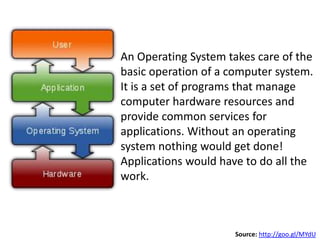
An Operating System takes care of the
basic operation of a computer system.
It is a set of programs that manage
computer hardware resources and
provide common services for
applications. Without an operating
system nothing would get done!
Applications would have to do all the
work.


                      Source: http://goo.gl/MYdU
Brief History of Linux
• MULTICS (Multiplexed Information and
  Computing Service).

• UNIX was developed by computer scientists at
  AT&T/Bell labs in 1969.

• Minux created by Andrew Tannebaum.

• Linus Torvalds continually e-mailed modification
  requests and later decided to rewrite the kernel
  and share the code. Linux was born!
Tip 1: Pick a distribution that
    best fits your needs.
A distribution is an “operating system” that
   also includes a collection of software
    applications (e.g., word processors,
     spreadsheets, media players etc.)


 Check out Top Ten Distributions from Distrowatch.com
I am currently using …


       10.04 LTS (Long-term Support)


          http://www.ubuntu.com
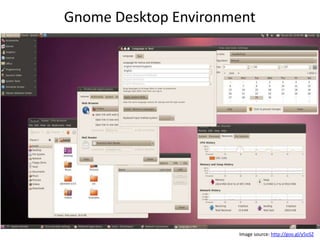
Gnome Desktop Environment


Gnome                KDE


                      Image source: http://goo.gl/y5oSZ
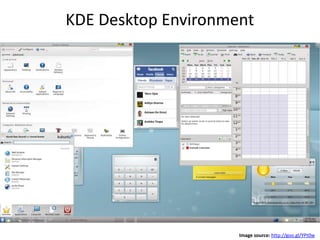
KDE Desktop Environment


                     Image source: http://goo.gl/YPt0w
Tip 1.5: Use InfraRecorder to
  burn the .ISO image file.


    http://infrarecorder.org/
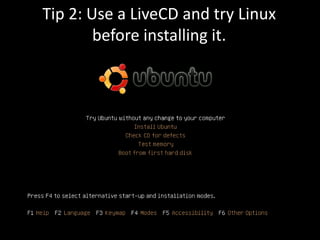
Tip 2: Use a LiveCD and try Linux
        before installing it.
Having a LiveCD can help you gain
access to a crashed non-Linux system!
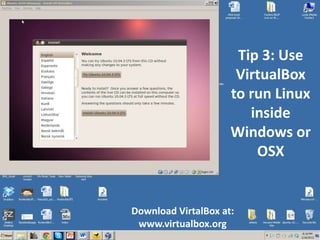
Tip 3: Use
                      VirtualBox
                     to run Linux
                        inside
                     Windows or
                         OSX


Download VirtalBox at:
 www.virtualbox.org
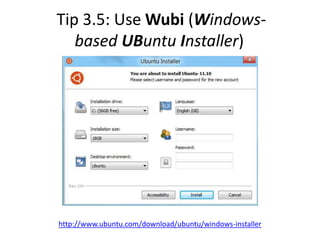
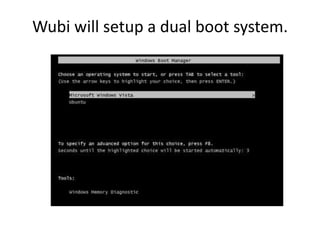
Tip 3.5: Use Wubi (Windows-
   based UBuntu Installer)


http://www.ubuntu.com/download/ubuntu/windows-installer
Wubi will setup a dual boot system.
Tip 4: Explore
GNOME Desktop
 (panels, menu
bar, drawers etc.)


 Quick Demo
http://ubuntu-tweak.com/
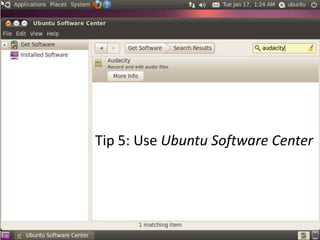
Tip 5: Use Ubuntu Software Center
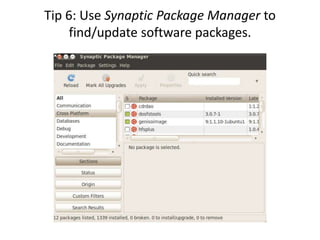
Tip 6: Use Synaptic Package Manager to
     find/update software packages.
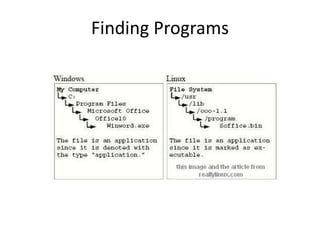
Finding Programs
Tips 7 and 8:

Understand the Linux
File System Hierarchy.

 Learn to change file
    permissions.

     Quick Demo
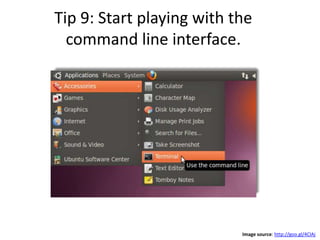
Tip 9: Start playing with the
  command line interface.


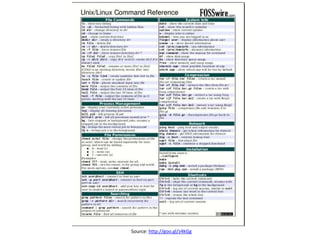
                           Image source: http://goo.gl/4ClAj
Source: http://goo.gl/z4kGg
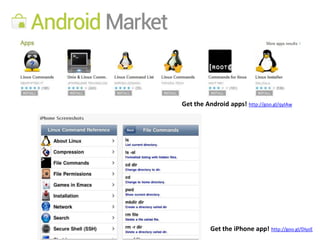
Get the Android apps! http://goo.gl/qyIAw


          Get the iPhone app! http://goo.gl/DIyzE
Tip 10: Have Fun and Explore


      Compiz/Fusion 3D Desktop in Ubuntu


                                           Video source: http://goo.gl/BNSqe
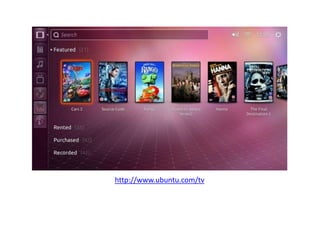
http://www.ubuntu.com/tv
Select Linux Resources
•   http://www.ubuntu.com/
•   https://www.linux.com/
•   http://www.linuxjournal.com/
•   http://www.linux-tutorial.info/
•   http://www.linuxselfhelp.com/
•   http://www.youtube.com/ (Search for Linux)
Let’s
  Hangout!


gplus.to/chadmairn

Top 10 Tips for Beginning Linux Users

  • 1.
    Top 10 Tipsfor Beginning Linux Users
  • 2.
  • 3.
    Agenda • Discover whatopen source software is. • Learn what an operating system does. • Cover a brief history of Linux • Acquire 10 tips to help users who are making the switch to Linux become more confident using it. • Heresy: I am using Windows today, but will show Linux in action via VirtualBox. (More later)
  • 4.
    According to theOpen Source Initiative, “open source is a development method for software that harnesses the power of distributed peer review and transparency of process. The promise of open source is better quality, higher reliability, more flexibility, lower cost, and an end to predatory vendor lock-in.” Source: http://www.opensource.org/
  • 5.
    An Operating Systemtakes care of the basic operation of a computer system. It is a set of programs that manage computer hardware resources and provide common services for applications. Without an operating system nothing would get done! Applications would have to do all the work. Source: http://goo.gl/MYdU
  • 6.
    Brief History ofLinux • MULTICS (Multiplexed Information and Computing Service). • UNIX was developed by computer scientists at AT&T/Bell labs in 1969. • Minux created by Andrew Tannebaum. • Linus Torvalds continually e-mailed modification requests and later decided to rewrite the kernel and share the code. Linux was born!
  • 7.
    Tip 1: Picka distribution that best fits your needs. A distribution is an “operating system” that also includes a collection of software applications (e.g., word processors, spreadsheets, media players etc.) Check out Top Ten Distributions from Distrowatch.com
  • 8.
    I am currentlyusing … 10.04 LTS (Long-term Support) http://www.ubuntu.com
  • 9.
    Gnome Desktop Environment Gnome KDE Image source: http://goo.gl/y5oSZ
  • 10.
    KDE Desktop Environment Image source: http://goo.gl/YPt0w
  • 11.
    Tip 1.5: UseInfraRecorder to burn the .ISO image file. http://infrarecorder.org/
  • 12.
    Tip 2: Usea LiveCD and try Linux before installing it.
  • 13.
    Having a LiveCDcan help you gain access to a crashed non-Linux system!
  • 14.
    Tip 3: Use VirtualBox to run Linux inside Windows or OSX Download VirtalBox at: www.virtualbox.org
  • 15.
    Tip 3.5: UseWubi (Windows- based UBuntu Installer) http://www.ubuntu.com/download/ubuntu/windows-installer
  • 16.
    Wubi will setupa dual boot system.
  • 17.
    Tip 4: Explore GNOMEDesktop (panels, menu bar, drawers etc.) Quick Demo
  • 18.
  • 19.
    Tip 5: UseUbuntu Software Center
  • 20.
    Tip 6: UseSynaptic Package Manager to find/update software packages.
  • 21.
  • 22.
    Tips 7 and8: Understand the Linux File System Hierarchy. Learn to change file permissions. Quick Demo
  • 23.
    Tip 9: Startplaying with the command line interface. Image source: http://goo.gl/4ClAj
  • 24.
  • 25.
    Get the Androidapps! http://goo.gl/qyIAw Get the iPhone app! http://goo.gl/DIyzE
  • 26.
    Tip 10: HaveFun and Explore Compiz/Fusion 3D Desktop in Ubuntu Video source: http://goo.gl/BNSqe
  • 27.
  • 28.
    Select Linux Resources • http://www.ubuntu.com/ • https://www.linux.com/ • http://www.linuxjournal.com/ • http://www.linux-tutorial.info/ • http://www.linuxselfhelp.com/ • http://www.youtube.com/ (Search for Linux)
  • 29.