Linux operating
system
Communication L3
Contents of this COURSE
Here’s what you’ll find in this COURSE:
● Create a Virtual Machine.
● Setup Ubuntu on the virtual Machine.
● Linux Shortcut.
● Linux Basic commands.
● Shell Programming.
● C Programming Language on linux.
Whoa!
What Exactly Linux
01
Linux History
Linux began in 1991 as a personal project by Finnish student Linus Torvalds:
to create a new free operating system kernel. The resulting Linux kernel has
been marked by constant growth throughout its history. Since the initial
release of its source code in 1991, it has grown from a small number
of C files under a license prohibiting commercial distribution to the 4.15
version in 2018 with more than 23.3 million lines of source code, not
counting comments.
Linux History
In 1991, while studying computer science at University of Helsinki, Linus
Torvalds began a project that later became the Linux kernel. He wrote the
program specifically for the hardware he was using and independent of an
operating system because he wanted to use the functions of his new PC with
an 80386 processor. Development was done on MINIX using the GNU C
Compiler.
UNIX History
Unix is multi-tasking, multi-user operating system but is not free to use and
is not open source. It was developed in 1969 by Ken Thompson team at
AT&T Bell Labs. It is widely used on servers, workstations etc. Following are
the important differences between Linux and Unix.
Linux is Unix?
Linux is not Unix, but it is a Unix-like operating system. Linux system is
derived from Unix and it is a continuation of the basis of Unix design. Linux
distributions are the most famous and healthiest example of the direct Unix
derivatives. BSD (Berkley Software Distribution) is also an example of a Unix
derivative
Reasons Why Linux Is
Better Than Windows
 Open Source Nature.
 Secure.
 Can revive older computers.
 Perfect For Programmers.
 Customization.
 Variety Of Distributions.
 Free to Use.
 Better Community Support.
 Reliability
 Privacy
Reasons Why Linux Is
Better Than Windows
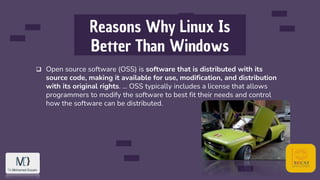
 Open source software (OSS) is software that is distributed with its
source code, making it available for use, modification, and distribution
with its original rights. ... OSS typically includes a license that allows
programmers to modify the software to best fit their needs and control
how the software can be distributed.
Reasons Why Linux Is
Better Than Windows
 Open Source Nature.
 Secure.
 Can revive older computers.
 Perfect For Programmers.
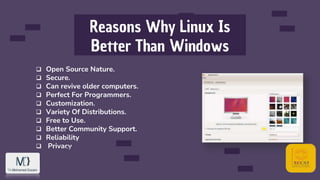
 Customization.
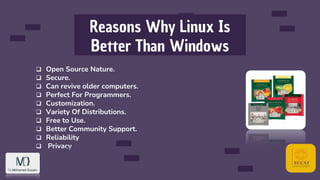
 Variety Of Distributions.
 Free to Use.
 Better Community Support.
 Reliability
 Privacy
Reasons Why Linux Is
Better Than Windows
 Open Source Nature.
 Secure.
 Can revive older computers.
 Perfect For Programmers.
 Customization.
 Variety Of Distributions.
 Free to Use.
 Better Community Support.
 Reliability
 Privacy
Reasons Why Linux Is
Better Than Windows
 Open Source Nature.
 Secure.
 Can revive older computers.
 Perfect For Programmers.
 Customization.
 Variety Of Distributions.
 Free to Use.
 Better Community Support.
 Reliability
 Privacy
Reasons Why Linux Is
Better Than Windows
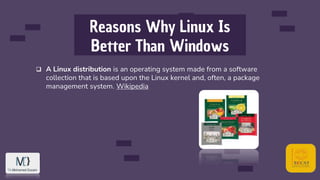
 A Linux distribution is an operating system made from a software
collection that is based upon the Linux kernel and, often, a package
management system. Wikipedia
Reasons Why Linux Is
Better Than Windows
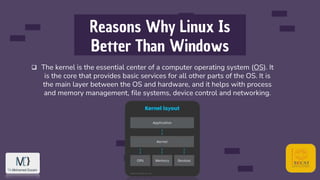
 The kernel is the essential center of a computer operating system (OS). It
is the core that provides basic services for all other parts of the OS. It is
the main layer between the OS and hardware, and it helps with process
and memory management, file systems, device control and networking.
Reasons Why Linux Is
Better Than Windows
 Open Source Nature.
 Secure.
 Can revive older computers.
 Perfect For Programmers.
 Customization.
 Variety Of Distributions.
 Free to Use.
 Better Community Support.
 Reliability
 Privacy
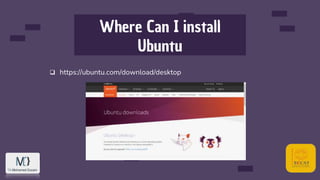
Where Can I install
Ubuntu
 https://ubuntu.com/download/desktop
What Exactly
Virtual Machines
02
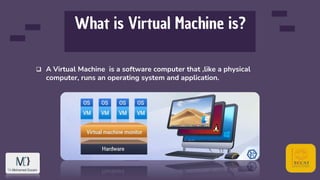
What is Virtual Machine is?
 A Virtual Machine is a software computer that ,like a physical
computer, runs an operating system and application.
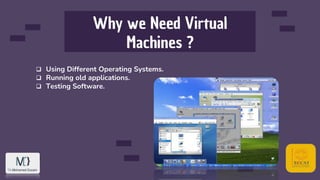
Why we Need Virtual
Machines ?
 Using Different Operating Systems.
 Running old applications.
 Testing Software.
Virtual Box
Oracle VM VirtualBox is a free and open-source hosted hypervisor for x86
virtualization, developed by Oracle Corporation. Created by Innotek, it was
acquired by Sun Microsystems in 2008, which was in turn acquired by Oracle
in 2010. VirtualBox may be installed on Windows, macOS, Linux, Solaris and
OpenSolaris. Wikipedia
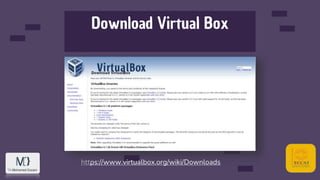
Download Virtual Box
https://www.virtualbox.org/wiki/Downloads
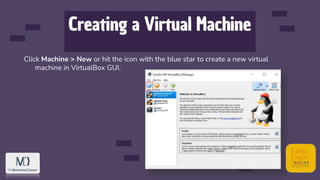
Creating a Virtual Machine
Click Machine > New or hit the icon with the blue star to create a new virtual
machine in VirtualBox GUI.
Linux shortcuts
03
Useful shortcuts
 Large portions of GNU/Linux functionality are achieved using the terminal.
Most distributions of Linux include terminal emulators that allow users to
interact with a shell from their desktop environment. A shell is a
commandline interpreter that executes user inputted commands. Bash
(Bourne Again SHell) is a common default shell among many Linux
distributions and is the default shell for macOS.
Useful shortcuts
 The shell is an interactive interface that allows users to execute other
commands and utilities in Linux and other UNIX-based operating
systems. When you login to the operating system, the standard shell is
displayed and allows you to perform common operations such as copy
files or restart the system.
 A shell is a user interface for access to an operating system's services. ...
The terminal is a program that opens a graphical window and lets you
interact with the shell.
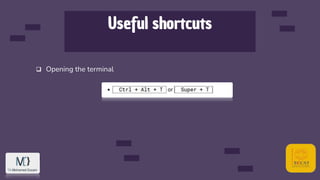
Useful shortcuts
 Opening the terminal
Useful shortcuts
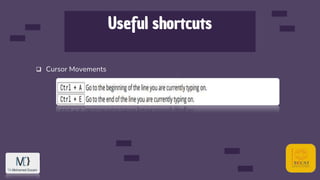
 Cursor Movements
Useful shortcuts
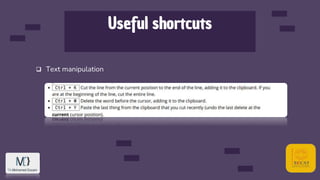
 Text manipulation
Useful shortcuts
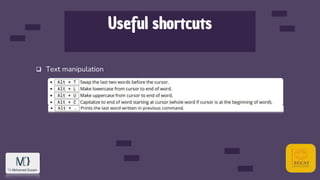
 Text manipulation
Useful shortcuts
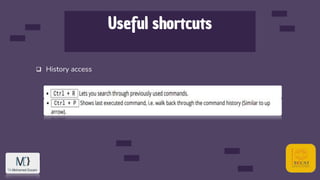
 History access
Useful shortcuts
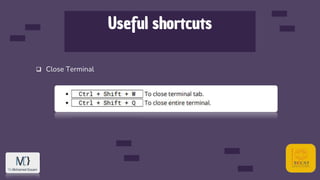
 Close Terminal
File Management
Commands
04
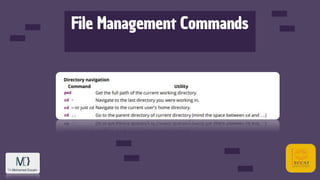
File Management Commands
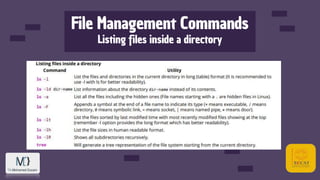
 Whenever you are in a terminal in Linux, you will be in what is called the
current working directory. Often your command prompt will display either
the full working directory, or just the last part of that directory
File Management Commands
Listing files inside a directory
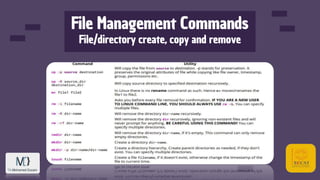
File Management Commands
File/directory create, copy and remove
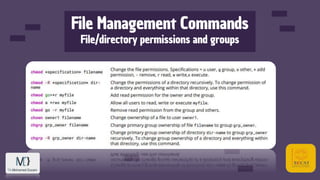
File Management Commands
File/directory permissions and groups

Linux operating system

  • 1.
  • 2.
    Contents of thisCOURSE Here’s what you’ll find in this COURSE: ● Create a Virtual Machine. ● Setup Ubuntu on the virtual Machine. ● Linux Shortcut. ● Linux Basic commands. ● Shell Programming. ● C Programming Language on linux.
  • 3.
  • 4.
  • 5.
    Linux History Linux beganin 1991 as a personal project by Finnish student Linus Torvalds: to create a new free operating system kernel. The resulting Linux kernel has been marked by constant growth throughout its history. Since the initial release of its source code in 1991, it has grown from a small number of C files under a license prohibiting commercial distribution to the 4.15 version in 2018 with more than 23.3 million lines of source code, not counting comments.
  • 6.
    Linux History In 1991,while studying computer science at University of Helsinki, Linus Torvalds began a project that later became the Linux kernel. He wrote the program specifically for the hardware he was using and independent of an operating system because he wanted to use the functions of his new PC with an 80386 processor. Development was done on MINIX using the GNU C Compiler.
  • 7.
    UNIX History Unix ismulti-tasking, multi-user operating system but is not free to use and is not open source. It was developed in 1969 by Ken Thompson team at AT&T Bell Labs. It is widely used on servers, workstations etc. Following are the important differences between Linux and Unix.
  • 8.
    Linux is Unix? Linuxis not Unix, but it is a Unix-like operating system. Linux system is derived from Unix and it is a continuation of the basis of Unix design. Linux distributions are the most famous and healthiest example of the direct Unix derivatives. BSD (Berkley Software Distribution) is also an example of a Unix derivative
  • 9.
    Reasons Why LinuxIs Better Than Windows  Open Source Nature.  Secure.  Can revive older computers.  Perfect For Programmers.  Customization.  Variety Of Distributions.  Free to Use.  Better Community Support.  Reliability  Privacy
  • 10.
    Reasons Why LinuxIs Better Than Windows  Open source software (OSS) is software that is distributed with its source code, making it available for use, modification, and distribution with its original rights. ... OSS typically includes a license that allows programmers to modify the software to best fit their needs and control how the software can be distributed.
  • 11.
    Reasons Why LinuxIs Better Than Windows  Open Source Nature.  Secure.  Can revive older computers.  Perfect For Programmers.  Customization.  Variety Of Distributions.  Free to Use.  Better Community Support.  Reliability  Privacy
  • 12.
    Reasons Why LinuxIs Better Than Windows  Open Source Nature.  Secure.  Can revive older computers.  Perfect For Programmers.  Customization.  Variety Of Distributions.  Free to Use.  Better Community Support.  Reliability  Privacy
  • 13.
    Reasons Why LinuxIs Better Than Windows  Open Source Nature.  Secure.  Can revive older computers.  Perfect For Programmers.  Customization.  Variety Of Distributions.  Free to Use.  Better Community Support.  Reliability  Privacy
  • 14.
    Reasons Why LinuxIs Better Than Windows  A Linux distribution is an operating system made from a software collection that is based upon the Linux kernel and, often, a package management system. Wikipedia
  • 15.
    Reasons Why LinuxIs Better Than Windows  The kernel is the essential center of a computer operating system (OS). It is the core that provides basic services for all other parts of the OS. It is the main layer between the OS and hardware, and it helps with process and memory management, file systems, device control and networking.
  • 16.
    Reasons Why LinuxIs Better Than Windows  Open Source Nature.  Secure.  Can revive older computers.  Perfect For Programmers.  Customization.  Variety Of Distributions.  Free to Use.  Better Community Support.  Reliability  Privacy
  • 17.
    Where Can Iinstall Ubuntu  https://ubuntu.com/download/desktop
  • 18.
  • 19.
    What is VirtualMachine is?  A Virtual Machine is a software computer that ,like a physical computer, runs an operating system and application.
  • 20.
    Why we NeedVirtual Machines ?  Using Different Operating Systems.  Running old applications.  Testing Software.
  • 21.
    Virtual Box Oracle VMVirtualBox is a free and open-source hosted hypervisor for x86 virtualization, developed by Oracle Corporation. Created by Innotek, it was acquired by Sun Microsystems in 2008, which was in turn acquired by Oracle in 2010. VirtualBox may be installed on Windows, macOS, Linux, Solaris and OpenSolaris. Wikipedia
  • 22.
  • 23.
    Creating a VirtualMachine Click Machine > New or hit the icon with the blue star to create a new virtual machine in VirtualBox GUI.
  • 24.
  • 25.
    Useful shortcuts  Largeportions of GNU/Linux functionality are achieved using the terminal. Most distributions of Linux include terminal emulators that allow users to interact with a shell from their desktop environment. A shell is a commandline interpreter that executes user inputted commands. Bash (Bourne Again SHell) is a common default shell among many Linux distributions and is the default shell for macOS.
  • 26.
    Useful shortcuts  Theshell is an interactive interface that allows users to execute other commands and utilities in Linux and other UNIX-based operating systems. When you login to the operating system, the standard shell is displayed and allows you to perform common operations such as copy files or restart the system.  A shell is a user interface for access to an operating system's services. ... The terminal is a program that opens a graphical window and lets you interact with the shell.
  • 27.
  • 28.
  • 29.
  • 30.
  • 31.
  • 32.
  • 33.
  • 34.
    File Management Commands Whenever you are in a terminal in Linux, you will be in what is called the current working directory. Often your command prompt will display either the full working directory, or just the last part of that directory
  • 35.
  • 36.
    File Management Commands Listingfiles inside a directory
  • 37.
  • 38.