Tools4BPEL Tutorial
      Niels Lohmann

  Humboldt-Universität zu Berlin
 Department of Computer Science
nlohmann@informatik.hu-berlin.de
Overview


           2
The tools
• BPEL2oWFN
  translates a BPEL service into an oWFN

• Fiona
  analyzes the interaction of an oWFN:
  (1) checks controllability and
  (2) computes the operating guideline of the net

• Tools4BPEL GUI
  graphical user interface for BPEL2oWFN and Fiona
                                              3
Download,
Setup and Install

                4
Requirements
• to run:
   – Windows, Linux, UNIX or Macintosh for BPEL2oWFN
     and Fiona
   – J2SE 5.0 (Java 1.5) for the GUI
• to compile:
   – GNU Compiler Collection (gcc)
• to develop:
   – GNU Autotools (automake, autoconf, …)
   – GNU Compiler Tools (flex, bison, kimwitu++)

                                                  5
Download
• all tools are free and open source

• download them from the Tools4BPEL website
  www.informatik.hu-berlin.de/top/tools4bpel

• the tools are also hosted at SourceForge.net
  sourceforge.net/projects/tools4bpel


                                                 6
Set up BPEL2oWFN
• download the source tarball (“bpel2owfn-1.3.tar.gz”)
• open a shell and enter:
   –   gunzip bpel2owfn-1.3.tar.gz
   –   tar xf bpel2owfn-1.3.tar
   –   cd bpel2owfn-1.3
   –   ./configure
   –   make
• an executable file “bpel2owfn” is created in the
  directory /bpel2owfn-1.3/src

                                               7
Set up Fiona
• download the source tarball (“fiona-1.0.tar.gz”)
• open a shell and enter:
   –   gunzip fiona-1.0.tar.gz
   –   tar xf fiona-1.0.tar
   –   cd fiona-1.0
   –   ./configure
   –   make
• an executable file “fiona” is created in the
  directory /fiona-1.0/src

                                               8
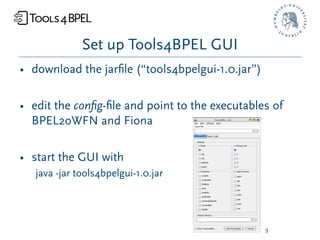
Set up Tools4BPEL GUI
• download the jarfile (“tools4bpelgui-1.0.jar”)

• edit the config-file and point to the executables of
  BPEL2oWFN and Fiona

• start the GUI with
   java -jar tools4bpelgui-1.0.jar


                                                  9
BPEL2oWFN


            10
Overview
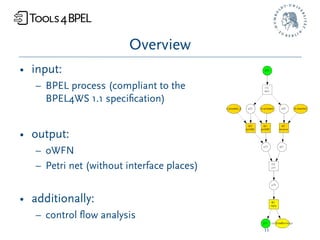
• input:
   – BPEL process (compliant to the
     BPEL4WS 1.1 specification)


• output:
   – oWFN
   – Petri net (without interface places)


• additionally:
   – control flow analysis
                                            11
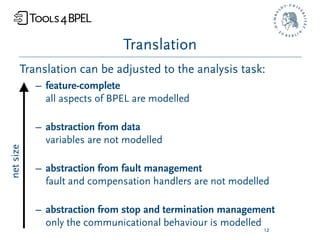
Translation
      Translation can be adjusted to the analysis task:
           – feature-complete
             all aspects of BPEL are modelled

           – abstraction from data
             variables are not modelled
net size


           – abstraction from fault management
             fault and compensation handlers are not modelled

           – abstraction from stop and termination management
             only the communicational behaviour is modelled
                                                           12
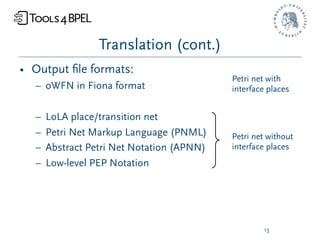
Translation (cont.)
• Output file formats:
                                           Petri net with
  – oWFN in Fiona format                   interface places


  –   LoLA place/transition net
  –   Petri Net Markup Language (PNML)     Petri net without
  –   Abstract Petri Net Notation (APNN)   interface places
  –   Low-level PEP Notation


                                                   13
Translation (cont.)
• The translation is supported by:
   – static analysis
   – structural simplification rules


                                      14
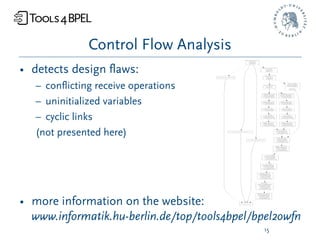
Control Flow Analysis
• detects design flaws:
   – conflicting receive operations
   – uninitialized variables
   – cyclic links
   (not presented here)


• more information on the website:
  www.informatik.hu-berlin.de/top/tools4bpel/bpel2owfn
                                              15
Fiona


        16
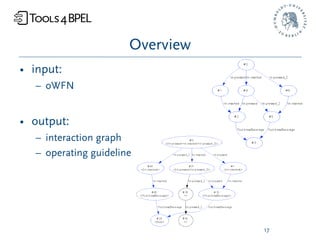
Overview
• input:
   – oWFN


• output:
   – interaction graph
   – operating guideline


                                  17
Parameters
• set communication depth

• adjust maximal event occurrence

• usage of reduction rules for the IG


• more information on the website:
  www.informatik.hu-berlin.de/top/tools4bpel/fiona
                                              18
Example #1

The Online Shop

               19
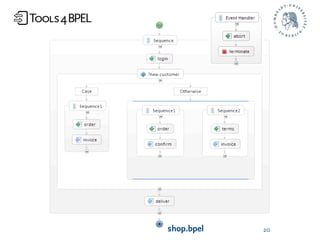
shop.bpel   20
Description
When the online shop receives the login information from a
customer, its business strategy distinguishes between already
known customers and new customers. In case of a known
customer the left branch is executed: first the shop expects an
order, and then it sends the invoice to the customer. In case of a
new customer (right branch) the shop initiates two tasks
concurrently: in the first task (Sequence1) the shop first receives
the order and then confirms it. In the second task (Sequence2)
the shop receives the terms of payment before it sends an invoice
to the customer. In either case the shop finally sends the delivery
information to the customer. The customer may send an abort
message at any time. This is modelled by an event handler that
receives the abort message and then terminates the whole
process.                                                   21
Analysis tasks
• Does there exist a partner that can use the online
  shop “properly”, i.e. login, order and eventually
  receive a delivery information?

• If there exists more than one partner of the online
  shop, can we characterize all of them?


                                                22
Todo
1. Translate the BPEL process to an oWFN
   (prerequisite for further analysis)

2. Check for controllability and calculate the IG
   (analysis: existence of a partner)

3. Calculate the operating guideline
   (analysis: characterize all partners)


                                                23
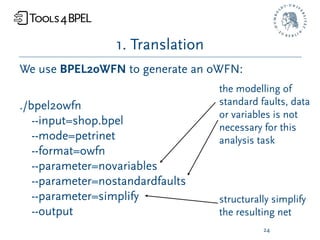
1. Translation
We use BPEL2oWFN to generate an oWFN:
                                  the modelling of
./bpel2owfn                       standard faults, data
                                  or variables is not
   --input=shop.bpel
                                  necessary for this
   --mode=petrinet                analysis task
   --format=owfn
   --parameter=novariables
   --parameter=nostandardfaults
   --parameter=simplify           structurally simplify
   --output                       the resulting net
                                            24
1. Translation (cont.)
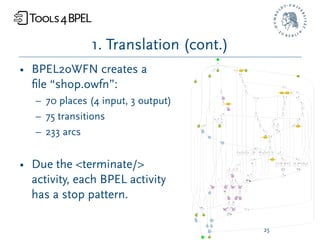
• BPEL2oWFN creates a
  file “shop.owfn”:
   – 70 places (4 input, 3 output)
   – 75 transitions
   – 233 arcs


• Due the <terminate/>
  activity, each BPEL activity
  has a stop pattern.

                                        25
2. Controllability
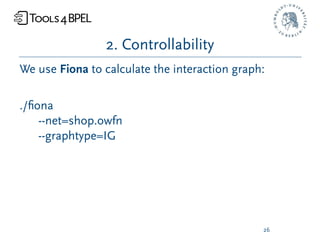
We use Fiona to calculate the interaction graph:

./fiona
    --net=shop.owfn
    --graphtype=IG


                                               26
2. Controllability (cont.)
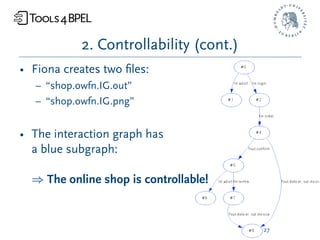
• Fiona creates two files:
   – “shop.owfn.IG.out”
   – “shop.owfn.IG.png”


• The interaction graph has
  a blue subgraph:

  ) The online shop is controllable!


                                         27
2. Controllability (cont.)
The controller found reflects the intended behaviour
of a customer. First he sends a login, followed by an
order. Then he must be able to either receive an
invoice (in case he is known to the shop) or to receive
the confirmation (in case he is a new customer). If he
actually has received the confirmation, he must send a
terms of payment message. After that he will receive
the invoice. In either case he finally receives the
delivery information. At any time he may abort.


                                               28
3. Operating Guideline
We use Fiona to calculate the operating guideline:

./fiona
    --net=shop.owfn
    --graphtype=OG


                                               29
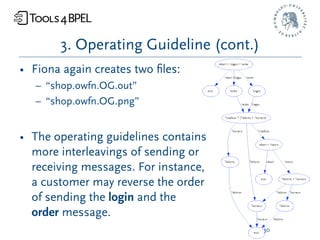
3. Operating Guideline (cont.)
• Fiona again creates two files:
   – “shop.owfn.OG.out”
   – “shop.owfn.OG.png”


• The operating guidelines contains
  more interleavings of sending or
  receiving messages. For instance,
  a customer may reverse the order
  of sending the login and the
  order message.
                                        30
Example#2

The new Online Shop

                 31
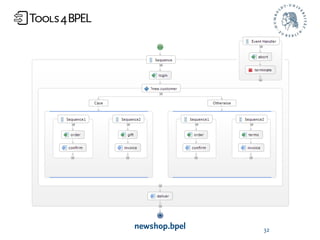
newshop.bpel   32
Description
The shop now modifies its business strategy: every
known customer that orders something can choose a
gift. The changes only affect the left branch of the
switch. The shop initiates two tasks concurrently now:
in the first task (Sequence1) the shop first receives the
order and then confirms it. In the second task
(Sequence2) the shop receives which gift is chosen
before it sends the invoice to the customer.


                                                33
Analysis tasks
• Does this change have an impact on the partners?


                                             34
Todo
1. Translate the BPEL process to an oWFN
   (prerequisite for further analysis)

2. Check for controllability and calculate the IG
   (analysis: existence of a partner)

3. Calculate the operating guideline
   (analysis: characterize all partners)

4. Compare it to the operating guideline of the first
   online shop                                 35
1. Translation
• Using the same parameters
  as before, BPEL2oWFN
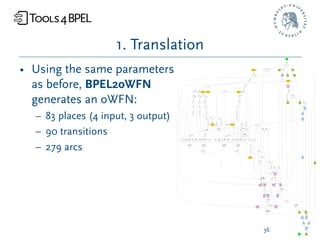
  generates an oWFN:
  – 83 places (4 input, 3 output)
  – 90 transitions
  – 279 arcs


                                     36
2. Controllability
• Using the same parameters as
  before, Fiona calculates an
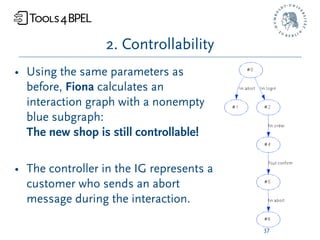
  interaction graph with a nonempty
  blue subgraph:
  The new shop is still controllable!

• The controller in the IG represents a
  customer who sends an abort
  message during the interaction.

                                          37
3. Operating Guidelines
• Using the same parameters as
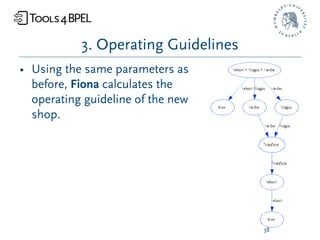
  before, Fiona calculates the
  operating guideline of the new
  shop.


                                     38
4. Comparison
A closer look at the OG reveals that actually every
customer of the modified shop must eventually send
an abort message. This surely means that the process
is controllable. However, the way this is done is
obviously a not intended one. There is no way that a
customer can get what he has ordered from the
process.


                                             39
4. Comparison (cont.)
We can see that the shop does not communicate its inner
decision about which branch (known customer, new customer) is
chosen. In the original online shop the controller must send an
order, but receives either an invoice or a confirmation w.r.t. which
branch the shop has chosen before. That way the controller knows
what branch the shop is actually in and hence knows how to
continue. In contrast, in the modified shop the controller must
send an order and receives undistinguishable confirmation
messages in either case. The modified shop expects a choice of a
gift in case it decided for the known customer branch. In the other
case it expects the terms of payment. The controller, however,
does not know about the decision of the shop. However, sending
an abort is always correct.
                                                          40
Example #3

Coffee Vending
  Machine
                41
coffee.bpel

             42
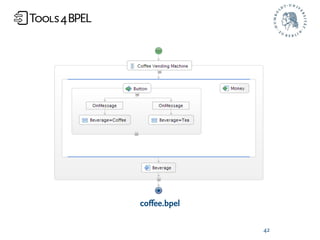
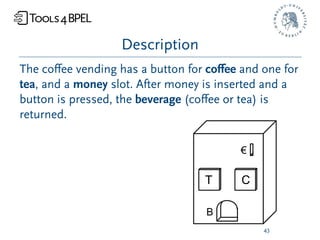
Description
The coffee vending has a button for coffee and one for
tea, and a money slot. After money is inserted and a
button is pressed, the beverage (coffee or tea) is
returned.


                                             43
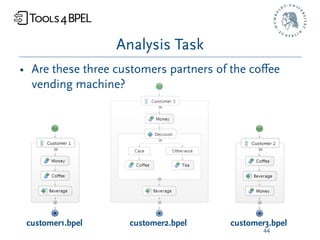
Analysis Task
• Are these three customers partners of the coffee
  vending machine?


 customer1.bpel     customer2.bpel     customer3.bpel
                                               44
Todo
1. Translate the vending machine service to an
   oWFN.

2. For each customer service:
   a) Translate the service to an oWFN.
   b) Compose this oWFN with the oWFN of the
      service.
   c) Test: Is the composed service weak
      terminating?
                                             45
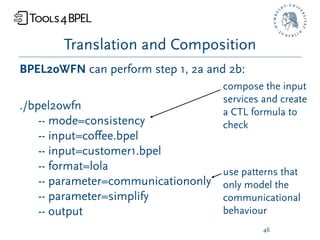
Translation and Composition
BPEL2oWFN can perform step 1, 2a and 2b:
                                     compose the input
                                     services and create
./bpel2owfn                          a CTL formula to
    -- mode=consistency              check
    -- input=coffee.bpel
    -- input=customer1.bpel
    -- format=lola                   use patterns that
    -- parameter=communicationonly   only model the
    -- parameter=simplify            communicational
    -- output                        behaviour
                                              46
Translation and Composition (cont.)
• BPEL2oWFN creates two files for the explicit model
  checker LoLA:
   – coffee_customer1.lola
     the composed net in LoLA format

  – coffee_customer1.task
    a CTL formula stating that it is always possible to
    reach the final marking of the composed net
    (AG EF finalmarking)

                                               47
Test on weak termination
• We use the LoLA to check the CTL formula:

  ./lola coffee_customer1.lola -a

• LoLA verifies the formula: the final state of the
  composed service can be reached from any
  reachable marking


                                               48
Results
• The composition weakly terminates.

) The first customer is a partner of the coffee
 vending machine (and vice versa).

• Using the same parameters, we find that the
  second consumer is also a partner of the coffee
  vending machine (and vice versa).


                                                49
Results (cont.)
• The composition of the coffee vending machine
  service and the third consumer does not weakly
  terminate:
   – LoLA finds a counter example path (the
     composition deadlocks after the coffee button is
     pressed).
   – This path can be used to fix the BPEL process of
     this customer (an automatic re-translation is
     subject of current work).

                                              50
Conclusion
and References

                 51
Conclusion
The presented tools can:
• generate a formal model of a BPEL process
  (translate a BPEL process to an oWFN or a Petri net
  without interface),
• generate a partner of a service, if there is one (check
  an oWFN for controllability),
• characterize all partners of a service (calculate the
  operating guideline of an oWFN),
• check if two services are partners, i.e. they are
  consistent (check if the composition is weakly
  terminating).
                                                 52
References
• These slides together with all examples can be
  downloaded at:

  www.informatik.hu-berlin.de/top/tools4bpel/tools/tutorial


• For more information on the tool chain, see:

  Niels Lohmann, Peter Massuthe, Christian Stahl, and
  Daniela Weinberg. Analyzing Interacting BPEL Processes.
  BPM 2006, Lecture Notes in Computer Science (to appear),
  2006. Springer-Verlag.
                                                        53
References (cont.)
• For more information on LoLA, see:

  Karsten Schmidt. LoLA: A Low Level Analyser. In Mogens
  Nielsen and Dan Simpson, editors, ICATPN 2000, volume
  1825 of Lecture Notes in Computer Science, pages 465-474,
  June 2000. Springer-Verlag.


• LoLA can be downloaded at:

  www.informatik.hu-berlin.de/top/lola

                                                     54
Tools4BPEL Tutorial
      Niels Lohmann

  Humboldt-Universität zu Berlin
 Department of Computer Science
nlohmann@informatik.hu-berlin.de

Tools4BPEL Tutorial

  • 1.
    Tools4BPEL Tutorial Niels Lohmann Humboldt-Universität zu Berlin Department of Computer Science nlohmann@informatik.hu-berlin.de
  • 2.
  • 3.
    The tools • BPEL2oWFN translates a BPEL service into an oWFN • Fiona analyzes the interaction of an oWFN: (1) checks controllability and (2) computes the operating guideline of the net • Tools4BPEL GUI graphical user interface for BPEL2oWFN and Fiona 3
  • 4.
  • 5.
    Requirements • to run: – Windows, Linux, UNIX or Macintosh for BPEL2oWFN and Fiona – J2SE 5.0 (Java 1.5) for the GUI • to compile: – GNU Compiler Collection (gcc) • to develop: – GNU Autotools (automake, autoconf, …) – GNU Compiler Tools (flex, bison, kimwitu++) 5
  • 6.
    Download • all toolsare free and open source • download them from the Tools4BPEL website www.informatik.hu-berlin.de/top/tools4bpel • the tools are also hosted at SourceForge.net sourceforge.net/projects/tools4bpel 6
  • 7.
    Set up BPEL2oWFN •download the source tarball (“bpel2owfn-1.3.tar.gz”) • open a shell and enter: – gunzip bpel2owfn-1.3.tar.gz – tar xf bpel2owfn-1.3.tar – cd bpel2owfn-1.3 – ./configure – make • an executable file “bpel2owfn” is created in the directory /bpel2owfn-1.3/src 7
  • 8.
    Set up Fiona •download the source tarball (“fiona-1.0.tar.gz”) • open a shell and enter: – gunzip fiona-1.0.tar.gz – tar xf fiona-1.0.tar – cd fiona-1.0 – ./configure – make • an executable file “fiona” is created in the directory /fiona-1.0/src 8
  • 9.
    Set up Tools4BPELGUI • download the jarfile (“tools4bpelgui-1.0.jar”) • edit the config-file and point to the executables of BPEL2oWFN and Fiona • start the GUI with java -jar tools4bpelgui-1.0.jar 9
  • 10.
  • 11.
    Overview • input: – BPEL process (compliant to the BPEL4WS 1.1 specification) • output: – oWFN – Petri net (without interface places) • additionally: – control flow analysis 11
  • 12.
    Translation Translation can be adjusted to the analysis task: – feature-complete all aspects of BPEL are modelled – abstraction from data variables are not modelled net size – abstraction from fault management fault and compensation handlers are not modelled – abstraction from stop and termination management only the communicational behaviour is modelled 12
  • 13.
    Translation (cont.) • Outputfile formats: Petri net with – oWFN in Fiona format interface places – LoLA place/transition net – Petri Net Markup Language (PNML) Petri net without – Abstract Petri Net Notation (APNN) interface places – Low-level PEP Notation 13
  • 14.
    Translation (cont.) • Thetranslation is supported by: – static analysis – structural simplification rules 14
  • 15.
    Control Flow Analysis •detects design flaws: – conflicting receive operations – uninitialized variables – cyclic links (not presented here) • more information on the website: www.informatik.hu-berlin.de/top/tools4bpel/bpel2owfn 15
  • 16.
  • 17.
    Overview • input: – oWFN • output: – interaction graph – operating guideline 17
  • 18.
    Parameters • set communicationdepth • adjust maximal event occurrence • usage of reduction rules for the IG • more information on the website: www.informatik.hu-berlin.de/top/tools4bpel/fiona 18
  • 19.
  • 20.
  • 21.
    Description When the onlineshop receives the login information from a customer, its business strategy distinguishes between already known customers and new customers. In case of a known customer the left branch is executed: first the shop expects an order, and then it sends the invoice to the customer. In case of a new customer (right branch) the shop initiates two tasks concurrently: in the first task (Sequence1) the shop first receives the order and then confirms it. In the second task (Sequence2) the shop receives the terms of payment before it sends an invoice to the customer. In either case the shop finally sends the delivery information to the customer. The customer may send an abort message at any time. This is modelled by an event handler that receives the abort message and then terminates the whole process. 21
  • 22.
    Analysis tasks • Doesthere exist a partner that can use the online shop “properly”, i.e. login, order and eventually receive a delivery information? • If there exists more than one partner of the online shop, can we characterize all of them? 22
  • 23.
    Todo 1. Translate theBPEL process to an oWFN (prerequisite for further analysis) 2. Check for controllability and calculate the IG (analysis: existence of a partner) 3. Calculate the operating guideline (analysis: characterize all partners) 23
  • 24.
    1. Translation We useBPEL2oWFN to generate an oWFN: the modelling of ./bpel2owfn standard faults, data or variables is not --input=shop.bpel necessary for this --mode=petrinet analysis task --format=owfn --parameter=novariables --parameter=nostandardfaults --parameter=simplify structurally simplify --output the resulting net 24
  • 25.
    1. Translation (cont.) •BPEL2oWFN creates a file “shop.owfn”: – 70 places (4 input, 3 output) – 75 transitions – 233 arcs • Due the <terminate/> activity, each BPEL activity has a stop pattern. 25
  • 26.
    2. Controllability We useFiona to calculate the interaction graph: ./fiona --net=shop.owfn --graphtype=IG 26
  • 27.
    2. Controllability (cont.) •Fiona creates two files: – “shop.owfn.IG.out” – “shop.owfn.IG.png” • The interaction graph has a blue subgraph: ) The online shop is controllable! 27
  • 28.
    2. Controllability (cont.) Thecontroller found reflects the intended behaviour of a customer. First he sends a login, followed by an order. Then he must be able to either receive an invoice (in case he is known to the shop) or to receive the confirmation (in case he is a new customer). If he actually has received the confirmation, he must send a terms of payment message. After that he will receive the invoice. In either case he finally receives the delivery information. At any time he may abort. 28
  • 29.
    3. Operating Guideline Weuse Fiona to calculate the operating guideline: ./fiona --net=shop.owfn --graphtype=OG 29
  • 30.
    3. Operating Guideline(cont.) • Fiona again creates two files: – “shop.owfn.OG.out” – “shop.owfn.OG.png” • The operating guidelines contains more interleavings of sending or receiving messages. For instance, a customer may reverse the order of sending the login and the order message. 30
  • 31.
  • 32.
  • 33.
    Description The shop nowmodifies its business strategy: every known customer that orders something can choose a gift. The changes only affect the left branch of the switch. The shop initiates two tasks concurrently now: in the first task (Sequence1) the shop first receives the order and then confirms it. In the second task (Sequence2) the shop receives which gift is chosen before it sends the invoice to the customer. 33
  • 34.
    Analysis tasks • Doesthis change have an impact on the partners? 34
  • 35.
    Todo 1. Translate theBPEL process to an oWFN (prerequisite for further analysis) 2. Check for controllability and calculate the IG (analysis: existence of a partner) 3. Calculate the operating guideline (analysis: characterize all partners) 4. Compare it to the operating guideline of the first online shop 35
  • 36.
    1. Translation • Usingthe same parameters as before, BPEL2oWFN generates an oWFN: – 83 places (4 input, 3 output) – 90 transitions – 279 arcs 36
  • 37.
    2. Controllability • Usingthe same parameters as before, Fiona calculates an interaction graph with a nonempty blue subgraph: The new shop is still controllable! • The controller in the IG represents a customer who sends an abort message during the interaction. 37
  • 38.
    3. Operating Guidelines •Using the same parameters as before, Fiona calculates the operating guideline of the new shop. 38
  • 39.
    4. Comparison A closerlook at the OG reveals that actually every customer of the modified shop must eventually send an abort message. This surely means that the process is controllable. However, the way this is done is obviously a not intended one. There is no way that a customer can get what he has ordered from the process. 39
  • 40.
    4. Comparison (cont.) Wecan see that the shop does not communicate its inner decision about which branch (known customer, new customer) is chosen. In the original online shop the controller must send an order, but receives either an invoice or a confirmation w.r.t. which branch the shop has chosen before. That way the controller knows what branch the shop is actually in and hence knows how to continue. In contrast, in the modified shop the controller must send an order and receives undistinguishable confirmation messages in either case. The modified shop expects a choice of a gift in case it decided for the known customer branch. In the other case it expects the terms of payment. The controller, however, does not know about the decision of the shop. However, sending an abort is always correct. 40
  • 41.
  • 42.
  • 43.
    Description The coffee vendinghas a button for coffee and one for tea, and a money slot. After money is inserted and a button is pressed, the beverage (coffee or tea) is returned. 43
  • 44.
    Analysis Task • Arethese three customers partners of the coffee vending machine? customer1.bpel customer2.bpel customer3.bpel 44
  • 45.
    Todo 1. Translate thevending machine service to an oWFN. 2. For each customer service: a) Translate the service to an oWFN. b) Compose this oWFN with the oWFN of the service. c) Test: Is the composed service weak terminating? 45
  • 46.
    Translation and Composition BPEL2oWFNcan perform step 1, 2a and 2b: compose the input services and create ./bpel2owfn a CTL formula to -- mode=consistency check -- input=coffee.bpel -- input=customer1.bpel -- format=lola use patterns that -- parameter=communicationonly only model the -- parameter=simplify communicational -- output behaviour 46
  • 47.
    Translation and Composition(cont.) • BPEL2oWFN creates two files for the explicit model checker LoLA: – coffee_customer1.lola the composed net in LoLA format – coffee_customer1.task a CTL formula stating that it is always possible to reach the final marking of the composed net (AG EF finalmarking) 47
  • 48.
    Test on weaktermination • We use the LoLA to check the CTL formula: ./lola coffee_customer1.lola -a • LoLA verifies the formula: the final state of the composed service can be reached from any reachable marking 48
  • 49.
    Results • The compositionweakly terminates. ) The first customer is a partner of the coffee vending machine (and vice versa). • Using the same parameters, we find that the second consumer is also a partner of the coffee vending machine (and vice versa). 49
  • 50.
    Results (cont.) • Thecomposition of the coffee vending machine service and the third consumer does not weakly terminate: – LoLA finds a counter example path (the composition deadlocks after the coffee button is pressed). – This path can be used to fix the BPEL process of this customer (an automatic re-translation is subject of current work). 50
  • 51.
  • 52.
    Conclusion The presented toolscan: • generate a formal model of a BPEL process (translate a BPEL process to an oWFN or a Petri net without interface), • generate a partner of a service, if there is one (check an oWFN for controllability), • characterize all partners of a service (calculate the operating guideline of an oWFN), • check if two services are partners, i.e. they are consistent (check if the composition is weakly terminating). 52
  • 53.
    References • These slidestogether with all examples can be downloaded at: www.informatik.hu-berlin.de/top/tools4bpel/tools/tutorial • For more information on the tool chain, see: Niels Lohmann, Peter Massuthe, Christian Stahl, and Daniela Weinberg. Analyzing Interacting BPEL Processes. BPM 2006, Lecture Notes in Computer Science (to appear), 2006. Springer-Verlag. 53
  • 54.
    References (cont.) • Formore information on LoLA, see: Karsten Schmidt. LoLA: A Low Level Analyser. In Mogens Nielsen and Dan Simpson, editors, ICATPN 2000, volume 1825 of Lecture Notes in Computer Science, pages 465-474, June 2000. Springer-Verlag. • LoLA can be downloaded at: www.informatik.hu-berlin.de/top/lola 54
  • 55.
    Tools4BPEL Tutorial Niels Lohmann Humboldt-Universität zu Berlin Department of Computer Science nlohmann@informatik.hu-berlin.de