
Jithin Parakka
Department of Computer Science
     Pondicherry University
•   Cloud Middleware
•   Amazon EC2
•   Eucalyptus
•   Openstack
•   Ubuntu Enterprise Cloud
•   Google App Engine
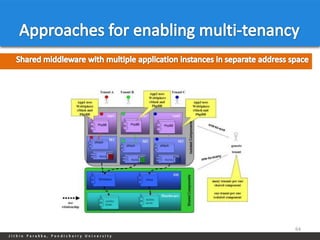
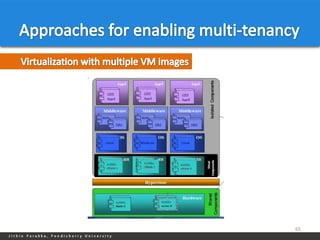
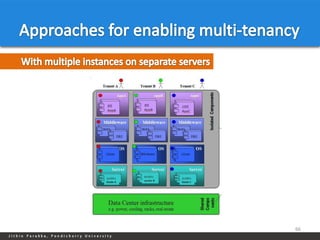
•   Approaches to enable multi-tenancy


                                         2
3
Middleware is a general term for any program that serves to "glue together"
or mediate between two separate and often already existing programs.

Cloud Middleware is software used to integrate services, applications and
content available on the cloud.


                                                                               4
Data management
Identity / security management
User interfaces and portals
Billing and metering
Management and monitoring


                                  5
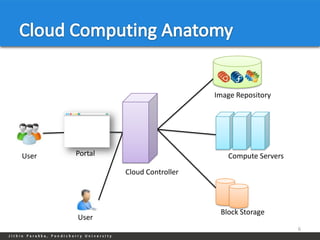
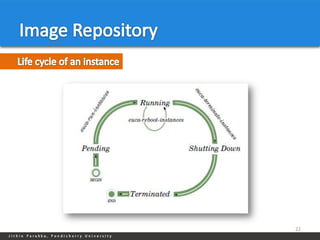
Image Repository


User   Portal                         Compute Servers

                Cloud Controller


                                    Block Storage
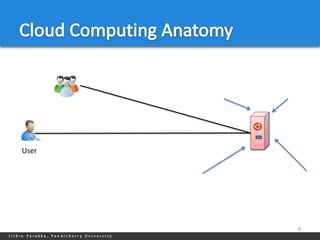
       User
                                                        6
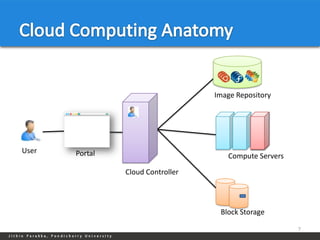
Image Repository


User   Portal                         Compute Servers

                Cloud Controller


                                    Block Storage

                                                        7
User


       8
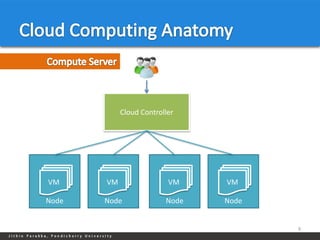
Cloud Controller


VM     VM                 VM    VM

Node   Node              Node   Node


                                       9
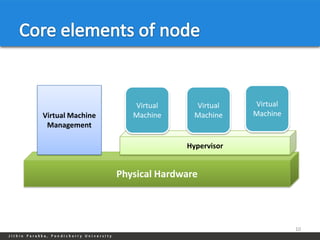
Virtual      Virtual    Virtual
Virtual Machine      Machine      Machine    Machine
 Management

                                Hypervisor


                  Physical Hardware


                                                       10
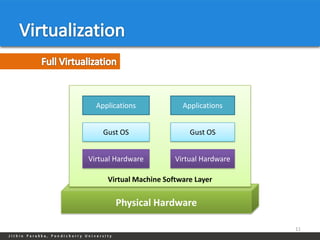
Applications            Applications


    Gust OS                 Gust OS


Virtual Hardware        Virtual Hardware

     Virtual Machine Software Layer


       Physical Hardware

                                           11
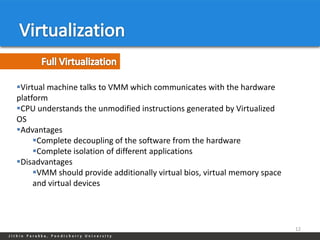
Virtual machine talks to VMM which communicates with the hardware
platform
CPU understands the unmodified instructions generated by Virtualized
OS
Advantages
     Complete decoupling of the software from the hardware
     Complete isolation of different applications
Disadvantages
     VMM should provide additionally virtual bios, virtual memory space
     and virtual devices


                                                                           12
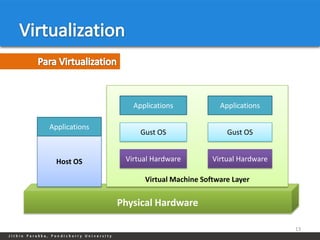
Applications            Applications

Applications
                    Gust OS                 Gust OS


  Host OS       Virtual Hardware        Virtual Hardware

                     Virtual Machine Software Layer


               Physical Hardware

                                                           13
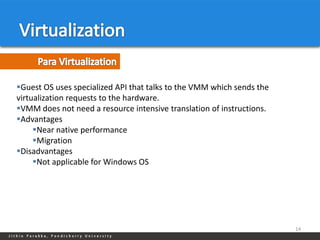
Guest OS uses specialized API that talks to the VMM which sends the
virtualization requests to the hardware.
VMM does not need a resource intensive translation of instructions.
Advantages
     Near native performance
     Migration
Disadvantages
     Not applicable for Windows OS


                                                                       14
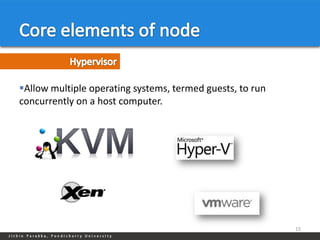
Allow multiple operating systems, termed guests, to run
concurrently on a host computer.


                                                           15
A software implementation of a computing environment in which an
operating system (OS) or program can be installed and run.
Typically emulates a physical computing environment.
Requests for CPU, memory, hard disk, network and other hardware
resources are managed by a virtualization layer which translates these
requests to the underlying physical hardware.
Advantages.
    Multiple OS environments can co-exist on the same computer.
    Application provisioning, maintenance, high availability and disaster
    recovery.
Disadvantages
    Security

                                                                             16
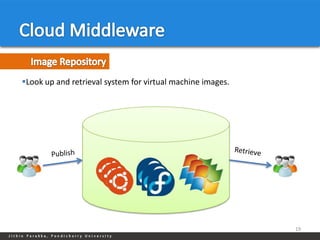
Look up and retrieval system for virtual machine images.


                                                            19
Contain Core Operating System and essential tools.
It’s a prototype from which virtual servers are created.
Can be obtained from public repository.
Or you can create yourself.
An image have unique ID and it is used to provision the image.
Contain three part
      Kernel Image.
      Ramdisk Image.
          Is an initial root file system that is mounted prior to when the real
          root file system is available
      Root File System image.


                                                                                   20
Create a virtual disk image
ˆ Installing the OS
ˆ Installing required applications
ˆ Make the OS ready to run on cloud
Registering the images with image repository
ˆ Testing the image


                                                21
22
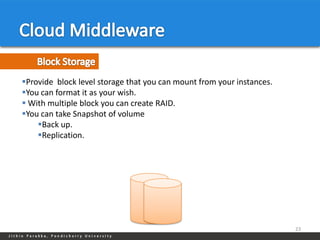
Provide block level storage that you can mount from your instances.
You can format it as your wish.
 With multiple block you can create RAID.
You can take Snapshot of volume
    Back up.
    Replication.


                                                                       23
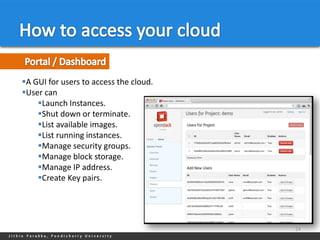
A GUI for users to access the cloud.
User can
    Launch Instances.
    Shut down or terminate.
    List available images.
    List running instances.
    Manage security groups.
    Manage block storage.
    Manage IP address.
    Create Key pairs.


                                        24
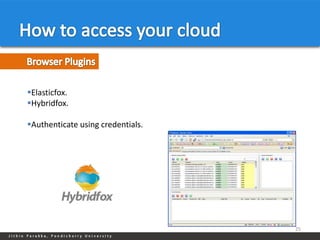
Elasticfox.
Hybridfox.

Authenticate using credentials.


                                   25
Euca2ools.
User can
    Launch Instances.
    Shut down or terminate.
    List available images.
    List running instances.
    Manage security groups.
    Manage block storage.
    Manage IP address.
    Create Key pairs.


                               26
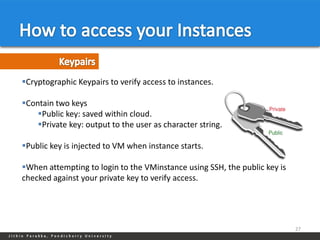
Cryptographic Keypairs to verify access to instances.

Contain two keys
    Public key: saved within cloud.
    Private key: output to the user as character string.

Public key is injected to VM when instance starts.

When attempting to login to the VMinstance using SSH, the public key is
checked against your private key to verify access.


                                                                           27
A security group is a set of networking rules applied to instances.

When you first create an instance, it is assigned to a default security group
that denies incoming network traffic from all sources.

To allow login and usage of a new instance, you must authorize network
access to the default security group.


                                                                                 28
Instances typically have two IPs associated with them.
Private IPs are intended for internal communications between instances
and are usually only routable within a cloud.
Public IPs are used for external access and are usually routable outside of
cloud.
With elastic IPs the user gains control over a set of static IP addresses. Once
allocated to the user, those same IPs can be dynamically associated to
running instances, overriding pre-assigned public IPs.


                                                                               29
On-premise and Hybrid Cloud Infrastructure as a Service.

It uses existing infrastructure to create a scalable, secure web services layer
that abstracts compute, network and storage to offer IaaS.

Eucalyptus web services are uniquely designed for hybrid clouds using the
industry standard Amazon Web Services™ (AWS) API.

Research project in the Computer Science Department at the University of
California, Santa Barbara.

Elastic Utility Computing Architecture Linking Your Programs To Useful
Systems.


                                                                               32
Amazon AWS Interface Compatibility
High-Availability IaaS Service
                                          Quota Management and Accounting
Flexible Clustering
                                          User Group and Role-Based Access
Network Management, Security
                                          Management
Groups, Traffic Isolation
                                          Self-service User Portal*
Elasticity and Self-Service Capability
                                          VMware Hypervisor Support*
Bucket-Based Storage Abstraction (S3-
                                          Virtual-to-Virtual Image Conversion for
Compatible)
                                          VMware*
Block-Based Storage Abstraction (EBS-
                                          Robust SAN Integration*
Compatible)
Xen and KVM Hypervisor Support
Microsoft Windows Guest Support

                                                                             33
34
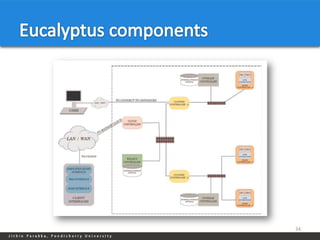
Node Controller (NC)

Cluster Controller (CC)

Walrus Storage Controller (WS3)

Storage Controller (SC)

Cloud Controller (CLC)

VMware Broker


                                   35
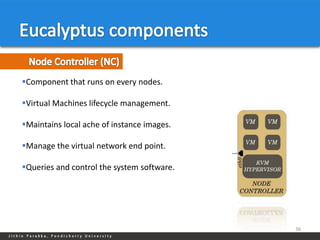
Component that runs on every nodes.

Virtual Machines lifecycle management.

Maintains local ache of instance images.

Manage the virtual network end point.

Queries and control the system software.


                                            36
Gather information about set of Node Controllers.

Schedule a virtual machine execution on a specific Node controller.

Manage the virtual machine network.


                                                                       37
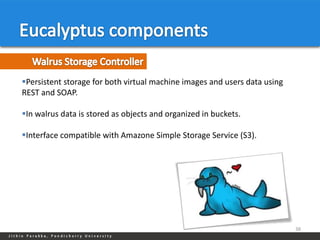
Persistent storage for both virtual machine images and users data using
REST and SOAP.

In walrus data is stored as objects and organized in buckets.

Interface compatible with Amazone Simple Storage Service (S3).


                                                                           38
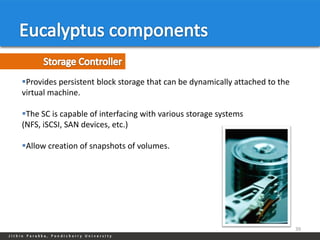
Provides persistent block storage that can be dynamically attached to the
virtual machine.

The SC is capable of interfacing with various storage systems
(NFS, iSCSI, SAN devices, etc.)

Allow creation of snapshots of volumes.


                                                                             39
Front end of the entire cloud infrastructure.

Entry point into the cloud for administrators, developers, project managers
and end users.

Monitoring resources: Queries other components for information about
resources.

Resource abstraction: Decide which cluster will be used for provisioning the
instances.

Monitoring the running instances.


                                                                            40
41
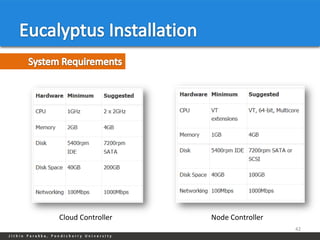
Cloud Controller   Node Controller
                                     42
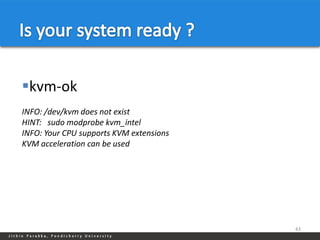
kvm-ok
INFO: /dev/kvm does not exist
HINT: sudo modprobe kvm_intel
INFO: Your CPU supports KVM extensions
KVM acceleration can be used


                                         43
Assigns a random MAC address to the VM instance before booting and
attaches the VM instance's Ethernet device to the physical Ethernet through
the node's local Xen bridge.
VM instances typically obtain an IP address using DHCP.


Administrator configures Eucalyptus with a 'map' of MAC address/IP
Address pairs


                                                                          44
Maintain a DHCP server with static mappings for each VM instance that is
created.

Allows Eucalyptus expose a capability similar to Amazon's 'security groups.

Elastic IP is supported in this mode only.


                                                                               45
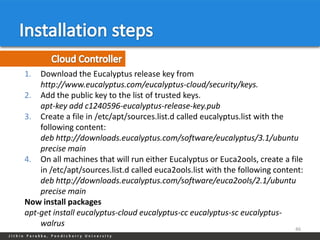
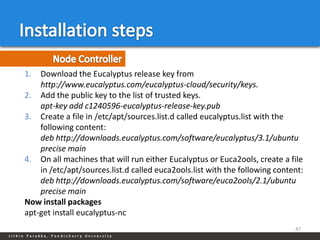
1.  Download the Eucalyptus release key from
    http://www.eucalyptus.com/eucalyptus-cloud/security/keys.
2. Add the public key to the list of trusted keys.
    apt-key add c1240596-eucalyptus-release-key.pub
3. Create a file in /etc/apt/sources.list.d called eucalyptus.list with the
    following content:
    deb http://downloads.eucalyptus.com/software/eucalyptus/3.1/ubuntu
    precise main
4. On all machines that will run either Eucalyptus or Euca2ools, create a file
    in /etc/apt/sources.list.d called euca2ools.list with the following content:
    deb http://downloads.eucalyptus.com/software/euca2ools/2.1/ubuntu
    precise main
Now install packages
apt-get install eucalyptus-cloud eucalyptus-cc eucalyptus-sc eucalyptus-
    walrus
                                                                             46
1.  Download the Eucalyptus release key from
    http://www.eucalyptus.com/eucalyptus-cloud/security/keys.
2. Add the public key to the list of trusted keys.
    apt-key add c1240596-eucalyptus-release-key.pub
3. Create a file in /etc/apt/sources.list.d called eucalyptus.list with the
    following content:
    deb http://downloads.eucalyptus.com/software/eucalyptus/3.1/ubuntu
    precise main
4. On all machines that will run either Eucalyptus or Euca2ools, create a file
    in /etc/apt/sources.list.d called euca2ools.list with the following content:
    deb http://downloads.eucalyptus.com/software/euca2ools/2.1/ubuntu
    precise main
Now install packages
apt-get install eucalyptus-nc
                                                                             47
48
49
50
51
Open source IaaS cloud computing project started by Rackspace Cloud and
NASA in 2010.

Currently OpenStack is a global collaboration of more than hundred
companies including Dell, AMD, Intel, hp, SUSE, redhat etc.

Currently has packages for CentOS, Fedora, RHEL, Debian, and Ubuntu.

Hypervisors supported by open stack are Xen, KVM, VMware V-Sphere and
Hyper-V.


                                                                        53
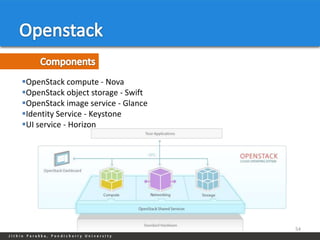
OpenStack compute - Nova
OpenStack object storage - Swift
OpenStack image service - Glance
Identity Service - Keystone
UI service - Horizon


                                    54
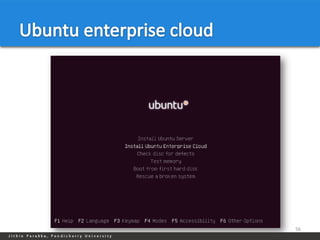
A package stack of applications from Canonical.

UEC includes a number of open source tools to manage the infrastructure,
including open source cloud software Eucalyptus.

KVM support.

Interface compatibility with EC2.

Simple installation and deployment.

Basic administrative tools for system management and user accounting.


                                                                            55
56
Lets you run web applications on Google's infrastructure.

App Engine applications are easy to build, easy to maintain, and easy to
scale as your traffic and data storage needs grow.

With App Engine, there are no servers to maintain.

You can serve your app from your own domain name.

You can serve your app using a free name on the appspot.com domain.


                                                                            59
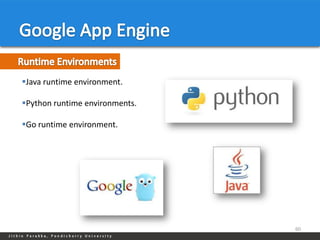
Java runtime environment.

Python runtime environments.

Go runtime environment.


                                60
62
63
64
65
66
67
Jithin Parakka
parakkajithin@gmail.com

Cloud Computing Tools

  • 1.
    Jithin Parakka Department ofComputer Science Pondicherry University
  • 2.
    Cloud Middleware • Amazon EC2 • Eucalyptus • Openstack • Ubuntu Enterprise Cloud • Google App Engine • Approaches to enable multi-tenancy 2
  • 3.
  • 4.
    Middleware is ageneral term for any program that serves to "glue together" or mediate between two separate and often already existing programs. Cloud Middleware is software used to integrate services, applications and content available on the cloud. 4
  • 5.
    Data management Identity /security management User interfaces and portals Billing and metering Management and monitoring 5
  • 6.
    Image Repository User Portal Compute Servers Cloud Controller Block Storage User 6
  • 7.
    Image Repository User Portal Compute Servers Cloud Controller Block Storage 7
  • 8.
  • 9.
    Cloud Controller VM VM VM VM Node Node Node Node 9
  • 10.
    Virtual Virtual Virtual Virtual Machine Machine Machine Machine Management Hypervisor Physical Hardware 10
  • 11.
    Applications Applications Gust OS Gust OS Virtual Hardware Virtual Hardware Virtual Machine Software Layer Physical Hardware 11
  • 12.
    Virtual machine talksto VMM which communicates with the hardware platform CPU understands the unmodified instructions generated by Virtualized OS Advantages Complete decoupling of the software from the hardware Complete isolation of different applications Disadvantages VMM should provide additionally virtual bios, virtual memory space and virtual devices 12
  • 13.
    Applications Applications Applications Gust OS Gust OS Host OS Virtual Hardware Virtual Hardware Virtual Machine Software Layer Physical Hardware 13
  • 14.
    Guest OS usesspecialized API that talks to the VMM which sends the virtualization requests to the hardware. VMM does not need a resource intensive translation of instructions. Advantages Near native performance Migration Disadvantages Not applicable for Windows OS 14
  • 15.
    Allow multiple operatingsystems, termed guests, to run concurrently on a host computer. 15
  • 16.
    A software implementationof a computing environment in which an operating system (OS) or program can be installed and run. Typically emulates a physical computing environment. Requests for CPU, memory, hard disk, network and other hardware resources are managed by a virtualization layer which translates these requests to the underlying physical hardware. Advantages. Multiple OS environments can co-exist on the same computer. Application provisioning, maintenance, high availability and disaster recovery. Disadvantages Security 16
  • 17.
    Look up andretrieval system for virtual machine images. 19
  • 18.
    Contain Core OperatingSystem and essential tools. It’s a prototype from which virtual servers are created. Can be obtained from public repository. Or you can create yourself. An image have unique ID and it is used to provision the image. Contain three part Kernel Image. Ramdisk Image. Is an initial root file system that is mounted prior to when the real root file system is available Root File System image. 20
  • 19.
    Create a virtualdisk image ˆ Installing the OS ˆ Installing required applications ˆ Make the OS ready to run on cloud Registering the images with image repository ˆ Testing the image 21
  • 20.
  • 21.
    Provide block levelstorage that you can mount from your instances. You can format it as your wish.  With multiple block you can create RAID. You can take Snapshot of volume Back up. Replication. 23
  • 22.
    A GUI forusers to access the cloud. User can Launch Instances. Shut down or terminate. List available images. List running instances. Manage security groups. Manage block storage. Manage IP address. Create Key pairs. 24
  • 23.
  • 24.
    Euca2ools. User can Launch Instances. Shut down or terminate. List available images. List running instances. Manage security groups. Manage block storage. Manage IP address. Create Key pairs. 26
  • 25.
    Cryptographic Keypairs toverify access to instances. Contain two keys Public key: saved within cloud. Private key: output to the user as character string. Public key is injected to VM when instance starts. When attempting to login to the VMinstance using SSH, the public key is checked against your private key to verify access. 27
  • 26.
    A security groupis a set of networking rules applied to instances. When you first create an instance, it is assigned to a default security group that denies incoming network traffic from all sources. To allow login and usage of a new instance, you must authorize network access to the default security group. 28
  • 27.
    Instances typically havetwo IPs associated with them. Private IPs are intended for internal communications between instances and are usually only routable within a cloud. Public IPs are used for external access and are usually routable outside of cloud. With elastic IPs the user gains control over a set of static IP addresses. Once allocated to the user, those same IPs can be dynamically associated to running instances, overriding pre-assigned public IPs. 29
  • 30.
    On-premise and HybridCloud Infrastructure as a Service. It uses existing infrastructure to create a scalable, secure web services layer that abstracts compute, network and storage to offer IaaS. Eucalyptus web services are uniquely designed for hybrid clouds using the industry standard Amazon Web Services™ (AWS) API. Research project in the Computer Science Department at the University of California, Santa Barbara. Elastic Utility Computing Architecture Linking Your Programs To Useful Systems. 32
  • 31.
    Amazon AWS InterfaceCompatibility High-Availability IaaS Service Quota Management and Accounting Flexible Clustering User Group and Role-Based Access Network Management, Security Management Groups, Traffic Isolation Self-service User Portal* Elasticity and Self-Service Capability VMware Hypervisor Support* Bucket-Based Storage Abstraction (S3- Virtual-to-Virtual Image Conversion for Compatible) VMware* Block-Based Storage Abstraction (EBS- Robust SAN Integration* Compatible) Xen and KVM Hypervisor Support Microsoft Windows Guest Support 33
  • 32.
  • 33.
    Node Controller (NC) ClusterController (CC) Walrus Storage Controller (WS3) Storage Controller (SC) Cloud Controller (CLC) VMware Broker 35
  • 34.
    Component that runson every nodes. Virtual Machines lifecycle management. Maintains local ache of instance images. Manage the virtual network end point. Queries and control the system software. 36
  • 35.
    Gather information aboutset of Node Controllers. Schedule a virtual machine execution on a specific Node controller. Manage the virtual machine network. 37
  • 36.
    Persistent storage forboth virtual machine images and users data using REST and SOAP. In walrus data is stored as objects and organized in buckets. Interface compatible with Amazone Simple Storage Service (S3). 38
  • 37.
    Provides persistent blockstorage that can be dynamically attached to the virtual machine. The SC is capable of interfacing with various storage systems (NFS, iSCSI, SAN devices, etc.) Allow creation of snapshots of volumes. 39
  • 38.
    Front end ofthe entire cloud infrastructure. Entry point into the cloud for administrators, developers, project managers and end users. Monitoring resources: Queries other components for information about resources. Resource abstraction: Decide which cluster will be used for provisioning the instances. Monitoring the running instances. 40
  • 39.
  • 40.
    Cloud Controller Node Controller 42
  • 41.
    kvm-ok INFO: /dev/kvm doesnot exist HINT: sudo modprobe kvm_intel INFO: Your CPU supports KVM extensions KVM acceleration can be used 43
  • 42.
    Assigns a randomMAC address to the VM instance before booting and attaches the VM instance's Ethernet device to the physical Ethernet through the node's local Xen bridge. VM instances typically obtain an IP address using DHCP. Administrator configures Eucalyptus with a 'map' of MAC address/IP Address pairs 44
  • 43.
    Maintain a DHCPserver with static mappings for each VM instance that is created. Allows Eucalyptus expose a capability similar to Amazon's 'security groups. Elastic IP is supported in this mode only. 45
  • 44.
    1. Downloadthe Eucalyptus release key from http://www.eucalyptus.com/eucalyptus-cloud/security/keys. 2. Add the public key to the list of trusted keys. apt-key add c1240596-eucalyptus-release-key.pub 3. Create a file in /etc/apt/sources.list.d called eucalyptus.list with the following content: deb http://downloads.eucalyptus.com/software/eucalyptus/3.1/ubuntu precise main 4. On all machines that will run either Eucalyptus or Euca2ools, create a file in /etc/apt/sources.list.d called euca2ools.list with the following content: deb http://downloads.eucalyptus.com/software/euca2ools/2.1/ubuntu precise main Now install packages apt-get install eucalyptus-cloud eucalyptus-cc eucalyptus-sc eucalyptus- walrus 46
  • 45.
    1. Downloadthe Eucalyptus release key from http://www.eucalyptus.com/eucalyptus-cloud/security/keys. 2. Add the public key to the list of trusted keys. apt-key add c1240596-eucalyptus-release-key.pub 3. Create a file in /etc/apt/sources.list.d called eucalyptus.list with the following content: deb http://downloads.eucalyptus.com/software/eucalyptus/3.1/ubuntu precise main 4. On all machines that will run either Eucalyptus or Euca2ools, create a file in /etc/apt/sources.list.d called euca2ools.list with the following content: deb http://downloads.eucalyptus.com/software/euca2ools/2.1/ubuntu precise main Now install packages apt-get install eucalyptus-nc 47
  • 46.
  • 47.
  • 48.
  • 49.
  • 51.
    Open source IaaScloud computing project started by Rackspace Cloud and NASA in 2010. Currently OpenStack is a global collaboration of more than hundred companies including Dell, AMD, Intel, hp, SUSE, redhat etc. Currently has packages for CentOS, Fedora, RHEL, Debian, and Ubuntu. Hypervisors supported by open stack are Xen, KVM, VMware V-Sphere and Hyper-V. 53
  • 52.
    OpenStack compute -Nova OpenStack object storage - Swift OpenStack image service - Glance Identity Service - Keystone UI service - Horizon 54
  • 53.
    A package stackof applications from Canonical. UEC includes a number of open source tools to manage the infrastructure, including open source cloud software Eucalyptus. KVM support. Interface compatibility with EC2. Simple installation and deployment. Basic administrative tools for system management and user accounting. 55
  • 54.
  • 56.
    Lets you runweb applications on Google's infrastructure. App Engine applications are easy to build, easy to maintain, and easy to scale as your traffic and data storage needs grow. With App Engine, there are no servers to maintain. You can serve your app from your own domain name. You can serve your app using a free name on the appspot.com domain. 59
  • 57.
    Java runtime environment. Pythonruntime environments. Go runtime environment. 60
  • 59.
  • 60.
  • 61.
  • 62.
  • 63.
  • 64.
  • 65.

Editor's Notes

  • #7 Tell how all this thing is happening. Fits the user create an account then he will get access to portalThen he will provision the services. He will take an image
  • #8 Tell how all this thing is happening. Fits the user create an account then he will get access to portalThen he will provision the services. He will take an image
  • #9 Once the instance has served its purpose and is deleted all state is reclaimed, except thepersistent volume. The ephemeral storage is purged. Memory and vCPU resources arereleased. And of course the image has remained unchanged through out.
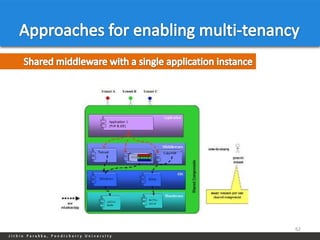
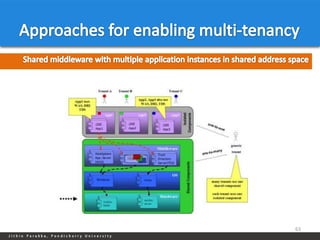
  • #13 Tenants may be given the ability to customize some parts of the application, such as color of the user interface ( UI) or business rules, but they cannot customize the application's code.
  • #21 he initial RAM disk (initrd) is an initial root file system that is mounted prior to when the real root file system is available. The initrd is bound to the kernel and loaded as part of the kernel boot procedure. The kernel then mounts this initrd as part of the two-stage boot process to load the modules to make the real file systems available and get at the real root file system.The initrd image contains the necessary executables and system files to support the second-stage boot of a Linux system.When you add a root filesystem to Walrus, you bundle the root filesystem file, upload the file to a bucket in Walrus thatyou name, and then register the root filesystem with Eucalyptus. The bundle operation can include a registered ramdisk(ERI ID) and a registered kernel (EKI ID). The resulting image will associate the three images.
  • #22 Reed eucabook image management in detail E:\\study\\Second_sem\\cloud
  • #23 here are a few things thathappen on various components of UEC:. Authentication/Authorization of the user request to ensure you havepermission to launch the instance. Identication of CC to take responsibility for deploying the instanceand identication of the NC for running the instance.. Downloading the image from WS3 to NC (images are cached so thatstarting multiple instances of the same machine image downloads thatimage only once)Creating the requested virtual network interface. Starting the instance of the machine image running as a virtual machineusing KVM
  • #42 Study the exacctdiffernce between stiragecontrollr and walrus
  • #43 Study the exacctdiffernce between stiragecontrollr and walrus