Cloud Summary
• Cloud computing is an umbrella term used to refer to
  Internet based development and services

• A number of characteristics define cloud data,
  applications services and infrastructure:
   – Remotely hosted: Services or data are hosted on remote
     infrastructure.
   – Ubiquitous: Services or data are available from anywhere.
   – Commodified: The result is a utility computing model similar
     to traditional that of traditional utilities, like gas and electricity
     - you pay for what you would want!
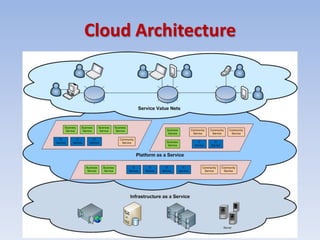
Cloud Architecture
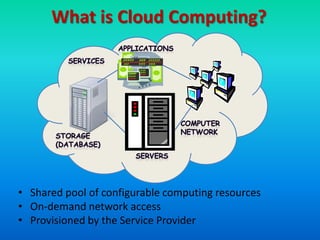
What is Cloud Computing?


• Shared pool of configurable computing resources
• On-demand network access
• Provisioned by the Service Provider
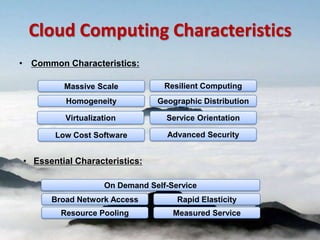
Cloud Computing Characteristics
• Common Characteristics:

         Massive Scale           Resilient Computing
          Homogeneity          Geographic Distribution

         Virtualization          Service Orientation

       Low Cost Software         Advanced Security


• Essential Characteristics:

                   On Demand Self-Service
      Broad Network Access          Rapid Elasticity
        Resource Pooling           Measured Service
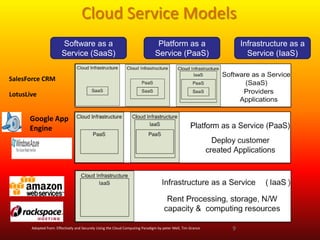
Cloud Service Models
                        Software as a                                           Platform as a                    Infrastructure as a
                        Service (SaaS)                                         Service (PaaS)                      Service (IaaS)


SalesForce CRM

LotusLive


      Google App
      Engine


       Adopted from: Effectively and Securely Using the Cloud Computing Paradigm by peter Mell, Tim Grance   9
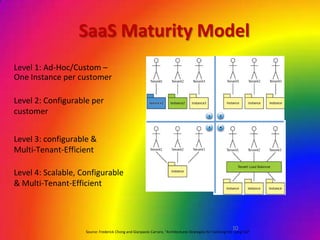
SaaS Maturity Model
Level 1: Ad-Hoc/Custom –
One Instance per customer

Level 2: Configurable per
customer


Level 3: configurable &
Multi-Tenant-Efficient

Level 4: Scalable, Configurable
& Multi-Tenant-Efficient


                                                                                                             10
                    Source: Frederick Chong and Gianpaolo Carraro, “Architectures Strategies for Catching the Long Tail”
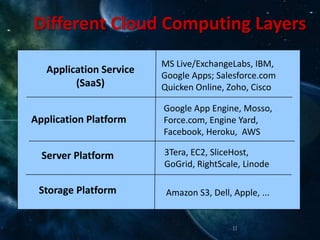
Different Cloud Computing Layers
                         MS Live/ExchangeLabs, IBM,
   Application Service
                         Google Apps; Salesforce.com
         (SaaS)          Quicken Online, Zoho, Cisco

                         Google App Engine, Mosso,
Application Platform     Force.com, Engine Yard,
                         Facebook, Heroku, AWS

  Server Platform        3Tera, EC2, SliceHost,
                         GoGrid, RightScale, Linode

 Storage Platform         Amazon S3, Dell, Apple, ...


                                           11
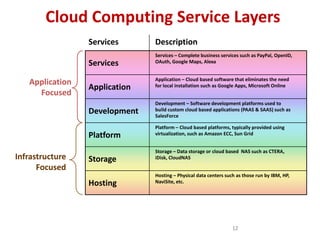
Cloud Computing Service Layers
                 Services      Description
                               Services – Complete business services such as PayPal, OpenID,
                 Services      OAuth, Google Maps, Alexa


                               Application – Cloud based software that eliminates the need
   Application
                 Application   for local installation such as Google Apps, Microsoft Online
     Focused
                               Development – Software development platforms used to
                 Development   build custom cloud based applications (PAAS & SAAS) such as
                               SalesForce

                               Platform – Cloud based platforms, typically provided using
                 Platform      virtualization, such as Amazon ECC, Sun Grid


                               Storage – Data storage or cloud based NAS such as CTERA,
Infrastructure   Storage       iDisk, CloudNAS
      Focused
                               Hosting – Physical data centers such as those run by IBM, HP,
                 Hosting       NaviSite, etc.


                                                                  12
Basic Cloud Characteristics
• The “no-need-to-know” in terms of the underlying
  details of infrastructure, applications interface with
  the infrastructure via the APIs.
• The “flexibility and elasticity” allows these systems to
  scale up and down at will
   – utilizing the resources of all kinds
      • CPU, storage, server capacity, load balancing, and databases
• The “pay as much as used and needed” type of utility
  computing and the “always on!, anywhere and any
  place” type of network-based computing.

                                                        13
Basic Cloud Characteristics
• Cloud are transparent to users and
  applications, they can be built in multiple
  ways
  – branded products, proprietary open source,
    hardware or software, or just off-the-shelf PCs.
• In general, they are built on clusters of PC
  servers and off-the-shelf components plus
  Open Source software combined with in-
  house applications and/or system software.

                                         14
Software as a Service (SaaS)
• SaaS is a model of software deployment where an
  application is hosted as a service provided to
  customers across the Internet.
• Saas alleviates the burden of software
  maintenance/support
   – but users relinquish control over software versions and
     requirements.
• Terms that are used in this sphere include
   – Platform as a Service (PaaS) and
   – Infrastructure as a Service (IaaS)

                                                15
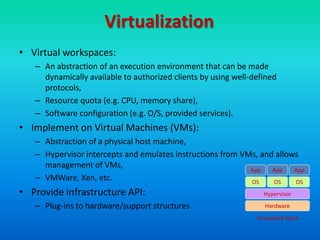
Virtualization
• Virtual workspaces:
   – An abstraction of an execution environment that can be made
     dynamically available to authorized clients by using well-defined
     protocols,
   – Resource quota (e.g. CPU, memory share),
   – Software configuration (e.g. O/S, provided services).
• Implement on Virtual Machines (VMs):
   – Abstraction of a physical host machine,
   – Hypervisor intercepts and emulates instructions from VMs, and allows
     management of VMs,                                     App   App   App
   – VMWare, Xen, etc.                                      OS    OS    OS
• Provide infrastructure API:                                     Hypervisor

   – Plug-ins to hardware/support structures                       Hardware
                                                                Virtualized Stack
Virtual Machines
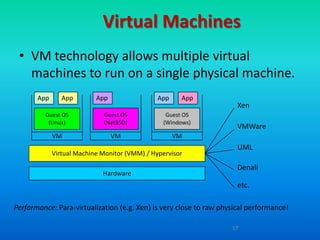
 • VM technology allows multiple virtual
   machines to run on a single physical machine.
       App      App        App                 App    App
                                                                     Xen
         Guest OS            Guest OS            Guest OS
          (Linux)            (NetBSD)           (Windows)
                                                                      VMWare
             VM                  VM                  VM
                                                                      UML
             Virtual Machine Monitor (VMM) / Hypervisor
                                                                      Denali
                             Hardware
                                                                      etc.

Performance: Para-virtualization (e.g. Xen) is very close to raw physical performance!

                                                                    17
Virtualization in General
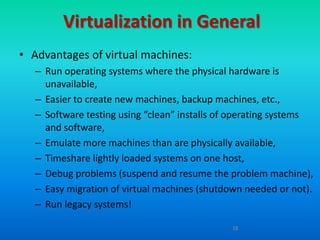
• Advantages of virtual machines:
   – Run operating systems where the physical hardware is
     unavailable,
   – Easier to create new machines, backup machines, etc.,
   – Software testing using “clean” installs of operating systems
     and software,
   – Emulate more machines than are physically available,
   – Timeshare lightly loaded systems on one host,
   – Debug problems (suspend and resume the problem machine),
   – Easy migration of virtual machines (shutdown needed or not).
   – Run legacy systems!

                                               18
What is the purpose and
             benefits?
• Cloud computing enables companies and
  applications, which are system infrastructure
  dependent, to be infrastructure-less.
• By using the Cloud infrastructure on “pay as used
  and on demand”, all of us can save in capital and
  operational investment!
• Clients can:
   – Put their data on the platform instead of on their own
     desktop PCs and/or on their own servers.
   – They can put their applications on the cloud and use the
     servers within the cloud to do processing and data
     manipulations etc.
                                                19
Cloud-Sourcing
• Why is it becoming a Big Deal:
   –   Using high-scale/low-cost providers,
   –   Any time/place access via web browser,
   –   Rapid scalability; incremental cost and load sharing,
   –   Can forget need to focus on local IT.
• Concerns:
   –   Performance, reliability, and SLAs,
   –   Control of data, and service parameters,
   –   Application features and choices,
   –   Interaction between Cloud providers,
   –   No standard API – mix of SOAP and REST!
   –   Privacy, security, compliance, trust…
                                                   20
Some Commercial Cloud
      Offerings


                  21
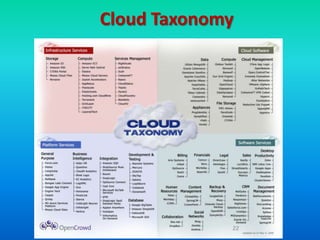
Cloud Taxonomy


             22
Cloud Storage
• Several large Web companies are now exploiting the
  fact that they have data storage capacity that can be
  hired out to others.
     – allows data stored remotely to be temporarily cached on
       desktop computers, mobile phones or other Internet-
       linked devices.


• Amazon’s Elastic Compute Cloud (EC2) and Simple
  Storage Solution (S3) are well known examples
     – Mechanical Turk


23
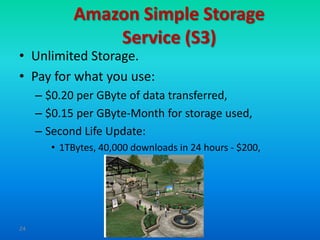
Amazon Simple Storage
                 Service (S3)
• Unlimited Storage.
• Pay for what you use:
     – $0.20 per GByte of data transferred,
     – $0.15 per GByte-Month for storage used,
     – Second Life Update:
        • 1TBytes, 40,000 downloads in 24 hours - $200,


24
Utility Computing – EC2
• Amazon Elastic Compute Cloud (EC2):
     – Elastic, marshal 1 to 100+ PCs via WS,
     – Machine Specs…,
     – Fairly cheap!
• Powered by Xen – a Virtual Machine:
     – Different from Vmware and VPC as uses “para-virtualization” where
       the guest OS is modified to use special hyper-calls:
     – Hardware contributions by Intel (VT-x/Vanderpool) and AMD (AMD-V).
     – Supports “Live Migration” of a virtual machine between hosts.
• Linux, Windows, OpenSolaris
• Management Console/AP


25
EC2 – The Basics
•    Load your image onto S3 and register it.
•    Boot your image from the Web Service.
•    Open up required ports for your image.
•    Connect to your image through SSH.
•    Execute you application…


26
Opportunities and Challenges
• The use of the cloud provides a number of
  opportunities:
     – It enables services to be used without any understanding
       of their infrastructure.
     – Cloud computing works using economies of scale:
        • It potentially lowers the outlay expense for start up companies, as
          they would no longer need to buy their own software or servers.
        • Cost would be by on-demand pricing.
        • Vendors and Service providers claim costs by establishing an
          ongoing revenue stream.
     – Data and services are stored remotely but accessible from
       “anywhere”.

27
Opportunities and Challenges
• In parallel there has been backlash against cloud computing:
     – Use of cloud computing means dependence on others and that could
       possibly limit flexibility and innovation:
         • The others are likely become the bigger Internet companies like Google
           and IBM, who may monopolise the market.
         • Some argue that this use of supercomputers is a return to the time of
           mainframe computing that the PC was a reaction against.
     – Security could prove to be a big issue:
         • It is still unclear how safe out-sourced data is and when using these
           services ownership of data is not always clear.
     – There are also issues relating to policy and access:
         •   If your data is stored abroad whose policy do you adhere to?
         •   What happens if the remote server goes down?
         •   How will you then access files?
         •   There have been cases of users being locked out of accounts and losing
             access to data.


28
Advantages of Cloud Computing
• Lower computer costs:
     – You do not need a high-powered and high-priced computer
       to run cloud computing's web-based applications.
     – Since applications run in the cloud, not on the desktop PC,
       your desktop PC does not need the processing power or hard
       disk space demanded by traditional desktop software.
     – When you are using web-based applications, your PC can be
       less expensive, with a smaller hard disk, less memory, more
       efficient processor...
     – In fact, your PC in this scenario does not even need a CD or
       DVD drive, as no software programs have to be loaded and
       no document files need to be saved.


29
Advantages of Cloud Computing
• Improved performance:
     – With few large programs hogging your computer's
       memory, you will see better performance from your PC.
     – Computers in a cloud computing system boot and run
       faster because they have fewer programs and processes
       loaded into memory…
• Reduced software costs:
     – Instead of purchasing expensive software applications, you
       can get most of what you need for free-ish!
        • most cloud computing applications today, such as the Google Docs suite.
     – better than paying for similar commercial software
        • which alone may be justification for switching to cloud applications.


30
Advantages of Cloud Computing
• Instant software updates:
     – Another advantage to cloud computing is that you are no longer faced
       with choosing between obsolete software and high upgrade costs.
     – When the application is web-based, updates happen automatically
         • available the next time you log into the cloud.
     – When you access a web-based application, you get the latest version
         • without needing to pay for or download an upgrade.


• Improved document format compatibility.
     – You do not have to worry about the documents you create on your
       machine being compatible with other users' applications or OSes
     – There are potentially no format incompatibilities when everyone is
       sharing documents and applications in the cloud.


31
Advantages of Cloud Computing
• Universal document access:
     – That is not a problem with cloud computing, because you
       do not take your documents with you.
     – Instead, they stay in the cloud, and you can access them
       whenever you have a computer and an Internet connection
     – Documents are instantly available from wherever you are
• Latest version availability:
     – When you edit a document at home, that edited version is
       what you see when you access the document at work.
     – The cloud always hosts the latest version of your documents
        • as long as you are connected, you are not in danger of having an outdated
          version


32
Advantages of Cloud Computing
• Easier group collaboration:
     – Sharing documents leads directly to better collaboration.
     – Many users do this as it is an important advantages of cloud
       computing
        • multiple users can collaborate easily on documents and projects
• Device independence.
     – You are no longer tethered to a single computer or network.
     – Changes to computers, applications and documents follow
       you through the cloud.
     – Move to a portable device, and your applications and
       documents are still available.

33
Disadvantages of Cloud Computing
• Requires a constant Internet connection:
     – Cloud computing is impossible if you cannot connect to the
       Internet.
     – Since you use the Internet to connect to both your
       applications and documents, if you do not have an Internet
       connection you cannot access anything, even your own
       documents.
     – A dead Internet connection means no work and in areas
       where Internet connections are few or inherently
       unreliable, this could be a deal-breaker.


34
Disadvantages of Cloud Computing
• Does not work well with low-speed connections:
     – Similarly, a low-speed Internet connection, such as that
       found with dial-up services, makes cloud computing
       painful at best and often impossible.
     – Web-based applications require a lot of bandwidth to
       download, as do large documents.
• Features might be limited:
     – This situation is bound to change, but today many web-
       based applications simply are not as full-featured as their
       desktop-based applications.
        • For example, you can do a lot more with Microsoft PowerPoint
          than with Google Presentation's web-based offering


35
Disadvantages of Cloud Computing
• Can be slow:
     – Even with a fast connection, web-based applications can
       sometimes be slower than accessing a similar software
       program on your desktop PC.
     – Everything about the program, from the interface to the
       current document, has to be sent back and forth from your
       computer to the computers in the cloud.
     – If the cloud servers happen to be backed up at that
       moment, or if the Internet is having a slow day, you would
       not get the instantaneous access you might expect from
       desktop applications.


36
Disadvantages of Cloud Computing
• Stored data might not be secure:
     – With cloud computing, all your data is stored on the cloud.
        • The questions is How secure is the cloud?
     – Can unauthorised users gain access to your confidential data?
• Stored data can be lost:
     – Theoretically, data stored in the cloud is safe, replicated
       across multiple machines.
     – But on the off chance that your data goes missing, you have
       no physical or local backup.
        • Put simply, relying on the cloud puts you at risk if the cloud lets you
          down.


37
Disadvantages of Cloud Computing
• HPC Systems:
     – Not clear that you can run compute-intensive HPC
       applications that use MPI/OpenMP!
     – Scheduling is important with this type of application
        • as you want all the VM to be co-located to minimize communication
          latency!
• General Concerns:
     – Each cloud systems uses different protocols and different APIs
        • may not be possible to run applications between cloud based systems
     – Amazon has created its own DB system (not SQL 92), and
       workflow system (many popular workflow systems out there)
        • so your normal applications will have to be adapted to execute on
          these platforms.

38
The Future
• Many of the activities loosely grouped together under cloud
  computing have already been happening and centralised
  computing activity is not a new phenomena
• Grid Computing was the last research-led centralised
  approach
• However there are concerns that the mainstream adoption of
  cloud computing could cause many problems for users
• Many new open source systems appearing that you can install
  and run on your local cluster
     – should be able to run a variety of applications on these systems


39
Cloud computing by prabhunath sharma

Cloud computing by prabhunath sharma

  • 5.
    Cloud Summary • Cloudcomputing is an umbrella term used to refer to Internet based development and services • A number of characteristics define cloud data, applications services and infrastructure: – Remotely hosted: Services or data are hosted on remote infrastructure. – Ubiquitous: Services or data are available from anywhere. – Commodified: The result is a utility computing model similar to traditional that of traditional utilities, like gas and electricity - you pay for what you would want!
  • 6.
  • 7.
    What is CloudComputing? • Shared pool of configurable computing resources • On-demand network access • Provisioned by the Service Provider
  • 8.
    Cloud Computing Characteristics •Common Characteristics: Massive Scale Resilient Computing Homogeneity Geographic Distribution Virtualization Service Orientation Low Cost Software Advanced Security • Essential Characteristics: On Demand Self-Service Broad Network Access Rapid Elasticity Resource Pooling Measured Service
  • 9.
    Cloud Service Models Software as a Platform as a Infrastructure as a Service (SaaS) Service (PaaS) Service (IaaS) SalesForce CRM LotusLive Google App Engine Adopted from: Effectively and Securely Using the Cloud Computing Paradigm by peter Mell, Tim Grance 9
  • 10.
    SaaS Maturity Model Level1: Ad-Hoc/Custom – One Instance per customer Level 2: Configurable per customer Level 3: configurable & Multi-Tenant-Efficient Level 4: Scalable, Configurable & Multi-Tenant-Efficient 10 Source: Frederick Chong and Gianpaolo Carraro, “Architectures Strategies for Catching the Long Tail”
  • 11.
    Different Cloud ComputingLayers MS Live/ExchangeLabs, IBM, Application Service Google Apps; Salesforce.com (SaaS) Quicken Online, Zoho, Cisco Google App Engine, Mosso, Application Platform Force.com, Engine Yard, Facebook, Heroku, AWS Server Platform 3Tera, EC2, SliceHost, GoGrid, RightScale, Linode Storage Platform Amazon S3, Dell, Apple, ... 11
  • 12.
    Cloud Computing ServiceLayers Services Description Services – Complete business services such as PayPal, OpenID, Services OAuth, Google Maps, Alexa Application – Cloud based software that eliminates the need Application Application for local installation such as Google Apps, Microsoft Online Focused Development – Software development platforms used to Development build custom cloud based applications (PAAS & SAAS) such as SalesForce Platform – Cloud based platforms, typically provided using Platform virtualization, such as Amazon ECC, Sun Grid Storage – Data storage or cloud based NAS such as CTERA, Infrastructure Storage iDisk, CloudNAS Focused Hosting – Physical data centers such as those run by IBM, HP, Hosting NaviSite, etc. 12
  • 13.
    Basic Cloud Characteristics •The “no-need-to-know” in terms of the underlying details of infrastructure, applications interface with the infrastructure via the APIs. • The “flexibility and elasticity” allows these systems to scale up and down at will – utilizing the resources of all kinds • CPU, storage, server capacity, load balancing, and databases • The “pay as much as used and needed” type of utility computing and the “always on!, anywhere and any place” type of network-based computing. 13
  • 14.
    Basic Cloud Characteristics •Cloud are transparent to users and applications, they can be built in multiple ways – branded products, proprietary open source, hardware or software, or just off-the-shelf PCs. • In general, they are built on clusters of PC servers and off-the-shelf components plus Open Source software combined with in- house applications and/or system software. 14
  • 15.
    Software as aService (SaaS) • SaaS is a model of software deployment where an application is hosted as a service provided to customers across the Internet. • Saas alleviates the burden of software maintenance/support – but users relinquish control over software versions and requirements. • Terms that are used in this sphere include – Platform as a Service (PaaS) and – Infrastructure as a Service (IaaS) 15
  • 16.
    Virtualization • Virtual workspaces: – An abstraction of an execution environment that can be made dynamically available to authorized clients by using well-defined protocols, – Resource quota (e.g. CPU, memory share), – Software configuration (e.g. O/S, provided services). • Implement on Virtual Machines (VMs): – Abstraction of a physical host machine, – Hypervisor intercepts and emulates instructions from VMs, and allows management of VMs, App App App – VMWare, Xen, etc. OS OS OS • Provide infrastructure API: Hypervisor – Plug-ins to hardware/support structures Hardware Virtualized Stack
  • 17.
    Virtual Machines •VM technology allows multiple virtual machines to run on a single physical machine. App App App App App Xen Guest OS Guest OS Guest OS (Linux) (NetBSD) (Windows) VMWare VM VM VM UML Virtual Machine Monitor (VMM) / Hypervisor Denali Hardware etc. Performance: Para-virtualization (e.g. Xen) is very close to raw physical performance! 17
  • 18.
    Virtualization in General •Advantages of virtual machines: – Run operating systems where the physical hardware is unavailable, – Easier to create new machines, backup machines, etc., – Software testing using “clean” installs of operating systems and software, – Emulate more machines than are physically available, – Timeshare lightly loaded systems on one host, – Debug problems (suspend and resume the problem machine), – Easy migration of virtual machines (shutdown needed or not). – Run legacy systems! 18
  • 19.
    What is thepurpose and benefits? • Cloud computing enables companies and applications, which are system infrastructure dependent, to be infrastructure-less. • By using the Cloud infrastructure on “pay as used and on demand”, all of us can save in capital and operational investment! • Clients can: – Put their data on the platform instead of on their own desktop PCs and/or on their own servers. – They can put their applications on the cloud and use the servers within the cloud to do processing and data manipulations etc. 19
  • 20.
    Cloud-Sourcing • Why isit becoming a Big Deal: – Using high-scale/low-cost providers, – Any time/place access via web browser, – Rapid scalability; incremental cost and load sharing, – Can forget need to focus on local IT. • Concerns: – Performance, reliability, and SLAs, – Control of data, and service parameters, – Application features and choices, – Interaction between Cloud providers, – No standard API – mix of SOAP and REST! – Privacy, security, compliance, trust… 20
  • 21.
  • 22.
  • 23.
    Cloud Storage • Severallarge Web companies are now exploiting the fact that they have data storage capacity that can be hired out to others. – allows data stored remotely to be temporarily cached on desktop computers, mobile phones or other Internet- linked devices. • Amazon’s Elastic Compute Cloud (EC2) and Simple Storage Solution (S3) are well known examples – Mechanical Turk 23
  • 24.
    Amazon Simple Storage Service (S3) • Unlimited Storage. • Pay for what you use: – $0.20 per GByte of data transferred, – $0.15 per GByte-Month for storage used, – Second Life Update: • 1TBytes, 40,000 downloads in 24 hours - $200, 24
  • 25.
    Utility Computing –EC2 • Amazon Elastic Compute Cloud (EC2): – Elastic, marshal 1 to 100+ PCs via WS, – Machine Specs…, – Fairly cheap! • Powered by Xen – a Virtual Machine: – Different from Vmware and VPC as uses “para-virtualization” where the guest OS is modified to use special hyper-calls: – Hardware contributions by Intel (VT-x/Vanderpool) and AMD (AMD-V). – Supports “Live Migration” of a virtual machine between hosts. • Linux, Windows, OpenSolaris • Management Console/AP 25
  • 26.
    EC2 – TheBasics • Load your image onto S3 and register it. • Boot your image from the Web Service. • Open up required ports for your image. • Connect to your image through SSH. • Execute you application… 26
  • 27.
    Opportunities and Challenges •The use of the cloud provides a number of opportunities: – It enables services to be used without any understanding of their infrastructure. – Cloud computing works using economies of scale: • It potentially lowers the outlay expense for start up companies, as they would no longer need to buy their own software or servers. • Cost would be by on-demand pricing. • Vendors and Service providers claim costs by establishing an ongoing revenue stream. – Data and services are stored remotely but accessible from “anywhere”. 27
  • 28.
    Opportunities and Challenges •In parallel there has been backlash against cloud computing: – Use of cloud computing means dependence on others and that could possibly limit flexibility and innovation: • The others are likely become the bigger Internet companies like Google and IBM, who may monopolise the market. • Some argue that this use of supercomputers is a return to the time of mainframe computing that the PC was a reaction against. – Security could prove to be a big issue: • It is still unclear how safe out-sourced data is and when using these services ownership of data is not always clear. – There are also issues relating to policy and access: • If your data is stored abroad whose policy do you adhere to? • What happens if the remote server goes down? • How will you then access files? • There have been cases of users being locked out of accounts and losing access to data. 28
  • 29.
    Advantages of CloudComputing • Lower computer costs: – You do not need a high-powered and high-priced computer to run cloud computing's web-based applications. – Since applications run in the cloud, not on the desktop PC, your desktop PC does not need the processing power or hard disk space demanded by traditional desktop software. – When you are using web-based applications, your PC can be less expensive, with a smaller hard disk, less memory, more efficient processor... – In fact, your PC in this scenario does not even need a CD or DVD drive, as no software programs have to be loaded and no document files need to be saved. 29
  • 30.
    Advantages of CloudComputing • Improved performance: – With few large programs hogging your computer's memory, you will see better performance from your PC. – Computers in a cloud computing system boot and run faster because they have fewer programs and processes loaded into memory… • Reduced software costs: – Instead of purchasing expensive software applications, you can get most of what you need for free-ish! • most cloud computing applications today, such as the Google Docs suite. – better than paying for similar commercial software • which alone may be justification for switching to cloud applications. 30
  • 31.
    Advantages of CloudComputing • Instant software updates: – Another advantage to cloud computing is that you are no longer faced with choosing between obsolete software and high upgrade costs. – When the application is web-based, updates happen automatically • available the next time you log into the cloud. – When you access a web-based application, you get the latest version • without needing to pay for or download an upgrade. • Improved document format compatibility. – You do not have to worry about the documents you create on your machine being compatible with other users' applications or OSes – There are potentially no format incompatibilities when everyone is sharing documents and applications in the cloud. 31
  • 32.
    Advantages of CloudComputing • Universal document access: – That is not a problem with cloud computing, because you do not take your documents with you. – Instead, they stay in the cloud, and you can access them whenever you have a computer and an Internet connection – Documents are instantly available from wherever you are • Latest version availability: – When you edit a document at home, that edited version is what you see when you access the document at work. – The cloud always hosts the latest version of your documents • as long as you are connected, you are not in danger of having an outdated version 32
  • 33.
    Advantages of CloudComputing • Easier group collaboration: – Sharing documents leads directly to better collaboration. – Many users do this as it is an important advantages of cloud computing • multiple users can collaborate easily on documents and projects • Device independence. – You are no longer tethered to a single computer or network. – Changes to computers, applications and documents follow you through the cloud. – Move to a portable device, and your applications and documents are still available. 33
  • 34.
    Disadvantages of CloudComputing • Requires a constant Internet connection: – Cloud computing is impossible if you cannot connect to the Internet. – Since you use the Internet to connect to both your applications and documents, if you do not have an Internet connection you cannot access anything, even your own documents. – A dead Internet connection means no work and in areas where Internet connections are few or inherently unreliable, this could be a deal-breaker. 34
  • 35.
    Disadvantages of CloudComputing • Does not work well with low-speed connections: – Similarly, a low-speed Internet connection, such as that found with dial-up services, makes cloud computing painful at best and often impossible. – Web-based applications require a lot of bandwidth to download, as do large documents. • Features might be limited: – This situation is bound to change, but today many web- based applications simply are not as full-featured as their desktop-based applications. • For example, you can do a lot more with Microsoft PowerPoint than with Google Presentation's web-based offering 35
  • 36.
    Disadvantages of CloudComputing • Can be slow: – Even with a fast connection, web-based applications can sometimes be slower than accessing a similar software program on your desktop PC. – Everything about the program, from the interface to the current document, has to be sent back and forth from your computer to the computers in the cloud. – If the cloud servers happen to be backed up at that moment, or if the Internet is having a slow day, you would not get the instantaneous access you might expect from desktop applications. 36
  • 37.
    Disadvantages of CloudComputing • Stored data might not be secure: – With cloud computing, all your data is stored on the cloud. • The questions is How secure is the cloud? – Can unauthorised users gain access to your confidential data? • Stored data can be lost: – Theoretically, data stored in the cloud is safe, replicated across multiple machines. – But on the off chance that your data goes missing, you have no physical or local backup. • Put simply, relying on the cloud puts you at risk if the cloud lets you down. 37
  • 38.
    Disadvantages of CloudComputing • HPC Systems: – Not clear that you can run compute-intensive HPC applications that use MPI/OpenMP! – Scheduling is important with this type of application • as you want all the VM to be co-located to minimize communication latency! • General Concerns: – Each cloud systems uses different protocols and different APIs • may not be possible to run applications between cloud based systems – Amazon has created its own DB system (not SQL 92), and workflow system (many popular workflow systems out there) • so your normal applications will have to be adapted to execute on these platforms. 38
  • 39.
    The Future • Manyof the activities loosely grouped together under cloud computing have already been happening and centralised computing activity is not a new phenomena • Grid Computing was the last research-led centralised approach • However there are concerns that the mainstream adoption of cloud computing could cause many problems for users • Many new open source systems appearing that you can install and run on your local cluster – should be able to run a variety of applications on these systems 39

Editor's Notes

  • #29 Freedom of Information == FOI