TinyMCE Editor
TinyMCE Editor
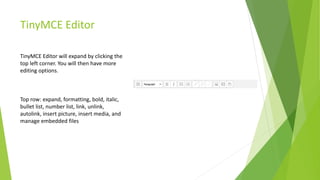
TinyMCE Editor will expand by clicking the
top left corner. You will then have more
editing options.
Top row: expand, formatting, bold, italic,
bullet list, number list, link, unlink,
autolink, insert picture, insert media, and
manage embedded files
TinyMCE Editor
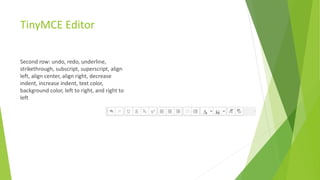
Second row: undo, redo, underline,
strikethrough, subscript, superscript, align
left, align center, align right, decrease
indent, increase indent, text color,
background color, left to right, and right to
left
TinyMCE Editor
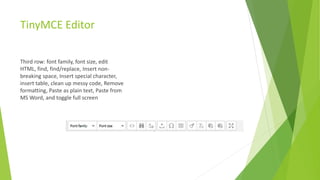
Third row: font family, font size, edit
HTML, find, find/replace, Insert non-
breaking space, Insert special character,
insert table, clean up messy code, Remove
formatting, Paste as plain text, Paste from
MS Word, and toggle full screen
HTML
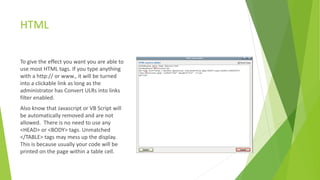
To give the effect you want you are able to
use most HTML tags. If you type anything
with a http:// or www., it will be turned
into a clickable link as long as the
administrator has Convert ULRs into links
filter enabled.
Also know that Javascript or VB Script will
be automatically removed and are not
allowed. There is no need to use any
<HEAD> or <BODY> tags. Unmatched
</TABLE> tags may mess up the display.
This is because usually your code will be
printed on the page within a table cell.

Tiny mce editor

  • 1.
  • 2.
    TinyMCE Editor TinyMCE Editorwill expand by clicking the top left corner. You will then have more editing options. Top row: expand, formatting, bold, italic, bullet list, number list, link, unlink, autolink, insert picture, insert media, and manage embedded files
  • 3.
    TinyMCE Editor Second row:undo, redo, underline, strikethrough, subscript, superscript, align left, align center, align right, decrease indent, increase indent, text color, background color, left to right, and right to left
  • 4.
    TinyMCE Editor Third row:font family, font size, edit HTML, find, find/replace, Insert non- breaking space, Insert special character, insert table, clean up messy code, Remove formatting, Paste as plain text, Paste from MS Word, and toggle full screen
  • 5.
    HTML To give theeffect you want you are able to use most HTML tags. If you type anything with a http:// or www., it will be turned into a clickable link as long as the administrator has Convert ULRs into links filter enabled. Also know that Javascript or VB Script will be automatically removed and are not allowed. There is no need to use any <HEAD> or <BODY> tags. Unmatched </TABLE> tags may mess up the display. This is because usually your code will be printed on the page within a table cell.