Basic Forum
Basic Forum
Forums are a great way to have Instructor and
student collaboration. There are four basic forums.
These can be graded by just the instructor or by
students.
Forum Setup
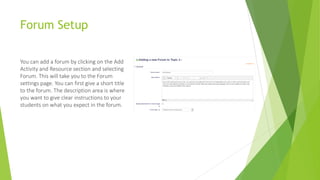
You can add a forum by clicking on the Add
Activity and Resource section and selecting
Forum. This will take you to the Forum
settings page. You can first give a short title
to the forum. The description area is where
you want to give clear instructions to your
students on what you expect in the forum.
Basic Forums
 A single simple discussion - A single topic
discussion developed on one page, which
is useful for short focused discussions
(cannot be used with separate groups)
 Standard forum for general use - An open
forum where anyone can start a new
topic at any time; this is the best general-
purpose forum
 Each person posts one discussion - Each
person can post exactly one new
discussion topic (everyone can reply to
them though); this is useful when you
want each student to start a discussion
about, say, their reflections on the week's
topic, and everyone else responds to
these
 Q and A Forum - Instead of initiating
discussions participants pose a question
in the initial post of a discussion. Students
may reply with an answer, but they will
not see the replies of other Students to
the question in that discussion until they
have themselves replied to the same
discussion.
 Standard forum displayed in a blog-like
format
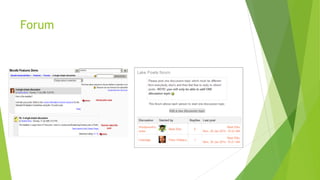
Forum

Basic forum documentaton

  • 1.
  • 2.
    Basic Forum Forums area great way to have Instructor and student collaboration. There are four basic forums. These can be graded by just the instructor or by students.
  • 3.
    Forum Setup You canadd a forum by clicking on the Add Activity and Resource section and selecting Forum. This will take you to the Forum settings page. You can first give a short title to the forum. The description area is where you want to give clear instructions to your students on what you expect in the forum.
  • 4.
    Basic Forums  Asingle simple discussion - A single topic discussion developed on one page, which is useful for short focused discussions (cannot be used with separate groups)  Standard forum for general use - An open forum where anyone can start a new topic at any time; this is the best general- purpose forum  Each person posts one discussion - Each person can post exactly one new discussion topic (everyone can reply to them though); this is useful when you want each student to start a discussion about, say, their reflections on the week's topic, and everyone else responds to these  Q and A Forum - Instead of initiating discussions participants pose a question in the initial post of a discussion. Students may reply with an answer, but they will not see the replies of other Students to the question in that discussion until they have themselves replied to the same discussion.  Standard forum displayed in a blog-like format
  • 5.