THINK LIKE
A LIBRARIAN
ELM databases for beginners
MILI 2010-2011
LeAnn Suchy, Metronet
leann@metronet.lib.mn.us
http://www.flickr.com/photos/fabi_k/3546466770/
Visible versus Invisible Web
 “VisibleWeb” (often called “Surface
Web”)
 Stuff you find via search engines like
Google,Yahoo, Bing, etc.
 “InvisibleWeb” (often called
“HiddenWeb” or “DeepWeb”)
 Things not searchable by regular search
engines
 Think subscription databases
Visible Web
 Last year Google indexed its
trillionth webpage (1 trillion unique
URLs)
 This is only half of theVisibleWeb
 Results are relevancy ranked
 Over 200 factors determine relevancy
 Popularity is a large factor
 Relevancy rankings aren’t always credible
http://www.ipl.org/
Invisible Web
 InvisibleWeb is anywhere from 100
to 500 times bigger than theVisible
Web (or even bigger?)
 Includes more credible sources
 Search engines like Google can’t
index the InvisibleWeb because:
 Items found via a query
 Passwords
How do I find Invisible Web?
 Think DATABASES
 Database through the government,
libraries and state of MN
 Databases through your school
 Today we’re focusing on: ELM
databases (ELM = Electronic Library
for Minnesota
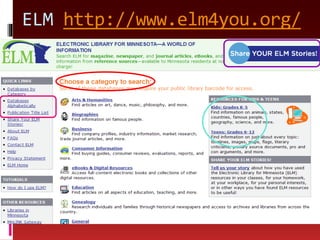
ELM http://www.elm4you.org/
Searchasaurus
Kids Search
Academic Search Premier
InfoTrac Junior Edition
InfoTrac Student Edition
¡Informe!
Britannica Online
ProQuest Newsstand Complete
Student Resources in Context
CAMIO
Many more
 Almost 50 ELM databases
 More databases available through
your school, so talk to your media
specialist
 And now, think like a librarian…
Before recommending, explore
 Ask these questions of the database:
 What type of content is provided?
 How many publications are included?Years?
 How frequently is it updated?
 What navigational tools are provided?
 Are there tutorials? A help section? Search tips?
 How are search results displayed?
 Can I save, email or print articles? RSS feeds?
 Which students would best be served by this?
 These questions and more are on
Database Exploration Checklist
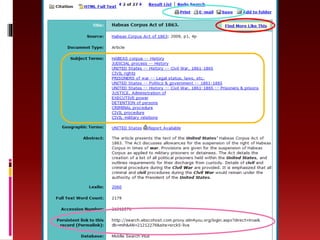
Detailed Search
Search like a librarian
Between now and our meeting
 Check out the Database Exploration
Checklist worksheet
 Go into the ELM databases (or
databases linked from your school
library) and use the worksheet to
analyze a couple databases
 Blog about your experiences
 When we meet in-person: Bring an
assignment with you where you had to
have students research something

Think like a librarian 2010

  • 1.
    THINK LIKE A LIBRARIAN ELMdatabases for beginners MILI 2010-2011 LeAnn Suchy, Metronet leann@metronet.lib.mn.us http://www.flickr.com/photos/fabi_k/3546466770/
  • 2.
    Visible versus InvisibleWeb  “VisibleWeb” (often called “Surface Web”)  Stuff you find via search engines like Google,Yahoo, Bing, etc.  “InvisibleWeb” (often called “HiddenWeb” or “DeepWeb”)  Things not searchable by regular search engines  Think subscription databases
  • 3.
    Visible Web  Lastyear Google indexed its trillionth webpage (1 trillion unique URLs)  This is only half of theVisibleWeb  Results are relevancy ranked  Over 200 factors determine relevancy  Popularity is a large factor  Relevancy rankings aren’t always credible
  • 4.
  • 8.
    Invisible Web  InvisibleWebis anywhere from 100 to 500 times bigger than theVisible Web (or even bigger?)  Includes more credible sources  Search engines like Google can’t index the InvisibleWeb because:  Items found via a query  Passwords
  • 9.
    How do Ifind Invisible Web?  Think DATABASES  Database through the government, libraries and state of MN  Databases through your school  Today we’re focusing on: ELM databases (ELM = Electronic Library for Minnesota
  • 10.
  • 11.
  • 12.
  • 13.
  • 14.
  • 15.
  • 16.
  • 17.
  • 18.
  • 19.
  • 20.
  • 21.
    Many more  Almost50 ELM databases  More databases available through your school, so talk to your media specialist  And now, think like a librarian…
  • 22.
    Before recommending, explore Ask these questions of the database:  What type of content is provided?  How many publications are included?Years?  How frequently is it updated?  What navigational tools are provided?  Are there tutorials? A help section? Search tips?  How are search results displayed?  Can I save, email or print articles? RSS feeds?  Which students would best be served by this?  These questions and more are on Database Exploration Checklist
  • 23.
  • 25.
  • 26.
    Search like alibrarian
  • 31.
    Between now andour meeting  Check out the Database Exploration Checklist worksheet  Go into the ELM databases (or databases linked from your school library) and use the worksheet to analyze a couple databases  Blog about your experiences  When we meet in-person: Bring an assignment with you where you had to have students research something