NEC Virtual PC Center (VPCC)


For VPCC virtual desktop solutions

Thin Client Terminals
Create a secure and highly productive working
environment with NEC’s thin client terminals

NEC’s virtual desktop solutions simplify management of your business

Ensuring security and reducing TCO (Total Cost of Ownership) are no longer fads--
                                                                               --they are
essentials for any business looking to grow. As an effective solution to both of these issues,
thin client systems are rapidly gaining in popularity. Thin client solutions eliminate the need for
data storage on client terminals by consolidating data and applications that have traditionally
been stored on individual PCs. Not only does this minimize the risk of information leaks, it also
enables centralized management of multiple terminals, thus reducing operational costs.
NEC’s thin client system brings you tremendous growth opportunities.


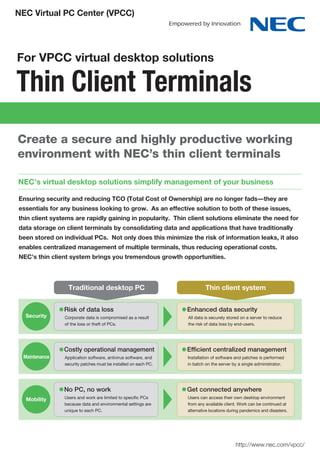
                 Traditional desktop PC                                   Thin client system


                Risk of data loss                                Enhanced data security
  Security      Corporate data is compromised as a result        All data is securely stored on a server to reduce
                of the loss or theft of PCs.                     the risk of data loss by end-users.


                Costly operational management                    Efficient centralized management
 Maintenance    Application software, antivirus software, and    Installation of software and patches is performed
                security patches must be installed on each PC.   in batch on the server by a single administrator.


                No PC, no work                                   Get connected anywhere
  Mobility      Users and work are limited to specific PCs       Users can access their own desktop environment
                because data and environmental settings are      from any available client. Work can be continued at
                unique to each PC.                               alternative locations during pandemics and disasters.


                                                                                          http://www.nec.com/vpcc/
Thin Client Terminals
    Thin client system for virtual desktop solutions

    Virtual PC Center (VPCC)
     Choosing the right server platform, along with the right terminals, makes a big difference in setting up a thin client environment.
     NEC proudly offers rack-optimized and blade server systems for businesses which require expandability and load balancing
     capabilities in anticipation of future expansion of the number of client terminals.
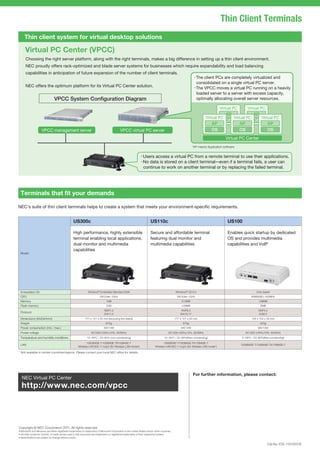
                                                                                                                                          ・The client PCs are completely virtualized and
                                                                                                                                           consolidated on a single virtual PC server.
     NEC offers the optimum platform for its Virtual PC Center solution.                                                                  ・The VPCC moves a virtual PC running on a heavily
                                                                                                                                           loaded server to a server with excess capacity,
                           VPCC System Configuration Diagram                                                                                optimally allocating overall server resources.

                                                                                                                                                                 Virtual PC       Virtual PC
                                                                                                                                                               AP            AP
                                                                                                                                                    Virtual PC    Virtual PC    Virtual PC
                                                                                                                                                               OS            OS
                                                                                                                                                        AP            AP            AP
                 VPCC management server                                         VPCC virtual PC server                                                  OS            OS            OS
                                                                                                                                                                    Virtual PC Center
                                                                                                                                          *AP means Application software.


                                                                                                    ・Users access a virtual PC from a remote terminal to use their applications.
                                                                                                    ・ data is stored on a client terminal---even if a terminal fails, a user can
                                                                                                     No
                                                                                                     continue to work on another terminal or by replacing the failed terminal.


 Terminals that fit your demands

NEC’s suite of thin client terminals helps to create a system that meets your environment-specific requirements.


                                          US300c                                                         US110c                                                      US100

                                          High performance, highly extensible                            Secure and affordable terminal                              Enables quick startup by dedicated
                                          terminal enabling local applications,                          featuring dual monitor and                                  OS and provides multimedia
                                          dual monitor and multimedia                                    multimedia capabilities                                     capabilities and VoIP
                                          capabilities
 Model


 Embedded OS                                          Windows® Embedded Standard 2009                                      Windows® CE 6.0                                              Unix-based
 CPU                                                            VIA Eden 1GHz                                                VIA Eden 1GHz                                           ARM926EJ 400MHz
 Memory                                                              1GB                                                        512MB                                                     128MB
 Flash memory                                                        2GB                                                        128MB                                                      2MB
                                                                   RDP7.0                                                       RDP6.0                                                    RDP5.2
 Protocol
                                                                   ICA11.2                                                     ICA10.17                                                   ICA8.0
 Dimensions (WxDxHmm)                               177 x 121 x 34 mm (excluding the stand)                                177 x 121 x 34 mm                                         150 x 104 x 34 mm
 Weight                                                              670g                                                         670g                                                     420g
 Power consumption (min./ max.)                                    5W/14W                                                       5W/14W                                                   9W/13W
 Power voltage                                           AC100V-240V±10%, 50/60Hz                                    AC100V-240V±10%, 50/60Hz                                    AC100V-240V±10%, 50/60Hz
 Temparature and humidity conditions                 10~35ºC / 20~80% (non-condensing)                            10~35ºC / 20~80%(Non-condensing)                            5~35ºC / 20~80%(Non-condensing)
                                                     1000BASE-T/100BASE-TX/10BASE-T                               1000BASE-T/100BASE-TX/10BASE-T
 LAN                                                                                                                                                                          1000BASE-T/100BASE-TX/10BASE-T
                                              Wireless LAN 802.11 b/g/n (for Wireless LAN model*)          Wireless LAN 802.11 b/g/n (for Wireless LAN model*)

* Not available in certain countries/regions. Please contact your local NEC office for details.


                                                                                                                                          For further information, please contact:
  NEC Virtual PC Center
  http://www.nec.com/vpcc


Copyright © NEC Corporation 2011. All rights reserved.


                                                                                                                                                                                                  Cat.No. E05-11010001E

NEC Virtual PC Center (VPCC)

  • 1.
    NEC Virtual PCCenter (VPCC) For VPCC virtual desktop solutions Thin Client Terminals Create a secure and highly productive working environment with NEC’s thin client terminals NEC’s virtual desktop solutions simplify management of your business Ensuring security and reducing TCO (Total Cost of Ownership) are no longer fads-- --they are essentials for any business looking to grow. As an effective solution to both of these issues, thin client systems are rapidly gaining in popularity. Thin client solutions eliminate the need for data storage on client terminals by consolidating data and applications that have traditionally been stored on individual PCs. Not only does this minimize the risk of information leaks, it also enables centralized management of multiple terminals, thus reducing operational costs. NEC’s thin client system brings you tremendous growth opportunities. Traditional desktop PC Thin client system Risk of data loss Enhanced data security Security Corporate data is compromised as a result All data is securely stored on a server to reduce of the loss or theft of PCs. the risk of data loss by end-users. Costly operational management Efficient centralized management Maintenance Application software, antivirus software, and Installation of software and patches is performed security patches must be installed on each PC. in batch on the server by a single administrator. No PC, no work Get connected anywhere Mobility Users and work are limited to specific PCs Users can access their own desktop environment because data and environmental settings are from any available client. Work can be continued at unique to each PC. alternative locations during pandemics and disasters. http://www.nec.com/vpcc/
  • 2.
    Thin Client Terminals Thin client system for virtual desktop solutions Virtual PC Center (VPCC) Choosing the right server platform, along with the right terminals, makes a big difference in setting up a thin client environment. NEC proudly offers rack-optimized and blade server systems for businesses which require expandability and load balancing capabilities in anticipation of future expansion of the number of client terminals. ・The client PCs are completely virtualized and consolidated on a single virtual PC server. NEC offers the optimum platform for its Virtual PC Center solution. ・The VPCC moves a virtual PC running on a heavily loaded server to a server with excess capacity, VPCC System Configuration Diagram optimally allocating overall server resources. Virtual PC Virtual PC AP AP Virtual PC Virtual PC Virtual PC OS OS AP AP AP VPCC management server VPCC virtual PC server OS OS OS Virtual PC Center *AP means Application software. ・Users access a virtual PC from a remote terminal to use their applications. ・ data is stored on a client terminal---even if a terminal fails, a user can No continue to work on another terminal or by replacing the failed terminal. Terminals that fit your demands NEC’s suite of thin client terminals helps to create a system that meets your environment-specific requirements. US300c US110c US100 High performance, highly extensible Secure and affordable terminal Enables quick startup by dedicated terminal enabling local applications, featuring dual monitor and OS and provides multimedia dual monitor and multimedia multimedia capabilities capabilities and VoIP capabilities Model Embedded OS Windows® Embedded Standard 2009 Windows® CE 6.0 Unix-based CPU VIA Eden 1GHz VIA Eden 1GHz ARM926EJ 400MHz Memory 1GB 512MB 128MB Flash memory 2GB 128MB 2MB RDP7.0 RDP6.0 RDP5.2 Protocol ICA11.2 ICA10.17 ICA8.0 Dimensions (WxDxHmm) 177 x 121 x 34 mm (excluding the stand) 177 x 121 x 34 mm 150 x 104 x 34 mm Weight 670g 670g 420g Power consumption (min./ max.) 5W/14W 5W/14W 9W/13W Power voltage AC100V-240V±10%, 50/60Hz AC100V-240V±10%, 50/60Hz AC100V-240V±10%, 50/60Hz Temparature and humidity conditions 10~35ºC / 20~80% (non-condensing) 10~35ºC / 20~80%(Non-condensing) 5~35ºC / 20~80%(Non-condensing) 1000BASE-T/100BASE-TX/10BASE-T 1000BASE-T/100BASE-TX/10BASE-T LAN 1000BASE-T/100BASE-TX/10BASE-T Wireless LAN 802.11 b/g/n (for Wireless LAN model*) Wireless LAN 802.11 b/g/n (for Wireless LAN model*) * Not available in certain countries/regions. Please contact your local NEC office for details. For further information, please contact: NEC Virtual PC Center http://www.nec.com/vpcc Copyright © NEC Corporation 2011. All rights reserved. Cat.No. E05-11010001E