THE WORLD WIDE WEB

AnGeL SopHiE
THE INTERNET

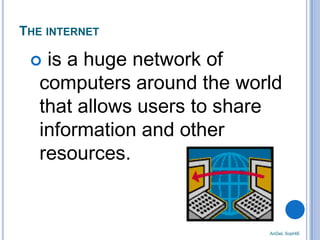
is a huge network of
computers around the world
that allows users to share
information and other
resources.



AnGeL SopHiE
Individuals of all ages use the Internet to search for
information on almost any topic.
☻ Doctors – to know about new drugs and keep themselves

updated on the current treatments and trends in medical practice.
☻ Students – to find information.
☻ Teachers – to find data for their research, host online classes,
make instructional materials available outside class time, post
grades and publish electronic announcements.
☻ Consumers shop online, pay bills and transact with their banks.

People are continually coming up with new uses for the
Internet, making it increasingly valuable to individuals and
businesses.

AnGeL SopHiE
THE WORLD WIDE WEB
or the web is a collection of
electronic documents that are
linked together like a spider web.

Web Page
Web Site

• Is an electronic document written in a
computer language called Hypertext
Markup Language (HTML).
• Is a collection of related web pages
managed by an individual or an
organization.

AnGeL SopHiE

these documents are stored on
computers called servers located
around the world.
AnGeL SopHiE

WEB BROWSERS
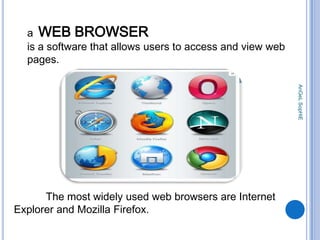
a WEB BROWSER
is a software that allows users to access and view web
pages.
AnGeL SopHiE

The most widely used web browsers are Internet
Explorer and Mozilla Firefox.
WHAT IS HOME PAGE?

It is the starting web page of a browser

It provides connections to other
documents, web pages or
websites.

AnGeL SopHiE

It provides information about the
website’s purpose and content.
AnGeL SopHiE

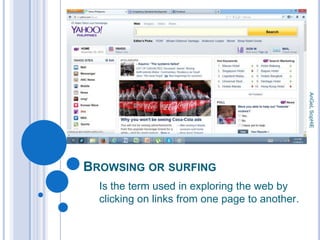
BROWSING OR SURFING
Is the term used in exploring the web by
clicking on links from one page to another.
DOWNLOADING

UPLOADING
• is the process of
copying, sending or
transferring files from your
computer to a server.

AnGeL SopHiE

• is the process of transferring
information, such as from a
server on the internet to your
computer.
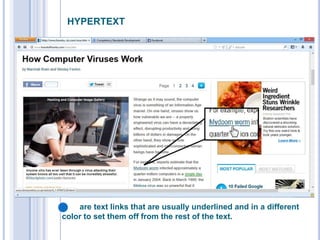
HYPERTEXT

AnGeL SopHiE

..
are text links that are usually underlined and in a different
color to set them off from the rest of the text.
NAVIGATION
AnGeL SopHiE

TOOLS
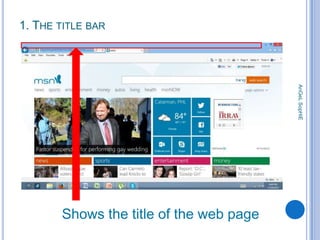
1. THE TITLE BAR

AnGeL SopHiE

Shows the title of the web page
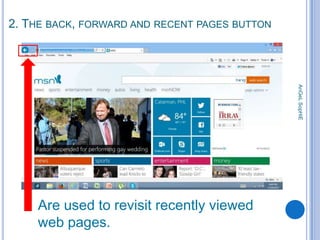
2. THE BACK, FORWARD AND RECENT PAGES BUTTON

AnGeL SopHiE

Are used to revisit recently viewed
web pages.
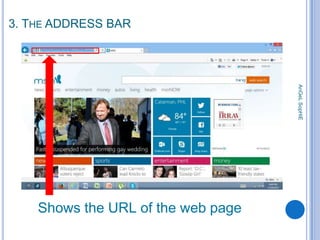
3. THE ADDRESS BAR

AnGeL SopHiE

Shows the URL of the web page
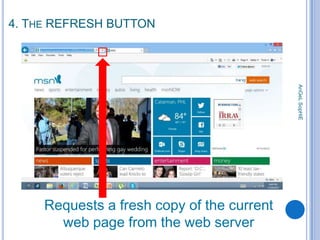
4. THE REFRESH BUTTON

AnGeL SopHiE

Requests a fresh copy of the current
web page from the web server
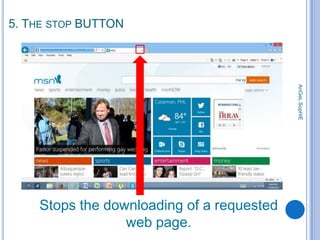
5. THE STOP BUTTON

AnGeL SopHiE

Stops the downloading of a requested
web page.
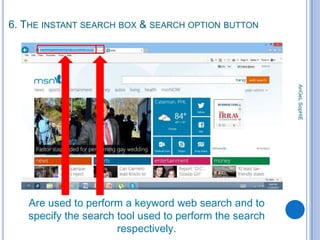
6. THE INSTANT SEARCH BOX & SEARCH OPTION BUTTON

AnGeL SopHiE

Are used to perform a keyword web search and to
specify the search tool used to perform the search
respectively.
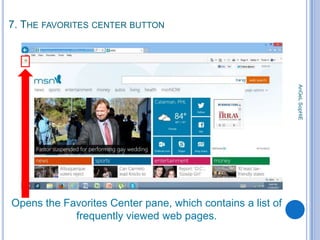
7. THE FAVORITES CENTER BUTTON

AnGeL SopHiE

Opens the Favorites Center pane, which contains a list of
frequently viewed web pages.
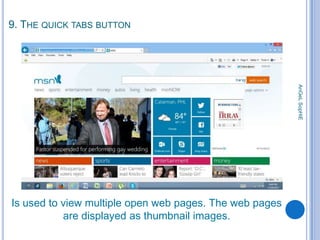
9. THE QUICK TABS BUTTON

AnGeL SopHiE

Is used to view multiple open web pages. The web pages
are displayed as thumbnail images.
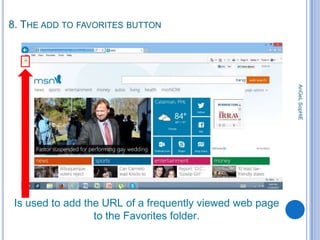
8. THE ADD TO FAVORITES BUTTON

AnGeL SopHiE

Is used to add the URL of a frequently viewed web page
to the Favorites folder.
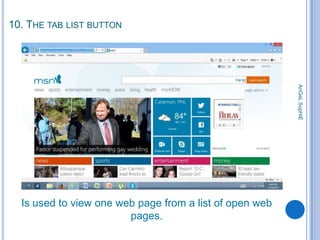
10. THE TAB LIST BUTTON

AnGeL SopHiE

Is used to view one web page from a list of open web
pages.
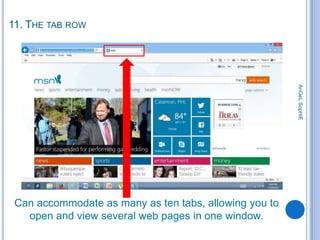
11. THE TAB ROW

AnGeL SopHiE

Can accommodate as many as ten tabs, allowing you to
open and view several web pages in one window.
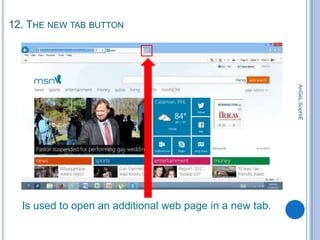
12. THE NEW TAB BUTTON

AnGeL SopHiE

Is used to open an additional web page in a new tab.
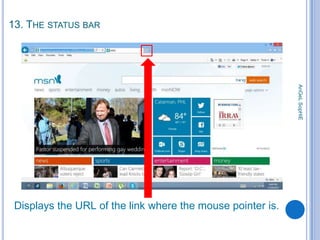
13. THE STATUS BAR

AnGeL SopHiE

Displays the URL of the link where the mouse pointer is.
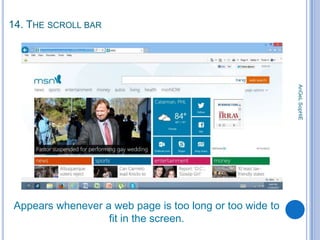
14. THE SCROLL BAR

AnGeL SopHiE

Appears whenever a web page is too long or too wide to
fit in the screen.
REFERENCE

Second Edition
By: Clifford P. Esteban

AnGeL SopHiE

The amazing World of Computers 5

The World Wide Web

  • 1.
    THE WORLD WIDEWEB AnGeL SopHiE
  • 2.
    THE INTERNET is ahuge network of computers around the world that allows users to share information and other resources.  AnGeL SopHiE
  • 3.
    Individuals of allages use the Internet to search for information on almost any topic. ☻ Doctors – to know about new drugs and keep themselves updated on the current treatments and trends in medical practice. ☻ Students – to find information. ☻ Teachers – to find data for their research, host online classes, make instructional materials available outside class time, post grades and publish electronic announcements. ☻ Consumers shop online, pay bills and transact with their banks. People are continually coming up with new uses for the Internet, making it increasingly valuable to individuals and businesses. AnGeL SopHiE
  • 4.
    THE WORLD WIDEWEB or the web is a collection of electronic documents that are linked together like a spider web. Web Page Web Site • Is an electronic document written in a computer language called Hypertext Markup Language (HTML). • Is a collection of related web pages managed by an individual or an organization. AnGeL SopHiE these documents are stored on computers called servers located around the world.
  • 5.
  • 6.
    a WEB BROWSER isa software that allows users to access and view web pages. AnGeL SopHiE The most widely used web browsers are Internet Explorer and Mozilla Firefox.
  • 7.
    WHAT IS HOMEPAGE? It is the starting web page of a browser It provides connections to other documents, web pages or websites. AnGeL SopHiE It provides information about the website’s purpose and content.
  • 8.
    AnGeL SopHiE BROWSING ORSURFING Is the term used in exploring the web by clicking on links from one page to another.
  • 9.
    DOWNLOADING UPLOADING • is theprocess of copying, sending or transferring files from your computer to a server. AnGeL SopHiE • is the process of transferring information, such as from a server on the internet to your computer.
  • 10.
    HYPERTEXT AnGeL SopHiE .. are textlinks that are usually underlined and in a different color to set them off from the rest of the text.
  • 11.
  • 12.
    1. THE TITLEBAR AnGeL SopHiE Shows the title of the web page
  • 13.
    2. THE BACK,FORWARD AND RECENT PAGES BUTTON AnGeL SopHiE Are used to revisit recently viewed web pages.
  • 14.
    3. THE ADDRESSBAR AnGeL SopHiE Shows the URL of the web page
  • 15.
    4. THE REFRESHBUTTON AnGeL SopHiE Requests a fresh copy of the current web page from the web server
  • 16.
    5. THE STOPBUTTON AnGeL SopHiE Stops the downloading of a requested web page.
  • 17.
    6. THE INSTANTSEARCH BOX & SEARCH OPTION BUTTON AnGeL SopHiE Are used to perform a keyword web search and to specify the search tool used to perform the search respectively.
  • 18.
    7. THE FAVORITESCENTER BUTTON AnGeL SopHiE Opens the Favorites Center pane, which contains a list of frequently viewed web pages.
  • 19.
    9. THE QUICKTABS BUTTON AnGeL SopHiE Is used to view multiple open web pages. The web pages are displayed as thumbnail images.
  • 20.
    8. THE ADDTO FAVORITES BUTTON AnGeL SopHiE Is used to add the URL of a frequently viewed web page to the Favorites folder.
  • 21.
    10. THE TABLIST BUTTON AnGeL SopHiE Is used to view one web page from a list of open web pages.
  • 22.
    11. THE TABROW AnGeL SopHiE Can accommodate as many as ten tabs, allowing you to open and view several web pages in one window.
  • 23.
    12. THE NEWTAB BUTTON AnGeL SopHiE Is used to open an additional web page in a new tab.
  • 24.
    13. THE STATUSBAR AnGeL SopHiE Displays the URL of the link where the mouse pointer is.
  • 25.
    14. THE SCROLLBAR AnGeL SopHiE Appears whenever a web page is too long or too wide to fit in the screen.
  • 26.
    REFERENCE Second Edition By: CliffordP. Esteban AnGeL SopHiE The amazing World of Computers 5