The World Wide Web
What is the World Wide Web ? A collection of documents or files connected together on the Internet Called the  Web  or  www  for short
What is a Web browser ? A software program used to view documents & move around on the Web Examples: Internet Explorer (PC) Safari (Mac)
Web Page : each document or file that is part of the WWW is called a web page HTML :  special language used to publish web pages Web site : collection of Web pages
Web site’s home page The home page often contains the site’s: Name Author or creator  Copyright date
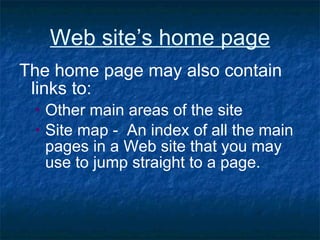
Web site’s home page The home page may also contain links to:   Other main areas of the site Site map -  An index of all the main pages in a Web site that you may use to jump straight to a page.
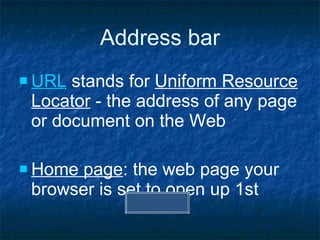
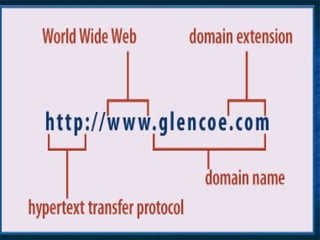
Address bar URL  stands for  Uniform Resource Locator  - the address of any page or document on the Web Home page : the web page your browser is set to open up 1st
 
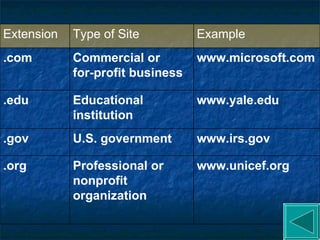
Extension Type of Site Example .com Commercial or  for-profit business www.microsoft.com .edu Educational institution www.yale.edu .gov U.S. government  www.irs.gov .org Professional or  nonprofit organization www.unicef.org
Toolbar Buttons Back Forward Stop Home Print Download more options
Status bar Shows what is happening as you connect to a Web site Located at the bottom of the screen Web site found, opening picture, done, connecting to…
Bookmarks/Favorites You can use a  bookmark  to note a Web page you might want to visit again later. Bookmarks are helpful because you do not have to:  Remember how you got to the Web page. Write down the Web page’s URL.
History If you forget to bookmark a page, check the browser’s  History  to find the URL. Your browser keeps track of every page you have visited for the past few days or even weeks.
Printing If you need to print a hard copy of a Web page you are visiting, you can do so by using the:   Browser’s Print button  Print function in the File menu  Printer-friendly link on the Web page, if available Always  Print Preview !!
What is a link ? Button, text, or image that connects to another Web page When you move the mouse pointer over a link, it changes to a hand & the address appears in the status bar Changes color after you click on it
What is a search engine ? Program for finding info on the Web Examples: Google, Yahoo, ask.com, bing
Search Engine Tips Use  keywords  to help your search so that it better meets your needs A  Boolean search  uses keywords &/or symbols to help limit search results to useful and relevant Web pages.
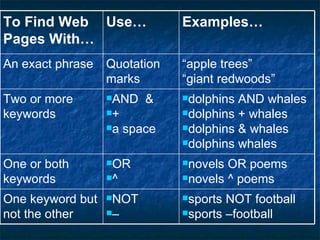
To Find Web  Pages With… Use… Examples… An exact phrase Quotation marks “ apple trees” “ giant redwoods” Two or more keywords AND  & + a space  dolphins AND whales dolphins + whales dolphins & whales dolphins whales One or both keywords OR ^ novels OR poems novels ^ poems One keyword but not the other NOT – sports NOT football sports –football
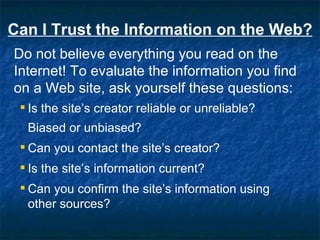
Can I Trust the Information on the Web? Do not believe everything you read on the Internet! To evaluate the information you find on a Web site, ask yourself these questions:  Is the site’s creator reliable or unreliable?  Biased or unbiased?  Can you contact the site’s creator?  Is the site’s information current?  Can you confirm the site’s information using  other sources?
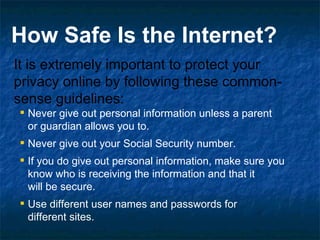
It is extremely important to protect your privacy online by following these common-sense guidelines: Never give out personal information unless a parent  or guardian allows you to.  Never give out your Social Security number.  If you do give out personal information, make sure you know who is receiving the information and that it  will be secure.  Use different user names and passwords for  different sites.   How Safe Is the Internet?

Www

  • 1.
  • 2.
    What is theWorld Wide Web ? A collection of documents or files connected together on the Internet Called the Web or www for short
  • 3.
    What is aWeb browser ? A software program used to view documents & move around on the Web Examples: Internet Explorer (PC) Safari (Mac)
  • 4.
    Web Page :each document or file that is part of the WWW is called a web page HTML : special language used to publish web pages Web site : collection of Web pages
  • 5.
    Web site’s homepage The home page often contains the site’s: Name Author or creator Copyright date
  • 6.
    Web site’s homepage The home page may also contain links to: Other main areas of the site Site map - An index of all the main pages in a Web site that you may use to jump straight to a page.
  • 7.
    Address bar URL stands for Uniform Resource Locator - the address of any page or document on the Web Home page : the web page your browser is set to open up 1st
  • 8.
  • 9.
    Extension Type ofSite Example .com Commercial or for-profit business www.microsoft.com .edu Educational institution www.yale.edu .gov U.S. government www.irs.gov .org Professional or nonprofit organization www.unicef.org
  • 10.
    Toolbar Buttons BackForward Stop Home Print Download more options
  • 11.
    Status bar Showswhat is happening as you connect to a Web site Located at the bottom of the screen Web site found, opening picture, done, connecting to…
  • 12.
    Bookmarks/Favorites You canuse a bookmark to note a Web page you might want to visit again later. Bookmarks are helpful because you do not have to: Remember how you got to the Web page. Write down the Web page’s URL.
  • 13.
    History If youforget to bookmark a page, check the browser’s History to find the URL. Your browser keeps track of every page you have visited for the past few days or even weeks.
  • 14.
    Printing If youneed to print a hard copy of a Web page you are visiting, you can do so by using the: Browser’s Print button Print function in the File menu Printer-friendly link on the Web page, if available Always Print Preview !!
  • 15.
    What is alink ? Button, text, or image that connects to another Web page When you move the mouse pointer over a link, it changes to a hand & the address appears in the status bar Changes color after you click on it
  • 16.
    What is asearch engine ? Program for finding info on the Web Examples: Google, Yahoo, ask.com, bing
  • 17.
    Search Engine TipsUse keywords to help your search so that it better meets your needs A Boolean search uses keywords &/or symbols to help limit search results to useful and relevant Web pages.
  • 18.
    To Find Web Pages With… Use… Examples… An exact phrase Quotation marks “ apple trees” “ giant redwoods” Two or more keywords AND & + a space dolphins AND whales dolphins + whales dolphins & whales dolphins whales One or both keywords OR ^ novels OR poems novels ^ poems One keyword but not the other NOT – sports NOT football sports –football
  • 19.
    Can I Trustthe Information on the Web? Do not believe everything you read on the Internet! To evaluate the information you find on a Web site, ask yourself these questions: Is the site’s creator reliable or unreliable? Biased or unbiased? Can you contact the site’s creator? Is the site’s information current? Can you confirm the site’s information using other sources?
  • 20.
    It is extremelyimportant to protect your privacy online by following these common-sense guidelines: Never give out personal information unless a parent or guardian allows you to. Never give out your Social Security number. If you do give out personal information, make sure you know who is receiving the information and that it will be secure. Use different user names and passwords for different sites. How Safe Is the Internet?