Flow Chart and Pseudo Code
© Dr. Jyoti Lakhani
The American National Standards Institute (ANSI) set standards for
flowcharts and their symbols in the 1960s.
The International Organization for Standardization (ISO) adopted the
ANSI symbols in 1970.
The current standard, ISO 5807, was revised in 1985.
Generally, flowcharts flow from top to bottom and left to right.
© Dr. Jyoti Lakhani
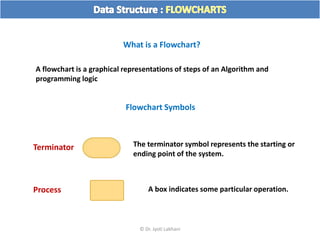
What is a Flowchart?
A flowchart is a graphical representations of steps of an Algorithm and
programming logic
Flowchart Symbols
Terminator
Process
The terminator symbol represents the starting or
ending point of the system.
A box indicates some particular operation.
© Dr. Jyoti Lakhani
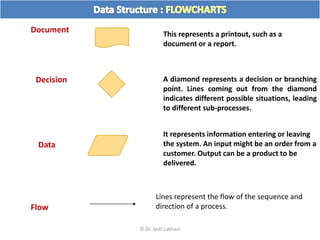
This represents a printout, such as a
document or a report.
Document
Decision A diamond represents a decision or branching
point. Lines coming out from the diamond
indicates different possible situations, leading
to different sub-processes.
Data
It represents information entering or leaving
the system. An input might be an order from a
customer. Output can be a product to be
delivered.
Lines represent the flow of the sequence and
direction of a process.
Flow
© Dr. Jyoti Lakhani
On-Page Reference This symbol would contain a letter inside. It
indicates that the flow continues on a
matching symbol containing the same letter
somewhere else on the same page.
This symbol would contain a letter inside. It
indicates that the flow continues on a
matching symbol containing the same letter
somewhere else on a different page.
Off-Page Reference
Identifies a delay or a bottleneck.
Delay or Bottleneck
© Dr. Jyoti Lakhani
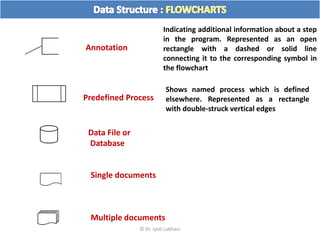
Annotation
Indicating additional information about a step
in the program. Represented as an open
rectangle with a dashed or solid line
connecting it to the corresponding symbol in
the flowchart
Shows named process which is defined
elsewhere. Represented as a rectangle
with double-struck vertical edges
Predefined Process
Data File or
Database
Single documents
Multiple documents
© Dr. Jyoti Lakhani
Manual operation
Manual input
Preparation or Initialization
© Dr. Jyoti Lakhani
© Dr. Jyoti Lakhani
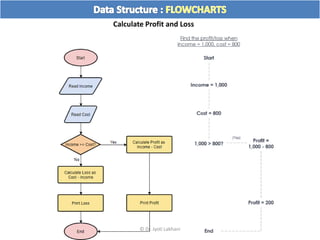
Calculate Profit and Loss
© Dr. Jyoti Lakhani
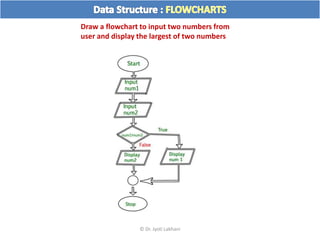
Draw a flowchart to input two numbers from
user and display the largest of two numbers
© Dr. Jyoti Lakhani
http://flowgorithm.org/download/index.htm
Download, Install and Practice
© Dr. Jyoti Lakhani
© Dr. Jyoti Lakhani
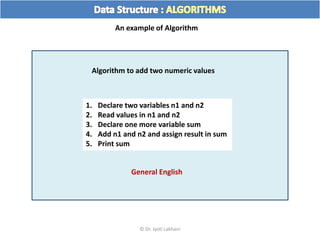
An example of Algorithm
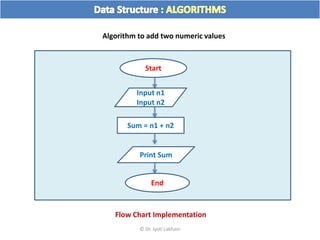
Algorithm to add two numeric values
1. Declare two variables n1 and n2
2. Read values in n1 and n2
3. Declare one more variable sum
4. Add n1 and n2 and assign result in sum
5. Print sum
General English
Flow Chart Implementation
Algorithm to add two numeric values
Start
End
Input n1
Input n2
Print Sum
Sum = n1 + n2
© Dr. Jyoti Lakhani
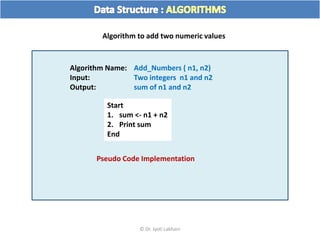
Algorithm Name: Add_Numbers ( n1, n2)
Input: Two integers n1 and n2
Output: sum of n1 and n2
Start
1. sum <- n1 + n2
2. Print sum
End
Pseudo Code Implementation
Algorithm to add two numeric values
© Dr. Jyoti Lakhani
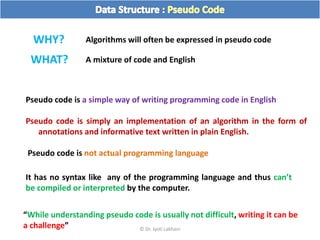
Pseudo code is a simple way of writing programming code in English
Pseudo code is simply an implementation of an algorithm in the form of
annotations and informative text written in plain English.
Pseudo code is not actual programming language
It has no syntax like any of the programming language and thus can’t
be compiled or interpreted by the computer.
Algorithms will often be expressed in pseudo code
WHY?
WHAT? A mixture of code and English
“While understanding pseudo code is usually not difficult, writing it can be
a challenge” © Dr. Jyoti Lakhani
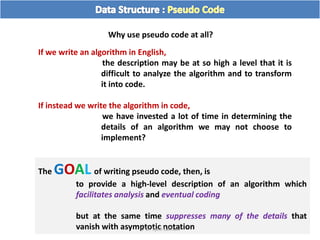
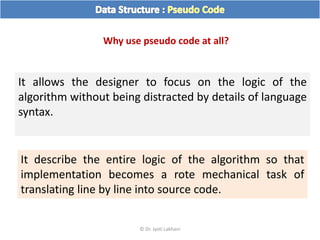
Why use pseudo code at all?
If we write an algorithm in English,
the description may be at so high a level that it is
difficult to analyze the algorithm and to transform
it into code.
If instead we write the algorithm in code,
we have invested a lot of time in determining the
details of an algorithm we may not choose to
implement?
The GOAL of writing pseudo code, then, is
to provide a high-level description of an algorithm which
facilitates analysis and eventual coding
but at the same time suppresses many of the details that
vanish with asymptotic notation
© Dr. Jyoti Lakhani
Why use pseudo code at all?
It allows the designer to focus on the logic of the
algorithm without being distracted by details of language
syntax.
It describe the entire logic of the algorithm so that
implementation becomes a rote mechanical task of
translating line by line into source code.
© Dr. Jyoti Lakhani
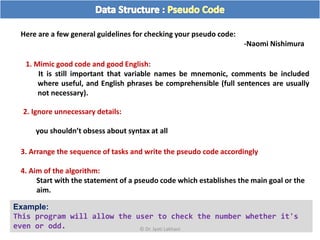
Here are a few general guidelines for checking your pseudo code:
-Naomi Nishimura
1. Mimic good code and good English:
It is still important that variable names be mnemonic, comments be included
where useful, and English phrases be comprehensible (full sentences are usually
not necessary).
2. Ignore unnecessary details:
you shouldn’t obsess about syntax at all
3. Arrange the sequence of tasks and write the pseudo code accordingly
4. Aim of the algorithm:
Start with the statement of a pseudo code which establishes the main goal or the
aim.
Example:
This program will allow the user to check the number whether it's
even or odd. © Dr. Jyoti Lakhani
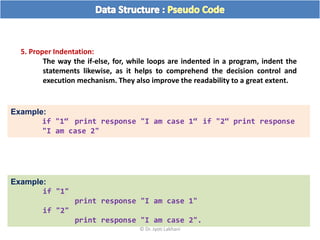
5. Proper Indentation:
The way the if-else, for, while loops are indented in a program, indent the
statements likewise, as it helps to comprehend the decision control and
execution mechanism. They also improve the readability to a great extent.
Example:
if "1"
print response "I am case 1"
if "2"
print response "I am case 2".
Example:
if "1“ print response "I am case 1“ if "2“ print response
"I am case 2"
© Dr. Jyoti Lakhani
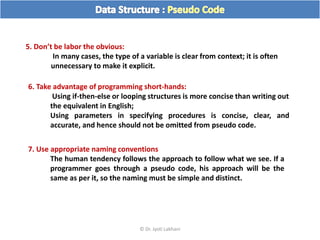
5. Don’t be labor the obvious:
In many cases, the type of a variable is clear from context; it is often
unnecessary to make it explicit.
6. Take advantage of programming short-hands:
Using if-then-else or looping structures is more concise than writing out
the equivalent in English;
Using parameters in specifying procedures is concise, clear, and
accurate, and hence should not be omitted from pseudo code.
7. Use appropriate naming conventions
The human tendency follows the approach to follow what we see. If a
programmer goes through a pseudo code, his approach will be the
same as per it, so the naming must be simple and distinct.
© Dr. Jyoti Lakhani
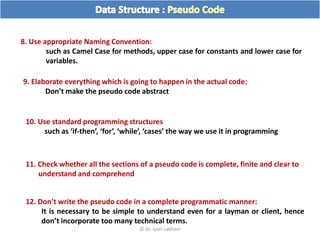
8. Use appropriate Naming Convention:
such as Camel Case for methods, upper case for constants and lower case for
variables.
9. Elaborate everything which is going to happen in the actual code:
Don’t make the pseudo code abstract
10. Use standard programming structures
such as ‘if-then’, ‘for’, ‘while’, ‘cases’ the way we use it in programming
11. Check whether all the sections of a pseudo code is complete, finite and clear to
understand and comprehend
12. Don’t write the pseudo code in a complete programmatic manner:
It is necessary to be simple to understand even for a layman or client, hence
don’t incorporate too many technical terms.
© Dr. Jyoti Lakhani
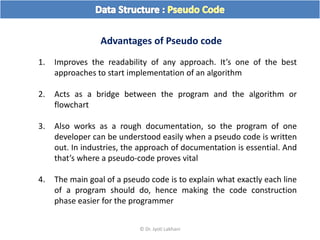
Advantages of Pseudo code
1. Improves the readability of any approach. It’s one of the best
approaches to start implementation of an algorithm
2. Acts as a bridge between the program and the algorithm or
flowchart
3. Also works as a rough documentation, so the program of one
developer can be understood easily when a pseudo code is written
out. In industries, the approach of documentation is essential. And
that’s where a pseudo-code proves vital
4. The main goal of a pseudo code is to explain what exactly each line
of a program should do, hence making the code construction
phase easier for the programmer
© Dr. Jyoti Lakhani
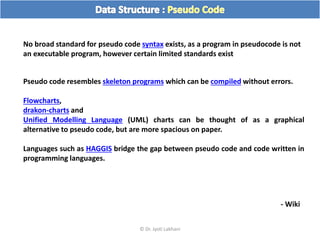
No broad standard for pseudo code syntax exists, as a program in pseudocode is not
an executable program, however certain limited standards exist
Pseudo code resembles skeleton programs which can be compiled without errors.
Flowcharts,
drakon-charts and
Unified Modelling Language (UML) charts can be thought of as a graphical
alternative to pseudo code, but are more spacious on paper.
Languages such as HAGGIS bridge the gap between pseudo code and code written in
programming languages.
- Wiki
© Dr. Jyoti Lakhani
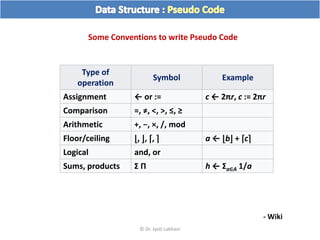
Type of
operation
Symbol Example
Assignment ← or := c ← 2πr, c := 2πr
Comparison =, ≠, <, >, ≤, ≥
Arithmetic +, −, ×, /, mod
Floor/ceiling ⌊, ⌋, ⌈, ⌉ a ← ⌊b⌋ + ⌈c⌉
Logical and, or
Sums, products Σ Π h ← Σa∈A 1/a
Some Conventions to write Pseudo Code
- Wiki
© Dr. Jyoti Lakhani
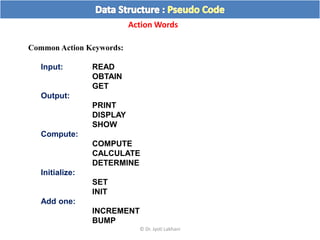
Common Action Keywords:
Input: READ
OBTAIN
GET
Output:
PRINT
DISPLAY
SHOW
Compute:
COMPUTE
CALCULATE
DETERMINE
Initialize:
SET
INIT
Add one:
INCREMENT
BUMP
Action Words
© Dr. Jyoti Lakhani
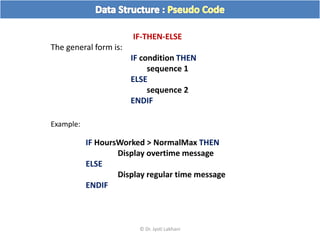
IF-THEN-ELSE
The general form is:
IF condition THEN
sequence 1
ELSE
sequence 2
ENDIF
IF HoursWorked > NormalMax THEN
Display overtime message
ELSE
Display regular time message
ENDIF
Example:
© Dr. Jyoti Lakhani
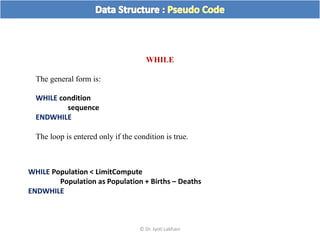
WHILE
The general form is:
WHILE condition
sequence
ENDWHILE
The loop is entered only if the condition is true.
WHILE Population < LimitCompute
Population as Population + Births – Deaths
ENDWHILE
© Dr. Jyoti Lakhani
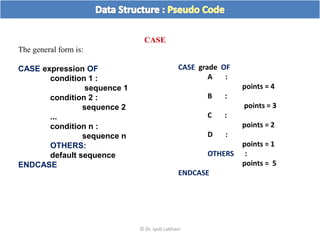
CASE
The general form is:
CASE expression OF
condition 1 :
sequence 1
condition 2 :
sequence 2
...
condition n :
sequence n
OTHERS:
default sequence
ENDCASE
CASE grade OF
A :
points = 4
B :
points = 3
C :
points = 2
D :
points = 1
OTHERS :
points = 5
ENDCASE
© Dr. Jyoti Lakhani
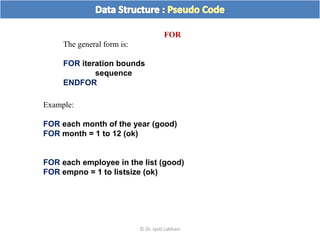
FOR
The general form is:
FOR iteration bounds
sequence
ENDFOR
Example:
FOR each month of the year (good)
FOR month = 1 to 12 (ok)
FOR each employee in the list (good)
FOR empno = 1 to listsize (ok)
© Dr. Jyoti Lakhani
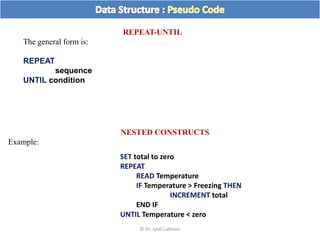
REPEAT-UNTIL
The general form is:
REPEAT
sequence
UNTIL condition
NESTED CONSTRUCTS
Example:
SET total to zero
REPEAT
READ Temperature
IF Temperature > Freezing THEN
INCREMENT total
END IF
UNTIL Temperature < zero
© Dr. Jyoti Lakhani
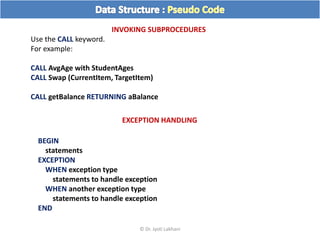
INVOKING SUBPROCEDURES
Use the CALL keyword.
For example:
CALL AvgAge with StudentAges
CALL Swap (CurrentItem, TargetItem)
CALL getBalance RETURNING aBalance
BEGIN
statements
EXCEPTION
WHEN exception type
statements to handle exception
WHEN another exception type
statements to handle exception
END
EXCEPTION HANDLING
© Dr. Jyoti Lakhani
© Dr. Jyoti Lakhani

Ds02 flow chart and pseudo code

  • 1.
    Flow Chart andPseudo Code © Dr. Jyoti Lakhani
  • 2.
    The American NationalStandards Institute (ANSI) set standards for flowcharts and their symbols in the 1960s. The International Organization for Standardization (ISO) adopted the ANSI symbols in 1970. The current standard, ISO 5807, was revised in 1985. Generally, flowcharts flow from top to bottom and left to right. © Dr. Jyoti Lakhani
  • 3.
    What is aFlowchart? A flowchart is a graphical representations of steps of an Algorithm and programming logic Flowchart Symbols Terminator Process The terminator symbol represents the starting or ending point of the system. A box indicates some particular operation. © Dr. Jyoti Lakhani
  • 4.
    This represents aprintout, such as a document or a report. Document Decision A diamond represents a decision or branching point. Lines coming out from the diamond indicates different possible situations, leading to different sub-processes. Data It represents information entering or leaving the system. An input might be an order from a customer. Output can be a product to be delivered. Lines represent the flow of the sequence and direction of a process. Flow © Dr. Jyoti Lakhani
  • 5.
    On-Page Reference Thissymbol would contain a letter inside. It indicates that the flow continues on a matching symbol containing the same letter somewhere else on the same page. This symbol would contain a letter inside. It indicates that the flow continues on a matching symbol containing the same letter somewhere else on a different page. Off-Page Reference Identifies a delay or a bottleneck. Delay or Bottleneck © Dr. Jyoti Lakhani
  • 6.
    Annotation Indicating additional informationabout a step in the program. Represented as an open rectangle with a dashed or solid line connecting it to the corresponding symbol in the flowchart Shows named process which is defined elsewhere. Represented as a rectangle with double-struck vertical edges Predefined Process Data File or Database Single documents Multiple documents © Dr. Jyoti Lakhani
  • 7.
    Manual operation Manual input Preparationor Initialization © Dr. Jyoti Lakhani
  • 8.
    © Dr. JyotiLakhani
  • 9.
    Calculate Profit andLoss © Dr. Jyoti Lakhani
  • 10.
    Draw a flowchartto input two numbers from user and display the largest of two numbers © Dr. Jyoti Lakhani
  • 11.
  • 12.
    © Dr. JyotiLakhani An example of Algorithm Algorithm to add two numeric values 1. Declare two variables n1 and n2 2. Read values in n1 and n2 3. Declare one more variable sum 4. Add n1 and n2 and assign result in sum 5. Print sum General English
  • 13.
    Flow Chart Implementation Algorithmto add two numeric values Start End Input n1 Input n2 Print Sum Sum = n1 + n2 © Dr. Jyoti Lakhani
  • 14.
    Algorithm Name: Add_Numbers( n1, n2) Input: Two integers n1 and n2 Output: sum of n1 and n2 Start 1. sum <- n1 + n2 2. Print sum End Pseudo Code Implementation Algorithm to add two numeric values © Dr. Jyoti Lakhani
  • 15.
    Pseudo code isa simple way of writing programming code in English Pseudo code is simply an implementation of an algorithm in the form of annotations and informative text written in plain English. Pseudo code is not actual programming language It has no syntax like any of the programming language and thus can’t be compiled or interpreted by the computer. Algorithms will often be expressed in pseudo code WHY? WHAT? A mixture of code and English “While understanding pseudo code is usually not difficult, writing it can be a challenge” © Dr. Jyoti Lakhani
  • 16.
    Why use pseudocode at all? If we write an algorithm in English, the description may be at so high a level that it is difficult to analyze the algorithm and to transform it into code. If instead we write the algorithm in code, we have invested a lot of time in determining the details of an algorithm we may not choose to implement? The GOAL of writing pseudo code, then, is to provide a high-level description of an algorithm which facilitates analysis and eventual coding but at the same time suppresses many of the details that vanish with asymptotic notation © Dr. Jyoti Lakhani
  • 17.
    Why use pseudocode at all? It allows the designer to focus on the logic of the algorithm without being distracted by details of language syntax. It describe the entire logic of the algorithm so that implementation becomes a rote mechanical task of translating line by line into source code. © Dr. Jyoti Lakhani
  • 18.
    Here are afew general guidelines for checking your pseudo code: -Naomi Nishimura 1. Mimic good code and good English: It is still important that variable names be mnemonic, comments be included where useful, and English phrases be comprehensible (full sentences are usually not necessary). 2. Ignore unnecessary details: you shouldn’t obsess about syntax at all 3. Arrange the sequence of tasks and write the pseudo code accordingly 4. Aim of the algorithm: Start with the statement of a pseudo code which establishes the main goal or the aim. Example: This program will allow the user to check the number whether it's even or odd. © Dr. Jyoti Lakhani
  • 19.
    5. Proper Indentation: Theway the if-else, for, while loops are indented in a program, indent the statements likewise, as it helps to comprehend the decision control and execution mechanism. They also improve the readability to a great extent. Example: if "1" print response "I am case 1" if "2" print response "I am case 2". Example: if "1“ print response "I am case 1“ if "2“ print response "I am case 2" © Dr. Jyoti Lakhani
  • 20.
    5. Don’t belabor the obvious: In many cases, the type of a variable is clear from context; it is often unnecessary to make it explicit. 6. Take advantage of programming short-hands: Using if-then-else or looping structures is more concise than writing out the equivalent in English; Using parameters in specifying procedures is concise, clear, and accurate, and hence should not be omitted from pseudo code. 7. Use appropriate naming conventions The human tendency follows the approach to follow what we see. If a programmer goes through a pseudo code, his approach will be the same as per it, so the naming must be simple and distinct. © Dr. Jyoti Lakhani
  • 21.
    8. Use appropriateNaming Convention: such as Camel Case for methods, upper case for constants and lower case for variables. 9. Elaborate everything which is going to happen in the actual code: Don’t make the pseudo code abstract 10. Use standard programming structures such as ‘if-then’, ‘for’, ‘while’, ‘cases’ the way we use it in programming 11. Check whether all the sections of a pseudo code is complete, finite and clear to understand and comprehend 12. Don’t write the pseudo code in a complete programmatic manner: It is necessary to be simple to understand even for a layman or client, hence don’t incorporate too many technical terms. © Dr. Jyoti Lakhani
  • 22.
    Advantages of Pseudocode 1. Improves the readability of any approach. It’s one of the best approaches to start implementation of an algorithm 2. Acts as a bridge between the program and the algorithm or flowchart 3. Also works as a rough documentation, so the program of one developer can be understood easily when a pseudo code is written out. In industries, the approach of documentation is essential. And that’s where a pseudo-code proves vital 4. The main goal of a pseudo code is to explain what exactly each line of a program should do, hence making the code construction phase easier for the programmer © Dr. Jyoti Lakhani
  • 23.
    No broad standardfor pseudo code syntax exists, as a program in pseudocode is not an executable program, however certain limited standards exist Pseudo code resembles skeleton programs which can be compiled without errors. Flowcharts, drakon-charts and Unified Modelling Language (UML) charts can be thought of as a graphical alternative to pseudo code, but are more spacious on paper. Languages such as HAGGIS bridge the gap between pseudo code and code written in programming languages. - Wiki © Dr. Jyoti Lakhani
  • 24.
    Type of operation Symbol Example Assignment← or := c ← 2πr, c := 2πr Comparison =, ≠, <, >, ≤, ≥ Arithmetic +, −, ×, /, mod Floor/ceiling ⌊, ⌋, ⌈, ⌉ a ← ⌊b⌋ + ⌈c⌉ Logical and, or Sums, products Σ Π h ← Σa∈A 1/a Some Conventions to write Pseudo Code - Wiki © Dr. Jyoti Lakhani
  • 25.
    Common Action Keywords: Input:READ OBTAIN GET Output: PRINT DISPLAY SHOW Compute: COMPUTE CALCULATE DETERMINE Initialize: SET INIT Add one: INCREMENT BUMP Action Words © Dr. Jyoti Lakhani
  • 26.
    IF-THEN-ELSE The general formis: IF condition THEN sequence 1 ELSE sequence 2 ENDIF IF HoursWorked > NormalMax THEN Display overtime message ELSE Display regular time message ENDIF Example: © Dr. Jyoti Lakhani
  • 27.
    WHILE The general formis: WHILE condition sequence ENDWHILE The loop is entered only if the condition is true. WHILE Population < LimitCompute Population as Population + Births – Deaths ENDWHILE © Dr. Jyoti Lakhani
  • 28.
    CASE The general formis: CASE expression OF condition 1 : sequence 1 condition 2 : sequence 2 ... condition n : sequence n OTHERS: default sequence ENDCASE CASE grade OF A : points = 4 B : points = 3 C : points = 2 D : points = 1 OTHERS : points = 5 ENDCASE © Dr. Jyoti Lakhani
  • 29.
    FOR The general formis: FOR iteration bounds sequence ENDFOR Example: FOR each month of the year (good) FOR month = 1 to 12 (ok) FOR each employee in the list (good) FOR empno = 1 to listsize (ok) © Dr. Jyoti Lakhani
  • 30.
    REPEAT-UNTIL The general formis: REPEAT sequence UNTIL condition NESTED CONSTRUCTS Example: SET total to zero REPEAT READ Temperature IF Temperature > Freezing THEN INCREMENT total END IF UNTIL Temperature < zero © Dr. Jyoti Lakhani
  • 31.
    INVOKING SUBPROCEDURES Use theCALL keyword. For example: CALL AvgAge with StudentAges CALL Swap (CurrentItem, TargetItem) CALL getBalance RETURNING aBalance BEGIN statements EXCEPTION WHEN exception type statements to handle exception WHEN another exception type statements to handle exception END EXCEPTION HANDLING © Dr. Jyoti Lakhani
  • 32.
    © Dr. JyotiLakhani