Robotics: Lego Mindstorm NXT

 Stage 2: Programming
Time to Program!

You just built your starting robot! Congrats, now it’s
 ready for action. Oh wait, it’s just sitting there isn’t it…

That’s because you didn’t give it a program yet, therefore,
 it doesn’t know what to do yet!

So let’s learn how to program!
Change How You Think
Remember when I told you the most important thing you have
  to do it change how you think?
Well now is when you learn why.

To program, you have to understand how to think like a
  computer. And that’s to be able to think with algorithms,
  which is the computers thought process. You take for
  granted how easy it comes for people to be able to think and
  then act off that impulse, so we’re going to make you do an
  exercise to learn how to think like a programmed robot.
Stop and get programmed
We are going to put you in groups of two. One volunteer to be
 the robot, the other is the programmer.

Now blindfold the volunteered robot, arrange an obstacle
 course in our room, and the programmer verbally direct the
 “robot” through it. (i.e.“Take 3 steps, stop, turn left 90
 degrees, stop, take 4 steps, stop, etc.”)

And the robot can’t feel around, keep arms to the side.
What did you learn?
You probably noticed that it was harder to get around when
  you couldn’t think for yourself as the robot. And if you were
  the programmer, you must have had to think pretty detailed
  on what directions to give and how.

That’s the point. Robots can’t think for themselves, they need
  exact directions. When you program your robot you are
  going to need to know where you want it to go, how far,
  what direction, when to turn, when to stop, etc.
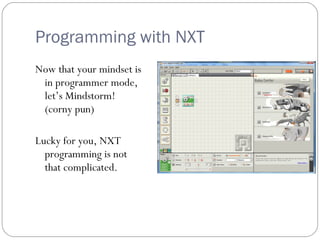
Programming with NXT
Now that your mindset is
 in programmer mode,
 let’s Mindstorm!
 (corny pun)

Lucky for you, NXT
  programming is not
  that complicated.
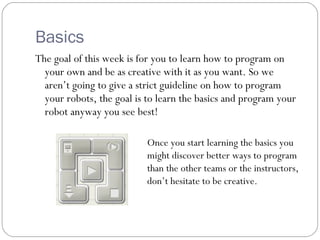
Basics
The goal of this week is for you to learn how to program on
  your own and be as creative with it as you want. So we
  aren’t going to give a strict guideline on how to program
  your robots, the goal is to learn the basics and program your
  robot anyway you see best!

                           Once you start learning the basics you
                           might discover better ways to program
                           than the other teams or the instructors,
                           don’t hesitate to be creative.
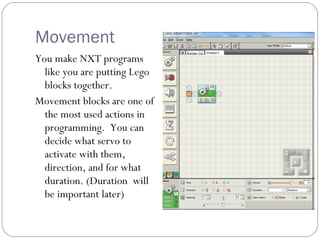
Movement
You make NXT programs
  like you are putting Lego
  blocks together.
Movement blocks are one of
  the most used actions in
  programming. You can
  decide what servo to
  activate with them,
  direction, and for what
  duration. (Duration will
  be important later)
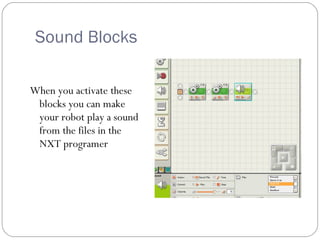
Sound Blocks

When you activate these
 blocks you can make
 your robot play a sound
 from the files in the
 NXT programer
Switch
         When you need to program a
           function for a sensor, you use the
           switch function. It allows you to
           program exactly what the robot
           should do if a sensor is tripped.
         Example: Touch sensor trips,
           program to move back 2 rotations,
           then turn right, continue to next
           function.
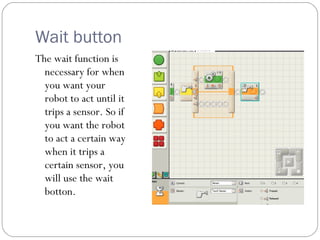
Wait button
The wait function is
  necessary for when
  you want your
  robot to act until it
  trips a sensor. So if
  you want the robot
  to act a certain way
  when it trips a
  certain sensor, you
  will use the wait
  botton.
Loopty Loop


   Loops are very handy, they
     contain a program you want to
     repeat. It can repeat once until
     forever if you like.
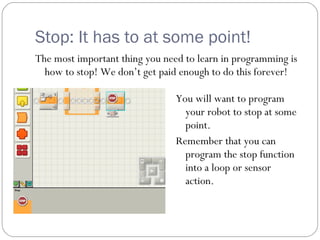
Stop: It has to at some point!
The most important thing you need to learn in programming is
  how to stop! We don’t get paid enough to do this forever!

                                You will want to program
                                  your robot to stop at some
                                  point.
                                Remember that you can
                                  program the stop function
                                  into a loop or sensor
                                  action.
Making the Distance
Remember the movement blocks? When you want to program
  your robot to go a certain distance, how do you know how
  long to make it run?

Well, you don’t. The fact that any robot you make can move
 different than other robots means that you have to find out
 how far it will go on your own.

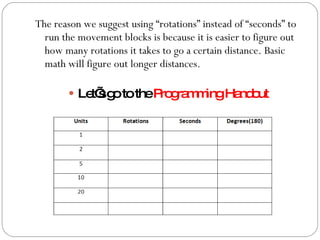
We have a handout ready to help you write down your data.
The reason we suggest using “rotations” instead of “seconds” to
  run the movement blocks is because it is easier to figure out
  how many rotations it takes to go a certain distance. Basic
  math will figure out longer distances.

         Le sg totheP g m ingHa o
            t’ o      ro ra m   nd ut
Stage 3
Now that you have
 collected your data on                                    (Obstacle2)


 distance, you can             (Obstacle3)
                                             (Obstacle1)
 accurately program your
 robotic system around
 our obstacle course. The
 course floor plan will
 vary depending on what
 location you are in, but it                    Start

 will look something like       Finish
 this.
Competition
We will have a friendly competition to see what team has
 programmed their robot with more skill. The team that
 completes our course with the best time wins.

However, when the competition is complete, you can readily
 get back into teams and begin to create more robotic
 creations.

The point of all three stages was to teach you how to create and
  program NXT robots, so be creative and have fun!
Additional Designs
There are some additional designs in the Lego NXT program,
  but if you want to find designs off the internet go to the
  following sites:

 www.nxtprograms.com


 http://www.thenxtstep.blogspot.com/


 http://www.nxtasy.org/
Hope You Have Fun!
   Good Luck!

Lego Robotics(Programming)

  • 1.
    Robotics: Lego MindstormNXT Stage 2: Programming
  • 2.
    Time to Program! Youjust built your starting robot! Congrats, now it’s ready for action. Oh wait, it’s just sitting there isn’t it… That’s because you didn’t give it a program yet, therefore, it doesn’t know what to do yet! So let’s learn how to program!
  • 3.
    Change How YouThink Remember when I told you the most important thing you have to do it change how you think? Well now is when you learn why. To program, you have to understand how to think like a computer. And that’s to be able to think with algorithms, which is the computers thought process. You take for granted how easy it comes for people to be able to think and then act off that impulse, so we’re going to make you do an exercise to learn how to think like a programmed robot.
  • 4.
    Stop and getprogrammed We are going to put you in groups of two. One volunteer to be the robot, the other is the programmer. Now blindfold the volunteered robot, arrange an obstacle course in our room, and the programmer verbally direct the “robot” through it. (i.e.“Take 3 steps, stop, turn left 90 degrees, stop, take 4 steps, stop, etc.”) And the robot can’t feel around, keep arms to the side.
  • 5.
    What did youlearn? You probably noticed that it was harder to get around when you couldn’t think for yourself as the robot. And if you were the programmer, you must have had to think pretty detailed on what directions to give and how. That’s the point. Robots can’t think for themselves, they need exact directions. When you program your robot you are going to need to know where you want it to go, how far, what direction, when to turn, when to stop, etc.
  • 6.
    Programming with NXT Nowthat your mindset is in programmer mode, let’s Mindstorm! (corny pun) Lucky for you, NXT programming is not that complicated.
  • 7.
    Basics The goal ofthis week is for you to learn how to program on your own and be as creative with it as you want. So we aren’t going to give a strict guideline on how to program your robots, the goal is to learn the basics and program your robot anyway you see best! Once you start learning the basics you might discover better ways to program than the other teams or the instructors, don’t hesitate to be creative.
  • 8.
    Movement You make NXTprograms like you are putting Lego blocks together. Movement blocks are one of the most used actions in programming. You can decide what servo to activate with them, direction, and for what duration. (Duration will be important later)
  • 9.
    Sound Blocks When youactivate these blocks you can make your robot play a sound from the files in the NXT programer
  • 10.
    Switch When you need to program a function for a sensor, you use the switch function. It allows you to program exactly what the robot should do if a sensor is tripped. Example: Touch sensor trips, program to move back 2 rotations, then turn right, continue to next function.
  • 11.
    Wait button The waitfunction is necessary for when you want your robot to act until it trips a sensor. So if you want the robot to act a certain way when it trips a certain sensor, you will use the wait botton.
  • 12.
    Loopty Loop Loops are very handy, they contain a program you want to repeat. It can repeat once until forever if you like.
  • 13.
    Stop: It hasto at some point! The most important thing you need to learn in programming is how to stop! We don’t get paid enough to do this forever! You will want to program your robot to stop at some point. Remember that you can program the stop function into a loop or sensor action.
  • 14.
    Making the Distance Rememberthe movement blocks? When you want to program your robot to go a certain distance, how do you know how long to make it run? Well, you don’t. The fact that any robot you make can move different than other robots means that you have to find out how far it will go on your own. We have a handout ready to help you write down your data.
  • 15.
    The reason wesuggest using “rotations” instead of “seconds” to run the movement blocks is because it is easier to figure out how many rotations it takes to go a certain distance. Basic math will figure out longer distances.  Le sg totheP g m ingHa o t’ o ro ra m nd ut
  • 16.
    Stage 3 Now thatyou have collected your data on (Obstacle2) distance, you can (Obstacle3) (Obstacle1) accurately program your robotic system around our obstacle course. The course floor plan will vary depending on what location you are in, but it Start will look something like Finish this.
  • 17.
    Competition We will havea friendly competition to see what team has programmed their robot with more skill. The team that completes our course with the best time wins. However, when the competition is complete, you can readily get back into teams and begin to create more robotic creations. The point of all three stages was to teach you how to create and program NXT robots, so be creative and have fun!
  • 18.
    Additional Designs There aresome additional designs in the Lego NXT program, but if you want to find designs off the internet go to the following sites:  www.nxtprograms.com  http://www.thenxtstep.blogspot.com/  http://www.nxtasy.org/
  • 19.
    Hope You HaveFun! Good Luck!