
The Design Discovery
Jetpack
AN INTRODUCTION TO USER EXPERIENCE RESEARCH
Jesse Emmanuel Rosario
USER EXPERIENCE RESEARCHER + DESIGNER
@jemrosario
FACT:
The first few days 

of pretty much 

any new project 

is (typically) exciting
Dear Diary,
We had a great kickoff
meeting today!
The client is here.
The executives are excited.
The team is assembled and
ready to go.
I’m so excited I just can’t hide
it!
Mwahuggles,
Me
“We should do 

UX research!
Discover the right
problem to solve!”
- Every UX designer alive…
only to
be met
with…
confusion
or
(worse)…
resistance!
Today, we’re going to talk about
Good Design Discovery 

by way of 

Effective User Experience Research
TODAY’S AGENDA:
• What is Design Discovery?
• The Design Discovery Jetpack
• Special Questions in Design Discovery
• Conclusion
Design Discovery is the first mile
in the design process.
This is where we understand the design problem
in order to table a strong, solid solution.
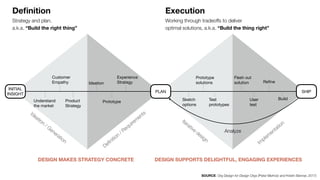
INITIAL
INSIGHT
SHIPPLAN
Understand

the market
Product

Strategy
Prototype
Ideation
Experience

Strategy
Customer

Empathy
Sketch

options
Test

prototypes
User

test
Build
Prototype

solutions
Flesh out 

solution Refine
Definition
Strategy and plan,
a.k.a. “Build the right thing”
Execution
Working through tradeoffs to deliver
optimal solutions, a.k.a. “Build the thing right”
SOURCE: Org Design for Design Orgs (Peter Merholz and Kristin Skinner, 2017)
Ideation
/ Generation
Definition
/ Requirem
ents
Iterative
design
Im
plem
entation
DESIGN MAKES STRATEGY CONCRETE DESIGN SUPPORTS DELIGHTFUL, ENGAGING EXPERIENCES
Analyze
So how do you conduct an
effective Discovery Phase?
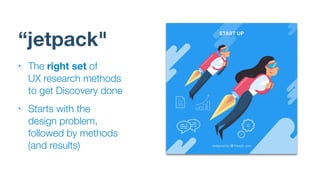
“jetpack"
• The right set of 

UX research methods
to get Discovery done
• Starts with the 

design problem,
followed by methods
(and results)
DISCLAIMER


This process worked for me. 

True, effective design
research is contingent on
the problem you’re trying
to solve. Mix and match
accordingly.
Also not an exhaustive list.
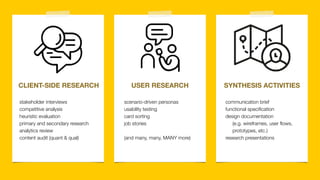
CLIENT-SIDE RESEARCH USER RESEARCH SYNTHESIS ACTIVITIES
communication brief
functional specification
design documentation 

(e.g. wireframes, user flows, 

prototypes, etc.)
research presentations
stakeholder interviews
competitive analysis
heuristic evaluation
primary and secondary research
analytics review
content audit (quant & qual)
scenario-driven personas
usability testing
card sorting
job stories
(and many, many, MANY more)
Typical Activities Include:
• stakeholder interviews
• competitive analysis
• heuristic evaluation
• primary and secondary research
• analytics review
• content audit (quantitative &
qualitative)
• metrics, metrics, metrics
1
Client-Side
Research
WHY DO IT?
Probe your project’s business
context so we know what to
optimize or design for with this 

new product/service offering.
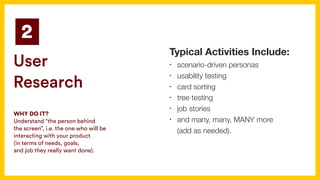
Typical Activities Include:
• scenario-driven personas
• usability testing
• card sorting
• tree testing
• job stories
• and many, many, MANY more 

(add as needed).
2
User
Research
WHY DO IT?
Understand “the person behind 

the screen”, i.e. the one who will be
interacting with your product 

(in terms of needs, goals, 

and job they really want done).
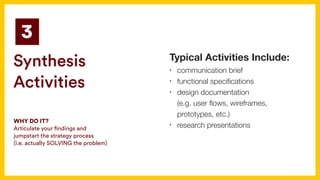
Typical Activities Include:
• communication brief
• functional specifications
• design documentation 

(e.g. user flows, wireframes,
prototypes, etc.)
• research presentations
3
Synthesis
Activities
WHY DO IT?
Articulate your findings and
jumpstart the strategy process 

(i.e. actually SOLVING the problem)
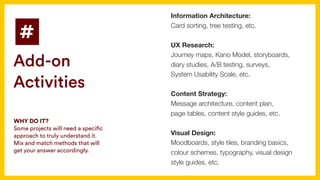
Information Architecture:
Card sorting, tree testing, etc.
UX Research:
Journey maps, Kano Model, storyboards,
diary studies, A/B testing, surveys, 

System Usability Scale, etc.
Content Strategy:
Message architecture, content plan, 

page tables, content style guides, etc.
Visual Design:
Moodboards, style tiles, branding basics,
colour schemes, typography, visual design
style guides, etc.
#
Add-on
Activities
WHY DO IT?
Some projects will need a specific
approach to truly understand it. 

Mix and match methods that will
get your answer accordingly.
Special Questions 

on Design Discovery
Or how to make the process your own.
• Ideal scenario: 

Fit UX research and design 

to the sprint schedule
(hypothesis, metrics, tests, 

and all)
How does 

Design Discovery
work for 

Agile projects?
• PROBLEM: 

UX research and design
becomes shoehorned into the
process, sacrificing the deep,
contextual thought needed in
the design process.
How does 

Design Discovery
work for 

Agile projects?
START!
FINISH!
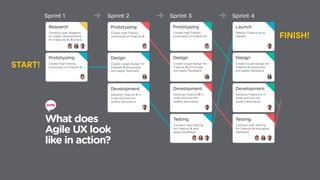
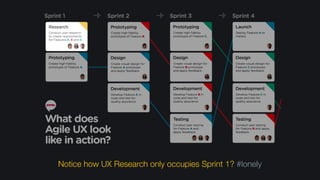
Notice how UX Research only occupies Sprint 1? #lonely
“Agile is Not Easy for UX: (How to) Deal with It”
by Page Laubheimer (Nielsen Norman Group)
As a result, designers [in an agile process]

are under enormous pressure to create, test,
refine, and deliver their output unrealistically fast,
and with little of the context and big-picture
thinking that suits consistent, user-centered
designs.
“
• COMPROMISE: 

“sprint zero” 

upfront UX research and design
work to get the hard stuff out of
the way and devote the sprint
cycles on specific user stories.
How does 

Design Discovery
work for 

Agile projects?
• All client-side information used
to establish (business) context
• e.g. analytics, customer logs,
CRM info, service calls, etc.
“Data”
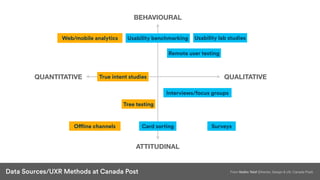
BEHAVIOURAL
ATTITUDINAL
QUANTITATIVE QUALITATIVE
Usability lab studiesWeb/mobile analytics Usability benchmarking
Remote user testing
Interviews/focus groups
Card sorting Surveys
True intent studies
Tree testing
Offline channels
From Vadim Tslaf (Director, Design & UX, Canada Post)Data Sources/UXR Methods at Canada Post
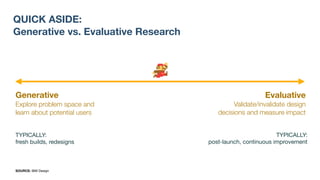
QUICK ASIDE:
Generative vs. Evaluative Research
Generative
Explore problem space and
learn about potential users
Evaluative
Validate/invalidate design
decisions and measure impact
TYPICALLY:

fresh builds, redesigns
TYPICALLY:

post-launch, continuous improvement
SOURCE: IBM Design
BEHAVIOURAL
ATTITUDINAL
QUANTITATIVE QUALITATIVE
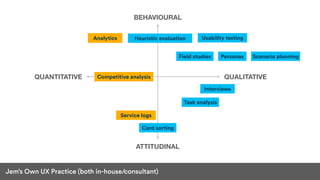
Usability testingAnalytics Heuristic evaluation
Interviews
Card sorting
Personas
Competitive analysis
Service logs
Jem’s Own UX Practice (both in-house/consultant)
Field studies Scenario planning
Task analysis
• Pick research methods based
on where the project is and
what you really want to know
and why.
• Quant + Qual = Full Picture
“Data”
• Early and deliberately.
• Content and design teams have
a crucial responsibility to display
information that is not a barrier.
• Incorporate folks with a11y
needs very early on and
incorporate them in the design
process.
How do you
incorporate
accessibility into
the process?
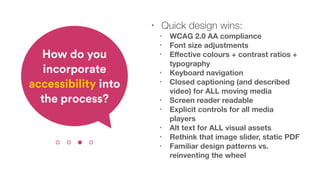
• Quick design wins:
• WCAG 2.0 AA compliance
• Font size adjustments
• Effective colours + contrast ratios +
typography
• Keyboard navigation
• Closed captioning (and described
video) for ALL moving media
• Screen reader readable
• Explicit controls for all media
players
• Alt text for ALL visual assets
• Rethink that image slider, static PDF
• Familiar design patterns vs.
reinventing the wheel
How do you
incorporate
accessibility into
the process?
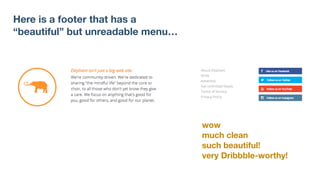
Here is a footer that has a 

“beautiful” but unreadable menu…
wow
much clean
such beautiful!
very Dribbble-worthy!
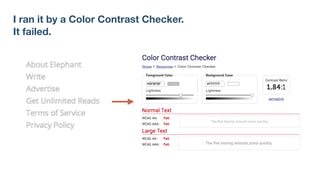
I ran it by a Color Contrast Checker.
It failed.
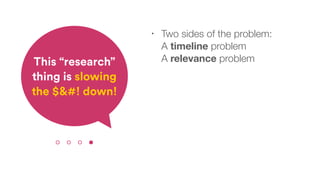
• Two sides of the problem:

A timeline problem

A relevance problemThis “research”
thing is slowing
the $&#! down!
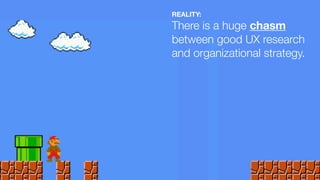
REALITY:
There is a huge chasm
between good UX research
and organizational strategy.
• PRO TIP: 

Create the ‘Oh’ Moment

(when sharing UX research
findings)


Make that constant connection
between what you are doing
and how the company is
actually going to benefit.
• REALITY: 

“Design is only as 

‘human-centred’ as the
business model allows” 

(Erika Hall, “Thinking in Triplicate”)
• We got to move from 

human-centred design to 

value-centred design if our goal 

is to entrench strategic thinking 

in the design of products and services.
IN BRIEF
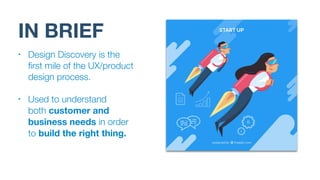
• Design Discovery is the
first mile of the UX/product
design process.
• Used to understand 

both customer and
business needs in order
to build the right thing.
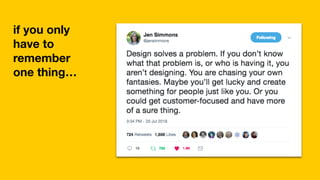
if you only
have to
remember
one thing…
THANK YOU!
Jesse Emmanuel Rosario
@jemrosario
jem@jemrosario.com
http://jemrosario.com

The Design Discovery Jetpack

  • 1.
    The Design Discovery Jetpack ANINTRODUCTION TO USER EXPERIENCE RESEARCH Jesse Emmanuel Rosario USER EXPERIENCE RESEARCHER + DESIGNER @jemrosario
  • 2.
    FACT: The first fewdays 
 of pretty much 
 any new project 
 is (typically) exciting
  • 3.
    Dear Diary, We hada great kickoff meeting today! The client is here. The executives are excited. The team is assembled and ready to go. I’m so excited I just can’t hide it! Mwahuggles, Me
  • 4.
    “We should do
 UX research! Discover the right problem to solve!” - Every UX designer alive…
  • 5.
  • 6.
  • 7.
    Today, we’re goingto talk about Good Design Discovery 
 by way of 
 Effective User Experience Research
  • 8.
    TODAY’S AGENDA: • Whatis Design Discovery? • The Design Discovery Jetpack • Special Questions in Design Discovery • Conclusion
  • 9.
    Design Discovery isthe first mile in the design process. This is where we understand the design problem in order to table a strong, solid solution.
  • 10.
    INITIAL INSIGHT SHIPPLAN Understand the market Product Strategy Prototype Ideation Experience Strategy Customer Empathy Sketch options Test prototypes User test Build Prototype solutions Flesh out solution Refine Definition Strategy and plan, a.k.a. “Build the right thing” Execution Working through tradeoffs to deliver optimal solutions, a.k.a. “Build the thing right” SOURCE: Org Design for Design Orgs (Peter Merholz and Kristin Skinner, 2017) Ideation / Generation Definition / Requirem ents Iterative design Im plem entation DESIGN MAKES STRATEGY CONCRETE DESIGN SUPPORTS DELIGHTFUL, ENGAGING EXPERIENCES Analyze
  • 11.
    So how doyou conduct an effective Discovery Phase?
  • 12.
    “jetpack" • The rightset of 
 UX research methods to get Discovery done • Starts with the 
 design problem, followed by methods (and results)
  • 13.
    DISCLAIMER This process workedfor me. True, effective design research is contingent on the problem you’re trying to solve. Mix and match accordingly. Also not an exhaustive list.
  • 14.
    CLIENT-SIDE RESEARCH USERRESEARCH SYNTHESIS ACTIVITIES communication brief functional specification design documentation 
 (e.g. wireframes, user flows, 
 prototypes, etc.) research presentations stakeholder interviews competitive analysis heuristic evaluation primary and secondary research analytics review content audit (quant & qual) scenario-driven personas usability testing card sorting job stories (and many, many, MANY more)
  • 15.
    Typical Activities Include: •stakeholder interviews • competitive analysis • heuristic evaluation • primary and secondary research • analytics review • content audit (quantitative & qualitative) • metrics, metrics, metrics 1 Client-Side Research WHY DO IT? Probe your project’s business context so we know what to optimize or design for with this 
 new product/service offering.
  • 16.
    Typical Activities Include: •scenario-driven personas • usability testing • card sorting • tree testing • job stories • and many, many, MANY more 
 (add as needed). 2 User Research WHY DO IT? Understand “the person behind 
 the screen”, i.e. the one who will be interacting with your product 
 (in terms of needs, goals, 
 and job they really want done).
  • 17.
    Typical Activities Include: •communication brief • functional specifications • design documentation 
 (e.g. user flows, wireframes, prototypes, etc.) • research presentations 3 Synthesis Activities WHY DO IT? Articulate your findings and jumpstart the strategy process 
 (i.e. actually SOLVING the problem)
  • 18.
    Information Architecture: Card sorting,tree testing, etc. UX Research: Journey maps, Kano Model, storyboards, diary studies, A/B testing, surveys, 
 System Usability Scale, etc. Content Strategy: Message architecture, content plan, 
 page tables, content style guides, etc. Visual Design: Moodboards, style tiles, branding basics, colour schemes, typography, visual design style guides, etc. # Add-on Activities WHY DO IT? Some projects will need a specific approach to truly understand it. 
 Mix and match methods that will get your answer accordingly.
  • 19.
    Special Questions 
 onDesign Discovery Or how to make the process your own.
  • 20.
    • Ideal scenario:
 Fit UX research and design 
 to the sprint schedule (hypothesis, metrics, tests, 
 and all) How does 
 Design Discovery work for 
 Agile projects?
  • 21.
    • PROBLEM: 
 UXresearch and design becomes shoehorned into the process, sacrificing the deep, contextual thought needed in the design process. How does 
 Design Discovery work for 
 Agile projects?
  • 22.
  • 23.
    Notice how UXResearch only occupies Sprint 1? #lonely
  • 24.
    “Agile is NotEasy for UX: (How to) Deal with It” by Page Laubheimer (Nielsen Norman Group) As a result, designers [in an agile process]
 are under enormous pressure to create, test, refine, and deliver their output unrealistically fast, and with little of the context and big-picture thinking that suits consistent, user-centered designs. “
  • 25.
    • COMPROMISE: 
 “sprintzero” 
 upfront UX research and design work to get the hard stuff out of the way and devote the sprint cycles on specific user stories. How does 
 Design Discovery work for 
 Agile projects?
  • 26.
    • All client-sideinformation used to establish (business) context • e.g. analytics, customer logs, CRM info, service calls, etc. “Data”
  • 27.
    BEHAVIOURAL ATTITUDINAL QUANTITATIVE QUALITATIVE Usability labstudiesWeb/mobile analytics Usability benchmarking Remote user testing Interviews/focus groups Card sorting Surveys True intent studies Tree testing Offline channels From Vadim Tslaf (Director, Design & UX, Canada Post)Data Sources/UXR Methods at Canada Post
  • 28.
    QUICK ASIDE: Generative vs.Evaluative Research Generative Explore problem space and learn about potential users Evaluative Validate/invalidate design decisions and measure impact TYPICALLY: fresh builds, redesigns TYPICALLY: post-launch, continuous improvement SOURCE: IBM Design
  • 29.
    BEHAVIOURAL ATTITUDINAL QUANTITATIVE QUALITATIVE Usability testingAnalyticsHeuristic evaluation Interviews Card sorting Personas Competitive analysis Service logs Jem’s Own UX Practice (both in-house/consultant) Field studies Scenario planning Task analysis
  • 30.
    • Pick researchmethods based on where the project is and what you really want to know and why. • Quant + Qual = Full Picture “Data”
  • 31.
    • Early anddeliberately. • Content and design teams have a crucial responsibility to display information that is not a barrier. • Incorporate folks with a11y needs very early on and incorporate them in the design process. How do you incorporate accessibility into the process?
  • 32.
    • Quick designwins: • WCAG 2.0 AA compliance • Font size adjustments • Effective colours + contrast ratios + typography • Keyboard navigation • Closed captioning (and described video) for ALL moving media • Screen reader readable • Explicit controls for all media players • Alt text for ALL visual assets • Rethink that image slider, static PDF • Familiar design patterns vs. reinventing the wheel How do you incorporate accessibility into the process?
  • 33.
    Here is afooter that has a 
 “beautiful” but unreadable menu… wow much clean such beautiful! very Dribbble-worthy!
  • 34.
    I ran itby a Color Contrast Checker. It failed.
  • 35.
    • Two sidesof the problem:
 A timeline problem
 A relevance problemThis “research” thing is slowing the $&#! down!
  • 36.
    REALITY: There is ahuge chasm between good UX research and organizational strategy.
  • 37.
    • PRO TIP:
 Create the ‘Oh’ Moment
 (when sharing UX research findings)
 
 Make that constant connection between what you are doing and how the company is actually going to benefit.
  • 38.
    • REALITY: 
 “Designis only as 
 ‘human-centred’ as the business model allows” 
 (Erika Hall, “Thinking in Triplicate”) • We got to move from 
 human-centred design to 
 value-centred design if our goal 
 is to entrench strategic thinking 
 in the design of products and services.
  • 39.
    IN BRIEF • DesignDiscovery is the first mile of the UX/product design process. • Used to understand 
 both customer and business needs in order to build the right thing.
  • 40.
    if you only haveto remember one thing…
  • 41.
    THANK YOU! Jesse EmmanuelRosario @jemrosario jem@jemrosario.com http://jemrosario.com