@CHRISPRENDER | #TRENDIGITALSF
I’M NOT REALLY A

‘NUMBERS PERSON’
GROWTH HACKER
SOCIAL MEDIA GURU
NINJAPRENEUR
IT’S ALL NUMBERS
WELCOME NERDS
ADVANCED ANALYTICS
IT’S ACTUALLY MORE

COMPLICATED THAN THAT
VISUALIZATION
ATTRIBUTION
EXPERIMENTATION
VISUALIZATION
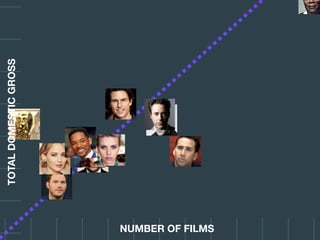
A data point tells
you almost nothing.
TOTALDOMESTICGROSS
TOTALDOMESTICGROSS
NUMBER OF FILMS
TOTALDOMESTICGROSS
NUMBER OF FILMS
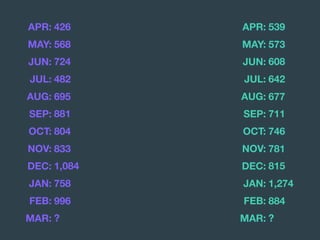
The story behind the
data is more complex
than a single number.
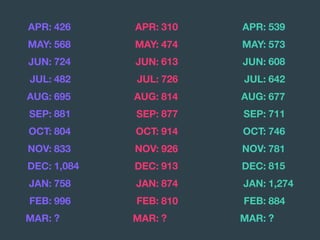
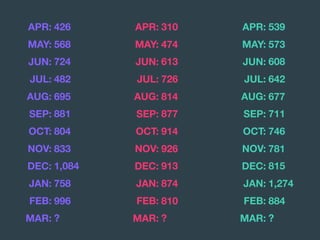
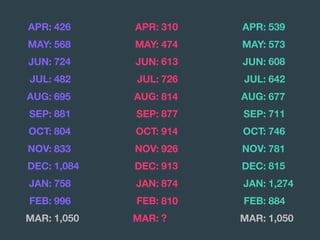
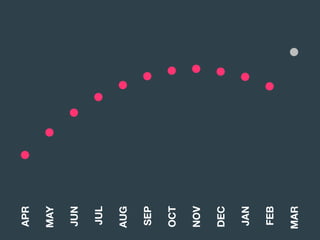
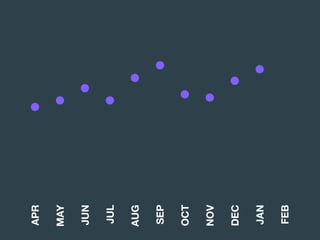
APR: 426
MAY: 568
JUN: 724
JUL: 482
AUG: 695
SEP: 881
OCT: 804
NOV: 833
DEC: 1,084
JAN: 758
FEB: 996
MAR: ?
APR: 426
MAY: 568
JUN: 724
JUL: 482
AUG: 695
SEP: 881
OCT: 804
NOV: 833
DEC: 1,084
JAN: 758
FEB: 996
MAR: ?
APR: 539
MAY: 573
JUN: 608
JUL: 642
AUG: 677
SEP: 711
OCT: 746
NOV: 781
DEC: 815
JAN: 1,274
FEB: 884
MAR: ?
APR: 426
MAY: 568
JUN: 724
JUL: 482
AUG: 695
SEP: 881
OCT: 804
NOV: 833
DEC: 1,084
JAN: 758
FEB: 996
MAR: ?
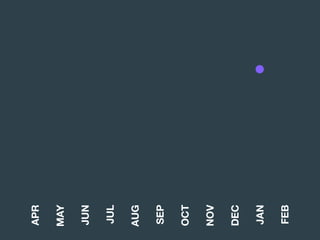
APR: 539
MAY: 573
JUN: 608
JUL: 642
AUG: 677
SEP: 711
OCT: 746
NOV: 781
DEC: 815
JAN: 1,274
FEB: 884
MAR: ?
APR: 310
MAY: 474
JUN: 613
JUL: 726
AUG: 814
SEP: 877
OCT: 914
NOV: 926
DEC: 913
JAN: 874
FEB: 810
MAR: ?
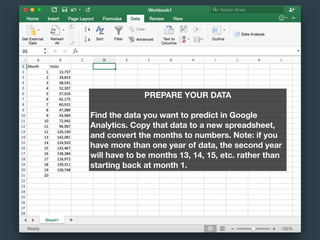
PREPARE YOUR DATA
Find the data you want to predict in Google
Analytics. Copy that data to a new spreadsheet,
and convert the months to numbers. Note: if you
have more than one year of data, the second year
will have to be months 13, 14, 15, etc. rather than
starting back at month 1.
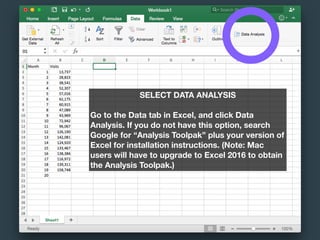
SELECT DATA ANALYSIS
Go to the Data tab in Excel, and click Data
Analysis. If you do not have this option, search

Google for “Analysis Toolpak” plus your version of
Excel for installation instructions. (Note: Mac

users will have to upgrade to Excel 2016 to obtain
the Analysis Toolpak.)
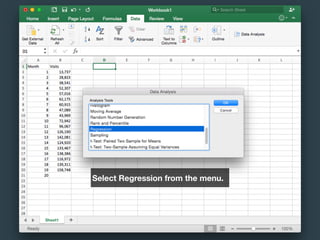
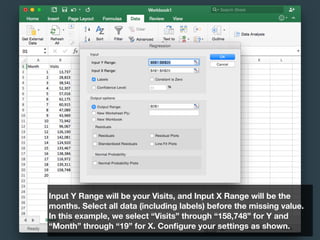
Select Regression from the menu.
Input Y Range will be your Visits, and Input X Range will be the
months. Select all data (including labels) before the missing value.
In this example, we select “Visits” through “158,748” for Y and
“Month” through “19” for X. Configure your settings as shown.
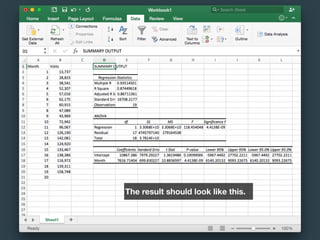
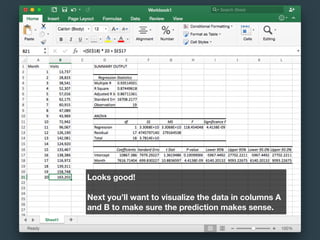
The result should look like this.
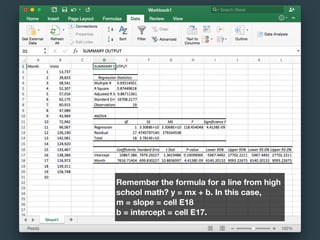
Remember the formula for a line from high
school math? y = mx + b. In this case,
m = slope = cell E18
b = intercept = cell E17.
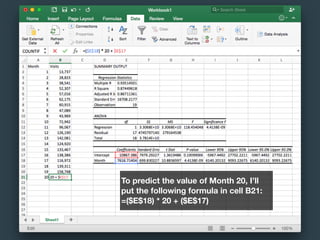
To predict the value of Month 20, I’ll
put the following formula in cell B21:
=($E$18) * 20 + ($E$17)
Looks good!
Next you’ll want to visualize the data in columns A
and B to make sure the prediction makes sense.
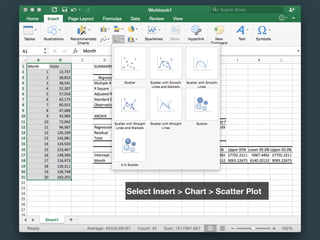
Select Insert > Chart > Scatter Plot
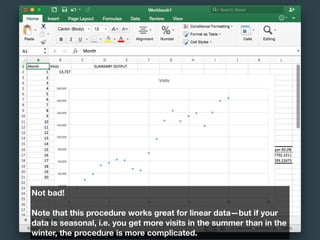
Not bad!
Note that this procedure works great for linear data—but if your
data is seasonal, i.e. you get more visits in the summer than in the
winter, the procedure is more complicated.
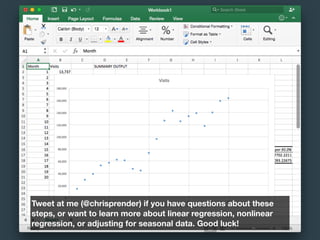
Tweet at me (@chrisprender) if you have questions about these
steps, or want to learn more about linear regression, nonlinear
regression, or adjusting for seasonal data. Good luck!
APR: 426
MAY: 568
JUN: 724
JUL: 482
AUG: 695
SEP: 881
OCT: 804
NOV: 833
DEC: 1,084
JAN: 758
FEB: 996
MAR: ?
APR: 539
MAY: 573
JUN: 608
JUL: 642
AUG: 677
SEP: 711
OCT: 746
NOV: 781
DEC: 815
JAN: 1,274
FEB: 884
MAR: ?
APR: 310
MAY: 474
JUN: 613
JUL: 726
AUG: 814
SEP: 877
OCT: 914
NOV: 926
DEC: 913
JAN: 874
FEB: 810
MAR: ?
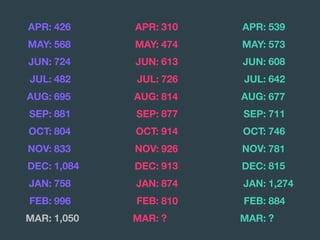
APR: 426
MAY: 568
JUN: 724
JUL: 482
AUG: 695
SEP: 881
OCT: 804
NOV: 833
DEC: 1,084
JAN: 758
FEB: 996
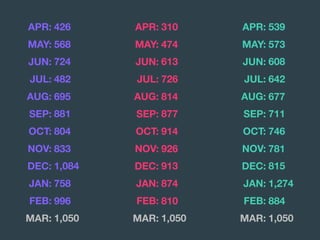
MAR: 1,050
APR: 539
MAY: 573
JUN: 608
JUL: 642
AUG: 677
SEP: 711
OCT: 746
NOV: 781
DEC: 815
JAN: 1,274
FEB: 884
MAR: ?
APR: 310
MAY: 474
JUN: 613
JUL: 726
AUG: 814
SEP: 877
OCT: 914
NOV: 926
DEC: 913
JAN: 874
FEB: 810
MAR: ?
APR: 426
MAY: 568
JUN: 724
JUL: 482
AUG: 695
SEP: 881
OCT: 804
NOV: 833
DEC: 1,084
JAN: 758
FEB: 996
MAR: 1,050
APR: 539
MAY: 573
JUN: 608
JUL: 642
AUG: 677
SEP: 711
OCT: 746
NOV: 781
DEC: 815
JAN: 1,274
FEB: 884
MAR: 1,050
APR: 310
MAY: 474
JUN: 613
JUL: 726
AUG: 814
SEP: 877
OCT: 914
NOV: 926
DEC: 913
JAN: 874
FEB: 810
MAR: ?
APR: 426
MAY: 568
JUN: 724
JUL: 482
AUG: 695
SEP: 881
OCT: 804
NOV: 833
DEC: 1,084
JAN: 758
FEB: 996
MAR: 1,050
APR: 539
MAY: 573
JUN: 608
JUL: 642
AUG: 677
SEP: 711
OCT: 746
NOV: 781
DEC: 815
JAN: 1,274
FEB: 884
MAR: 1,050
APR: 310
MAY: 474
JUN: 613
JUL: 726
AUG: 814
SEP: 877
OCT: 914
NOV: 926
DEC: 913
JAN: 874
FEB: 810
MAR: 1,050
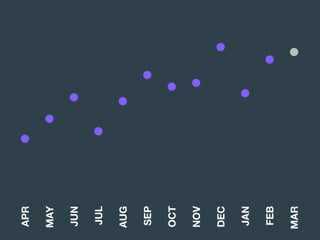
APR
MAY
JUN
JUL
AUG
SEP
OCT
NOV
DEC
JAN
FEB
MAR
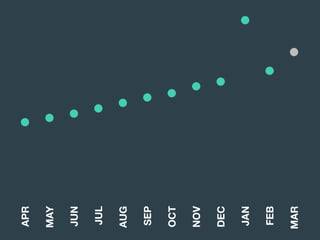
APR
MAY
JUN
JUL
AUG
SEP
OCT
NOV
DEC
JAN
FEB
MAR
APR
MAY
JUN
JUL
AUG
SEP
OCT
NOV
DEC
JAN
FEB
MAR
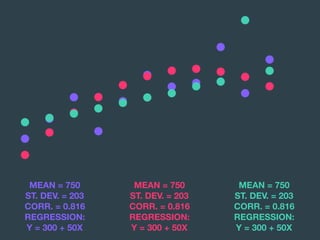
MEAN = 750
ST. DEV. = 203

CORR. = 0.816

REGRESSION:

Y = 300 + 50X
MEAN = 750
ST. DEV. = 203

CORR. = 0.816

REGRESSION:

Y = 300 + 50X
MEAN = 750
ST. DEV. = 203

CORR. = 0.816

REGRESSION:

Y = 300 + 50X
Data without
visualization only

tells half the story.
IT’S COMPLICATED
APR
MAY
JUN
JUL
AUG
SEP
OCT
NOV
DEC
JAN
FEB
APR
MAY
JUN
JUL
AUG
SEP
OCT
NOV
DEC
JAN
FEB
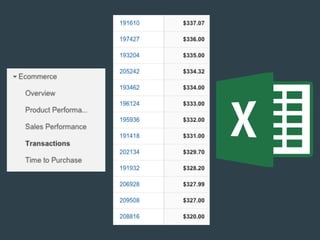
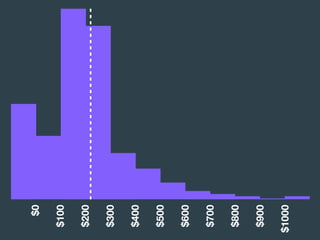
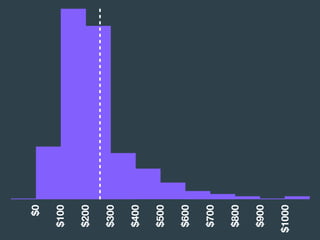
DOWNLOAD HISTOGRAM
Google Sheets Link
Excel Download
Note: You will need a Google account to use Google
Sheets. To use, click the link above, and go to File >
Make a Copy to create your own personal file.
$0
$100
$200
$300
$400
$500
$600
$700
$800
$900
$1000
$0
$100
$200
$300
$400
$500
$600
$700
$800
$900
$1000
PAID SOCIAL?
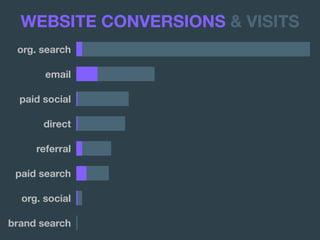
org. search
email
paid social
direct
referral
paid search
org. social
brand search
WEBSITE CONVERSIONS & VISITS
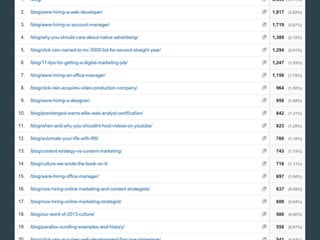
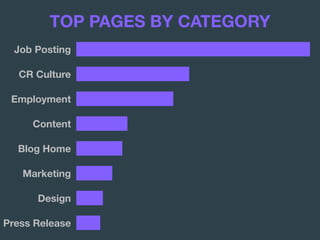
TOP PAGES BY CATEGORY
Job Posting
CR Culture
Employment
Content
Blog Home
Marketing
Design
Press Release
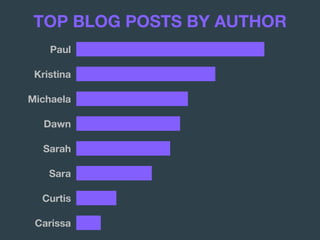
TOP BLOG POSTS BY AUTHOR
Paul
Kristina
Michaela
Dawn
Sarah
Sara
Curtis
Carissa
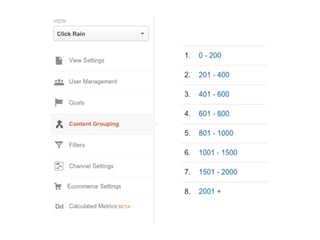
TOP BLOG POSTS BY WORD COUNT
0 - 200
201 - 400
401 - 600
601 - 800
801 - 1,000
1,001 - 1,500
1,501 - 2,000
2,001 +
Link to Last Year’s Presentation
BANK WEBSITES
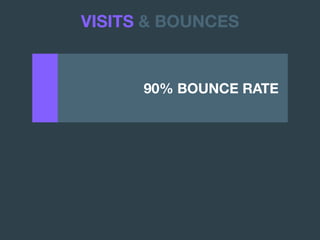
90% BOUNCE RATE .
VISITS & BOUNCES
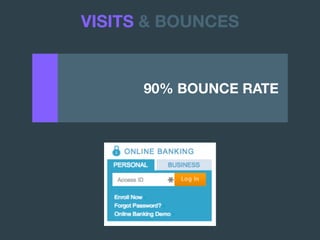
90% BOUNCE RATE .
VISITS & BOUNCES
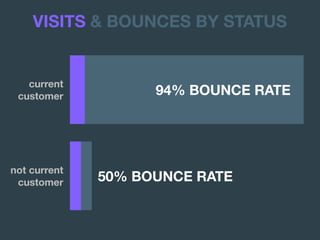
current

customer 94% BOUNCE RATE .
VISITS & BOUNCES BY STATUS
not current

customer 50% BOUNCE RATE
CONTENT WEBSITES
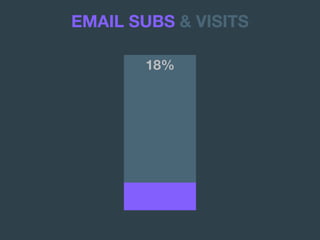
18%
EMAIL SUBS & VISITS
0FAQ
1FAQ
2FAQ
3FAQ
4FAQ
5FAQ
6FAQ
7FAQ
8FAQ
9FAQ
10FAQ
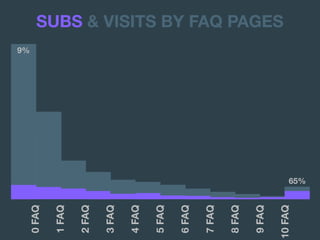
9%
SUBS & VISITS BY FAQ PAGES
65%
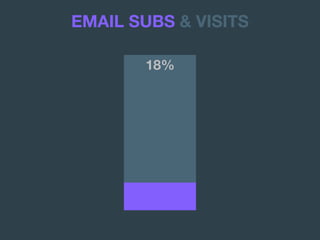
18%
EMAIL SUBS & VISITS
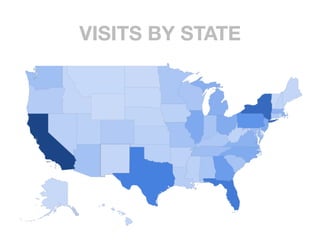
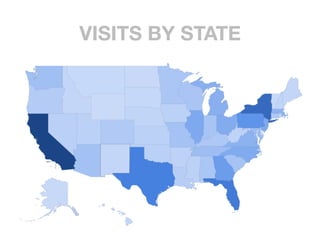
VISITS BY STATE
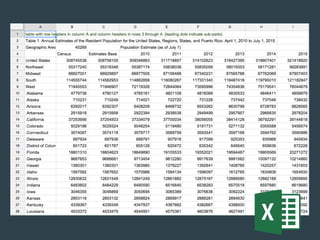
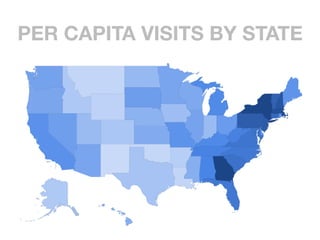
DOWNLOAD PER-CAPITA
Google Sheets Link
Excel Download
Note 1: You will need a Google
account to use Google Sheets.
To use, click the link above, and
go to File > Make a Copy to
create your own personal file.
Note 2: Excel does not have a
built-in mapping function, so you
will have to use Google Sheets
to visualize your per-capita data.
VISITS BY STATE
PER CAPITA VISITS BY STATE
VISUALIZATION
ATTRIBUTION
Attribution is

the number one

digital marketing

trend of 2016.
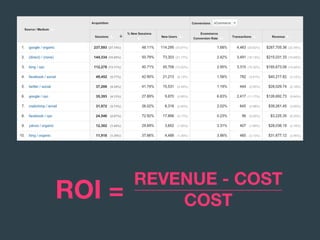
ROI =
REVENUE - COST

COST
IT’S NOT ABOUT

THE MONEY
IT’S ABOUT

TAKING CREDIT
Bing is the

Skinny Pete of your
online marketing
funnel.
ROI =
REVENUE - COST

COST
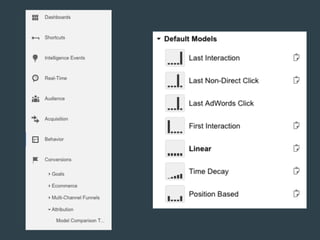
By default, Google
Analytics uses last
non-direct click
attribution.
There is no one right
attribution model.

But some of them are

definitely wrong.
@avinash
LAST-CLICK

ATTRIBUTION
FIRST-CLICK

ATTRIBUTION
First-click attribution
is like thanking your
first girlfriend at

your wedding.
@avinash
FIRST-CLICK

ATTRIBUTION
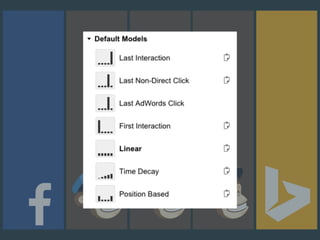
LINEAR

ATTRIBUTION
TIME-DECAY

ATTRIBUTION
POSITIONAL

ATTRIBUTION
G O O G L E ’ S N E X T
VIEW-THROUGH
CONVERSIONS
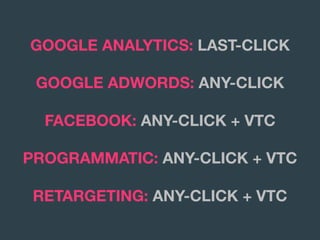
GOOGLE ANALYTICS: LAST-CLICK
GOOGLE ADWORDS: ANY-CLICK
FACEBOOK: ANY-CLICK + VTC
PROGRAMMATIC: ANY-CLICK + VTC
RETARGETING: ANY-CLICK + VTC
ATTRIBUTION
EXPERIMENTATION
Most marketers are not
doing A/B testing.


And most that are doing

it are doing it wrong.
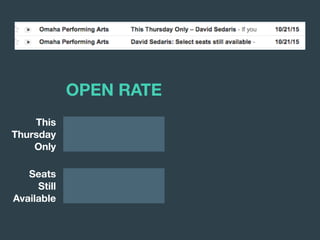
This
Thursday
Only
Seats
Still
Available
OPEN RATE
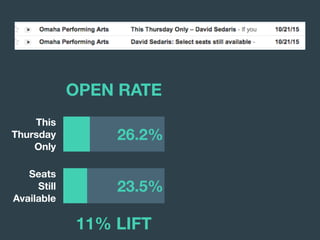
This
Thursday
Only
Seats
Still
Available
23.5%
26.2%
11% LIFT
OPEN RATE
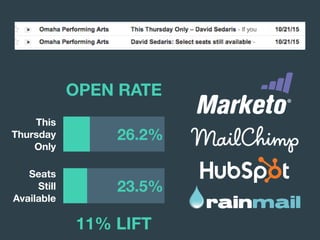
OPEN RATE
This
Thursday
Only
Seats
Still
Available
23.5%
26.2%
11% LIFT
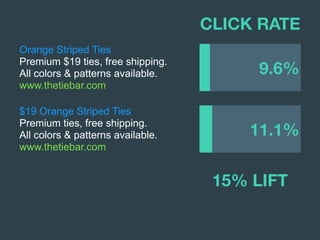
Orange Striped Ties
Premium $19 ties, free shipping.
All colors & patterns available.
www.thetiebar.com
CLICK RATE
$19 Orange Striped Ties
Premium ties, free shipping.
All colors & patterns available.
www.thetiebar.com
11.1%
9.6%
CLICK RATE
15% LIFT
Orange Striped Ties
Premium $19 ties, free shipping.
All colors & patterns available.
www.thetiebar.com
$19 Orange Striped Ties
Premium ties, free shipping.
All colors & patterns available.
www.thetiebar.com
11.1%
9.6%
CLICK RATE
Orange Striped Ties
Premium $19 ties, free shipping.
All colors & patterns available.
www.thetiebar.com
$19 Orange Striped Ties
Premium ties, free shipping.
All colors & patterns available.
www.thetiebar.com
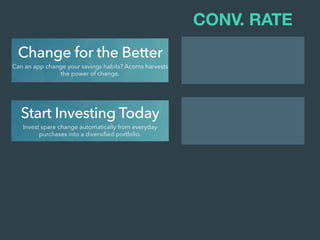
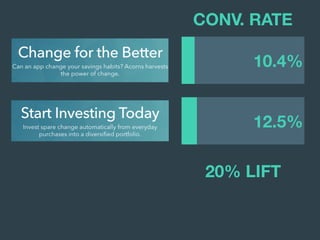
CONV. RATE
CONV. RATE
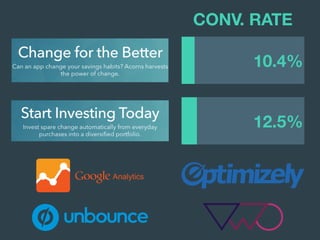
12.5%
10.4%
20% LIFT
CONV. RATE
12.5%
10.4%
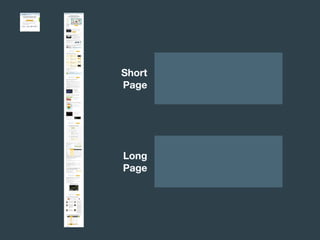
Make your first A/B
test an A/Z test.
You can do minor tests
forever, but only expect
minor results.
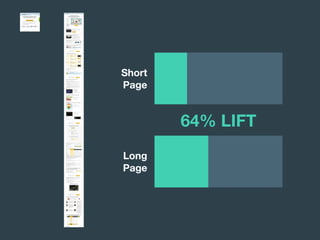
Short

Page
Long

Page
Short

Page
Long

Page
64% LIFT
HOW DO YOU KNOW
WHAT WORKED?
DOES IT MATTER?
You don’t have a
winner when one
variation is winning.
Trendigital Summit 2016
Technology and marketing
conference in Sioux Falls.
trendigitalsummit.com
$49 Tech Conference
Trendigital Summit on Jan. 29.
Tickets available now!
trendigitalsummit.com
Trendigital Summit 2016
Technology and marketing
conference in Sioux Falls.
trendigitalsummit.com
$49 Tech Conference
Trendigital Summit on Jan. 29.
Tickets available now!
trendigitalsummit.com
LIFT = 50%

CONFIDENCE = 37%
Trendigital Summit 2016
Technology and marketing
conference in Sioux Falls.
trendigitalsummit.com
$49 Tech Conference
Trendigital Summit on Jan. 29.
Tickets available now!
trendigitalsummit.com
2 / 20
3 / 20
LIFT = 50%

CONFIDENCE = 87%
Trendigital Summit 2016
Technology and marketing
conference in Sioux Falls.
trendigitalsummit.com
$49 Tech Conference
Trendigital Summit on Jan. 29.
Tickets available now!
trendigitalsummit.com
20 / 200
30 / 200
LIFT = 50%

CONFIDENCE = 99.9%
Trendigital Summit 2016
Technology and marketing
conference in Sioux Falls.
trendigitalsummit.com
$49 Tech Conference
Trendigital Summit on Jan. 29.
Tickets available now!
trendigitalsummit.com
200 / 2,000
300 / 2,000
PEARSON’S

CHI-SQUARED TEST
PEARSON’S

CHI-SQUARED TEST
DOWNLOAD CHI-SQUARED
Google Sheets Link
Excel Download
Note: You will need a Google account to use Google
Sheets. To use, click the link above, and go to File >
Make a Copy to create your own personal file.
EXPERIMENTATION
WE DID IT.
VISUALIZATION
ATTRIBUTION
EXPERIMENTATION
IT’S COMPLICATED.

BUT NOW WE UNDERSTAND IT

A LITTLE BETTER.
#HAIKU
@CHRISPRENDER | #TRENDIGITALSF

The Data-Driven Marketer - Trendigital 2016