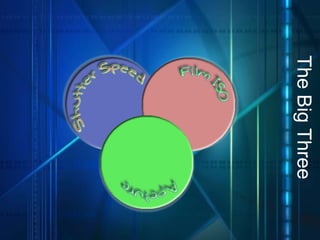
The Big Three
A Window Example :  Aperture  is the size of the window. If it’s bigger more light gets through and the room is brighter.
A Window Example :  Shutter Speed  is the amount of time you leave the window open. The longer you leave them open the more light comes in.
A Window Example :  ISO  is the sensitivity to light of the person inside the room. If they are wearing sunglasses (low ISO) it will take more light for them to see the image then if they are staring at it wide-eyed (high ISO).
The Exposure Triangle
Shutter Speed The length of time that the shutter remains open.  Each progression represents half as much light. Common shutter settings:  1 second, 1/2, 1/4, 1/8, 1/15, 1/30, 1/60, 1/125, 1/250, 1/500, 1/1000, and 1/2000 second.
Focal Plane Door Sample
Leaf Shutter Example
Fast Shutter Speed ADVANTAGES Reduces blurriness as image is ‘seen’ only briefly  Freeze Fast Motion Great for sports events. DISADVANTAGES Less time for light to enter camera Requires bright conditions
Fast Shutter Speed Sample
Slow Shutter Speed ADVANTAGES Great for Darker Conditions Soften Consistent Motion DISADVANTAGES Increased chance for bluriness Often requires Tripod
Slow Shutter Speed Sample
Slow Shutter Speed Sample More: http://www.digital-photography-school.com/blur-movement
Side By Side Shutter Speed
Shutter Speed Assignment Using Manual Shutter Speed Settings take one picture each of the following: a)Freeze Fast Motion  b)Same motion but blurry Soften or Purposefully Blur Consistent/Constant Motion Add Motion to moving subject with blurry Background Stationary subject with blurry background One Additional Creative Use of Shutter Speed * Number pictures as listed above * Include shutter speed settings in title * Example Title: “1a Fast Motion 1/125”
The Big Three
F ~ What ?!? Camera Aperture The size of the opening that lets light in Also Called F-Stop  F = Fractional opening relative to lens length
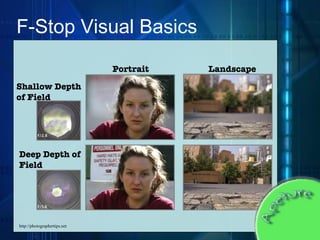
Nonsense Numbers ?!? F-Stop Numbering Common Stops: f2.8, f4, f5.6, f8, f11, f16, f22 Small Numbers = Wide Opening Large Numbers = Narrow Opening Wide Opening = Short/Shallow Depth of Field Narrow Opening = Long/Deep Depth of Field  Small Number = Shallow (small) Depth of Field Large Number = Deep (Large) Depth of Field Confused Yet, No Worries Me Too…
F - Stop Visual Basics
F - Stop Visual Basics http://photographertips.net Portrait Landscape Shallow Depth of Field Deep Depth of Field
Depth and Defocus Blur plane of focus sensor lens defocus blur depends on distance from plane of focus subject rays from point in focus converge to single pixel circle of confusion
Depth and Defocus Blur lens plane of focus defocus blur depends on aperture size aperture http://photographertips.net sensor subject circle of confusion
Narrow Apertures Usage Advantages Gives Deep Depth of Field Shows complete scene Landscape Photography Disadvantages Requires more Light May require longer Shutter Speed Increases chance for blur
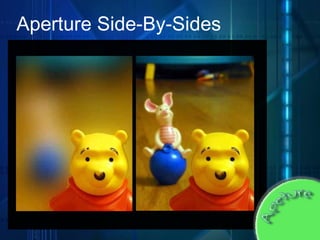
Wide Apertures Usage Advantages Less Light Required Allows for Faster Shutter Speed Give focus to objects on focal  plane Disadvantages Shallow DOF Can produced Washed-out, Over lit images
Aperture Side - By - Sides
Lens Length The  “ X ”  Factor Depth of field is dependent on Lens Length F-Stop is a “Fraction” of lens length The longer the lens the more room the light rays have to get off-track Zoom usually results in reduced DOF DOF Calculations DOF is generally 1/3 in front of and 2/3 behind focal plane.  Numerous Online Calculators:  http://www.dofmaster.com/dofjs.html
Aperture Pictures Using Manual Aperture Settings take one picture each of the following: A Landscape photo with deep depth of field A Mid-Shot Portrait with (a) shallow DOF (b) Deep DOF A macro CU with Shallow DOF A posed Portrait with initial foreground blurry, shallow DOF, far background blurry * Number pictures as listed above * Include Aperture settings in title * Example Title: “2a Shallow DOF f22”
ISO What is ISO The sensitivity of the sensor to light Terminology Low=Slow, High=Fast Slow Fast
More ISO Refer to Class handout for more information regarding ISO.
ISO Pictures By Adjusting the ISO settings take 3 shots of each of the following subjects A Landscape photo (Slow ISO, Med ISO, Fast ISO) A Mid-Shot Portrait (Slow ISO, Med ISO, Fast ISO) A ECU (Slow ISO, Med ISO, Fast ISO) * Number pictures and name pictures as listed above

The Big Three

  • 1.
  • 2.
    A Window Example: Aperture is the size of the window. If it’s bigger more light gets through and the room is brighter.
  • 3.
    A Window Example: Shutter Speed is the amount of time you leave the window open. The longer you leave them open the more light comes in.
  • 4.
    A Window Example: ISO is the sensitivity to light of the person inside the room. If they are wearing sunglasses (low ISO) it will take more light for them to see the image then if they are staring at it wide-eyed (high ISO).
  • 5.
  • 6.
    Shutter Speed Thelength of time that the shutter remains open. Each progression represents half as much light. Common shutter settings: 1 second, 1/2, 1/4, 1/8, 1/15, 1/30, 1/60, 1/125, 1/250, 1/500, 1/1000, and 1/2000 second.
  • 7.
  • 8.
  • 9.
    Fast Shutter SpeedADVANTAGES Reduces blurriness as image is ‘seen’ only briefly Freeze Fast Motion Great for sports events. DISADVANTAGES Less time for light to enter camera Requires bright conditions
  • 10.
  • 11.
  • 12.
    Slow Shutter SpeedADVANTAGES Great for Darker Conditions Soften Consistent Motion DISADVANTAGES Increased chance for bluriness Often requires Tripod
  • 13.
  • 14.
  • 15.
  • 16.
    Slow Shutter SpeedSample More: http://www.digital-photography-school.com/blur-movement
  • 17.
    Side By SideShutter Speed
  • 18.
    Side By SideShutter Speed
  • 19.
    Shutter Speed AssignmentUsing Manual Shutter Speed Settings take one picture each of the following: a)Freeze Fast Motion b)Same motion but blurry Soften or Purposefully Blur Consistent/Constant Motion Add Motion to moving subject with blurry Background Stationary subject with blurry background One Additional Creative Use of Shutter Speed * Number pictures as listed above * Include shutter speed settings in title * Example Title: “1a Fast Motion 1/125”
  • 20.
  • 21.
    F ~ What?!? Camera Aperture The size of the opening that lets light in Also Called F-Stop F = Fractional opening relative to lens length
  • 22.
    Nonsense Numbers ?!?F-Stop Numbering Common Stops: f2.8, f4, f5.6, f8, f11, f16, f22 Small Numbers = Wide Opening Large Numbers = Narrow Opening Wide Opening = Short/Shallow Depth of Field Narrow Opening = Long/Deep Depth of Field Small Number = Shallow (small) Depth of Field Large Number = Deep (Large) Depth of Field Confused Yet, No Worries Me Too…
  • 23.
    F - StopVisual Basics
  • 24.
    F - StopVisual Basics http://photographertips.net Portrait Landscape Shallow Depth of Field Deep Depth of Field
  • 25.
    Depth and DefocusBlur plane of focus sensor lens defocus blur depends on distance from plane of focus subject rays from point in focus converge to single pixel circle of confusion
  • 26.
    Depth and DefocusBlur lens plane of focus defocus blur depends on aperture size aperture http://photographertips.net sensor subject circle of confusion
  • 27.
    Narrow Apertures UsageAdvantages Gives Deep Depth of Field Shows complete scene Landscape Photography Disadvantages Requires more Light May require longer Shutter Speed Increases chance for blur
  • 28.
    Wide Apertures UsageAdvantages Less Light Required Allows for Faster Shutter Speed Give focus to objects on focal plane Disadvantages Shallow DOF Can produced Washed-out, Over lit images
  • 29.
    Aperture Side -By - Sides
  • 30.
    Aperture Side -By - Sides
  • 31.
    Aperture Side -By - Sides
  • 32.
    Lens Length The “ X ” Factor Depth of field is dependent on Lens Length F-Stop is a “Fraction” of lens length The longer the lens the more room the light rays have to get off-track Zoom usually results in reduced DOF DOF Calculations DOF is generally 1/3 in front of and 2/3 behind focal plane. Numerous Online Calculators: http://www.dofmaster.com/dofjs.html
  • 33.
    Aperture Pictures UsingManual Aperture Settings take one picture each of the following: A Landscape photo with deep depth of field A Mid-Shot Portrait with (a) shallow DOF (b) Deep DOF A macro CU with Shallow DOF A posed Portrait with initial foreground blurry, shallow DOF, far background blurry * Number pictures as listed above * Include Aperture settings in title * Example Title: “2a Shallow DOF f22”
  • 34.
    ISO What isISO The sensitivity of the sensor to light Terminology Low=Slow, High=Fast Slow Fast
  • 35.
    More ISO Referto Class handout for more information regarding ISO.
  • 36.
    ISO Pictures ByAdjusting the ISO settings take 3 shots of each of the following subjects A Landscape photo (Slow ISO, Med ISO, Fast ISO) A Mid-Shot Portrait (Slow ISO, Med ISO, Fast ISO) A ECU (Slow ISO, Med ISO, Fast ISO) * Number pictures and name pictures as listed above