The Big Six


    Created by
 Mike B. Eisenberg
         &
Robert E. Berkowitz
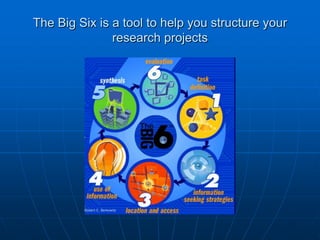
The Big Six is a tool to help you structure your
               research projects
Step 1
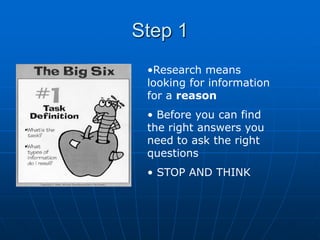
 •Research means
 looking for information
 for a reason
 • Before you can find
 the right answers you
 need to ask the right
 questions
 • STOP AND THINK
Brainstorming
   What do I already know about the subject? This
    is an opportunity to „brainstorm‟
        If the whole subject is new to you, this is a
        good time to look up an encyclopedia

   What will I have to find out so that I can answer
    the question?

   What keywords will I use in my search for
    information?
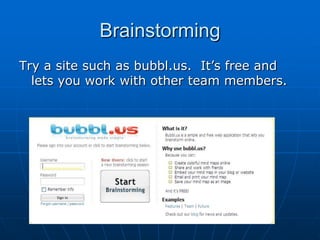
Brainstorming
Try a site such as bubbl.us. It‟s free and
  lets you work with other team members.
Keywords
   Think about your keywords

      What alternative keywords can you think for
      „United States‟?

      What is a wider keyword for „Dubai‟?

      What is a narrower keyword for „energy‟?
Step 2

 More brainstorming!
 Where am I going to look
 for information?
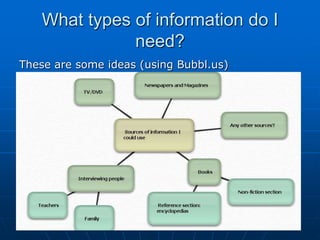
What types of information do I
               need?
These are some ideas (using Bubbl.us)
What types of information do I
               need?


Decide which will be the best sources of information


Divide the work up between the team
Step 3

 This is when you finally start
 to look for your information.


 Find that website
 Find the book in the library


 BUT……
Step 3
BE CRITICAL

Evaluate the information you find:

  When was the website last updated?
  Who produced the website?
  Is their information biased?
  Is there contact information?
  Does the website have the information you need?
  Can you understand the language?
Step 3
Use an online collaboration site such as:

www.evernote.com
or
www.webnotes.net

Or even Google docs

  They all allow you to work with your team and save your
  work as you go.
  The advantage of Evernote and Webnotes is that they keep
  a record of the URLs of the sites you have taken
  information from.
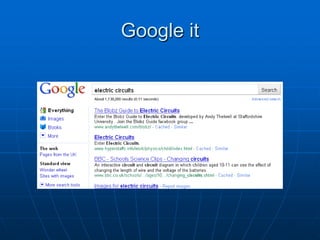
Google it
Print Sources
As with online sources BE CRITICAL
   Does the book have the information you need?

    Use your keywords to look up:

                         THE CONTENTS PAGE
                                &
                              INDEX

   When was it published?

   Can you read the book easily?
Step 4
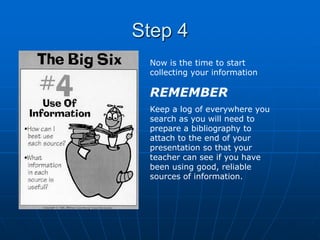
 Now is the time to start
 collecting your information

 REMEMBER
 Keep a log of everywhere you
 search as you will need to
 prepare a bibliography to
 attach to the end of your
 presentation so that your
 teacher can see if you have
 been using good, reliable
 sources of information.
Step 4
Basic Information to put in a Bibliography

Website: The URL and the date you last
 accessed the site e.g.
www.big6.com (last accessed 12/09/2012)


Book: The author, title, publisher and date
 of publication e.g.
Baines, J. Country Fact Files: Japan, Simon & Schuster (1992)
Step 4
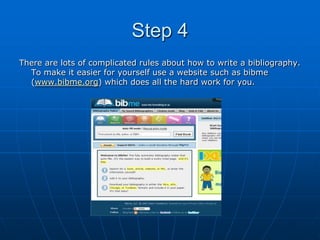
There are lots of complicated rules about how to write a bibliography.
  To make it easier for yourself use a website such as bibme
  (www.bibme.org) which does all the hard work for you.
Very Brief Guide to Note-Taking

DO skim the passage to get the general idea of what it is
  about.

DO scan the passage if you are looking for a particular
  keyword.

DON‟T copy great long passages of text (or copy and paste
  from a website).

When you find some useful information, read it carefully and
  take brief notes just highlighting the main points.
Very Brief Guide to Note-Taking

NEVER use somebody else‟s work
 without acknowledging it.

If you do, it is called plagiarism and
  can land you in serious trouble.
Very Brief Guide to Note-Taking
It is not a problem to use somebody else‟s work but you must
    give them credit for it.

If you use a quotation from somebody else‟s work, put the
   phrase or sentence “in quotation” marks and make a
   footnote saying where the information came from. If the
   quotation is from a book, remember to take a note of the
   page number.

If you are using Microsoft Word to write up your
   research, there is a handy tool which enters your footnotes
   for you
(You can find it at Insert    Reference      Footnote)
Step 5

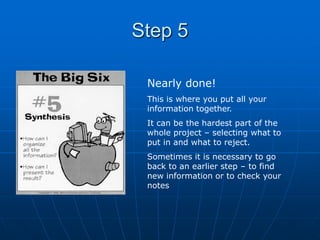
 Nearly done!
 This is where you put all your
 information together.
 It can be the hardest part of the
 whole project – selecting what to
 put in and what to reject.
 Sometimes it is necessary to go
 back to an earlier step – to find
 new information or to check your
 notes
Step 6
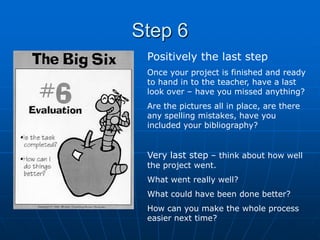
 Positively the last step
 Once your project is finished and ready
 to hand in to the teacher, have a last
 look over – have you missed anything?
 Are the pictures all in place, are there
 any spelling mistakes, have you
 included your bibliography?


 Very last step – think about how well
 the project went.
 What went really well?
 What could have been done better?
 How can you make the whole process
 easier next time?
BIBLIOGRAPHY
   "Ages 12-14 - Information Literacy." Supporting Curriculum for Excellence
    (CfE), assessment, community and lifelong learning - Learning and
    Teaching Scotland. (last accessed10 Sept. 2012).
    <http://www.ltscotland.org.uk/informationliteracy/12to14/index.asp>.

  "BibMe: Fast & Easy Bibliography Maker - MLA, APA, Chicago, Turabian -
   Free." BibMe: Fast & Easy Bibliography Maker -
   MLA, APA, Chicago, Turabian - Free. (last accessed10 Sept. 2012)
. <http://bibme.org>.

  "Skillswise printable factsheet." BBC - Homepage. (last accessed 10 Sept.
   2012).
<http://www.bbc.co.uk/skillswise/words/reading/techniques/skimming/factsh
   eet1.shtml>.

   "Big6." Big6 . (last accessed 12. Sept. 2012). <http://big6.com>.

MLA formatting by BibMe.org.

The Big Six Research Skills

  • 1.
    The Big Six Created by Mike B. Eisenberg & Robert E. Berkowitz
  • 2.
    The Big Sixis a tool to help you structure your research projects
  • 3.
    Step 1 •Researchmeans looking for information for a reason • Before you can find the right answers you need to ask the right questions • STOP AND THINK
  • 4.
    Brainstorming  What do I already know about the subject? This is an opportunity to „brainstorm‟ If the whole subject is new to you, this is a good time to look up an encyclopedia  What will I have to find out so that I can answer the question?  What keywords will I use in my search for information?
  • 5.
    Brainstorming Try a sitesuch as bubbl.us. It‟s free and lets you work with other team members.
  • 6.
    Keywords  Think about your keywords What alternative keywords can you think for „United States‟? What is a wider keyword for „Dubai‟? What is a narrower keyword for „energy‟?
  • 7.
    Step 2 Morebrainstorming! Where am I going to look for information?
  • 8.
    What types ofinformation do I need? These are some ideas (using Bubbl.us)
  • 9.
    What types ofinformation do I need? Decide which will be the best sources of information Divide the work up between the team
  • 10.
    Step 3 Thisis when you finally start to look for your information. Find that website Find the book in the library BUT……
  • 11.
    Step 3 BE CRITICAL Evaluatethe information you find: When was the website last updated? Who produced the website? Is their information biased? Is there contact information? Does the website have the information you need? Can you understand the language?
  • 12.
    Step 3 Use anonline collaboration site such as: www.evernote.com or www.webnotes.net Or even Google docs They all allow you to work with your team and save your work as you go. The advantage of Evernote and Webnotes is that they keep a record of the URLs of the sites you have taken information from.
  • 13.
  • 14.
    Print Sources As withonline sources BE CRITICAL  Does the book have the information you need? Use your keywords to look up: THE CONTENTS PAGE & INDEX  When was it published?  Can you read the book easily?
  • 15.
    Step 4 Nowis the time to start collecting your information REMEMBER Keep a log of everywhere you search as you will need to prepare a bibliography to attach to the end of your presentation so that your teacher can see if you have been using good, reliable sources of information.
  • 16.
    Step 4 Basic Informationto put in a Bibliography Website: The URL and the date you last accessed the site e.g. www.big6.com (last accessed 12/09/2012) Book: The author, title, publisher and date of publication e.g. Baines, J. Country Fact Files: Japan, Simon & Schuster (1992)
  • 17.
    Step 4 There arelots of complicated rules about how to write a bibliography. To make it easier for yourself use a website such as bibme (www.bibme.org) which does all the hard work for you.
  • 18.
    Very Brief Guideto Note-Taking DO skim the passage to get the general idea of what it is about. DO scan the passage if you are looking for a particular keyword. DON‟T copy great long passages of text (or copy and paste from a website). When you find some useful information, read it carefully and take brief notes just highlighting the main points.
  • 19.
    Very Brief Guideto Note-Taking NEVER use somebody else‟s work without acknowledging it. If you do, it is called plagiarism and can land you in serious trouble.
  • 20.
    Very Brief Guideto Note-Taking It is not a problem to use somebody else‟s work but you must give them credit for it. If you use a quotation from somebody else‟s work, put the phrase or sentence “in quotation” marks and make a footnote saying where the information came from. If the quotation is from a book, remember to take a note of the page number. If you are using Microsoft Word to write up your research, there is a handy tool which enters your footnotes for you (You can find it at Insert Reference Footnote)
  • 21.
    Step 5 Nearlydone! This is where you put all your information together. It can be the hardest part of the whole project – selecting what to put in and what to reject. Sometimes it is necessary to go back to an earlier step – to find new information or to check your notes
  • 22.
    Step 6 Positivelythe last step Once your project is finished and ready to hand in to the teacher, have a last look over – have you missed anything? Are the pictures all in place, are there any spelling mistakes, have you included your bibliography? Very last step – think about how well the project went. What went really well? What could have been done better? How can you make the whole process easier next time?
  • 23.
    BIBLIOGRAPHY  "Ages 12-14 - Information Literacy." Supporting Curriculum for Excellence (CfE), assessment, community and lifelong learning - Learning and Teaching Scotland. (last accessed10 Sept. 2012). <http://www.ltscotland.org.uk/informationliteracy/12to14/index.asp>.  "BibMe: Fast & Easy Bibliography Maker - MLA, APA, Chicago, Turabian - Free." BibMe: Fast & Easy Bibliography Maker - MLA, APA, Chicago, Turabian - Free. (last accessed10 Sept. 2012) . <http://bibme.org>.  "Skillswise printable factsheet." BBC - Homepage. (last accessed 10 Sept. 2012). <http://www.bbc.co.uk/skillswise/words/reading/techniques/skimming/factsh eet1.shtml>.  "Big6." Big6 . (last accessed 12. Sept. 2012). <http://big6.com>. MLA formatting by BibMe.org.